THE OPERATOR'S LIBRARY · MISSING MANUAL NO. 3
The Make manual that should already exist.
For Make users whose scenarios work in testing, then fail when real dates, real errors, and real limits show up — and who are tired of piecing the answers together from thin docs, old tutorials, and forum fragments.
Verified May 2026 — against Make’s current UI, public docs, API reference, billing language, and AI Agents / MCP material.
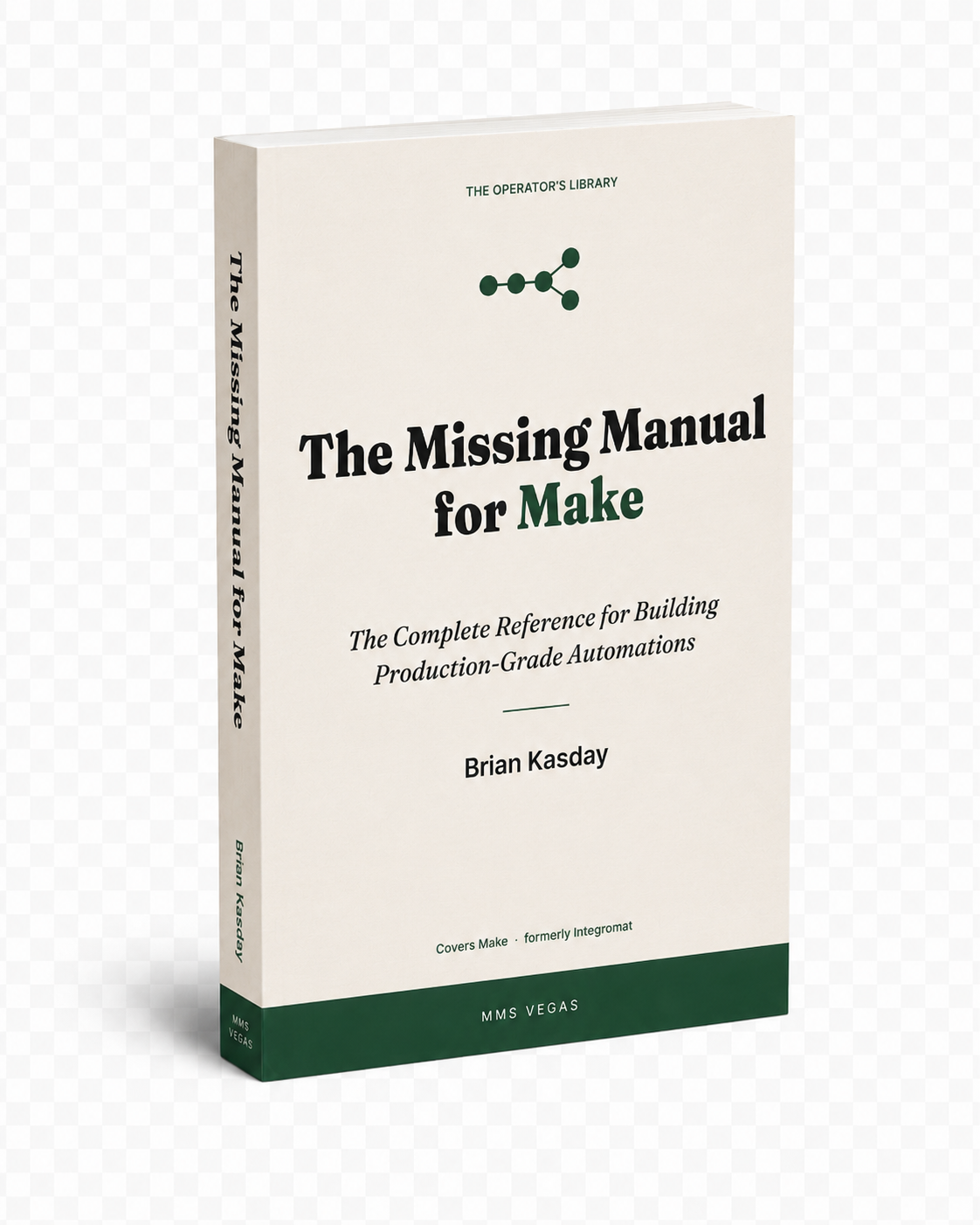
380-page digital reference · PDF + EPUB · Companion Kit included · Instant download · 60-day use-it guarantee
THE PROBLEM YOU PROBABLY HAVE
If any of these sounds familiar, the book is written for you.
| "It worked in testing. Now it's bleeding operations and I can't tell why." | Find the failure point before it burns credits |
| "We lost a day's worth of orders. The retry logic was wrong." | Set error handling so one bad record doesn't kill the day |
| "We're hitting the ops cap by the 22nd of every month." | Know which limit you're hitting and design around it |
| "ChatGPT gave me a confident answer. Make's interface didn't match it." | Use AI on Make without trusting stale menu paths |
| "They renamed a sheet column and the whole pipeline died." | Hand a scenario to a client without it breaking on their account |
| "Third rejection. I can't tell what they actually want." | Pass Make's custom-app review |
| "I default to Iterator. I know that's wrong. I don't know what's right." | Choose Iterator, Aggregator, or inline mapping without guessing |
Most readers don’t need the whole book. They need the right 30 pages right now. That’s how it’s organized — as a reference manual, designed to be jumped into.
Make changes constantly. Their official documentation rarely keeps up. The community forum knows what’s on fire today but not what the platform actually is. Search engines turn up tutorials that worked in 2023.
The result is a market full of people who can build a Make scenario that runs in testing — and a much smaller number who can build one that survives production. The difference between them is rarely talent. It’s usually one specific thing: knowing what the docs don’t tell you, in the order you need it.
That's what this book is for.
WHY THIS EXISTS
Make is a serious tool. What it doesn't have is a book.
Make has quietly become the automation platform operators reach for when Zapier hits a ceiling. It runs real business infrastructure now.
The learning layer around it never caught up. Make’s own documentation is comprehensive in parts and thin in others. The tutorials on YouTube mostly teach the demo, not the production version, and half of them describe a version of the platform that no longer exists. The forum knows what’s on fire today but not why. Search engines turn up answers that worked in 2023.
So you can find fragments. What you can’t find is a single, current, production-grade reference manual you keep open while you build.
Make became serious infrastructure. The manual for it never showed up. So I wrote it.
Instant download — no shipping, no waiting.
Your AI assistant may be answering from the wrong version of Make.
Ask ChatGPT or Claude how to do something in Make and you'll often get a fluent, confident answer. The problem comes when the question touches the current UI, the billing language, the newer AI/MCP features, or module behavior that changed — there, the answer may be working from an older version of the platform. The model isn't lying. It has no way to know which parts of what it learned are now out of date.
That's not a reason to stop using AI for Make. AI is genuinely useful here — for debugging, for reasoning through a scenario's structure, for drafting the logic. It's only as good as the source material you hand it.
This book is that source material. A current, structured, verified reference you can keep open beside your assistant — so it stops guessing from stale memory and starts reasoning from the same facts you're looking at. The result isn't magic automation. It's better questions, faster diagnosis, and fewer dead ends.
It won't build your scenarios for you. Nothing will, yet. It makes the building faster and the wrong turns rarer.
Sold as a digital reference on purpose.
This isn't a printed book squeezed onto a screen. It's built to be used digitally: searchable when you need one function at 2 a.m., copyable when you're pasting a pattern into Make, and easy to keep open in a tab beside the editor while you work.
Buying it here, direct, also gets you the current edition, the Companion Kit, the downloadable assets, and corrections as the platform shifts — the version that stays useful, not a static file.
WHAT THIS WOULD COST OTHERWISE
The math, briefly.
| Hire a Make consultant for an afternoon | $150–$300 an hour. One session: $400–$800. |
| Hire a Make solution partner for a real build | $1,500–$5,000 per project. |
| YouTube + trial and error | Free upfront. Expensive when the scenario fails in production. |
| The Missing Manual for Make · Complete Edition | $49 · get it now |
USE IT LIKE A REFERENCE, NOT A TEXTBOOK
You don’t read this front to back. You keep it open when something breaks, gets expensive, or needs to be handed off.
WHAT'S INSIDE
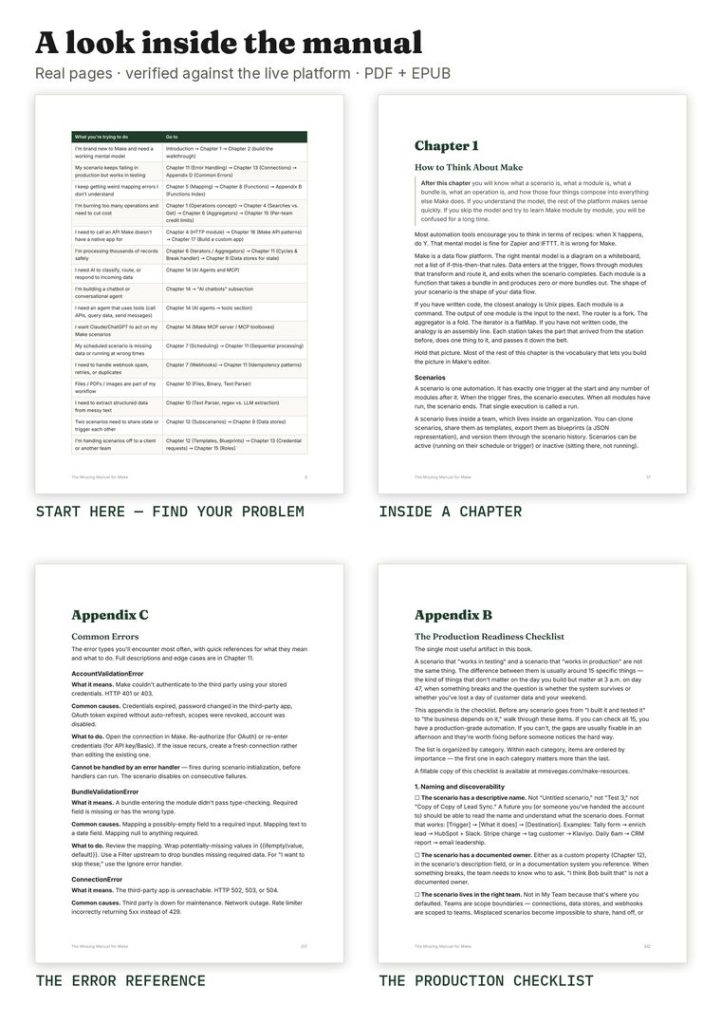
Eighteen chapters. Six appendices. Here's the map.
Most buyers start in one of four places — error handling, flow control, functions, or production readiness. The rest is there when the scenario gets more complicated.
WHO THIS IS NOT FOR
Honest caveats build credibility. There are two.
This is not the right Make resource for everyone.
If you’ve never opened Make, this book isn’t a good starting point. It assumes you’ve moved a module around, triggered a scenario, and seen the interface. The introductory tutorials Make provides are genuinely useful for that first hour. Start there, then come back.
If you’re looking for a video course, this isn’t one. It’s a book — a technical reference manual. You read it, you reference it, you use it alongside a live scenario. If you need someone to narrate every click, a different product serves you better.
If either of those is you, there’s no pressure — this just isn’t the right fit.
HOW THIS BOOK WAS BUILT
A technical reference manual is only as good as the work behind it.
A buyer of a Make book is right to ask how seriously the author took the job. Here’s how this one was made.
- ✓ Make's official Help Center, Developer Hub, and API documentation reviewed end to end
- ✓ Release notes and the platform changelog cross-referenced against every chapter
- ✓ The clearest community explanations of the platform's harder edges read against the chapters they touch
- ✓ Ninety-two specific time-sensitive claims — limits, prices, screen labels, API behaviors — verified against the live platform before publication
- ✓ The Companion Kit reference cards designed to be corrected as Make changes: when something in the kit breaks, the corrected card lands in your inbox
The mental model lasts. The specifics get watched.
THE GUARANTEE
The 60-day "use it on one real scenario" guarantee.
Use it on one real scenario. Not a tutorial. Not a toy build. Something you actually maintain. If it doesn’t make that scenario easier to build, debug, or explain, email me within 60 days and I’ll refund you.
No questions, no hoops, no “did you complete all the chapters” checklist. One email to [email protected]. Done.
Keep the book. Keep the kit. Keep the blueprints. I’d rather you have the material than I have the forty-nine dollars.
The guarantee exists because I’m confident the book earns it — and because the kind of person who buys a technical reference manual is exactly the kind of person who will actually use it.
— Brian
WHO WROTE IT

I’m Brian Kasday. Forty years in direct response marketing — copy, strategy, list, and offer — most of it for clients who needed automation to actually work, not just demo well. I came to Make the same way most serious users do: I needed something built, found the official documentation incomplete, and ended up learning most of it by reading error messages.
I’m an operator, not a Make influencer. This book isn’t bait for a course or a consulting funnel. It’s the reference I wanted and couldn’t buy.
I write The Operator’s Library — field guides for people running real operations on the tools. This one covers the platform itself: how it works, why it behaves the way it does, and how to build on it if you intend to stay.
THE COMPANION KIT
If you came in through the free Kit, you've already got it.
If you didn't — here's what arrives alongside the book.
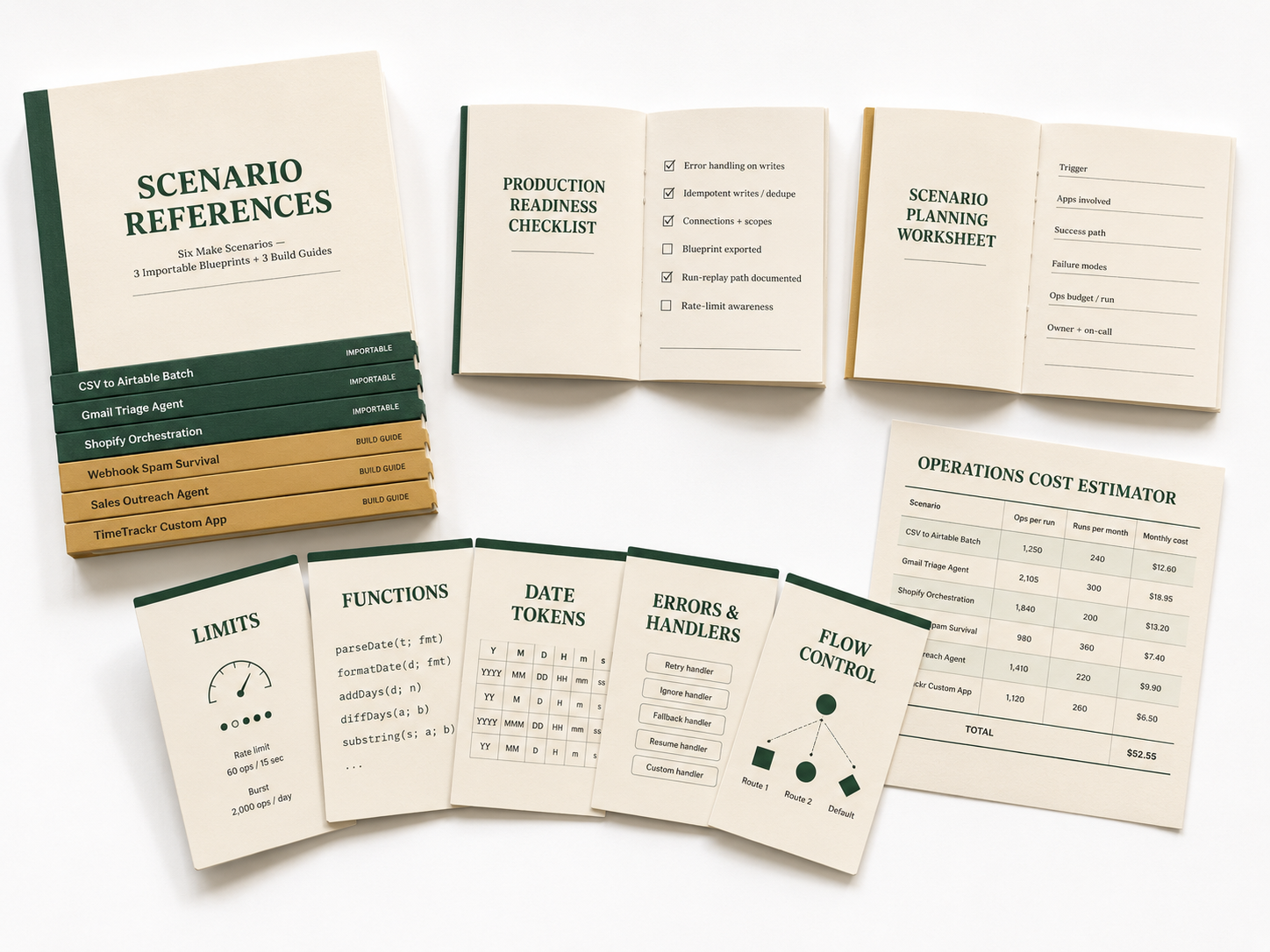
- ✓ Five reference cards
- ✓ The Production Readiness Checklist
- ✓ The Scenario Planning Worksheet
- ✓ Three importable blueprints (.json) and three step-by-step build guides
- ✓ The Operations Cost Estimator (.xlsx)
The Kit comes with the Complete Edition. The book is what it points to.
WHAT YOU CAN DO ONCE YOU'VE READ IT
Not the marketing version of this. The actual version.
Build a scenario that handles a real edge case without breaking — and know, beforehand, that it will handle it, because you designed it that way rather than found out by accident.
Read an error message and know what it’s actually telling you. Not guess. Not post it in a Facebook group. Know.
Set up a multi-step scenario with conditional routing, error handling, and a fallback path — and explain to a client or manager what each part does and why.
Estimate what a scenario will cost to run before you build it. Make your credit-burn decisions on purpose.
Hand a scenario off to someone else — or pick up someone else’s scenario — and get up to speed without reverse-engineering it from the modules out.
Deploy something to a client or a team and not spend the next three weeks babysitting it.
That's the book.
WHAT PEOPLE ASK BEFORE BUYING
A few honest answers.
Make updates constantly. Won’t this book be out of date?
Interfaces change. Mental models don’t. Error handling, scenario architecture, flow control, cost discipline, and production thinking are as valid today as they were when Make was called Integromat. The details that do shift — module names, screen labels, billing terms — are covered by corrections: when Make makes a material change, I update the affected reference card or page note and push it to everyone who bought the Complete Edition, free, so you’re not left working from stale instructions. Separate monthly briefings exist for people who want ongoing platform monitoring, but they’re not required to use this book.
Can’t I just ask ChatGPT or Claude?
You can, and you should — for the things AI is good at. Just know it’s often answering from a version of Make that no longer exists. This book is the current source you hand your assistant so its answers are grounded instead of guessed. The two work together; the book is what makes the AI reliable.
Can’t I just learn this from YouTube?
You can learn specific tricks from YouTube. What YouTube doesn’t give you is a coherent mental model of how the platform works as a whole — why things behave the way they do, how the pieces fit together, and what the failure modes are before you hit them. This book is what fills that gap. Use both.
$49 for a PDF?
You’re not buying paper, and you’re not buying “a PDF.” You’re buying a searchable 380-page working reference that sits open beside Make while you build — plus the Companion Kit, the worksheets, the cost estimator, and the importable blueprints. One blown ops cap, one lost order flow, or one afternoon chasing instructions that turned out to be for an old version of Make costs more than $49 — and leaves you nothing to keep. This leaves you the reference.
I already build in Make. Is there anything here for me?
You’re not buying beginner instruction. You’re buying a reference layer: the functions reference, the architecture decisions, error handling, client hand-off, cost control, the AI/MCP material, the API, and custom-app work — in one place, current, instead of scattered across tabs. If you build in Make, this is the book you keep open, not the one you read once.
Why isn’t this on Amazon?
Because Amazon doesn’t allow me to update the file after purchase, and this book gets updated. When Make changes something material, I revise the relevant section and push the new file directly to buyers. That’s only possible through direct distribution. Amazon also takes a significant cut that would either raise the price or reduce the quality of the supporting materials.
Are the scenario blueprints useful if I’m not an advanced user?
Yes — they’re designed to be read and modified, not just imported and run. Each blueprint comes with annotations explaining the design decisions. Even if you don’t use the blueprint directly, studying how it’s structured is one of the fastest ways to close the gap between “can follow a tutorial” and “can build from scratch.”
Is there a video course version?
Not yet. The Build-Alongs — recorded walkthroughs of the worked examples in the book — are in production and will be available as an add-on bundle later this year. The book stands on its own without them.
Is there a deluxe edition or an upgrade path?
The Complete Edition is the full book — there’s no content held back for a higher tier. What’s coming later is adjacent, not above it: a Scenario Vault of production-ready importable blueprints built by a Make-certified partner, and a set of Build-Alongs that record the worked examples on screen. Those will bundle with the book as the Operator’s Edition for builders who want the video and verified-blueprint layer. The book stands on its own — those add depth, not pages you’re missing.
What if I want a refund?
Email [email protected] within 60 days. No explanation required. I’ll refund you the same day. The guarantee section above covers this in more detail, but the short version is: one email, no questions, done.
Manuscript verified against live Make documentation: May 2026.
THE MISSING MANUAL FOR MAKE · COMPLETE EDITION
Download it today. Use it on the next scenario you actually maintain.
Keep the PDF open beside Make, run the checklist before launch, and decide within 60 days whether it earned its place.
$49 · Instant download
- ✓ The Missing Manual for Make — full text (PDF + EPUB)
- ✓ The Builder’s Companion Kit (five reference cards, checklists, worksheet)
- ✓ Three importable blueprints (.json) + three step-by-step build guides
- ✓ The Operations Cost Estimator (.xlsx)
- ✓ 60-day “use it on a real scenario” guarantee
- ✓ Instant download — no shipping, no waiting
— Brian
After checkout: immediate access to the PDF, EPUB, Companion Kit, the three blueprints and three build guides, and the cost estimator.
ANOTHER PATH
Rather not learn Make at all?
If you’d sooner have someone build it for you, that’s a legitimate choice — a Make solution partner is the right answer, not this book. Tell me what you need and I’ll introduce you to whoever fits the scope. No fee to you.