
Table of contents
- The 30-second answer
- What the HTTP module actually is
- Setting up a request that works
- Cause 1: the response won’t map (empty panel)
- Cause 2: authentication is wrong
- Cause 3: a 4xx or 5xx you never see
- Cause 4: timeouts and slow endpoints
- Cause 5: rate limits (429)
- A worked example: debugging a live request
- Frequently asked questions
- Sources
You reach for the HTTP module because the service you want has no dedicated Make app, you wire up the URL and the method, you run the scenario, and something is off. The request returns nothing you can use. Or it errors with a message that means nothing. Or it runs green but the fields you need refuse to appear in the next module. When the Make HTTP module is not working the way you expect, the cause is almost always one of a handful of predictable mismatches between what you sent and what the endpoint actually wanted, or between what came back and what Make can show you.
The HTTP module is the most powerful and the least forgiving module in Make. It assumes you know exactly what the API on the other end expects, because it does nothing to help you guess. This guide walks through the specific reasons an HTTP request misbehaves, and the fix for each, grounded in how the module actually works. The labels below follow the current HTTP app (version 4); if you’re still on the HTTP (legacy) version 3 app, a few field names differ and are noted in parentheses.
The 30-second answer
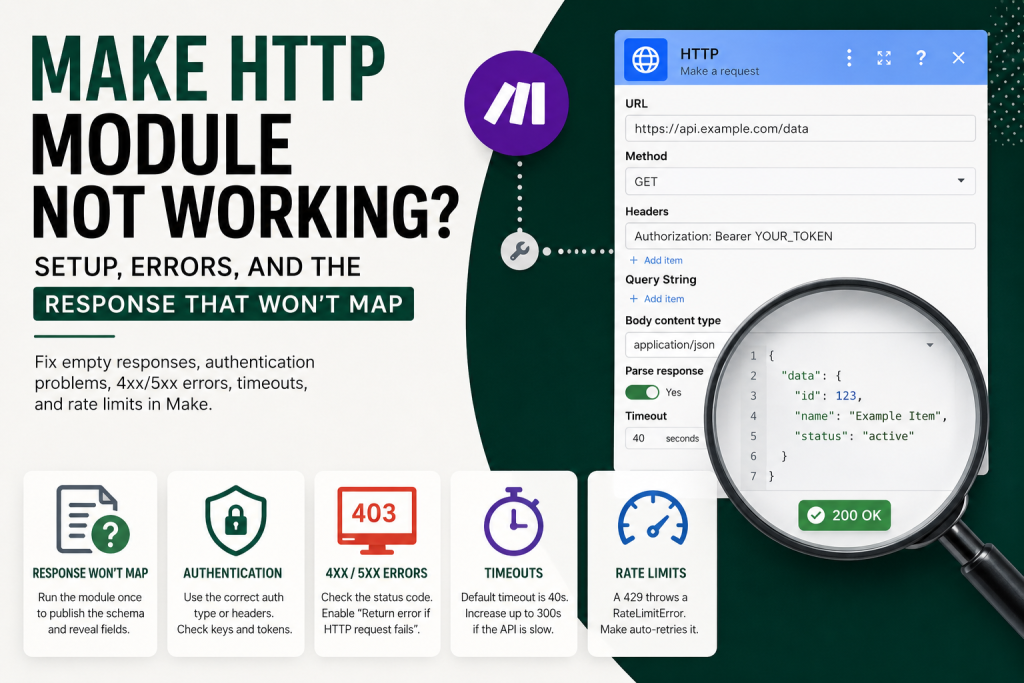
The HTTP “Make a request” module sends a raw request to any URL and returns the response as a bundle. If yours is misbehaving, work through these in order:
- The response won’t mapthe mapping panel shows only a generic “Bundle 1: data” placeholder until the module runs once with real data. Run it once and the fields appear. This is the single most common HTTP complaint, and it isn’t a bug.
- Authenticationthe module supports API key, Basic auth, and OAuth 2.0 through a dedicated Authentication type field, but it applies none of them unless you configure them. A missing or malformed credential is the usual reason a request returns a 401 or 403.
- A status code you never seeunless you turn on Return error if HTTP request failsa 4xx or 5xx response can come back without stopping the scenario, so a failed call can look successful. Check the actual status code in the bundle.
- Timeoutsthe module gives up after 40 seconds by default. A slow endpoint surfaces as a ModuleTimeoutError.
- Rate limitsa 429 surfaces as a RateLimitError, which Make auto-retries before it gives up.
The fastest diagnostic: run the module on its own, then click the output bubble and read the real status code and body the endpoint returned. Most “broken HTTP” problems disappear the moment you stop guessing what came back and actually look at it.
What the HTTP module actually is
The HTTP app is the universal module. It handles most HTTP requests to services that expose an API endpoint, without needing a dedicated Make app. Its “Make a request” module is one of the most-used modules in production scenarios: it supports the full range of authentication types, complete request and response control, file uploads, and structured parsing of JSON, XML, or text responses.
The mental model is simple: you give it the endpoint URL (beginning with https://Make only allows secure connections), the method (GET, POST, PUT, PATCH, DELETE, and so on), headers, query parameters, and a body if needed. The response comes back as a bundle. That is the whole job. The module does not know what the API expects, does not validate your request before sending it, and does not interpret the response for you beyond optional parsing. Everything that goes wrong with an HTTP module goes wrong because one of those raw pieces, URL, method, headers, body, or how you read the response, doesn’t match reality.
It is also the escape hatch. The typical progression: start with HTTP for the prototype, see if the integration becomes recurring, then build a custom app once it’s clear it’s earning its keep. If you only need a service in one or two scenarios, HTTP is the right tool. If you’re fighting it constantly, that’s a signal the integration has earned a proper app.
Setting up a request that works
A working request needs four things to line up: the right URL, the right method, the headers the API requires, and, for POST or PUT, a body in the format the API accepts. The quick version: HTTP “Make a request” calls any REST API; you set the authentication, URL, method, headers, body content type, and parse response.
Two setup details cause most early failures. First, the body format. In the current HTTP app the field is Body content typeand the choice matters. Use application/json when the API expects JSON (you can enter it as a data structure to map field by field, or paste a raw JSON string). Use application/x-www-form-urlencoded when the API expects URL-encoded form fields as key/value pairs. Use multipart/form-data when you’re sending files or mixed form data. Use custom for anything else, such as plain text, XML, or HTML, where you set the content-type value yourself. If the endpoint returns a 400 “bad request,” a body-format mismatch is the first thing to check, you sent JSON where it wanted form data, or vice versa.
Second, parsing the response. Set Parse response to Yes when you want Make to structure the returned data so it’s easy to map; the mappable items become available after the module runs once. If Parse response is off, the body comes back as one raw string instead of a structured set of fields, so if your response looks like a single blob of text you can’t drill into, this setting is the likely cause. If you genuinely have a raw JSON string that wasn’t parsed, send it through a separate JSON > Parse JSON module downstream.
Want the field-mapping shortcut? Our free Builder’s Companion Kit includes the import cards and worked blueprints that show exactly how to wire HTTP responses into the next module without the empty-panel dance. Grab it at mmsvegas.com/make-resources.
Cause 1: the response won’t map (empty panel)
This is the one that sends people to forums convinced the module is broken. You wire an HTTP request, then add a module after it, click into a field, and the mapping panel offers you nothing but a placeholder like “Bundle 1: data” with no expandable fields underneath. The data is plainly coming back, you can see it, but you can’t map it.
The reason is structural. The HTTP module is one of a handful of modules whose output shape Make can’t predict in advance, alongside JSON > Parse JSON without a defined data structure, and Webhooks > Custom Webhook before any payload has been received. In those cases, the mapping panel can’t know the structure yet, so it shows a placeholder like “Bundle 1: data” with no expandable sub-fields.
The fix is to run the module once with real data: right-click the module and pick “Run this module only.” After it executes once against the live endpoint, Make captures the real shape of the response and publishes it, and the downstream mapping panel fills in with the actual fields. This is not a workaround, it is how dynamic-output modules are designed to work. Run first, map second. (Setting Parse response to Yes is what makes those fields cleanly mappable once the run completes.)
Cause 2: authentication is wrong
The current HTTP app handles authentication through a dedicated Authentication type field, with four options: No authentication (for open endpoints or web scraping), API key, Basic auth, and OAuth 2.0. It applies exactly none of them on your behalf unless you choose one and add the matching Credentials. If the endpoint needs a key and you didn’t attach one, you get a 401. If you attached one in the wrong place or the wrong format, you get a 401 or 403.
Make’s own guidance is to store credentials in the dedicated Credentials/keychain fields rather than hand-building an Authorization header or passing a key as a query parameter. Doing it through the built-in fields keeps the key out of your request, centralizes control, and lets you rotate keys safely. Only fall back to a custom header for authentication when the API requires a header pattern the built-in auth types don’t cover. Treat auth as a condition to test, not a guess: if you can call the endpoint successfully from a tool like Postman or curl, reproduce that exact credential in the module. A 401/403 nearly always means what Make sent doesn’t match what worked elsewhere.
For services that use OAuth 2.0, Make can hold a proper connection rather than a hand-built header, if the third party documents an OAuth 2.0 endpoint, the HTTP app’s OAuth 2.0 authentication type exposes enough fields to handle almost anything. One real gotcha: the default Google OAuth used by the Google Sheets and Gmail apps isn’t accessible to the HTTP module, you need your own OAuth client in Google Cloud Platform. If you’re calling a Google API directly over HTTP, that’s why your existing Google connection won’t carry over.
Cause 3: a 4xx or 5xx you never see
Here’s the trap that wastes the most time. An HTTP module can finish green, no error, scenario completes, while the call actually failed on the server side with a 403 or a 500. That can happen when Return error if HTTP request fails is not enabled, because the module may return the response bundle instead of stopping the scenario on a 4xx or 5xx.
The control that governs this is an advanced setting called Return error if HTTP request fails (in the HTTP legacy version 3 app, the comparable toggle is “Evaluate all states as errors”). Set it to Yes when you want a 4xx or 5xx to stop the scenario and route into your error handler. Leave it off when you want to inspect the status code yourself and branch on it.
Either way, the diagnostic is the same: run the module and read the status code field in the output bundle. A green run with a status code of 403 is not a success, it’s a failure the module didn’t flag. Once you can see the code, the meaning follows the usual rules: a 4xx means fix your request (auth, URL, body), and a 5xx means the server failed and a retry may help. For the retry side of that, see our guide on Make retry strategyand for routing failures cleanly, Make error handling.
Cause 4: timeouts and slow endpoints
If the endpoint is slow, the module gives up. The Timeout advanced setting defaults to 40 seconds and accepts a value between 1 and 300 seconds, so you can raise it, but 300 seconds is the ceiling. When the wait runs out you get a ModuleTimeoutError: the module’s request didn’t get a response within the timeout window.
For a genuinely long job, don’t just keep extending the wait. The better pattern is to break the work into stages: kick off the job with one request, poll a status endpoint on a schedule, then fetch the result once it’s ready. That keeps each individual call comfortably inside the timeout instead of betting the whole run on one slow response, and it’s far more resilient than holding a single request open near the 300-second limit.
Cause 5: rate limits (429)
If you’re firing requests in a loop or hammering an endpoint, the server will eventually answer with a 429 “too many requests.” In Make this surfaces as a RateLimitError, which the platform auto-retries before giving up rather than failing immediately. That auto-retry is helpful, but it doesn’t fix the underlying pace, if you keep sending faster than the API allows, you’ll keep hitting the wall.
The durable fixes are to slow the calls down (smaller batches, a pause between iterations) and to lean on Make’s built-in retry behavior for the occasional spike. The mechanics of that, what auto-retries, how many times, and how to add your own backoff, are covered in Make retry strategy.
A worked example: debugging a live request
Say you’re calling a REST API to create a contact, and the new module after the HTTP call shows an empty mapping panel and the scenario “works” but no contact appears in the target system. Here’s the order that settles it fastest.
Step 1, run the module on its own. Right-click the HTTP module and choose “Run this module only.” This both forces a real call and publishes the response schema so the downstream panel can populate.
Step 2, read the output bundle. Click the output bubble. Look at the status code first. If it’s 200/201, the call succeeded and your problem is downstream mapping. If it’s 401/403, it’s auth. If it’s 400, it’s your body or URL. If it’s 429, it’s rate limiting. If it’s a 5xx, it’s the server.
Step 3, match the request to a known-good call. If the status code says your request was rejected, compare your method, headers, and body against a call you know works (from the vendor’s docs, Postman, or curl). The difference is your bug, almost always a header or a body-format mismatch.
Step 4, decide how failures should behave. Once the call works, decide whether a future failure should halt the scenario (set Return error if HTTP request fails to Yes and add an error handler) or be inspected in-flow (leave it off and branch on the status code). Don’t leave it ambiguous, a silent 4xx in production is the version of this bug that costs you a week.
One operations note while you’re in there: each execution of the HTTP module is one operation, and for a standard non-AI module that’s one credit. A request inside a loop runs, and bills, once per iteration, so a runaway loop is both a rate-limit risk and a credit cost. If you’re watching usage, see Make operations vs credits.
Frequently asked questions
Why does my HTTP module return “Bundle 1: data” with no fields to map? Because the HTTP module produces a dynamic output structure that Make can’t predict until it sees a real response. Right-click the module and choose “Run this module only.” After it runs against the live endpoint once, with Parse response set to Yes, the real fields appear in the downstream mapping panel.
Why does my HTTP request succeed but nothing happens on the other end? If “Return error if HTTP request fails” is not enabled, the module can return a 4xx or 5xx response without stopping the scenario, so a rejected call can finish green. Run the module, read the status code in the output bundle, and set “Return error if HTTP request fails” to Yes in advanced settings if you want failed calls to actually stop the scenario.
Why am I getting a 401 or 403 from the HTTP module? Authentication. The module applies no auth unless you set an Authentication type and add credentials. Confirm the exact method the API requires, and compare it against a call you know works elsewhere. A 401 usually means missing or malformed credentials; a 403 usually means the credentials are valid but not allowed to do that.
Why does my HTTP module time out? The Timeout setting defaults to 40 seconds and returns a ModuleTimeoutError when it’s exceeded. You can raise it up to 300 seconds, but for genuinely slow endpoints use a polling pattern, start the job, poll its status, then fetch the result, rather than holding one long call open.
Do I need a Parse JSON module after an HTTP call? Not always. With Parse response set to Yes, the HTTP module parses JSON, XML, and text responses itself. You only need a separate JSON > Parse JSON module when you have a raw JSON string that wasn’t parsed, for example, a body that came back as plain text.
How many credits does an HTTP module use? One execution is one operation, and standard non-AI modules use one credit per operation. Inside a loop, the HTTP module runs once per iterated bundle, so the cost scales with how many times it fires.
Sources
Brian Kasday, The Missing Manual for Make (MMS Vegas, 2026), chapters on modules and the HTTP app, mapping, flow control, and error handling. Current field names and limits in this article were verified against Make’s official HTTP app documentation at apps.make.com/http (current version 4 app), last updated June 2026.
Written by Brian Kasday, a direct-response marketer with 40 years in the trade who rebuilt his entire marketing capability as a one-person operation using AI and a few-dollars-a-day software stack. He writes The Operator’s Library for MMS Vegas. Ready to build faster and break fewer scenarios? Start with the free Builder’s Companion Kitcards, blueprints, and a cost estimator, at mmsvegas.com/make-resources.
More Make guides
Free · Make Operator Toolkit
Running scenarios in Make?
Get the free operator toolkit — production checklists and the fixes that keep scenarios alive under real traffic, plus a note when this guide changes.
Get the free toolkit →