
Table of contents
- The quick answer
- You never captured the customer’s email
- Cart Tracking is not enabled
- The automation toggle is off
- SMTP is not configured correctly
- It’s set to “Runs Once” instead of “Multiple Times”
- Not enough time has passed (the abandonment window)
- A Goal step is exiting contacts early
- The emails send, but the recovery link is dead
- The order you test in
- Frequently asked questions
You built the abandoned cart sequence, flipped it on, and then watched a week of abandoned carts roll by with not a single recovery email going out. When FunnelKit abandoned cart emails are not sending, the instinct is to assume the automation is broken. It usually isn’t. The sequence is almost always firing exactly as designed, the problem is a condition upstream of it that you can’t see from the canvas.
Cart recovery is the highest-ROI automation in the whole system, so it’s worth getting right. Below are the things to check, roughly in the order they trip people up. Treat each one as a condition to test on your own store, not a universal verdict, your setup will have its own answer.
FunnelKit abandoned cart emails not sending: the quick answer
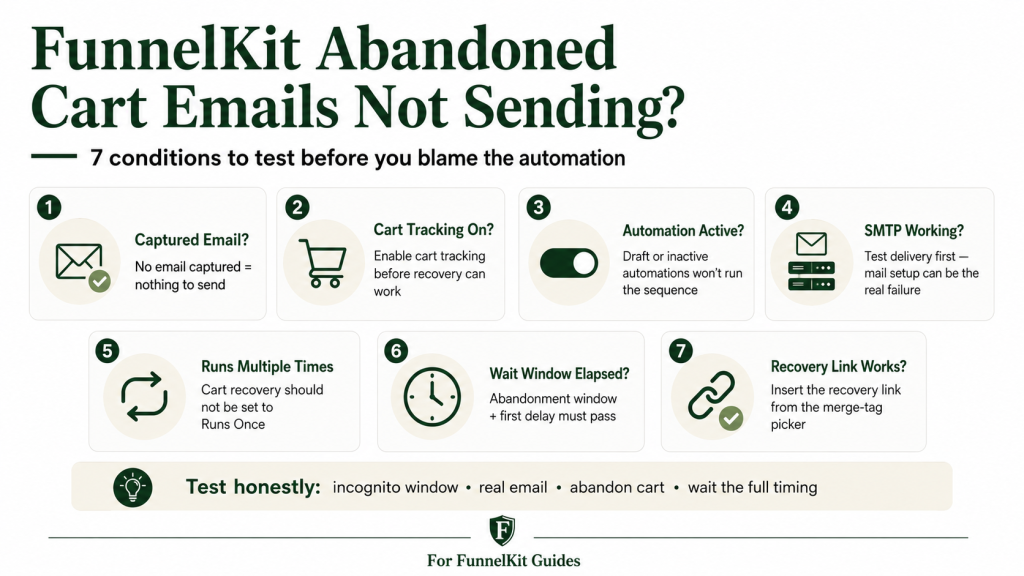
If FunnelKit isn’t sending abandoned cart emails, work this short list before anything else:
- Was an email ever captured? FunnelKit can only recover a cart it can attach to an email address. A pure anonymous visitor who never typed an email is invisible, there is nothing to send to.
- Is Cart Tracking enabled? FunnelKit Automations → Settings → Cart must have Enable Cart Tracking turned on before abandoned-cart recovery can work.
- Is the automation Active? The toggle at the top of the canvas has to read Active, not Draft.
- Is your SMTP working? FunnelKit sends through WordPress’s mail function. If SMTP is misconfigured, emails can appear to fire while never reaching the inbox.
- Is it set to “Runs Multiple Times”? Cart recovery should run every time. “Runs Once” blocks repeat fires.
- Has the abandonment window actually elapsed? The default is a 15-minute wait before a cart counts as abandoned, then your first delay on top of that.
Most “not sending” reports come down to email capture, cart tracking, or mail delivery. Here’s each one in detail.
You never captured the customer’s email
This is the single most common reason, and it’s the one nobody wants to hear, because it isn’t a bug, it’s how cart tracking works.
FunnelKit can recover a cart for two kinds of visitors: logged-in users, whose cart is automatically tied to their account, and identified guests, who entered their email on the checkout page before they left. For a cart to be recoverable at all, FunnelKit has to know the email address. A visitor who added to cart, browsed the checkout, and bailed without ever typing an email is a pure anonymous visitor. There is no address on file, so there is no recovery email to send. The automation isn’t skipping them, it literally has nowhere to send.
If a big share of your carts are dying anonymous, the fix isn’t in the automation at all. It’s in capturing the email earlier. A two-step checkout collects name and email in step one, which identifies the visitor immediately, so even someone who abandons before paying is now recoverable. Moving email capture as early as possible in the flow is the lever that turns invisible carts into recoverable ones. If you want to see how the whole FunnelKit cart abandonment setup is meant to be wired together, that guide walks it from the trigger forward.
Test it the honest way. A preview send has no cart context, so it can’t tell you whether real recovery is working. Open an incognito window, add a product, start the checkout, enter a real email you control, then close the tab. Wait out the abandonment window plus your first delay, and watch whether the email lands. That’s the only test that proves the path end to end.
Cart Tracking is not enabled
Before the automation can recover anything, FunnelKit has to be tracking carts. Go to FunnelKit Automations → Settings → Cart and confirm Enable Cart Tracking is turned on. FunnelKit uses this setting to live-capture the buyer’s email when they enter it at checkout, then waits the configured period before marking the cart abandoned. If you’ve confirmed tracking is on and carts still aren’t registering, FunnelKit cart abandonment not tracking covers every cause in detail.
If cart tracking is off, the automation may be built perfectly and still have nothing to act on. Turn tracking on, save the settings, then run the incognito test again with a real email address.
The automation toggle is off
Obvious, easy to miss. Go to FunnelKit Automations → Automations, find your cart recovery automation, and confirm the toggle reads Active. An automation imported from the template library or duplicated from another sequence can land inactive or in draft mode. If it is inactive, it will not run the recovery sequence, even if carts are being captured elsewhere. This is worth verifying early because it costs ten seconds and rules out the simplest explanation.
SMTP is not configured correctly
This is the quiet killer. FunnelKit Automations sends email through your WordPress email setup, so if SMTP is missing, credentials are wrong, or your sending service is restricted, emails may appear to fire in the automation while never reaching the inbox. From the outside, that looks like a broken abandoned-cart automation, but the failure is really mail delivery.
Check it at FunnelKit Automations → Settings → Email, and send a test email from there if your build offers it. If the test email doesn’t arrive either, the problem is your mail delivery, not the cart automation, and fixing SMTP fixes every email FunnelKit sends, not just this one. This is worth ruling out early, because a mail-delivery failure can look identical to a broken automation from the outside.
It’s set to “Runs Once” instead of “Multiple Times”
Every automation carries a “Runs” setting: Once or Multiple Times. “Runs Once” means a given contact can only enter the automation a single time, ever, no matter how many times the trigger fires for them. That’s the right setting for a welcome sequence. It’s the wrong setting for cart recovery.
Abandoned cart recovery should be set to Runs Multiple Times because every abandoned cart deserves its own recovery sequence. If yours is on Runs Once and the contact has been through the automation before, even months ago, even on a different cart, the trigger fires and FunnelKit declines to enter them again. From the outside it looks like the email didn’t send. It’s the Runs setting quietly doing its job. Open the automation, check the Runs setting, and switch it to Multiple Times if it’s wrong.
Not enough time has passed (the abandonment window)
FunnelKit doesn’t treat a cart as abandoned the instant someone leaves. There’s a configurable abandonment window, 15 minutes by default, that has to elapse before the Cart Abandoned trigger fires at all. Then your first email delay sits on top of that. If your sequence opens with a 30-minute delay, the soonest a real abandoned cart produces an email is roughly 45 minutes after the customer walked away.
So if you abandoned a test cart five minutes ago and you’re refreshing your inbox, nothing is wrong, you simply haven’t waited long enough. Give it the full window plus the first delay before you conclude anything is broken. This is also why testing cart recovery is a patience exercise, not a click-and-confirm.
A Goal step is exiting contacts early
The recommended cart recovery build puts a Goal step checking “order placed” at the start of the sequence and before each delay. The point is to catch anyone who completes their purchase mid-sequence and pull them out, so you never email a “you left something behind” reminder to someone who already bought an hour ago. It’s a feature, and you want it.
But it does mean that if the contact you’re testing with has any completed order that the Goal reads as satisfying the condition, the Goal will exit them, and you’ll see no email. When you test, use a fresh email address with no purchase history, so a Goal step doesn’t legitimately route your tester out of the sequence. If real customers are getting emails but your own test never does, an over-eager Goal match on your test account is a likely reason.
The emails send, but the recovery link is dead
Sometimes the emails are sending fine and the real complaint is that they don’t work, the “complete your order” button goes nowhere, or lands on an empty cart. That’s a different failure, and it’s worth checking because it’s a pure revenue leak hiding inside a sequence that looks healthy.
The recovery link has to be a real, restored-cart URL wrapped in an actual anchor. The most common mistake is a button or line of text that was never given a working link, plain text styled to look like a link, with no destination behind it. FunnelKit provides the restored-cart URL through the merge-tag picker. Look for the cart recovery link / cart recovery URL merge tag and insert it from the picker rather than typing the token from memory, so you get the exact tag your version uses, and confirm it’s sitting inside a clickable link, not bare in the body. The other cart merge tags worth using, and worth checking render correctly, are the cart items table, the cart total, and the customer’s first name with a fallback set, since you may not have a name for someone who abandoned early. If merge tags are outputting blank or literal text anywhere in your sequence, FunnelKit merge tags not working covers every failure mode.
Want the whole sequence laid out the way it’s meant to be built, trigger, Goal checks, the three-email cadence, and the copy logic behind each send? Grab the FunnelKit Resources kit it’s the companion to The Missing Manual for FunnelKit the field guide for operators who’d rather build it right once than debug it five times.
The order you test in
A quick word on testing discipline, because half of “it’s not sending” turns out to be a testing artifact. Cart recovery can only be confirmed on a real abandoned cart with a real captured email, after the real timing has elapsed. Preview sends prove nothing here, they have no cart context. Logged-in admin sessions can behave differently from a cold guest. And a test account with prior orders can trip the Goal step out of the sequence.
So the clean test is: incognito window, fresh email you control, add to cart, enter the email at checkout, abandon, then wait out the window plus the first delay. If that lands, your sequence works and any “not sending” report is about a specific contact’s circumstances, most often that they never gave you an email to begin with.
Once your cart recovery is firing, it’s worth making sure the rest of your funnel is pulling its weight too. If your checkout has an order bump that customers aren’t seeing, start with FunnelKit order bump not showing and if your post-purchase offer isn’t appending, FunnelKit one-click upsell not working walks the same kind of checklist for that step.
Frequently asked questions
Why isn’t FunnelKit sending abandoned cart emails to anyone? Check three things first: that Cart Tracking is enabled under FunnelKit Automations → Settings → Cart, that the automation toggle reads Active, and that your SMTP is configured and a test email actually arrives. A mail-delivery failure is a common store-wide cause, the emails appear to fire but never leave the server.
Why does FunnelKit only recover some abandoned carts? Because it can only recover carts it can attach to an email address. Logged-in users and guests who entered their email at checkout are recoverable; pure anonymous visitors who never gave an email are not. Capturing the email earlier, a two-step checkout helps, raises the share of carts you can reach.
How long should I wait before an abandoned cart email sends? The cart isn’t counted as abandoned until the abandonment window elapses (15 minutes by default), and then your first email delay runs on top of that. A sequence with a 30-minute first delay won’t produce an email until roughly 45 minutes after the customer left.
My test cart never triggers a recovery email, what’s wrong? Usually the test, not the automation. Use an incognito window and a fresh email with no order history, enter that email at checkout, then wait out the full window plus the first delay. A logged-in admin session, a preview send, or a test account with past purchases (which a Goal step can legitimately exit) will all produce a misleading result.
Should abandoned cart recovery be set to Runs Once or Multiple Times? Multiple Times. Every abandoned cart deserves its own recovery sequence. Runs Once will block the automation from re-entering a contact who has been through it before, which looks exactly like “not sending.”
The emails send but the recovery link doesn’t work, how do I fix it? Insert the recovery link from the merge-tag picker (the cart recovery link / cart recovery URL tag) and make sure it sits inside a real clickable link, not as plain text. A button with no destination behind it is the usual culprit.
Can I check the automation logs to see why a specific contact didn’t get the email? Yes. FunnelKit Automations keeps a per-contact execution log that shows exactly where a contact entered, what each step did, and where it stopped. Go to FunnelKit Automations → Logs, filter by the contact’s email, and look for the cart recovery automation. The log will show whether the contact was never entered (email not captured, Runs Once block), exited by a Goal step, or whether a send action fired but mail delivery failed. That log is the fastest way to move from guessing to knowing. The full walkthrough is in FunnelKit Automation Logs: How to Debug Stuck or Failed Actions.
Brian Kasday spent forty years in direct-response marketing before rebuilding the whole capability as a one-person operation, classic discipline, modern AI, and a software stack that costs a few bucks a day. He writes The Operator’s Library for MMS Vegas.
Build it right the first time. The FunnelKit Resources kit and The Missing Manual for FunnelKit give you the funnel and automation playbook end to end, checkout, bumps, upsells, and the automations that run while you sleep.
Sources: The Missing Manual for FunnelKit, Ch. 22 (Abandoned Cart Recovery), Ch. 15 (The Automations Interface), Ch. 16 (Triggers), Ch. 17 (Conditions and Delays), Ch. 43 (Troubleshooting). Cart Tracking setting and the Settings → Cart location verified against FunnelKit’s live documentation (Enable Cart Tracking; Cart settings), June 2026.
More FunnelKit guides
Free · FunnelKit Operator Toolkit
Building checkouts in FunnelKit?
Get the free operator toolkit — order-bump templates, checkout checklists, and a note when what you just read changes.
Get the free toolkit →