
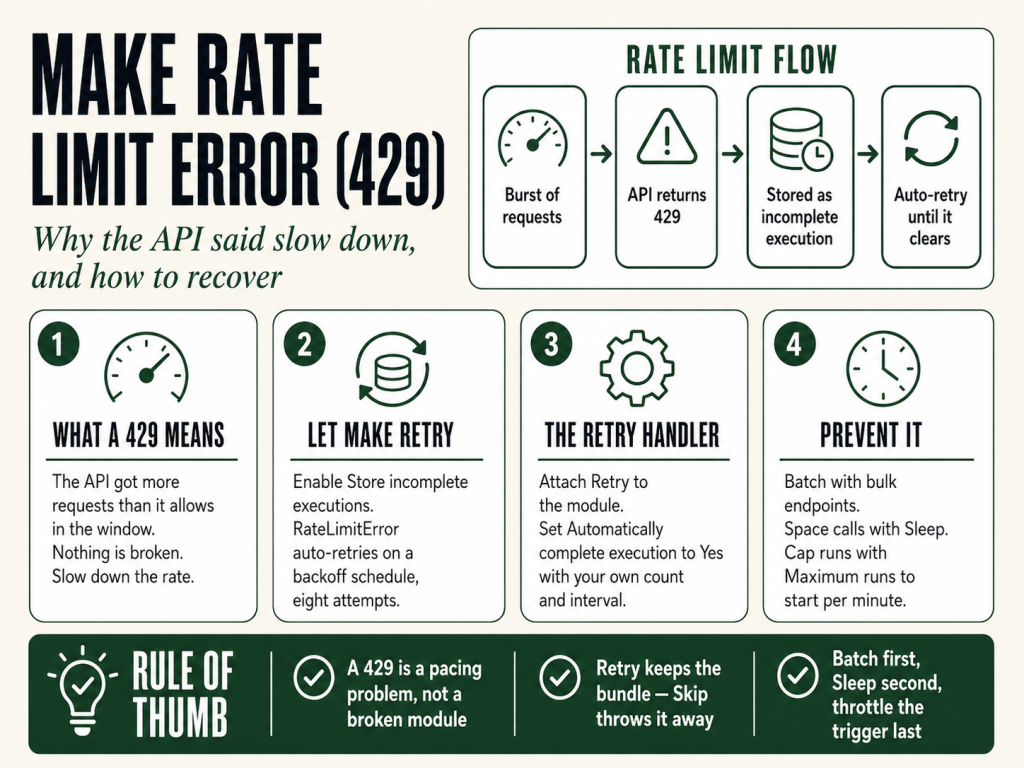
A Make rate limit error is Make’s way of telling you that requests are leaving faster than an API will accept them. It surfaces as HTTP 429, “Too Many Requests”, and it comes from one of two places: an app your scenario calls, or Make’s own API. Either way the run stops mid-stream, and if you change nothing, it keeps happening. The good news is that a 429 is almost never a bug. It’s a speed limit, and Make gives you the controls to stay under it.
The 30-second answer
A Make rate limit error (429) means too many requests hit an API inside one time window. If incomplete executions are turned on, Make retries with exponential backoff on its own, a scheduled scenario pauses its next run for 20 minutes first, then retries. To stop the error recurring, slow the requests down: cap an instant scenario with the lightning-icon maximum runs to start per minute, turn on sequential processing, process fewer records per run (Make suggests around 20), drop a Sleep module in front of the module that’s getting throttled, or batch calls with an Aggregator or a bulk-action module. Make’s own API has hard ceilings too, 60 requests a minute on Core, up to 1,000 on Enterprise.
What this covers
- What a Make rate limit error actually is
- How Make reacts to a 429 on its own
- Fixing it in an instant (webhook) scenario
- Fixing it in a scheduled scenario
- Fixes that work either way
- When it’s Make’s own API limit, the actual numbers
- FAQ
What a Make rate limit error actually is
429 is a standard HTTP status code that means “too many requests in a given window.” The service on the other end is protecting itself, and it’s doing exactly what it’s supposed to do. Nothing in your scenario is broken, you’re just knocking on the door faster than the doorman will open it.
In Make, that 429 shows up in two different situations, and telling them apart is the whole game:
- An app or endpoint your scenario calls returns a 429. This is the common one. A Slack, Airtable, HubSpot, or generic REST call, often through the HTTP module, comes back “Too Many Requests” because the module fired more calls than that service allows per second or per minute.
- Make’s own API returns a 429. This happens when you’re driving Make itself programmatically, creating scenarios, reading data stores, or triggering runs through the Make API, and you cross your organization’s per-minute limit. The numbers for that are further down.
How Make reacts to a 429 on its own
Before you change anything, know what Make already does for you. Its response depends on the scenario type and on one setting: whether incomplete executions are stored.
- Scheduled scenarios: Make pauses the next run for 20 minutes to let the target API recover, then reruns the stored incomplete execution with exponential backoff, if incomplete executions are enabled.
- Instant scenarios: Make reruns the incomplete execution with exponential backoff automatically, again only when incomplete executions are enabled.
That last clause matters. If store incomplete executions is set to No, nothing retries, the run simply errors and the data is gone. So step one for most people is turning it on: open the scenario settings and set store incomplete executions to Yes. Now a 429 becomes a temporary hiccup Make recovers from instead of a hard failure. For the mechanics of how those retries and backoff behave, see the guides on Make error handling and Make’s retry strategy. If 429s keep stacking up as incomplete executions, the batching fixes below are the next step.
Fixing it in an instant (webhook) scenario
Instant scenarios are the usual source of 429s because they can fire in parallel, a burst of webhooks becomes a burst of downstream API calls. Three controls tame that:
- Set a scenario rate limit. Click the lightning icon on the scenario and use the maximum runs to start per minute field. This caps how fast Make launches runs, which caps how fast the calls behind them go out.
- Enable sequential processing. This forces runs to happen one at a time instead of all at once, no parallel pile-up hammering the same endpoint.
- Add a Sleep module. Place it before the module that’s getting throttled to space calls out deliberately.
Fixing it in a scheduled scenario
Scheduled scenarios usually hit a 429 because a single run tries to push too many records through at once. Two adjustments fix that:
- Process fewer records per run. Set the limit field in your trigger or search module. Make recommends processing no more than about 20 records per run when you’re hitting rate limits, smaller batches, more runs, fewer 429s.
- Extend the scheduling interval. If you’re expecting a high volume of records, widen the gap between runs so each batch has room to clear before the next one starts. For help tuning that gap, see how Make scheduling works.
With incomplete executions enabled, the built-in 20-minute pause and backoff will also quietly clean up the runs that did trip the limit.
Fixes that work either way
Some moves cut request volume no matter how the scenario is triggered. The pattern behind all of them is the same: send fewer, larger requests instead of many small ones.
- Sleep module. Insert it before the problem module. It’s adjustable up to 300 seconds, which is plenty to get under most per-minute limits.
- Aggregator module. If you’re calling an API once per bundle, an Aggregator combines bundles first so you send one request for the whole group. If your Aggregator isn’t combining things as expected, see Make Aggregator not working.
- Bulk-action modules. Many apps offer a “create/update multiple” module. One of those replaces a loop of single calls with a single call.
When it’s Make’s own API limit, the actual numbers
If the 429 is coming from the Make API rather than a third-party app, you’ve crossed your organization’s per-minute request ceiling. Those limits are fixed by plan:
- Core: 60 requests per minute
- Pro: 120 requests per minute
- Teams: 240 requests per minute
- Enterprise: 1,000 requests per minute
Cross the line and the API responds with a 429 and the message “Requests limit for organization exceeded, please try again later.” You can confirm your own ceiling by calling the organizations endpoint for your organization ID and reading the apiLimit value inside the returned license object. The fix here is the same in spirit, space your calls out and batch where you can, but tuned to these hard numbers rather than a third party’s undisclosed limit.
Building automations that have to survive production traffic? The rate limits, retry settings, and batching patterns above are the difference between a scenario that runs clean and one that fails every busy afternoon. Get the full set of Make build and troubleshooting resources at mmsvegas.com/make-resources.
FAQ
Does Make retry a 429 automatically?
Yes, if store incomplete executions is on. Instant scenarios rerun the incomplete execution with exponential backoff; scheduled scenarios pause the next run for 20 minutes and then rerun with backoff. With incomplete executions off, nothing retries and the run just fails.
Why does my scheduled scenario stop for 20 minutes after a rate limit error?
That’s Make’s built-in cooldown. On a 429, a scheduled scenario pauses its next run for 20 minutes to let the target API recover, then reruns the stored incomplete execution with exponential backoff.
How do I make a module wait and try again?
Put a Sleep module in front of it (adjustable up to 300 seconds) to space requests out, and enable incomplete executions so Make retries with backoff. In an instant scenario, also cap throughput with the lightning-icon maximum runs to start per minute and turn on sequential processing.
What are Make’s own API rate limits?
Per organization, per minute: Core 60, Pro 120, Teams 240, Enterprise 1,000. Exceed it and the API returns a 429 with “Requests limit for organization exceeded, please try again later.”
Is a Make rate limit error the same as running out of operations?
No. A 429 is a speed limit, too many requests too fast. Running out of operations is a volume limit against your plan’s allotment for the billing period. Different problem, different fix.
Will an Aggregator really help with rate limits?
Often, yes. If you’re calling an API once per bundle, an Aggregator (or a bulk-action module) lets you send one request for many items instead of dozens, fewer requests means fewer 429s.
Can a Make rate limit error come from an iterator sending too many bundles?
Yes. An iterator that expands a large array fires one bundle per item, and if each bundle triggers a downstream API call, the total can blow past a per-minute limit fast. Pair the iterator with an Aggregator to batch the output, or add a Sleep module between the iterator and the API call to pace things out. See Make iterator not working if the iterator itself is behaving unexpectedly.
Sources
- Make Help Center, Fix rate limit errors
- Make Developer Hub, Rate limiting
- Make Developer Hub, 429 error handling
Written and maintained by Brian Kasday for The Operator’s Library. For the full Make toolkit, visit mmsvegas.com/make-resources.
More Make guides
Free · Make Operator Toolkit
Running scenarios in Make?
Get the free operator toolkit — production checklists and the fixes that keep scenarios alive under real traffic, plus a note when this guide changes.
Get the free toolkit →