
The 30-second answer
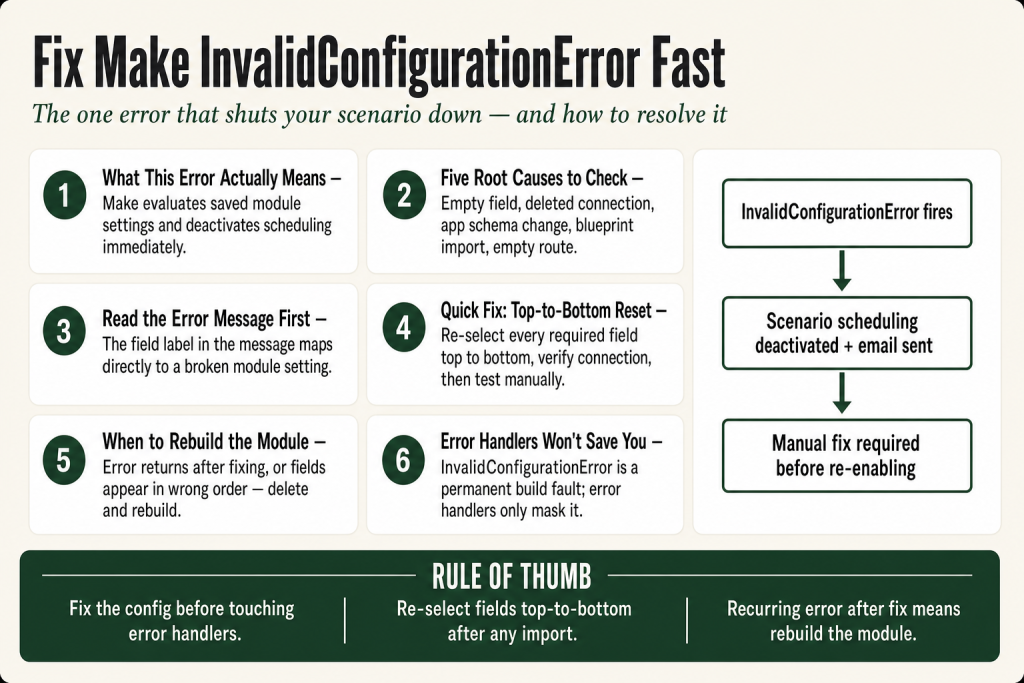
- What it is: A configuration-level error that immediately deactivates the scenario’s scheduling and emails you. It signals that a module’s saved settings are structurally invalid, not just that a runtime value is wrong.
- How to find it: Open the Scenarios page, go to History (the clock icon), open the failed execution, and click the caution icon on the highlighted module. The error panel shows the exact message and field.
- Most common causes: A required dropdown was never selected, a connection was deleted or re-authorized under a different account, an app update changed or removed a field that your module still references, or a blueprint was imported without completing every connection and required selection.
- Quick fix sequence: Open the broken module, re-select every required field from top to bottom, verify the connection is live, save, and run a manual test before re-enabling scheduling.
- When to rebuild: If the module’s layout looks wrong or fields you remember are missing, delete the module and add a fresh copy. Corrupted module state rarely self-heals.
- Error handler note: Unlike DataError or ConnectionError, InvalidConfigurationError cannot be reliably caught and retried at runtime. Fix the configuration first.
Take this fix into your next scenario. The free Builder’s Companion Kit collects the checklists and templates that pair with this guide — so next time, you start from a template, not a blank page. Grab it free →
- What Make InvalidConfigurationError actually means
- Reading the error message to identify the broken field
- Cause 1: A required dropdown or field was never completed
- Cause 2: The connection was deleted, expired, or reauthorized under a different account
- Cause 3: The app updated and changed its field schema
- Cause 4: An imported blueprint has unresolved placeholders
- Cause 5: An empty route or error-handler flow
- Worked example: tracing an InvalidConfigurationError from a Google Sheets module
- When to rebuild rather than repair
- Can an error handler catch InvalidConfigurationError?
- FAQ
Make InvalidConfigurationError is the one error type that doesn’t wait politely for you to fix things. When Make sees it, the platform treats it as a configuration-level fault, deactivates your scenario’s scheduling, and notifies you by email. The execution log will point at the offending module with a caution icon, but the message itself is often terse: a field name you don’t recognize, a value Make says is wrong, or nothing more specific than “configuration is invalid.” This article walks you through every common cause, a repeatable diagnostic sequence, and the fix for each variant, including the ones that appear without any warning inside imported blueprints.
What Make InvalidConfigurationError actually means
Make classifies every error by two dimensions: origin (where did it come from?) and cause (what went wrong?). Most errors, a ConnectionError or a RateLimitError, originate from a live call to an external service. Make can retry those automatically.
An InvalidConfigurationError is different. It means Make evaluated the saved settings inside the module itself before a call was ever made, and found something that can’t be resolved. Think of it as Make looking at the blueprint of a machine and saying “this part doesn’t exist” rather than “the machine jammed while running.”
The practical consequence is significant. According to Make’s developer documentation, a configuration-related problem deactivates the scenario and notifies the user. It does not pause and retry the way a ConnectionError does. Your scenario goes dark the moment Make hits it, which means any data that was supposed to flow through stays stuck until you manually fix the setting and re-enable scheduling.
The error surfaces in two places: the red execution row in History, and an email to the scenario owner. The module that caused it gets a caution triangle in the scenario editor. Click that triangle and you see the full error string, which almost always contains a clue about which field or value Make found invalid.
Reading the error message to identify the broken field
The error string usually follows one of these patterns:
InvalidConfigurationError: [FieldLabel] is requireda required field was left blank or its saved value was cleared.InvalidConfigurationError: [Value] is not valida saved value (like an IP address, a URL, or a custom field ID) no longer passes validation.InvalidConfigurationError: Flow is empty and contains no configured modulea router branch or sub-flow has no active module in it. This appears when a module inside an error-handler route or a router branch was deleted without removing the route itself.InvalidConfigurationError: Invalid [filetype] filea module expected a specific binary format and the mapped value doesn’t match it.
The field label in the message maps directly to a setting inside that module. Open the module, scroll through every section from top to bottom, and look for the field with a red border or a warning indicator. That’s your target.
If the message contains an ID (like a field ID, board ID, or list ID from a third-party app), that ID no longer exists in the connected account. The resource was deleted upstream. You need to re-select or re-enter a valid one.
Cause 1: A required dropdown or field was never completed
This is the most common trigger on brand-new scenarios or freshly imported blueprints. Some module fields only become visible after you choose a value in an upstream field, a pattern called dynamic field loading. If you saved the module before all the dependent fields resolved, Make stores a partially configured module that looks valid in the UI but fails at runtime.
The fix: open the module and work through it from top to bottom, treating every dropdown as a fresh selection. Changing a higher-level field (like the Action or the connected spreadsheet) often collapses and re-expands the fields below it. Don’t assume a field that shows a value is valid. If it was set in a previous session and the source resource changed, the stored value can be stale.
Pay particular attention to:
- Action and operation selectorsthe first dropdown in most app modules. If the app updated and the action was renamed, your saved value may no longer match any option.
- Object or record type selectorsboards, sheets, tables, forms. If the resource was deleted in the connected app, the dropdown shows nothing or shows an ID that resolves to nothing.
- Filter and condition fields inside the moduleseparate from Make’s route filters, some modules have their own internal filter builders that require at least one condition.
See also: Make Mapping Fields Missing covers the closely related problem of mapped values disappearing from output panels after a module change.
Cause 2: The connection was deleted, expired, or reauthorized under a different account
A connection in Make stores the credentials a module uses to talk to a third-party app. If that connection is deleted from the Connections page, or if someone reauthorized it under a different user account, every module that references the old connection ID gets an InvalidConfigurationError the next time it runs.
This is easy to confuse with an AccountValidationError or a plain ConnectionError. The difference: those two errors fire when the credential exists but fails authentication at the API call. An InvalidConfigurationError from a connection problem fires when Make can’t even find the connection record the module points to.
How to check: open the broken module and look at the Connection field (the very first field in almost every app module). If it shows a blank, a connection name in red, or a gear icon with a warning, the connection is gone or invalid. Re-select a working connection from the dropdown, or create a new one.
Prevention: if you share scenarios across team members, use a shared service account for connections rather than a personal login. Personal logins get revoked, changed, or removed, and every scenario that relied on them breaks silently until the next run.
If you’re rebuilding connections frequently, see Make Connection Not Working for the full reauthorization checklist.
Cause 3: The app updated and changed its field schema
Third-party apps change their APIs. When they do, Make’s connector for that app eventually updates to match. A field that existed in last year’s version of the Airtable, HubSpot, or Notion module may be renamed, removed, or moved under a different section in the current version. Your saved module still references the old field name or field ID in its configuration JSON, and Make rejects it as invalid.
This is the most frustrating variant because nothing you did caused it. The scenario ran fine for weeks, and then it just stopped.
The symptoms: the module’s settings panel looks slightly different from what you remember. Fields you set are gone, or you see unfamiliar fields with no values. The error message often contains a field name or key you don’t recognize.
Your options:
- Re-open and re-configure the module. Select the same action and re-map every field. This clears the stale field references and replaces them with the current schema.
- Check the app’s changelog or Make’s release notes. If the field was renamed, you’ll see it under a new label. Map to that.
- If re-configuring doesn’t clear it, rebuild the module. Delete the module from the canvas, add a fresh copy of the same module, reconnect it to the scenario flow, and configure it from scratch. A fresh module always loads the current schema.
Custom app developers also run into a related issue: when a custom app’s module schema is updated, existing scenarios may still cache the old input structure. The fix there is to open the module in the scenario editor and re-save it, which forces a schema reload.
Cause 4: An imported blueprint has unresolved placeholders
Blueprint import is the fastest way to clone a scenario, and it’s also a reliable source of InvalidConfigurationError reports on the Make community forum. Here’s why: a blueprint is a JSON snapshot of the scenario’s structure. It stores connection IDs, resource IDs (board IDs, sheet IDs, folder IDs), and any static values you typed into fields. None of those IDs transfer to a new organization or a new account.
When you import a blueprint, Make reconstructs the canvas but leaves every connection slot blank and every app-specific resource field unresolved. The scenario looks complete on the canvas. Every module appears to be there. But when you run it, the first module with a blank connection or an unresolved resource ID fires an InvalidConfigurationError.
The discipline to apply immediately after importing:
- Click every module in the scenario, one by one, in execution order.
- For each module: assign a connection, re-select the action if needed, and re-select every resource (spreadsheet, table, board, folder) that the module targets.
- Pay extra attention to modules that have nested dynamic fields, because those won’t reveal themselves until you select the parent field first.
- Run a manual test with real or test data before enabling scheduling.
Data Store modules deserve a special note. When a blueprint stores a Data Store module, the imported scenario can’t auto-link to your data store because the stored reference belongs to the original account. You have to re-select your data store in each Data Store module manually. Community reports confirm the mapping of variables and field configuration is also lost on import, so treat every Data Store module as a fresh configuration after an import.
For a deeper look at blueprint-specific gotchas, see Make Blueprint Import Not Working.
Cause 5: An empty route or error-handler flow
The error message “Flow is empty and contains no configured module” is its own specific variant of InvalidConfigurationError. It means Make found a route (a branch from a Router module, or an error-handler route attached to a module) that has no active module in it.
This happens when:
- You deleted a module from inside a router branch but left the route itself connected.
- You added an error-handler route to a module (right-click the module, Add error handler) but didn’t place any handler module inside it.
- An imported blueprint created a route structure, but the module that was supposed to live on that route didn’t import correctly.
The fix: go to the route or error-handler flow that’s empty. Either add the missing module back, or delete the empty route entirely. A route with no modules is structurally invalid and Make refuses to initialize the scenario with it present.
For more on how routes work and why this matters, see Make Router Guide and Make Error Handling.
Worked example: tracing an InvalidConfigurationError from a Google Sheets module
Here’s what a real diagnostic session looks like. Suppose you have a scenario that reads from Google Sheets and posts to a Slack channel. It ran cleanly for two months. One morning you get the deactivation email.
- Go to the scenario. You see the scheduling toggle is off. Open History (the clock icon in the scenario header). The most recent row shows a red error icon.
- Click the row to open the execution. The scenario editor loads with the Google Sheets module highlighted and a caution triangle above it.
- Click the caution triangle. The error panel shows:
InvalidConfigurationError: Spreadsheet ID is not valid. - Open the Google Sheets module settings. The Spreadsheet field shows a name in grey text with a small warning icon. The spreadsheet was renamed and the internal ID didn’t change, but the associated Google Drive folder was restructured and the file was moved to a different shared drive, which changed how Make’s connector resolves the resource.
- Re-select the spreadsheet from the dropdown. It now appears under its new location. Re-select the sheet (tab) as well, because that field clears when you change the spreadsheet.
- Save the module, run a manual test. The execution succeeds. Re-enable scheduling.
Two minutes of work once you know where to look. The time cost is almost entirely in reading the error message and tracing it back to the field. Resist the urge to rebuild the whole scenario before you’ve confirmed the exact broken field.
If a formula inside the module is producing the invalid value that triggers the error, see Make Formula Not Working for expression-level debugging.
When to rebuild rather than repair
Most of the time you fix an InvalidConfigurationError by editing the module in place. But there’s a class of breakage where the module’s internal state is corrupted in a way that simple edits don’t resolve. Signs you’re there:
- You correct the flagged field, save, and the error comes back on the next run with the same or a different field.
- The module’s settings panel shows fields in a strange order, or fields that don’t match the current app documentation.
- The module silently ignores changes you save.
- You see a schema mismatch between what the module outputs (visible in the output panel after a test run) and what downstream modules expect.
In those cases, rebuild. The process:
- Screenshot or note every setting and mapping in the current module, including field values and mapped tokens from upstream modules.
- Note the module’s position in the scenario flow: what feeds into it and what it feeds into.
- Delete the module.
- Add a fresh copy of the same module to the canvas.
- Reconnect it to the modules before and after it.
- Re-enter every setting and mapping from your notes.
- Run a manual test.
A fresh module always loads from the current app schema. You lose any cached output data from previous runs (it’s not stored in the module itself), but the scenario itself is clean again.
If a rebuilt module still throws the same error, the problem is likely in the connected app’s account or permissions, not in Make’s module. Check the third-party service directly.
Can an error handler catch InvalidConfigurationError?
Technically, you can attach an error-handler route to a module that throws an InvalidConfigurationError. But it’s not a useful long-term strategy. The error fires because the module’s configuration is broken, not because of a runtime data problem. Even if the handler route catches the error and routes around it, you’ve just hidden the broken module. Every run will hit the same invalid configuration, burn operations, and silently skip whatever that module was supposed to do.
The right pattern: fix the configuration. Error handlers are for transient failures, like a third-party API being temporarily down. An InvalidConfigurationError is a permanent build-time fault that only resolves when you correct the setting.
One exception worth knowing: if you’re running a scenario and a single module’s invalid configuration affects only non-critical side logic (say, a logging module), you could temporarily add an Ignore handler to keep the main flow alive while you schedule the fix. But mark it in your scenario notes and revisit it within the same week. An Ignore handler on a broken module is a timer, not a fix.
For more on how Make handles incomplete executions and what you can retry safely, see Make Incomplete Executions and Make Error Handling.
FAQ
Why does Make deactivate my scenario when InvalidConfigurationError occurs?
Make treats configuration errors as permanent faults rather than temporary failures. Unlike a connection timeout, which might resolve on the next attempt, an invalid module setting won’t fix itself. So Make deactivates scheduling and notifies you instead of retrying indefinitely. You have to correct the setting and manually re-enable the scenario.
InvalidConfigurationError says a field is required but I can see a value in it
The visible value is stale. It was set when the module was first configured, but the underlying resource (a spreadsheet, a board, a list) was deleted or moved in the connected app. Make stored the old ID, that ID is now invalid, and the field appears populated but points to nothing. Re-select the field from the dropdown to replace the stored ID with a valid current one.
How do I stop InvalidConfigurationError from appearing after every blueprint import?
Open every module immediately after importing and assign connections and resources from top to bottom. Blueprint JSON stores IDs from the original account, and none of them carry over. Treat a fresh import the same as building a new scenario from scratch: every connection and every resource selector needs your attention before the first run.
Can I use an error handler to stop InvalidConfigurationError from deactivating my scenario?
You can attach an error-handler route to delay the deactivation impact, but this only masks the problem. The module’s configuration is structurally broken and will fail on every run until you fix it. Error handlers are for transient runtime failures. Fix the configuration and remove the workaround.
InvalidConfigurationError: Flow is empty and contains no configured module, what does this mean?
A router branch or error-handler route exists in your scenario with no module inside it. Make refuses to run a flow with an empty route. Find the empty branch on the canvas (it appears as a line with no module at the end), then either add the missing module or delete the empty route.
My module throws InvalidConfigurationError but I fixed the field and it keeps coming back
This points to corrupted module state rather than a single bad field. The module’s internal configuration JSON may reference a schema that no longer matches the current app version. Delete the module, add a fresh copy, and re-enter your settings. A fresh module loads from the current schema and the stale references disappear.
Sources:
Sources: Make Help Center: Types of errors; Make Developer Hub: Error handling; Make Help Center: Manage incomplete executions; Make Help Center: Overview of error handling; Make Help Center: Fix errors and warnings; Make Community forum threads on InvalidConfigurationError (community.make.com), verified July 2026.
Brian Kasday spent forty years in direct-response marketing before rebuilding the whole operation as a one-person shop. He writes The Operator’s Library — including “The Missing Manual for Make” — for operators who’d rather build it themselves than wait on someone else.
Get the Builder’s Companion Kit — the free checklists and templates that pair with this guide: mmsvegas.com/make-resources.
This guide solves one Make problem. The Missing Manual for Make covers the production system. See the manual →
More Make guides
Free · Make Operator Toolkit
Running scenarios in Make?
Get the free operator toolkit — production checklists and the fixes that keep scenarios alive under real traffic, plus a note when this guide changes.
Get the free toolkit →