
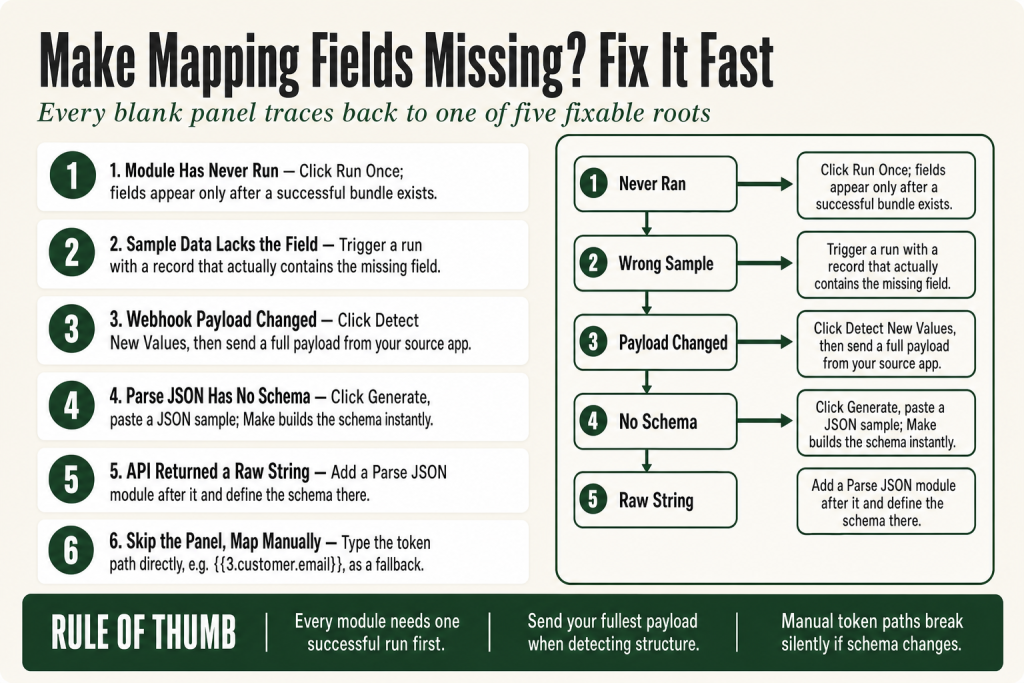
The 30-second answer
- Module never ran: Make needs at least one successful execution to build the data tree. Click Run once (bottom of the scenario editor) to produce sample data.
- Sample data is missing the field: The test record that ran did not contain the field you need. Trigger a run with a record that includes it, or use the most recent execution bundle.
- Webhook payload changed: Open the webhook module, click Detect new values (the button label in the live Make webhook app docs at apps.make.com/gateway; the action is also described as re-determining the data structure), then send a real payload from the source app.
- Parse JSON has no data structure: The module cannot expose fields until it has a schema. Attach a data structure, or run the module once with a live JSON string so Make can infer the shape.
- Module outputs a raw string, not an object: An API returned JSON as a plain text string. Add a Parse JSON module after it and define the schema there.
- Manual mapping as a fallback: If a field appears intermittently (optional fields in a payload), type the token path directly, e.g.
{{1.customer.email}}, instead of picking it from the panel. If the upstream schema later changes, update the path to match.
Take this fix into your next scenario. The free Builder’s Companion Kit collects the checklists and templates that pair with this guide — so next time, you start from a template, not a blank page. Grab it free →
- Why Make needs sample data before it can show you anything
- Your module ran, but the field still does not appear
- Webhook payload changed after you built the scenario
- Parse JSON module: fields missing because there is no data structure
- Empty outputs, arrays in the panel, and fields that show but never carry values
- When to skip the panel and map manually
- Worked example: restoring make mapping fields missing after a webhook payload update
- FAQ
Make mapping fields missing from your panel is one of the most common build blockers on the platform. You open a downstream module, click into a field, and the data tree on the right is either blank or showing a stripped-down ghost of what you expected. Nothing is broken in the traditional sense, no red error bubble, no failed execution. Make just has no idea what your upstream module is going to output, so it has nothing to show you. Every cause traces back to one of five roots: the upstream module has never run, the sample data it produced does not include the field you need, a webhook payload changed after the data structure was set, a Parse JSON module is missing its schema, or a module is outputting a raw string instead of a parsed object. This article walks through all five, in the order you are most likely to hit them.
Why Make needs sample data before it can show you anything
Make’s mapping panel is not a static field list pulled from an API spec. It is a live snapshot of the last bundle that module produced during a test run. Think of it like a Post-it note the module leaves behind: downstream modules read that note to know what tokens are available. If the module has never run, there is no note, and the panel is blank.
This is a deliberate design choice. Make does not pre-fetch schemas from every connected app at build time. It waits for real data to arrive, then reflects that shape back to you. The practical consequence: every new module you drop into a scenario needs to produce at least one successful output before you can map from it.
The fix is always the same: run the scenario. Click Run once at the bottom of the scenario editor. When the execution completes, each module shows a numbered bubble. Click any bubble to inspect the output bundle. Once that bundle exists, every downstream module’s mapping panel will show the fields that bundle contained.
One miss I made early on: I kept running the scenario from the trigger and wondering why a middle module’s fields were still missing. The issue was that the trigger had no new records to process, so the middle module never fired. You need the whole chain to execute, not just the first step.
For more on how executions and operations interact with your plan, see Make Operations vs Credits: What Counts, What Changed, and How to Lower Your Bill.
Your module ran, but the field still does not appear
This one trips people up because the module looks healthy. It ran, it has a bubble, but when you open the downstream mapping panel the specific field you need is not in the tree.
The reason: Make’s data tree only shows fields that were present in the sample bundle it captured. If your test record had a blank or absent value for a field, that field may not appear at all, or it may appear with an empty value that later modules cannot resolve cleanly.
The most common scenario: you triggered a test with a minimal record (say, a form submission where the optional “phone” field was left blank), and now the phone token is nowhere in the panel. The fix is to trigger a new run using a record that actually contains the field. After that run completes, the field will appear in the tree.
A second scenario: the first bundle Make captured came from a record where a field genuinely was not part of the response. Some APIs return different keys depending on record state. A Shopify order that has not shipped yet may not include a tracking_number key at all. Make can only reflect keys it has seen. If the key never appeared in any execution, it will not be in the panel.
Two ways to handle this:
- Trigger a run with a record that includes the field, so Make can add it to the sample.
- Map the field manually by typing the token path directly (covered in the manual-mapping section below), so you are not blocked while waiting for a qualifying record to come through.
If your scenario involves optional fields that vary by record, you may also want filters to guard downstream modules against missing values. The Make Filter Not Working guide covers how to set those conditions correctly.
Webhook payload changed after you built the scenario
Webhooks have a specific version of this problem, and it catches builders off-guard because the scenario was working fine until the source app changed what it sends.
When you first set up a Custom Webhook module in Make, the platform determines the data structure from the first payload it receives. That structure gets stored in the module. Every field in the mapping panel for downstream modules comes from that stored structure, not from whatever the webhook is currently receiving live.
If the source app later adds a field, removes a field, or renames one, Make keeps showing the old structure. The new fields are invisible in the panel even though the data is arriving correctly.
The fix: click Detect new values inside the Custom Webhook module settings. This is the button label confirmed in the live Make webhook app documentation at apps.make.com/gateway. Make’s help text also describes the same action as “re-determining the data structure,” which is how some older guides and community threads refer to it. Once you click it, Make enters a listening state. Send a real test event from your source app that includes all the fields you need, including any new ones. Make parses that payload, updates the stored structure, and the new fields immediately become available in every downstream mapping panel.
The Custom Webhook module also displays a status card showing your current detection state. Check it to confirm whether Make has a structure ready to map from, whether it is still listening, or whether no data has been detected yet.
A few things to verify before you click that button:
- Your scenario must be turned on (the toggle in the top-right of the scenario editor). An inactive scenario does not receive webhooks.
- Send a payload that contains your most complete possible set of fields. Whatever is in that sample becomes the new structure. If you send a minimal test payload, optional fields will still be missing.
- After re-determining, open every downstream module and confirm existing mappings still resolve. Renaming a key in the payload breaks any token that references the old key name.
If your payload arrives as a single long string instead of a parsed object, that is a different problem. The webhook may be receiving something that is not application/json content type, or the source app is wrapping JSON in quotes. In that case, check the content-type the source is sending and consider routing the raw body through a Parse JSON module.
For the full webhook setup guide, including credential security and operation costs, see Make Webhooks Explained. And if your webhook is not firing at all before you even get to mapping, check Make Webhook Not Triggering first.
Parse JSON module: fields missing because there is no data structure
The Parse JSON module is the most common place builders hit the missing-fields problem, and it is entirely predictable once you understand how the module works.
Parse JSON needs to know the shape of the JSON it is going to receive before it can expose individual fields for mapping. That shape is defined by a Data structure you attach to the module. Without one, Make cannot build a mapping panel for downstream modules, because it has no schema to work from.
There are two ways to give Parse JSON a data structure:
- Use the built-in generator. Inside the Parse JSON module settings, open the Data structure field and click Generate. Paste a representative JSON sample into the generator. Make creates a schema from it. Save it and the fields appear in downstream panels immediately.
- Run the module once with a live JSON string. If the JSON string field is already mapped from an upstream module, connect no downstream modules yet, then run the scenario. Make will infer the structure from the real output. After that run, reconnect your downstream modules and the fields will be present.
A stale schema is a close relative of a missing schema. If the JSON your API or AI module returns changes shape (a new key appears, a nested object gets flattened), the old data structure stored in the Parse JSON module becomes wrong. Fields you map may resolve to empty even though the JSON is arriving with values. Whether that produces a visible error or a silent empty depends on the downstream module: if the field is required by that module, you will get an error; if it is optional, the value resolves to empty with no warning. The fix either way: delete the old data structure and regenerate it from a current sample payload.
There is also a subtler trap. Some APIs return a JSON object as a quoted string inside another JSON object. Make receives it as text, not a parsed structure, so the child keys are inaccessible. If you see a field in your bundle output that looks like {"name":"Alice","id":42} as a single text token, you need to feed that token into a Parse JSON module to crack it open. The HTTP module’s own “Parse response” option (when available) may also handle this, depending on the endpoint.
For a deeper walkthrough of Parse JSON specifically, see Make Parse JSON Not Working? Fix the Empty Output Panel. For the HTTP module’s parse response behavior, see Make HTTP Module Not Working.
Empty outputs, arrays in the panel, and fields that show but never carry values
Two closely related problems show up after you get fields into the panel: the field appears but maps as empty at runtime, or the field is buried inside an array that Make cannot automatically flatten for you.
Fields that show but produce empty values: This usually happens when the data structure stored in the module was built from a sample where the field was present but the value was empty or null. Make saw the key, so the field shows in the panel. But at runtime, the actual bundle still carries no value. Whether that resolves quietly to empty or throws an error depends on the downstream module. If the destination field is required by that module (an email address field in a send-email module, for example), Make will surface a real error. If the field is optional, the empty value passes through without any warning and you may not notice until something downstream breaks. Check two things: first, that the upstream module is actually returning a value for that key at runtime (inspect the output bubble during a live run), and second, that the data type in your stored schema matches what the API sends. A field defined as a number that arrives as a string, or vice versa, can cause this behavior on certain module types.
Arrays in the output: If a field in your mapping panel shows as an array (you see a list icon or the field expands to show numbered items), you cannot map an individual item from it directly without an iterator or a map() function. Make cannot guess which element you want. You either iterate over the array to process each item as a separate bundle, or you use a function like first(array) or get(array; index) to extract a specific element. See Make Iterator vs Aggregator for the full breakdown of when each approach applies.
The Set Variable / Get Variable trap: If you are storing a value with a Set Variable module and then trying to map it downstream but seeing empty, the variable scope and module order matter. Confirm the Set Variable module runs before the module trying to read it, and that the variable name is spelled exactly the same in both places. For a full diagnosis of that specific issue, see Make Set Variable / Get Variable Not Working.
When to skip the panel and map manually
The mapping panel is convenient, but it is not the only way to insert a token. If a field appears inconsistently (optional fields, webhook payloads that vary by event type, or API responses where some keys are conditional), waiting for a perfect sample run to surface the field is slow and fragile. You can type the token path directly.
Click into any field in a module’s configuration. Instead of clicking a token in the data tree, type the reference yourself using the double-brace syntax Make uses internally. For a field called customer_email from module 3, the token is {{3.customer_email}}. For a nested field, it follows the dot path: {{3.address.city}}. For an array element, you reference by index: {{3.tags[].name}} for an iterated value or a specific position.
One important caveat with manual tokens: if the upstream schema changes later (a key gets renamed, a nested object gets restructured), your manually typed path breaks silently. Make does not validate token paths at build time, and it will not warn you that the path no longer exists. Build in the habit of re-checking manual mappings any time you update a webhook structure or regenerate a data structure in a Parse JSON module.
Manual mapping is appropriate when:
- A field only appears on some records (optional API keys) and you cannot force a qualifying test run right now.
- You are building from a blueprint that imported with broken mappings because the connection was not present when the blueprint was created.
- You know the exact key name from API documentation even though Make has never seen that key in a live run.
The honest caveat: manually typed tokens are not validated by Make at build time. If you mistype the path or the key does not exist at runtime, the field resolves to empty rather than throwing an error (unless the destination field is required, in which case the downstream module will surface an error). Always run the scenario after adding manual mappings and inspect the output bundle to confirm the value is arriving. If you want Make to surface a silent empty as a real error, a BundleValidationError in a downstream module will catch it when the expected field is absent.
Worked example: restoring make mapping fields missing after a webhook payload update
Here is a concrete scenario. You built a lead-routing automation six weeks ago. The webhook receives form submissions and passes fields to a CRM module. Last week the form added a new “Lead source” field. Now “Lead source” is nowhere in the CRM module’s mapping panel, even though it is arriving in the webhook payload.
Step 1: Confirm the field is actually arriving. Go to your scenario’s execution history. Click the most recent successful run, then click the bubble on the webhook module. Look through the output bundle for the lead_source key. If you see it there, the data is arriving fine. The problem is purely that Make’s stored structure does not include it yet. If you do not see it, the source app is not sending it, and you need to fix that side first before touching Make.
Step 2: Open the Custom Webhook module. Click the module in the scenario editor to open its settings panel. Look for the Detect new values button. This is the label the live Make webhook app documentation at apps.make.com/gateway uses for this action. (Some older community guides still refer to this as “Re-determine data structure,” which is the same action under a previous label.) The module may also show a status card indicating the current detection state. If it shows that no data has been detected yet, that confirms Make is not aware of your new field.
Step 3: Click Detect new values, then send a full test payload. Once you click the button, Make enters a listening state. While it is listening, submit a test form entry that includes the lead_source field with a real value. Use the actual form, a Postman call, or any tool that can POST to the webhook URL. Make captures the payload and updates the stored structure. The status card will update to confirm detection when it succeeds.
Step 4: Verify downstream modules. Open your CRM module. The lead_source field should now appear in the mapping panel. Map it. Then check every other downstream module to confirm no existing mappings broke. Renaming a key in the source app is the most common way to silently break a token that used to work.
Step 5: Run a live test. Run the scenario once more with a real form submission. Click the CRM module’s output bubble and confirm the lead_source value is present in the input bundle before you switch the scenario back on for production traffic.
If you hit incomplete executions during this process, the Make Incomplete Executions guide explains how to clear them without losing data.
FAQ
why are my make mapping fields missing
The upstream module has not produced a successful test run yet, so Make has no sample data to build the panel from. Click Run once at the bottom of the scenario editor, let the scenario execute with real data, then open the downstream module. The fields appear as soon as a bundle exists.
make webhook fields not showing in mapping panel
Open the Custom Webhook module and click Detect new values (the confirmed button label in Make’s live webhook app docs at apps.make.com/gateway; some older guides call it Re-determine data structure). While Make is listening, send a complete payload from your source app with every field you need. Make updates its stored structure immediately, and the new fields become available in all downstream mapping panels.
make parse json fields not available to map
Parse JSON needs a data structure before it can expose any fields. Open the module, click Generate inside the Data structure field, and paste a representative JSON sample. Make builds a schema from it and the keys appear as mappable tokens downstream. If the JSON shape changes later, delete the old structure and regenerate from a current sample.
make module shows field in output but maps as empty
The stored data structure was probably built from a sample where the field existed but had no value, or the field’s type in the schema does not match what the API sends at runtime. Whether this produces a visible error or a silent empty depends on the downstream module: required fields will throw an error; optional fields will pass through empty with no warning. Inspect the live output bubble during a real execution to confirm the value is present, then verify the field type in your data structure matches what the API actually returns.
can I map a field that doesn’t appear in the make mapping panel
Yes. Click into the destination field and type the token path directly using Make’s double-brace syntax: for example, {{3.customer.email}} for a nested field from module 3. Keep in mind that manually typed paths are not validated at build time. If the upstream schema later changes (a key is renamed or the path is restructured), the token breaks without any warning. Always run the scenario after adding manual mappings and check the output bundle to confirm the value resolves correctly.
make blueprint imported with missing mapping fields
Blueprints carry module configuration but not live data or stored execution bundles. Set up your connections, then run the scenario with real data. Each module needs at least one successful execution before downstream mapping panels populate. For further issues specific to imported scenarios, see the Make Blueprint Import Not Working guide.
Sources:
Sources consulted: Make official webhook app documentation at apps.make.com/gateway (“Detect new values” button label and re-determine data structure workflow); Make official help documentation at help.make.com/webhooks (webhook data structure setup); Make Community feature spotlight (community.make.com, June 2026, webhook detection status card feature); Make community threads on missing mapping fields, webhook structure changes, and Parse JSON schema issues (community.make.com, multiple threads, 2022 to 2025); Hamsterstack webhook setup guide (hamsterstack.com, March 2026); Use Apify Make.com webhooks tutorial (use-apify.com, March 2026).
Brian Kasday spent forty years in direct-response marketing before rebuilding the whole operation as a one-person shop. He writes The Operator’s Library — including “The Missing Manual for Make” — for operators who’d rather build it themselves than wait on someone else.
Get the Builder’s Companion Kit — the free checklists and templates that pair with this guide: mmsvegas.com/make-resources.
This guide solves one Make problem. The Missing Manual for Make covers the production system. See the manual →
More Make guides
Free · Make Operator Toolkit
Running scenarios in Make?
Get the free operator toolkit — production checklists and the fixes that keep scenarios alive under real traffic, plus a note when this guide changes.
Get the free toolkit →