
Table of contents
- The quick answer
- First, split “didn’t fire” from “fired but didn’t send”
- Is the automation actually Active?
- You picked the wrong trigger
- When “Order Created” fires inconsistently
- “Runs Once” already used up this contact
- Tag-based automations and when the tag actually lands
- A condition or Goal step is routing contacts away
- The contact record was never created
- There’s no native trigger for arbitrary hooks
- Frequently asked questions
- Sources
A FunnelKit automation not triggering is one of the more frustrating things to debug, because the canvas gives you almost no feedback. The automation just sits there. Nothing enters it, nothing moves, and there’s no error to read. The good news: the reasons an automation won’t fire are a short, knowable list, and you can walk them in a few minutes once you know what you’re looking at.
The trigger is the “when” of an automation, the event that’s supposed to start it. Get the trigger wrong and the automation fires at the wrong time, or never. Below are the conditions to test, framed as things to check on your store rather than universal rules, because the right answer depends on how your automation is wired.
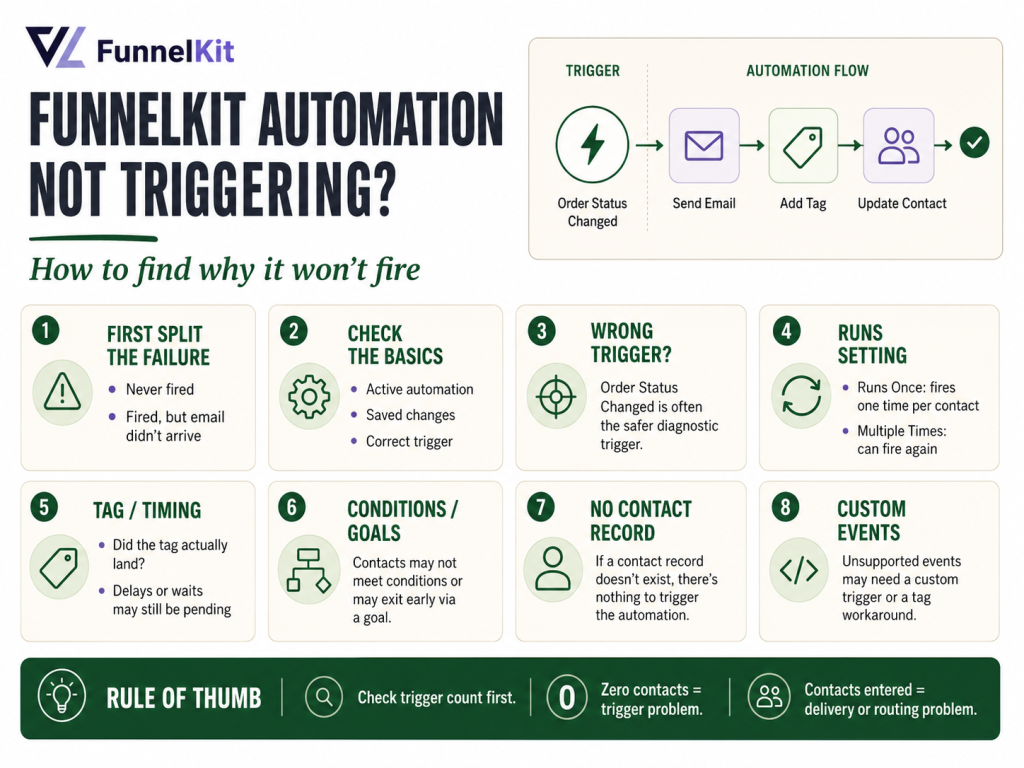
FunnelKit automation not triggering: the quick answer
When a FunnelKit automation isn’t triggering, check these in order:
- Is it Active? A Draft automation will not run the sequence.
- Is the trigger right for the event? The classic mistake is using “Order Created” where “Order Status Changed” would be the steadier choice.
- Is “Order Created” firing reliably? If it’s flaky, switch to Order Status Changed on a status your orders reliably reach, it’s the safer trigger to diagnose.
- Is it “Runs Once” and the contact already entered? Then it won’t re-enter, which looks like it never fired.
- Did the contact record even get created? No contact, nothing to trigger.
And before any of that, separate two failures that look identical from the outside.
First, split “didn’t fire” from “fired but didn’t send”
“My automation isn’t triggering” almost always means one of two very different things, and you fix them in different places:
The automation never fired. No contact entered it. The right-hand analytics panel shows zero contacts at the trigger node. This is a trigger problem, the event you’re keying on isn’t reaching the automation, or the automation isn’t eligible to accept it.
The automation fired, but the email never arrived. The contact entered, moved through the steps, the email node shows activity, and nothing landed in the inbox. This is a delivery problem, not a trigger problem. The usual place to check is your WordPress/FunnelKit email setup. FunnelKit recommends configuring a proper SMTP/mail service, then testing delivery from the email action or email settings area.
Look at the trigger node’s contact count first. If it’s climbing but nobody gets the email, stop reading about triggers and go fix delivery. If it’s stuck at zero, you’re in the right article, keep going.
Is the automation actually Active?
The toggle at the top of the canvas has to read Active. A newly built automation, an imported template, or a duplicated sequence can sit in a deactivated state, and a deactivated automation accepts no contacts. It’s the ten-second check that rules out the dumbest possible explanation, so do it first. Also confirm you saved the automation after your last edit, an unsaved trigger change isn’t live.
You picked the wrong trigger
FunnelKit’s triggers come in four groups: WooCommerce, WordPress, FunnelKit forms and opt-ins, and triggers registered by third-party plugins. Picking the wrong one is the most common reason an automation never fires for the event you have in mind.
A few that get confused often:
- Order Created fires when a new order is created, before payment is confirmed. Fast, but more sensitive to the exact order-creation path (more on that below).
- Order Status Changed fires when an order moves from one status to another, you set the “from” and “to,” or use “Any.” This is the most flexible order trigger in the system, and usually the steadier one to diagnose.
- Order Completed fires only when an order reaches Completed status, right for post-delivery follow-ups and review requests, wrong if you expected it on a fresh order that’s still Processing.
- Product Purchased fires for a specific product or category, if you scoped it to the wrong product, it’ll never match.
- Cart Abandoned requires the customer’s email to have been captured first; an anonymous visitor can’t trigger it.
- Tag Added fires when a specific tag is applied, the most versatile trigger, and the one most dependent on something else happening first.
The operator rule from the manual: when in doubt on order events, use Order Status Changed. It’s a few seconds slower than Order Created but generally easier to diagnose.
When “Order Created” fires inconsistently
If your automation is keyed on Order Created and it is intermittently or completely failing to fire, suspect a conflict in the order flow or a site-level security/firewall layer. FunnelKit documents Order Created and Order Status Changed as separate WooCommerce events, and in practice Order Status Changed is often the safer diagnostic trigger because it fires from a status transition rather than the initial order-creation moment.
The safer backup trigger is Order Status Changed using the status your orders reliably reach. Because it fires on a status transition rather than the initial order-creation moment, it can be easier to diagnose and less dependent on the exact order-creation path.
One trigger, not two. While you’re in here, make sure you don’t have both Order Created and Order Status Changed active on the same automation as a “belt and suspenders” move. That doesn’t make it more reliable, it makes the automation fire twice for the same order. Pick one and remove the other.
“Runs Once” already used up this contact
Every automation has a Runs setting: Once or Multiple Times. “Runs Once” means a contact can enter the automation exactly one time, ever, no matter how many times the trigger fires for them afterward. That’s correct for welcome sequences and milestone notifications, where a repeat would be wrong.
But if you’re testing with a contact who has already been through the automation, “Runs Once” will refuse to re-enter them, and you’ll swear the trigger is dead. It isn’t, it’s the Runs setting doing precisely what it’s set to do. When you test a Runs Once automation, use a brand-new contact every time. And if an automation genuinely needs to fire repeatedly for the same person, order confirmations, payment reminders, cart recovery, confirm it’s set to Multiple Times.
Tag-based automations and when the tag actually lands
Tag Added is the most flexible trigger FunnelKit has, and it’s the one where “not triggering” is most often a timing or sequencing issue rather than a broken trigger. The automation fires when a specific tag is applied to a contact, but that means something else has to apply the tag first: a form submission, a PHP snippet, or an action step in another automation.
So when a Tag Added automation won’t fire, the real question is usually: is the tag actually being applied, and is it the exact tag this automation listens for? A capitalization mismatch, a near-duplicate tag, or an upstream automation that didn’t run will all leave your Tag Added automation waiting on a tag that never arrives. Open a contact who should have triggered it and confirm the precise tag is on their profile. If the tag isn’t there, your problem is upstream, whatever was supposed to apply it.
A condition or Goal step is routing contacts away
Sometimes the automation is firing, contacts are entering, but they’re being routed down a branch you didn’t expect, so the email you’re watching for never sends. That can read as “not triggering” if you’re only watching the end of the flow.
Condition nodes split the flow into a Yes branch and a No branch based on order or contact data, with AND or OR logic across multiple conditions. If a condition is stricter than you intended, say, AND logic requiring both a status and an order total, contacts can quietly fall to the No branch. Goal steps do something similar on purpose: a Goal checking “order placed” will pull a contact out of the sequence the moment they’ve satisfied it, which is exactly what you want in cart recovery but a surprise if you forgot it was there. Click through each condition and Goal node and confirm the contact you’re testing actually qualifies for the path you expect.
Want the trigger-and-condition logic mapped out the way it’s meant to be built, which trigger to use for which event, where Goal steps belong, and the conditions that keep an automation from firing on the wrong people? The FunnelKit Resources kit is the companion to The Missing Manual for FunnelKitwritten for operators who want it built right once.
The contact record was never created
FunnelKit Automations can only act on a contact it has a record for. It creates contact records when customers place orders through WooCommerce or submit opt-in forms. If contacts aren’t appearing at all, no trigger that depends on a contact can fire.
Two things to check here. First, is FunnelKit Automations active and licensed? An inactive or unlicensed install won’t be building contacts. Second, are the orders actually coming through WooCommerce? Orders created through other methods may not trigger contact creation. And note that historical orders from before you installed FunnelKit are not imported automatically, contacts are created as new orders come in, so an old order won’t retroactively generate a contact or fire an automation. If you imported contacts manually, use the order resync on the contact profile to attach their history.
There’s no native trigger for arbitrary hooks
One more reason an automation “won’t trigger”: you’re trying to fire it from an event FunnelKit doesn’t natively support. FunnelKit Automations does not have a built-in way to trigger from an arbitrary WordPress action hook. The trigger selector shows WooCommerce events, a short list of WordPress events (User Created, User Login, User Role Updated), FunnelKit form and opt-in events, and whatever third-party plugins have registered, and nothing else.
If the event you want isn’t in that list, no amount of clicking will surface it, because the trigger genuinely doesn’t exist yet. Bridging an unsupported event requires registering a custom trigger class via PHP, you define the hook to listen on and the data to expose, and the custom trigger then appears in the selector under the WordPress tab. That’s developer territory; if you’re not comfortable in PHP, that’s the point to hand it to someone who is. A common, no-code workaround is to have the upstream action apply a tagand trigger your automation on Tag Added instead, which routes you right back to the timing checks above.
Once your triggers are firing cleanly, the rest of the funnel is worth a pass too. If your post-purchase offer isn’t appending to the order, FunnelKit one-click upsell not working runs the same kind of checklist, and if your recovery emails aren’t going out, see FunnelKit abandoned cart emails not sending.
Frequently asked questions
How do I tell if my FunnelKit automation didn’t fire or just didn’t send the email? Look at the contact count on the trigger node in the canvas analytics. If it’s zero, nobody entered, that’s a trigger problem. If it’s climbing but no email arrived, the automation fired and the issue is delivery. Check your WordPress/FunnelKit email setup and send a test email before changing the trigger.
Which order trigger is most reliable in FunnelKit? Order Status Changed is often the safer diagnostic trigger. It fires on a status transition rather than the initial order-creation moment, so it’s less dependent on the exact order-creation path. When in doubt on order events, use Order Status Changed.
Why does my “Order Created” automation fire inconsistently? If Order Created is firing inconsistently, suspect a conflict in the order flow or a site-level security/firewall layer. Switch to Order Status Changed, using the status your orders reliably reach, as a safer diagnostic trigger.
My Tag Added automation never fires, why? Tag Added depends on something upstream applying the exact tag it listens for. Open a contact who should have triggered it and confirm that precise tag is on their profile. If it isn’t there, the problem is whatever was supposed to apply the tag, a form, a snippet, or another automation, not this automation.
Why won’t my automation fire a second time for the same customer? Check the Runs setting. “Runs Once” lets a contact enter only one time ever; for anything that should repeat, order confirmations, payment reminders, cart recovery, set it to Multiple Times.
Can FunnelKit trigger an automation from any WordPress hook? Not natively. The trigger selector only shows WooCommerce, a few WordPress events, FunnelKit forms, and registered third-party plugin triggers. For an unsupported hook you either register a custom trigger class via PHP, or have the upstream action apply a tag and trigger on Tag Added instead.
Brian Kasday spent forty years in direct-response marketing before rebuilding the whole capability as a one-person operation, classic discipline, modern AI, and a software stack that costs a few bucks a day. He writes The Operator’s Library for MMS Vegas.
Build it right the first time. The FunnelKit Resources kit and The Missing Manual for FunnelKit give you the funnel and automation playbook end to end, triggers, conditions, and the sequences that run your marketing while you sleep.
Sources
This guide is grounded in The Missing Manual for FunnelKitCh. 15 (The Automations Interface), Ch. 16 (Triggers), Ch. 17 (Conditions and Delays), Ch. 40 (Custom Triggers via PHP), Ch. 43 (Troubleshooting).
More FunnelKit guides
Free · FunnelKit Operator Toolkit
Building checkouts in FunnelKit?
Get the free operator toolkit — order-bump templates, checkout checklists, and a note when what you just read changes.
Get the free toolkit →