
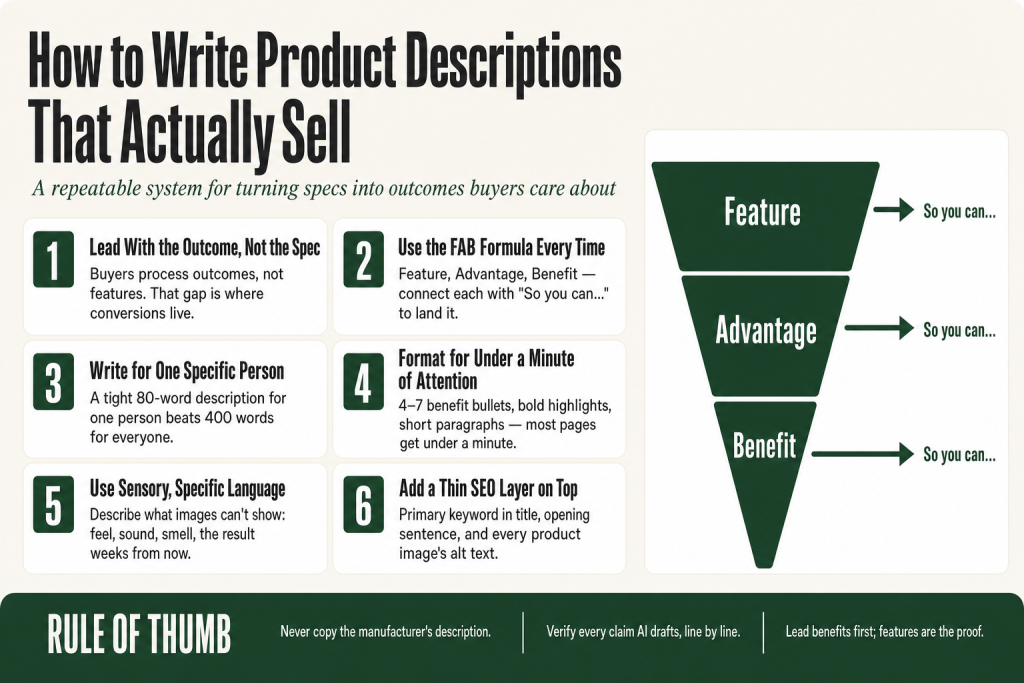
The 30-second answer
- Lead with the outcome, not the spec. A buyer wants to know what changes for them, not what the product “is.”
- Use the FAB formula. Feature, Advantage, Benefit. State the feature, explain what it does, then land on what the buyer gains.
- Write for a specific person. Generic copy written for everyone converts for no one.
- Make it scannable. Short paragraphs, 4 to 7 benefit bullets, bold highlights. Most product pages get under a minute of attention.
- Use sensory and specific language. Describe what images can’t show: feel, sound, smell, the result six weeks from now.
- Never copy the manufacturer description. It exists on every competitor’s page and Google penalizes duplicate content.
- Add a thin SEO layer. Primary keyword in the title tag, naturally in the opening sentence, and in the alt text of every product image.
- Verify everything AI drafts. The prompt is yours. The judgment is yours. The final call is always yours.
Take this fix into your next scenario. The free Builder’s Companion Kit collects the checklists and templates that pair with this guide — so next time, you start from a template, not a blank page. Grab it free →
- The Core Mistake: Describing the Product Instead of the Buyer’s Life
- The FAB Formula: Feature, Advantage, Benefit
- Write for One Person, Not Everyone
- Structure: What Goes Where
- Use Specific, Sensory Language Instead of Vague Superlatives
- Worked Example: How to Write Product Descriptions From a Spec Sheet
- The SEO Layer: How to Write Product Descriptions That Rank
- Using AI to Write Product Descriptions Without Losing Your Voice
- FAQ
Knowing how to write product descriptions is the difference between a product page that earns its place in your funnel and a product page that silently bleeds revenue. Most descriptions fail before the second sentence because they read like a spec sheet nobody asked for. The features are all there. The buyer isn’t.
This guide gives you a repeatable system: a formula for translating specs into outcomes, a structure that works on mobile and desktop, an AI-assisted workflow where your judgment stays in charge, and a quick SEO layer so your copy can be found in the first place.
The Core Mistake: Describing the Product Instead of the Buyer’s Life
Here’s the trap most operators fall into. You know your product cold, so you write about it the way you think about it: materials, specs, dimensions, technical capabilities. It feels thorough. It reads like a filing cabinet.
Buyers don’t process features as value. They process outcomes. A feature is what the product has. A benefit is what the product does for the customer. The gap between those two things is where conversions live.
Think of it this way: nobody buys a drill bit because they want a drill bit. They want the hole. And they don’t really want the hole either. They want the picture hanging on the wall, the shelf that’s finally up, the satisfaction of finishing the job. Your description needs to follow that thread all the way to its end.
The fix is not to remove features. Features are essential proof. The fix is to pair every feature with the outcome it produces, so the buyer can see themselves using the product, not just inspecting it.
The FAB Formula: Feature, Advantage, Benefit
The FAB formula is the most durable copywriting structure for product descriptions. It works for physical products, digital products, and services, and it’s easy to teach yourself by running through it once per feature.
- Feature: a factual statement about the product. What it is, what it has, what it’s made of.
- Advantage: how that feature directly affects the buyer’s experience. The “how” bridge.
- Benefit: the outcome the buyer gains. The answer to “what does this mean for me?”
A simple connector phrase makes this easier to write in practice. Try “This means that…” or “So you can…” after each feature. If the sentence that follows sounds like something a real buyer cares about, you’ve landed the benefit.
FAB in practice
Here’s the same product detail written three ways:
- Feature-only (weak): “Vacuum-insulated stainless-steel walls.”
- Feature + Advantage (better): “Vacuum-insulated stainless-steel walls keep liquids at temperature for 24 hours.”
- FAB (strong): “Vacuum-insulated stainless-steel walls hold temperature for a full 24 hours, so your coffee is still hot at your afternoon meeting and your water is still cold at the end of a long shift.”
The specs are identical in all three. The third one sells.
Run every major feature through this chain before you write a word of copy. The FAB table you build during that process becomes the raw material for your bullets and your opening paragraph.
Write for One Person, Not Everyone
Generic product copy is the result of trying not to exclude anyone. The problem is that writing for everyone lands with no one. A description that tries to speak to the 22-year-old gym regular and the 55-year-old weekend hiker at the same time ends up meaning nothing to either of them.
Before you write, answer three questions about the person most likely to buy:
- What problem are they in when they find this product? Be specific. “They want a gift” is not specific. “They just burned three mugs in a row and they’re annoyed at themselves” is specific.
- What language do they use when they search for a solution? Their words, not yours. Customer reviews, forum posts, and support emails are gold here. If you need a structured approach to pulling those signals together, the market research with AI guide walks through a workflow you can run in an afternoon.
- What’s the one thing that would make them click away without buying? Unresolved doubt kills more sales than bad copy does. Name and neutralize the objection in the description itself.
Your description doesn’t need to be long. It needs to be aimed. A tight 80-word description written for one specific person outperforms a 400-word description written for the category.
Structure: What Goes Where
Most product pages get under a minute of attention from a buyer who is simultaneously comparing you to three browser tabs. Format is not a style choice. It’s a functional requirement.
A structure that holds up on both desktop and mobile:
- Opening hook (1 to 2 sentences). Start with the outcome or the problem, not the product name. “Tired of coffee getting cold on your commute?” is a stronger opener than “Introducing the ThermoX 16oz Insulated Mug.”
- Benefit bullets (4 to 7 items). Lead each bullet with the benefit, follow with the feature as the proof. Keep each bullet to one idea.
- Sensory or scenario sentence. Use copy to describe what images can’t show: the texture, the sound, the smell, or the result you’ll see three weeks from now. This is where browsers become buyers.
- Spec table or list. Dimensions, materials, compatibility, what’s in the box. Buyers who’ve already decided to buy use this to confirm the decision. Put it after the copy, not before.
- Objection or FAQ block. One to three short questions in the buyer’s voice, answered in one to two sentences each. This removes the last friction before the add-to-cart.
Short paragraphs, two to three sentences maximum. Bullet points for lists. Bold the one phrase per bullet that earns the most weight. Leave white space. A product page that’s easy to skim gets read. A wall of text gets abandoned.
Use Specific, Sensory Language Instead of Vague Superlatives
The words that feel safe, “high-quality,” “premium,” “best-in-class,” are also the words that do no work. Every competitor uses them. Buyers tune them out the way they tune out elevator music.
Specific language is more trusted than vague superlatives. The specificity is the signal. “Keeps liquids hot for 8 hours” is more believable than “keeps liquids hot for a long time.” “Fits standard car cup holders” solves a real objection. “Convenient size” solves nothing.
Sensory language fills the gap between what a photo shows and what a photo can’t show. Your images show the color and shape. Your copy shows the weight in the hand, the click of the lid, the way it doesn’t sweat on a desk, the smell of the leather after a few uses. That is the information a buyer needs to commit, and only copy can deliver it.
A useful test: read your description out loud and mark every adjective. If you can’t immediately replace it with a specific fact or a sensory detail, cut it.
Worked Example: How to Write Product Descriptions From a Spec Sheet
Here’s how the process runs from a raw spec sheet to a finished description. The product is a standing desk mat.
Step 1: List the raw specs
Material: 3/4-inch high-density foam, polyurethane top layer
Dimensions: 20 x 39 inches
Bevel edge on all sides
Non-slip bottom
Surface texture: matte, wipe-clean
Step 2: Run every spec through FAB
- 3/4-inch foam → absorbs standing pressure → your feet and lower back stop aching by mid-afternoon
- Bevel edge → no tripping hazard → you can step on and off without looking down
- Non-slip bottom → stays in place on hard floors and carpet → you’re not nudging it back into position every hour
- Wipe-clean surface → spills don’t soak in → five-second cleanup, not a production
Step 3: Identify the buyer’s main problem
They’ve started standing at their desk but their feet hurt by noon and they’re back in the chair by 2pm. The mat is the thing that makes standing sustainable, not aspirational.
Step 4: Write the hook and opening
“Most people give up on standing desks because of their feet, not their motivation. This mat changes the math.”
Step 5: Write the benefit bullets
- Your feet stop aching by mid-afternoon. 3/4-inch high-density foam absorbs standing pressure where cheaper mats go flat.
- Step on and off without looking down. Beveled edges on all four sides mean no tripping hazard, no shuffling.
- It stays where you put it. The non-slip base holds on hardwood and carpet without anchors or tape.
- Clean up a coffee spill in five seconds. The polyurethane surface wipes down without soaking through.
Step 6: Add the sensory detail
“The surface has a firm give underfoot, not squishy, not hard, more like the feeling of good sneakers after you’ve broken them in.”
That sentence doesn’t appear in any spec sheet. It’s the one sentence that makes the product real before the buyer buys it.
The SEO Layer: How to Write Product Descriptions That Rank
Good copy that nobody finds is shelf copy. A thin SEO layer on top of strong benefit-driven writing is how you get both.
The fundamentals, verified against current search guidance:
- Primary keyword in the product title (H1). The title is the clearest signal to search engines about what the page covers. Use the phrase your buyer actually searches, not your internal product name.
- Keyword in the opening sentence, naturally. Not forced, not repeated. Once is enough to confirm the topic.
- Title tag: 50 to 60 characters, keyword first. Put the most important phrase at the front. The rest of the title gets truncated on mobile if you run long.
- Meta description: 150 to 155 characters, active voice, specific. Google rewrites a high percentage of meta descriptions, but a well-written one still lifts click-through rate. Make it a one-sentence pitch, not a summary of the page.
- Image alt text: descriptive and keyword-bearing. Describe what’s in the image the way a human would, and include the product name or primary keyword naturally. This also improves accessibility.
- No keyword stuffing. Forcing keywords into every sentence hurts readability and destroys trust. Natural integration is the standard.
- Unique copy on every product page. Copy-pasting the manufacturer’s description puts identical content on dozens of competing sites. Google penalizes duplicate content, and it does nothing to differentiate you from the seven other retailers selling the same item.
If you’re on WooCommerce, the Rank Math or Yoast WooCommerce SEO plugins let you add product schema (structured data) without writing code. Note that Rank Math includes WooCommerce product schema support in its free version, while Yoast’s full product schema output for WooCommerce requires the paid WooCommerce SEO add-on. Product schema tells search engines your price, availability, and aggregate rating, which qualifies your listing for rich results in SERPs. Verify your markup with Google’s Rich Results Test (search.google.com/test/rich-results) before publishing.
On other platforms, check your platform’s own documentation or app marketplace for equivalent structured data tools. The principle is the same: get your price, availability, and rating into schema so search engines can surface rich results.
For a broader keyword research workflow that feeds directly into this, see the keyword research small business guide.
Using AI to Write Product Descriptions Without Losing Your Voice
AI can cut the time it takes to draft a product description from 45 minutes to 10. What it cannot do is a longer list: it cannot decide what your buyer actually cares about, it does not know your product specs unless you feed them in, and it regularly generates confident-sounding details that are factually wrong. AI models are designed to predict plausible text, not to verify truth. That means a draft can sound completely credible and still contain invented dimensions, wrong materials, or made-up performance claims. The drafting seat belongs to AI. The editor’s seat, the fact-checking, and the final sign-off stay with you. Always. No tool changes that.
Here’s a workflow that keeps AI in the drafting seat and you in the editor’s seat:
1. Build the input document first
Before you prompt anything, make a deliberate call about what goes in. Assemble: the raw spec sheet, your FAB table from the exercise above, three to five phrases lifted directly from real customer reviews (their words, not yours), and the one objection you most need to neutralize. That curation step is yours alone. You’re deciding what the AI should prioritize and what it should ignore. Feed all of that into the prompt. The more specific your input, the less generic the output. This also reduces (but does not eliminate) the risk of the model inventing details that aren’t true of your actual product.
2. Write a tight prompt
A prompt that works:
You are writing a product description for . Target buyer: [one specific person, one specific problem]. Tone: [brief description of your brand voice]. Lead with the benefit, not the feature name. Include these 4 benefit-feature pairs: [your FAB table]. Include this sensory detail: [your sensory sentence]. Address this objection: [main doubt]. Under 150 words. Short paragraphs. No jargon.
Include a tone-of-voice reference and a target length. Without those, you get a competent but generic draft. The choices you make in the prompt, what to emphasize, what tone to set, what objection to surface, are judgment calls that belong to you. AI executes on your direction. It doesn’t supply the direction.
3. Edit for accuracy and voice
This step is not optional. Read every single claim in the draft against your actual spec sheet, line by line. AI does not have a built-in fact-checking mechanism. It generates text by predicting what sounds right, not by confirming what is true. Numbers, materials, dimensions, compatibility claims, and performance figures are the highest-risk areas: the model will state them with complete confidence whether or not they match your product. If a claim can’t be verified against your own product data, cut it or rewrite it from scratch. Then read the whole draft out loud. Anything that sounds like a brochure gets rewritten in plain speech. The judgment on what’s accurate and what sounds like your brand never leaves your desk. AI assists the process. It does not own any part of it.
For a broader framework on working with AI on marketing copy, the how to write marketing copy with AI guide covers the full prompt-to-publish process.
4. Versioning and testing
Most platforms don’t include built-in A/B testing for individual product description copy out of the box. WooCommerce requires a plugin (Nelio A/B Testing is a commonly cited option). Shopify introduced a native feature called Rollouts as part of the Winter ’26 Edition. Rollouts is a theme-level testing tool: it splits traffic between your live theme and a modified copy, and you control what percentage of visitors see each version. It is useful for testing layout and design changes on product pages, but it does not directly test product description text in isolation, and full experiment analytics require an Advanced plan or higher. Description-copy tests on Shopify still benefit from a dedicated app such as Intelligems or Shoplift. If your platform and setup support it, run two versions of your highest-traffic product description: one with a problem-led hook, one with a sensory-led hook. Give each at least two weeks of data before calling a winner. One learning from one product can improve every description in the same category.
FAQ
how long should a product description be
It depends on price and complexity. Simple, low-cost items can convert with 50 to 100 words if the copy is sharp. High-ticket or technically complex products often need 200 to 400 words to resolve enough doubt. The rule is: as long as it needs to be, no longer. Cut anything that doesn’t move the buyer closer to a decision.
should product descriptions focus on features or benefits
Lead with benefits in most cases, but the right balance depends on your buyer and product type. Emotional, lifestyle, or impulse purchases convert best with benefit-led copy because the buyer is deciding with feeling first. Technical or high-consideration purchases, where the buyer is comparing specs across options, need both: the benefit earns the interest, and the feature provides the proof. A good rule of thumb: lead every bullet and your opening paragraph with the benefit, then follow with the feature as supporting evidence. Neither works well alone. Features without benefits read like a spec sheet. Benefits without features can feel like a claim you can’t back up.
can I use ChatGPT or AI to write product descriptions
Yes, as a drafting tool with a detailed prompt and a mandatory editing pass. Feed it your FAB table, real customer language from reviews, and a clear tone direction. Then verify every factual claim against your actual product specs, because AI generates confident-sounding details that are sometimes wrong. This isn’t a minor quirk: AI models predict plausible text, not verified truth, so numbers, materials, and performance claims are all at risk. The judgment on what’s accurate and what sounds like your brand stays with you. AI cuts the time to a first draft. You make the final call.
how do I write product descriptions that rank on Google
Put your primary keyword in the product title (H1), in the first sentence of the description, in the page title tag (50 to 60 characters), and in image alt text. Write unique copy for every product page, never paste manufacturer descriptions. Natural keyword integration is the standard; stuffing hurts readability and can hurt rankings.
what makes a product description convert
A specific buyer in mind, a benefit-led opening, sensory or scenario language that describes what photos can’t show, a scannable format with short paragraphs and benefit bullets, and at least one direct answer to the buyer’s main objection. Vague superlatives and feature lists do not convert. Specific outcomes and proof do.
do product descriptions affect SEO
Yes, directly. Unique, keyword-relevant copy on each product page helps search engines understand what you sell and rank you for relevant queries. Duplicate or manufacturer-copied descriptions can trigger a duplicate content penalty. Product schema markup (structured data) added through a plugin can also qualify your listing for rich results, which increases click-through rate from search.
Sources:
- BigCommerce Editorial: “How to Write Product Descriptions that Drive Sales” (bigcommerce.com/articles/ecommerce/ecommerce-product-description/), sensory language and A/B testing guidance.
- CXL Institute: “The Complete Guide to Writing Product Descriptions That Convert” (cxl.com/blog/product-descriptions/), readability, specificity, and the benefits-plus-features argument.
- Practical Ecommerce: “AI Prompts for Better Product Descriptions” (practicalecommerce.com/ai-prompts-for-better-product-descriptions), prompt engineering framework and AI editing guidance.
- SearchXPro: “Product Description SEO Best Practices for 2026” (searchxpro.com/product-description-seo-best-practices-for-2026), product schema fields and Rich Results Test recommendation.
- Distribb: “Product Description SEO: How to Write Descriptions That Rank and Sell” (distribb.io/blog/product-description-seo), on-page structure guidance, title vs. H1 distinction.
- Scale Growth Digital: “32 ChatGPT Prompts for Product Descriptions (2026)” (scalegrowth.digital), average product page attention span data (Contentsquare, 2025) and benefit-first prompt templates.
- SEO Vendor / SalesHive: SEO meta title and meta description length best practices, 2025 to 2026 (seovendor.co, saleshive.com), 50 to 60 character title tag and 150 to 155 character meta description guidance.
- Volusion Blog: “Ecommerce Product Descriptions: Avoid These 8 Mistakes” (volusion.com), duplicate content and boilerplate copy risks.
- Digital Thrive AI: “Ecommerce Copywriting: The Ultimate Guide to Selling More” (digitalthriveai.com), feature list trap, mobile commerce traffic majority claim.
- Neliosoftware.com: “Best A/B Testing Plugins for WooCommerce in 2026”, A/B testing plugin options for WooCommerce product pages.
- Charleagency.com / Ecomhint.com / Kahunam.com / Pulsecro.com: Shopify Rollouts native A/B testing feature (Winter ’26 Edition), theme-level testing scope, plan requirements for full experiment analytics, and limitations for product description copy testing.
- Contentgecko.io / Rankmath.com / Yoast.com: Rank Math and Yoast WooCommerce SEO plugin schema capabilities, product schema, free vs. paid tier differences, Rich Results Test validation.
Brian Kasday spent forty years in direct-response marketing before rebuilding the whole operation as a one-person shop. He writes The Operator’s Library — including “Build a Complete Marketing Department” — for operators who’d rather build it themselves than wait on someone else.
Get the Builder’s Companion Kit — the free checklists and templates that pair with this guide: mmsvegas.com/resources.
This guide handles one marketing job. Build a Complete Marketing Department builds the whole department. See the manual →
More Marketing guides
Free · Marketing Operator Toolkit
Running marketing on your own?
Get the free toolkit — the templates and the expensive mistakes behind a one-person marketing department, plus a note when this guide changes.
Get the free toolkit →