
The 30-second answer
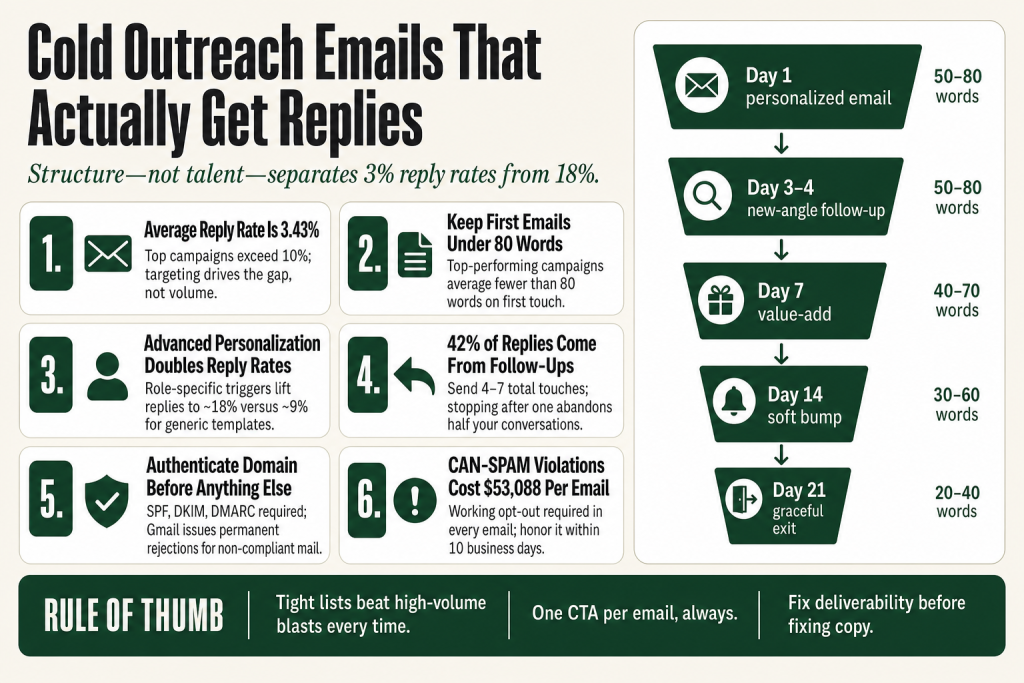
- The average cold reply rate is around 3.43%. Top campaigns exceed 10% in favorable conditions. The difference is targeting, not volume, though industry and ICP also play a role.
- Write under 80 words per first email. Top-performing campaigns average fewer than 80 words on the first touch, per Instantly’s benchmark report. Every word must earn its place.
- Personalize past the first name. Advanced personalization (role-specific pain, a named trigger event) lifts reply rates to roughly 18% in multiple studies, versus around 9% for generic templates. That gap holds across sources, though exact baselines vary by industry.
- Subject line: 4 to 8 words, front-loaded, no spam triggers. Personalized subject lines lift open rates by about 50%. Keep it under 50 characters so mobile doesn’t cut it off mid-thought.
- Send 4 to 7 touches total. 42% of all replies come from follow-ups. Stopping after one email abandons nearly half your potential conversations.
- Send Tuesday through Thursday, 9:30 to 11:30 AM local. Multiple benchmark studies point to this window for peak reply rates, though Belkins’ data found evening sends also perform well in some segments. Test what works for your audience.
- Authenticate your domain (SPF, DKIM, DMARC). Without it, your emails don’t reach the inbox, no matter how good your copy is.
- Honor opt-outs promptly. CAN-SPAM requires a working opt-out in every email. Violations run up to $53,088 per email, the current FTC inflation-adjusted maximum.
Take this fix into your next scenario. The free Builder’s Companion Kit collects the checklists and templates that pair with this guide — so next time, you start from a template, not a blank page. Grab it free →
- Why Most Cold Outreach Emails Never Get Read
- Get Your Deliverability Foundation Right First
- Build the Right List Before You Write a Word
- The Anatomy of a Cold Outreach Email That Gets a Reply
- Worked Example: Cold Outreach Email Before and After
- The Follow-Up Sequence: Where Half Your Replies Actually Come From
- Personalization at Scale: What AI Can and Can’t Do
- Measuring What Actually Matters
- Connecting Cold Outreach to Your Broader Sales System
- FAQ
Cold outreach emails average a 3.43% reply rate across billions of sends, according to Instantly’s Cold Email Benchmark Report, which analyzed platform-wide data. That number sounds grim until you see what separates the bottom from the top: campaigns with tight targeting, genuine personalization, and a proper follow-up sequence regularly clear 10%, though results vary by industry, list quality, and offer. The gap isn’t talent. It’s structure. This article gives you that structure, step by step, with worked examples you can use today. Your judgment drives every call here. The frameworks just cut the time it takes to apply it.
Why Most Cold Outreach Emails Never Get Read
Most cold emails die before anyone reads the first word. Low open rates are often a deliverability problem, not a copy problem. Roughly 17% of cold emails never reach the inbox at all, typically because of poor domain authentication, high bounce rates, or spam-triggering language. Fix the pipes before you fix the prose.
The second failure is the list. Smaller, tightly targeted lists consistently outperform high-volume blasts. Campaigns under 50 recipients average a 5.8% reply rate versus around 2.1% for sends over 1,000 contacts, according to data cited across multiple benchmark reports. More names in the spreadsheet does not mean more replies. It usually means fewer, and a worse sender reputation on the way out.
The third failure is the email itself. Generic batch-and-blast templates get 1 to 5% reply rates across most benchmarks. Emails with advanced personalization, referencing a specific pain point or trigger event relevant to the recipient, reach roughly 18% in multiple published studies. That gap is the entire game.
Before you write a single word of copy, you need three things locked: a clean authenticated domain, a tight list, and a clear reason why this person would care about what you’re sending today.
Get Your Deliverability Foundation Right First
Since early 2024, Google and Yahoo have required bulk senders to authenticate domains with SPF, DKIM, and DMARC, maintain spam complaint rates under 0.3%, and support one-click unsubscribe. Enforcement has tightened since: Gmail now issues permanent 5.7.x rejections for non-compliant mail, not soft deferrals you can retry. Check Google’s current sender guidelines directly, as these requirements can be updated.
Here’s the practical setup checklist:
- SPF: Publish a single SPF record that covers every tool in your sending stack. For Google Workspace it’s
include:_spf.google.com. For Microsoft 365 it’sinclude:spf.protection.outlook.com. Check your cold email platform’s documentation for its own include directive. - DKIM: Enable DKIM with at least a 1024-bit key (2048-bit is the current best practice) in your mailbox provider and any outbound platform that supports domain-level signing.
- DMARC: Start with
p=noneto collect visibility. Tighten the policy as your reports confirm alignment. - Spam complaint rate: Keep it below 0.10%. At 0.30% you trigger domain-wide enforcement at Gmail.
- Sending domain: Strongly consider a secondary sending domain rather than your primary business domain. Reputation damage from a cold campaign can spill into your transactional email if you use the same domain for both.
- Warm new domains: New domains need 3 to 4 weeks of gradual ramp-up before you scale volume. Fresh domains sent at scale immediately get flagged.
One more thing on the legal side: CAN-SPAM (US) requires accurate headers, a non-deceptive subject line, a valid physical postal address in every email, and a working opt-out mechanism honored within 10 business days. Violations run up to $53,088 per email, the current FTC inflation-adjusted maximum (effective January 2025, and confirmed unchanged for 2026). If you’re emailing EU contacts, GDPR requires a lawful basis for outreach. For B2B, that’s typically legitimate interest, but you must document it. Canada’s CASL requires consent before the first send. Verify which rules apply to your list before you hit send. This article isn’t legal advice, and the rules vary by jurisdiction.
Build the Right List Before You Write a Word
A 50-person list of people who have a genuine reason to care beats a 5,000-person list of names you scraped and hoped for the best. That’s not a platitude. It’s what the data shows.
Start with your ideal customer profile: the specific job title, company size, industry, and situation that makes someone a real prospect. Then look for a trigger: something that happened recently that gives you a reason to reach out right now. Common triggers include a new product launch, a job change, a funding announcement, a recent piece of content they published, or a competitor they just mentioned publicly.
Signal-based emails, those that reference a specific buying trigger, achieve meaningfully higher reply rates than the platform average of 3.43%. Published benchmarks put that range anywhere from 5% to 18% depending on how targeted and specific the signal is. That range isn’t marketing magic. It’s the difference between “I found your name on a list” and “I have a specific reason to think this is relevant to you right now.”
Where to find prospects:
- LinkedIn Sales Navigator (filter by title, company size, and recent activity)
- Apollo.io, Clay, or similar enrichment tools for contact data
- Your own customers’ peers and industry groups
- Conference speaker lists and industry association directories
Verify email addresses before you send. Bounce rates above 2% damage your sender reputation fast. Most enrichment tools have built-in verification, or run your list through a dedicated verifier before importing it into your sending platform.
One honest caveat: AI tools can help you research prospects and identify triggers at scale. But every output needs a human check before anything goes out. A wrong city in a merge field or a stale job title signals to the recipient that you scraped their record badly, and that’s worse than no personalization at all. The research, the accuracy check on every detail, and the final call on whether a trigger is real and relevant: those stay with you.
The Anatomy of a Cold Outreach Email That Gets a Reply
Top-performing first-touch cold outreach emails run under 80 words. That’s a consistent finding from Instantly’s benchmark report, which analyzed top-performing campaigns across billions of sends. Short enough to read on a phone in ten seconds. Long enough to make one clear point and ask one clear question. The structure has four parts.
1. Subject line
Four to eight words, under 50 characters, front-loaded with the thing that matters. Personalized subject lines lift open rates by roughly 50%, according to data cited across multiple benchmark reports. First name alone is now table stakes: the lift from a name token alone has compressed because every other cold emailer is doing it too. The real lift comes in the second token: pair the name with a specific signal (a role-specific pain, a named competitor, a recent LinkedIn post, a city) and you hit meaningfully higher open rates against a generic baseline.
What works: Quick question about [Company]'s onboarding or [First name], saw your post on X. What kills you: “Re:” prefixes implying prior correspondence that doesn’t exist (a CAN-SPAM violation), spam triggers like “free,” “urgent,” or “act now,” and subject lines over 60 characters that get cut off on mobile mid-thought.
2. Opening line (the hook)
This is not “I hope this finds you well.” It’s the one sentence that proves you did your homework. Reference something specific and real: a piece of content they published, an announcement their company made, a problem that’s well-documented in their role. Keep it under 20 words and make it about them, not you.
Bad: My name is Brian and I help companies grow their revenue.
Better: Saw you just brought on three new SDRs at Acme, most teams at that stage hit the same onboarding bottleneck.
3. The value bridge (one sentence)
Connect their situation to what you do. One sentence. No feature list. No case study yet. Just the specific, plausible reason your thing is relevant to their thing right now.
Example: We help sales teams cut ramp time for new reps by about 30% in the first 60 days.
4. The CTA (one small ask)
Ask for the smallest possible next step. Not “would you like to schedule a 45-minute demo?” Ask if it’s worth a 15-minute call. Or ask a yes/no question that invites a reply without committing them to anything. Timeline-based CTAs like “Worth 15 minutes this week?” consistently outperform open-ended ones in booking rate data.
One CTA per email. That’s it. Multiple asks kill replies because they create decision paralysis.
Worked Example: Cold Outreach Email Before and After
Here’s the same outreach scenario written two ways. The prospect is a VP of Sales at a 50-person B2B SaaS company who recently posted on LinkedIn about their team’s onboarding challenges.
Before (generic, 142 words)
Subject: Partnership opportunity

Hi Sarah,

I wanted to reach out because we work with a lot of B2B SaaS companies and I thought there might be some synergies between what we do and what Acme Corp is working on.

We offer a comprehensive sales enablement platform that helps companies of all sizes improve their onboarding process, close more deals, and drive revenue growth. Our platform includes a wide range of features including video training, playbooks, CRM integration, and real-time coaching.

Would you be open to jumping on a call sometime this week or next to explore whether there might be a fit?

Looking forward to hearing from you.

Best,
Brian
What’s wrong with it: Subject line signals nothing specific. Opening line is about “synergies,” which means nothing to anyone. It lists features instead of connecting to her situation. The CTA is vague. At 142 words it’s nearly twice the length that top performers use.
After (specific, 71 words)
Subject: Your LinkedIn post on SDR onboarding

Hi Sarah,

Your post on new-rep ramp time hit close to home, most VP Sales I talk to say the first 60 days are where the most pipeline gets left on the table.

We help teams at the 40-80 person stage cut that ramp time by about 30% with a pretty lightweight setup.

Worth a 15-minute call this week to see if the fit's there?

Brian
What’s better: Subject line references something real she did. Opening line proves you read her post. The value claim is specific and scoped to her company size. One clear, low-friction CTA. 71 words total.
The “before” email is the default output when someone asks AI to “write a cold email.” The “after” is what you get when you give the AI the specific trigger, the ICP pain, the one-line value claim, and the CTA format, then edit the output yourself. AI drafts faster than you type. But the research that feeds the prompt, the accuracy check on every personalization detail, and the judgment call on whether the tone lands: those are yours, every time. You make every final call. AI gives you faster first drafts and cuts your need for outside copywriting help on routine emails. It doesn’t replace the thinking behind the copy, and it doesn’t replace you. See how to write marketing copy with AI for the prompt structure that makes this repeatable.
The Follow-Up Sequence: Where Half Your Replies Actually Come From
Here’s the number that changes how you think about cold outreach: 42% of all replies come from follow-ups, not the first email per Instantly’s benchmark report. Stopping after one touch abandons nearly half your potential conversations. Yet 48% of salespeople never send a single follow-up, according to data cited by HubSpot and Martal.
The first follow-up alone can lift reply rates meaningfully, with Backlinko’s analysis of 12 million outreach emails citing a 65.8% lift. After that, the data points to a 4 to 7 touch total sequence as the practical sweet spot. Beyond 7 touches on a poorly matched list, your spam complaint risk climbs faster than your reply rate.
Here’s a 5-touch sequence structure that works for most B2B SMB outreach:
- Touch 1 (Day 1): The personalized first email described above. Under 80 words, one CTA.
- Touch 2 (Day 3 to 4): A short, different-angle follow-up. Don’t repeat the first email. Add one new data point, a brief case study reference, or a relevant question. Still under 60 words.
- Touch 3 (Day 7): A value-add touch. Share something genuinely useful: a relevant piece of content, a data point specific to their industry, a short observation about their competitive landscape. Make it worth opening even if they never buy.
- Touch 4 (Day 14): A soft bump. Short. “Wanted to make sure this didn’t get buried.” One sentence. One CTA.
- Touch 5 (Day 21): The graceful exit. Tell them you won’t follow up again. This often generates replies from people who were interested but kept putting it off. The psychological close of a door gets them to open it.
Space your first follow-up 3 to 4 days after the initial email. Waiting longer than 5 days reduces response likelihood meaningfully. Send Tuesday through Thursday, 9:30 to 11:30 AM in the recipient’s local time zone. Multiple benchmark studies point to this window consistently, though Belkins’ 2025 dataset found evening sends also performed well, so test what works for your audience.
Each touch should add something new. “Just checking in” is not a follow-up. It’s noise. Every email in the sequence needs to earn its open independently.
Keep your spam complaint rate below 0.10%. If it climbs toward 0.30%, pause the campaign immediately. That threshold triggers domain-wide enforcement at Gmail. Your entire sending infrastructure is at risk if you ignore it.
Personalization at Scale: What AI Can and Can’t Do
Advanced personalization, the kind that references a specific trigger event and connects it to a role-specific pain, lifts reply rates to roughly 18% in multiple published studies, versus around 9% for generic templates. Only about 5% of senders personalize every email at that level, according to data cited across several benchmark reports. That’s the opportunity.
AI can help you get there without spending 20 minutes per prospect. Here’s the honest version of how it works:
- What AI can do: Given a prospect’s name, company, role, recent LinkedIn post, and one piece of context, a good prompt will produce a solid first-line draft and a value bridge in under a minute. It can also generate subject line variants to test, rewrite a paragraph at a different length, and help you map your ICP pain points to your offer language. It cuts the time you spend on drafting. A lot. And it reduces your dependence on bringing in outside copywriting help for routine first drafts.
- What AI cannot do: Replace your judgment. It can’t verify that the trigger is real, confirm that the company still has the problem you’re describing, or judge whether the personalization sounds natural or robotic. It can’t tell you whether the facts are accurate. That read of the output is yours, every time. You edit, you verify each personalization detail, you approve, you send. The judgment stays with you, full stop.
A practical workflow for a 50-person list:
- Research each prospect for 3 to 5 minutes. Find one real trigger (a post, an announcement, a job change, a review they left somewhere).
- Drop the trigger, their role, their company size, and your one-line value claim into your AI prompt. Ask for a 70-word first-touch email and three subject line options.
- Read every output before it goes anywhere. Edit the ones that sound AI-generated. Kill the ones that are wrong on the facts.
- Test subject lines on small batches before scaling. Let reply rate data, not your gut, pick the winner.
On the data quality side: a wrong merge field is worse than no personalization. A misspelled name, a stale job title, or a city pulled from an outdated record signals to the recipient that you scraped them carelessly. Verify your list before you personalize it. This is the step most people skip and then wonder why their “personalized” campaign bombed.
For the broader copywriting approach behind this, see how to write marketing copy with AI. And if you’re mapping this outreach into a larger lead generation system, the lead follow-up process playbook covers what happens after you get the reply.
Measuring What Actually Matters
Open rate is the wrong primary metric. Apple Mail Privacy Protection pre-loads tracking pixels for a significant share of tracked opens, meaning a meaningful portion of the open rate data you see may be software activity, not human attention. Use it as a rough directional signal, not a performance scorecard.
Track these instead:
- Reply rate: Total replies divided by delivered emails. This is your primary signal. Platform average is around 3.43%. Good is above 5%. Top performers in favorable conditions clear 10%, though this varies by industry, list quality, and offer type.
- Positive reply rate: The share of replies that express genuine interest (not unsubscribes or “not interested”). This is what predicts pipeline.
- Meetings booked per 100 sends: The number that connects outreach activity to revenue. Published benchmarks suggest roughly 1 to 3% conversion from send to meeting at the industry average, with top performers doing better. Verify this against your own data, since it varies widely by industry and ICP.
- Bounce rate: Keep it under 2% per campaign. Above that, you’re hurting your sender reputation.
- Spam complaint rate: Check Google Postmaster Tools regularly. Stay below 0.10%.
Run small tests before you scale. Two subject line variants. Two opening line approaches. Send each to a batch of 25 to 50 prospects, wait for data, then scale the winner. Sending untested emails to 500 people on day one is the fastest way to waste a list and damage a domain at the same time.
If your reply rate is below 1%, the problem is almost certainly one of three things: deliverability (emails not reaching the inbox), targeting (list is too broad or wrong ICP), or copy (generic templates with no real personalization). Address them in that order before changing anything else.
For the broader analytics mindset that connects outreach data to your marketing picture, see how to read your marketing data without an analyst.
Connecting Cold Outreach to Your Broader Sales System
Cold outreach doesn’t live in isolation. A reply is the start of a conversation, not a sale. Where that conversation goes depends on what you’ve built around it.
If you’re running outreach to generate leads, make sure the backend is ready before the campaign starts. That means a clear follow-up process for replies, a landing page or booking link that doesn’t make prospects do extra work, and a way to track whether replied leads actually turn into revenue. See the lead follow-up process playbook for the mechanics.
If outreach is one channel in a larger system, think about what you’re pointing people toward. A lead magnet can make the CTA lower-friction than asking for a call, especially early in a relationship. See lead magnet for service business for the right format for different offer types.
If you’re doing outreach to potential referral partners rather than direct buyers, the mechanics are the same but the value bridge changes. You’re not solving their problem. You’re proposing a mutual benefit. The referral program for service business article covers how to frame that conversation.
Finally, cold outreach generates data about your market: what pain points resonate, which triggers get replies, which offers land. Feed that back into your positioning and your broader marketing. The people who reply (and the people who don’t) are telling you something. Pay attention.
FAQ
What is a good cold email reply rate in 2026?
Platform-wide, the average sits around 3.43%, based on Instantly’s benchmark report covering billions of sends. A good reply rate is above 5%, which puts you ahead of most senders. Top campaigns in favorable conditions clear 10%, though this varies meaningfully by industry, list quality, and offer type. Legal services, for example, can hit 10% as a category average, while SaaS often runs under 2 to 3%. Treat these as directional targets, not fixed thresholds, and calibrate against the benchmarks closest to your specific industry.
How many follow-up emails should I send in a cold email campaign?
The data points to 4 to 7 total touches as the practical sweet spot. Around 42% of all replies come from follow-ups rather than the first email, per Instantly’s benchmark report, and the first follow-up alone can lift overall reply rates significantly. Beyond 7 touches on a poorly matched list, spam complaint risk grows faster than reply rate.
How long should a cold email be?
Under 80 words for your first touch. That’s the consistent finding from Instantly’s benchmark report on top-performing campaigns. The 50 to 125 word range is the broader workable band across multiple studies. Long enough to make one point, short enough to read in 10 seconds on a phone.
Is cold email legal in the US?
Yes, B2B cold email is legal in the US under the CAN-SPAM Act without prior consent. You must use accurate sender headers, a non-deceptive subject line, a valid physical postal address in every email, and a working opt-out honored within 10 business days. Violations run up to $53,088 per email, the current FTC inflation-adjusted maximum (confirmed unchanged for 2026). If you’re emailing EU or Canadian contacts, different rules apply. This isn’t legal advice, so verify the rules for your specific situation.
Does personalization actually increase cold email reply rates?
Yes, significantly. Multiple benchmark studies show advanced personalization, referencing a specific trigger event or role-specific pain point, lifts reply rates to roughly 18%, compared to around 9% for generic templates. (Exact baselines vary by source and industry, but the gap is consistently large.) First name alone is now table stakes. The real lift comes from pairing a name with a specific signal: a recent post, a company announcement, a named pain point relevant to their role.
Can I use AI to write cold outreach emails?
AI can draft first-touch emails, generate subject line variants, and help map ICP pain points to offer language in a fraction of the manual time. It reduces your dependence on outside copywriting help for routine drafts. What it can’t do is replace your judgment. It can’t verify that the trigger you’re referencing is real, confirm the personalization is accurate, or read whether the tone lands. That stays with you. You supply the research, review and edit every draft, verify each personalization detail before it goes out, and make every final call. A wrong merge field or stale job title signals to the recipient that you scraped their record carelessly, which is worse than no personalization at all.
Sources:
- Instantly Cold Email Benchmark Report (instantly.ai, covering platform-wide data from billions of emails), reply rate averages, sequence length, word count, and follow-up share data.
- Backlinko cold email outreach study (12 million emails), follow-up reply lift and reply rate benchmarks.
- Woodpecker cold email study (20M+ emails), personalization lift data and platform-wide reply rate corroboration.
- Saleshandy analysis, reply rate benchmarks and timing data.
- Belkins cold outreach study (7.5 million emails, 2025 campaigns), sequence and reply rate data by seniority, company size, and timing.
- Google Email Sender Guidelines (support.google.com), SPF, DKIM, DMARC, spam complaint threshold, and one-click unsubscribe requirements.
- Outreachbloom Cold Email Compliance 101 (outreachbloom.com), CAN-SPAM, GDPR, and CASL requirements and penalty figures.
- Cleverly Cold Email Statistics (100M+ emails), industry reply rate benchmarks and personalization data.
- Martal Group B2B Cold Email Statistics, personalization and deliverability data with historical trend context.
- Sopro personalization benchmark, 18% reply rate for advanced personalization versus ~9% for generic emails, cited across multiple sources.
- FTC CAN-SPAM enforcement record, $53,088 per-email civil penalty, confirmed as the current maximum (2025 inflation-adjusted figure, unchanged for 2026 per Federal Register).
Brian Kasday spent forty years in direct-response marketing before rebuilding the whole operation as a one-person shop. He writes The Operator’s Library — including “Build a Complete Marketing Department” — for operators who’d rather build it themselves than wait on someone else.
Get the Builder’s Companion Kit — the free checklists and templates that pair with this guide: mmsvegas.com/resources.
This guide handles one marketing job. Build a Complete Marketing Department builds the whole department. See the manual →
More Marketing guides
Free · Marketing Operator Toolkit
Running marketing on your own?
Get the free toolkit — the templates and the expensive mistakes behind a one-person marketing department, plus a note when this guide changes.
Get the free toolkit →