
Table of contents
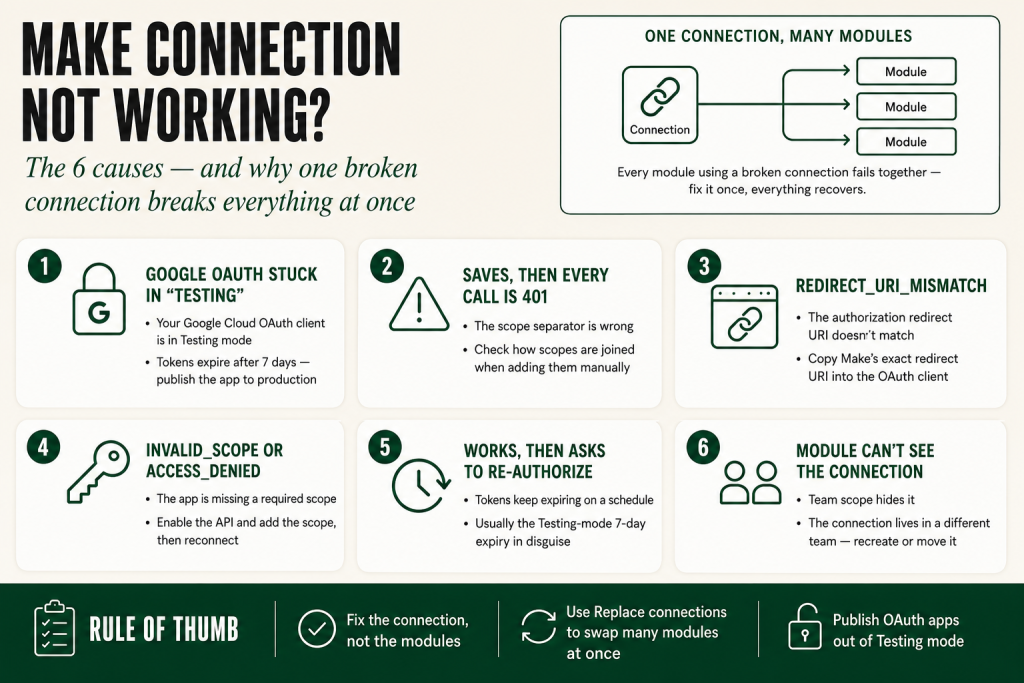
- The 30-second answer: why your Make connection is not working
- Why one broken connection breaks everything at once
- Cause 1: Your Google OAuth client is stuck in “Testing”
- Cause 2: Connection saves, but every call returns 401 (scope separator)
- Cause 3: redirect_uri_mismatch on authorization
- Cause 4: invalid_scope or access_denied
- Cause 5: It works for a while, then asks you to re-authorize
- Cause 6: The connection isn’t visible to the module (team scope)
- Fixing many modules at once with Replace connections
- Make connection not working: the fast checklist
- Frequently asked questions
A Make connection not working is higher-stakes than a single broken module — a connection is shared, so the moment it breaks, every scenario that uses it breaks at once, usually at the worst possible time. The good news is that connection failures cluster into a short list of specific, recognizable causes, and most of them announce themselves with an exact error string you can match.
This guide covers why connections fail account-wide, then the specific OAuth and authorization problems that cause a Make connection to stop working — with the fix for each.
The 30-second answer: why your Make connection is not working
If your Make connection is not working, check for these in order:
- Your Google Cloud OAuth client is in Testing status, which forces re-authorization roughly every week.
- The connection saves but every API call returns 401 — usually a wrong scope separator.
- redirect_uri_mismatch during authorization — the redirect URI isn’t exactly what Make expects.
- invalid_scope (the API isn’t enabled) or access_denied (the account isn’t a permitted test user).
- It worked, then started asking you to re-authorize — you’re missing a refresh token.
- A module can’t see the connection at all — connections are team-scoped.
Each of these maps to a precise fix below. If you have an exact error string from the authorization screen, jump to the matching cause.
Why one broken connection breaks everything at once
A connection is your saved authentication for an external app. Connections live at the team level — a connection in one team is invisible to another, even inside the same organization — and modules reference a connection by ID, so the same connection is reused by every module of that app across the team. That sharing is what makes a connection failure so disruptive: fix it once and everything recovers; leave it broken and every dependent scenario fails together.
Make supports several auth flavors — OAuth 2.0 (most modern apps), OAuth 1.0, API key, Basic auth, JWT, and Custom. Most native app modules use OAuth 2.0’s standard authorization-code flow: you click Authorize, approve on the third party’s consent screen, and Make stores a token. The failures below are almost all about that OAuth flow — especially when you set up your own OAuth client, which Google in particular requires. When a broken connection causes a scenario to fail mid-run, you may also see incomplete executions pile up until you fix the underlying auth problem.
Cause 1: Your Google OAuth client is stuck in “Testing”
This is the most common — and most maddening — reason a Make connection stops working on a schedule. When you create a custom OAuth client in Google Cloud, the project starts in Testing status. If the app stays in Testing, you have to reauthorize the connection in Make roughly every week. The classic symptom: scenarios that ran fine all week fail every Monday morning.
The fix is to publish the app. In Google Cloud Console, go to APIs & Services → OAuth consent screen → Audience and click Publish app to move it out of Testing into In Production. You’ll likely see a “Needs verification” note; for development and small-team internal use you can still connect to an unverified app. (Google’s policy here can change, so check current docs if you’re building for serious external distribution.) Once published, the weekly re-auth stops.
Cause 2: Connection saves, but every call returns 401 (scope separator)
A subtle one: the connection authorizes and saves without complaint, but every API call it makes comes back 401 Unauthorized. The usual culprit on a custom OAuth client is the scope separator. In the connection’s Advanced settings, the scope separator must match what the provider expects — for Google that’s SPACE. The wrong separator breaks the connection silently: it looks connected, but the scopes were never granted correctly.
Add each scope as its own separate entry — don’t combine multiple scopes into one string. For Google Sheets read+write, for example, that’s two entries (the Drive scope and the Spreadsheets scope), with the scope separator set to SPACE.
Cause 3: redirect_uri_mismatch on authorization
If the authorization screen throws redirect_uri_mismatch, the redirect URI registered in your OAuth client doesn’t exactly match the callback URL Make expects for that connection type. For a generic HTTP > Make a request module using OAuth 2.0, Make’s required redirect URI is https://www.integromat.com/oauth/cb/oauth2. Native app modules may use app-specific callback URLs, so always use the redirect URI shown in the relevant Make setup guide or connection screen.
The URI may use the legacy integromat.com domain on purpose. Make is the product, Integromat was the original company name, and some OAuth callbacks still use that old domain. Re-open your provider’s client credentials, confirm the redirect URI character-for-character, save, and re-authorize.
Cause 4: invalid_scope or access_denied
Two more error strings with clean fixes:
- invalid_scope — the scope you requested doesn’t match what’s enabled or what your client supports. Most often the API isn’t enabled for the project. In Google Cloud, go to APIs & Services → Library, find the specific API (Sheets, Gmail, Drive), and click Enable. Enabling is per-API — turning on Sheets does not turn on Drive.
- access_denied — the consent screen rejected the authorization. This commonly happens because the signing-in account isn’t listed as a test user (while the app is still in Testing status), or because the requested scopes require verification. Add the account as a test user, or publish the app (Cause 1).
During development you may also see a “Google hasn’t verified this app” warning — click Advanced and proceed to integromat.com to continue. The “unsafe” label is alarming but expected for an unverified internal app.
Cause 5: It works for a while, then asks you to re-authorize
If a connection works initially but keeps lapsing and demanding re-authorization, you’re likely missing a refresh token. On a custom OAuth client you have to ask for one explicitly. In the connection’s Authorize parameters, add two items: access_type = offline (this is what grants a refresh token, so the connection doesn’t need a human to re-auth) and prompt = consent (this forces a fresh consent and therefore a fresh refresh token even if you’ve authorized before).
Set both, then save and re-authorize once. With offline access in place — and the app published rather than left in Testing — the connection should stop asking you to sign in again.
Cause 6: The connection isn’t visible to the module (team scope)
If a module shows no connection to select, or a cloned scenario’s modules suddenly reference a missing connection, remember that connections are team-scoped. A connection created in one team isn’t available to a module running under a different team. This shows up most when you clone a scenario into another team: the copy still points at the original team’s connections, which it can’t use.
There’s also a specific gap worth knowing: if you’re calling a Google API through the HTTP > Make a request module rather than a native Google app module, the default Google OAuth that the native modules use is not accessible to the HTTP module — you need your own custom OAuth client (Causes 1–5). That’s by design, not a bug. If the HTTP module itself is misbehaving, that article covers the full range of setup errors and response-mapping problems.
Fixing many modules at once with Replace connections
Once you’ve created a working connection, you often need every module to use it — after rotating credentials, migrating accounts, or consolidating a duplicate connection you made by accident. Editing each module by hand is tedious and error-prone. Use Replace connections instead: open the scenario, click the three-dot menu in the upper right, choose Replace connections, pick the connection to replace from and the one to replace to, and confirm. Make updates every module using that connection in one pass. It’s also the standard way to finish a cross-team clone — clone the scenario, then swap all its connections to the new team’s in one operation.
Tip: don’t store API keys in custom variables to “work around” a connection — variables aren’t encrypted. Use connections for credentials, every time.
Make connection not working: the fast checklist
- Re-auths weekly / fails every Monday? Publish the Google OAuth app out of Testing.
- Saves but 401 on every call? Fix the scope separator (SPACE for Google); one scope per entry.
- redirect_uri_mismatch? Confirm the exact redirect URI Make requires for that connection type. For generic HTTP OAuth 2.0, use
https://www.integromat.com/oauth/cb/oauth2. - invalid_scope? Enable the specific API in the Cloud project (per-API).
- access_denied? Add the account as a test user, or publish the app.
- Keeps asking to re-authorize? Add access_type=offline and prompt=consent for a refresh token.
- Module can’t see the connection? It’s team-scoped; re-create or Replace connections in the right team.
Match the symptom to the cause and a Make connection that’s not working is usually a five-minute fix — and Replace connections propagates that fix across every dependent module at once.
Want the OAuth setup steps as a reference card? Grab the free Builder’s Companion Kit — cards, ready-to-import blueprints, and a cost estimator. Setting up your stack? You can start a free Make account here.
Frequently asked questions
Why does my Make Google connection break every week? The Google Cloud OAuth client is in Testing status, which forces re-authorization roughly every 7 days. Publish the app (OAuth consent screen → Audience → Publish app) to move it to In Production and stop the weekly re-auth.
My Make connection saved but every call returns 401 — why? On a custom OAuth client this is usually the wrong scope separator. Set the scope separator to SPACE (for Google) in Advanced settings, and add each scope as its own entry rather than combining them in one string.
How do I fix redirect_uri_mismatch in Make? The authorized redirect URI in your provider’s OAuth client must exactly match the callback URL Make expects for that connection type. For generic HTTP OAuth 2.0 connections, Make uses https://www.integromat.com/oauth/cb/oauth2; native app modules may use app-specific callback URLs.
Why does my Make connection keep asking me to re-authorize? You’re missing a refresh token. In the connection’s Authorize parameters add access_type=offline and prompt=consent, then re-authorize once. Also make sure the OAuth app is published, not in Testing.
Why can’t a module see my connection? Connections are team-scoped — one created in another team isn’t available. This commonly appears after cloning a scenario to a new team; re-create the connection in the right team or use Replace connections.
How do I update a connection across many modules at once? Use Replace connections: scenario three-dot menu → Replace connections, choose the from and to connections, and confirm. Make updates every module using that connection in one pass.
Can a Make connection not working cause a blueprint import to break? Yes. When you import a blueprint into a different team, the modules still reference the original team’s connection IDs, which no longer resolve. Use Replace connections immediately after import to repoint every module to a valid connection in the new team. See the full breakdown in the Make blueprint import guide.
Sources
This guide is grounded in The Missing Manual for Make (Chapter 13: Connections in Depth and Securing Data). Related reading: Make error handling, Make webhooks, and Make retry strategy.
Brian Kasday is a direct-response marketer with 40 years in the trade who rebuilt the entire marketing function as a one-person operation using modern AI and a few-dollars-a-day software stack. He writes The Operator’s Library for MMS Vegas.
More Make guides
Free · Make Operator Toolkit
Running scenarios in Make?
Get the free operator toolkit — production checklists and the fixes that keep scenarios alive under real traffic, plus a note when this guide changes.
Get the free toolkit →