
Table of contents
- Custom Webhook vs. Instant Trigger
- How to set up a Custom Webhook in 3 minutes
- The Webhook Response module
- How webhooks charge credits
- Data size limits and timeout limits
- What happens when calls pile up
- Headers, authentication, and security
- Debugging a webhook that will not fire
- Quick reference table
- Frequently asked questions
Most Make tutorials show you where to click to create a webhook. They skip everything that matters when you are running it in production, what happens to credits, what happens when you send 500KB of JSON, what happens when two calls arrive at the same moment. This article covers all of it.
Custom Webhook vs. Instant Trigger
Make has two ways to receive incoming data without polling.
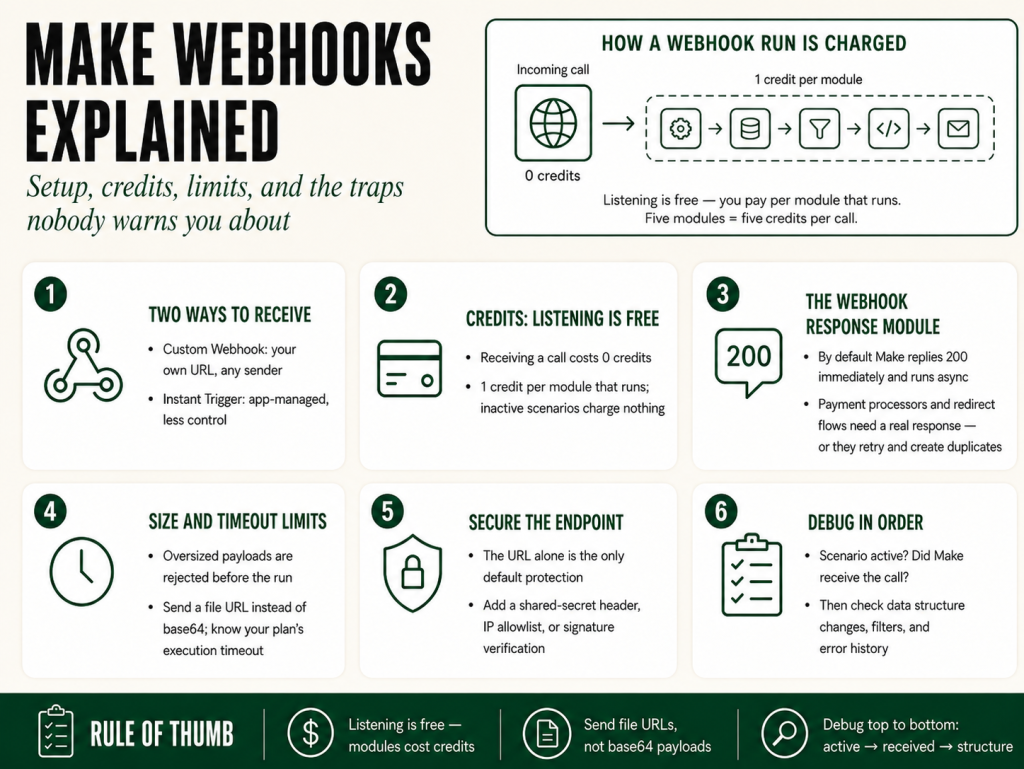
Custom WebhookYou create a URL inside Make. Any external system, a form builder, a payment processor, your own code, another Make scenario, POSTs data to that URL. Make receives it and runs your scenario. The sending system does not need a native Make integration. It just needs to be able to make an HTTP POST request.
Instant TriggersThese live inside specific app modules. When you open the trigger dropdown for Gmail, Google Forms, Airtable, or dozens of other apps, you will see options labeled “Watch New” with a lightning bolt icon. That lightning bolt means instant, the app pushes data to Make via a webhook behind the scenes rather than Make polling on a schedule. You do not manage the URL; Make handles registration with the app automatically.
For most operators the choice is simple: if the sending app has a native Make module with an instant trigger, use that. If not, or if you are sending from your own code, a form tool, or a service without a Make module, use a Custom Webhook.
Key distinction: A Custom Webhook has no schema until you teach it one. An instant trigger already knows what fields to expect. This matters when you are mapping data downstream, with a Custom Webhook you either send a sample payload first so Make learns the structure, or you reference fields manually.
How to set up a Custom Webhook in 3 minutes
Here is the exact sequence.
1. Create a new scenario. Click “Create a new scenario.” On the blank canvas, click the empty trigger module circle.
2. Choose Webhooks then Custom Webhook. In the module picker, search “webhook.” Select the Webhooks app, then choose “Custom Webhook” as your trigger module.
3. Add a new webhook. Click “Add” next to the Webhook field. Give it a name that tells you which system sends to it, “Typeform Lead Form,” not “Webhook 1.” Click Save. Make generates a unique URL.
4. Teach Make the data structure. Click “Redetermine data structure.” This puts Make into listening mode. Go to your sending system and fire a test payload, submit the form, trigger the event, or POST sample JSON using Postman or curl. Make captures the structure and your fields appear in the module.
5. Build the rest of your scenario. Map those fields to whatever comes next, a Google Sheets row, a CRM record, a Slack message. Activate the scenario.
The gotcha at step 4: If you skip teaching Make the structure and activate without sending a sample, Make will receive data but will not know what to call the fields. You will see incoming calls in History but your downstream mappings will be empty. Always send a sample first. If your fields disappear after a schema change, the Make Mapping Fields Missing guide covers every cause.
What Make actually receives
Make accepts JSON (most common), form-encoded data, XML, and plain text. You can see exactly what arrived, headers included, in the Execution History for each scenario run.
The Webhook Response module, and why you probably need it
This is the most commonly missed piece, and it causes real production problems.
By default, when Make receives a webhook call, it responds with HTTP 200 immediately and runs the scenario asynchronously. Most of the time that is fine. But some sending systems, payment processors, form tools with redirect logic, apps waiting for a confirmation, need Make to send back a specific payload or status code before they proceed. If Make does not respond promptly, some senders mark the delivery as failed and retry, creating duplicate runs.
The Webhooks – Webhook Response module fixes this. Add it as the last module in your scenario. It lets you set a custom HTTP status code, a custom response body (JSON, plain text, or XML), and custom response headers.
The constraint you need to know: When you use the Webhook Response module, Make shifts to synchronous mode. The sending system holds the connection open until your scenario completes and sends the response. Your scenario must finish within Make’s webhook response window (about 40 seconds), or the sending system gets a timeout error. If your scenario does heavy processing, looping thousands of records, chaining slow external APIs, respond immediately with 200 from a fast first scenario, then hand off to a second scenario for the heavy work. Do not try to do everything in one synchronous run.
How Make.com webhooks charge credits
This is the question Make’s documentation answers vaguely. Here is the concrete version.
Each module that executes in a scenario run costs one credit. (Make renamed “operations” to “credits” in 2025, the Make Operations vs Credits explainer covers that history.) For a webhook-triggered scenario:
- Receiving the webhook costs 0 credits. Make does not charge you for listening.
- The scenario run costs 1 credit for the trigger module, plus 1 per additional module that executes.
- Calls that arrive while your scenario is inactive cost 0 credits. They queue or get dropped, but they do not consume credits.
In practice: a five-module scenario triggered by a webhook costs five credits per incoming call. A hundred calls per day equals 500 credits per day. This adds up faster than people expect on lower-tier plans. See Make Pricing Explained: What You Actually Pay For for how credits translate to real dollars across plans.
The Webhook Response module counts as a module. Add one credit to your math if you use it.
Data size limits, timeout limits, and what happens when you hit them
Incoming payload size
Make caps incoming webhook payloads at 5 MB (5,242,880 bytes) per request on every plan, and the limit cannot be raised. If the payload exceeds this limit, Make rejects the request with a 413 error before your scenario even runs. You do not consume credits, but the sending system sees an error and may retry. The fix: split large payloads at the source, or send only a reference. This catches people who try to send base64-encoded images or PDFs in a webhook body. Send a URL pointing to the file instead and have Make download it separately with the HTTP module.
Execution timeout
Make’s maximum scenario execution time is 40 minutes; a run that exceeds it is terminated mid-run. If your scenario has not finished within the timeout, Make terminates it mid-run and logs an error. Modules that already ran are done, Make does not roll them back automatically unless you have configured rollback handling. See the Make error handling guide for how rollback and the Commit directive work in practice.
What happens when calls pile up
Make processes one webhook call per scenario run. If a second call arrives while the first is still executing, Make queues it. The queue has a limit, 667 queued items per 10,000 credits licensed per month, capped at 10,000 items, and calls beyond that limit are dropped silently. No credit charge for dropped calls. No data either.
If you are building anything that could receive bursts, a payment webhook, a form handler during a launch, a webhook fed by a loop in another scenario, test this deliberately. Fire 20 calls in rapid succession and compare your execution history count against the number you sent. If the numbers differ, you hit the queue limit.
The fix for high volume: Have the receiving scenario do one thing only, write the incoming data to a data store or a Google Sheet row, respond with 200, and end. The run takes under two seconds and almost never queues. A second scenario, running on a schedule, processes the queue. This pattern handles burst traffic cleanly and keeps you well inside timeouts.
Headers, authentication, and securing your webhook
Every Custom Webhook URL Make gives you is publicly reachable by anyone who has the URL. Make does not add authentication by default. If someone finds or guesses your URL, they can trigger your scenario with arbitrary data.
Option 1: Shared secret in a header (simplest)
Require the sending system to include a shared secret as a custom request header, something like X-Webhook-Secret: your-secret-value. In your scenario, add a filter immediately after the webhook trigger that checks for that exact value. If the secret does not match, the filter kills the run. Unauthorized calls cost you one credit (the trigger) and nothing else.
Option 2: IP allowlisting
Services like Stripe, GitHub, and Shopify publish their outbound IP ranges. You can check the x-forwarded-for header in the incoming request and reject anything from an unexpected source. More maintenance, but useful as a second layer for high-stakes webhook endpoints.
Option 3: Cryptographic signature verification
Services like Stripe and GitHub include a cryptographic signature in a request header computed from your secret and the request body. Verifying this inside Make requires a custom approach using the Tools module with a SHA-256 HMAC function. As of mid-2026 Make has no native signature verification for custom webhooks, the dedicated app triggers (Stripe, Shopify, GitHub) validate signatures internally, but a custom webhook still needs the HMAC approach above. For most operator use cases, a shared secret is sufficient.
Debugging a Make.com webhook that will not fire
You set up the webhook, you sent a test, nothing happened. Work through this list. For a deeper dive, the Make Webhook Not Triggering article walks every failure mode in diagnostic order.
Is the scenario active?
Webhooks only process calls when the scenario is active (toggle is green). An inactive scenario parks calls in the queue, or drops them if the queue is full, without running any modules. Activate first, then test.
Did Make receive the call?
Go to Webhooks in your Make sidebar. Find your webhook. There is a data indicator showing calls received. If you see a count there but no scenario run, the scenario was inactive when the call arrived. If you see nothing, the call never reached Make, check your sending system’s outbound request logs and verify the URL is correct.
Did the data structure change?
If you trained Make on a test payload but the real system sends different field names, your downstream mappings will be blank even though the scenario runs. Redetermine the data structure using a real payload. Or use Make’s get function to access nested keys dynamically instead of relying on auto-mapped fields, which break when the schema varies.
Is a filter killing the run early?
Open Execution History and click on a run. Look at which module was the last to execute. If a filter returned false, the run stopped there and all subsequent modules show as skipped, not errored, skipped. This looks like nothing happened from the outside. If you added a secret-checking filter and forgot to update the expected value, you will see this on every real call. The Make Filter Not Working guide covers the full list of reasons a filter silently passes everything or nothing.
Is the scenario erroring out?
Execution History shows every run, successful, errored, and incomplete. Red entries are errors. Click one to see which module failed and what Make says about it. Make’s error messages usually surface the exact API response code or the exact field that caused the problem.
Quick reference: Make.com webhook limits at a glance
| Parameter | Value | Status |
|---|---|---|
| Max incoming payload size | 5 MB (5,242,880 bytes), all plans | Confirmed |
| Scenario execution timeout | 40 minutes (webhook response to the caller: ~40 seconds) | Confirmed |
| Webhook queue depth | 667 items per 10,000 monthly credits, max 10,000 | Confirmed |
| Concurrent runs per scenario | 1 (others queue behind it) | Confirmed |
| Credits per trigger | 1 (trigger) + 1 per downstream module | Confirmed |
| Accepted content types | JSON, form-encoded, XML, plain text | Confirmed |
| Webhook URL format | Unique HTTPS URL per webhook | Confirmed |
| Webhook Response module cost | 1 credit when it executes | Confirmed |
Frequently asked questions
Can I use the same webhook URL in multiple scenarios? No. Each Custom Webhook URL is tied to one scenario. To fan out incoming data to multiple scenarios, receive it in one and use the “Call another scenario” module, or write to a shared data store that other scenarios read. A Router in the receiving scenario also lets you branch into separate paths without needing multiple webhooks.
Can I rename a webhook without breaking the URL? Yes. Renaming changes only the display name, the URL stays the same. Deleting a webhook or deleting the scenario it belongs to will orphan or destroy the URL. Clean up orphaned webhooks in the Webhooks sidebar periodically.
Does Make retry if my scenario errors out after receiving a webhook? No automatic retry. If your scenario runs and fails partway through, Make logs the error and stops. The webhook URL has already responded to the sending system. You re-run manually from Execution History, or build a retry loop into your error handler. The Make error handling guide covers the Retry handler in detail.
What is the difference between a webhook trigger and a scheduled trigger? A scheduled trigger polls for new data on a timer, every 15 minutes, every hour. You pay credits each time it polls, whether or not there is new data. A webhook trigger runs only when data actually arrives, you pay credits only when something happens. For event-driven workflows, webhooks are almost always cheaper and faster. For systems that do not push data, scheduled polling may be your only option.
Can I send files through a webhook to Make? Technically yes, by base64-encoding the file in the JSON body, but you will hit the payload size limit fast, and decoding it inside Make requires extra steps. The better pattern: have the sending system upload the file to cloud storage (S3, Google Drive, Dropbox), include only the file URL in the webhook payload, and have Make download the file in a subsequent HTTP module. Faster, cleaner, and no size ceiling issue.
How many make webhooks can I have on one account? Make does not publish a hard cap on the number of Custom Webhook URLs you can create, but each webhook must be attached to a scenario, and the number of active scenarios you can run concurrently is governed by your plan. In practice, most operators hit scenario or credit limits long before they hit any webhook count ceiling. Audit your Webhooks sidebar periodically and delete any that are no longer attached to an active scenario, orphaned webhooks clutter your workspace and can become a security liability if the URL leaks.
Can I pause a Make webhook temporarily without losing queued data? Yes, with a caveat. If you deactivate the scenario, incoming calls queue up (up to the plan queue limit). Reactivate and Make processes the queue in order. If the queue fills before you reactivate, the overflow calls are dropped silently with no notification. For any webhook that handles important events, keep an eye on queue depth or use the “receive and store” pattern: write every incoming payload to a data store immediately, so nothing is lost even if downstream processing is paused.
Get the full Make reference
Webhooks are one of the highest-leverage tools in Make, and one of the most under-documented. If you want a complete reference that covers this level of operational detail across every major Make feature, that is exactly what The Missing Manual for Make is built to be. It is MMS Vegas Book 3, part of the Operator’s Library.
In the meantime, grab the Builder’s Companion Kita free resource set with templates, checklists, and module reference cards built for operators who use Make in production. Get it at Get the kit →.
If you are not on Make yet, or you are evaluating plans, sign up through this link to get started. We may earn a small commission, which helps fund more articles like this one, at no extra cost to you.
More Make guides
Free · Make Operator Toolkit
Running scenarios in Make?
Get the free operator toolkit — production checklists and the fixes that keep scenarios alive under real traffic, plus a note when this guide changes.
Get the free toolkit →