
Table of contents
- What each one actually is
- The honest tradeoff, in one table
- The pricing difference that actually decides it
- Where Make is the right call
- Where n8n is the right call
- The decision, made simple
- Quick reference
- Frequently asked questions
I build automations the way a marketer builds them, to save time and make money, not to admire the architecture. So this isn’t a feature-matrix beauty contest. It’s the question you actually care about: which one do I put my next two hours into?
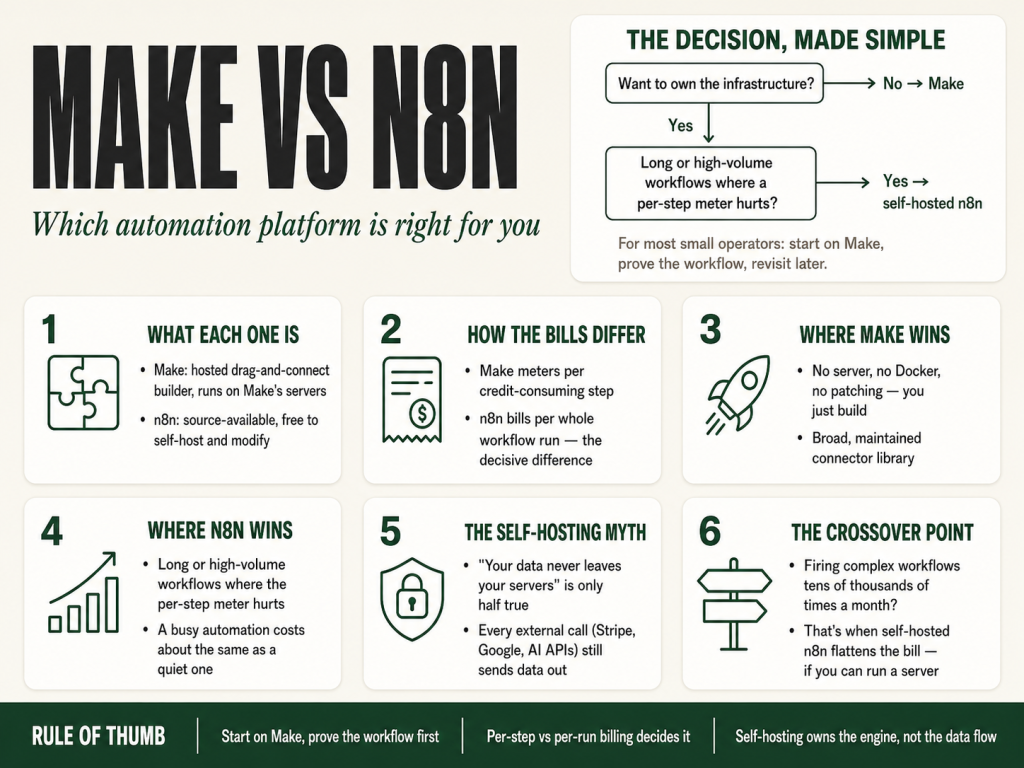
Make vs n8n, in one line: Make is better for non-technical operators who want hosted, visual automations fast. n8n is better for technical teams that want self-hosting, long multi-step workflows, or execution-based pricing.
What each one actually is
Make (the platform formerly called Integromat) is a hosted, drag-and-connect automation builder. You log in, drag modules onto a canvas, wire them together, and Make runs the whole thing on its servers. You never touch a command line. You pay by usage, Make meters work in credits (the billing unit it renamed from “operations” on August 27, 2025), and most standard credit-consuming operations cost one credit each.
n8n is a source-available automation tool. Its code is openly visible and you’re free to self-host and modify it, n8n calls its model “fair-code,” distributed under the Sustainable Use License. (Worth being precise here, because people get it wrong constantly: n8n is not open-source in the strict OSI sense, the license puts limits on commercial use, so n8n itself declines the “open-source” label. For your purposes it behaves a lot like open-source for internal business use: free to run, modify, and self-host.) Run it on your own server, a cheap cloud box, or a Docker container, and the executions don’t carry a per-step fee, you’re paying for the server, not per task. Or skip the server work entirely and pay for n8n Cloudn8n’s managed hosting, which looks much more like Make from a “just log in and build” standpoint.
That single difference, hosted-and-metered versus self-hostable-and-flat, drives almost everything else.
The honest tradeoff, in one table
| What you care about | Make | n8n |
|---|---|---|
| Time to first working automation | Minutes. Nothing to install. | Fast on n8n Cloud; slower if you self-host first. |
| How you’re billed | Per credit, most modules ~1 credit per run (filters/routers free; actions per bundle) | Per workflow execution (whole run = 1) on Cloud; flat server cost if self-hosted |
| Many-step workflows | More credit-consuming steps add up | Step count doesn’t change the execution count, long workflows stay cheaper at the meter |
| High-volume runs | Credits climb with usage | Self-host and volume barely moves the cost |
| Pre-built app connections | Very large library, polished | Large and growing; occasionally more “wire it yourself” |
| Infrastructure control | Runs on Make’s servers | Self-host and the instance runs on hardware you control |
| Visual clarity for non-coders | Excellent, the canvas is the product | Good, but assumes more comfort with logic |
| Who maintains the plumbing | Make does | You do (self-hosted) or n8n does (Cloud) |
The pricing difference that actually decides it
This is the part most “Make vs n8n” pages skim, and it’s the part that should drive your decision, so let’s be concrete.
Make charges by the credit, and credits track the steps that do work. Most modules cost about one credit each time they run; the exceptions are worth knowing, filters and routers are free, and an action that processes many bundles costs a credit per bundle. The practical effect still holds: the more credit-consuming steps in your automation, and the more often it runs, the more the meter moves. A scenario with ten credit-consuming operations that runs a thousand times spends on the order of ten thousand credits. (The full credit model, per-bundle actions, free flow control, dynamic AI usage, is in the companion Make pricing guide.)
n8n charges per whole workflow run. On n8n Cloud, one execution is one complete workflow run, no matter how many steps are inside it. A three-step workflow and a thirty-step workflow each count as a single execution. So the same job, a ten-step workflow running a thousand times, is about ten thousand credits on Make but only a thousand executions on n8n.
Read that difference carefully, because it drives most of the crossover:
- Short, frequent automations tend to favor Make, few steps means few credits, and you get Make’s polish and zero infrastructure for free.
- Long, multi-step or high-volume automations tend to favor n8n, because piling on steps doesn’t multiply your bill the way per-step credits do.
Two honest caveats so you don’t over-trust the headline. First, Make has a usable free plan and isn’t expensive at modest volume, the per-step model only becomes the thing you watch as scenarios get long or run constantly. (For exactly how Make’s meter works, read the companion piece on Make pricing and the deeper one on operations vs. credits.) Second, n8n Cloud’s execution tiers have their own caps, and, this catches people, n8n Cloud is paid, with a trial rather than a permanent free plan. The genuinely free path on n8n is self-hosting the Community Edition, which has unlimited executions but hands you the server to run.
Where Make is the right call
Make is the right starting point for most small operators. Here’s why.
You want to be building, not provisioning. With Make there is no server to stand up, no Docker to learn, no security patch to remember. You open the canvas and the only problem in front of you is the automation itself. For a busy owner, that removed friction is worth real money, the automation you actually ship beats the elegant one you never get around to self-hosting.
The connector library is broad and maintained. When you need to talk to a CRM, a spreadsheet, a payment processor, or an email tool, Make usually has a polished, ready module for it. That saves you the “wire up the API by hand” tax you’ll occasionally pay on either platform for less-common apps.
The visual model teaches you as you go. Make’s canvas, modules, routers, filters, iterators, and aggregators is genuinely good at showing you how the data flows. For someone learning automation thinking for the first time, that legibility is a feature, not decoration.
The honest caveat: Make’s pricing is usage-based, so the better your automation works, the more it runs, and the more credits it burns. That’s fine, and frankly a good problem, until you’re running long workflows or very high volume, at which point the per-step meter is the thing you start watching. If you want to understand it before it surprises you, the limits guide and the pricing guide cover it. And if a scenario ever stops firing when you expect it to, the scheduling troubleshooting guide walks you through every cause in diagnostic order.
Before you build anything in Make: grab the free Builder’s Companion Kit, the reference cards, six importable starter blueprints, and a cost estimator so the credit meter never surprises you.
Where n8n is the right call
n8n earns its place in a few specific situations.
You run long or high-volume workflows and the per-step meter hurts. This is the classic crossover. Because n8n bills per whole workflow run rather than per step, multi-step automations and heavy throughput cost far less than they would on a per-step credit model. If you’re firing complex workflows tens or hundreds of thousands of times a month, self-hosted n8n flattens the bill: you pay for the server, and a busy automation costs about the same as a quiet one.
You want to own the infrastructure. Self-hosting puts the n8n instance, and the execution data and credentials it holds, on hardware you control. For some teams that control is the whole point: a regulated industry, a client contract, an internal policy that says the automation engine lives on your own box. Be precise about what that does and doesn’t guarantee, though (more on that in a second).
You (or someone on your team) are comfortable owning infrastructure. Self-hosting is not free in the way “free to download” sounds free. Someone has to update it, secure it, back it up, and fix it at the worst possible moment. If you have that person, n8n’s flexibility is a gift. If you don’t, that “free” tool has a salary attached. And if you want n8n without the server work, n8n Cloud removes most of that burden, you just give up the flat-cost advantage and step back onto execution-based tiers.
One thing people overstate about self-hosting
You’ll hear “self-host n8n and your data never leaves your servers.” That’s only half true, and the half that’s wrong matters. Self-hosting keeps the n8n instanceits execution logs, and your stored credentials on your infrastructure, real and valuable. But the moment a workflow calls an external service (Stripe to charge a card, Google to read a sheet, an AI API to summarize text, your CRM to update a record), data goes to that service. Self-hosting controls where the automation engine runs; it does not magically keep every byte on-premises if your workflow’s whole job is to talk to other systems. So the accurate claim is: self-hosting gives you control over the engine and its data store, not a blanket guarantee that nothing ever leaves. If true data isolation is the requirement, you have to design the workflows for it too, not just self-host the platform.
The decision, made simple
Strip away the feature comparisons and it comes down to two questions:
- Do you want to own the infrastructure? If no, and for most small operators the answer is no, start with Make.
- Are your workflows long or high-volume enough that a per-step meter becomes your biggest line item? If yes, and you have someone to run a server, self-hosted n8n is worth the move.
Here’s the move I actually recommend for someone choosing today: start on Make. Build your first real automation this week, prove the workflow earns its keep, and learn how automation thinking works on a platform that won’t make you fight infrastructure to get there. If you later hit a volume or step-count wall where the credit meter genuinely hurts, you’ll port the logic you learned to self-hosted n8n in an afternoon, and you’ll port it knowing exactly what you need, because you’ll have run it for real. The reverse path, standing up infrastructure you have to maintain before you’ve proven a single automation pays, is how good ideas die in a half-configured Docker container.
If you go the Make route, you can create a free Make account here and have your first scenario running today. The free plan is enough to learn on, and it costs you nothing to find out whether automation pays for your business.
Quick reference
| If this is you… | Start with |
|---|---|
| Small operator, no infra person, wants results this week | Make |
| Learning automation for the first time | Make |
| Mostly short automations, modest volume | Make |
| Needs the broadest library of ready connectors | Make |
| Running long, multi-step or very high-volume workflows | n8n (self-hosted) |
| Wants the automation engine on infrastructure you control | n8n (self-hosted) |
| Wants n8n’s model without server work | n8n Cloud (paid tiers) |
Frequently asked questions
Is n8n open-source? Not in the strict sense. n8n’s source code is openly available and you’re free to self-host and modify it, but its Sustainable Use License places limits on commercial use, so n8n itself declines the “open-source” label and uses the term “fair-code” instead. In practice, for internal business use it behaves much like open-source: free to run, modify, and self-host. The accurate words are source-available, fair-code, and self-hostable.
Is Make or n8n cheaper? It depends on your workflows. Make bills by credits tied to credit-consuming operations (most modules ~1 credit, actions per bundle, filters and routers free), so short automations at modest volume are inexpensive and come with zero infrastructure. n8n bills per whole workflow run (on Cloud) or a flat server cost (self-hosted), so long, multi-step, or very high-volume workflows get dramatically cheaper on n8n. The crossover is driven by step count and run frequency: the longer and busier your automations, the more n8n’s model wins; the shorter and lighter they are, the more Make’s convenience wins.
Does n8n have a free plan? Self-hosting the n8n Community Edition is free and has unlimited executions, you only pay for the server it runs on. n8n Cloud, the managed option, is paid, it offers a trial rather than a permanent free plan. So “free n8n” means self-hosted Community Edition, not cloud.
Can I move from Make to n8n later? Don’t expect a one-click migration, Make and n8n use different formats, but the automation logic you learn on Make (triggers, filters, routing, iterating over data, handling errors) ports directly because the concepts are the same. Most people who switch rebuild the workflow rather than convert a file, and it goes quickly because they already know exactly what they need.
Which is better for someone who can’t code? Make. Its visual canvas is the cleanest on-ramp for non-coders, and the broad connector library means you rarely have to hand-wire an API. n8n is approachable too, especially on its cloud plan, but it leans slightly more toward people comfortable with logic and the occasional bit of technical setup.
How does Make compare to Zapier instead of n8n? That’s a different axis, Zapier is also hosted and metered, like Make, so the comparison is about pricing model and depth of logic rather than hosted-vs-self-hosted. We cover it in the companion article, Make vs. Zapier.
Can Make handle errors automatically when a scenario fails? Yes, Make has a dedicated error-handling system with routes for retrying, skipping, resuming, committing, or rolling back on failure. The details (and a trap that causes silent data corruption) are in the Make error handling guide.
If I start on Make, how do I know when I’ve hit the point where n8n makes more sense? Watch for two signals. First, your monthly credit spend is climbing and most of it comes from one or two long, frequently-running scenarios. Second, you find yourself wishing you could just add another step without thinking about the credit cost. When both are true, pull your scenario’s execution history, count the average step count and monthly run frequency, and compare what that would cost on n8n Cloud’s tiers versus self-hosting. That math, not a feature comparison, is what should make the call for you.
Sources: Make help, developer, and pricing documentation (make.com); n8n documentation, license, and pricing (n8n.io, docs.n8n.io). Platform facts current as of mid-2026, pricing, plan structures, and execution limits change often, so confirm specifics on each vendor’s live pricing and licensing pages before committing.
Sources
Verified against the official docs:
- Make Help Center — help.make.com
- Make pricing & plans — make.com/en/pricing
- n8n documentation — docs.n8n.io
More Make guides
Free · Make Operator Toolkit
Running scenarios in Make?
Get the free operator toolkit — production checklists and the fixes that keep scenarios alive under real traffic, plus a note when this guide changes.
Get the free toolkit →