
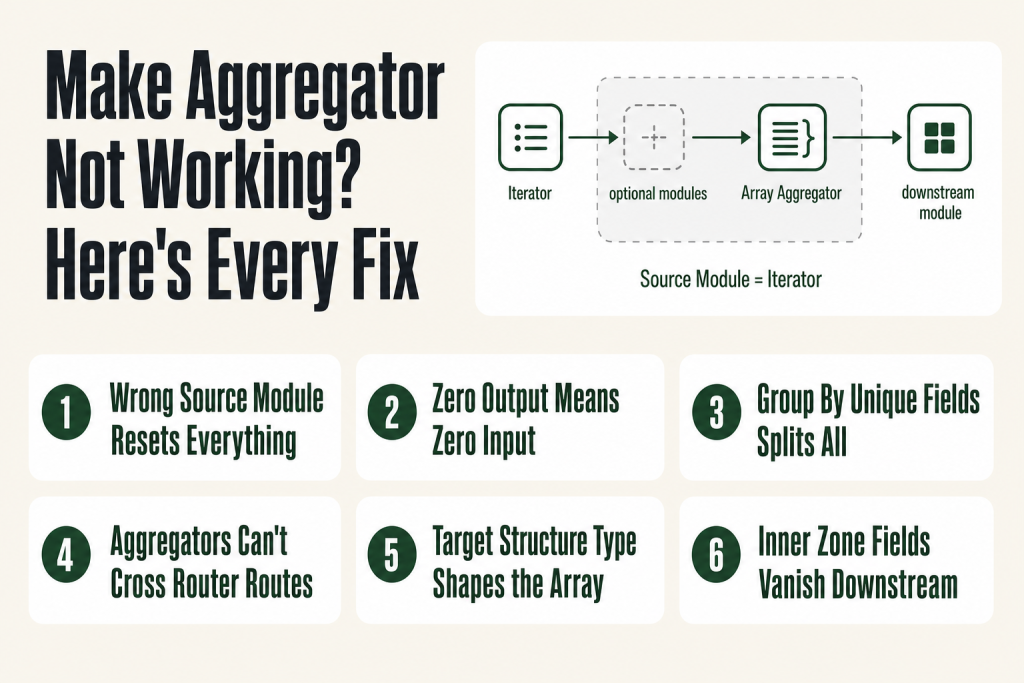
The 30-second answer
- No output at all: the source module produced zero bundles, or a filter between the source and aggregator blocked everything.
- Too many output bundles: the Source Module field points to a module that runs once per bundle rather than once per batch, so the aggregator resets on every item.
- Wrong number of groups: the Group By expression evaluates differently for each bundle, creating a separate group per item.
- Wrong combined structure: Target Structure Type is set to Custom when a downstream module’s array field should be selected instead, or vice versa.
- Aggregator across a router boundary: Make cannot collect bundles that traveled down different router routes into a single aggregator.
- Mapped fields from inside the aggregation zone are invisible downstream: only the aggregator’s own output is accessible after the grey boundary.
Take this fix into your next scenario. The free Builder’s Companion Kit collects the checklists and templates that pair with this guide — so next time, you start from a template, not a blank page. Grab it free →
- How the Aggregator Actually Works (The Mental Model You Need First)
- Fix 1: The Source Module Is Set to the Wrong Module
- Fix 2: The Aggregator Produces No Output at All
- Fix 3: Too Many Output Bundles Because of a Group By Expression
- Fix 4: The Router Boundary Trap (You Can’t Aggregate Across Routes)
- Fix 5: The Wrong Target Structure Type Breaks Downstream Mapping
- Fix 6: Inspect Bundles Before the Aggregator (and After It)
- Worked Example: Aggregating Translated Strings Back into One Email
- Execution Order, Scope, and the Variables You Can’t Map
- FAQ
A make aggregator not working is one of the most disorienting problems in Make because the scenario completes without errors, yet the next module receives garbage: an empty array, a dozen separate bundles instead of one, or a combined structure that the destination app refuses. The aggregator looks fine on the canvas. The execution history shows a success status. Nothing tells you what went wrong. This guide names every cause, shows you where to look in the scenario editor, and hands you the fix for each one.
How the Aggregator Actually Works (The Mental Model You Need First)
Think of the aggregator as a waiting room. Every bundle that the source module generates walks in through the door. The aggregator refuses to let anyone leave until the last bundle has arrived. Then it pushes everyone out together as a single bundle containing an array.
In Make’s own terminology, a bundle is one unit of data passing through a module: one row, one record, one item. The aggregator collects multiple bundles and merges them into a single output bundle whose array holds one item per accumulated bundle. That’s the official language Make uses throughout its help center, and it’s what you’ll see in the execution inspector when you click a module’s output bubble.
Three things control that process:
- Source Moduletells Make which module’s run defines “all the bundles in this batch.”
- Group Byan optional expression that splits the batch into sub-groups, each producing its own output bundle.
- Target Structure Type (Array Aggregator only), controls the shape of the array items the downstream module will receive.
When any one of those three is wrong, the aggregator either waits forever, fires too early and repeatedly, or ships malformed data. Once you set the Source Module and close the aggregator’s configuration panel, Make wraps the route between the source module and the aggregator in a grey area to mark the aggregation boundary. If you do not see that grey area, the source module is not set correctly.
Read the Make Iterator vs Aggregator guide if you need a refresher on how the two modules relate before diving into the fixes below.
Fix 1: The Source Module Is Set to the Wrong Module
This is the most common cause of a make aggregator not working. The Source Module field defines the outer boundary of aggregation. Make counts bundles from that module forward and waits until all of them have passed through before emitting output.
Pick the wrong module and you get one of two symptoms:
- One output bundle per incoming bundleif you point the source at a module that fires once per bundle (say, a “Get a Record” module inside a loop), the aggregator resets every single time that module runs. You end up with as many output bundles as you had input bundles. Nothing got combined.
- Only the last item in the arrayif the source module is set downstream of where items diverge, Make may only see one bundle arriving and close the waiting room after it.
The source module is usually the Iterator or the search module that originally produced the series of bundles. If a filter sits between the Iterator and the aggregator, the source module should still point to the Iterator, not the filter. Make handles the missing bundles (the ones the filter dropped) automatically and closes the waiting room when the Iterator’s full run is complete.
How to verify: after you set the Source Module and close the aggregator’s configuration panel, look for the grey area in the scenario editor. It must start at the source module and end at the aggregator. If the grey area looks wrong, too short, absent, or starting at the wrong module, open the aggregator again and reselect.
The canonical pattern when you run an Iterator before the aggregator:
Iterator (source) → [optional modules] → [optional filter] → Array Aggregator
 Source Module = Iterator
If you placed a search module (such as “Search Records”) before the aggregator without an Iterator in between, set the Source Module to that search module directly.
Fix 2: The Aggregator Produces No Output at All
An aggregator that receives zero bundles emits zero bundles. That sounds obvious, but it’s easy to miss because the execution history shows the aggregator ran, it just ran on an empty batch.
Check these in order:
- Click the bubble on the source module. How many bundles did it output? If the answer is 0, the problem is upstream: the trigger found no new records, the search returned nothing, or the previous module filtered everything out. The aggregator is innocent. Fix the source first.
- Check filters between the source and aggregator. A filter that passes nothing leaves the aggregator with an empty waiting room. Open the filter, inspect the condition, and run the scenario with “Run once” to see which bundles reach the filter and which do not. See Make Filter Not Working for a full filter diagnostic.
- Check the max-results setting on the source module. Many search and watch modules have a “Limit” or “Maximum number of results” field. If that is set to 0 or 1 and you expect dozens of records, the aggregator only ever sees one bundle (or none).
- Look for an error on a module inside the aggregation zone. If a module between the source and aggregator throws an error and your error handler is set to ignore/skip, bundles may stop mid-flow and never reach the aggregator. Check your error handling setup.
Fix 3: Too Many Output Bundles Because of a Group By Expression
The Group By field is optional. When it’s blank, the aggregator collapses everything into one output bundle. When it’s populated, the aggregator splits results into one bundle per unique value that the expression evaluates to.
That is exactly what you want when you’re grouping orders by customer ID. It is a silent disaster when you accidentally leave a unique field (like a record ID or a timestamp) in the Group By box. Every bundle gets a different Group By value, so every bundle gets its own output group. You end up with the same number of output bundles as input bundles, and nothing was actually combined.
Symptoms:
- The aggregator output shows N bundles when you expected 1 (or a small number).
- Each output bundle’s array contains exactly one item.
Fix:
- If you do not need grouping: clear the Group By field entirely.
- If you need grouping by customer, order ID, or some other meaningful category: make sure the expression resolves to that category value, not to a per-row unique identifier. A field like
{{1.customer_id}}groups by customer. A field like{{1.record_id}}creates a unique group per row.
Each output bundle from a grouped aggregator contains two fields: Key (the grouped value) and Array (the aggregated data). Downstream modules need to reference Array, not the top-level bundle, to get the combined items.
Fix 4: The Router Boundary Trap (You Can’t Aggregate Across Routes)
Make routes bundles down each router path one at a time. An aggregator on one route can only collect bundles that traveled that same route. It cannot reach across and collect bundles from a sibling route.
This catches people building scenarios where two router routes each process a subset of items and they want a single aggregator at the end of both paths to combine everything. That architecture does not work. Make will either refuse to let you set a cross-route source module, or the aggregator will silently collect only the bundles from its own route.
Workarounds:
- Aggregate before the router. If you need to combine all items regardless of type, aggregate them upstream of the router, then pass the single combined bundle into the router for routing decisions.
- Use a data store as a staging area. At the end of each route, add a Data Store > Add/replace a record module to write that route’s output into a shared data store record. Then add a separate, filter-free route from the router that reads the data store with a Data Store > Get a record module and continues from there. The official Make help center documents this pattern as the recommended workaround for combining data across routes. See Make Data Stores for setup details.
- Use Set Variable / Get Variable. For simpler cases where only one or a few values need to pass between routes, set a variable at the end of each route and retrieve it on a shared continuation route. Be aware of scope limitations covered in Make Set Variable / Get Variable Not Working.
- Restructure the scenario so each route handles its own aggregation independently, and downstream modules after the router handle each aggregated bundle on its own route.
The router guide covers route execution order in detail: see Make Router: Routes, Filters, the Fallback Route.
Fix 5: The Wrong Target Structure Type Breaks Downstream Mapping
The Array Aggregator has a Target Structure Type field that controls the shape of each item inside the output array. This setting confuses almost everyone the first time.
When it is set to Custom, you define the field names yourself in the mapping panel. The output is a generic array of collections with the field names you chose. That’s the right choice when the downstream module accepts free-form arrays or when you’re building JSON for an HTTP call.
When you connect a specific module after the Array Aggregator and then reopen its configuration, additional options appear in the Target Structure Type dropdown alongside Custom. For example, if you add a Gmail “Send an Email” module after the aggregator, an option such as Attachments becomes available. Selecting it tells the aggregator to build each item in exactly the shape that module expects. The aggregator’s mapping panel then shows the specific fields that module needs, and Make handles the structural translation automatically. The exact options you see depend on which downstream module is connected and which of its fields accept arrays.
Common mistakes:
- Choosing Custom when the downstream module has a structured array field available, then manually recreating field names and getting them slightly wrong. The receiving module rejects the payload.
- Choosing a downstream target structure before the downstream module is connected, which is why the option doesn’t appear yet. The fix: add the downstream module first, then come back and open the aggregator to pick the target structure.
- Using a target structure from a module that has since been deleted or reconnected. If the dropdown shows a stale module name, pick Custom and remap manually.
If the downstream module is an HTTP request and you need a JSON body, use the Array Aggregator with Custom target structure, then feed the result into a JSON-encode step. The Make Parse JSON Not Working guide covers the JSON mapping side.
Fix 6: Inspect Bundles Before the Aggregator (and After It)
You cannot fix what you cannot see. The scenario editor’s execution inspector is your main tool, and most operators do not use it thoroughly enough on aggregator problems.
Step-by-step inspection routine:
- Run the scenario once with “Run once” using real or representative data.
- Click the output bubble on the source module. Read the bundle count. This number is what the aggregator expects to collect. If it is 0, stop here and fix the source.
- Click the output bubble on each module inside the aggregation zone. Watch for drops: if the source outputs 10 bundles but a module two steps later shows 4, a filter or an error is swallowing 6 of them. That is intentional if you have a filter; it is a bug if you do not.
- Click the output bubble on the aggregator itself. You should see 1 bundle (or N bundles if Group By is active and intentional). Open that bundle and inspect the array. Confirm the item count matches your expectation and that each item’s fields contain real values, not empty strings or
undefined. - Click the output bubble on the first module after the aggregator. Confirm it received the array and that its input mapping shows the correct field paths.
A common trap: fields mapped from inside the aggregation zone are not accessible in modules after the aggregator. Only the aggregator’s own output fields are in scope downstream. If you need a value from before the loop (like a webhook ID or a trigger timestamp), map it from the original trigger module, which sits outside the grey boundary.
If your bundles look correct going in but the array coming out is empty or malformed, re-check the aggregated fields panel inside the aggregator. It is possible you opened the aggregator, changed the Source Module, and the previously mapped fields now reference a module that is no longer in scope. Clear and remap them.
Worked Example: Aggregating Translated Strings Back into One Email
Here is a concrete scenario that hits almost every failure mode above. You receive a Google Sheet row with three product descriptions. You want to translate each one with DeepL, then send a single email with all three translations.
Correct structure:
1. Google Sheets, Get a Row (trigger, 1 bundle)
2. Iterator → splits the descriptions array into 3 bundles
3. DeepL, Translate → 3 bundles out (one per description)
4. Array Aggregator → 1 bundle out (array of 3 translated strings)
 Source Module = Iterator (module 2)
 Group By = (empty)
 Target Structure = Custom, field: "translated_text" mapped to DeepL output
5. Gmail, Send an Email → maps the array from step 4 into the body
Failure: aggregator outputs 3 bundles instead of 1. Check: Source Module is accidentally set to the DeepL module (step 3) instead of the Iterator (step 2). DeepL runs once per bundle, so the aggregator resets three times. Fix: change Source Module to the Iterator.
Failure: the email body shows empty. Check: the Gmail module is mapped to a field from inside the aggregation zone (the DeepL output) rather than from the aggregator’s own output array. Fix: map the Gmail body to the Array Aggregator’s output array, then join the items with a join function or a Text Aggregator if you want a plain string instead of an array.
Failure: three separate emails send instead of one. Check: no aggregator is present, or the aggregator is positioned after the Gmail module. The Gmail module is inside the loop. Move it after the aggregator.
For the iterator side of this pattern, see Make Iterator Not Working.
Execution Order, Scope, and the Variables You Can’t Map
Make runs modules sequentially, bundle by bundle. When an Iterator fires, it produces bundle 1 and passes it all the way to the aggregator before bundle 2 starts. The aggregator collects them all, then the scenario continues from the aggregator’s output as a single bundle.
This sequential model has one important consequence for mapping: any data produced inside the aggregation zone (between the source module and the aggregator) is not visible to modules after the aggregator. The aggregation zone compresses that data into the array. Once the aggregator fires, the individual bundle fields from inside the loop are gone.
If you need context that was only available inside the loop (say, an API response field from a module between the Iterator and the aggregator), you have two options:
- Include that field in the aggregator’s own mapping so it becomes part of each array item.
- Use a Data Store to write it out during the loop and read it after.
Conversely, data from modules before the source module (including the trigger) remains fully accessible after the aggregator. That is where you get values like the original record ID, the user email from the trigger, or any field set before the Iterator started.
If your formula is returning empty or an error after the aggregator, check whether the mapped token’s module number sits inside or outside the grey aggregation boundary. If it is inside, it is out of scope. Remap to the aggregator output or to a pre-loop module.
FAQ
Make aggregator not working: why does it output the same number of bundles as it received?
The Source Module field is pointing to a module that runs once per bundle rather than once per batch. Change it to the Iterator or the search module that originally produced the series of bundles. After you save, you should see the grey aggregation area appear in the editor spanning from the source module to the aggregator.
Why is my Make array aggregator showing 0 bundles in the output?
The source module produced zero bundles, or a filter between the source and the aggregator blocked everything. Click the output bubble on the source module to see its bundle count. If it shows 0, the problem is upstream of the aggregator entirely. Fix the trigger, search, or filter before revisiting the aggregator.
Can I aggregate bundles from two different router routes into one array?
Not directly. An aggregator can only collect bundles from its own route. To combine results from two routes, write each route’s output to a Data Store using a Data Store > Add/replace a record module during its own route, then read that record with a Data Store > Get a record module on a shared continuation route. Alternatively, restructure so the aggregation happens before the router.
Why does my Group By field create a separate group for every bundle?
The expression in Group By is evaluating to a unique value for each bundle, typically a record ID or a timestamp. Each unique value creates its own output bundle with a one-item array. Either clear the Group By field if you want everything in one bundle, or change the expression to a category field that has the same value across multiple related bundles.
Why is the Target Structure Type only showing Custom in my Array Aggregator?
The downstream module has not been connected yet. Add the module you want to feed the array into, then come back and reopen the aggregator. The downstream module’s array-type fields will now appear in the Target Structure Type dropdown alongside the Custom option. For example, connecting a Gmail “Send an Email” module surfaces an Attachments option in the dropdown.
Can I map fields from inside the aggregation zone in modules after the aggregator?
No. Once the aggregator fires, only its own output fields are in scope. Fields from modules inside the grey aggregation boundary (between the source module and the aggregator) are compressed into the array and are no longer individually accessible. Include those fields in the aggregator’s mapping panel so they appear inside each array item.
Sources:
Sources: Make Help Center, Aggregator (checked August 2026); Make, Array Aggregator How-To Guide; Make, Iterator and Array Aggregator Tutorial; Make Help Center, Converger (router workarounds) (checked August 2026); Adobe Workfront Fusion, Aggregator Module Reference (parallel platform; used for Target Structure Type and Group By field definitions, cross-checked against Make Help Center).
Brian Kasday spent forty years in direct-response marketing before rebuilding the whole operation as a one-person shop. He writes The Operator’s Library — including “The Missing Manual for Make” — for operators who’d rather build it themselves than wait on someone else.
Get the Builder’s Companion Kit — the free checklists and templates that pair with this guide: mmsvegas.com/make-resources.
This guide solves one Make problem. The Missing Manual for Make covers the production system. See the manual →
More Make guides
Free · Make Operator Toolkit
Running scenarios in Make?
Get the free operator toolkit — production checklists and the fixes that keep scenarios alive under real traffic, plus a note when this guide changes.
Get the free toolkit →