
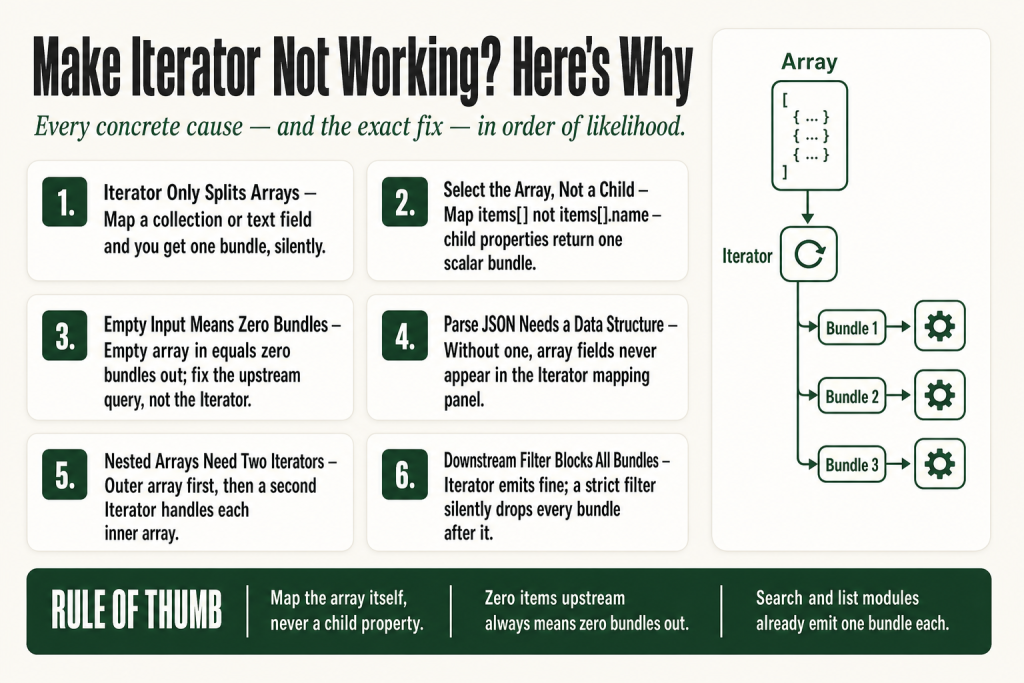
The 30-second answer
- Input is not an array. The Iterator only splits arrays. A collection or a plain text field produces no bundles or exactly one bundle.
- Wrong array field selected. You picked a property inside the array instead of the array itself. The panel shows
items[].namewhen you needitems[]. - Upstream module returned nothing. An empty array in equals zero bundles out. Verify the previous module actually found records.
- Parse JSON has no data structure. Without a defined data structure, the Parse JSON module does not expose your arrays for mapping.
- Nested array not reached. Your JSON has an array inside an array. You need a second Iterator for the inner level.
- Filter between Iterator and next module is too strict. The Iterator emits bundles fine, but a downstream filter blocks all of them.
- You don’t need an Iterator at all. Search and list modules already emit one bundle per record automatically.
Take this fix into your next scenario. The free Builder’s Companion Kit collects the checklists and templates that pair with this guide — so next time, you start from a template, not a blank page. Grab it free →
- How the Iterator Actually Works
- Arrays vs. Collections: The Core Confusion
- Selecting the Correct Array Field
- Empty Input Equals Zero Bundles Out
- Parse JSON and the Iterator: The Data Structure Trap
- Nested Arrays: When You Need a Second Iterator
- You May Not Need an Iterator at All
- Worked Example: HTTP Module, Parse JSON, and a Make Iterator Not Working Fix
- The Iterator Emits Bundles But They Disappear Downstream
- Specialized Iterators Built into App Modules
- FAQ
A make iterator not working problem tends to feel like a mystery: you set up the module, you run the scenario, and either nothing comes out or only one bundle appears where you expected ten. The Iterator itself rarely throws an error. It just sits there looking healthy while every module downstream runs zero times. This article walks through every concrete cause, in the order most likely to be your actual problem, and hands you the fix for each one.
How the Iterator Actually Works
The Iterator is a special type of module that converts an array into a series of bundles: each array item outputs as a separate bundle. Think of a vending machine that takes one bag of chips and dispenses each chip individually through a slot. The bag is your array. Each chip is a bundle. Modules downstream don’t see the bag; they see one chip at a time, and they run once per chip.
When a scenario receives a list as one bundle, most modules can only handle one item at a time. The Iterator splits that one bundle into N individual bundles. That’s the whole job. It does nothing else. So when the Iterator produces no bundles, or only one, the problem is almost always in what you fed it.
Before you read any further, run the scenario in test mode and click on the Iterator bubble. The output panel will show you exactly how many bundles it produced and what’s inside each one. That one step rules out half the causes below.
Arrays vs. Collections: The Core Confusion
This is the number-one reason an Iterator misbehaves, and it catches people constantly. Make has three data types that look similar in the mapping panel but behave completely differently.
A bundle represents a single record or row of data and is processed individually in a scenario, making it the smallest unit of data. A collection is a grouping of related fields. It allows you to manage multiple data items together. For example, various attributes related to a single email, such as date, size, and thread ID, can all be part of a collection. Arrays are structured lists of items, particularly useful when dealing with multiple entries such as email attachments. Each item in an array can be accessed using its index, which represents its position in the list.
The visual difference in the mapping panel: a collection looks like a folder with named fields inside it. An array looks like a folder with [] brackets in the label, for example attachments[] or items[]. The Iterator only works on arrays. If the value you map to the Iterator is not an array, the module will not be able to produce bundles correctly.
If you map a collection to the Iterator, you get one bundle containing that collection’s fields. If you map a plain text field, you get one bundle containing that text. Neither is wrong enough to throw an error. Both are wrong enough to break your scenario silently.
Fix: Open the Iterator, click into the Array field, and expand the output of the previous module. Look for a field whose label ends with []. That is your array. Select it at that top level, not a child field inside it.
Selecting the Correct Array Field
Even when you know you need an array, it’s easy to select the wrong one. The mapping panel is a tree, and arrays can be several levels deep.
Be careful to select the array itself, not a single property inside the array. For example, map items[], not items[1].name. Selecting a child property gives you a scalar value (a single name or ID), which the Iterator can only wrap in one bundle.
The practical check: after you save the Iterator configuration, look at the Array field. The mapped value should end with [] and should not include a dot-separated property name after it. If it reads something like {{1.items[].status}}, you’ve gone one level too deep. The correct mapping is {{1.items[]}}.
When setting up the Iterator, make sure you select the real array, not a single object. In the output of your previous module, look for fields marked as lists. Selecting a non-array field will cause the module to behave unexpectedly or fail.
Some app modules return multiple named arrays in one bundle. A Monday.com board response, for example, might contain items[], columns[], and updates[] as three separate arrays. If you need to process items, map items[] specifically. Mapping the wrong array gives you the wrong data, not an error.
Empty Input Equals Zero Bundles Out
The Iterator is not broken when it returns nothing and the upstream module returned nothing. It’s working exactly as designed. When an array is empty, the Iterator outputs nothing, so the flow does not continue. Zero items in, zero bundles out, and every module downstream is silently skipped.
This happens more than you’d expect. A search module finds no records. An HTTP call returns an empty list. A filter on the source module is too aggressive. The Iterator produces an empty array, you see a clean execution with no errors, and you wonder why nothing happened downstream.
How to diagnose it: Click the bubble on the module that feeds the Iterator, not the Iterator itself. Count the items in the array field. If it says [] or shows zero items, the Iterator has nothing to process. Fix the upstream query, not the Iterator.
What you can do when empty arrays are expected: If your scenario must continue even when the array is empty, you have two options. First, add a Router before the Iterator and use a separate path that handles the zero-items case. Second, use a Set Variable module with an ifempty() formula to substitute a default array. Both require the judgment call to be yours: what should happen when there’s nothing to process? Make won’t make that decision for you.
For more on how filters can quietly kill bundles before they reach any module, see Make Filter Not Working.
Parse JSON and the Iterator: The Data Structure Trap
This combination trips up a lot of people. You get a JSON string from an HTTP module or a webhook. You drop in a Parse JSON module. You attach an Iterator. The Iterator input shows up empty. Nothing works.
The usual culprit: the Parse JSON module has no data structure defined, so Make doesn’t know the shape of your JSON. Without a data structure, the Parse JSON module gives output in multiple bundles, but critically, the array fields inside that JSON are not surfaced as mappable arrays in downstream modules. When the Iterator tries to find the array, there’s nothing to select.
Fix this in three steps:
- Run the scenario once so Make receives a real sample payload.
- Open the Parse JSON module. Click “Generate” next to the Data Structure field. Make will infer the structure from the sample, including any arrays.
- Save, then open the Iterator. The array fields from your JSON will now appear in the mapping panel with
[]brackets.
If the JSON payload varies and “Generate” doesn’t capture all fields, you can create a data structure manually. Name it, add the fields you need, and mark list fields as arrays. It takes a few minutes up front and saves you a lot of confusion later.
For a full breakdown of why the Parse JSON output panel looks empty and how to fix it, see Make Parse JSON Not Working.
Nested Arrays: When You Need a Second Iterator
Your JSON has an array of orders, and each order has an array of line items. You iterate over orders fine. But inside each order bundle, the line items field is still an array, not individual bundles. You can’t map a line item field because it’s not been split yet.
This is the nested array problem. JSON can contain an array of objects, where each object includes a nested array. The goal of processing specific data from each nested item requires a second pass. The first Iterator handles the outer array. For each bundle that comes out, a second Iterator handles the inner array.
The pattern looks like this:
HTTP / Webhook
  └── Parse JSON
        └── Iterator 1 (outer array: orders[])
              └── Iterator 2 (inner array: orders[].lineItems[])
                    └── Process each line item
Avoid creating multiple nested Iterators unless you genuinely need to iterate over arrays inside arrays. Deep nesting makes scenarios harder to debug and can increase execution time. Before you nest, ask whether you can flatten the structure with a formula first. Sometimes map() or flatten() applied before the Iterator simplifies the whole scenario.
One practical cost note: every item in the array becomes a new execution path. Large arrays can trigger many operations in the rest of the scenario. Nested iterators multiply that. An outer array of 20 items, each with an inner array of 10 items, runs downstream modules 200 times. Make sure that’s what you actually need before you build it. For how operations accumulate in this kind of pattern, see Make Operations vs Credits.
You May Not Need an Iterator at All
This is the mistake I made myself early on. I added an Iterator after a Google Sheets “Search Rows” module because I wanted to process each row. The scenario ran, the Iterator produced one bundle per row, and everything worked. But it was unnecessary. When a Google Sheets “Search Rows” module finds 80 rows, it outputs 80 bundles, and every downstream module runs once per bundle automatically.
Search modules, list modules, and watch triggers already emit one bundle per record. Placing an Iterator after them doesn’t break anything, but it adds a module and changes the bundle structure in ways that can confuse your mapping downstream.
The rule of thumb: Use an Iterator when your data arrives as an array inside a single bundle. If the upstream module already emits separate bundles, skip the Iterator. Check the bubble on the previous module. If it shows “1 bundle” containing an array field, you need the Iterator. If it shows “10 bundles,” you don’t.
For a deeper comparison of what the Iterator does versus what an Aggregator does, and when to use each, see Make Iterator vs Aggregator.
Worked Example: HTTP Module, Parse JSON, and a Make Iterator Not Working Fix
Here’s a concrete scenario that combines all the common mistakes into one diagnostic sequence.
Setup: You call a REST API with an HTTP module. The response is a JSON object like this:
{
  "status": "ok",
  "results": [
    { "id": 1, "name": "Alpha" },
    { "id": 2, "name": "Beta" },
    { "id": 3, "name": "Gamma" }
  ]
}
Problem: Your Iterator shows 1 bundle or the Iterator input is empty.
Step 1: Check the HTTP module output. Click the HTTP module bubble. You should see one bundle. Expand it. Find the Data field (or Body, depending on your parse setting). If “Parse response” is off, the entire response is a raw string. Turn “Parse response” on, or feed the output to a Parse JSON module first.
Step 2: Set up Parse JSON correctly. Add a Parse JSON module. In the JSON String field, map the HTTP module’s raw body. Then click “Generate” next to Data Structure to build the structure from your sample payload. You should see Make detect status (text) and results[] (array of collections). Save.
Step 3: Configure the Iterator. Add an Iterator module after Parse JSON. Click into the Array field. You should now see results[] available. Select it at that top level. Do not select results[].id or results[].name.
Step 4: Verify bundle by bundle. After you save the Iterator, run the scenario in test mode so you can see what bundles it produces. The output of the Iterator should show one bundle per item. In this example you’d see 3 bundles. Click each one. Inspect one sample bundle in detail to understand the exact field names. Confirm that id and name are present and mappable.
Step 5: Check downstream modules. Confirm that bundles are actually reaching the next module. Review filters or routers that might be skipping all items. A filter set to “only continue if id is greater than 10” would silently drop all three bundles here.
The Iterator Emits Bundles But They Disappear Downstream
This one is particularly maddening. You click the Iterator bubble and see 5 bundles. You click the next module bubble and see 0 bundles or 0 operations. The Iterator is fine. Something between them is swallowing everything.
The usual suspects:
- A filter with an impossible condition. A filter set to check a field from the Iterator that doesn’t exist, or a field name with a typo, will always evaluate to false and drop every bundle. If you add modules downstream of a Filter but before an Aggregator, they only run on items that passed the filter. Double-check the field name the filter is reading and confirm it matches what the Iterator actually outputs.
- A router path that nothing can enter. If you’ve placed a Router after the Iterator, check each path’s filter conditions. A misconfigured path condition blocks everything. The related article on Make Router covers the fallback route and how to use it to catch bundles that no path claims.
- A module error that stops the bundle silently. If a module after the Iterator throws an error on the first bundle and your error handling is set to stop, subsequent bundles never run. Check the execution log for incomplete executions. The article on Make Incomplete Executions explains how to read and clear them.
The diagnostic move: temporarily remove or disable every filter and router between the Iterator and the next processing module. Run again. If bundles flow, add each filter back one at a time until you find the one blocking everything.
Specialized Iterators Built into App Modules
You don’t always need to add a standalone Iterator module. Many app modules include specialized iterators for your convenience. Gmail’s “Watch Attachments” module, for example, already splits attachments into individual bundles without a separate Iterator step. If you add a generic Iterator after one of these modules, you’re often wrapping an already-split stream, which produces one bundle containing one item instead of the cleaner direct output.
Before you reach for the Iterator, check whether the app module you’re using has a built-in iteration option. Look for modules labeled “List,” “Watch,” or “Search” in the app’s module list. When a module returns multiple records, it already outputs them as individual bundles, and every downstream module runs once per bundle automatically. Adding a manual Iterator on top is usually unnecessary and can complicate your mapping.
Where a dedicated Iterator does earn its place: after an HTTP module that returns a JSON array, after a Parse JSON module with a complex structure, or when you need to iterate over an array that’s a field inside a larger bundle rather than the bundle itself.
FAQ
why does my iterator show 1 bundle instead of multiple
You’ve most likely mapped a single property inside the array instead of the array itself. Open the Iterator config, look at the Array field, and confirm the mapped value ends with [] and has no dot-separated property after it. If it reads something like items[].name, change it to items[].
make iterator returns no bundles
Check the upstream module first. If the module feeding the Iterator returned an empty array, the Iterator has nothing to split and outputs zero bundles. Click the bubble on the previous module and count the items in the array field. If the array is empty, fix the upstream query, filter, or connection.
do i need an iterator if i use google sheets search rows
No. The Google Sheets Search Rows module already outputs one bundle per row it finds. Modules downstream automatically run once per bundle. You only need an Iterator when data arrives as an array field inside a single bundle, such as a JSON response from an HTTP call.
make parse json iterator empty input
The Parse JSON module needs a data structure defined before its array fields are visible in the Iterator mapping panel. Open Parse JSON, click Generate next to Data Structure after a test run, and Make will detect your arrays automatically. Then reopen the Iterator and the array fields will appear.
how do i iterate a nested array in make
You need two Iterator modules in sequence. The first Iterator splits the outer array into bundles. For each bundle, the second Iterator splits the inner array. Chain them: first Iterator, then any processing you need per outer item, then second Iterator, then processing per inner item. Be aware this multiplies your operation count.
iterator bundles not passed to next module
The Iterator is likely producing bundles correctly, but a filter or router between the Iterator and the next module is blocking them. Temporarily disable any filters and run again. If bundles flow, the filter condition is the problem. Check for field name mismatches or impossible conditions.
Sources:
Sources: Make Help Center: Iterator (official documentation); Make Apps Documentation: JSON modules; Make Community forum threads on iterator empty input and bundle-passing issues (community.make.com).
Brian Kasday spent forty years in direct-response marketing before rebuilding the whole operation as a one-person shop. He writes The Operator’s Library — including “The Missing Manual for Make” — for operators who’d rather build it themselves than wait on someone else.
Get the Builder’s Companion Kit — the free checklists and templates that pair with this guide: mmsvegas.com/make-resources.
This guide solves one Make problem. The Missing Manual for Make covers the production system. See the manual →
More Make guides
Free · Make Operator Toolkit
Running scenarios in Make?
Get the free operator toolkit — production checklists and the fixes that keep scenarios alive under real traffic, plus a note when this guide changes.
Get the free toolkit →