
Table of contents
- The 30-second answer: why your Make webhook is not triggering
- How a Make webhook actually fires a scenario
- First move: check the Logs tab to see if the request even arrived
- Cause 1: The schedule isn’t set to “Immediately”
- Cause 2: The webhook expired and returns 410 Gone
- Cause 3: The queue is full or draining too slowly
- Cause 4: You’re hitting the webhook rate limit (429)
- Cause 5: It fires, but no fields show downstream
- Cause 6: Runs collide because parallel processing is on
- Make webhook not triggering: the fast checklist
- Frequently asked questions
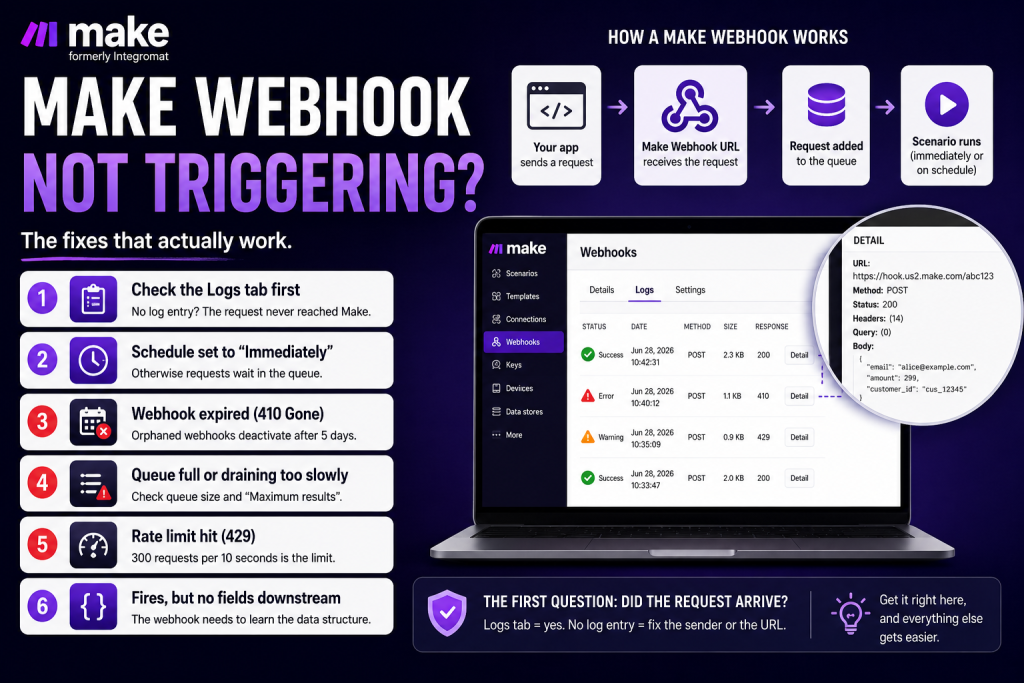
A Make webhook not triggering is one of the most common automation snags, and the question to answer first is simple: did the outside service’s request actually reach Make, or not? Everything downstream branches from that one fact. If the request never arrived, the problem is the sender or the URL. If it arrived but nothing happened, the problem is the schedule, the queue, or the scenario. Make gives you a Logs tab that settles the question in seconds.
This guide walks through how a webhook fires a scenario, then through the most common reasons a Make webhook stops triggering, in the order you should check them.
The 30-second answer: why your Make webhook is not triggering
If your Make webhook is not triggering, check these in order:
- Confirm the request arrivedopen the webhook’s Logs tab. No log entry means it’s a sender/URL problem, not a Make problem.
- The scenario’s schedule isn’t set to “Immediately,” so requests sit in the queue until the next interval instead of firing on arrival.
- The webhook expiredan orphaned URL deactivates after 5 days and returns 410 Gone.
- The queue is full (requests rejected) or draining slower than it fills.
- You exceeded the rate limit and Make is returning 429.
- It actually fired, but no fields appear downstream because the webhook hasn’t learned its data structure yet.
Also confirm the scenario is switched on. If the scenario is deactivated, incoming requests may appear to arrive, but the scenario will not execute them.
How a Make webhook actually fires a scenario
A webhook is a URL Make generates so an outside service can send data into a scenario. When Make receives a request at that URL, it stores the payload in the webhook’s queue and then either fires the scenario immediately or waits for the next scheduled run, depending on the schedule you set.
There are two flavors. App-specific webhooks are instant triggers in apps that support webhook-based events; Make registers the URL with the third party for you through the connection. Custom webhooks (the Webhooks > Custom webhook module) give you a URL like https://hook.us2.make.com/abc123 that you paste into the third-party service yourself. With a custom webhook, the most common “not triggering” cause is the dullest one: the URL was never pasted into the sender, or it was pasted with a typo. Verify the exact URL is registered on the sending side before anything else. For a deeper look at how webhooks work inside Make, see the Make webhooks explained guide.
First move: check the Logs tab to see if the request even arrived
Before you change anything in the scenario, find out whether the request reached Make. In the left sidebar, click Webhookspick the webhook, and open the Logs tab. Each entry shows status (success, warning, or error), a timestamp, and request size. Click Detail to see the full request, URL, method, headers, query params, body, and the response.
The Logs tab is the answer to “did the third party actually send the webhook?” A log entry means the request arrived and the problem is on Make’s side (schedule, queue, or a scenario error). No log entry means the request never arrived, go fix the sender or the URL. Note that logs are retained for 3 days on standard plans (30 on Enterprise), so check promptly.
Cause 1: The schedule isn’t set to “Immediately”
This is the most common reason a Make webhook seems to not be triggering when the requests are actually arriving fine. Every scenario has a schedule. If the webhook scenario’s schedule is set to a polling interval (every 15 minutes, hourly) instead of Immediatelyincoming requests pile up in the queue and get processed in batches when the interval fires, not the instant the request lands. To the outside it looks dead, then suddenly catches up.
Open the schedule (the clock icon in the bottom toolbar) and set it to Immediatelywhich is available for instant triggers and webhooks. If you do want batch processing on an interval, that’s fine, just know that’s why it isn’t firing on arrival, and size the batch correctly (next section). The Make scheduling explained guide covers the full set of interval options and how instant triggers interact with them.
Cause 2: The webhook expired and returns 410 Gone
Make automatically deactivates webhooks that aren’t connected to any scenario for more than 5 days (120 hours). “Disconnected” means you removed the trigger from the scenario, deleted the scenario without deleting the webhook, or otherwise orphaned the URL. After that window, the URL returns HTTP 410 Goneand if the third-party service doesn’t surface 410 errors visibly, you lose data silently while everything looks fine on your end.
Two defenses. Don’t orphan webhooks, when you delete a scenario, delete its webhook too. And for any URL embedded in a third-party service that needs to stay live, keep at least one scenario wired to it; even a near-empty scenario with just the trigger is enough to keep the webhook alive. If you suspect expiration, the Logs tab and the third party’s delivery logs will show the 410 responses.
Cause 3: The queue is full or draining too slowly
Every webhook has its own queue, and that queue has a hard cap that scales with your plan, roughly 667 items per webhook for every 10,000 credits per month, with an absolute ceiling of 10,000 items per webhook regardless of plan. When the queue is full, Make rejects incoming requests (the caller gets a 400 with “Queue is full”), so new events simply don’t get processed.
This happens when requests arrive faster than your schedule drains them. Two grounded fixes: increase the Maximum number of results on the webhook module (the default is usually 2, which is too low for production) so each run pulls more items from the queue, or change the schedule to fire more often. You can inspect and clear the queue under Webhooks → pick the webhook → the Queue tab, where you can also delete bad items you don’t want processed.
Cause 4: You’re hitting the webhook rate limit (429)
Make’s platform limit is 300 incoming webhook requests per 10-second interval, per webhook URL. Send more than that and the platform returns 429 Too many requestsso a burst of events can look like the webhook stopped triggering. This bites when a third party fires many events at once (Shopify can emit a burst on a single order if you’re subscribed to everything), when your own code calls Make in a tight loop, or when a webhook is carrying a high-frequency stream that really should be batched.
To scale past it, spread events across multiple webhooks (one per event type or region) or switch to a polling pattern where your scenario pulls from a queue you control instead of receiving a fire-hose. If the caller is well-behaved, a 429 just tells it to back off and retry, see the Make retry strategy guide for handling backoff cleanly. For more on how rate-limit errors surface and how to handle them, see the Make rate limit error (429) guide.
Cause 5: It fires, but no fields show downstream
Sometimes the webhook is triggering fine, but it looks broken because the mapping panel under the trigger shows only generic placeholders and downstream modules have nothing to map. A custom webhook doesn’t know the payload’s shape until it has seen one. The fix is the Determine data structure step: send a real sample payload to the URL (from the third-party service, or with curl/Postman) so Make captures it and infers the fields, or define the data structure manually if you know the schema in advance.
This is the same pattern as a Parse JSON module with no defined structure: send real data once, and the structure populates. For the full set of “fields aren’t showing” cases, see the companion guide on Make mapping fields missing.
Cause 6: Runs collide because parallel processing is on
By default, scenarios with instant triggers run in parallelif a previous request’s execution is still running, Make starts a new one anyway. That’s fast, but it introduces concurrency: two executions can read and write the same record at once, and the symptom often reads as “the webhook is doing the wrong thing” rather than not triggering. If order matters or downstream systems can’t handle concurrent writes, open scenario settings and turn on Sequential processing so Make finishes one execution before starting the next.
One related guardrail: if you use the Webhook response module, keep it last in the scenario for production. Placed in the middle, a downstream error won’t deactivate the scenario or notify you, because the caller already got a 200, so failures go silent. Pair early responses with explicit error handling.
Make webhook not triggering: the fast checklist
- Logs tab. Entry present → Make-side issue. No entry → sender or URL issue.
- URL + scenario on. Confirm the exact URL is registered with the sender and the scenario is switched on.
- Schedule. Set to “Immediately” if you expect instant firing.
- Expiration. Suspect a 410 if the URL was orphaned for 5+ days; re-wire and re-create if needed.
- Queue. Check the Queue tab; raise Maximum number of results or run more often if it’s backing up.
- Rate limit. Bursts over 300 per 10 seconds return 429; split webhooks or batch.
- Data structure. Send one sample payload so the fields populate downstream.
Worked top to bottom, this list resolves nearly every “my webhook stopped triggering” case, usually at step one, the moment you learn whether the request arrived.
Want the webhook and scheduling shortcuts in one place? Grab the free Builder’s Companion Kitreference cards, ready-to-import blueprints, and a cost estimator. Setting up a new automation stack? You can start a free Make account here.
Frequently asked questions
How do I know if my Make webhook received the request? Open Webhooks in the sidebar, select the webhook, and check the Logs tab. A log entry means the request arrived; click Detail to see the full request and response. No entry means it never reached Make, check the sender and the URL.
Why does my Make webhook only run on a schedule instead of instantly? The scenario’s schedule is set to a polling interval rather than “Immediately.” Open the schedule (clock icon) and choose Immediately so requests fire the scenario on arrival.
Why does my Make webhook URL return 410 Gone? Make deactivates webhooks orphaned from any scenario for more than 5 days, after which the URL returns 410. Keep at least one scenario wired to the webhook to keep it alive, and don’t delete a scenario without handling its webhook.
Why is Make rejecting my webhook requests? Either the queue is full (a 400 “Queue is full”), or you exceeded 300 requests per 10 seconds (a 429). Raise the Maximum number of results to drain the queue faster, run the scenario more often, or spread events across multiple webhooks.
My webhook fires but no fields show downstream, why? The custom webhook hasn’t learned its data structure. Send a real sample payload to the URL so Make infers the fields, or define the data structure manually.
Should I use Immediately or a polling schedule for webhooks? Use Immediately for near-real-time work; webhook-triggered scenarios consume credits only when an event actually causes modules to run. Use a polling interval only when you genuinely want to batch incoming requests.
Can a Make webhook not triggering cause incomplete executions to pile up? Yes, if requests arrive but the scenario errors out mid-run rather than never starting, Make parks them as incomplete executions. Check the Make incomplete executions guide to understand what they are and how to clear them.
Sources
This guide is grounded in The Missing Manual for Make (Chapter 7: Webhooks, Mailhooks, and Scheduling). Related reading: Make webhooksMake retry strategyand Make error handling.
Brian Kasday is a direct-response marketer with 40 years in the trade who rebuilt the entire marketing function as a one-person operation using modern AI and a few-dollars-a-day software stack. He writes The Operator’s Library for MMS Vegas.