
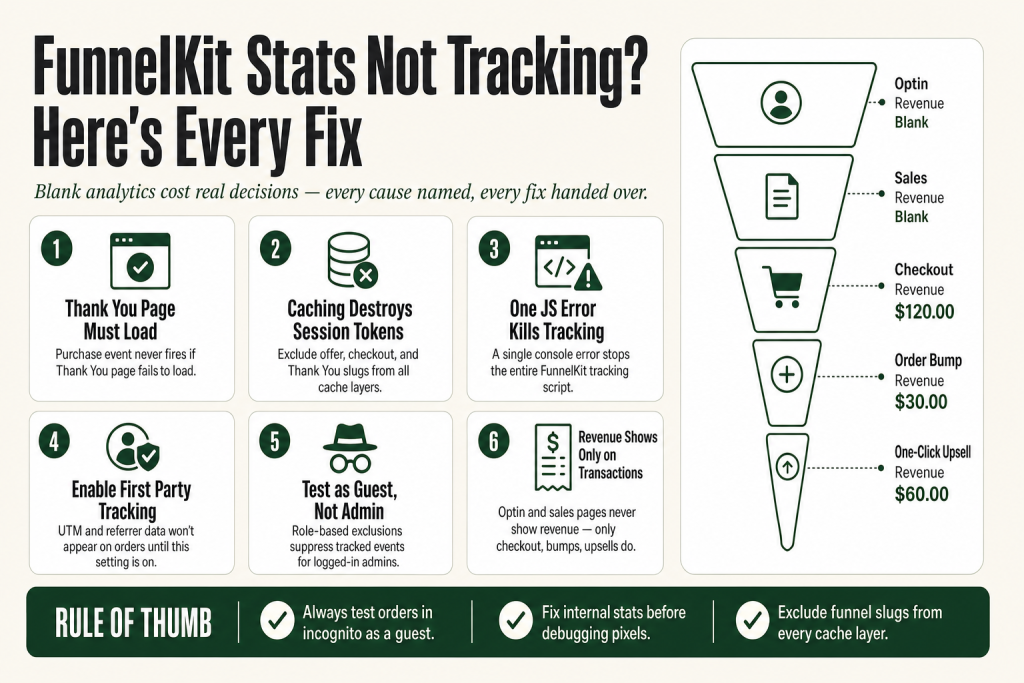
The 30-second answer
- Thank You page not loading correctly: if the buyer never reaches the FunnelKit or WooCommerce Thank You page, the purchase event never fires and no conversion is recorded.
- Caching serving a stale page: cached offer and Thank You pages break the session token FunnelKit needs to attribute the sale. Exclude those URLs from your cache plugin and host cache.
- JavaScript error on the page: a single JS conflict kills the entire tracking script. Open browser DevTools on your Thank You page and look for red errors.
- Cookies blocked by an ad blocker or consent plugin: GDPR plugins and ad blockers strip the cookies that carry UTM and referrer data before FunnelKit can read them.
- Purchase event disabled for a user role: if you test purchases while logged in as an admin, a role-based exclusion may be suppressing your own test data.
- First Party Conversion Tracking not enabled: UTM and referrer data will not appear on orders until you enable this setting at FunnelKit > Settings > First Party Tracking.
- Pixel ID wrong or missing: if the pixel, GA4 measurement ID, or Google Ads conversion label is incorrect, external platform events will not record even when internal stats are fine.
- Optin and Sales pages show no revenue, and that is expected: only Checkout, Order Bumps, and One-Click Upsells report revenue figures.
Take this fix into your next scenario. The free Builder’s Companion Kit collects the checklists and templates that pair with this guide — so next time, you start from a template, not a blank page. Grab it free →
- How FunnelKit Tracks Stats in the First Place
- The Thank You Page Is Not Loading Correctly
- Caching Is Stripping the Session Data FunnelKit Needs
- A JavaScript Error or Plugin Conflict Is Killing the Tracking Script
- Ad Blockers and Cookie Consent Plugins Are Blocking the Cookies
- Purchase Event Tracking Is Disabled for Your User Role
- The Pixel ID, Measurement ID, or Conversion Label Is Incorrect
- First Party Tracking Is Off and UTM Data Is Missing from Orders
- You Are Seeing Duplicate Events Instead of Zero Events
- Walkthrough: Diagnosing FunnelKit Stats Not Tracking from Scratch
- What FunnelKit Stats Cannot Do (and What You Have to Verify Yourself)
- FAQ
FunnelKit stats not tracking is one of those problems that hides in plain sight. Orders come in, revenue lands in WooCommerce, but the analytics dashboard sits at zero, or stops updating mid-month. You do not know whether your order bump is earning its keep, whether your upsell page converts better than the default, or where your traffic actually comes from. Blank numbers are not neutral. They cost you real decisions. This article names every cause and hands you the fix for each one.
How FunnelKit Tracks Stats in the First Place
Before you can fix a gap, you need to know what the system is actually doing. FunnelKit Funnel Builder records two separate types of data.
The first is internal funnel analytics: views, conversions, revenue, order bump revenue, and upsell revenue, all stored in your WordPress database and displayed inside FunnelKit’s Analytics tab. These numbers come from server-side events triggered when a buyer completes a step, they do not depend on any pixel or third-party platform. The analytics tab shows global data across your whole store, and you can filter down to a single funnel or compare periods side by side.
The second type is pixel and platform tracking: events sent to Facebook, Google Analytics 4, Google Ads, TikTok, Pinterest, and Snapchat via FunnelKit’s Pixel Tracking settings. These depend on JavaScript executing on the page and on cookies surviving the browser session.
Knowing which layer is broken saves you time. If your FunnelKit dashboard shows zeroes but WooCommerce shows paid orders, the internal recording pipeline has a problem. If your dashboard looks fine but Facebook or GA4 shows nothing, the issue is pixel-side only.
One fact that surprises people: opt-in pages and sales pages do not generate revenue figures in FunnelKit analytics, those steps simply do not produce transactions. Revenue columns appear only for Checkout steps, Order Bumps, and One-Click Upsells. If you are staring at a blank revenue column on your opt-in page, that is intended behavior, not a bug.
The Thank You Page Is Not Loading Correctly
This is the most common root cause. FunnelKit fires the purchase event when the buyer lands on the Thank You page (or on an active upsell offer page). If that page does not load, or if it redirects to a 404, a blank screen, or a custom page that does not use standard WooCommerce hooks, the event never fires and nothing gets recorded.
Three scenarios cause this:
- A custom Thank You page built outside of FunnelKit that skips the standard WooCommerce order-received hook.
- A broken redirect that sends the buyer somewhere other than the correct order-confirmation URL.
- A browser console error on the Thank You page that crashes the page before the tracking script runs.
The fix: place a test order as a guest in an incognito window, follow the checkout through to the Thank You page, and confirm the page actually loads. Then open browser DevTools (F12), click the Console tab, and look for red errors. Any JavaScript error there is a candidate for your tracking gap.
If the Thank You page loads but tracking still fails, read the section on JS conflicts below. If the page does not load at all, the FunnelKit Thank You Page Not Showing guide covers every reason that redirect can break.
Caching Is Stripping the Session Data FunnelKit Needs
Caching is the second-biggest cause of blank FunnelKit stats. The problem is specific: FunnelKit’s upsell offer pages carry a session parameter (wfocu-key) in the URL. When a caching plugin or managed host serves a cached copy of that page, it strips that parameter and breaks the session that connects the offer acceptance to the original order. No session, no conversion recorded.
Managed WordPress hosts, including WP Engine, Cloudways, Kinsta, and Flywheel, cache pages by default at the server level, often regardless of what your WordPress caching plugin does. Your caching plugin settings alone may not be enough.
What to exclude from caching:
- Your FunnelKit upsell offer page slug (check the current slug at FunnelKit > Settings > General > Permalink). The default slug is
offerso excluding any URL containing/offer*covers the pattern. - Your checkout page slug.
- Your Thank You page slug.
Every major caching plugin (WP Rocket, W3 Total Cache, WP Super Cache, LiteSpeed Cache) has an exclusion field. Add the slug patterns there. Then contact your host’s support to confirm server-level exclusions, especially if you are on a managed host.
After you update caching exclusions, place a fresh test order in incognito mode and check whether the conversion appears in FunnelKit’s Conversion Activity feed before you assume the problem is fixed.
A JavaScript Error or Plugin Conflict Is Killing the Tracking Script
FunnelKit’s purchase event fires via JavaScript. One unrelated plugin error on the same page can stop the entire script before it reaches the tracking call. This is the silent killer: everything looks fine on the surface, the page loads, the buyer sees a confirmation, but the event never fires.
How to diagnose it: open the Thank You page URL in your browser while logged out (or in incognito), open DevTools (F12 or right-click > Inspect), and check the Console tab for red errors. Any uncaught JavaScript exception is a suspect.
Common culprits are optimization plugins that minify or combine JavaScript files (merge order matters), security plugins that block inline scripts, and third-party tracking plugins that also inject code on WooCommerce order-received pages.
The fastest isolation method is the WordPress Health Check plugin. Enable it, switch to a default theme, and deactivate all plugins except FunnelKit and WooCommerce. Place a test order. If stats record, re-enable plugins one by one until the problem returns. That is your conflict.
If you also run an external Google Analytics plugin alongside FunnelKit, you may see duplicate purchase events rather than zero events. FunnelKit’s own docs note that if you use an external plugin for GA tracking, you should disable the purchase event in that external plugin to avoid sending the data twice.
Ad Blockers and Cookie Consent Plugins Are Blocking the Cookies
This one affects pixel-side tracking (Facebook, GA4, Google Ads) more than it affects FunnelKit’s internal stats, but it is worth separating clearly.
If cookies are blocked by the browser, events cannot be sent to Facebook or other tracking platforms. GDPR consent plugins, when configured to block non-essential cookies until the user opts in, can silently suppress pixel fires. Ad blockers do the same thing, and many browsers now apply tracking prevention by default.
FunnelKit’s First Party Conversion Tracking (enabled at FunnelKit > Settings > First Party Tracking) stores UTM parameters and referrer data using first-party cookies. If that setting is not enabled, none of that attribution data appears on your WooCommerce orders, even when the checkout itself works perfectly. Enable it, save, then place a test order with a UTM-tagged URL to verify the data shows up under the order details.
For pixel tracking, the practical reality is that a share of your real buyers will always have cookies blocked or ads blocked. FunnelKit’s Conversion API integration for Facebook is the server-side alternative that does not rely on browser cookies at all. If pixel match quality is your concern, that is the path, but diagnosing cookie consent issues is outside the scope of the plugin’s own support.
Purchase Event Tracking Is Disabled for Your User Role
This one catches people who run their own test purchases while logged in. FunnelKit supports disabling purchase event tracking for specific user roles, and some setups implement this intentionally for administrator or shop manager roles to keep internal test transactions out of analytics. If you or a developer added that exclusion, your logged-in test purchases will never appear in stats.
The fix is simple: always run test purchases in incognito mode as a guest. That eliminates the user role variable entirely. If events appear in incognito but not when logged in, you have a role-based exclusion in place.
You can also check whether any custom code in your functions.php or via the Code Snippets plugin is hooking into FunnelKit’s tracking filter to suppress events for certain roles. If that code is unintentional, remove it. If it is intentional, keep running tests as a guest.
The Pixel ID, Measurement ID, or Conversion Label Is Incorrect
FunnelKit’s pixel events live or die on the ID you enter in settings. A transposed digit in a Facebook Pixel ID, a wrong GA4 Measurement ID, or an incorrect Google Ads Conversion Label means the event fires but lands in a dead end, or someone else’s account.
Navigate to FunnelKit > Settings > Pixel Tracking and double-check each ID against the values shown in your actual ad platform or analytics account. Copy-paste rather than retyping. Also confirm the events you want to track are individually enabled inside that settings section, FunnelKit lets you toggle which events (purchase, checkout, add-to-cart, and so on) are active for each platform.
If you run multiple funnels for different brands or clients, FunnelKit allows you to override the global tracking IDs for a specific funnel. Check that a per-funnel override has not been set to a stale or incorrect ID for the funnel you are troubleshooting.
First Party Tracking Is Off and UTM Data Is Missing from Orders
You run an email campaign or a paid ad. Someone clicks. Someone buys. You go to the WooCommerce order and there is no source, no UTM, no referrer. This is not a bug, it is a setting that is not enabled.
FunnelKit’s First Party Conversion Tracking feature passes UTM parameters and referrer data along with the transaction when a buyer checks out. Without it enabled, that attribution chain is never captured. Go to FunnelKit > Settings > First Party Trackingenable conversion tracking, and save.
Once enabled, you can verify it by opening any order in WooCommerce that was placed with a UTM-tagged URL, the Conversion Tracking section in the order details will show source, medium, campaign, content, and term. You can also see aggregated referrer data across all orders by going to FunnelKit > Analytics > Referrers.
Keep in mind that this first-party data is separate from what your GA4 or Facebook dashboards show. Discrepancies between FunnelKit’s internal referrer data and your ad platform’s attribution are expected, every platform counts conversions differently. The FunnelKit number is what actually happened on your server. The ad platform number reflects its own attribution model.
You Are Seeing Duplicate Events Instead of Zero Events
The opposite problem also happens: stats record twice. If you have a separate Google Analytics plugin or a Facebook plugin running alongside FunnelKit’s built-in pixel tracking, both will fire a purchase event when the Thank You page loads. You end up with inflated conversion numbers that do not match actual orders.
FunnelKit’s own docs are direct about this: if you use an external plugin for Google Analytics tracking, disable the purchase event tracking in that external plugin. FunnelKit handles end-to-end pixel tracking on its own and the two systems do not coordinate.
There is also a legitimate scenario where two Facebook purchase events fire within a single order: FunnelKit fires one event when the primary order is placed, and a second when the buyer accepts a upsell offer on the next step. That is intentional design, not a bug. If you want to suppress the event on the offer page, FunnelKit provides documentation on how to disable it for that specific step. This is also relevant context if your one-click upsell stats look inflated relative to the checkout conversion count.
Walkthrough: Diagnosing FunnelKit Stats Not Tracking from Scratch
Here is the sequence to run when you open the analytics tab and see nothing.
- Confirm WooCommerce has paid orders in the date range you are viewing. Open WooCommerce > Orders and filter by the same date range. If orders are there and FunnelKit shows zero views and zero conversions, the pipeline is broken at the recording step.
- Check your date filter. FunnelKit’s analytics tab has a date range selector. It is easy to have it set to a period with no traffic. Set it to “Last 30 days” and confirm you have volume.
- Place a fresh test order in incognito mode as a guest. Go through the full flow: checkout, any offer pages, Thank You page. Watch whether the Thank You page actually loads. Open DevTools and check for JS errors in the Console tab.
- Check Conversion Activity immediately after your test order. Go to FunnelKit > Analytics > Conversion Activity. Your test transaction should appear within seconds if the internal recording is working. If it does not, the issue is between the Thank You page and the database write.
- Check caching. After your test, clear all caches (plugin cache, host cache, CDN cache) and repeat the test order. If it now records, caching was the problem, configure your exclusions.
- Deactivate and reactivate plugins one at a time if the problem persists. Use WordPress Health Check’s troubleshooting mode to isolate the conflict without taking your site offline.
- Verify pixel IDs only after the internal stats are confirmed working. External platform gaps are a separate problem from blank FunnelKit dashboard data.
If your checkout itself is not completing properly, stats will obviously be empty because there are no conversions to record. Start with the FunnelKit Checkout Not Loading guide first in that case. Similarly, if cart abandonment data is also missing, the FunnelKit Cart Abandonment Not Tracking guide covers the additional tracking layer specific to that feature.
What FunnelKit Stats Cannot Do (and What You Have to Verify Yourself)
Be clear-eyed about the limits before you spend time debugging something that is not actually broken.
- FunnelKit cannot control how events appear in your ad platform or analytics dashboard. The plugin fires the event. What the receiving platform does with it, attribution windows, deduplication, reporting delays, is outside FunnelKit’s scope.
- Historical data is not retroactively filled. If tracking was broken for two weeks and you fix it today, those two weeks stay blank. Stats accumulate from the moment tracking works correctly.
- The FunnelKit Funnel Builder analytics feature is included in paid plans. Verify your plan covers the analytics features you expect, the Plus package and above include the detailed per-step analytics that show order bump and upsell revenue separately.
- FunnelKit Automations has its own separate analytics dashboard for email and SMS campaigns, showing opens, clicks, orders placed, and revenue from automation-triggered emails. If automation-driven revenue is not appearing there, that is a different layer from funnel conversion stats, check the FunnelKit Automation Not Triggering guide if your automations are also misbehaving.
The judgment call on whether your numbers are accurate, weighing FunnelKit’s internal data against what GA4 and your ad platform report, stays with you. The tools give you data. Reading that data critically is your job.
FAQ
Why does my FunnelKit analytics show zero conversions even though WooCommerce shows paid orders?
The most likely cause is that buyers are not reaching the FunnelKit or WooCommerce Thank You page, so the purchase event never fires. A JavaScript error on that page, a bad redirect, or a caching plugin serving a stale page can all cause this. Place a test order in incognito mode, follow the full flow to the Thank You page, and check your browser’s DevTools console for JS errors.
Why is there no UTM or referrer data on my WooCommerce orders from FunnelKit?
First Party Conversion Tracking is not enabled. Go to FunnelKit > Settings > First Party Tracking and enable it. Once enabled, UTM parameters and referrer information are captured and stored with each order. Orders placed before you enable this setting will not be back-filled.
Why do my FunnelKit optin and sales pages show no revenue in analytics?
That is expected behavior, not a bug. FunnelKit only reports revenue for Checkout steps, Order Bumps, and One-Click Upsells, the steps where transactions actually happen. Optin pages and sales pages do not generate revenue columns.
FunnelKit stats track fine when I test as a guest but not when I am logged in as admin. Why?
Purchase event tracking can be disabled for specific user roles. If you or a developer added a role-based exclusion for administrators, your logged-in test purchases will not appear in analytics. Always test purchases in incognito mode as a guest to get a clean result.
Could caching really cause FunnelKit stats to stop tracking?
Yes, and it is one of the most common causes. FunnelKit’s upsell offer pages use a session parameter in the URL. When a cache plugin or managed host serves a cached version of that page, it can destroy the session FunnelKit needs to attribute the sale. Exclude your offer page slug, checkout page slug, and Thank You page slug from all caching layers including your host’s server-level cache.
I see double purchase events in Facebook or GA4. Is FunnelKit broken?
Probably not. If you run a separate tracking plugin alongside FunnelKit’s built-in pixel integration, both fire a purchase event on the Thank You page. Disable the purchase event in your external plugin and let FunnelKit handle it. There is also a legitimate scenario where two events fire when a buyer accepts a one-click upsell, that is by design, and FunnelKit documents how to turn off the offer-page event if you prefer not to count it.
Sources:
Sources consulted: FunnelKit Funnel Builder Analytics documentation; Funnels (Global Analytics); Conversion Activity; Analytics Dashboard; Reasons Why FunnelKit Events Are Not Tracking; First Party Conversion Tracking; Google Analytics (Pixel Tracking); Global Settings (General); Permalinks; WordPress Caching Plugins and Hosting Compatibility; Disable Purchase Event Tracking for a Specific Funnel; Why Two Facebook Purchase Events Occur; Track Custom Purchase Event Tracking; FunnelKit Changelog; FunnelKit Automations Analytics Dashboard. All documentation verified August 2026.
Brian Kasday spent forty years in direct-response marketing before rebuilding the whole operation as a one-person shop. He writes The Operator’s Library — including “The Missing Manual for FunnelKit” — for operators who’d rather build it themselves than wait on someone else.
Get the Builder’s Companion Kit — the free checklists and templates that pair with this guide: mmsvegas.com/op/funnelkit-resources/.
This guide fixes one FunnelKit step. The Missing Manual for FunnelKit covers the whole checkout system. See the manual →
More FunnelKit guides
Free · FunnelKit Operator Toolkit
Building checkouts in FunnelKit?
Get the free operator toolkit — order-bump templates, checkout checklists, and a note when what you just read changes.
Get the free toolkit →