The 30-second answer
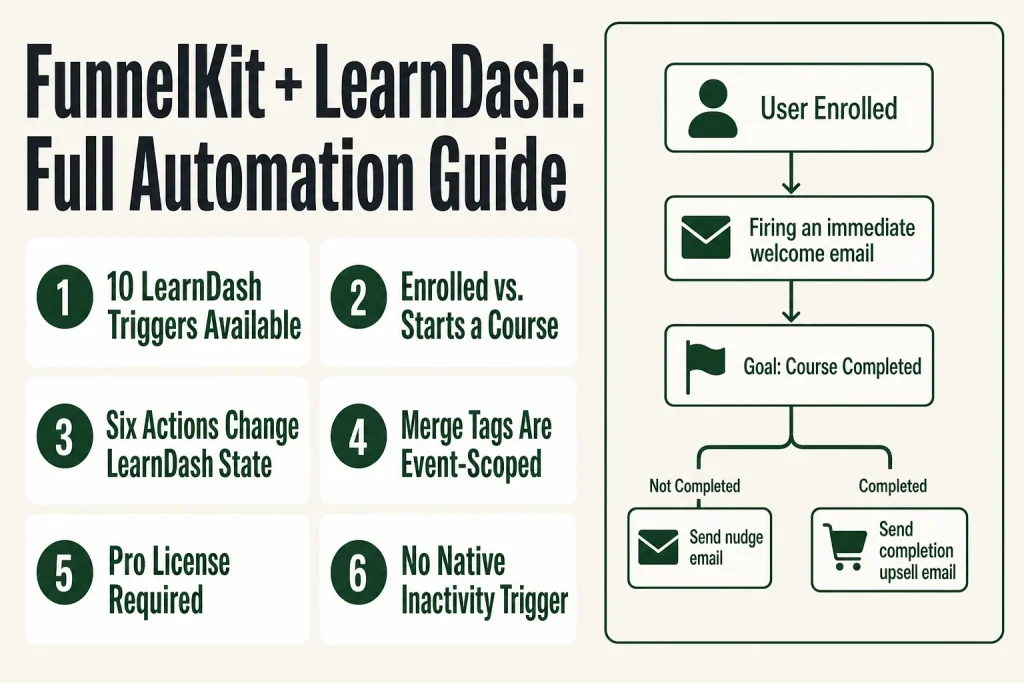
- LearnDash triggers in FunnelKit Automations Pro: User Enrolled in a Course, User Removed from a Course, User Completes a Course, User Completes a Lesson, User Completes a Topic, User Completes a Quiz, User Added to Group, User Removed from Group, User Course Access Expired, and User Starts a Course (the most recent addition, fires on first activity only).
- LearnDash actions you can run: Enroll user into a course, Remove user from course, Add user to group, Remove user from a group, Reset course progress, Reset quiz attempts.
- Key merge tags:
{{ld_candidate_name}},{{ld_course_name}},{{ld_lesson_name}},{{ld_quiz_name}},{{ld_quiz_percentage}},{{ld_quiz_highest_points}},{{ld_enrolled_courses}},{{new_user_password}}. - Requires FunnelKit Automations Pro. The free tier does not include LearnDash integration.
- Build sequence: Go to Automations (Next Gen), click Add New, choose Start from scratch, name it, click Select Trigger, pick your LearnDash event, then add actions and delays.
- “User Starts a Course” vs. “User Enrolled”: Enrolled fires on enrollment (including bulk imports). Starts a Course fires only on first actual course activity. Use the right one or you will double-fire sequences.
Take this fix into your next scenario. The free Builder’s Companion Kit collects the checklists and templates that pair with this guide — so next time, you start from a template, not a blank page. Grab it free →
- What You Need Before You Start
- Every FunnelKit LearnDash Trigger Explained
- LearnDash Actions You Can Run Inside Any Automation
- LearnDash Merge Tags and What Each One Pulls
- Worked Example: Build a funnelkit learndash Enrollment and Completion Sequence
- “User Enrolled” vs. “User Starts a Course”: Which to Use
- What FunnelKit Cannot Do Here (and What to Verify)
- If You Are Selling Courses Through WooCommerce
- FAQ
FunnelKit LearnDash automation is the part of your course business that never sleeps. A student enrolls at 2 a.m., and the welcome email is already in their inbox before they close the tab. A student finishes a quiz on a Tuesday, and your upsell sequence starts Wednesday morning. None of that happens unless you understand which triggers exist, what they actually fire on, and how to wire them into emails that do something useful. This guide covers all of it, with verified trigger names, the full merge-tag list, and a worked walkthrough for the most common sequence operators actually need.
What You Need Before You Start
You need three things in place before any FunnelKit LearnDash trigger will fire.
- LearnDash LMS installed and active on your WordPress site.
- FunnelKit Automations Pro. The free tier does not include plugin integrations. LearnDash is listed under third-party integrations, which are Pro-only.
- A connected sending service. Triggers fire correctly even without one, but emails will not go out until your sender is configured. If you have not done that yet, see FunnelKit Sending Service: How to Connect an Email Provider to FunnelKit Automations first.
You do not need WooCommerce for the LearnDash triggers to work, but if you are selling courses as WooCommerce products (the most common setup), the enrollment trigger fires after LearnDash grants access based on order status. Verify which order statuses grant enrollment by going to LearnDash LMS > WooCommerce and checking the Enrollment Status list. That setting controls whether a “processing” order enrolls the student or whether you wait for “completed.”
Every FunnelKit LearnDash Trigger Explained
FunnelKit Automations gives you ten LearnDash triggers. Here is what each one actually does and when to use it.
User Enrolled in a Course
Fires the moment LearnDash grants course access. This is your welcome-sequence trigger. It also fires during bulk re-enrollment operations, so if you ever run a mass-enrollment sync, every enrolled contact will enter this automation. Plan for that or add a condition to suppress duplicates.
User Starts a Course
Added in FunnelKit Automations 3.8.1, this trigger fires only on the very first course activity for a contact, not on enrollment and not on every later course they pick up. If you want to send a “great, you actually started!” sequence that is distinct from the enrollment email, this is the cleaner trigger. Enrollment fires when access is granted; this one fires when the student clicks into the content.
User Completes a Course
Fires when LearnDash marks the course complete. Use this for certificates, congratulations emails, upsells to the next course, and re-engagement sequences for students who might drift. This is the right place to offer an upgrade or the next course in a series.
User Completes a Lesson
Fires per lesson. Useful for drip-style encouragement or unlocking bonus content. Be careful: if your course has thirty lessons and you attach a sequence to this trigger, you will generate a lot of automation entries per student. Add a condition to filter by specific lesson if you only want to fire on key milestones.
User Completes a Topic
Same logic as lesson completion, but at the topic level. Usually only worth wiring up if a specific topic is a decision point (like a prerequisite check or a module that unlocks paid content).
User Completes a Quiz
Fires when a quiz is submitted. You have quiz-specific merge tags here: {{ld_quiz_name}}, {{ld_quiz_percentage}}, and {{ld_quiz_highest_points}}. A common use: branch on the score. Students above a threshold get a congratulations email; students below get encouragement and a link to try again.
User Course Access Expired
Added in FunnelKit Automations 3.7.0. This fires when LearnDash marks a student’s access as expired (time-limited course access). Use it to send a re-enrollment offer, a subscription renewal prompt, or simply a “your access has ended” notice. If you sell with WooCommerce Subscriptions or Sublium, pair this with your subscription-lapse automations.
User Added to Group / User Removed from Group
Group triggers let you fire sequences when a student joins or leaves a LearnDash group, which is useful for cohort-based courses or team licensing. As of FunnelKit Automations 3.7.0, there is also a Group field available on all LearnDash events, so you can filter any trigger by group.
User Removed from a Course
Fires when access is revoked, whether manually or by automation. Pair this with a win-back email or a survey asking why they left.
LearnDash Actions You Can Run Inside Any Automation
Beyond sending emails, FunnelKit Automations can reach back into LearnDash and change enrollment state. These actions work inside any automation, not just LearnDash-triggered ones. You could trigger them from a WooCommerce purchase, a tag change, or a webhook.
- Enroll user into a course: Grants course access programmatically. The student must already be a WordPress user for this to attach to an account.
- Remove user from course: Revokes access. Use it when a subscription lapses, a refund is processed, or as a cleanup after a cohort closes.
- Add user to group: Adds the contact to a LearnDash group. The group must already exist in LearnDash before you reference it here.
- Remove user from a group: Removes group membership without necessarily revoking individual course access.
- Reset course progress: Wipes progress data for a course. Useful when you want to let a student restart, or when you have sold a course retake. This is irreversible inside the automation, so scope it carefully.
- Reset quiz attempts: Clears attempt history for a quiz so the student can retake it fresh.
You can also manually add contacts to LearnDash-triggered automations from the contact profile inside FunnelKit’s CRM, which is useful for backfilling students who enrolled before you built the automation. See FunnelKit Automation Logs: How to Debug Stuck or Failed Actions if actions run but nothing changes in LearnDash, that log view is where enrollment failures surface.
LearnDash Merge Tags and What Each One Pulls
These merge tags are event-based: they are only available in automations triggered by the matching LearnDash event. Using a quiz merge tag in an enrollment email will return blank output because there is no quiz context. If you are seeing blank merge tags, check FunnelKit Merge Tags Not Working: Blank Output, Literal Text, and Wrong Values Fixed.
{{ld_candidate_name}}: The student’s name as stored in LearnDash.{{ld_course_name}}: The name of the course that triggered the event.{{ld_lesson_name}}: The lesson name. Available on lesson-completion triggers.{{ld_topic_name}}: The topic name. Available on topic-completion triggers.{{ld_quiz_name}}: The quiz name. Available on quiz-completion triggers.{{ld_quiz_percentage}}: The student’s score as a percentage.{{ld_quiz_highest_points}}: The highest points the student has scored on that quiz across all attempts.{{ld_enrolled_courses}}: A list of all courses the contact is currently enrolled in. Useful in re-engagement emails or upsell copy.{{ld_group_name}}: The name of the group involved in a group trigger.{{ld_group_leader_emails}}: Email address(es) of the admin or leader(s) of a particular group.{{ld_group_leaders}}: Names of the admin or leader(s) of a particular group.{{new_user_password}}: Generates a one-time password. Use this in enrollment emails for new users who need account credentials. Enable “save password in plain text for one-time use” in the Create User action for this tag to populate.
FunnelKit also introduced an Enrolled Course IDs merge tag that dynamically pulls course IDs for the contact’s current enrollments, which is useful if you are building conditional logic or passing data to external systems via webhook.
Worked Example: Build a funnelkit learndash Enrollment and Completion Sequence
Here is the sequence most course operators need first: a welcome email on enrollment, a progress nudge if the student has not completed within a set window, and an upsell when they finish. This is two automations, not one, so you can manage them independently.
Automation 1: Enrollment Welcome
- Go to Automations (Next Gen) in your WordPress menu and click Add New.
- Click Start from scratch and name it something like “LearnDash: Course Welcome.”
- Click Select Trigger, choose the LearnDash category, and select User Enrolled in a Course.
- Select the specific course from the dropdown, or leave it set to all courses if this is a global welcome. Click Done.
- Add a Send Email action. In the subject line and body, use
{{ld_candidate_name}}and{{ld_course_name}}to personalize. If the student is a new WordPress user who needs login credentials, include{{new_user_password}}here. - Optionally, add an Add Tag action after the email to flag this contact as enrolled for use in FunnelKit lists and tags segmentation later.
- Set the automation to Active.
Automation 2: Completion Upsell
- Create a second automation with the trigger User Completes a Course, scoped to the same course.
- Add a Send Email action immediately: congratulations, here is what they can do next.
- Add a Delay of two or three days.
- Add a second Send Email action with your next-course offer or a discount coupon for the upgrade.
- Optionally, use an Enroll user into a course action if you want to auto-grant access to a free bonus course on completion.
Optional: Progress Nudge for Stalled Students
This is trickier because FunnelKit does not have a native “student has not completed by date X” trigger. The common workaround: use the enrollment trigger to start a delayed sequence, then add a Goal step (available in Pro) set to “User Completes a Course.” If the student completes before the nudge fires, the goal exits them from the sequence cleanly. If they do not complete, the nudge sends. This is the right pattern rather than trying to build a time-based inactivity check from scratch.
If your delays are not firing as expected, check FunnelKit Delay Not Working: Why Contacts Are Stuck Waiting before you assume a trigger problem.
“User Enrolled” vs. “User Starts a Course”: Which to Use
This is the most common mistake in FunnelKit LearnDash setups, and it costs you duplicated emails.
“User Enrolled in a Course” fires when LearnDash records enrollment. That includes bulk admin enrollments, manual enrollment from the contact profile, and any enrollment sync you run from LearnDash LMS > WooCommerce. If you run a mass sync against existing orders, every student in that sync enters the enrollment automation. For most operators that is not what you want after launch.
“User Starts a Course,” introduced in version 3.8.1, fires only on the very first course activity. It does not fire on enrollment, and it does not fire again when the student picks up a second course. This makes it cleaner for “you actually started, here is how to get the most out of this” sequences that should feel personal rather than transactional.
A practical split: use “User Enrolled” for the account-credentials and access-confirmation email (which needs to go out immediately regardless of whether they start). Use “User Starts a Course” for the onboarding sequence that walks them through how to navigate the course. That way a student who enrolls but never starts does not get five onboarding emails about a course they never opened.
What FunnelKit Cannot Do Here (and What to Verify)
Be honest with yourself about these limits before you over-engineer the setup.
- No native inactivity trigger. FunnelKit does not fire an event when a student has been inactive for X days. The Goal-block workaround described in the walkthrough section is the closest you get without custom code or a third-party plugin.
- Merge tags are event-scoped. You cannot pull quiz data into an enrollment email because the quiz event has not happened yet. Plan your merge tags against the trigger event, not the contact’s full history.
- Group field requires 3.7.0 or later. If you are on an older version of FunnelKit Automations Pro and do not see a group filter on LearnDash triggers, update the plugin.
- “User Starts a Course” requires 3.8.1 or later. This trigger is not available on older plugin versions.
- LearnDash must grant enrollment before the trigger fires. If students are enrolling but the trigger is not firing, check the order status settings in LearnDash LMS > WooCommerce first. The trigger cannot fire until LearnDash records enrollment.
- The free tier does not include LearnDash. Plugin integrations, including LearnDash, are Pro-only in FunnelKit Automations.
If your automation is not triggering at all, the diagnostic path is: verify the trigger is active, confirm the student has a matching WordPress user account, and check the automation log. See FunnelKit Automation Not Triggering? How to Find Why It Won’t Fire for the full diagnostic process.
If You Are Selling Courses Through WooCommerce
LearnDash with WooCommerce is the most common setup: each course is a WooCommerce product, the student buys it at checkout, and LearnDash grants access when the order hits the right status. FunnelKit Funnel Builder sits on top of that checkout, and FunnelKit Automations fires on the LearnDash enrollment event (not on the WooCommerce order event) for course-specific sequences.
This matters because you likely have two parallel automation layers: one fired by WooCommerce order events (order confirmation, receipt, post-purchase follow-up), and one fired by LearnDash enrollment events (welcome to the course, credentials, onboarding). Do not duplicate. The WooCommerce order confirmation email should cover the purchase receipt. The LearnDash enrollment email should cover course access and next steps. Sending both from the same trigger means the student gets two similar emails in the same minute.
If you are selling course subscriptions, the “User Course Access Expired” trigger is where you catch lapsed subscribers. Pair it with a renewal offer email and, if you want, a “Remove user from course” action to revoke access after a grace period. For the subscription side of that setup, see FunnelKit WooCommerce Subscriptions: What Works and What to Test.
If you are using FunnelKit’s sales funnel to sell the course, a one-click upsell at checkout is a natural fit: the student buys Course A, and you offer Course B at a discount on the thank-you step. After they accept, an enrollment automation fires for Course B automatically because the order triggers LearnDash enrollment. You do not need a separate action to enroll them. The funnel handles the sale; LearnDash handles enrollment; FunnelKit Automations fires the welcome email. Each tool does one job.
FAQ
does funnelkit learndash integration require woocommerce
No. The FunnelKit Automations triggers fire on LearnDash events directly, without WooCommerce in the picture. You need WooCommerce only if you are selling the courses as WooCommerce products. If you are granting access manually or through a membership plugin, the enrollment trigger still fires.
what is the difference between user enrolled and user starts a course in funnelkit
“User Enrolled in a Course” fires when LearnDash records enrollment, including bulk admin enrollments and sync operations. “User Starts a Course” (added in Automations 3.8.1) fires only on the first actual course activity. Use enrollment for credentials and access confirmation, and use starts-a-course for the onboarding sequence so students who enroll but never start do not get irrelevant emails.
how do i send a one-time password to a new learndash student in funnelkit
Add a Create User action before your Send Email action. In the Create User action, set the role to match your course access role and enable the option to save the auto-generated password in plain text for one-time use. Then use the {{new_user_password}} merge tag inside your enrollment email body. The tag will not populate if the Create User action is missing or if the contact already has a WordPress account.
can funnelkit send an email when a student fails a quiz
Not natively by pass/fail status. The “User Completes a Quiz” trigger fires on quiz submission regardless of score. You can use the {{ld_quiz_percentage}} merge tag to show the score, and you can add a condition step in a Pro automation to branch on the percentage value, sending different email content to high scorers and low scorers.
funnelkit learndash trigger not firing, what should I check
Start with three checks: (1) Confirm the student has a WordPress user account, because enrollment attaches to a user account and without one there is nothing to trigger on. (2) Check LearnDash LMS > WooCommerce Enrollment Status to confirm the order status actually grants enrollment. (3) Open the FunnelKit automation log to see whether the trigger fired but an action failed, or whether the trigger never registered at all.
is funnelkit learndash automation available on the free plan
No. Plugin integrations, including LearnDash, are available only in FunnelKit Automations Pro. The free tier covers basic WooCommerce and email actions, but third-party plugin integrations require a Pro license.
Sources:
Sources: FunnelKit Automations official LearnDash documentation; FunnelKit Automations 3.8.1 release notes (User Starts a Course trigger); FunnelKit What’s New changelog (3.7.0 User Course Access Expired and Group field); FunnelKit LearnDash WooCommerce integration guide; FunnelKit LearnDash Notifications guide; FunnelKit Lite vs Pro feature comparison. All trigger names, action names, and merge tag strings verified against live FunnelKit documentation as of November 2026.
Brian Kasday spent forty years in direct-response marketing before rebuilding the whole operation as a one-person shop. He writes The Operator’s Library — including “The Missing Manual for FunnelKit” — for operators who’d rather build it themselves than wait on someone else.
Get the Builder’s Companion Kit — the free checklists and templates that pair with this guide: mmsvegas.com/op/funnelkit-resources/.
This guide fixes one FunnelKit step. The Missing Manual for FunnelKit covers the whole checkout system. See the manual →
More FunnelKit guides
Free · FunnelKit Operator Toolkit
Building checkouts in FunnelKit?
Get the free operator toolkit — order-bump templates, checkout checklists, and a note when what you just read changes.
Get the free toolkit →