
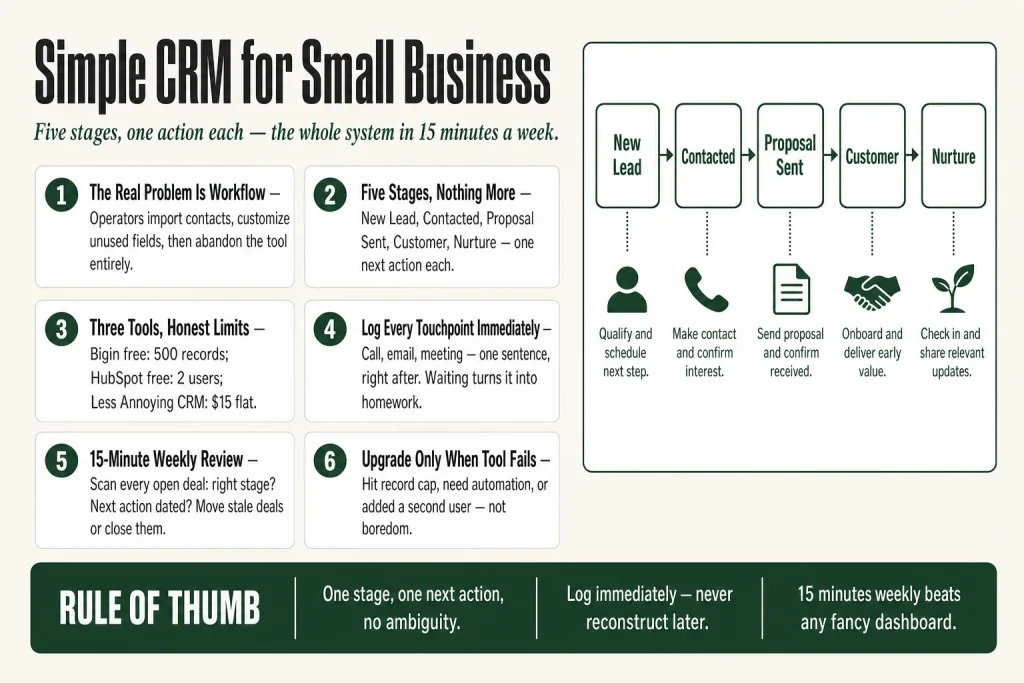
The 30-second answer
- Define five pipeline stages before you open any software: New Lead, Contacted, Proposal Sent, Customer, and Nurture. That’s it.
- Pick a tool that matches your contact volume: Zoho Bigin’s free plan works for one user with up to 500 records and three automations (instant triggers only); HubSpot’s free plan covers up to two users with one deal pipeline and no multi-step workflow automation; Less Annoying CRM costs $15/user/month flat with no record caps.
- One action per stage: each stage in your pipeline has exactly one next action attached. No ambiguity.
- Log every touchpoint: email, call, meeting. If it isn’t in the CRM it didn’t happen.
- Run a 15-minute weekly review: scan every open deal, move stale ones, and close out anything that’s gone cold.
- Your judgment drives the system. The CRM surfaces what needs attention. You decide what to do about it.
Take this fix into your next scenario. The free Builder’s Companion Kit collects the checklists and templates that pair with this guide — so next time, you start from a template, not a blank page. Grab it free →
- Why Most CRM Setups Fail Before You Get a Single Deal
- The Five-Stage Pipeline Every Solo Operator Actually Needs
- Choosing the Right Simple CRM for Small Business: Three Honest Options
- What to Log in Your CRM (and the Shortcut That Makes It Stick)
- The 15-Minute Weekly Review That Keeps the Whole System Honest
- Worked Example: How a Simple CRM for Small Business Handles One Lead From Inquiry to Client
- How Your CRM Connects to Your Email List (Without Getting Complicated)
- When to Upgrade (and What That Actually Means)
- FAQ
A simple CRM for small business is not a software problem. It’s a workflow problem. Most solo operators buy a tool, import their contacts, and then do nothing with it because they never decided what the tool was supposed to do. Months later the CRM is a glorified address book and they’re back to chasing leads in their inbox. This article gives you the five-stage workflow first, then helps you match it to a tool that won’t slow you down.
Why Most CRM Setups Fail Before You Get a Single Deal
The failure mode is almost always the same. You sign up for a tool, watch a 45-minute onboarding video, spend two hours customising fields you’ll never use, and then stop opening the app. The tool didn’t fail you. The absent workflow did.
A CRM is a scoreboard, not a strategy. It can show you where every contact sits, which follow-ups are overdue, and how long deals are sitting at each stage. What it can’t do is tell you what stages to build, what action belongs at each one, or when to cut a lead loose. Those calls stay with you. The CRM just holds the record.
The second common failure: operators try to replicate a sales-team setup when they have no sales team. Enterprise CRMs are built around hand-offs between marketing, sales, and customer success reps. When you’re all three of those people, a ten-stage pipeline with lead-scoring rules is a distraction. You need five stages, one action per stage, and a 15-minute weekly review. That’s the whole system.
If you haven’t mapped out your broader lead and follow-up process yet, read the lead follow-up process playbook before you build your pipeline stages. The CRM is where you track the process, not where you invent it.
The Five-Stage Pipeline Every Solo Operator Actually Needs
Keep this flat. Complexity in a pipeline is a sign that you’re optimising for a team you don’t have yet.
- New Lead: Someone has shown interest. They filled out a form, replied to cold outreach, or got referred. They’re in the system but you haven’t made contact yet. The one action here: reach out within 24 hours.
- Contacted: You’ve made real contact beyond an automated reply. You’ve had a conversation, exchanged substantive emails, or had a discovery call. The one action: move them to proposal or mark them as not a fit. Don’t let deals sit here indefinitely.
- Proposal Sent: You’ve sent a quote, proposal, or offer. The one action: follow up at a defined interval. Three days is a reasonable default for most service businesses. Log the follow-up date in the CRM so you see it in your weekly review.
- Customer: They’ve said yes and paid. Move them here the moment money changes hands. The one action: trigger your onboarding sequence and schedule a 30-day check-in.
- Nurture: This is where leads that aren’t ready right now and past customers who aren’t active go. They stay on your email list and you stay visible. The one action: make sure they’re tagged for your regular email sends. Nothing more.
That’s five stages. A contact is always in exactly one of them. You always know the next action. That’s what makes it a working system instead of a contact list.
Notice there’s no “Maybe” stage and no “Thinking About It” stage. Those are inbox categories, not pipeline stages. If a contact is genuinely thinking about it, they’re in Proposal Sent with a follow-up date attached.
Choosing the Right Simple CRM for Small Business: Three Honest Options
You don’t need the most powerful tool. You need the one you’ll actually open every week. Here are the three options worth considering for a solo or near-solo setup, with honest caveats on each.
Zoho Bigin (Free to $7/user/month)
Bigin is purpose-built for small and micro businesses. The free plan gives you one user, one pipeline, up to 500 records, and three automations (instant triggers only), with no credit card required and no expiry date. It includes a built-in phone line, mobile apps for iOS and Android, and basic integrations with Zapier and Zoho Forms. Note that the 500-record ceiling counts contacts, companies, deals, and activities together, so it arrives sooner than raw contact math suggests. Email sync and bulk-email capability begin on the Express plan at $7/user/month (billed annually), which also adds three pipelines, 30 workflow automations, and 50,000 records.
The honest limit: 500 records goes fast if you do any list-based marketing. Once you hit it, the Express plan ($7/user/month billed annually, $9/user/month billed monthly) adds three pipelines, 30 workflow automations, and 50,000 records. There are no seat minimums and no onboarding fees.
Best for: true solos who want a working pipeline today with zero spend.
HubSpot Free CRM
HubSpot’s free tier has no expiry date and requires no credit card to start. As of late 2026, the free plan is capped at 2 users, 1 deal pipeline, and 10 custom properties, with 2,000 marketing email sends per month and HubSpot branding on emails, forms, and meeting links. For accounts created after September 2024, total contacts are capped at 1,000. Accounts created before that date may carry higher legacy allowances. Check your own limits under Settings before you build your workflow around them. You get basic email tracking, a visual deal board, and one automated email action per form submission. Multi-step workflow automation is not included on the free plan. Branching sequences and deal-stage-triggered workflows require a paid tier.
One important distinction: HubSpot separates CRM contacts from marketing contacts. A contact stored in the CRM is not automatically a marketing contact. Marketing contacts are the ones you can send bulk marketing emails to or enroll in ad audiences using HubSpot’s marketing tools. Contacts you keep as non-marketing can be stored and used for one-to-one sales communication without counting toward your marketing contact tier, but HubSpot’s broadcast tools can’t reach them until you set their status to marketing contact. Verify the current distinction in HubSpot’s documentation before you assume everyone in your pipeline is receiving your broadcast emails.
Best for: operators who want a polished interface and plan to grow into HubSpot’s email and marketing tools over time.
Less Annoying CRM ($15/user/month)
One plan, one price, no tiers. $15 per user per month gets you unlimited contacts, unlimited custom fields, unlimited pipelines, email logging, task management, and phone and email support. There’s no annual contract required and a 30-day free trial with no credit card and no feature restrictions. Automation is minimal: Less Annoying CRM is deliberately light on rules-based automation, so if you need multi-step sequences triggered by deal-stage changes, you’ll need a separate tool for that piece.
Best for: operators who are done trying to make a free plan work and want something they can set up in an afternoon and forget about for a year.
What to Log in Your CRM (and the Shortcut That Makes It Stick)
The system dies if logging feels like homework. The goal is to make every significant touchpoint visible in the contact record so that when you open a deal two weeks from now, you don’t have to go hunting through your inbox to remember where things stand.
Log these three things, nothing more:
- Every meaningful conversation: a call, a reply to a proposal, a meeting. One sentence is enough. “Called 14 Oct, interested but waiting on budget sign-off. Follow up 28 Oct.” That sentence is worth more than a perfectly formatted note nobody writes.
- Every stage change: the moment a contact moves from Contacted to Proposal Sent, or from Proposal Sent to Customer, log the date and what triggered the move.
- Every follow-up commitment: if you said you’d follow up on a specific date, put a task in the CRM for that date. This is the one habit that separates operators who close deals from operators who lose them to silence.
The shortcut that makes logging stick: do it immediately, not later. The two minutes after a call ends is when the note takes 90 seconds to write. Waiting until the end of the day turns it into a reconstruction project you’ll skip. Keep the CRM open in a browser tab during working hours. Treat it the same way you treat marking an email read.
AI tools can help you draft a note from a voice memo or a call transcript, and that’s a useful time-saver. But you’re deciding what’s worth capturing, what the conversation actually meant, and what the right next step is. The words get down faster. The judgment stays entirely with you. No tool makes that call for you.
The 15-Minute Weekly Review That Keeps the Whole System Honest
A CRM without a weekly review is a filing cabinet. You put things in, nothing comes back out.
Set aside 15 minutes on the same day every week. Work through the pipeline left to right, stage by stage. For each open deal ask two questions: Is this contact in the right stage? Does the next action have a date attached?
If a deal has been sitting in Contacted for three weeks with no activity, you have three choices: follow up now, move it to Nurture, or close it as lost. Those are the only three options. There is no fourth option called “leave it there and hope.”
The weekly review also gives you one useful data point over time: average time in each stage. If most deals sit in Proposal Sent for more than two weeks before going either way, that’s a pricing or follow-up problem, not a CRM problem. The CRM just makes it visible. For a deeper look at how to read that kind of data without getting lost in dashboards, see how to read your marketing data without an analyst.
Keep the review short enough that you actually do it. 15 minutes is the constraint on purpose. If the review takes 45 minutes, your pipeline has too many stages or too many stale contacts that should have been cleaned out months ago.
Worked Example: How a Simple CRM for Small Business Handles One Lead From Inquiry to Client
Here’s how the five-stage workflow runs in practice for a solo service business, using any of the three tools above.
Day 0, Monday morning. A referral emails to ask about your services. You create a contact record immediately, set the stage to New Lead, and log: “Referred by [name], interested in X service, replied with availability.” You schedule a discovery call for Wednesday and attach a task to the record dated Wednesday.
Day 2, Wednesday. Discovery call happens. You move the contact to Contacted and log a two-sentence summary: “Good fit, budget confirmed, timeline is Q1. Sending proposal by Friday.” You create a task dated Friday: “Send proposal.”
Day 4, Friday. Proposal goes out. Stage moves to Proposal Sent. You log the date and set a follow-up task for the following Tuesday, three business days out.
Day 7, Tuesday. Your weekly review surfaces the follow-up task. You send a one-line check-in. Contact replies the same day: “Looks good, let’s move forward.” Stage moves to Customer. You log “Agreed verbally, invoice sent.” You trigger your onboarding sequence and schedule a 30-day check-in task.
60 days later. Project is complete. You move the contact to Nurture and make sure they’re on your email list. They stay warm. When something relevant comes up, they hear about it.
Total CRM time across the whole deal: under 20 minutes. That’s the point. The system carries the memory so your head doesn’t have to.
If you want to build the email side of this workflow, including the welcome sequence that fires when someone becomes a customer, see welcome email sequence for small business. For keeping those customers long-term, how to reduce customer churn as a small business covers the retention layer the CRM alone won’t give you.
How Your CRM Connects to Your Email List (Without Getting Complicated)
Your CRM and your email list serve different jobs. The CRM tracks individual relationships and deal status. Your email list does broadcast communication: newsletters, product announcements, nurture sequences. Conflating the two creates chaos. Keeping them separate, with a clean link between them, keeps both useful.
The link is your Nurture stage. Every contact who lands in Nurture should be on your email list. Every customer who completes a project should be moved to Nurture and confirmed on your list. That’s the only sync you need to manage manually. Everything else stays in one system or the other.
If you’re segmenting your list by what kind of buyer someone is, or by what service they purchased, the CRM is where that tag lives. Export it when you need to segment a campaign. Don’t try to replicate your whole CRM data structure inside your email tool. For the mechanics of doing that cleanly, how to segment your email list covers the no-chaos method in full.
One honest caveat specific to HubSpot: storing a contact in the CRM and making them a marketing contact are two different things. A contact in your deal pipeline is not automatically a marketing contact. Marketing contacts are the ones HubSpot allows you to send bulk marketing emails to, enroll in marketing workflows, and include in ad audiences. Contacts set as non-marketing stay fully in your CRM for tracking, deal management, and one-to-one sales emails, but they won’t receive your broadcast emails or enter marketing workflows. You have to explicitly set a contact’s marketing contact status before HubSpot’s marketing tools can reach them. Check HubSpot’s current documentation on marketing contact status before you assume everyone in your pipeline is receiving your email sends.
When to Upgrade (and What That Actually Means)
Upgrade your tool when the tool is causing the problem, not when you’re bored with it or read a listicle about a shinier option.
The real signals that you’ve outgrown your current setup:
- You’re hitting a record cap and routinely need contacts you can’t store.
- You’re doing the same five manual tasks every week that a simple automation would eliminate. (Most small businesses need three to five core automations: lead capture, follow-up reminders, onboarding, and renewal reminders. If your tool can’t handle those, it’s undersized.)
- A second person needs access and your plan doesn’t support it.
- You’re spending more time exporting data to spreadsheets for reporting than you are actually working deals.
What upgrading does not fix: a pipeline you never update, contacts you never log notes on, or a weekly review you’ve stopped doing. Those are discipline problems. A more expensive CRM won’t solve them.
Before you upgrade your CRM, check whether your current tool supports the automations you actually need. A $7/month plan that handles your workflow beats a $50/month plan that handles everything you’ll never use. The same logic applies to your whole marketing tech stack. For a full view of what the minimum viable setup looks like, see marketing tech stack for small business.
FAQ
What is the best simple CRM for small business with no budget?
Zoho Bigin’s free plan is the strongest zero-cost option for a single user: one pipeline, up to 500 records, three automations (instant triggers only), and a built-in phone line with no expiry date. HubSpot’s free plan covers up to two users with one deal pipeline and no multi-step workflow automation. For accounts created after September 2024, the contact cap is 1,000. Accounts created before that date may carry higher legacy allowances. Verify current limits on both tools’ official pricing pages before you build your workflow around them.
Do I need a CRM if I only have a few clients?
Yes, but you can start with the simplest possible setup. Even five active clients benefit from logged notes, stage tracking, and a follow-up task list. A spreadsheet works until it doesn’t: the moment you miss a follow-up or forget where a conversation left off, you’ve paid a higher price than any CRM subscription. Start small, but start.
How many stages should a small business CRM pipeline have?
Five is enough for most solo operators: New Lead, Contacted, Proposal Sent, Customer, and Nurture. More stages than that usually means you’re building a pipeline for a team you don’t have. Every stage you add is another place a deal can stall. Keep it flat until the business genuinely forces more complexity.
Can I use a CRM without any automation?
Yes. The workflow described in this article runs entirely on manual stage moves, logged notes, and task reminders. Automation helps, but it’s the discipline of the weekly review and the habit of logging after every touchpoint that makes the system reliable. Add automation once the manual process is running smoothly, not before.
Is HubSpot free CRM actually free?
HubSpot’s free CRM has no expiry date and requires no credit card to start. As of late 2026, the free plan is capped at 2 users, 1 deal pipeline, and 10 custom properties, with 2,000 marketing email sends per month and HubSpot branding on emails, forms, and meeting links. For accounts created after September 2024, total contacts are capped at 1,000. Accounts created before September 2024 may carry higher legacy allowances from the earlier pricing model. Check your own limits under Settings and verify against HubSpot’s current pricing documentation, since figures change and many older guides reflect outdated numbers. One automated email action per form submission is available on the free tier. Branching sequences and deal-stage-triggered workflows require a paid plan.
What’s the difference between a CRM and an email marketing tool?
Your CRM tracks individual relationships: deal stage, notes, follow-up tasks, contact history. Your email marketing tool handles broadcast communication to a list. They serve different jobs. In HubSpot specifically, a contact stored in the CRM is not automatically a marketing contact. Marketing contacts are the ones HubSpot allows you to send bulk marketing emails to, enroll in marketing workflows, and include in ad audiences. Contacts you keep as non-marketing stay fully usable in the CRM for deal tracking and one-to-one sales emails, but they won’t receive your broadcast emails or enter marketing workflows. You have to explicitly set a contact’s marketing contact status before HubSpot’s marketing tools can reach them. The connection point in your workflow is your Nurture stage: anyone who lands there should also be on your email list, with their marketing contact status confirmed. Keep the two tools separate and sync them manually at that one handoff point.
Sources:
Tool limits verified against live documentation and third-party audits current as of October 2026: HubSpot pricing page and marketing contacts documentation (hubspot.com/products/crm, hubspot.com/marketing-contacts); Zoho Bigin pricing page (bigin.com/pricing); Less Annoying CRM pricing page (lessannoyingcrm.com/pricing). Third-party cross-checks: claritysoft.com (updated October 2026), mo.agency (updated 2026), usecarly.com (updated 2026), saasrat.com (verified June 2026), bestcrmforstartups.com (2026). CRM workflow stage frameworks: sales-leads-crm.com, sparkle.io, syncmatters.com. All platform limits should be verified directly with vendor documentation before implementation, as pricing and feature caps change frequently.
Brian Kasday spent forty years in direct-response marketing before rebuilding the whole operation as a one-person shop. He writes The Operator’s Library — including “Build a Complete Marketing Department” — for operators who’d rather build it themselves than wait on someone else.
Get the Builder’s Companion Kit — the free checklists and templates that pair with this guide: mmsvegas.com/resources.
This guide handles one marketing job. Build a Complete Marketing Department builds the whole department. See the manual →
More Marketing guides
Free · Marketing Operator Toolkit
Running marketing on your own?
Get the free toolkit — the templates and the expensive mistakes behind a one-person marketing department, plus a note when this guide changes.
Get the free toolkit →