
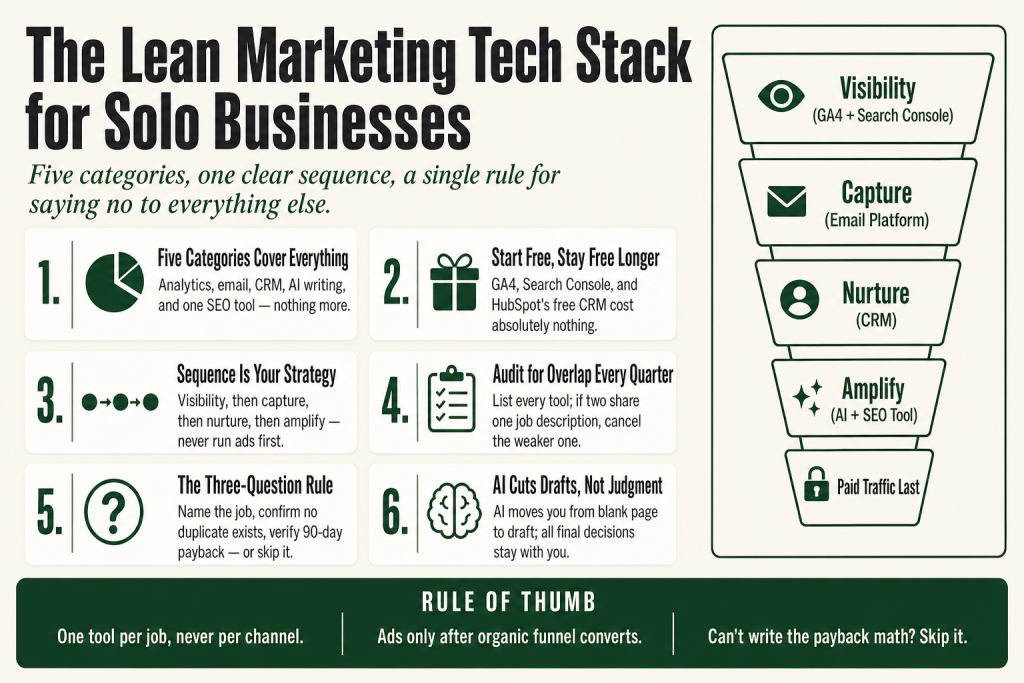
The 30-second answer
- Five categories cover everything a solo service business needs: a website with analytics, an email platform, a simple CRM, an AI writing assistant, and one SEO visibility tool.
- Most overlap lives between your email platform and your CRM. Pick one platform that handles both before buying two separate tools.
- Start free. GA4, Google Search Console, and HubSpot’s free CRM tier cost nothing. Add paid tools only when a specific bottleneck demands it.
- The add-a-tool rule: name the job it does, confirm nothing you already own does that job, and verify it pays back its cost within 90 days. If you can’t answer all three, skip it.
- AI does not replace your judgment. It cuts the time you spend on first drafts, not the thinking behind them.
- Sequence matters. Analytics first, then capture (email), then nurture (CRM), then amplify (SEO and content). Running ads before you have capture and nurture in place is burning money.
Take this fix into your next scenario. The free Builder’s Companion Kit collects the checklists and templates that pair with this guide — so next time, you start from a template, not a blank page. Grab it free →
- The Real Cost of Tool Sprawl
- The Five Tool Categories That Actually Earn Their Place
- How to Spot Overlap Before You Pay for It
- The Order to Add Tools as You Grow
- Worked Example: The Lean Marketing Tech Stack for a Solo Service Business
- The Marketing Tech Stack for Small Business Rule for Saying No
- FAQ
A marketing tech stack for small business is the set of tools that removes friction between you and the next customer. That’s it. If you’re not sure where to start, you’re in good company: most solo operators begin by grabbing tools they’ve heard of, paying for subscriptions that overlap, and waking up six months later wondering why nothing feels connected. This article gives you a different starting point. Five tool categories. A clear order to add them. A single rule for saying no to everything else. You don’t need a complex setup to run effective marketing as a one-person operation. You need the right five things, in the right sequence, doing specific jobs. That’s the minimum viable build, and this guide walks you through it from scratch.
The Real Cost of Tool Sprawl
Here’s what tool sprawl actually costs you: not just the monthly fees, but the mental overhead of logging into nine dashboards, reconciling data that doesn’t agree, and learning interfaces you use once a quarter. In 2025, the average small business with 10 to 50 employees ran 28 active SaaS tools, up from 19 just two years prior. That number keeps climbing because of how tools get added: a free trial converts automatically, a teammate signs up for something independently, an AI tool becomes a habit in 2024 and nobody cancels the old one when a better feature lands inside a tool you already pay for.
A tool that was best-in-class six months ago may already be superseded by a built-in feature in a tool the team already pays for. Teams subscribe during an evaluation phase, the tool gets used heavily for weeks, then a better alternative emerges. The subscription does not. That’s the real waste: zombie subscriptions sitting on a credit card while you’re too busy to cancel them.
The fix isn’t finding better tools. It’s consolidating into fewer, more integrated tools that actually talk to each other. Think of your stack like a kitchen: a great chef works with a chef’s knife, a paring knife, and a serrated blade. Every specialty gadget that comes after that is only worth space on the counter if it does something the three can’t.
The Five Tool Categories That Actually Earn Their Place
Every other tool on the market either duplicates one of these or is an optimization you don’t need yet. Master this list first.
1. Website with analytics (free)
Google Analytics 4 is completely free. You create an account, install the tracking code on your website, and start collecting data at no cost. Out of the box, the free tier includes event-based tracking, real-time reporting, exploration reports (funnel analysis, path analysis, free-form exploration), audience building, and native Google Ads integration. Pair it with Google Search Console, which is also free and shows you exactly which search queries send traffic to your site and which pages have indexing problems.
One update worth knowing about: as of May 13, 2026, GA4 added a native “AI Assistant” channel to its Default Channel Group, confirmed in Google’s Analytics Help Center “What’s New” documentation. It automatically separates traffic arriving from AI chatbots (ChatGPT, Gemini, Claude, Copilot, and Grok are on Google’s current list) from your standard Referral traffic, with no configuration required on your end. Before this, all AI chatbot clicks landed in the Referral bucket with no clean way to tell them apart. The channel is not retroactive, so historical AI traffic stays categorized under its original channels. If you’ve already built a custom regex channel group to track AI referrals, verify whether it overlaps with the new native definition before removing it. Every local service business needs Google’s free toolkit configured and actively used before spending a dollar on anything else. You can’t improve what you can’t see.
2. Email platform (free to start)
Email still returns more per dollar than almost any other channel. Pick a platform that grows with your list and doesn’t punish you for doing well. Mailchimp’s free plan caps you at 250 contacts and 500 emails per month (with a daily send limit of 250), confirmed across multiple independent pricing reviews in August 2026. Note that automation workflows were fully removed from Mailchimp’s free tier by mid-2025, so if your business relies on a welcome sequence or triggered follow-ups, Mailchimp’s free plan won’t support it. That’s too small and too limited for most businesses to stay on for long. A better starting option: Brevo (formerly Sendinblue) offers a free plan with 300 emails per day and up to 100,000 contacts stored, re-verified on brevo.com in August 2026, making it one of the most contact-generous free tiers available. MailerLite’s free plan now covers 250 subscribers and 2,500 sends per month, per MailerLite’s official free plan page (updated June 16, 2026, down from 500 subscribers and 12,000 sends). Check each platform’s official pricing page before you sign up, as these limits have been changing frequently. Pick one and commit: migrating your list is a distraction you don’t need.
One honest caveat: automation (triggered sequences, not just broadcast emails) is where these platforms diverge fast. If your business relies on a welcome sequence or a lead follow-up series, check that automation is available on your chosen tier before you build everything around it. See the welcome email sequence setup guide for exactly what that first automation should look like.
3. A simple CRM (free to start)
You need one place where every lead, every conversation, and every follow-up task lives. A spreadsheet works until it doesn’t, and it stops working about the same time you miss a follow-up that cost you a client. HubSpot’s free CRM gives you up to 2 users, 1,000 marketing contacts, and 2,000 marketing emails per month with no expiration date, per HubSpot’s Product and Services Catalog checked July 2026. Keep in mind: the free tier puts HubSpot branding on all outbound assets and does not include multi-step workflow automation. For a solo operator under that ceiling, it’s a solid starting point. Confirm the current limits on HubSpot’s official pricing page before you build your workflow around them, as HubSpot adjusts plan details periodically. Zoho CRM also has a free tier worth checking if HubSpot’s contact cap becomes a constraint.
The mistake most operators make here is buying a CRM with features they’re not using yet: lead scoring, multiple pipelines, deep reporting. Those are upgrades for when you have a volume problem, not a tracking problem. If your close rate is below 10%, adding a more expensive CRM tier won’t fix it. The problem is process, not tooling. Build the process first with the lead follow-up playbook, then let a paid CRM tier serve the process you’ve proven out.
4. AI writing assistant (one subscription, not several)
According to Constant Contact’s Q1 2026 Small Business Now report (surveying over 1,500 SMB owners), 54% of small businesses already use AI marketing tools, and another 27% plan to start within the year. The useful question isn’t whether to use AI. It’s which one and how many. One subscription to a capable general-purpose AI (Claude, ChatGPT, or Gemini) gets you from a blank page to a workable first draft on copy, email subject lines, and social captions. Standard individual plans for Claude Pro, ChatGPT Plus, and Google AI Pro all cluster around $20 per month at the time of writing, though each provider has also introduced lower-cost entry tiers. Verify current pricing on each provider’s official page before you subscribe, as these plans have changed multiple times in 2026 alone. That’s the job. The AI isn’t a strategist, it doesn’t know your clients, and it can’t make the call on whether a campaign is worth running. You edit, you approve, you decide. The judgment and final calls stay with you. Pick one tool and learn it well instead of juggling several mediocre ones. For a disciplined method, the AI copywriting guide for solo operators covers exactly how to keep that judgment in your hands.
5. One SEO visibility tool (paid when you’re ready)
Google Search Console is your free baseline. When you’re ready to do keyword research and track competitor rankings, one paid tool earns its seat. Tools like Semrush and Ahrefs run $140 to $165 per month at entry level. That’s justifiable for an agency or a team doing SEO full-time. It’s harder to justify for a founder running SEO for two hours a week. In that case, SE Ranking or Mangools in the $30 to $50 per month range covers the basics: keyword tracking, site audits, and basic competitive research. Don’t buy this until you’ve exhausted the free Google tools and you know which keywords you’re targeting. The small business SEO checklist tells you when you’re ready.
How to Spot Overlap Before You Pay for It
Overlap is the silent budget drain in every small business stack. It usually hides in plain sight. Here are the three most common collisions:
- Email platform vs. CRM: Many email platforms include a basic CRM. Many CRMs include a basic email sender. Buy one tool that does both adequately before you buy two tools that each do one thing well. Brevo includes a basic CRM on most plans. HubSpot’s free tier includes email. Check what your existing platform already covers before adding a new subscription.
- AI writing tool vs. platform AI features: A tool that was best-in-class six months ago may already be superseded by a built-in feature in a tool the team already pays for. Your email platform, your CRM, and your website builder may all have AI writing features now. Test the built-in version before paying for a standalone tool.
- Social scheduler vs. built-in platform scheduling: LinkedIn, Instagram, and Facebook all have free native scheduling. A third-party scheduler earns its seat only when you’re publishing to four or more channels on a consistent weekly cadence. Before that point, it’s a solution to a problem you don’t have yet.
The audit is simple: list every active subscription, write one sentence describing the specific job it does, and then scan for duplicates. Any tool that shares a job description with another tool in your list gets canceled unless it’s clearly better at that specific job. Do this quarterly. Businesses accumulate tools reactively, adding a new platform every time a vendor makes a compelling pitch without a clear architecture for how the tools should work together. The result is a stack that costs more than it should, produces less than it could, and creates more complexity than it solves.
The Order to Add Tools as You Grow
Sequence is strategy. Adding tools in the wrong order means you’re optimizing a step before the step before it works. Here’s the order that makes sense for a solo service business:
- Visibility first. GA4 and Google Search Console go in on day one, before you touch anything else. You need a baseline before you can measure any improvement.
- Capture second. An email platform with a simple opt-in form. No leads in the list means no list to market to. This is your most important asset and it lives on your platform, not on social media.
- Nurture third. A CRM with a follow-up sequence. Once you have leads coming in, you need a reliable system for moving them toward a decision. This is where most service businesses leak revenue.
- Amplify fourth. AI writing assistance to produce content faster, and one SEO tool to target the right keywords once you know which ones convert.
- Paid traffic last. Run ads only after you know your funnel converts organically. Paid traffic amplifies what works. It doesn’t fix what doesn’t.
The temptation is to run ads in month one. Don’t. Email marketing returns $36 for every dollar spent, and SEO generates $22 for every dollar invested. Nail those before you add the complexity of a paid channel. And when you do add a channel, wire it through proper UTM tracking from day one. The UTM naming guide prevents the fragmented GA4 data problem that makes it impossible to know which channel actually drove a sale.
Worked Example: The Lean Marketing Tech Stack for a Solo Service Business
Say you run a one-person bookkeeping practice. You have a website, a handful of clients, and you’re trying to grow through referrals and search. Here’s exactly what a lean stack looks like for you, built in the order described above.
Month 1: Visibility and capture (cost: $0)
- Google Analytics 4 installed on your website. Set up one conversion event: a contact form submission. That’s the only number that matters right now.
- Google Search Console verified for your domain. Check which queries bring people to your site. You’ll probably be surprised.
- Email platform: Brevo free plan (300 emails per day, up to 100,000 contacts, re-verified on brevo.com August 2026). Build one simple opt-in: a one-page PDF guide your ideal client actually wants. The lead magnet guide covers how to pick the right problem to solve.
Month 2: Nurture (cost: $0)
- HubSpot free CRM (up to 2 users, 1,000 marketing contacts, 2,000 marketing emails per month, per HubSpot’s Product and Services Catalog, July 2026). Every inquiry goes into the CRM. You set up one deal pipeline: Inquiry, Proposal Sent, Won, Lost. Every lead has a next task and a due date. Nothing lives in your head.
- Welcome sequence in Brevo: three emails over seven days. Introduce yourself, address the main objection, make a low-friction offer. Automated. Done once.
Month 3: Amplify (cost: roughly $20 per month and up)
- AI writing assistant: one subscription to a general-purpose AI. Standard individual plans for Claude, ChatGPT, and Google AI Pro each cluster around $20 per month, with lower-cost entry tiers available. Every provider has updated pricing multiple times in 2026, so verify the current plan on each provider’s official pricing page before subscribing. Use it to draft blog posts, email subject lines, and proposal language. You edit and approve everything. The AI doesn’t know your clients. You do. The judgment stays with you.
- One SEO tool at the $30 to $50 tier once you’ve identified two or three keywords with real search volume that your site doesn’t rank for yet. This is the trigger: a specific keyword gap you’ve confirmed, not a vague desire to ‘do SEO.’
What you don’t add yet
No social scheduler. No webinar platform. No landing page builder (your email platform has one). No reputation management tool. No ads. Not yet. The rule for every tool someone pitches you from here: name the specific job it does that nothing in your current stack does, verify nothing you already own does that job, and confirm it pays back its monthly cost within 90 days. If you can’t answer all three, the answer is no. Keep a running list of tools you said no to and why. That list is worth more than the tools themselves.
When your referral volume picks up, you’ll want a system for it. The referral program guide shows how to track and reward referrals without adding a tool to do it.
The Marketing Tech Stack for Small Business Rule for Saying No
This is the single rule that keeps your stack lean permanently: every new tool must pass three questions before you pay for it.
- What specific job does this do? Not a category. A job. “It helps with social media” fails. “It lets me schedule posts to LinkedIn and Instagram from one queue and shows me which post time gets the most reach” passes.
- Does anything I already own do that job? Check your existing stack before you open a new tab to sign up. Your email platform’s analytics might already show you open rates by day and time. Your CRM might already have a social integration. If yes, the answer is no.
- Can I verify this pays back its monthly cost within 90 days? Not ‘could it.’ Can you write down the math right now? “If this tool books me one extra consult per month at $500, it pays for itself.” If you can’t write the math, you’re buying hope, not a tool.
That’s it. Three questions. The tool vendors won’t like it. Your bank account will. And your attention, which is the real scarce resource, gets to stay on the work that actually moves the needle.
If you’re thinking about adding a first marketing hire to run some of this for you, do that after your stack is proven, not before. Adding headcount to a broken process just breaks it faster. The first marketing hire guide explains how to match the role to the actual bottleneck.
FAQ
how many marketing tools does a small business actually need
Five to seven tool categories covers everything a solo service business needs: website analytics, an email platform, a simple CRM, an AI writing assistant, and one SEO tool. Below five and you’re missing a layer. Above seven and you’re paying for overlap. The goal is one tool per job, not one tool per channel.
what is the cheapest marketing tech stack for a small business
GA4, Google Search Console, Google Business Profile, HubSpot’s free CRM (up to 2 users, 1,000 marketing contacts, and 2,000 marketing emails per month, per HubSpot’s Product and Services Catalog, July 2026), and Brevo’s free email plan (300 emails per day, up to 100,000 contacts, re-verified August 2026) cost nothing. Add one AI assistant subscription and one mid-range SEO tool when you have a specific gap to fill. Total cost at that point: roughly $50 to $70 per month. Confirm all free tier limits on each platform’s official pricing page before you build around them, as these limits update frequently.
do I need a CRM and an email platform or can one tool do both
Often one tool can cover both, at least early on. Brevo includes a basic CRM on its paid plans. HubSpot’s free tier includes email sending. Check what your existing platform already does before paying for a second tool. You’ll want a dedicated CRM when your pipeline is complex enough that a simple contact list stops working.
when should a small business start using paid ads
After your funnel converts organically. Paid ads amplify what already works; they don’t fix a leaky funnel. Make sure you have a functional email capture, a welcome sequence, and a consistent follow-up process before you spend on ads. Running ads into a funnel with no nurture is paying to fill a bucket with a hole in it.
can AI replace my marketing tools
No, and be skeptical of anyone who says it can. An AI writing assistant reduces the time between a blank page and a workable draft. It doesn’t make strategy decisions, it doesn’t know your specific clients, and it doesn’t replace the judgment call on whether a campaign is worth running. Your tools still need to track, send, store, and report. AI helps you produce the content those tools distribute. The judgment and final calls stay with you.
how do I know if I’m paying for overlapping marketing tools
List every active subscription and write one sentence describing the specific job each one does. If two tools share the same sentence, you’re paying for overlap. The tool you’re less embedded in gets canceled. Run this audit quarterly because AI features ship constantly and a feature you once paid separately for often lands inside a tool you already own.
Sources:
Sources consulted for platform facts and statistics: HubSpot Product and Services Catalog (hubspot.com, July 2026), confirming free tier limits of 2 users, 1,000 marketing contacts, and 2,000 marketing emails per month; EmailToolTester Mailchimp Pricing review (emailtooltester.com, August 2026), confirming Mailchimp free plan at 250 contacts and 500 emails per month with a daily limit of 250, and confirming automation workflows were removed from the free tier by mid-2025; Multiple independent Mailchimp pricing reviews (emailtooltester.com, retainful.com, benchmarkemail.com, tinycommand.com, August 2026), cross-confirming free plan caps of 250 contacts and 500 sends per month with a daily limit of 250; Fastlancer Brevo review (fastlancer.org), re-verifying 300 emails/day and up to 100,000 contacts on brevo.com as of 17 August 2026; EmailToolTester Brevo Pricing review (emailtooltester.com, August 2026), confirming Brevo free plan (300 emails per day, up to 100,000 contacts); Google Analytics Help Center “What’s New” documentation (May 13, 2026), confirming the native AI Assistant channel was added to GA4’s Default Channel Group on May 13, 2026, automatically classifying traffic from AI chatbots including ChatGPT, Gemini, Claude, Copilot, and Grok, with broad property availability reached June 7, 2026; confirmed by Search Engine Journal (May 14, 2026), Elsop Insights (June 22, 2026), TechWyse (May 15, 2026), and DigitalApplied (June 11, 2026); Constant Contact Q1 2026 Small Business Now report (February 2026, n=1,500+ SMB owners across five countries), sourced via Forbes/Roger Dooley (February 11, 2026), confirming 54% of small businesses already use AI marketing tools and another 27% plan to start within the year; MailerLite official free plan page and Help Center FAQ (mailerlite.com, updated June 16, 2026), confirming updated free plan limits of 250 subscribers and 2,500 emails per month, down from 500 subscribers and 12,000 emails; confirmed by EmailToolTester MailerLite Pricing review (emailtooltester.com, August 2026) and EmailOctopus blog (June 19, 2026); SE Ranking / Ahrefs / Semrush entry-level pricing verified via independent review sites, August 2026; AI subscription pricing verified against multiple independent review sources (August 2026), confirming standard individual plans for Claude Pro, ChatGPT Plus, and Google AI Pro cluster around $20 per month, with lower-cost entry tiers available from each provider.
Brian Kasday spent forty years in direct-response marketing before rebuilding the whole operation as a one-person shop. He writes The Operator’s Library — including “Build a Complete Marketing Department” — for operators who’d rather build it themselves than wait on someone else.
Get the Builder’s Companion Kit — the free checklists and templates that pair with this guide: mmsvegas.com/resources.
This guide handles one marketing job. Build a Complete Marketing Department builds the whole department. See the manual →
More Marketing guides
Free · Marketing Operator Toolkit
Running marketing on your own?
Get the free toolkit — the templates and the expensive mistakes behind a one-person marketing department, plus a note when this guide changes.
Get the free toolkit →