
Last updated: July 2026
- The 30-second answer
- Why the Welcome Window Is Irreplaceable
- The Five-Email Welcome Email Sequence: What Each Email Does
- When to Add a Sixth Email
- Timing and Cadence: The Rules That Actually Matter
- Subject Lines That Get Opened Without Burning Trust
- Worked Example: A 5-Email Sequence for a Solo Copywriting Course Creator
- How to Use AI to Draft Your Welcome Email Sequence
- Setting It Up in Your ESP: Platform Notes
- The Six Mistakes That Kill Welcome Sequences
- The Metrics That Tell You If Your Sequence Is Working
- What Comes After the Welcome Sequence
- FAQ
A welcome email sequence is one of the most valuable automations a small business can own, and most solo operators either don’t have one, or have one that stops at a single email that says “Thanks for signing up!” and then goes quiet. That single email is like shaking someone’s hand at a party and then immediately walking away. The relationship dies before it starts.
The mechanics are simple: a new subscriber arrives, a short series of automated emails goes out over the next 7 to 14 days, and by the end of that window the subscriber either knows, trusts, and buys from you, or forgets you exist. That window never reopens at full strength. The attention you get in the first week is the best attention you’ll ever get from that person.
This guide gives you the complete structure: what goes in each email, exact timing, subject-line frameworks, the common mistakes that kill conversions, and a step-by-step method for using AI to draft the copy so you’re not starting from a blank screen. The AI handles the first draft, and only the first draft. Every decision about what’s true, what sounds like you, what fits your actual audience, and what actually gets sent stays with you, across every email and every revision. That division of labor is the only way this works at scale for one person.
The 30-second answer
- What it is: A welcome email sequence is a series of 4 to 6 automated emails triggered the moment someone subscribes, designed to build trust and convert attention into a first purchase.
- Why it matters: Automated welcome flows consistently generate a disproportionate share of email revenue relative to send volume, though the exact lift varies by industry, list quality, and offer. Open rates during this window are the highest you’ll typically see from any subscriber.
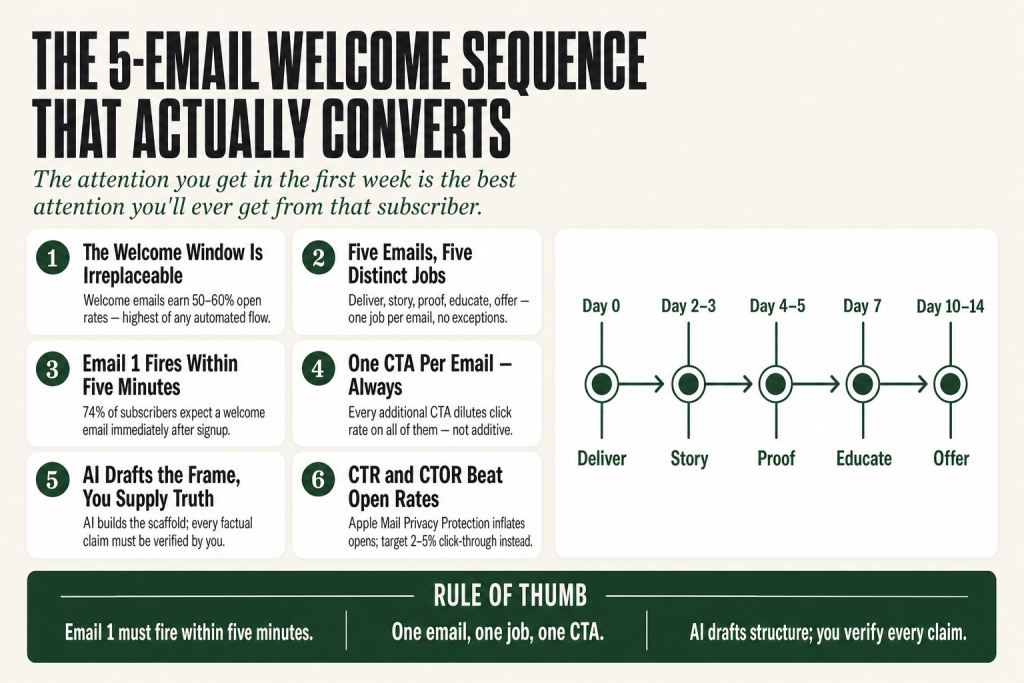
- The five-email structure: (1) Deliver + set expectations, (2) Tell your story, (3) Social proof, (4) Educate/add value, (5) Make the offer.
- Timing: Email 1 fires within 5 minutes of signup. Emails 2 to 5 spread across days 2, 4, 7, and 10 to 14. Never daily, every other day or every 3 days prevents fatigue.
- Subject lines: Keep them under 50 characters. Be direct. Misleading subject lines get opens once and unsubscribes forever.
- AI’s role: Give the model your brand voice samples, your offer, and the job of each email. It drafts a structural scaffold. You supply the truth, the specific details, and every judgment call, what to include, what to cut, what to verify, before anything goes live. The model doesn’t know your customers, your results, or your voice. You do.
- Platform: Any ESP with automation works, Klaviyo for e-commerce, Mailchimp’s Marketing Automation Flows (formerly Customer Journey Builder, rebranded June 2025; requires Standard plan for multi-step flows) for general use, MailerLite for tight budgets. The copy matters more than the platform.
Why the Welcome Window Is Irreplaceable
Here’s the uncomfortable truth: most of your email list will never be as interested in you as they are right now, within minutes of hitting Subscribe. That attention is as fresh as it’s ever going to be. What you do with it determines whether your list is an asset or a collection of unread emails.
The numbers back this up. Welcome emails consistently earn open rates in the range of 50 to 60%, the highest of any automated email flow. For context, average campaign open rates across all industries sit around 42 to 43%, and that figure is inflated by Apple’s Mail Privacy Protection, which auto-loads email images even when the recipient never actually opens the message. The welcome sequence’s edge isn’t inflated the same way, because subscribers are genuinely looking for the email they just signed up for.
The revenue argument is strong, though results vary by industry and list quality. Klaviyo’s benchmark data shows that automated email flows generated nearly 41% of email revenue from just 5.3% of total sends. Omnisend’s 2025 data told a similar story: automated emails represented roughly 2% of sends but captured around 30% of revenue. The welcome flow is a standout performer within that automated category, but how much it lifts your specific numbers depends on your offer, your audience, and how well the sequence is written.
Put those two facts together: your welcome sequence is the highest-engagement email you’ll send to any subscriber, and one of the strongest revenue levers in automated email, when the copy is right. Not setting one up, or setting up a one-email stub and calling it done, is a significant missed opportunity in small business email marketing.
There’s a deliverability angle too. Every open, click, and reply during the welcome window sends positive engagement signals to Gmail, Outlook, and Yahoo. Those signals set the baseline reputation your future emails inherit. A strong welcome sequence isn’t just good for conversions, it’s good for your inbox placement on every campaign you send afterward.
The Five-Email Welcome Email Sequence: What Each Email Does
Each email in a welcome sequence has exactly one job. Crowding multiple goals into a single email is the most common structural mistake, it dilutes focus and the subscriber doesn’t know what to do next. Think of each email as a relay baton: it does its job and passes the runner to the next one.
Here’s the five-email structure that works consistently for small businesses and solo operators. This isn’t theoretical, it reflects the pattern that shows up in every high-performing audit of email programs across B2C and service businesses.
Email 1, Deliver and Set Expectations (send immediately, within 5 minutes of signup)
Job: Fulfill the promise that got them to subscribe. If you offered a lead magnet, a PDF, discount code, checklist, free chapter, this email delivers it. If you offered nothing specific, this email confirms they’re in, sets up what’s coming, and gives them one simple next step.
What to include:
- The promised item, front and center
- A one-paragraph statement of who you are and what this list does for them
- What to expect from your emails (frequency, topics), this manages expectations and reduces future unsubscribes
- One low-stakes CTA: read a popular post, follow on one social channel, reply to say hello
What to skip: Your entire life story, every product you sell, a discount, a hard sell of any kind. You haven’t earned that yet. This email’s job is to not disappoint the person who just raised their hand.
Deliverability note: This email gets the highest open rate of anything you will ever send this person. A strong engagement signal here, especially a reply or a click, tells Gmail and Outlook that this subscriber wants your email. That reputation carries forward into your campaign sends.
Email 2, Your Story (send on Day 2 or Day 3)
Job: Give the subscriber a reason to root for you. People buy from people they understand. A brand story, told honestly, without the startup mythology, creates the kind of low-level trust that no feature list ever builds.
What to include:
- The honest origin: why you started this, what problem you were solving for yourself before you solved it for others
- One specific miss or mistake, this buys more credibility than three wins
- Where you are now, and what that means for the subscriber
- A soft CTA pointing to your most-read piece of content or a key page on your site
Keep it short. Three to four paragraphs is plenty. If your story needs ten paragraphs, you haven’t edited it yet. The goal is to be remembered, not to be comprehensive.
Email 3, Social Proof (send on Day 4 or Day 5)
Job: Show, don’t tell. By now the subscriber knows who you are. They need to see evidence that other people like them got a real result.
What to include:
- One strong testimonial or case study, specific, result-oriented, from a recognizable customer type
- A short “here’s the situation they were in before” setup so the subscriber can see themselves in the story
- A natural bridge to your offer or a relevant resource
Avoid: A wall of five-star quotes with no context. Generic praise (“John is amazing!”) doesn’t move anyone. Specific outcomes do (“I sold out my first workshop in 48 hours using the approach from Module 2”).
If you’re new and don’t have testimonials yet, use a reframe: show the problem clearly, demonstrate your expertise through a specific observation or result from your own work, and acknowledge you’re building the proof base. Honesty here outperforms borrowed credibility every time.
Email 4, Educate and Add Value (send on Day 7)
Job: Demonstrate competence and give something genuinely useful. This is the email that makes subscribers think “this person actually knows what they’re talking about.” It’s the one that earns the right for Email 5 to make an ask.
What to include:
- One useful insight, framework, or shortcut, something they can use today without buying anything
- A brief explanation of the mistake most people make in your space
- A natural mention of how your product or service solves the problem you just named
Keep the CTA soft. “Here’s the full breakdown if you want to go deeper” with a link to a sales page or product is plenty. You’re planting, not harvesting, that comes next.
Email 5, The Offer (send on Day 10 or Day 14)
Job: Make the ask. By this point, you’ve delivered value, told your story, shown proof, and taught something useful. The subscriber knows you. Now you ask them to buy.
What to include:
- A direct statement of what you’re offering and who it’s for
- The primary benefit (outcome), not a feature list
- Any limited incentive, a welcome discount, a bonus, a free call, that’s specific to new subscribers and has a real deadline
- A clear, singular CTA
One offer. One CTA. The impulse to list every product you sell in the “final” email is understandable, it feels efficient. It isn’t. Multiple options create decision paralysis and reduce clicks to zero. Pick your best entry-point offer and make the case for that one thing.
If the subscriber doesn’t buy after Email 5, they move into your regular broadcast schedule. They’re not lost, they’re just not ready yet. A good broadcast list with consistent value will convert them over time.
When to Add a Sixth Email
Five emails covers most small businesses. Add a sixth if your offer has a higher price point (above $300), a longer consideration cycle, or requires some education before the purchase makes sense.
The sixth email typically slots in at Day 5 to 6, between the social proof email and the value email. Its job is to handle objections, the specific hesitations your best customers had before they bought. Think of it as a preemptive FAQ, written in plain language, that takes the three most common “yeah, but…” thoughts and defuses them with specifics.
Common objections worth addressing in a standalone email:
- “This looks interesting but I’m not sure it’s for me.” → Describe exactly who gets the most out of your offer. Be specific enough that the right person recognizes themselves.
- “I’ve tried things like this before.” → Name the most common alternative and explain the specific difference. Don’t trash the competition, just clarify.
- “I don’t have time right now.” → Reframe the time investment honestly. If it takes 20 minutes a day, say 20 minutes a day.
One caveat: don’t add a sixth email just to have more emails. If your five-email sequence already handles objections inside individual emails, adding a dedicated objection email creates redundancy, and the sequence starts to feel like a sales bombardment. Less is more when the sequence is already doing its job.
Timing and Cadence: The Rules That Actually Matter
The most common timing mistake is bunching all five emails into the first three days because you’re worried the subscriber will forget about you. The opposite problem is spacing emails two weeks apart because you’re worried about annoying them. Both extremes kill sequences.
Here’s the timing framework that holds up across most businesses:
- Email 1: Fires within 5 minutes of signup. Not 30 minutes, not “within the hour.” Five minutes. The subscriber is still at their screen. That attention closes fast.
- Email 2: Day 2 or Day 3.
- Email 3: Day 4 or Day 5.
- Email 4: Day 7.
- Email 5: Day 10 or Day 14, depending on your offer complexity.
Never send daily during a welcome sequence. Every-other-day or every-three-days prevents fatigue while maintaining the momentum the first email created. Think of the cadence like a drip, not a flood: enough water to keep the plant alive, not enough to drown it.
One scheduling consideration most operators miss: if a subscriber opens and clicks Email 1, some ESPs let you send Email 2 faster, say, 24 hours instead of 48, because the engagement signal tells you they’re warm. If they didn’t open Email 1 at all, wait the full interval. You’re working with a cooler signal and pushing faster only accelerates unsubscribes.
A note on send-time optimization. Most major ESPs offer some version of send-time personalization, sending to each subscriber at the time of day they’ve historically opened email. This is worth enabling once you have data to work with, but don’t let the absence of it delay your sequence launch. A well-timed sequence with average send times outperforms a perfectly timed sequence you haven’t built yet every single time.
Subject Lines That Get Opened Without Burning Trust
Subject lines are not a copywriting trick. They’re a promise. The subject line tells the subscriber what’s inside. If the email delivers on that promise, you build trust. If it doesn’t, you lose it permanently, and open rates crater by Email 3.
Keep subject lines under 50 characters. That length displays fully on most mobile email clients, where the majority of email is now read. Beyond the character count, here are the rules worth keeping:
Clarity beats cleverness every time
A subject line that requires the subscriber to be curious enough to open it just to figure out what it means is a gamble you’ll lose on a cold audience. In a welcome sequence, where the subscriber barely knows you yet, direct and specific beats clever and vague.
Works: “Your [lead magnet name] is inside” · “Here’s the thing most [audience] get wrong” · “Why I started [business name]” · “One mistake that cost me [specific thing]”
Avoid: Fake urgency you can’t back up · All caps · Excessive punctuation · Subject lines that promise a reveal the email doesn’t deliver
Use the preview text as a second subject line
The preview text (the snippet that appears next to or below the subject line in most inboxes) is the most underused real estate in email marketing. Most ESPs let you set it explicitly. If you don’t set it, the platform pulls the first text from your email body, which is often your header graphic’s alt text, an unsubscribe notice, or a navigation link. Set it manually every time. Write it as a continuation of the subject line’s promise.
Example:
Subject: Why I shut down my first business
Preview: It taught me the one thing I’d been measuring wrong for three years.
Personalization: first name in the subject line
Using the subscriber’s first name in the subject line works, studies consistently show personalized subject lines lift open rates, but it only works if your signup form actually collects first names and your ESP is populating the field correctly. Verify this before you launch. A subject line that renders as “Hey, here’s your download” does more damage than no personalization at all.
A note on AI-generated subject lines: AI tools can generate a dozen subject-line options in under a minute. That’s useful for breaking the blank-screen problem. What AI can’t do is tell you which option fits your actual audience’s voice, whether the implied promise matches what’s inside the email, or whether the tone is right for where this subscriber came from. Generate options, then you choose, and verify every option against what the email actually delivers before it goes live. The judgment on which subject line to use is yours, not the model’s. That’s not a caveat. That’s the job.
Building this yourself? The free Builder’s Companion Kit collects the checklists and templates that go with this guide, grab it at mmsvegas.com/resources.
Worked Example: A 5-Email Sequence for a Solo Copywriting Course Creator
Abstract frameworks are easy to nod at and hard to act on. Here’s the same structure applied to a specific business: a solo operator selling a $297 self-paced course on writing better marketing copy, with a lead magnet of a free subject-line swipe file. If you’re still deciding what lead magnet to pair with your sequence, this guide on picking the right lead magnet for a service business walks through choosing a problem worth solving and turning it into a signup driver.
Subscriber signed up via: A content upgrade on a blog post about writing product descriptions.
Email 1, Day 0, within 5 minutes
Subject: Your subject line swipe file is attached
Preview: Plus one thing most people do with it that wastes the whole thing.
Body: Delivers the PDF download link. Three sentences on who this list is for (small business owners writing their own copy, not professional copywriters). One sentence on what to expect: one email every 2 to 3 days for the next two weeks, then weekly after that. CTA: “Reply and tell me the one piece of copy you dread writing most. I read every reply.”
Why the reply ask? Replies are the strongest engagement signal to inbox providers. They also give you real voice-of-customer data you can use to improve Email 4. AI can draft this email in minutes from a strong prompt, but the reply ask only works if you actually read those replies and let them inform the rest of the sequence. That part is on you, not the model.
Email 2, Day 3
Subject: Why I wrote terrible copy for two years
Preview: It wasn’t a skill problem. It was a sequence problem.
Body: The honest version of the origin story. Specific miss named: wrote features, not outcomes, for the first two years of a service business and couldn’t understand why traffic didn’t convert. What changed: one shift in how the problem was framed. Soft CTA: link to the most-read post on the site.
AI drafting note: The AI draft of this email will almost always sanitize the story, it defaults to a polished origin arc without the actual miss. Your editing job here is to add the specific failure back in. That detail is the whole point of this email, and only you know what it is. The AI builds the frame. You supply the truth, and that’s a distinction that matters every time you use it.
Email 3, Day 5
Subject: What happened when Sarah rewrote her homepage
Preview: She changed 47 words. Her contact form doubled in 30 days.
Body: A short, specific case study. Setup: what the page looked like before and what wasn’t working. What changed: specific language swaps, not vague advice. Result: concrete, measurable. Brief bridge: “If you want the framework behind that rewrite, it’s the core of what I teach in [Course Name].” No hard sell, just the name and a link.
Email 4, Day 7
Subject: The one question that fixes most copy
Preview: Most people ask “what do I want to say?” Ask this instead.
Body: Teaches one specific, actionable framework, the “so what?” edit. Explains the mistake (writing from the seller’s perspective) and the fix (writing from the buyer’s outcome). Example before/after for one product description. Closes: “The full system for applying this across every piece of copy you own is what [Course Name] covers. Here’s what’s inside: [link to sales page].”
Email 5, Day 14
Subject: A question before I stop bugging you
Preview: If copy is still the bottleneck, here’s the offer I made to new subscribers.
Body: Direct and honest. “You’ve been on my list for two weeks. Here’s the one thing I made for people in your situation: [Course Name]. New subscribers get $30 off through [date]. Here’s what it covers: [3-bullet summary]. Here’s who it’s right for: [one specific sentence]. Here’s the link: [CTA button].” After the deadline, that’s it, no extension, no “last chance” manufactured urgency. The discount meant something because it’s real.
AI drafting note for Email 5: AI handles the structural scaffold of an offer email reasonably well. What it cannot verify: whether your deadline is real, whether the discount is the right number, whether the “who it’s right for” sentence matches your actual buyer, or whether the tone lands correctly for this specific audience. Those are judgment calls that only you can make. Check every one of those claims against what you know before you send. The offer details are yours to own, the AI just fills the frame, and an unchecked frame can do real damage to trust.
Total word count across all five emails: roughly 1,400 words. Faster to write than a single blog post, especially with AI handling the first draft for each one. And unlike a blog post, it runs indefinitely for every new subscriber who joins the list.
How to Use AI to Draft Your Welcome Email Sequence
AI doesn’t write your welcome sequence. You do. What AI does is get you from a blank screen to a rough draft in 20 minutes instead of two hours. The judgment, what to say, what’s true, what resonates with your actual customers, what to cut, what to verify, stays with you on every email, every revision, and every send decision. The model doesn’t know your business, your customers, or your voice. It produces a plausible structural scaffold. You determine whether that scaffold reflects reality. That distinction isn’t a disclaimer. It’s the whole method.
Here’s the process that works for a solo operator building this from scratch.
Step 1: Gather your inputs before you open the chat
The quality of AI-drafted copy is almost entirely determined by the quality of the context you give it. Before you type a single prompt, collect:
- Brand voice sample: Two or three paragraphs you’ve already written, an email, a social post, a page from your site, that sound like you at your best. Paste these in.
- Customer language: The exact words your best customers use to describe the problem you solve. Pull these from testimonials, email replies, or reviews. If you don’t have them yet, write down the three most common complaints or questions you hear.
- Your offer: The name, the price, and the primary outcome, not the feature list. One sentence: “This helps [specific person] achieve [specific result] in [timeframe or context].”
- The signup context: Where did this subscriber come from? A content upgrade? A paid ad? A referral? The email that works for someone who downloaded a lead magnet is different from the email that works for someone who clicked from a product page.
Step 2: Write a role-and-context prompt for the full sequence
Give the AI the full context in one prompt before asking for individual emails. Something along these lines:
You are a direct-response email copywriter helping a solo operator build a 5-email welcome sequence.

Voice samples (match this tone exactly):
[paste 2 to 3 paragraphs of your own writing]

Business context:
- Business: [what you sell]
- Offer: [primary product/service, price, outcome]
- Lead magnet: [what they signed up for]
- Subscriber source: [where they came from]
- Customer language: [3 to 5 phrases your customers use]

Sequence goal: Build trust and make one offer by Email 5.

Write Email 1. Job: deliver the lead magnet and set expectations.
Subject line (under 50 characters): [your best attempt, ask it to improve or generate 3 options]
Preview text: [one line continuing the subject's promise]
Body: [no more than 200 words]
CTA: [one low-stakes action]
Run through each email separately, giving it the specific job of that email. Don’t ask for all five at once, the output gets generic when the scope is too wide.
Step 3: Edit for truth and specificity
The draft will be structurally plausible but too smooth, too general, and occasionally wrong about your business. Your editing job:
- Replace every generic claim with a specific one. “We’ve helped hundreds of business owners” → “17 of my students have launched their first course in the last 8 months.” Specifics are credible. Generics are not.
- Add the miss. AI almost never writes the honest admission of a mistake or failure, it defaults to the polished version of events. That’s the first thing to add back in.
- Kill the hype. Words like “transform,” “game-changing,” “revolutionary,” and “skyrocket” are AI default vocabulary. Delete them on sight. Replace with what actually happens.
- Check every factual claim. If the AI wrote something about your product, your results, or your market that you didn’t explicitly provide, verify it or remove it. AI fills gaps confidently and incorrectly. This check is not optional. It’s the job the AI literally cannot do for you.
Step 4: Send yourself a test and read it cold
Before you activate the sequence, send yourself all five emails in sequence and read them the way a stranger would, someone who signed up from a content upgrade and doesn’t know you yet. Ask: does each email do exactly one job? Does the tone feel like a person wrote it? Would I unsubscribe after Email 3?
If the answer to that last question is “maybe,” cut the sequence before you fix it. A 3-email sequence that feels right is better than a 5-email sequence that feels like a sales funnel in disguise.
For more on using AI as a drafting partner across your entire marketing operation, see the solo operator’s method for writing marketing copy with AI, which covers the full prompting workflow, voice-matching, and editing process in depth.
Setting It Up in Your ESP: Platform Notes
The welcome sequence described in this guide works in any email service provider (ESP) that supports automation. Here’s a practical breakdown of the most common options for solo operators, so you can match the platform to your situation rather than the other way around.
Klaviyo
Klaviyo calls its automation sequences “flows.” In the Flows tab, there’s a pre-built welcome series you can start from. The trigger is list-based: when someone is added to a specific list. Klaviyo’s flow builder supports unlimited steps, conditional branches, A/B testing on individual emails within a live flow, and smart sending windows. It’s the most capable option for e-commerce operators with WooCommerce or Shopify stores.
One setup note: whichever list you designate as your primary signup list should be the one new subscribers land in when they complete your forms, that’s what triggers the welcome flow. Confirm the list connection in your form settings before you go live.
Klaviyo’s “Flows AI” feature lets you describe the sequence you want in plain language and generates the flow structure automatically, useful for getting a scaffold in place quickly before you drop in your own copy. Per Klaviyo’s official product page (klaviyo.com/tools/flows-ai, verified July 2026), Flows AI is available to paid Klaviyo accounts with over 250 active profiles. Verify current access requirements at Klaviyo’s Help Center before relying on it, as eligibility criteria can change.
Mailchimp
Mailchimp’s automation builder is now called Marketing Automation Flows (the Customer Journey Builder was rebranded to this name in June 2025, per Mailchimp’s own pricing documentation). Here’s what each plan tier actually gives you for automation, because the differences matter before you commit to a plan:
- Free plan: No automation support. Mailchimp removed all automation from the free tier by mid-2025. At 250 contacts and 500 emails per month, this plan is for testing the interface, not running a sequence. If you’re on free, upgrade before building anything here.
- Essentials plan ($13/month for 500 contacts): Adds scheduling, A/B testing, and basic single-path automated flows, but no multi-step branching logic. Multiple independent sources confirm Essentials does not support multi-step Marketing Automation Flows with conditional splits. A simple linear 5-email welcome sequence may be possible on Essentials, but the moment you want conditional branches, “send Email 3 only if the subscriber opened Email 2”, you’ve hit the ceiling. Verify what Essentials currently supports at mailchimp.com/pricing before committing, because Mailchimp’s plan features have changed repeatedly.
- Standard plan ($20/month for 500 contacts): This is where multi-step Marketing Automation Flows with full branching logic unlocks. The Standard plan supports up to 200 journey points, behavioral triggers, and conditional splits, everything the 5-email sequence in this guide requires, including engagement-based routing. For a solo operator who needs a complete welcome sequence with branching, Standard is the minimum viable plan.
The honest short version: Free = no automation. Essentials = single-path flows only. Standard = full multi-step Marketing Automation Flows. Verify current pricing and feature availability at mailchimp.com/pricing before you commit, Mailchimp adjusts its plan features and pricing regularly.
MailerLite
MailerLite offers a free plan that includes automation, useful if you’re pre-revenue and want to conserve cash while the sequence proves itself. Verify the current free-plan limits directly on MailerLite’s pricing page before you commit. The subscriber cap and monthly send limit have been reduced multiple times since 2025. As of July 1, 2026, MailerLite’s official pricing page lists 250 active subscribers, 2,500 emails per month, and a cap of 3 active automations on the free plan. Full enforcement of these limits is scheduled for August 13, 2026, if you’re over any of those limits before that date, you’ll enter a restricted state after enforcement kicks in and will need to upgrade or trim your list. Those numbers may change again. The automation builder itself is clean and visual, which counts for something when you’re setting this up alone.
The honest caveat about platforms
No platform choice will save a bad sequence. A mediocre 5-email sequence on a free plan outperforms a sophisticated behavioral flow full of generic copy. Get the copy right first. Upgrade the platform when the sequence is working and you have data that tells you where behavioral triggers would improve it.
If you’re building the welcome sequence as part of a larger funnel, with lead magnet pages, tripwires, and post-purchase flows, see how to build a sales funnel without a team for the end-to-end structure.
The Six Mistakes That Kill Welcome Sequences
I’ve made most of these. Some of them more than once. Here’s the list, with the specific cost of each mistake so you know why it matters.
1. Sending Email 1 thirty minutes after signup
Seventy-four percent of subscribers expect a welcome email immediately after they sign up. “Immediately” means within minutes, not within the hour. At thirty minutes, the subscriber has moved on to the next tab. At an hour, they may have forgotten they signed up at all. Set the trigger to fire within 5 minutes. This is not a nice-to-have, it’s the baseline expectation.
2. Making Email 1 about you instead of them
The first email’s job is to deliver what you promised and tell the subscriber what’s in it for them. Not to introduce your founding story, your credentials, or your product line. That all comes in Emails 2 to 4. Email 1 that leads with a 300-word about-us section earns an unsubscribe before the relationship begins.
3. Sending the same welcome experience to everyone
This is one of the most common findings in professional email program audits: brands send the same sequence to new subscribers who have never bought and to customers who just made their first purchase. A buyer getting a 14-day “who are we and here’s our product” sequence while they’re waiting for their order to ship is a friction point, not a touchpoint. At minimum, filter purchasers out of the welcome flow so the sequence only goes to non-buyers.
4. Putting more than one CTA in each email
Every additional CTA you add to an email cuts the click rate on all of them. It’s not additive, it’s dilutive. Each email has one job. That job has one CTA. “Shop now / Read this / Follow us / Reply here” in a single email is four calls to inaction.
5. Making the offer in Email 1
The subscriber just handed you their email address. They don’t know you well enough to buy anything. An offer in Email 1, especially a hard sell with a countdown timer, signals that the “value” you promised was bait and the real intent is the pitch. You’ll see an open rate spike on Email 1 and a cliff on Emails 2 and 3. Trust takes more than one touchpoint to build.
6. Abandoning the sequence after Email 3 because you “don’t want to bother anyone”
This is the most common incomplete sequence pattern. You write the first three emails, they feel good, and then you stall on 4 and 5 because the ask makes you uncomfortable. So the subscriber gets two weeks of silence and then starts receiving your broadcast newsletter with no bridge and no context. The sequence isn’t rude. It’s what they signed up for. Finish it.
The Metrics That Tell You If Your Sequence Is Working
Open rates are the vanity metric of email. Since Apple’s Mail Privacy Protection pre-loads email images and marks messages as “opened” even when the recipient never reads them, open rates are partially inflated across any list with a significant percentage of Apple Mail users. Use open rates as a relative directional signal, is Email 3 performing dramatically worse than Emails 1 and 2? That’s worth investigating. But don’t optimize for open rate as your primary goal.
The metrics that tell you something real:
- Click-through rate (CTR): The percentage of recipients who clicked a link in the email. This is a real engagement signal, the subscriber did something. Benchmark: 2 to 5% CTR depending on your industry and the type of CTA.
- Click-to-open rate (CTOR): Of the people who opened the email, what percentage clicked? This tells you whether the body copy is delivering on the subject line’s promise. A high open rate with low CTOR means your subject line was compelling but the email itself didn’t follow through.
- Conversion rate per email: Who bought, booked, or completed the goal action after clicking. This is the only number that directly ties the sequence to revenue. Welcome flows see conversion rates of 2 to 3% across many industries, higher if the offer is well-matched to the signup intent and the sequence is well-written.
- Unsubscribe rate: Any spike on a specific email is a signal. If Email 3 consistently drives more unsubscribes than the others, something in that email is misaligned, too pushy, off-topic, or not delivering on the promise of the previous email.
- Drop-off between emails: What percentage of people who opened Email 1 also opened Email 4? If you lose more than 40% of your audience between Email 1 and Email 5, the sequence has a structural problem, usually topic drift or a mismatch between what the subscriber expected and what they got.
Run the sequence for 60 days before drawing conclusions. Early data on small lists produces misleading patterns. Once you have 200+ people through the full sequence, you’ll have enough signal to know which emails are working and which ones need a revision.
For a deeper look at reading these numbers without drowning in dashboards, see how to read your marketing data without an analyst.
What Comes After the Welcome Sequence
The welcome sequence ends. The relationship doesn’t. Once a subscriber exits the sequence, whether they bought or not, they move into your ongoing communication: your broadcast list, your product-specific flows, your re-engagement campaigns.
A few practical decisions to make before you flip the sequence live:
- Tag buyers immediately. Anyone who converts during the sequence should be tagged as a customer and suppressed from any future welcome-sequence re-enrollment. Sending “here’s who we are” emails to someone who just paid you is disorienting.
- Decide what “regular communication” means before the sequence ends. If a subscriber exits Email 5 and then hears nothing for six weeks, your hard-won trust erodes. Know in advance whether that’s a weekly newsletter, a biweekly broadcast, or a monthly roundup, and have at least two emails in the can before you flip the switch. A marketing calendar makes it easier to plan what comes after the sequence so the handoff isn’t a dead stop.
- Build a re-engagement branch for non-openers. If a subscriber hasn’t opened any of the first three emails, some ESPs let you route them to a shorter re-engagement branch before they exit entirely. A subject line change and a “did this land in the wrong place?” email can recover a portion of cold subscribers before you lose them to list decay.
The welcome sequence is the foundation. What you build on top of it, product launches, referral campaigns, seasonal offers, only works because the foundation is solid. Skip the foundation and everything built above it is shaky.
If you’re using the sequence as part of a product launch, the handoff between the welcome flow and launch emails requires its own structure. The solo operator’s product launch playbook covers that transition in detail.
FAQ
how many emails in a welcome sequence
Five emails is the right starting point for most small businesses. Research consistently supports 4 to 6 emails over 7 to 14 days for welcome flows. Start with five and cut to three if your offer is simple or your audience is cold. Add a sixth only if you have a high-consideration offer that needs an objection-handling email before the close.
when should the first welcome email be sent
Within five minutes of signup. Seventy-four percent of subscribers expect a welcome email immediately after they subscribe, and the engagement window closes fast. Set your automation trigger to fire within minutes, not hours. A same-day email is acceptable only if your ESP can’t do immediate triggers, anything longer than an hour loses significant momentum.
what should a welcome email include
The first welcome email should deliver whatever you promised at signup (the lead magnet, discount code, or confirmation), tell the subscriber briefly who this list is for, set expectations about frequency and content, and end with one simple low-stakes CTA. Skip the hard sell and the full product catalog. You haven’t earned that yet.
can I use ChatGPT or Claude to write my welcome emails
Yes, with the right inputs and a non-negotiable editing pass. Paste in two or three samples of your own writing so the AI matches your voice, then describe your offer, your subscriber source, and the specific job of each email. The AI drafts a structural scaffold; you make every decision about what’s true, what sounds like you, and what fits your actual audience before anything goes out. Every factual claim the AI makes about your business needs to be verified by you, it fills gaps confidently and incorrectly. The judgment stays with you at every stage. AI removes the blank-page problem. It doesn’t remove the thinking.
what is a good open rate for welcome emails
Welcome emails consistently earn the highest open rates of any email type, reported ranges run from 35% to 60%+ depending on the data source, audience, and how Apple Mail Privacy Protection affects measurement. More useful benchmarks: watch your click-through rate (aim for 2 to 5%) and click-to-open rate. These tell you whether the body copy is earning the open, not just whether the subject line did.
does a welcome sequence work for service businesses not just e-commerce
Yes. The five-email structure works for any business where a subscriber needs to know, trust, and choose you before they buy, which is most service businesses, course creators, coaches, and B2B operators. The main adjustment: your ‘offer’ email (Email 5) points to a booking link or sales page instead of a product checkout. The trust-building arc is identical.
how do I keep subscribers engaged after the welcome sequence ends
Move them onto a consistent broadcast schedule before the sequence ends, not after. Decide in advance whether that’s weekly, biweekly, or monthly, and queue at least two emails before you go live. Tag buyers separately so they get relevant follow-up rather than generic newsletters. Subscribers who came in warm through a well-built welcome email sequence respond well to content that continues the same tone and value level. Silence is the fastest way to undo what the sequence built.
Sources:
Sources consulted: Klaviyo Help Center, “Getting started with flows” and “How to use Flows AI to build a flow” (live documentation, verified July 2026); Klaviyo, “2026 Email & SMS Marketing Strategy: Insights From 100 Audits” (July 2026); Klaviyo flows-ai product page (klaviyo.com/tools/flows-ai, verified July 2026); Omnisend 2025 Email Marketing Statistics Report; MailerLite pricing page (mailerlite.com/pricing, verified July 2026) and “Free plan update: What you need to know” (official FAQ at mailerlite.com/help/free-plan-update-faq, verified July 2026); Mailchimp, Marketing Automation Flows (formerly Customer Journey Builder, rebranded June 2025) product pages and pricing page (mailchimp.com/pricing/marketing, verified July 2026); Bloomreach, “Welcome Email Series Best Practices” (April 2026); Digital Applied, “The Welcome Email Sequence: A 2026 Onboarding Framework” (June 2026); Mailflow Authority, “Welcome Email Sequence: Structure, Timing, and Deliverability” (updated June 2026); GetWPFunnels, “50+ Examples of Great Welcome Email Subject Lines” (June 2026); Referral Candy, “The Complete Guide to Klaviyo Email Flows Setup” (July 2026); HubSpot Email Marketing Benchmarks (2025 data); EmailToolTester, “Mailchimp Pricing 2026” (April 2026); Retainful, “Mailchimp Pricing 2026” (June 2026).
Brian Kasday spent forty years in direct-response marketing before rebuilding the whole operation as a one-person shop. He writes The Operator’s Library, including “Build a Complete Marketing Department”, for operators who’d rather build it themselves than wait on someone else.
Get the Builder’s Companion Kit, the free checklists and templates that pair with this guide: mmsvegas.com/resources.
More Marketing guides
Free · Marketing Operator Toolkit
Running marketing on your own?
Get the free toolkit — the templates and the expensive mistakes behind a one-person marketing department, plus a note when this guide changes.
Get the free toolkit →