
Last updated: July 2026
Table of contents
- The 30-second answer
- What an incomplete execution actually is
- Why you have none (or a pile), the setting that controls it
- When Make retries them for you, and when it won’t
- How to resolve Make incomplete executions by hand
- Why an error sometimes leaves no incomplete execution at all
- Keeping the queue from becoming a graveyard
- Frequently asked questions
A scenario that has run cleanly for months finally hits a bad afternoon, a third-party API times out, a token expires on a Sunday, one malformed bundle trips a halt, and the next morning you find a stack of entries in the Incomplete executions tab. Or the opposite: a scenario clearly failed overnight and lost data, and there is nothing in the tab at all. Both situations come down to the same small set of rules about Make incomplete executions and once you know them the tab stops being a mystery and becomes the safety net it was designed to be.
This guide walks through what an incomplete execution is, the one setting that decides whether you get them, which failures Make retries on its own, how to fix and resume the ones it can’t, and how to keep the queue from silently filling up. It’s grounded in how Make’s error-handling model actually works, not in guesswork.
The 30-second answer
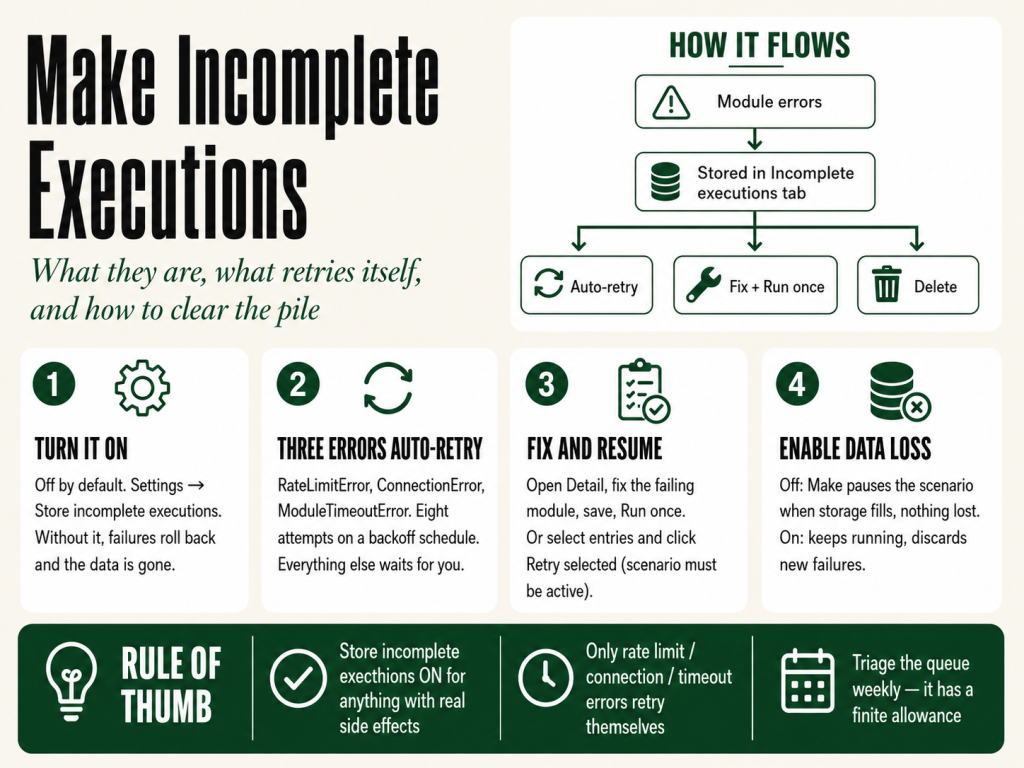
An incomplete execution is a saved snapshot of a scenario run that didn’t finish. When a module errors and you’ve enabled the right setting, Make stores the partial state, the data in flight, the module that failed, the modules that hadn’t run yet, so you can retry it, fix it, or delete it instead of losing the data. If you’re dealing with incomplete executions right now:
- Seeing none, but runs are failing? The feature is off by default. Turn on Settings → Store incomplete executions on the scenario. Without it, failures roll back and the data is gone.
- Seeing a pile that isn’t clearing? Make auto-retries only three error types (rate limit, connection, timeout). Everything else waits for you, open each one, fix the cause, and resume it.
- Want to retry as-is? Make sure the scenario is active, select the entries, and click Retry selected. You can’t retry on an inactive scenario.
- Queue filling toward its limit? Incomplete executions consume a storage allowance that scales with your plan. Triage weekly so it never fills.
The single most useful habit: turn on Store incomplete executions for anything that writes to a system of record, sends external messages, or charges money. It’s the difference between knowing about every failure and discovering a silent data gap days later.
What an incomplete execution actually is
A Make scenario is transactional, much like a relational database. Every run moves through three phases: an initialization phase where Make checks connections and module configuration before any data flows; one or more operation cycles where modules actually read and write, each ending in a commit or a rollback; and a finalization phase where connections close and history is written. The errors that produce incomplete executions happen during the operation cycles, the middle phase, where real work is being done.
Inside a cycle, if every module succeeds, the cycle commits and the changes are permanent. If a module errors, the cycle rolls back what it can (the ACID-tagged modules, like database writes) and the scenario halts, ignores, retries, or continues depending on the error handling in place. With no error handlers and incomplete executions off, the default is Rollback: stop the run, undo what’s reversible, surface the error in history, and, after enough consecutive failures, deactivate the scenario entirely.
An incomplete execution changes that outcome. When the feature is enabled and a module errors, Make freezes the run instead of discarding it and drops that frozen state into the Incomplete executions tab on the scenario’s detail page. From there the run is recoverable: you can let Make retry it, open it and fix the underlying problem, or delete it if the data isn’t worth saving.
Why you have none (or a pile), the setting that controls it
Incomplete executions are off by default. You turn them on per scenario in Settings → Store incomplete executions. If a scenario has been failing but the tab is empty, this is almost always why, the failures rolled back and left nothing behind. Enabling the setting opts the scenario into a safety mode: failures don’t lose data, you get a chance to fix and resume, and Make attempts automatic retry for the error categories where retry is likely to work.
There is a cost. Stored incomplete executions consume space from your account’s incomplete-execution allowance, and that allowance scales with your plan. A companion setting, Enable data loss decides what happens when the allowance fills up. With data loss disabled, Make pauses scheduling for the scenario until you free up room, nothing new runs, but nothing is lost. With data loss enabled, Make keeps running and discards new failures it can’t store. For a full picture of the storage and operations limits that interact with this setting, see Make limits.
The production default: for any scenario with real side effects, writing to a CRM, sending emails, charging a card, turn Store incomplete executions on and Enable data loss off. That combination guarantees you’ll know about every failure and never silently lose data. The trade is that you have to actively manage the queue.
When Make retries them for you, and when it won’t
Some failures are transient, a 502 from a load balancer that hiccupped, a connection that timed out because the network had a moment, a rate limit you tripped with a burst of requests. None reflect a real problem with your scenario, and they probably won’t be true 30 seconds from now. Make automatically retries incomplete executions for exactly three error types, with no setup beyond enabling Store incomplete executions:
- RateLimitError the third party returned a rate-limit response (HTTP 429 or equivalent).
- ConnectionError the connection to the third party failed.
- ModuleTimeoutError the module didn’t respond in time.
Retries run on a spaced-out backoff schedule so a longer outage doesn’t burn through your attempts in the first minute, the delays from the original failure run 1 minute, 11 minutes, 21 minutes, 51 minutes, then 1h 21m, 1h 51m, 4h 51m, and 7h 51m across eight attempts. Each retry re-runs the scenario starting from the failed module. If it succeeds at any point, the entry is marked Resolved and retries stop; Make deletes resolved entries automatically after 30 days. If all eight attempts fail, the entry is marked Unresolved and waits for you. Make also runs at most three retries from the same scenario in parallel, and won’t start retries while the scenario itself is running, a guard that stops the retry queue from creating its own rate-limit problem.
Most other error types don’t auto-retry, because retrying the same data with the same configuration would just reproduce the error. A DataError (a value that didn’t match the expected type), a RuntimeError, a BundleValidationError, an authentication failure, most third-party 4xx responses, Make stores these as incomplete executions but leaves them for manual intervention. That’s the pile that isn’t clearing on its own: it’s waiting for you to fix the cause. If your failures are the transient kind and you want to see how the retry categories behave in depth, our guide on Make retry strategy breaks them down, and Make connection not working covers the connection failures specifically.
How to resolve Make incomplete executions by hand
When auto-retry fails or wasn’t enabled, entries sit in the Incomplete executions tab on the scenario detail page. Each row shows an ID, when the failure happened, its size, a status (Unresolved, Pending, In progress, or Resolved), when the next retry is scheduled, the number of attempts, and a Detail link. To fix one properly rather than just retrying blindly:
- Click Detail to open the run in the editor with its stored data loaded.
- Find the module carrying the warning indicator.
- Inspect the input bundle and read the error message.
- Fix whatever needs fixing, a mapping expression, module configuration, the record the bundle was trying to write to.
- Save the module.
- Click Run once. The run resumes from the failed module with its original input.
If the run succeeds, the entry is marked Resolved. If it fails on a different module, Make creates a new incomplete execution for that one, you’ve moved the problem downstream, which is progress. To retry an entry without changes (useful for transient failures the auto-retry didn’t catch), first confirm the scenario is active, you can’t retry on an inactive scenario, then select the entries and click Retry selected. To clear entries whose data isn’t worth recovering, select them and click Delete selected; deletion cannot be undone.
Watch the sequential-processing interaction: if Sequential processing is enabled, a single incomplete execution pauses scheduling of the whole scenario until it’s resolved. That preserves chronological order, but for an instant-trigger scenario it means incoming events queue up while you work through the failure, and if events arrive faster than you resolve them, the webhook queue can fill. Leave sequential processing off where bundle order doesn’t matter.
Why an error sometimes leaves no incomplete execution at all
A few failure modes bypass the incomplete-executions system entirely, which is why a scenario can clearly have failed while the tab stays empty:
- The error was on the very first module. If the trigger itself errors, no work has started yet, so there’s nothing to store. The workaround: add a Retry error handler to the trigger module specifically, and Make will store the failure as an incomplete execution even when it’s the trigger that broke.
- Storage was full with data loss on. If your allowance is at capacity and Enable data loss is on, Make keeps scheduling but discards new failures. (With data loss off, the scenario is disabled instead.)
- The run hit the scenario timeout. A single execution that runs longer than the scenario duration limit (40 minutes by default, check your plan) terminates without storing an incomplete execution.
- The error was during initialization or finalization. Those phases sit outside the operation cycle, so there’s no partial state to save.
The trigger case is the one that catches people most often. If your scenario starts with an instant trigger on a flaky webhook source, or a polling trigger against a service that occasionally errors, attaching a Retry handler to that first module is the difference between a recoverable failure and a silent gap. For webhook triggers specifically, Make webhook not triggering covers the upstream causes worth ruling out first.
Keeping the queue from becoming a graveyard
The Incomplete executions tab is a safety net, not a filing cabinet, a few habits keep it working. Pair the Retry error handler with automatic completion for transient failures: right-click the at-risk module, add a Retry handler, and set Automatically complete execution to Yes with a retry count and interval (for example, three attempts, 15 minutes apart). That routes recoverable bundles into the retry loop and leaves the truly stuck ones for review. A common production pattern adds a Slack message and a data-store log to the error path before the handler, so a human hears about the failure immediately and there’s a record, while the bundle is still queued for retry. For the full menu of handlers and when each is right, see Make error handling.
Then avoid the recurring mistakes. Don’t run production scenarios with Store incomplete executions off, the default loses data on failure. Don’t set the Retry handler’s automatic completion to Yes for errors that won’t fix themselves; a DataError from malformed input won’t resolve by retrying, it’ll just cycle. Don’t let the queue accumulate forever, it has a finite allowance, and once full you’re choosing between paused scenarios and discarded failures, so triage it weekly. And don’t read a scenario’s “warning” status as success: warning means at least one error was handled, and if you’re not reading the history you’re not seeing the underlying problem. If a scenario stops running on schedule and the tab is full, clearing the queue is usually the first fix.
Want the error-handling patterns in one place? Grab the free Builder’s Companion Kit, cheat cards, ready-to-import blueprints, and the incomplete-execution and error-handling setups we reach for most, at Get the kit →. You’ll need a free Make account to import the blueprints; you can create one here.
Frequently asked questions
Where do I find incomplete executions in Make? Open the scenario, go to its detail page, and click the Incomplete executions tab. Each entry shows an ID, when it was created, its size, a status, the next scheduled retry, the number of attempts, and a Detail link that opens the stored run in the editor.
Why do I have no incomplete executions even though my scenario is failing? The feature is off by default. Turn on Store incomplete executions in the scenario’s settings. Without it, a failed run rolls back and leaves nothing to recover. Note too that errors on the trigger module, runs that hit the scenario timeout, and errors during initialization don’t create incomplete executions at all.
Does Make retry incomplete executions automatically? Only for three error types, RateLimitError, ConnectionError, and ModuleTimeoutError, and only when Store incomplete executions is enabled. Those retry on a backoff schedule across eight attempts. Other error types, such as DataError or BundleValidationError, are stored but wait for you to fix and resume them.
How do I retry an incomplete execution? To retry as-is, confirm the scenario is active, select the entries in the tab, and click Retry selected. To fix and resume, click Detail, correct the failing module, save, and click Run once, the run resumes from the module that failed using its original input.
How long does Make keep incomplete executions? Resolved entries are deleted automatically after 30 days. Unresolved ones stay until you resolve or delete them, and they count against your account’s incomplete-execution allowance, which scales with your plan. Deleting an entry cannot be undone.
What is the Enable data loss setting? It controls what happens when your incomplete-execution storage fills up. With it off, Make pauses scheduling for the scenario until you free space, so nothing is lost. With it on, Make keeps running and discards new failures it can’t store. For scenarios that matter, keep it off.
Can incomplete executions cause my scenario to stop running on schedule? Yes. If Sequential processing is on, one unresolved incomplete execution pauses scheduling for the entire scenario. Even without sequential processing, a full incomplete-execution storage allowance (with Enable data loss off) also pauses scheduling. Triage the queue regularly to prevent either situation.
Sources
Grounded in The Missing Manual for Make (MMS Vegas), Chapter 11, “Error Handling and Incomplete Executions,” and Appendix C, “Common Errors”, and verified against the current Make documentation:
- Make Help Center, Incomplete executions
- Make Help Center, Error handling
- Make Help Center, Types of errors and warnings
- Make Help Center, Scenario settings
About the author
Brian Kasday is a direct-response marketer with four decades in the trade who rebuilt his entire marketing capability as a one-person operation using AI and a low-cost software stack. He writes The Operator’s Library for MMS Vegas, including The Missing Manual for Make, the thorough, plain-language reference the platform’s own docs never quite became.
More Make guides
Free · Make Operator Toolkit
Running scenarios in Make?
Get the free operator toolkit — production checklists and the fixes that keep scenarios alive under real traffic, plus a note when this guide changes.
Get the free toolkit →