
Table of contents
- The 30-second answer
- What Parse JSON actually does
- Cause 1: the fields won’t show (empty panel)
- Cause 2: no data structure defined
- Cause 3: invalid or malformed JSON
- Cause 4: empty input
- Cause 5: it’s already a collection (or already a string)
- Cause 6: an empty panel under an iterator
- A worked example: parsing a webhook payload
- Frequently asked questions
- Sources
You drop in a JSON > Parse JSON module, feed it the string you got back from an API or a webhook, run the scenario, and the next module still can’t see the fields. Or the module turns red with a BundleValidationError and a message that doesn’t tell you much. When Make Parse JSON is not working it’s almost never the module failing at its job. It’s either that the module hasn’t run yet (so it has nothing to show you), or the thing you fed it isn’t the clean JSON string it needs.
Parse JSON is one of three modules in Make whose behavior surprises nearly everyone the first time, because its output is invisible until it has actually run. Once you understand why, the fixes are short. This guide walks through every version of the problem, empty panels, validation errors, and the type mix-ups that quietly break parsing, grounded in how the module actually works.
The 30-second answer
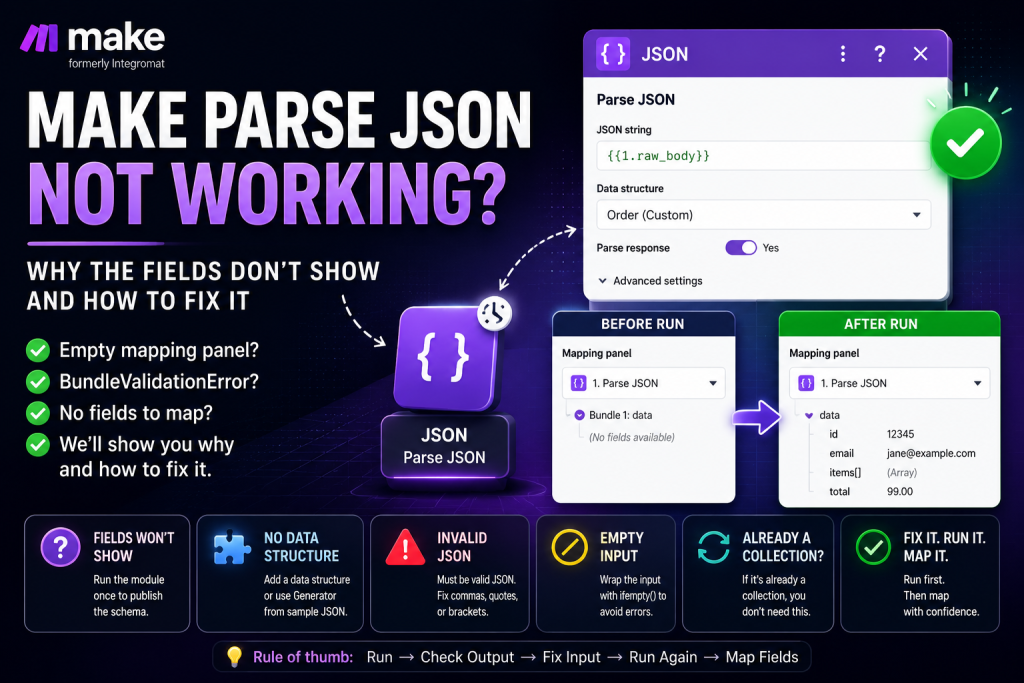
The Parse JSON module takes a JSON string as input and turns it into a typed bundle you can map from. If yours is misbehaving, check these in order:
- The fields won’t show Parse JSON produces a dynamic structure Make can’t predict, so the mapping panel shows only “Bundle 1: data” until the module runs once with real data. Run it once and the fields appear.
- No data structure defined if you want the fields available before running, add a Data structure. The Generator can build one from a pasted sample in seconds.
- Invalid JSON malformed input throws a BundleValidationError. The string has to be valid JSON, not “close enough.”
- Empty input feeding Parse JSON nothing also errors. Wrap the input with ifempty() so an empty value doesn’t blow up the module.
- It isn’t actually a string if the data is already a collection, you don’t need Parse JSON at all; if it’s a string that should be parsed, that’s exactly the job.
The fastest diagnostic: run the module on its own, then look at whether it errored or just produced an unmapped output. An error points to the input (invalid or empty); a green run with an empty downstream panel points to the run-once schema fix below.
What Parse JSON actually does
Parse JSON converts a JSON string into a structured bundle of typed fields, collections, arrays, and primitives you can map into the next module. The reason it needs a “run once” step at all comes down to how Make predicts output. As the manuscript explains, “the mapping panel shows you the predicted output of previous modules.” For most modules Make knows the shape in advance because the app defines it. Parse JSON is different: it is “the canonical example” of a module whose structure Make “doesn’t have a static output schema for.”
There are two ways to give Parse JSON a schema. The manuscript describes the data-structure route directly: “the JSON > Parse JSON module uses [data structures] to publish field schemas to downstream mapping panels.” So you either define a Data structure up front (and the fields appear immediately), or you skip it and run the module once against real data (and the fields appear after the run). Both produce the same result, mappable fields, just at different times. Everything that goes wrong with Parse JSON is some version of “I tried to map before either of those happened,” or “the input wasn’t valid JSON.”
Cause 1: the fields won’t show (empty panel)
This is the complaint that sends people to the forums. You wire Parse JSON, add a module after it, click into a field, and the mapping panel offers nothing but a placeholder like “Bundle 1: data” with no expandable sub-fields. The string is clearly there; you just can’t reach into it.
The manuscript names Parse JSON as one of three modules where this is expected: “For some modules, JSON > Parse JSON without a defined data structure, Webhooks > Custom Webhook before any payload has been received, HTTP > Make a request before parsing the response, the mapping panel can’t predict the structure. In those cases, you’ll see a placeholder like ‘Bundle 1: data’ with no expandable sub-fields.”
The fix is the one-liner the book repeats more than any other: “Run the upstream module manually (right-click → Run this module only). After it executes, the schema is published, and the downstream mapping panel populates.” Run first, map second. If you’ve ever wrestled with the same empty panel after an HTTP call or a webhook, it’s the identical mechanic, see our guides on the Make HTTP module and Make webhooks.
Cause 2: no data structure defined
Running once is fine for a quick build, but defining a data structure is more explicit and easier to maintain: someone reopening or editing the scenario may still run into the empty-panel problem unless the schema has been published, and a payload that changes shape can leave you mapping fields that aren’t there next time. The durable fix is to give Parse JSON a Data structure so the schema is always published, run or no run.
You don’t have to build it by hand. The manuscript describes the Generator: “paste a JSON example, Make infers the structure.” More fully: “For any module that needs a data structure, paste real sample data (JSON, CSV row, XML snippet) into the Generator field, click Generate, and Make produces the structure from the sample. This is faster and more reliable than manually clicking through every field.” A data structure “support[s] all of Make’s data types: Text, Number, Boolean, Date, Buffer, Collection, Array,” and “Collections can be nested. Arrays can contain primitives or collections”, so even a deeply nested payload generates cleanly from one good sample. If you’re not sure whether your scenario will actually run the module, see the Make execution history guide for how to confirm what ran and what didn’t.
Tired of the run-once dance on every build? Our free Builder’s Companion Kit includes the import cards and worked blueprints that show exactly how to define data structures so your fields are always there to map. Grab it at mmsvegas.com/make-resources.
Cause 3: invalid or malformed JSON
Parse JSON is strict. If the input isn’t valid JSON, the module errors. The manuscript uses this on purpose as a way to force an error in error-handling demos: “Drop in a JSON > Parse JSON module and feed it deliberately malformed JSON … Parse JSON throws a BundleValidationError.” That same error is what you hit by accident when the string is truncated, has trailing commas, smart quotes instead of straight quotes, or is actually HTML or an error page rather than JSON.
A BundleValidationError, in the book’s words, means “a bundle entering the module didn’t pass type-checking. Required field is missing or has the wrong type.” Treat it as a condition to test, not a mystery: click the input bubble and read the exact string you’re feeding the module. If the source returned HTML, plain text, or an error page instead of JSON, Parse JSON will fail because the input is not valid JSON, the content type the source sent may help explain why the wrong format came back, but the parse failure itself is caused by the invalid input. The usual culprits are a value that isn’t JSON at all (an API returned an HTML error page), or a string that got mangled upstream.
Cause 4: empty input
Feeding Parse JSON nothing breaks it too. This bites most often when the JSON comes from a branch or a route that didn’t run on this cycle, leaving the input blank. The manuscript flags exactly this pattern: “If no route runs, the Parse JSON will error on an empty input, wrap with ifempty() to handle.”
The fix is to guard the input. Wrap the mapped value in ifempty() so that when the real value is missing, Parse JSON receives a safe fallback (an empty object, say) instead of nothing at all, or add a filter before the module so it only runs when there’s actually something to parse. Either way, the goal is the same: never hand Parse JSON a blank.
Cause 5: it’s already a collection (or already a string)
Parse JSON exists for one specific situation: you have JSON as a string and need it as structured data. Two mix-ups follow from that.
First, you may not need Parse JSON at all. If the upstream module already returns structured data, an HTTP module that parsed its own response, for instance, the fields are already mappable and adding Parse JSON on top just gives you something that isn’t a string to parse. Second, the reverse: a value that looks structured may actually be text. The manuscript notes that when you map a collection into a text field, it gets “converted to a JSON string.” So a collection can arrive downstream as a JSON string, and that is precisely when Parse JSON is the right tool to turn it back into fields.
If you need to go the other direction, build a JSON string from fields, that’s the Create JSON module, not Parse JSON. The manuscript pairs them: “Use JSON > Create JSON to package the route’s output into a JSON string … then JSON > Parse JSON to deserialize.” (Make’s JSON app also includes other helpers such as Aggregate to JSON and Transform to JSON, but for this troubleshooting issue the important pair is Parse JSON and Create JSON: one unpacks a JSON string, the other builds one.) For billing, treat Parse JSON like a standard non-AI module: one execution is one operation, and under Make’s current credit model, standard non-AI modules generally use one credit per operation. For the bigger picture on counting, see Make operations vs credits.
Cause 6: an empty panel under an iterator
A specific version of the empty-panel problem shows up when you put an iterator after Parse JSON to loop over an array. The manuscript spells it out: “When you put an iterator after a module that doesn’t publish a schema for its arrays, JSON > Parse JSON without a data structure … the mapping panel under the iterator shows only Total number of bundles and Bundle order position, not the array’s actual fields.”
The fix is the same two-part choice as before: either define a data structure on the Parse JSON module so the array’s fields are published, or run the scenario once with real data so the iterator can see the array’s shape. After that, the per-item fields become mappable inside the loop. For how iterators and aggregators handle arrays in general, see Make iterators vs aggregators.
A worked example: parsing a webhook payload
Say a webhook delivers an order as a JSON string, you add Parse JSON to turn it into fields, and the module after it shows nothing to map. Here’s the order that settles it fastest.
Step 1, confirm the input is a real JSON string. Click the input bubble feeding Parse JSON and read it. If it’s blank, that’s an empty-input error waiting to happen, guard it with ifempty() or a filter. If it’s HTML or a fragment, it isn’t JSON and will throw a BundleValidationError.
Step 2, give it a schema. The clean way: copy one real sample payload, open the Parse JSON module’s Data structure field, click into the Generator, paste the sample, and Generate. Now the fields are published whether or not the module has run yet.
Step 3, or run it once. If you’d rather not define a structure, right-click the module and choose “Run this module only” against a real payload. After it executes, the downstream panel fills in.
Step 4, handle the array, if any. If the payload contains a list (line items, say) and you’ve added an iterator, the same schema step makes the per-item fields appear inside the loop. No schema, no fields, only the bundle counters.
Do these in order and the “Parse JSON not working” problem nearly always turns out to be one of two things: you mapped before the schema existed, or you fed it something that wasn’t clean JSON.
Frequently asked questions
Why does Parse JSON show “Bundle 1: data” with no fields to map? Because Parse JSON produces a dynamic structure Make can’t predict in advance. Either define a Data structure on the module so the fields are published immediately, or right-click and choose “Run this module only” with real data, after it runs, the downstream mapping panel populates.
What causes a BundleValidationError on Parse JSON? Invalid input. The string you fed the module isn’t valid JSON, it’s truncated, malformed, empty, or actually something else like an HTML error page. Click the input bubble and read the exact value the module received.
How do I get the fields without running the scenario first? Add a Data structure to the Parse JSON module. Use the Generator: paste one real sample JSON payload and click Generate, and Make builds the structure for you. The fields are then available to map before any run.
Why does Parse JSON error when a route doesn’t run? An unrun route leaves the input empty, and Parse JSON errors on empty input. Wrap the mapped value with ifempty() so it gets a safe fallback, or add a filter so the module only runs when there’s something to parse.
Do I always need Parse JSON after an HTTP call? No. The HTTP module can parse JSON, XML, and text responses itself, so its fields may already be mappable. Use Parse JSON only when you have a raw JSON string that wasn’t already parsed.
What’s the difference between Parse JSON and Create JSON? Parse JSON turns a JSON string into structured fields; Create JSON builds a JSON string from fields you define. They’re inverses, you often use Create JSON to package data and Parse JSON to unpack it later.
How many credits does Parse JSON use? Parse JSON is a standard non-AI module execution: one operation, generally one credit under Make’s current credit model. If it runs inside a loop, it runs once per bundle, so credit usage scales with the number of bundles processed.
Can Make Parse JSON not working be caused by mapping fields from a previous run that no longer exist? Yes. If the JSON structure changed between runs (a new payload shape, a missing key), any fields you mapped from the old schema still show the old field name but return empty or error. Re-run the module with the new payload, or update the Data structure to match, then remap the affected fields downstream.
Sources
Brian Kasday, The Missing Manual for Make (MMS Vegas, 2026), chapters on mapping, data structures, flow control, and error handling. Behavioral claims are grounded in that manuscript; current field names and module specifics were verified against Make’s official JSON app documentation at apps.make.com/json, last updated May 2026.
Written by Brian Kasday, a direct-response marketer with 40 years in the trade who rebuilt his entire marketing capability as a one-person operation using AI and a few-dollars-a-day software stack. He writes The Operator’s Library for MMS Vegas. Ready to build faster and break fewer scenarios? Start with the free Builder’s Companion Kit cards, blueprints, and a cost estimator, at mmsvegas.com/make-resources.