
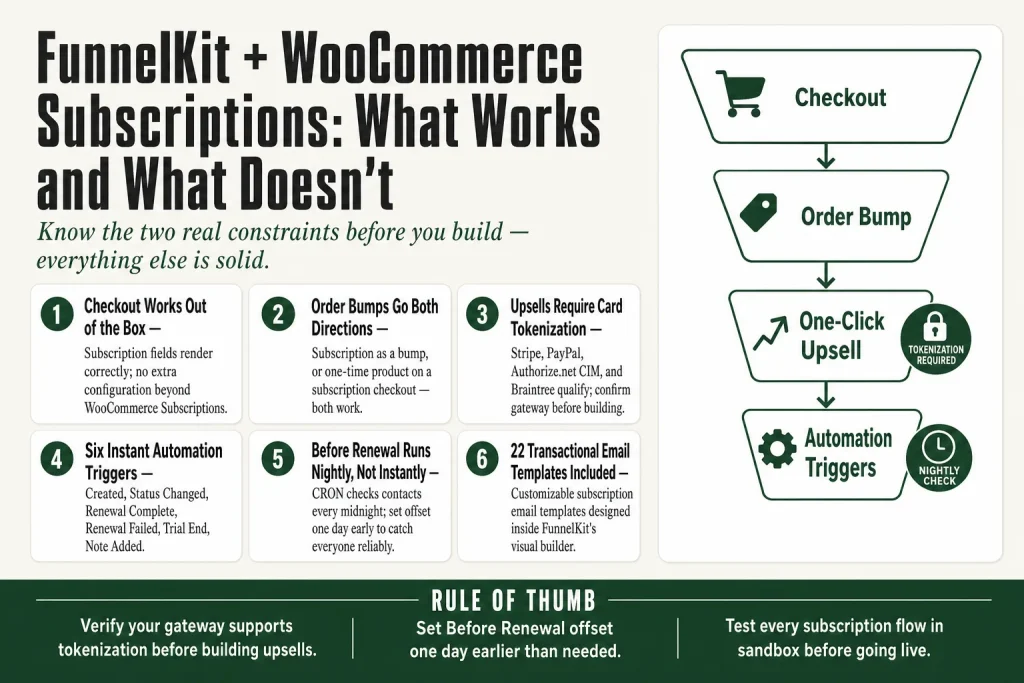
The 30-second answer
- Checkout: Subscription products work on FunnelKit checkouts exactly like simple products. No extra configuration needed beyond having WooCommerce Subscriptions active.
- Order bumps: You can add a subscription product as an order bump on a checkout that contains any product type, including another subscription.
- One-click upsells: Subscription products are supported as post-purchase upsell offers, but your payment gateway must support card tokenization. Stripe, PayPal, Authorize.net CIM, Braintree, and others qualify. Confirm your gateway before you build the offer.
- Automation triggers: FunnelKit Automations Pro provides instant triggers (Subscription Created, Renewal Payment Complete, Renewal Payment Failed, Status Changed, Trial End, Note Added) and scheduled triggers (Before Renewal, Card Expiry, Before End) tied to WooCommerce Subscriptions data.
- Scheduled triggers run nightly: The Before Renewal trigger checks contacts every midnight. It is not real-time. Factor that into your send timing.
- Transactional emails: FunnelKit Automations includes 22 customizable subscription transactional email templates you can design with the visual builder.
- Plan requirement: Order bumps and one-click upsells require FunnelKit Funnel Builder Plus or higher. The WooCommerce Subscriptions integration in Automations requires Automations Pro.
Take this fix into your next scenario. The free Builder’s Companion Kit collects the checklists and templates that pair with this guide — so next time, you start from a template, not a blank page. Grab it free →
- What Works at Checkout with Subscription Products
- Order Bumps with Subscription Products
- One-Click Upsells with FunnelKit WooCommerce Subscriptions
- Automation Triggers for the Subscription Lifecycle
- Actions, Merge Tags, and Transactional Emails
- Worked Example: A Three-Touch Renewal Reminder Sequence
- 3D Secure, SCA, and Renewal Declines
- WooCommerce Subscriptions vs. Sublium: Which One to Use with FunnelKit
- What to Test Before You Go Live
- FAQ
FunnelKit WooCommerce Subscriptions compatibility is broader than most people expect and narrower in a few spots that will burn you at launch. The short version: FunnelKit works with the official WooCommerce Subscriptions plugin across checkout, order bumps, and post-purchase one-click upsells. FunnelKit Automations connects to the full subscription lifecycle as a trigger source. But one-click upsells on subscription products require a gateway that supports card tokenization, and the before-renewal scheduled trigger runs on a nightly CRON, not the instant a customer clicks anything. Know those two constraints before you build, and the rest of the integration is solid.
What Works at Checkout with Subscription Products
FunnelKit Checkout treats a subscription product the same way WooCommerce does: as a product in the cart. Because FunnelKit’s checkout layer sits on top of WooCommerce rather than replacing its order logic, subscription-specific fields (billing interval, trial period, sign-up fee) all render and calculate correctly on a FunnelKit checkout page.
The practical result is that you can build a custom one-step or multi-step checkout funnel and put a subscription product at the center of it without any extra configuration beyond having WooCommerce Subscriptions active. Free trials, sign-up fees, and variable subscription pricing all carry through.
One thing to verify: if you use a mini cart or order summary block in your checkout template, confirm it displays the recurring price correctly after customization. The recurring price string comes from WooCommerce Subscriptions, and most FunnelKit templates pass it through untouched, but custom templates using a non-standard product price block may display only the initial payment. A quick test order with a trial product will tell you immediately.
For initial setup, see the complete FunnelKit checkout setup guide for the baseline steps before you layer in subscription products.
Order Bumps with Subscription Products
Order bumps support subscription products. You can place a subscription as the bump on a checkout that sells a one-time product, or place a one-time product as the bump on a subscription checkout. Both directions work.
The rule engine is where subscription bump offers get powerful. You can restrict a subscription bump to show only when the cart contains a specific product, a product from a specific category, or when the cart total crosses a threshold. That means you can offer a premium subscription tier as a bump only to buyers who are already spending above a certain amount, which is a much tighter audience than showing it to everyone.
A few things to confirm before you go live:
- Bump price display: The bump widget shows a price. For subscription products, check that the recurring label (“/month”, “/year”) renders alongside the price in the bump skin you chose. Some older or heavily customized skins may show only the numeric value.
- Trial period on a bump: If your subscription product has a free trial, the bump can carry that through. Test the order total calculation at checkout to confirm zero-charge or trial-charge behavior matches what WooCommerce Subscriptions expects.
- Multiple bumps: If you show more than one bump and one is a subscription, the order total update logic fires per-bump. Verify the subscription total line updates correctly when the buyer checks and unchecks the subscription bump.
For the full bump setup walkthrough, see how to set up a FunnelKit order bump. If your bump is not appearing at all, check the order bump not showing diagnostic guide.
One-Click Upsells with FunnelKit WooCommerce Subscriptions
This is the piece that trips people up most often, so read it carefully before you build the offer page.
FunnelKit’s post-purchase one-click upsell charges the buyer’s saved payment token without asking them to re-enter card details. That mechanism is what makes a “one-click” upsell actually one click. When the upsell product is a subscription, the same token that captured the initial order is used to create the subscription and its first charge.
The catch is that one-click upsells require a gateway that supports card tokenization. FunnelKit Checkout and order bumps work with every gateway WooCommerce supports. One-click upsells do not. The upsell feature requires the payment gateway to have card tokenization, and compatible gateways include Stripe, PayPal, Authorize.net CIM, Braintree, Square, and others listed in the FunnelKit docs.
Practical rule: before you build the upsell offer, go to your FunnelKit one-click upsell global settings and confirm your gateway appears in the enabled list. If your gateway is not there, the upsell page will not fire for buyers who paid with that method, regardless of whether the product is a subscription or a one-time item.
The other thing to test: upselling a subscription with a trial period. The trial creates a $0 or reduced initial charge. Some gateways handle that correctly; others require a minimum charge to store a token. Test a real transaction in sandbox mode before you launch. A failed token save means the upsell technically fires but the charge does not complete.
If your one-click upsell is not firing, the gateway compatibility check is always the first stop. The one-click upsell not working guide walks every cause in order.
Automation Triggers for the Subscription Lifecycle
FunnelKit Automations Pro connects to WooCommerce Subscriptions and gives you two categories of triggers: instant events and scheduled events.
Instant events fire the moment something happens in WooCommerce Subscriptions:
- Subscription Created
- Subscription Status Changed
- Renewal Payment Complete
- Renewal Payment Failed
- Subscription Trial End
- Subscription Note Added
Scheduled events run on a daily CRON check rather than firing instantly. FunnelKit Automations runs this worker every midnight and picks up contacts based on their subscription due date and the number of days configured in the event. The scheduled events are:
- Before Renewal (configurable days before the next payment, with a configurable time of day in the store’s timezone)
- Card Expiry (configurable days before the saved card expires)
- Before End (configurable days before the subscription’s end date)
The midnight CRON behavior is the one thing operators misconfigure most. If you set a “Before Renewal” trigger for 3 days out and a subscriber’s renewal is 3 days and 6 hours away at midnight, they get the email. If the renewal is 2 days and 23 hours away, they will not get it until the next midnight check. Build your day-offset with that in mind: set it to 4 days if you want to reliably catch people 3 days out.
Each trigger supports product-based filtering, so you can build automations that only fire for contacts subscribed to a specific product. That keeps your win-back sequence for a high-ticket subscription separate from your reminder for an entry-level plan.
To verify that a Before Renewal automation is actually running, check the automation logs. See FunnelKit Automation Logs for how to read them and identify stuck or missed triggers. If an automation is not triggering at all, start with the automation not triggering diagnostic.
Actions, Merge Tags, and Transactional Emails
Triggers are only half the equation. Once FunnelKit Automations fires on a subscription event, you can take direct action on the subscription itself, not just send an email. The Change Subscription Status action lets you update a WooCommerce subscription from one state to another (for example, moving a subscription from “On Hold” back to “Active” after a failed payment retry succeeds via a separate process).
For personalization, the WooCommerce Subscriptions integration provides merge tags covering subscription-specific data: next renewal date, subscription status, product name, billing amount, and more. Use these in your renewal reminder and failed-payment emails so the message matches the subscriber’s actual situation, not a generic template.
FunnelKit Automations also includes 22 customizable transactional email templates specifically for WooCommerce Subscriptions. These replace the default WooCommerce Subscriptions email notifications with templates you design in the visual email builder. To make them go out through a reliable sending path, make sure you have a dedicated sending service connected. See how to connect an email provider to FunnelKit Automations for setup. If emails are landing in spam instead of the inbox, work through the FunnelKit emails going to spam checklist.
One honest caveat: the contact profile in FunnelKit Automations gains a WooCommerce Subscriptions sidebar section when this integration is active. It shows active subscription count and related details at a glance. That is useful for support and for building contact segments. Verify you see it after installing and activating the integration, because if the WooCommerce Subscriptions plugin is not active at the time FunnelKit Automations loads, the integration module will not appear in the trigger list.
Worked Example: A Three-Touch Renewal Reminder Sequence
Here is what a practical pre-renewal sequence looks like built inside FunnelKit Automations with WooCommerce Subscriptions as the trigger source.
Goal: Remind active subscribers before their annual plan renews so they do not get surprised by the charge, reducing chargebacks and cancellations after the fact.
- Automation 1: 7-day reminder. Trigger: Before Renewal, configured to 7 days. Filter: subscription product = your annual plan SKU. Action: Send email. Subject uses the
{{subscription_product}}and{{renewal_date}}merge tags. Body confirms the amount, links to the customer portal, and reminds them what they get for the year. - Automation 2: 3-day reminder. Same trigger type, set to 3 days. Same product filter. This email is shorter. One paragraph, one button to manage the subscription. Add a condition to the automation: only run if the contact has not clicked the manage link in Automation 1. That requires checking your click-tracking data, which FunnelKit Automations records when you have a sending service connected.
- Automation 3: Renewal payment failed recovery. Trigger: Renewal Payment Failed (instant event). Action: Send an email within the hour pointing the subscriber to update their card. Follow it with a 48-hour delay, then a second email if the subscription status has not moved back to Active. Use the Change Subscription Status action sparingly here: automate the reminder, not the retry. Let WooCommerce Subscriptions handle the payment retry schedule.
This whole sequence involves no custom code. Your judgment goes into the copy, the offer you make in the reminder, and the decision about how many touches are appropriate for your audience before they feel hounded. The tooling handles the scheduling and sending.
To tag contacts at each stage so you can segment them later, see FunnelKit Lists and Tags for the right way to structure that.
3D Secure, SCA, and Renewal Declines
Subscription renewals in Europe and the UK run into Strong Customer Authentication (SCA) rules. The initial checkout can prompt the buyer for 3DS authentication. Automatic renewals are exempt from the interactive 3DS step under the recurring transaction exemption, but your gateway has to be set up correctly to claim that exemption, and not every gateway plugin does it by default.
If you are seeing renewal payments failing for cards that worked fine at initial checkout, SCA exemption handling is the first thing to check. The FunnelKit 3D Secure declined guide covers the SCA-specific failure patterns and how to address them at the gateway level.
The practical rule for subscriptions: test a real renewal in a sandbox environment using a European test card that requires 3DS. If the initial checkout succeeds and the simulated renewal also succeeds without prompting for authentication, your gateway is handling the exemption correctly. If the renewal fails, talk to your gateway provider about MIT (Merchant Initiated Transaction) flagging before you go live.
WooCommerce Subscriptions vs. Sublium: Which One to Use with FunnelKit
FunnelKit integrates with two subscription plugins: the official WooCommerce Subscriptions plugin (from WooCommerce/Automattic) and Sublium, which is built by the FunnelKit team itself.
WooCommerce Subscriptions is the long-standing standard. It is what most stores already have. FunnelKit’s integration with it covers checkout, bumps, upsells, and the full automation trigger set described in this article. If you are already on WooCommerce Subscriptions, there is no reason to switch just to use FunnelKit.
Sublium is the FunnelKit team’s own subscription engine, built specifically to work alongside FunnelKit Cart, the checkout, and Automations. It adds features that WooCommerce Subscriptions does not have natively: a cancellation flow you design (with a benefit reminder page and a cancellation reason survey), subscribe-and-save ordering, installment billing, and MRR/ARR/churn analytics built in. It also feeds the same automation trigger types into FunnelKit Automations, including Before Renewal, Card Expiry, and Before End scheduled events.
The honest tradeoff: WooCommerce Subscriptions has a larger ecosystem of add-ons and a longer track record. Sublium is newer and more tightly coupled to FunnelKit’s toolset. If you are starting fresh and your stack is primarily FunnelKit products, Sublium is worth evaluating. If you are migrating an existing subscription store with hundreds of active subscribers, the migration risk of switching subscription plugins is real. Verify any migration path thoroughly with both vendors before committing.
What to Test Before You Go Live
Run through this list with real (sandbox) transactions before you open the funnel to live traffic.
- Checkout: Place an order for a subscription product. Confirm the recurring price, trial period (if any), and sign-up fee all display correctly in the order summary and on the thank-you page.
- Order bump: Add a subscription as a bump and complete checkout. Verify the bump amount appears as a separate subscription in WooCommerce rather than a modified version of the main subscription.
- One-click upsell: Accept a post-purchase subscription upsell. Confirm the upsell charge completes and a new subscription is created in WooCommerce. Then try rejecting it and confirm the rejection path routes correctly. See the downsell not showing guide if your rejection path is not rendering.
- Upsell with trial: If the upsell subscription has a free trial, confirm the charge is zero and a subscription is still created in WooCommerce with the correct trial end date.
- Renewal payment failed trigger: In WooCommerce Subscriptions, manually set a test subscription to “Payment Failed” status. Confirm your Automations sequence fires. Check the automation log for the event.
- Before Renewal scheduled trigger: Set a test subscription’s renewal date to exactly the configured number of days out. Wait for (or manually trigger) the midnight CRON. Verify the contact enters the automation. The FunnelKit docs include a procedure for manually hitting the CRON worker URL if you cannot wait overnight.
- Transactional emails: If you have replaced the default WooCommerce Subscriptions emails with FunnelKit Automations templates, confirm each template sends and that merge tags resolve correctly. Watch especially for the renewal amount and next renewal date tags.
FAQ
does funnelkit work with woocommerce subscriptions
Yes. FunnelKit’s checkout, order bumps, and one-click upsells all support WooCommerce Subscriptions products. FunnelKit Automations Pro also connects to the full subscription lifecycle with instant and scheduled triggers. You need FunnelKit Funnel Builder Plus or higher for order bumps and upsells, and Automations Pro for the subscription triggers.
can you use a subscription product as a one-click upsell in funnelkit
Yes, but your payment gateway must support card tokenization. Gateways including Stripe, PayPal, Authorize.net CIM, and Braintree qualify. If your gateway is not on FunnelKit’s supported list for one-click upsells, the offer page will not fire for buyers who used that gateway. Check the gateway settings in FunnelKit’s one-click upsell global settings before you build the offer.
how does the before renewal trigger work in funnelkit automations
It is a scheduled trigger, not an instant one. FunnelKit Automations runs a CRON worker every midnight. That worker checks which subscribers have a renewal date matching your configured day offset and enrolls them in the automation. If a subscriber’s renewal is, say, 3 days and 2 hours away at midnight, they enter the automation. If it is only 2 days and 22 hours away, they will not enter until the following midnight check. Build your offset with that in mind.
funnelkit subscription order bump not working
First confirm the WooCommerce Subscriptions plugin is active. Then check your bump rule conditions: if your rule restricts the bump by cart total or product, a subscription product’s trial-period cart total may be $0, which can fail a minimum-amount rule. Also verify the bump product itself is a published subscription product, not a draft. Check the order bump not showing diagnostic if it does not appear at all.
should i use woocommerce subscriptions or sublium with funnelkit
If you already run WooCommerce Subscriptions, there is no pressing reason to switch. FunnelKit integrates deeply with both. Sublium, built by the FunnelKit team, adds features like a built-in cancellation flow, subscribe-and-save, and MRR/churn analytics. If you are starting from scratch and your entire stack is FunnelKit products, Sublium is worth evaluating. Migrating an existing subscriber base between subscription plugins carries real risk, so verify the migration path carefully before committing.
funnelkit subscription renewal emails not sending
Check three things in order. First, confirm WooCommerce Subscriptions is active and the relevant transactional email template in FunnelKit Automations is enabled. Second, verify your sending service is connected and not hitting rate limits. Third, if you are using the Before Renewal scheduled trigger in an automation, check that the CRON is running correctly and the automation log shows the contact entering. The automation logs guide covers how to read those entries.
Sources:
- FunnelKit Automations: WooCommerce Subscriptions Integration (Official Docs)
- FunnelKit: List of Supported Payment Gateways for One-Click Upsells (Official Docs)
- FunnelKit: Manually Trigger the Subscription Before Renewal Event (Official Docs)
- FunnelKit Funnel Builder plugin listing, WordPress.org
- FunnelKit Changelog and Release Notes
- FunnelKit Product Suite FAQ
Brian Kasday spent forty years in direct-response marketing before rebuilding the whole operation as a one-person shop. He writes The Operator’s Library — including “The Missing Manual for FunnelKit” — for operators who’d rather build it themselves than wait on someone else.
Get the Builder’s Companion Kit — the free checklists and templates that pair with this guide: mmsvegas.com/op/funnelkit-resources/.
This guide fixes one FunnelKit step. The Missing Manual for FunnelKit covers the whole checkout system. See the manual →
More FunnelKit guides
Free · FunnelKit Operator Toolkit
Building checkouts in FunnelKit?
Get the free operator toolkit — order-bump templates, checkout checklists, and a note when what you just read changes.
Get the free toolkit →