
The 30-second answer
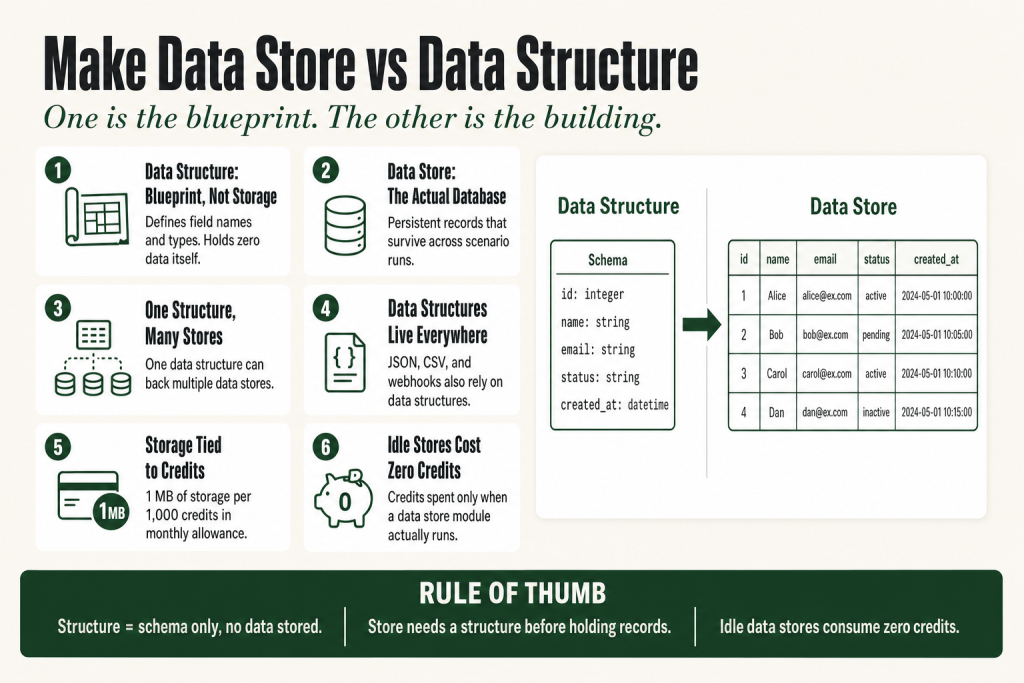
- Data structure: a schema document that defines field names, data types, and validation rules. It holds no data. Think of it as a table definition, not a table.
- Data store: a persistent, internal Make database that holds actual records. Every data store requires a data structure to define its columns.
- You can reuse one data structure across multiple data stores.
- Data structures are also used outside data stores: Parse JSON, Create JSON, CSV modules, and webhook payload detection all rely on them.
- Storage allowance is tied to your credit plan. Make’s official pricing page confirms that for every 1,000 credits in your monthly allowance, you get 1 MB of data store space. Each data store requires a minimum of 1 MB. Check Make’s pricing page for the current formula, as Make may update these figures.
- Data structures consume no storage. Only the data store does.
- A data store sitting idle costs you no credits. Credits are consumed only when a scenario runs a data store module, such as Add a Record or Search Records. Storage space and credit consumption are two separate things.
Take this fix into your next scenario. The free Builder’s Companion Kit collects the checklists and templates that pair with this guide — so next time, you start from a template, not a blank page. Grab it free →
- What a Data Structure Actually Is
- What a Data Store Actually Is
- How the Make Data Store vs Data Structure Relationship Works
- Storage Limits: What Your Plan Actually Gives You
- Where Data Structures Live Outside of Data Stores
- FAQ
The confusion around make data store vs data structure trips up almost everyone who builds their first persistent scenario. The two terms look similar, they live in the same part of the Make sidebar, and you can’t create a data store without touching a data structure first. But they do completely different jobs. One is a blueprint. The other is the building. Get them mixed up and you’ll spend twenty minutes trying to “query” something that can’t hold a single row of data.
What a Data Structure Actually Is
A data structure is a document that describes the format of data being transferred to Make. It tells the scenario editor which fields a module returns or receives, and what type each field is: text, number, boolean, date, array, or collection.
That’s it. A data structure stores nothing. It’s a column layout, not a table. You can think of it as the label on a set of filing slots before any paper goes in.
Make’s official help puts it plainly: “Based on this document, the scenario editor is able to figure out which module returns or receives which kind of data.” That’s the whole job.
Data structures show up in more places than most people realize:
- Parse JSON / Create JSON: the data structure tells Make how to map JSON keys into bundle fields you can use downstream.
- CSV modules: “Create CSV (advanced)” uses a data structure to define the column order.
- Webhook payload detection: when you send a test payload to a webhook and click “Re-determine data structure,” Make builds a data structure from that sample automatically.
- Data stores: every store requires a data structure to define its schema before it can hold a single record.
You’ll also find a built-in generator: paste a JSON sample into it and Make produces the matching data structure for you. You can then edit the result by hand.
What a Data Store Actually Is
A data store is a persistent, internal database hosted inside your Make organization. It holds records, the actual rows of data, that survive across scenario runs. Every make.com scenario is stateless by default: run it twice and the second execution knows nothing about the first. A data store breaks that constraint.
The analogy: if the data structure is a table definition, the data store is the populated table sitting in a database on Make’s servers.
Each record in a data store has a unique Key. You can define the key yourself (an email address, an external record ID) or let Make generate a UUID. Predictable keys matter because “Get a Record” looks up by key directly and never scans the whole store. “Search Records” is more flexible but slower on large stores.
Data stores are scoped to your Make organization, not to individual scenarios. Any scenario in the same organization can read from and write to the same store. That makes them useful for passing state between otherwise separate automations.
The available modules are:
- Add/Replace a Record: inserts or overwrites a record by key.
- Update a Record: modifies specific fields without replacing the whole record.
- Get a Record: fetches one record by its exact key.
- Search Records: returns all records matching a filter condition.
- Check the Existence of a Record: returns true or false without retrieving data. The cheapest way to deduplicate.
- Delete a Record and Delete All Records: removal operations.
- Count Records: returns the total number of records in the store.
One thing you can’t do: trigger a scenario when a record is added or changed. Data stores have no watch/trigger module. If you need event-driven behavior off a record change, you’ll need a different pattern (a webhook from an external system, for example).
How the Make Data Store vs Data Structure Relationship Works
The relationship is one-to-many in one direction: a single data structure can back multiple data stores. The reverse is not true. A data store requires exactly one data structure.
Here is the creation order that Make enforces:
- Define a data structure (field names and types).
- Create a data store, selecting that structure to define the columns.
- Set the maximum size in MB for the store.
- Save. The store is now available to any scenario module in your organization.
You can create the data structure inline while setting up the store, or create it separately under Data Structures in the sidebar and reuse it. The sidebar also shows you which stores and scenarios currently reference a given structure. That tracking matters when you rename a field: changing a field name in the data structure does not automatically update the field references in your modules. You’ll need to remap anything that was pointing to the old name.
Strict validation is off unless you enable it. With strict validation off, modules process data that does not conform to the structure rather than throwing an error. Enabling strict validation causes the storing module to return an error when incoming data does not fit the defined fields. Whether you want that guardrail depends on how clean your incoming data is.
Storage Limits: What Your Plan Actually Gives You
Data structures cost you nothing in terms of storage. Data stores do.
Two separate concepts are worth keeping straight here. The first is storage allowance: the total MB of data store space your plan gives you, calculated from your monthly credit count. The second is credit consumption: the credits your scenarios spend when they actually run data store modules. A data store sitting idle, with records in it, costs you zero credits. Credits are only consumed when a scenario executes a module, such as Add/Replace a Record, Search Records, or Check the Existence of a Record. Each of those module runs costs 1 credit, the same as any standard Make module.
Make’s official pricing page confirms the storage formula: for every 1,000 credits in your monthly allowance, you get 1 MB of data store space. Each data store requires a minimum of 1 MB. The 1,000-store ceiling is a hard organization-wide cap regardless of your plan or credit volume, meaning it’s not a per-scenario or per-team constraint. Storage space and the store count limit are two separate things: you can hit the storage ceiling long before you hit 1,000 stores.
A note on terminology: Make replaced “operations” with “credits” as its billing unit on August 27, 2025, converting existing balances at a 1:1 ratio. That date is now in the past, so the transition is complete. The storage formula in Make’s official help and pricing page uses credits throughout, but you may still see “operations” in older guides or inside your own scenario run history, where the term now refers to individual module runs as a tracking metric rather than a billing unit. The formula itself is the same either way: 1 MB of data storage per 1,000 credits in your monthly plan. Always verify the current numbers at make.com/en/pricing before you plan storage-heavy builds.
Credits also drive more than just storage. Each module execution in a scenario costs at least one credit, including triggers and filters. AI-native modules and the Make Code module bill at variable or higher rates. So the same credit pool that sizes your data storage also funds every scenario run.
In practice:
- Free plan (1,000 credits/month): 1 MB total. Since 1 MB is the minimum size per store, the free plan supports exactly one data store.
- Core plan (10,000 credits/month): 10 MB total.
- Higher plans: 1 MB per 1,000 credits in your monthly allowance.
- All plans: maximum of 1,000 data stores per organization, regardless of plan or credit volume.
The free plan’s single-store limit is the most common surprise. If you need a second store, you need a paid plan.
Data stores are not a replacement for a real database. If you’re storing customer lists that grow without bound, or caching large API responses, you’ll hit the cap. At that point, connect an external database (PostgreSQL, MySQL, Airtable) through the relevant Make module instead. See Make Data Stores: How They Work, When to Use Them, and the Limits That Will Surprise You for a full breakdown of where data stores belong in your stack.
If you’re already hitting duplicate-record problems inside a store, see Make Data Store Duplicate Records: How to Prevent, Detect, and Clean Them Up.
Where Data Structures Live Outside of Data Stores
This is the part that confuses people most. Data structures are not exclusively a data store concept. They appear wherever Make needs to know the shape of your data ahead of time so the mapping panel can display the correct fields.
Parse JSON module: if you attach a data structure, the module immediately exposes the mapped fields for downstream modules. Without one, you have to run the module once to auto-detect, then connect your downstream modules afterward. That auto-detection creates a data structure behind the scenes, it just does it for you. See Make Create JSON: Build Nested API Payloads Correctly for a walkthrough of how this works in the JSON context.
Webhook triggers: when you paste a test payload and click “Re-determine data structure,” Make builds a data structure from the sample. That structure is what allows you to map {{1.email}} or {{1.order_id}} in subsequent modules.
CSV (advanced) module: uses a data structure to define the column order for the output file.
In every case, the data structure is doing the same job: telling the editor what fields exist and what type they are. No data is stored in the structure itself. It is always just the schema.
FAQ
What is the difference between a Make data store and a data structure?
A data structure is a schema that defines field names and types. It holds no data. A data store is an actual persistent database inside Make that stores records using a data structure as its column layout. You need a data structure before you can create a data store.
Can I use a data structure without a data store?
Yes. Data structures are used independently in Parse JSON, Create JSON, CSV, and webhook modules. They tell Make the shape of data so the mapping panel can show the right fields. A data store is only one of many places a data structure is used.
Can one data structure be used by multiple data stores?
Yes. You can assign the same data structure to more than one data store. Each store holds its own records, but they all share the same column definitions. If you change the structure, all stores using it reflect the change.
How much storage do data stores get on the free Make plan?
The free plan includes 1,000 credits per month, which equals 1 MB of data store storage. Make’s official documentation confirms that 1 MB is the minimum size per data store, so the free plan supports exactly one data store. You need a paid plan for a second store. Verify current figures at make.com/en/pricing, as Make’s storage formula may change.
Why can’t I see my data store fields in the module mapping panel?
This usually means the data structure attached to the store has not been saved yet, or the module has not fetched the store’s structure. Open the Data Store module, select your store, and close and reopen the module. If fields still do not appear, check that the data structure has at least one field defined and is saved.
Does Make have a trigger module that watches for data store changes?
No. There is no watch or trigger module for data stores. Data stores are queried by scenarios, not the other way around. If you need event-driven behavior based on a record change, you need an external event source, such as a webhook from another system.
Does having a data store cost me credits?
No, not by itself. A data store sitting idle consumes zero credits. Credits are only spent when a scenario runs a data store module, such as Add/Replace a Record, Search Records, or Check the Existence of a Record. Each of those module runs costs 1 credit, the same as any standard Make module. Storage space (sized by your plan) and credit consumption (driven by scenario runs) are completely separate.
Sources:
- Make Help Center: Data Structures
- Make Help Center: Data Stores
- Make Pricing & Usage Allowance
- Make Help Center: Credits
- Make Help Center: Introducing Credits
- Make Developer Docs: Data Structures API
- Make Developer Docs: Data Stores API
- Make Apps Documentation: JSON Modules
Brian Kasday spent forty years in direct-response marketing before rebuilding the whole operation as a one-person shop. He writes The Operator’s Library — including “The Missing Manual for Make” — for operators who’d rather build it themselves than wait on someone else.
Get the Builder’s Companion Kit — the free checklists and templates that pair with this guide: mmsvegas.com/make-resources.
This guide solves one Make problem. The Missing Manual for Make covers the production system. See the manual →
More Make guides
Free · Make Operator Toolkit
Running scenarios in Make?
Get the free operator toolkit — production checklists and the fixes that keep scenarios alive under real traffic, plus a note when this guide changes.
Get the free toolkit →