
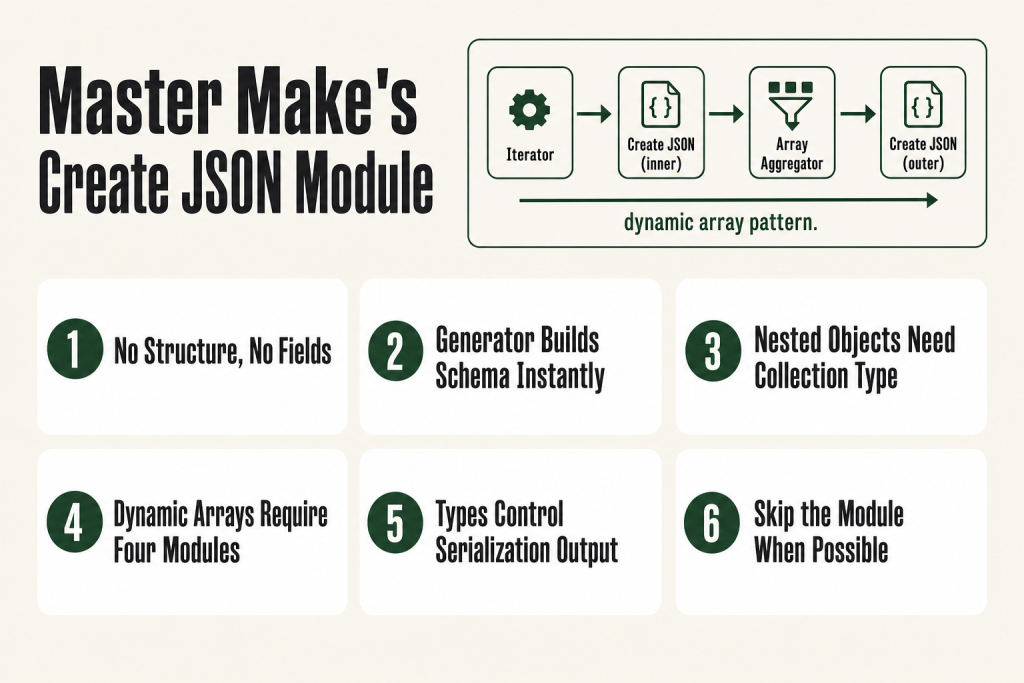
The 30-second answer
- Create JSON is listed under the Transformers section in Make’s official JSON app documentation (apps.make.com/json), meaning it processes one bundle in and outputs one bundle out, without connecting to an external service. It takes mapped fields and outputs a single JSON string you can pipe into an HTTP request body or a webhook response.
- The Data Structure drives everything. No structure, no mappable fields. Use the Data Structure Generator inside the data structure editor: paste a real sample payload from the API docs and let Make build the schema for you automatically.
- For a static nested object, define a Collection-type field inside the data structure and map into its child keys normally.
- For a dynamic array (rows that multiply at runtime), you need an Iterator, then a Create JSON module that outputs one bundle per row, then an Array Aggregator feeding back into the parent Create JSON. The order matters.
- Don’t need a separate module? The HTTP module’s application/json body type has its own data structure field. For simple, one-off payloads, skip Create JSON entirely and map directly there. Use a standalone Create JSON when you need to reuse the structure, test it in isolation, or produce the JSON string before the HTTP call.
- Type mismatches kill API calls silently. If a field expects a number, set the data structure field type to Number, not Text. Make serializes the value differently depending on that type setting: Number outputs
42, Text outputs"42". Fix the type in the data structure editor and re-run. - The resulting JSON string is available as a single mappable item on all downstream modules, including HTTP, webhooks, and data stores.
Take this fix into your next scenario. The free Builder’s Companion Kit collects the checklists and templates that pair with this guide — so next time, you start from a template, not a blank page. Grab it free →
- What the Create JSON Module Actually Does
- The Data Structure and the Data Structure Generator
- Building Nested Objects Inside Make Create JSON
- Dynamic Arrays: The Iterator and Aggregator Pattern
- HTTP Module JSON Body vs. a Separate Create JSON Module
- Type Mismatches and the Other Mistakes That Break Payloads
- FAQ
Make create JSON is the step that breaks more API calls than any auth error ever will. Make (formerly Integromat) ships a dedicated Create JSON module for exactly this problem, and getting it wrong is easy: the data structure is off, the payload looks fine to the eye, but the receiving API returns a 400 or silently ignores half the fields. The bracket is in the wrong place. A value that should be a number arrives as a string. An array that should hold three objects holds one stringified blob instead. This article walks through every piece of the Create JSON module: the data structure, the Data Structure Generator shortcut, nested objects, dynamic arrays built with an Iterator and Aggregator, and when to skip the module entirely and use the HTTP module’s built-in JSON body editor instead.
What the Create JSON Module Actually Does
Make (formerly Integromat) groups its JSON-related modules under the JSON app. That app contains several modules: Parse JSON, Aggregate to JSON, Convert JSON to XML, and Create JSON. No connection is required to use any of them.
Make’s official JSON app documentation (apps.make.com/json) lists Create JSON under a Transformers heading, alongside Convert JSON to XML. In Make’s module structure, that category covers modules that process one bundle in and produce one bundle out without touching an external service. You give it a data structure that describes the shape of your JSON, map values into the fields that appear, and it outputs a single bundle containing one item: the finished JSON string. That string is what you drop into an HTTP module body, a webhook response, or anywhere else that needs raw JSON.
The key insight: the fields you see inside the module are generated from the data structure, not hard-coded. Until you attach a data structure, the module has no input fields at all. This confuses a lot of people who open it for the first time and see an empty panel.
This is different from the HTTP module’s JSON body editor, which lets you type or map a raw JSON string directly. Create JSON is worth the extra step when your payload is complex, when you want to reuse the structure across multiple scenarios, or when you want Make to handle type coercion for you automatically.
The Data Structure and the Data Structure Generator
The data structure is a saved schema that tells Make what keys exist, what types they hold, and how they nest. It’s reusable: define it once, attach it to any Create JSON module in any scenario.
You have two ways to build one:
- Manual build: Click “Add” next to the Data Structure field, name your structure, then add fields one by one. For each field you specify a name, a type (Text, Number, Boolean, Date, Array, Collection), and whether it’s required.
- Data Structure Generator (the fast path): Inside the data structure editor, click Generator. Make’s official help docs call this feature the “Data Structure Generator.” Paste a real JSON sample into the sample data field and click Save. Make parses the sample and creates every field and nested type automatically.
The Generator path is almost always faster and less error-prone than manual entry. Grab a response example straight from the API’s documentation, paste it in, and you’re done. The generated structure will have the correct field names, types, and nesting levels already set.
One caveat: the Generator infers types from the sample values. If your sample has "age": 30, the field gets typed as Number. If your sample has "age": "30" (a quoted number, which some APIs do), you’ll get Text, and the API that expects an integer will reject it. Always check the generated types against the API documentation before you move on.
After you save the data structure, the module’s input panel populates with one field per top-level key. Nested collections appear as expandable groups. Array fields appear as a single slot where you map an array value from upstream.
Building Nested Objects Inside Make Create JSON
A nested object in JSON is a key whose value is another object, not a scalar. Something like this, where a payment record carries both an amount and a currency code together:
{
  "payment": {
    "amount": 99,
    "currency": "USD"
  }
}
In the data structure editor, you model this by adding a field named payment, setting its type to Collection, and then adding child fields inside it (amount as Number, currency as Text).
When you open the Create JSON module after attaching that structure, you’ll see a “payment” group with two nested fields beneath it. Map the amount and currency from whatever upstream module holds them, and Make assembles the nested object correctly.
You can nest as many levels deep as you need. A Collection inside a Collection inside an Array is valid. The data structure editor renders each level as an indented child group, so the visual layout mirrors the actual JSON shape.
Common mistake: people put the nested keys at the top level of the data structure instead of inside a Collection parent. The output comes out flat with no wrapper object, which is structurally wrong if the API expects a grouped object. Double-check that every group of related keys has a parent Collection field.
Dynamic Arrays: The Iterator and Aggregator Pattern
This is where most people get stuck. A static array is easy: define an Array field in the data structure, and map a fixed array value from upstream. But a dynamic array, where the number of items isn’t known until runtime (order line items, recipients, tags from a spreadsheet), requires a different approach.
The pattern is:
- Iterator: Takes an array from upstream and splits it into individual bundles, one per item. See Make Iterator Not Working if yours isn’t splitting correctly.
- Create JSON (inner): Receives one bundle at a time from the Iterator. Its data structure matches the shape of a single array item, not the whole payload. It outputs one JSON string per bundle.
- Array Aggregator: Collects all those single-item JSON strings and merges them into one array. Set the Source Module to the Iterator. The output is a single bundle containing one array. If your aggregator isn’t collapsing bundles, check Make Aggregator Not Working for the common causes.
- Create JSON (outer): Uses the full payload data structure. The Array field in the outer module receives the aggregated array from step 3. Everything else maps from the original trigger or earlier modules.
The mistake I kept making early on was trying to skip the inner Create JSON and map the raw array output from the Aggregator directly into the outer module’s Array field. It works sometimes on flat arrays, but breaks the moment each item needs to be an object with multiple keys. The inner Create JSON is what gives each item its proper structure before aggregation.
One more thing: the Array Aggregator’s “Target Structure Type” setting. You can leave it as “Custom” or point it to the Create JSON module. If you point it to the Create JSON module, the Aggregator knows exactly how to format each item. Either way works; pointing it explicitly makes the scenario easier to read months later.
HTTP Module JSON Body vs. a Separate Create JSON Module
You don’t always need a standalone Create JSON module. The HTTP module has its own body editor for JSON payloads, and knowing which to reach for saves you a module and a credit.
When the body content type is set to application/json, the HTTP module gives you two input methods: a raw text field where you type or map a JSON string, or a data structure field where you define the shape and map into fields, just like Create JSON does.
Use the HTTP module’s built-in JSON body when:
- The payload is simple and flat (a handful of keys, no complex nesting)
- You’re only sending it from one place in one scenario
- You want to reduce the credit count (Create JSON costs one credit per bundle it processes)
Use a standalone Create JSON module when:
- The same payload structure gets reused across multiple HTTP calls or scenarios. You save the data structure once and attach it wherever you need it.
- The payload is complex enough that you want to build and debug it in isolation before wiring it into an HTTP call. Easier to check the output bubble on a standalone module than to untangle a combined one.
- You need the JSON string as an intermediate value: stored in a variable, passed to a webhook response, or used in a conditional before the HTTP call happens.
- You’re building a dynamic array with the Iterator/Aggregator pattern. That chain always ends with a Create JSON module, not the HTTP module’s body field.
The short version: HTTP body editor for simple, one-off sends. Standalone Create JSON for anything reusable, complex, or built from an aggregated array.
For more on how the HTTP module handles body types and response parsing, see Make HTTP Module Not Working. And if the API you’re calling is returning a 400 after you’ve built the payload, the diagnostic steps in Make HTTP 400 Bad Request will walk you through isolating whether it’s the structure, the types, or the headers.
Type Mismatches and the Other Mistakes That Break Payloads
The data structure type setting is not cosmetic. It tells Make how to serialize the value into the JSON output. Here’s exactly what changes depending on what you set, and how to fix it when you get it wrong:
- Text vs. Number: A Number field outputs
42. A Text field outputs"42". Many APIs treat these as different types and will reject the string version for a field documented as integer. Fix: open the data structure editor, change the field type from Text to Number, save, and re-run. Make handles the serialization difference automatically. - Boolean: Must be set to Boolean type to output
trueorfalsewithout quotes. Mapping the word “true” into a Text field produces"true", which some APIs accept and some don’t. Fix: set the field type to Boolean in the data structure, then map a real Boolean value (not a text string) from upstream. - Date: Make stores dates internally in ISO 8601 format (YYYY-MM-DDTHH:mm:ss.sssZ). That said, some APIs expect a different date format entirely, such as a plain date string or a Unix timestamp. If the receiving API needs a specific format, convert the value upstream with Make’s date functions before it arrives at the Create JSON module. The fix is always upstream: format the date correctly before it gets here. See Make Date Functions for the formatting options.
Other mistakes worth naming:
- Mapping an entire collection into a Text field: The output becomes
"[object Object]"or similar garbage. Fix: expand the collection field in the data structure so Make knows to serialize it as a nested object, then re-map. - Using a formula that returns null into a required field: The module may still output the key with a null value, which some APIs reject. Use an
ifempty()function to provide a default, or mark the field as not required in the data structure and test what the API does with a missing key versus a null key. For formulas that return wrong values, see Make Formula Not Working. - Stale data structure after an API change: If the API adds or renames fields, your data structure doesn’t update automatically. You’ll need to edit or regenerate it. The symptoms look like mapping fields going missing downstream, which is covered in Make Mapping Fields Missing.
FAQ
Does Create JSON cost an operation?
Yes. Make switched its billing unit from operations to credits on August 27, 2025, at a 1:1 conversion, so the term you’ll see in your dashboard now is credits. Every module that processes a bundle costs one credit, and Create JSON is no exception: it costs one credit per bundle it processes. If you run it inside an Iterator loop, you pay one credit per iteration. For very high-volume scenarios, consider whether the HTTP module’s built-in JSON body editor can replace the standalone module and cut the credit count.
Can I use Create JSON without a data structure?
No. The Create JSON module requires a data structure before it will show any input fields. If you open the module and see nothing to map, that’s why. Click “Add” next to the Data Structure field, use the Data Structure Generator to paste a sample, and the fields will appear.
Why does my Create JSON output show [object Object] instead of a real value?
You mapped a collection or array into a field typed as Text. Make doesn’t know how to serialize a complex object into a plain string, so it falls back to a JavaScript-style toString. Fix it by changing that field’s type in the data structure to Collection or Array, then re-map.
How do I send a JSON array as the top-level payload instead of a JSON object?
Set the root of your data structure as an Array type (not a Collection). The Create JSON module will output a JSON array at the top level. Alternatively, the Aggregate to JSON module is specifically designed to collect multiple bundles into a single JSON array and may be a cleaner fit for that pattern.
What’s the difference between Create JSON and Aggregate to JSON?
Create JSON is listed under the Transformers section in Make’s JSON app docs: it takes a single bundle, applies a data structure, and outputs a structured JSON string. Aggregate to JSON is an aggregator: it takes multiple bundles from a source module and collapses them into one bundle containing a JSON array. Use Aggregate to JSON when your goal is collapsing many rows into one array. Use Create JSON when you’re shaping the structure of each item or building a larger payload that includes an array as one field among several.
Can I reuse the same data structure in multiple scenarios?
Yes. Data structures are saved at the organization level, not the scenario level. Once you create and name a data structure, it appears in the dropdown for any Create JSON or Parse JSON module across all your scenarios. Renaming or editing a shared data structure affects every module that references it, so treat production structures carefully.
Sources:
- Make JSON App Documentation (apps.make.com, verified September 2026): official module descriptions for Create JSON, Aggregate to JSON, and Parse JSON, including the Data Structure Generator workflow. Confirms Create JSON is listed under the Transformers section of the JSON app. Confirms the Generator button name in the context of creating a data structure from a JSON sample.
- Make Data Structures Help (help.make.com, verified September 2026): confirms the built-in feature is called the “Data Structure Generator” and describes the workflow of providing a data sample to auto-generate a structure.
- Make Developer Hub: Date Parameters (developers.make.com, verified September 2026): confirms Make uses ISO 8601 format (YYYY-MM-DDTHH:mm:ss.sssZ) internally for date values.
- Make HTTP App Documentation (apps.make.com, verified September 2026): body content types including application/json and the data structure input method.
- Make Credits Help (help.make.com, verified September 2026): confirms credits replaced operations as Make’s billing unit effective August 27, 2025, at a 1:1 conversion for standard module runs.
- Make Community threads on creating nested JSON data structures and dynamic arrays (community.make.com, referenced for real-world error patterns).
Brian Kasday spent forty years in direct-response marketing before rebuilding the whole operation as a one-person shop. He writes The Operator’s Library — including “The Missing Manual for Make” — for operators who’d rather build it themselves than wait on someone else.
Get the Builder’s Companion Kit — the free checklists and templates that pair with this guide: mmsvegas.com/make-resources.
This guide solves one Make problem. The Missing Manual for Make covers the production system. See the manual →
More Make guides
Free · Make Operator Toolkit
Running scenarios in Make?
Get the free operator toolkit — production checklists and the fixes that keep scenarios alive under real traffic, plus a note when this guide changes.
Get the free toolkit →