
The 30-second answer
- Where to find them: Click into any mappable field, then open the Math functions tab in the mapping panel.
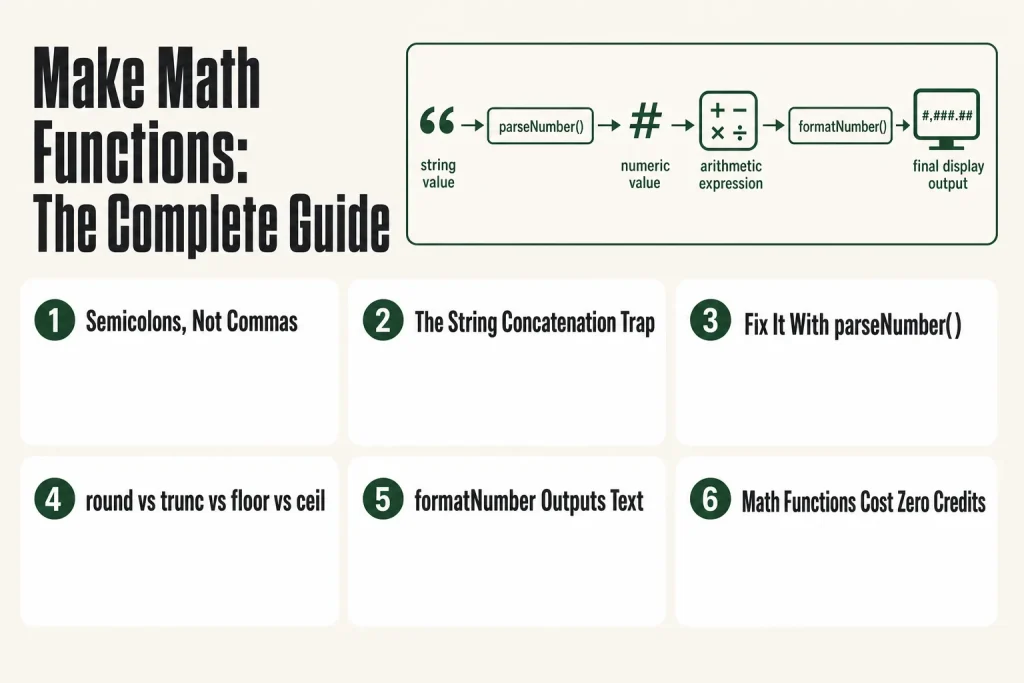
- Semicolons, not commas: Parameters are always separated by semicolons (e.g.,
formatNumber(1234.5; 2; .; ,)). - Full function list:
abs,average,ceil,floor,formatNumber,max,median,min,parseNumber,round,stdevP,stdevS,sum,trunc, plus therandomvariable. - Biggest gotcha: If either value in an addition is a string,
+concatenates instead of adding. Wrap the field inparseNumber()first. - round vs trunc vs floor/ceil:
roundgoes to nearest integer;truncchops the decimal off (toward zero always);floorgoes down;ceilgoes up. - formatNumber outputs text: Do not pipe that result into another math function or you are back to the string problem.
- Credits, not a gotcha: Inline math functions inside mapping fields cost zero credits. Make Functions app modules are also free. Always confirm current billing rules at help.make.com since Make’s billing model has evolved and details can change.
Take this fix into your next scenario. The free Builder’s Companion Kit collects the checklists and templates that pair with this guide — so next time, you start from a template, not a blank page. Grab it free →
- Where Make Math Functions Live and How to Insert Them
- Make Math Functions: Full Reference
- The Type-Coercion Trap That Silently Breaks Make Math Functions
- round vs trunc vs floor vs ceil: Which One Do You Actually Want?
- Worked Example: Invoice Total with Discount, Tax, and Formatted Output
- Using Make Math Functions on Arrays Without an Aggregator
- mod() and random: The Two Functions With Unusual Use Cases
- Make Functions App: The Visual Alternative to Inline Formulas
- FAQ
Make math functions let you calculate, round, format, and parse numbers directly inside any mappable field in your scenario, no external modules, no extra modules, no credits burned. The problem is they fail silently when a value that looks like a number is actually a string, and the error message gives you almost nothing to go on. This article covers every function in Make’s math library, the exact syntax, what each one actually does versus what you might expect, and the one coercion fix that makes everything work reliably.
Where Make Math Functions Live and How to Insert Them
Click into any mappable field in a module and the mapping panel opens on the right. The panel has several tabs. The first shows values you can map from upstream modules. The tab labeled Math functions lists every numeric operation available. Click a function name and Make inserts it at the cursor position with placeholder argument slots.
You can also type the function name directly. Make autocompletes as you type, which is faster once you know the names. Either way, the formula needs to be inside double curly braces when written manually: {{round(1.price)}}. When you build it through the panel UI, Make adds the braces for you.
One rule that trips up almost everyone coming from Excel or Google Sheets: parameters are separated by semicolons, not commas. formatNumber(1234; 2; .; ,) is correct. formatNumber(1234, 2, ., ,) will not parse the way you expect. The Make formula not working article has more on why this causes silent failures rather than visible errors.
Inline math functions used inside mapping fields cost zero credits. That is true whether you type a simple round() or a nested chain of six calls. Make replaced its billing unit from operations to credits on August 27, 2025, but inline IML functions remain free either way. Billing details can change, so if you want to confirm the current rules for your plan, check help.make.com directly.
Make Math Functions: Full Reference
Here is every function in the current Make math library with verified syntax, what it returns, and the thing the docs do not say clearly.
abs(number)
Returns the absolute (non-negative) value. abs(-5) returns 5. abs(5) returns 5. Useful when you need a distance or magnitude regardless of direction, for example a price difference that could be negative.
average([array]) or average(value1; value2; …)
Returns the arithmetic mean of the values you pass. You can pass a simple numeric array from a previous module, or list values individually with semicolons. average(10; 20; 30) returns 20. To average a field across an array of objects, extract the field first with map() and then pass the result: average(map({{1.items}}; "price")). This works because average() accepts an array of plain numeric values. If your array contains collections (objects with key-value pairs) rather than plain numbers, passing the array directly will not work as expected. Extract the numeric field with map() first, or use an iterator plus a Numeric Aggregator module.
ceil(number)
Returns the smallest integer greater than or equal to the number. ceil(1.2) returns 2. ceil(4) returns 4. Think of it as always rounding up, never down, even by a tiny fraction.
floor(number)
Returns the largest integer less than or equal to the number. floor(1.9) returns 1. floor(-1.2) returns -2 (it goes further negative, not toward zero). That last point surprises people who expect it to behave like trunc.
formatNumber(number; decimalPOINTS; [decimalSeparator]; [thousandsSeparator])
Returns a number formatted as a string. The official Make docs label the second parameter decimalPOINTS. Per those docs, the decimal separator defaults to , and the thousands separator defaults to . when you omit them. That is the European convention, and it applies regardless of your account locale. To produce US-style output you must always specify both separators explicitly: formatNumber(1234567.89; 2; .; ,) returns "1,234,567.89".
Critical caveat: the output is a string, not a number. Never pipe the result of formatNumber into another math function or you will trigger the concatenation bug described below. Use it only in the final display field.
max([array]) or max(value1; value2; …)
Returns the largest value. Works with an array or individual arguments: max(3; 7; 2) returns 7. Combine with map() to find the maximum across a field in a collection array: max(map({{1.items}}; "price")). See the Make map() function article for the full pattern.
median([array]) or median(value1; value2; …)
Returns the middle value of a sorted set. median(3; 5; 7) returns 5. For an even count, it returns the average of the two middle values. Useful for analytics where a single outlier would skew an average.
min([array]) or min(value1; value2; …)
Returns the smallest value. min(3; 7; 2) returns 2. Common use: cap a discount so it cannot go below zero: max(0; {{1.discount}}) (yes, you use max to enforce a lower bound).
parseNumber(number; decimalSeparator)
Parses a string that contains a number and returns an actual numeric value. The second argument tells Make what character the source uses as a decimal separator. If the source value is "1 756,456" and the decimal separator is a comma, parseNumber(1.value; ,) returns the number 1756.456. This is the fix for the type-coercion bug. See the dedicated section below.
round(number)
Rounds to the nearest integer using standard half-up rules. round(1.4) returns 1. round(1.5) returns 2. round(1.7) returns 2. Per the official Make docs, round() takes a single argument only and does not accept a decimal-places parameter. If you need two decimal places, use trunc(number * 100 + 0.5; 0) / 100 or let formatNumber handle the display rounding on the final output field.
stdevP([array])
Returns the standard deviation of a population (you have all the data, not a sample). stdevP(1; 2; 3; 4; 5) returns approximately 1.414. Use this when your array is the full dataset.
stdevS([array])
Returns the standard deviation of a sample (your data is a subset of a larger population). stdevS(1; 2; 3; 4; 5) returns approximately 1.581. In most business automation contexts, stdevS is the statistically correct choice unless you are measuring an entire population.
sum([array]) or sum(value1; value2; …)
Returns the total of all values. sum(10; 20; 30) returns 60. Like average, you can pass a plain numeric array directly or combine with map() to extract a field first: sum(map({{1.items}}; "qty")) totals a quantity field across every item in a bundle without an aggregator module.
trunc(number) or trunc(number; places)
Removes the fractional part of a number. With one argument, it truncates to an integer: trunc(3.789) returns 3. With two arguments, it truncates to that many decimal places: trunc(3.789; 2) returns 3.78. A negative second argument truncates to the left of the decimal: trunc(123.456; -2) returns 100. Unlike floor, trunc always moves toward zero. Per the official Make docs, trunc(-3.789; 2) returns -3.7, not -3.78, because truncation toward zero removes only the portion beyond the requested places without rounding further negative.
random (math variable)
random is a variable, not a function. It returns a floating-point pseudo-random number in the range [0, 1) (zero inclusive, one exclusive). To generate a random integer between a min and max, the documented formula is:
{{floor(random * (1.max - 1.min + 1)) + 1.min}}For a dice roll (1 to 6): {{floor(random * 6) + 1}}. Each scenario run generates a new value. There is no seed control.
The Type-Coercion Trap That Silently Breaks Make Math Functions
This is the thing that burns almost every person who is new to Make math, and honestly it burned me too the first time I saw an order total come out as "2550" instead of 275.
Make runs on JavaScript under the hood. In JavaScript, the + operator does double duty: it adds numbers and it concatenates strings. If either operand is a string, the result is a string. So 25 + 50 gives you 75, but "25" + 50 gives you "2550". No error. No warning. Just wrong output.
This matters in Make because many sources (webhooks, form submissions, spreadsheet cells) send numbers as strings. The value looks like a number in the execution log. It shows up purple in the mapping panel. But its data type is text, and the moment it touches +, the math breaks.
The fix is always parseNumber(). Wrap any value that might be a string before doing arithmetic:
{{parseNumber(1.price; .) + parseNumber(1.tax; .)}}The second argument to parseNumber is the decimal separator your source uses. If the source sends "19.99", use a period. If it sends "19,99" (European format), use a comma.
You can also confirm the type before building the formula. Run the scenario once, open the execution history, click the bundle output of the upstream module, and look at the value. A string shows in quotes. A number does not. That two-second check saves a lot of debugging time. The Make Execution History article walks through reading that panel in detail.
The subtraction operator does not have this problem. JavaScript only uses - for math, so it coerces both sides to numbers automatically. But do not rely on that. A non-numeric value like an empty string produces NaN, which then propagates silently through every downstream calculation.
round vs trunc vs floor vs ceil: Which One Do You Actually Want?
These four functions all change decimal numbers into something simpler, but they behave very differently, especially with negative numbers. Here is a direct comparison using the same input.
- round(1.5) →
2(nearest integer, half rounds up) - trunc(1.5) →
1(chops the decimal, always toward zero) - floor(1.5) →
1(rounds down, toward negative infinity) - ceil(1.5) →
2(rounds up, toward positive infinity)
Now with a negative value:
- round(-1.5) →
-2 - trunc(-1.5) →
-1(toward zero, so less negative) - floor(-1.5) →
-2(toward negative infinity) - ceil(-1.5) →
-1(toward positive infinity)
In most business scenarios you want round for display, floor for calculating how many whole units fit into a quantity, and ceil for billing (always charge for a full unit even if you only used a fraction). Use trunc when you specifically want to drop the decimal without rounding in either direction, regardless of whether the number is positive or negative.
One gap to know: Make’s round() accepts only a single argument per the official docs. If you need to round to two decimal places for a price, use trunc(number * 100 + 0.5; 0) / 100 or just let formatNumber handle the display rounding on the final output field.
Worked Example: Invoice Total with Discount, Tax, and Formatted Output
Say a form submission sends three values: unit_price (a string like "199.00"), quantity (a string like "3"), and discount_pct (a number like 10). You need to produce a formatted invoice total with tax at 8.5%.
Here is how each field in the downstream module gets built, step by step.
- Parse the strings first. In a Set Variable module (or directly in the formula), convert the incoming text values:
{{parseNumber(1.unit_price; .)}}→199{{parseNumber(1.quantity; .)}}→3 - Calculate the subtotal.
{{parseNumber(1.unit_price; .) * parseNumber(1.quantity; .)}}→597 - Apply the discount.
{{parseNumber(1.unit_price; .) * parseNumber(1.quantity; .) * (1 - 1.discount_pct / 100)}}→537.3 - Add tax.
{{parseNumber(1.unit_price; .) * parseNumber(1.quantity; .) * (1 - 1.discount_pct / 100) * 1.085}}→582.9705 - Format for display. In the invoice template field:
{{formatNumber(parseNumber(1.unit_price; .) * parseNumber(1.quantity; .) * (1 - 1.discount_pct / 100) * 1.085; 2; .; ,)}}→"582.97"
Notice that formatNumber wraps the entire calculation and is used only once, at the very end. Putting it earlier would turn the intermediate result into a string and break every multiplication after it.
If that chain gets long and hard to read, break it into a Set Variable module sequence: compute the raw total in one variable, then format in the next. Easier to debug and the credit cost is the same.
Using Make Math Functions on Arrays Without an Aggregator
A pattern that saves a surprising number of credits: when you have an array of objects from a previous module (say, a list of line items from a Shopify order), you do not always need an aggregator module just to get a total or a max value.
sum, average, max, min, and median all accept a plain numeric array directly. When your array contains collections (objects with multiple fields), combine those functions with map() to extract one numeric field first, then aggregate inline:
{{sum(map(1.line_items; "price"))}}That formula extracts the price field from every object in line_items and sums the result, in a single expression, in a single mapping field. No iterator, no aggregator, no extra credits. The same pattern works for average, max, min, and median.
One important caveat: if your array contains collections rather than plain numeric values and you try to pass it directly (without map()), the function may return an empty or unexpected result. Use map() to flatten to a plain numeric array first. And every extracted value must already be a number. If price comes back as a formatted string like "$19.99", sum() will return 0 or NaN with no useful error. Strip formatting upstream or use parseNumber() inside the map. The Make map() function article has the full syntax for that nested pattern.
For more advanced statistical needs (standard deviation across a dataset), stdevS and stdevP work the same way with array input. Pass the plain numeric array directly: {{stdevS(map(1.responses; "score"))}}.
mod() and random: The Two Functions With Unusual Use Cases
mod() is not in Make’s official math function list as a standalone named function. The modulo operation in Make is handled by the % operator in an expression: {{10 % 3}} returns 1 (the remainder after dividing 10 by 3). You will also see it written as mod in filter conditions inside a Router, where you set a numeric filter using the modulo operator. The Make documentation for incremental variables specifically shows mod used in a router filter to alternate between even and odd runs.
Practical uses: run something every third bundle ({{iteratorIndex % 3 == 0}}), alternate between two output paths, or check if a number is even ({{value % 2 == 0}}). Check that the field being evaluated is a numeric type, not text, before using it in a modulo filter or you will get NaN and the filter will behave unpredictably. Set the filter operator to Numeric (not the default Text operator) in the router condition.
random generates a new floating-point value between 0 (inclusive) and 1 (exclusive) each time the scenario runs. There is no way to seed it or reproduce a specific value. For integer ranges, the formula from the official docs is: {{floor(random * (max - min + 1)) + min}} where max and min are mapped values or literal numbers. This is useful for A/B testing routing, randomized delays, or generating test data. It is not suitable for cryptographic or high-security randomness.
Make Functions App: The Visual Alternative to Inline Formulas
If writing inline expressions feels fragile, Make has a separate module-based approach called the Make Functions app (found in the app directory as “Make Functions”). It exposes math operations as standalone modules you drop into the scenario canvas and chain together visually.
The trade-off is clarity versus canvas space. Each step in a multi-operation calculation becomes a separate module you can inspect individually, which makes debugging easier. The output of each module shows the intermediate result, so you can see exactly where a value changed. The downside is that longer chains clutter the canvas.
The credit cost is the same either way: Make Functions modules cost zero credits, just like inline IML functions. For a simple round() or formatNumber(), inline is faster. For a five-step calculation you need to debug repeatedly, the visual modules earn their canvas space.
If you find yourself re-using the same calculation across multiple scenarios, that is a sign the logic belongs in a sub-scenario with clearly defined numeric inputs and outputs, rather than duplicated inline formulas that drift out of sync.
FAQ
why is make addition returning a string instead of a number
Because one or both values are strings, not numbers. In Make (which runs on JavaScript), the + operator concatenates strings instead of adding them. Wrap each value in parseNumber() before adding: parseNumber(1.field; .) + parseNumber(2.field; .). The second argument is the decimal separator the source uses.
does Make have a mod or modulo function
Make does not have a mod() function in its inline math library. Use the % operator in an expression: {{10 % 3}} returns 1. In router filter conditions, select the modulo operator from the condition dropdown and set the operator type to Numeric, not Text.
what is the difference between round floor and trunc in Make
round() goes to the nearest integer (1.5 becomes 2). floor() always rounds toward negative infinity (1.9 becomes 1, but -1.2 becomes -2). trunc() always moves toward zero regardless of sign (-1.5 becomes -1, not -2). Per the official Make docs, round() accepts only a single argument. For most business rounding, round() is correct. For quantities that must be whole units, floor() is safer.
how do I format a number with commas and decimal places in Make
Use formatNumber(number; decimalPOINTS; decimalSeparator; thousandsSeparator). For US format: formatNumber(1234567.89; 2; .; ,) returns “1,234,567.89”. The decimal separator defaults to a comma and the thousands separator defaults to a period when omitted, so you must always specify both explicitly for US-style output. Important: the output is a string. Do not pass it into another math function or you will trigger the string concatenation bug. Verify current function behavior at help.make.com since the platform updates periodically.
can Make math functions work on arrays without an aggregator
Yes, with one caveat. sum(), average(), max(), min(), and median() all accept a plain numeric array directly. When your array contains objects (collections with multiple fields), combine with map() to extract the numeric field first: sum(map(1.line_items; “price”)) totals a price field across every item in a single inline expression. Passing a collection array directly without map() may return an empty or unexpected result.
do math functions cost operations in Make
No. Inline math functions used inside mapping fields cost zero credits. The same is true for modules from the Make Functions app. Make replaced its billing unit “operations” with “credits” on August 27, 2025, but inline IML functions remain free under either model. Billing details are subject to change, so verify the current rules for your specific plan at help.make.com.
Sources:
- Make Help Center: Math functions (verified October 2026)
- Make Help Center: Functions overview
- Make Help Center: Math variables (random)
- Make Help Center: Type coercion
- Make Help Center: Introducing credits (billing)
- Make Apps: Make Functions module documentation
- Make Community: parseNumber and string coercion discussion
Brian Kasday spent forty years in direct-response marketing before rebuilding the whole operation as a one-person shop. He writes The Operator’s Library — including “The Missing Manual for Make” — for operators who’d rather build it themselves than wait on someone else.
Get the Builder’s Companion Kit — the free checklists and templates that pair with this guide: mmsvegas.com/make-resources.
This guide solves one Make problem. The Missing Manual for Make covers the production system. See the manual →
More Make guides
Free · Make Operator Toolkit
Running scenarios in Make?
Get the free operator toolkit — production checklists and the fixes that keep scenarios alive under real traffic, plus a note when this guide changes.
Get the free toolkit →