
Table of contents
- The 30-second answer: why your Make formula is not working
- How Make actually evaluates a formula
- Cause 1: commas where Make expects semicolons
- Cause 2: the field comes out empty (display labels in map, sort, and get)
- Cause 3: 1-based vs 0-based index confusion
- Cause 4: the value is the wrong type
- Cause 5: if and empty values not behaving the way you expect
- Cause 6: “Function not found” and other error messages
- A worked example: debugging a live formula
- Frequently asked questions
- Sources
You wire up an expression in the mapping panel — a little if, a formatDate, maybe a map to pull one value out of an array — run the scenario, and the output is wrong. It returns the fallback when it should return the real value, or an empty string, or Make throws a red error the moment you click Save. When a Make formula is not working, the problem is almost never that Make’s expression engine is broken. It is one of a short list of predictable mismatches between the syntax Make expects and the syntax you typed, or between the data you think a field holds and the data it actually holds.
Make’s expression language has a handful of rules that trip up nearly everyone the first time. This guide walks through each one, in the order it tends to bite, with the fix grounded in how the functions actually behave.
The 30-second answer: why your Make formula is not working
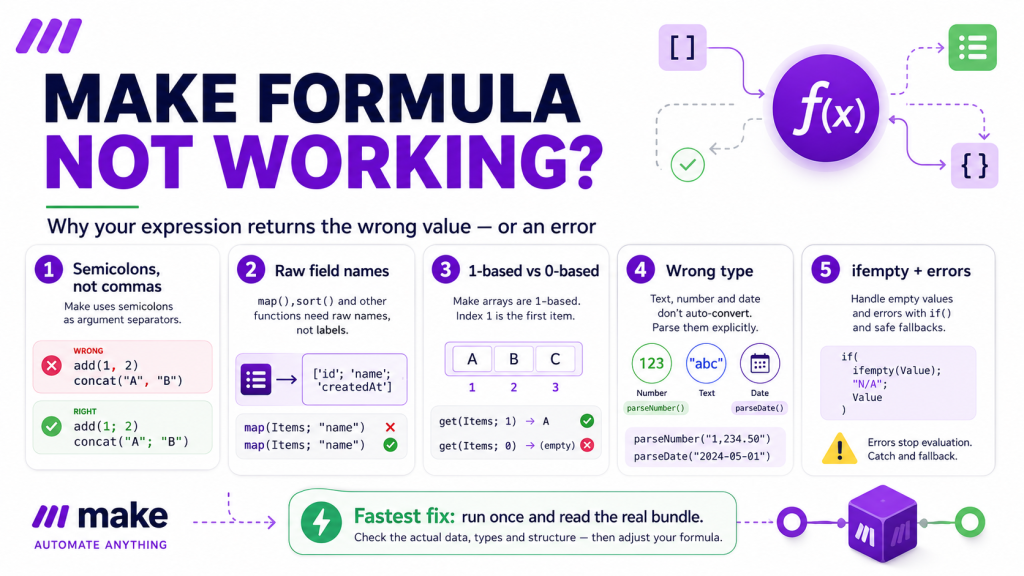
If your Make formula is not working, check these in order:
- You used commas instead of semicolons. Make separates function arguments with
;, not,— a comma is not treated as the argument separator. This is the single most common syntax error. - You used a display label instead of the raw field name inside
map,sort, ordistinct. These functions need the raw name, which is often lowercased even when the label is title-cased. - You assumed 0-based indexing. Arrays in Make start at 1 — except for
slice,substring, and the numberindexOfreturns, which are 0-based. - The value is the wrong type — a number arriving as text, or a date arriving as text — so comparisons and formatting silently misbehave.
- An
ifis returning the fallback because the field it tests is empty, or because both branches evaluate whether or not you expected them to. - Make throws “Function not found” or a validation error — usually a typo, a deleted custom function, or a required value that turned up empty.
The fastest diagnostic for any of these: run the scenario once, click the bundle bubble above the module, and read the actual value the formula received. Most “broken formula” problems dissolve the moment you see the real data instead of the data you assumed was there.
How Make actually evaluates a formula
A formula in Make is an expression you build in the mapping panel — a mix of literal text, mapped tokens from earlier modules, and functions from the six-tab function library (General, Math, Text and binary, Date and time, Array, and Custom). When the module runs, Make evaluates the whole expression once per bundle and substitutes the result into the field.
Three syntax rules govern every function you will ever write, and most formula bugs are a violation of one of them. Arguments are separated by semicolons, not commas. Array positions start at 1, not 0. And functions that reach inside arrays of objects — map, sort, distinct — want the raw field name, not the friendly label you see in the panel. Keep those three in mind and you have pre-empted the majority of what goes wrong.
Cause 1: commas where Make expects semicolons
This is the one that catches everyone. Make’s expressions use the semicolon to separate function arguments. A comma is not treated as the argument separator, so the formula may fail validation, misparse, or return something other than what you intended.
So this is correct:
if(1.amount > 100; "Above limit"; "Within limit")
And this one fails or misbehaves, because the commas are not treated as argument separators:
if(1.amount > 100, "Above limit", "Within limit")
The tell is usually a red validation error when you click Save, or an output that contains your commas and quotation marks as visible text. If a formula that looks right refuses to save, scan it for commas first. Every function in this article — if, switch, map, formatDate, substring — uses semicolons between its arguments.
Cause 2: the field comes out empty (display labels in map, sort, and get)
You use map to pull the email out of an array of contacts, and it returns nothing. The array clearly has emails in it. The problem is almost always that you typed the field’s display label instead of its raw name.
The functions that walk into arrays of collections — map, sort, and distinct — take a key argument that must be the raw field name. Raw names are frequently lowercased even when the panel shows a title-cased label, and nested fields use dot notation. To see the raw name, hover the field in the mapping panel.
Correct usage pulls the values cleanly:
map(1.contacts; "email")
sort(1.contacts; "asc"; "last_name")
distinct(1.events; "user.id")
One more thing about map that surprises people: it always returns an array, even when there is exactly one match. If you expected a single value and got a one-item array, wrap it in first:
first(map(1.metadata; "value"; "key"; "shipping_method"); 1)
The same “raw name, not label” rule applies to
getwhen you use a path.get(1.user; "address.city")returns null if the path doesn’t exist — and a wrong-cased or mislabeled key is a path that doesn’t exist, so you get null rather than an error. A silent null is exactly what makes this one hard to spot. If empty field mapping is causing broader issues, the guide on Make mapping fields missing covers every cause.
Cause 3: 1-based vs 0-based index confusion
Make is a 1-based platform. The first element of an array is position 1, ordinals are 1-based, and mapping references count from 1. This is consistent almost everywhere — which is exactly why the exceptions are so easy to get wrong.
Three functions break the pattern and use 0-based positions: slice, substring, and the value indexOf returns. So capping a tweet at 280 characters looks like this, starting from 0:
substring(1.tweet_body; 0; 280)
And indexOf returns 6, not 7, for the position of “world” in “hello world”, and returns -1 when the value isn’t found at all. If an expression that indexes into text or arrays is off by one, this mismatch is the first thing to check. Memorize the three exceptions and the rest of Make stays reliably 1-based.
Cause 4: the value is the wrong type
A formula can be written perfectly and still produce garbage because the value flowing into it is a different type than you assume. The classic case is a number that arrives as text from a CSV or an API. Compared as text, “10” sorts as less than “2,” and math on it misbehaves. Convert it explicitly with parseNumber, telling the function which character is the decimal point:
parseNumber("1,234.56"; ".")
Dates have the same trap. A date that arrives as text has to be parsed into a real date value before you can do arithmetic or reformat it, and the two date functions are easy to confuse. parseDate takes text and produces a date; formatDate takes a date and produces text. Neither is the inverse of itself, and reaching for the wrong one is a common source of a date field that comes out blank or literal.
parseDate("01/15/2026"; "MM/DD/YYYY")
formatDate(1.created_at; "YYYY-MM-DD hh:mm A")
Two type gotchas worth committing to memory. First, formatNumber defaults to European separators — comma for the decimal, period for thousands — so for US-style output you must pass the separators explicitly. Second, Make’s date coercion expects Unix timestamps in milliseconds; a seconds-based timestamp will be wildly wrong unless you multiply by 1000 or parse it with the X token, which expects seconds.
Cause 5: if and empty values not behaving the way you expect
Two things about conditional logic surprise people often enough to call out on their own.
First, if in Make evaluates both branches even though it only returns one. Most of the time that’s harmless. It matters when both branches contain expensive expressions — both still get computed. When you truly need one-path-or-the-other execution, that’s a job for a Router or the If-else module, not the if function. The guide on the Make Router explains how routes and filters work if you need to branch execution paths.
Second, an if that keeps returning its fallback is usually testing a field that is empty rather than the value you pictured. “Empty” in Make is broad: null, undefined, an empty string, an empty array, and an empty collection all count. Rather than wrapping every mapping in if(empty(x); fallback; x), reach for the purpose-built function:
ifempty(1.nickname; 1.first_name)
And be careful with text comparisons: contains is case-sensitive, so contains("hello world"; "World") is false. If you need a case-insensitive match, normalize both sides first with lower or upper:
contains(lower(1.message); lower("World"))
Cause 6: “Function not found” and other error messages
Some formula failures announce themselves with an explicit error rather than a wrong value. A few you will actually see:
Failed to map ‘<field>’: Function ‘<name>’ not found! On a standard built-in function this means a typo or a casing mistake in the function name. If your team uses a custom function (an Enterprise feature), this same error appears when someone deleted a custom function that your scenario still calls — and it breaks every scenario that used it. Before deleting any custom function, check its Scenarios tab to see where it is used.
A BundleValidationError on save or run. This is a type-check failure: a required field is missing or got the wrong type — mapping a possibly-empty field into a required input, or text into a date field. The fix is to guard the value with ifempty or to drop incomplete bundles with a Filter upstream before they reach the module. See the full breakdown in the guide on Make BundleValidationError.
A replace that errors on capture groups. The replace function accepts a regular expression and supports numbered capture groups ($1, $2) in the replacement string — but named capture groups in the replacement throw an error. Use the numbered form.
If a custom function is the culprit, remember its hard limits: it must finish in 300 milliseconds, stay under 5000 characters, run synchronously, and make no HTTP requests. A custom function that tries to call an API or runs too long will error at runtime and take the scenario down with it. Do that work in the scenario itself, with the HTTP module, instead.
A worked example: debugging a live formula
Say you’re building a notification and the line that should read “Order #1042 — $348.50 — ship to Berlin” is coming out with a blank total and the wrong date. Here is the order to work in.
Run the scenario once and read the real bundle. Click the bubble above the module and look at what the fields actually contain. You discover the total arrived as the text “348,50” and the date as the text “2026-03-19T14:30:00.000Z”.
Fix the total’s type. It’s text with a comma decimal, so parse it before formatting: parseNumber(1.total; ","). Now math and formatting work on a real number.
Fix the date. It’s an ISO string, so parse it, then format it — two functions, not one: formatDate(parseDate(1.created_at; "YYYY-MM-DDTHH:mm:ss.SSSZ"); "MMM D, YYYY").
Pull the city out of the array correctly. The shipping details are an array of key/value collections, so use the raw key names and grab the single value: first(map(1.metadata; "value"; "key"; "city"); 1).
Recheck the separators. Confirm every argument uses semicolons, and confirm none of your indexes assumed 0-based where Make is 1-based. Run once more, read the bubble, done.
Four of those five steps are about the data, not the syntax. That’s the pattern: a formula that isn’t working is usually one being fed something other than what you assumed.
Frequently asked questions
Why does my Make formula show up as literal text in the output instead of running? Usually the expression was not parsed as a formula: it was typed as plain text instead of inserted from the mapping panel, has a syntax problem, or contains commas where semicolons belong. Rebuild it from the mapping panel and function library where possible, and confirm every function argument uses semicolons.
Why does my map function return nothing? You almost certainly passed a display label where map needs the raw field name. Hover the field in the mapping panel to see the raw name (often lowercased), and remember map returns an array — wrap it in first if you want a single value.
Why is my array index off by one in Make? Make is 1-based nearly everywhere, but slice, substring, and the value returned by indexOf are 0-based. If you index into text or an array and land one position off, that exception is the usual cause.
Why does my if function always return the fallback? The field it tests is probably empty — and in Make, null, an empty string, an empty array, and an empty collection all count as empty. Read the real value in the bundle, and use ifempty for clean fallbacks.
What does “Function not found” mean in Make? A misspelled or mis-cased function name, or a custom function that was deleted while a scenario still called it. Check the spelling against the function library; if it’s a custom function, check its Scenarios tab before anyone deletes it, because deletion breaks every scenario that uses it.
Why is my date coming out wrong or blank in Make? You likely confused parseDate (text → date) with formatDate (date → text), or fed a seconds-based Unix timestamp where Make expects milliseconds. Parse text into a real date first, then format it.
Can a Make formula not working be caused by a filter passing the wrong bundles upstream? Yes. If the data reaching your formula module is already wrong or incomplete because a filter is too loose (or too strict), the formula has nothing correct to work with. Check the Make filter not working guide to rule out an upstream filter as the real culprit before spending more time on the formula itself.
Sources
This guide is drawn from The Missing Manual for Make, Chapter 8 (Functions: The Complete Reference) and Appendix C (Common Errors), and from Make’s own function and error documentation. Behavior can change as Make updates the platform — verify anything version-specific against the current Make documentation.
Get the free Builder’s Companion Kit. Function cheat sheets, error-handler patterns, and six importable blueprints to speed up your builds. Grab it at mmsvegas.com/make-resources. Newer to Make, or need an account to use the blueprints? You can start with Make here.
Related guides: Make error handling, Make iterators vs aggregators, and Make data stores.
Brian Kasday is a direct-response marketer with four decades in the trade who rebuilt the whole marketing stack as a one-person operation using modern AI and a few-dollars-a-day software toolkit. He writes The Operator’s Library for MMS Vegas — the missing manuals for the tools small operators actually run on.