
Table of contents
- The 30-second answer
- Router vs filter: which problem are you actually solving
- How routes are actually evaluated
- The “every matching route” trap
- The fallback route, and why most scenarios need one
- Building a router step by step
- Getting CASE-statement behavior (only one route)
- What a router costs you in credits
- Recombining routes after the split
- Quick reference: router decisions
- Frequently asked questions
- Sources
You built a scenario that takes a new lead and does something with it. At first there was one path: add the lead to the CRM. Then the requirements grew. Hot leads should get a Slack ping. Leads from the contact form should get one email; leads from the webinar should get another. Enterprise leads should route to a human. Suddenly your single straight line of modules can’t express what the business actually wants, because the business wants different things for different leads.
That’s the job the Router does. It’s the module that turns one path into many. It’s also one of the most misunderstood modules in Make, because its default behavior surprises almost everyone the first time a bundle quietly runs down two routes at once. It’s the kind of thing that quietly double-processes an order or double-charges a customer — not because the router is broken, but because people assume it works like a switch statement when it doesn’t.
The 30-second answer
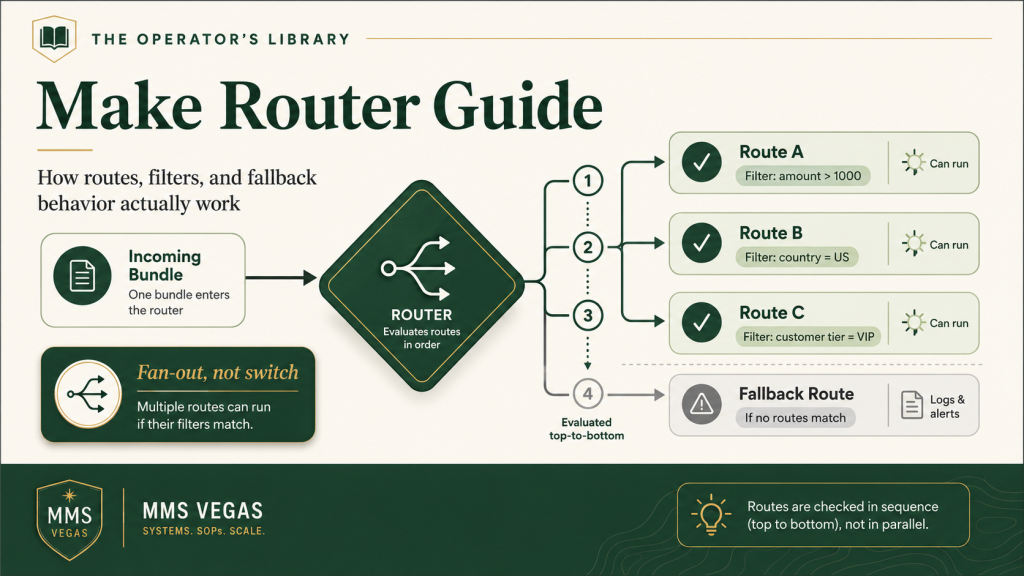
The Router splits one scenario into multiple branches (routes). When a bundle reaches the router, Make sends it down every route whose filter condition passes — not just the first match. Routes are processed top to bottom, one at a time, not in parallel. A bundle that matches three routes runs down all three.
The three things that trip people up:
- It’s not a switch statement. By default a bundle can take more than one route. If you want only-the-first-match behavior, you have to build mutually exclusive filters yourself.
- Routes run in order, not simultaneously. The top route finishes completely before the second route starts. Order matters.
- The fallback route is your safety net. Mark one route as the fallback and it fires only when no other route’s filter passed — so bundles never vanish silently.
If you only need to allow or block a bundle on a single path, you don’t need a router at all — you need a filter. Use a router when different bundles need to do genuinely different things.
Router vs filter: which problem are you actually solving
This is the first fork in the road, and getting it wrong leads to scenarios that are far more complicated than they need to be.
A filter sits on the connection between two modules and answers a yes/no question: should this bundle continue down this path? If the condition passes, the bundle proceeds. If it fails, the bundle stops there. One path, one gate.
A router answers a different question: which of several paths should this bundle take? It creates the branches, and then each branch gets its own filter to decide whether a given bundle belongs on it.
The practical test: if you catch yourself saying “only do this when…”, you want a filter. If you catch yourself saying “do this for some bundles and that for others,” you want a router. A single filter on a single line is almost always cleaner than a router with one route — if you built a router and only ever drew one branch out of it, you didn’t need the router.
A useful rule of thumb: a filter narrows, a router branches. The moment your scenario needs two different outcomes living side by side, that’s the router’s job. Everything before that is a filter.
How routes are actually evaluated
Here’s the mechanic, precisely, because it’s the part that’s easiest to get wrong by assumption.
When a bundle arrives at the router, Make looks at the routes in the order they appear, top to bottom. For each route, it checks that route’s filter. If the filter passes (or there’s no filter on that route), the bundle is sent down that route and the entire branch runs to completion. Then Make moves to the next route and repeats.
Two consequences fall out of this that you need to internalize:
1. Routes are sequential, not parallel. You’ll see blog posts claim the router runs branches “simultaneously” to speed things up. It doesn’t. Make executes one route fully, then the next — it won’t process the second route until it finishes the first. If route 1 calls a slow API and route 2 posts to Slack, the Slack post waits for the slow API to finish. If you reorder the routes, you change the order things happen in. For most scenarios this is invisible, but it matters when one route has a side effect a later route depends on — say route 1 writes a record to a Data Store and route 2 reads it back. Note that the routes don’t share data directly: a branch can’t reach over and read another branch’s output. Any cross-route hand-off has to go through something persistent — a Data Store, a variable, an external database — and then the execution order decides whether the value is there yet when the second route looks for it.
2. A route with no filter always runs. An empty filter is treated as “always true.” So a router with three unfiltered routes sends every single bundle down all three. That’s occasionally what you want (fan-out: do three independent things with the same data), and occasionally a bug you didn’t notice.
The “every matching route” trap
This is the single most expensive misunderstanding about the router, so it gets its own section.
People coming from programming expect a router to behave like a switch or if/else if/else block: check the conditions in order, take the first one that matches, and skip the rest. Make’s router does not do this. It checks every route and sends the bundle down every route whose filter passes.
Picture an order-processing scenario with a router that has three routes:
- Route 1 — filter:
order total > 100→ apply free shipping - Route 2 — filter:
customer is VIP→ send a thank-you gift - Route 3 — filter:
order total > 500→ assign an account manager
A VIP customer places a $600 order. In a switch statement, only the first matching branch runs. In Make’s router, all three run: free shipping, thank-you gift, and account-manager assignment, because the bundle satisfies all three filters. That’s correct here — those are independent actions you genuinely want stacked.
But now imagine the routes were three mutually exclusive billing tiers and you assumed only one would fire. A bundle that happens to match two of them gets billed twice. The scenario reports success. You find out when the customer emails. The router did exactly what it was designed to do; the design assumption was wrong.
Burn this in: a Make router is a fan-out, not a switch. Every route whose filter passes will run. If your routes are meant to be mutually exclusive, you are responsible for making the filters mutually exclusive — Make won’t do it for you.
The fallback route, and why most scenarios need one
What happens to a bundle that matches none of your routes? By default, nothing — it falls off the end of the router and that branch of work simply doesn’t happen. No error, no alert, no downstream action. For a fan-out that’s fine. For routing logic, it’s a silent leak.
The fallback route closes that hole. It’s the route Make evaluates as the last resort: it processes the bundles that don’t fit the conditions of the other routes. You designate one route as the fallback by marking it (Make tags it with a special arrow icon on the router), and in most scenarios you treat it as the broad “else” at the bottom of your branching logic — left wide enough to catch anything unmatched.
One nuance worth knowing, because it surprises people: Make does let you put a filter on a fallback route, the same as any other route. That can be useful, but use it deliberately — a filtered fallback can still exclude data you expected it to catch, which defeats the point of having a catch-all. For most routing scenarios, leave the fallback unfiltered so it genuinely catches everything the other routes missed.
Two rules to remember:
- One fallback per router. You can’t have two. Make uses it as the single catch-all.
- It’s evaluated as the last resort. The fallback only runs if every other route’s filter failed — it’s the route Make executes last.
In practice, almost every routing scenario (as opposed to a deliberate fan-out) should have a fallback that does something visible: write the unmatched bundle to a Data Store, post it to a Slack channel, or fire an alert. That’s how you catch the order that didn’t fit any tier, the lead source you didn’t anticipate, the status value someone added upstream that your filters don’t know about. Unmatched bundles are where real-world data quietly drifts away from your assumptions.
Building a router step by step
The mechanics, start to finish:
- Add the router. Right-click the connection (the bridge) between two modules and choose to add a Router, or add it from the Flow Control tools. It drops in as a diamond with one route already drawn.
- Draw your routes. Connect the router’s output to the first module of each branch. Each new connection from the router is a new route.
- Set a filter on each route. Click the wrench/filter icon on the connection leaving the router for that route. Give the filter a clear label (it shows on the route, so “VIP orders” beats an unnamed condition) and define the condition with the operators Make gives you — equals, contains, greater than, exists, and so on.
- Designate a fallback if you need one. Mark one route as the fallback so it catches everything the others missed. (You can add a filter to it, but in most cases leave it unfiltered so nothing slips past.)
- Mind the order. Set the sequence with the router’s Order routes action (right-click the router → Order routes, then move them with the arrows) so the order reflects any dependency between them. If nothing depends on order, put the most common case first for readability.
A worked example. You’re routing inbound form submissions by a hidden form_type field:
- Route 1 —
form_type = "demo"→ create a CRM deal + Slack the sales channel. - Route 2 —
form_type = "support"→ create a helpdesk ticket. - Route 3 —
form_type = "newsletter"→ add to the email list only. - Route 4 (fallback) — anything else → write the raw payload to a Data Store and post “unrecognized form_type” to Slack.
Because the three form_type values are mutually exclusive, each submission hits exactly one of routes 1–3, and any unexpected value lands in the fallback where you’ll actually see it. That’s a router doing its job correctly.
Want the router patterns pre-built? The free Builder’s Companion Kit includes six importable Make blueprints — several of them pre-wired with a router plus a fallback-to-Data-Store audit route, so you can see the mutually-exclusive-filter pattern working instead of rebuilding it from a screenshot. Get the kit →
Getting CASE-statement behavior (only one route)
Since the router fans out by default, how do you get true “only the first matching route runs” behavior when you actually need it? You make the filters mutually exclusive. There’s no hidden setting that does it for you — it’s a design discipline.
Say you want to tier customers by spend and have each customer hit exactly one tier:
- Instead of Route 1 =
spend > 100, Route 2 =spend > 500(which overlap — a $600 customer matches both), write: - Route 1 =
spend > 100 AND spend <= 500 - Route 2 =
spend > 500 - Route 3 (fallback) = everything $100 and under.
Now the bands don’t overlap, so each bundle satisfies exactly one route. This is more verbose than a switch statement, but it’s explicit, and explicit is what keeps a scenario from quietly doing the wrong thing six months later when someone forgets the router fans out. When tiers are non-numeric (a status, a category, a source), make sure the values are genuinely distinct and add a fallback to catch anything new.
What a router costs you in credits
Good news: the router itself doesn’t use credits. Routers and filters are flow-control tools, and Make lists them among the modules with no credit cost — what uses credits are the actual app modules on each route that run. (If you’re fuzzy on the difference, the operations vs credits breakdown covers exactly what counts.)
The cost trap isn’t the router — it’s forgetting that a fan-out multiplies work. If a bundle runs down three routes and each route has four standard one-credit modules, that’s roughly twelve credits’ worth of module runs for one bundle, not four (some module types — AI, Make Code, and others — cost differently). When you’re routing high-volume data, every route you add to the matching set multiplies your credit consumption. Two ways to keep that in check:
- Filter before the router, not just inside it. If you can drop bundles you don’t care about with a single upstream filter, you avoid spinning up routes for data that was never going to matter.
- Make routes mutually exclusive when the work is expensive. If only one route should run per bundle, mutually exclusive filters keep you from accidentally paying for two or three branches on every bundle.
Recombining routes after the split
A common follow-up: once I’ve branched, can I merge the routes back into one path? Not with a dedicated module — Make has no “converger” that waits for all branches and recombines them. (Make’s own docs call the converger a concept, not a module: there isn’t one.) Each route runs its own course to its own end.
What you do instead depends on why you want to recombine. If the goal is just to avoid duplicating a shared final step, Make documents a few supported patterns: write each route’s result to a Data Store and read it back in one common sequence; stash the value in a variable (Set Variable / Get Variable) and pick it up downstream; or push each route’s data to a separate scenario via a webhook and do the shared work there. The simplest option of all is often to not recombine at all — repeat the shared final module at the end of each route (it costs a credit per route, but it’s dead simple).
The cleaner design, when you can manage it, sidesteps the question: put everything common before the router, branch as late as possible, and keep the routes as short as the differences require. The later you branch, the less you have to duplicate or stitch back together.
Quick reference: router decisions
| Situation | What to do | Why |
|---|---|---|
| Allow or block a bundle on one path | Use a filter, not a router | A one-route router is just a filter with extra steps |
| Do different things for different bundles | Router with a filter per route | That’s the router’s actual job |
| Do several independent things with the same bundle | Router with unfiltered routes (deliberate fan-out) | Every route runs — exactly what you want here |
| Each bundle should take exactly one path | Router with mutually exclusive filters | The router won’t enforce exclusivity for you |
| Catch bundles that match no route | Add a fallback route that logs/alerts | Unmatched bundles vanish silently otherwise |
| One route needs another route’s result | Persist it (Data Store / variable), then order the reader after the writer | Branches can’t read each other directly — only via a stored hand-off |
| High-volume routing, cost matters | Filter before the router; keep routes exclusive | Fan-out multiplies credit use |
The full router reference, including nested routers and the interaction between routers and iterators and aggregators, is covered in The Missing Manual for Make.
The plan note
The router is available on every Make plan, including Free — there’s no tier gate on branching itself; routers and filters are listed right under the Free plan. What Free still limits is its monthly credit allowance and scheduling. For real routing logic across multiple production scenarios, you’ll usually outgrow Free because of volume — routers can burn through credits fast, since every matching route adds billable modules — not because the router itself is locked. Don’t have a Make account yet? You can start free here and move up to Core when the volume calls for it.
The pattern
Most router mistakes come from one wrong assumption: that the router picks a single route like a switch statement. It doesn’t. It fans out to every matching route, in order, top to bottom. Once you hold that correctly, the rest follows — use filters when you’re narrowing and routers when you’re branching, make your filters mutually exclusive when bundles should take exactly one path, and always give a routing scenario a fallback that surfaces the bundles nothing else caught.
Do that and the router stops being the module that quietly double-processes your data and becomes the one that makes a scenario readable: here’s the common work, here’s where it forks, here’s what happens to the cases I didn’t plan for.
Grab the free Builder’s Companion Kit. Includes the Operations Cost Estimator, module reference cards, the Production Readiness Checklist, the Scenario Planning Worksheet, and six importable starter blueprints — several built around routers with fallback audit routes. Get the kit →
Frequently asked questions
Does a Make router send a bundle to only one route? No. By default the router sends each bundle down every route whose filter condition passes, processed top to bottom. It is not a switch statement. If you need each bundle to take exactly one path, you have to build mutually exclusive filters on the routes yourself.
What’s the difference between a router and a filter in Make? A filter sits on a single connection and decides whether a bundle continues down that one path — it narrows. A router creates multiple branches so different bundles can follow different paths — it branches. Each route on a router gets its own filter. Use a filter to allow/block; use a router to do genuinely different things for different data.
What is a fallback route? A fallback route is the route Make evaluates last — it processes the bundles that didn’t fit the conditions of the other routes. You designate one route as the fallback, and in most cases you treat it as the broad catch-all. There can be only one fallback per router. Make does allow a filter on a fallback route, but if you add one the fallback may no longer catch every unmatched bundle — so usually you leave it unfiltered. It’s the “else” of your branching logic and the right place to log or alert on bundles that matched nothing.
Do routes in Make run in parallel? No. Despite what some tutorials claim, the router processes routes sequentially — the top route runs to completion, then the next, and so on. Make won’t process the second route until it finishes the first. If one route needs a result from another, store that result first — in a Data Store, a variable, or an external system — then order the reading route after the writing route. Routes can’t read each other’s output directly.
Does the router cost credits? No. The router itself and its filters don’t use credits — Make lists them among the modules with no credit cost. What uses credits are the app modules that run on each route. Remember that a fan-out multiplies cost: a bundle that runs down three routes pays for the modules on all three.
Can I merge routes back together after a router? Not with a dedicated module — Make has no converger module, only the concept. To avoid duplicating a shared final step, Make documents supported workarounds: store each route’s result in a Data Store or a variable and read it back in one common sequence, or pass the data to a separate scenario via webhook. The simplest option is often to repeat the final module on each route, or to do the common work before the router and branch as late as possible.
How do I debug a Make router when bundles seem to disappear? Start with the execution history: it shows exactly which routes a bundle entered and where it stopped. The most common causes are a filter condition that never passes (check the operator and data types), a fallback route that’s filtered when it shouldn’t be, and a bundle that matched no route and silently dropped. Run the scenario with a test bundle and check each route’s filter in isolation using the filter’s built-in “Run this filter” button before chasing deeper issues.
Sources
Verified live as of June 2026:
- Make Help Center — Router: help.make.com/router
- Make Help Center — How features use credits: help.make.com/how-features-use-credits
- Make Help Center — Converger (recombining routes): help.make.com/converger
- Make — Pricing & plans: make.com/en/pricing
- Make Community — Router execution logic and only-first-match discussions: community.make.com
Brian Kasday writes The Operator’s Library for MMS Vegas — production-grade reference manuals for the tools small operators actually run. The Missing Manual for Make is the long-form companion to articles like this one.