
The 30-second answer
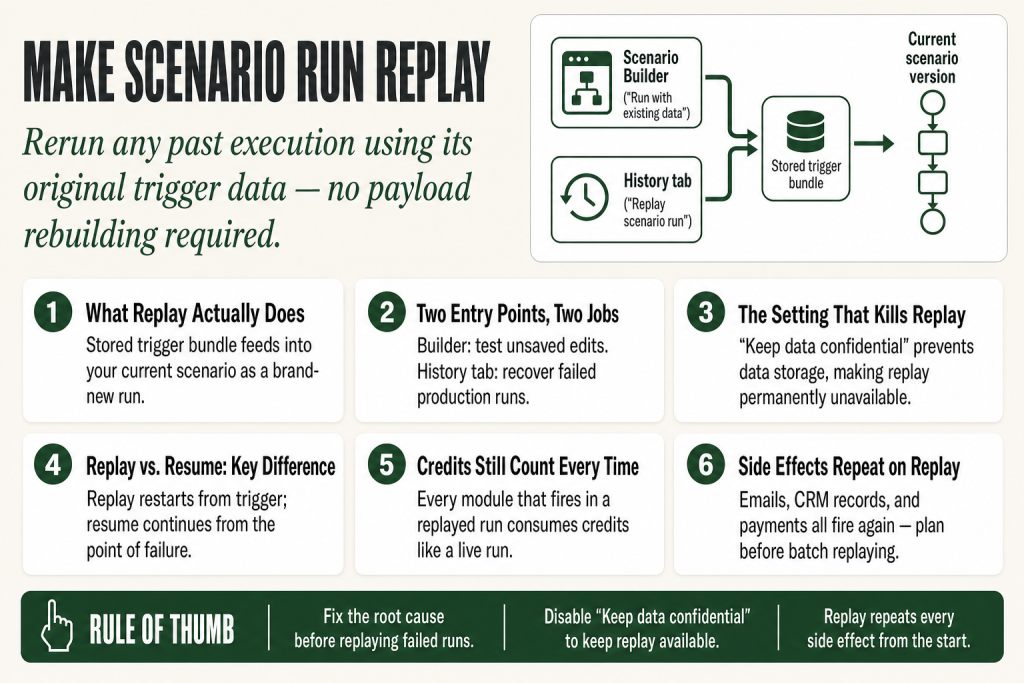
- What it is: Run replay reruns your current scenario version using trigger data captured from a previous execution, including failed ones.
- Available on all plansincluding Free.
- Two entry points: in the Scenario Builder (via the “Run with existing data” option in the Run Once dropdown) for active testing, and in the Scenario History list (via “Replay scenario run” next to the Details button) for backfilling or recovering from errors.
- Credits still count: every module that fires in the replayed run consumes credits the same as a live run.
- One killer setting: if “Keep data confidential” is enabled in your scenario settings, Make does not store execution data, so replay is unavailable for those runs.
- History retention limits apply: once a run ages out of your plan’s history window, its data is gone and cannot be replayed.
- Replaying a run does not resume an incomplete executionit creates a brand new run record.
Take this fix into your next scenario. The free Builder’s Companion Kit collects the checklists and templates that pair with this guide — so next time, you start from a template, not a blank page. Grab it free →
- How make scenario run replay actually works
- The two places you can trigger a replay
- The one setting that silently kills replay
- Replay is not the same as resuming an incomplete execution
- Walkthrough: fixing a failed run and replaying it
- Credit cost: what replay actually burns
- Honest limitations to know before you depend on replay
- FAQ
Make scenario run replay is the feature that lets you take any past execution, whether it succeeded or failed, and run it again using the exact trigger data from that original run. No rebuilding test payloads. No asking a client to re-submit a form. No firing a real Stripe payment just to check your mapping. The data is already there in your execution history. You point at it, hit replay, and Make runs your current scenario against it.
If you have never used this feature, you have almost certainly spent time doing something much harder instead: manually recreating data, resetting webhook queues, or just crossing your fingers and waiting for the next live event to come through so you could see whether your fix worked. This article covers exactly how replay works, where to find it, what can go wrong, and the one scenario setting that silently disables it.
How make scenario run replay actually works
Think of replay as a time machine for data, not for your scenario. The data travels back to the start; your scenario runs forward in its current saved state. That distinction matters a lot in practice.
When Make executes a scenario, it logs the trigger data (the bundle that came in) alongside the input and output of every module. Replay takes that stored trigger bundle and feeds it into the current version of your scenario as if it just arrived. The result is a brand-new execution record in your history, separate from the original run.
What replay does not do: it does not restore the scenario to its state at the time of the original run. If you have added, removed, or reconfigured modules since the original execution, the replayed run uses your current configuration. That is usually what you want when debugging a fix, but it is worth understanding before you replay a run from three weeks ago against a scenario you have restructured twice since then.
A replayed run consumes credits the same way a live run does. Every module that fires costs one credit. If your scenario processes 50 records and has six modules, that is 300 credits, same as always. The word “replay” does not imply free or discounted execution.
The two places you can trigger a replay
Make gives you two different replay entry points, and they are designed for different jobs. Using the wrong one is a common source of confusion.
Entry point 1: Scenario Builder (“Run with existing data”)
Inside the scenario builder, click the small arrow next to the Run once button. You will see an option called Run with existing data. This lets you pick a previous run and replay it against the scenario you are currently editing, even if you have not saved your latest changes yet.
Use this when you are actively building or fixing a scenario and you want to test your unsaved edits against real historical data. It is the fastest feedback loop available: make a change, replay a past run, see if the output looks right, repeat. You do not need to save first, which makes it far faster than saving, waiting for a live trigger, and checking the result.
Entry point 2: Scenario History (“Replay scenario run”)
Open your scenario list, click the scenario, then go to the History tab. Each row in the history list has a Details button. Beside it, you will find the replay control. Clicking it runs the last saved version of the scenario against that row’s trigger data.
Use this when you are in production recovery mode: a scenario failed because a downstream API was down, you have confirmed the API is back, and now you want to reprocess the affected runs. Or a dependent scenario had a bug that has since been fixed, and you need to backfill the records it should have handled. This is the backfill and error-recovery path.
You can also replay from the run detail view itself. Open a specific execution’s details, and Make gives you a replay option there too, so you can act on a run without navigating back to the history list. For more on reading what the history view tells you, see the Make Execution History guide.
The one setting that silently kills replay
This is the gotcha that catches people off guard. In your scenario settings (the gear icon in the builder), there is a toggle called Keep data confidential. When this is enabled, Make does not store the data processed during each run in your execution logs.
That sounds harmless until you need to replay something. If Make has not stored the bundle data, there is nothing to replay. The replay option will either be unavailable or will fail silently for any run captured while the setting was active. New runs after you disable it will be replayable; old ones captured during the confidential period will not.
The setting exists for a legitimate reason: if your scenario handles personally identifiable information or regulated data, you may have compliance reasons to prevent that data from persisting in Make’s logs. That trade-off is real. But many operators enable it without thinking through the consequence for debugging and recovery. If replay is important to you, leave this setting off unless you have a specific compliance requirement that forces it on.
A related issue: if you have deleted execution history manually, or if your plan’s history retention window has expired for a given run, the data is gone and replay is no longer possible for that run. The retention window varies by plan, so check Make’s current pricing page for your plan’s specific limit.
Replay is not the same as resuming an incomplete execution
These two things sound similar and are completely different. It is worth being clear on the distinction before you accidentally do one when you need the other.
Resume (incomplete executions): When a scenario fails mid-run and the break error handler is in place, Make can hold the partially processed data as an incomplete execution. You can then go to the incomplete executions queue, fix the issue, and resume from the point of failure, so the modules that already succeeded do not fire again.
Replay: Creates a brand-new run from the trigger. Everything runs again from the beginning, including modules that succeeded in the original run. If your scenario sends an email in step 2 and writes a database record in step 6, and you replay a run that failed at step 6, the email gets sent again.
That is not always wrong. Sometimes you want the full re-execution. But if your scenario has side effects (emails sent, records created, payments charged, messages posted), replaying will repeat those side effects. Plan for that before you fire off a batch of replays on a production scenario. For more detail on incomplete executions and when to use them, see the Make Incomplete Executions guide and the broader Make Error Handling guide.
Walkthrough: fixing a failed run and replaying it
Here is a concrete example. Your scenario watches for new orders from a webhook, transforms the data, and creates a record in your CRM. A third-party API had a 20-minute outage overnight, and 11 runs failed at the CRM module. The orders were received and logged, but the CRM records were never created.
- Confirm the API is back. Check your CRM’s status page or test the connection in Make. Replaying into a still-broken API just creates 11 more failed runs.
- Open the Scenario History tab for the affected scenario. Filter by status if your history is long. You should see the 11 failed runs clustered around the outage window.
- Fix the root cause first if there is a configuration issue on your end (wrong endpoint, expired connection). Save the scenario. If the only cause was the API outage and your configuration is correct, there may be nothing to change.
- Replay each failed run using the replay control next to the Details button. Each replay fires a new execution using the original webhook payload from that run.
- Check the new execution records to confirm they completed successfully. You can click “View run” after triggering a replay to open the new run’s details without losing your place in the history list.
- Watch for duplicates. If your CRM module creates records without checking for an existing match first, replaying 11 runs creates 11 new records, even if some original runs partially succeeded. Consider whether your CRM action is an upsert (update-or-create) or a pure create. If it is a pure create, handle deduplication before or after the replay batch. See the Make Data Store Duplicate Records guide for patterns that help here.
For webhook-triggered scenarios specifically, replay is especially valuable because the original webhook payload is typically a one-time event. The sending system will not re-fire it, and you cannot manufacture an identical payload by hand without significant effort. Replay gives you back that payload exactly as it arrived. Read more about how Make handles webhook data in the Make Webhooks guide.
Credit cost: what replay actually burns
A replay is a full execution. Every module that runs consumes one credit. If you are replaying 50 failed runs from a scenario with eight modules that each processed three bundles, you are looking at 50 × 8 × 3 = 1,200 credits before you start. That is not catastrophic on most paid plans, but it is not free either.
A few things to check before you run a large replay batch:
- How many modules fire per run? Count them in the original run’s detail view. Routers, iterators, and aggregators can multiply the module count fast.
- Are any modules in your replay path hitting paid external APIs? Replay does not cost extra in Make, but if your scenario calls an API that charges per request, those charges will hit your external account the same as a live run.
- Is your credit balance sufficient? If you hit your monthly cap mid-batch, some replays will fail. Check your usage dashboard before starting.
For background on how credits work and what counts, see Make Operations vs Credits.
Honest limitations to know before you depend on replay
Replay is a strong feature. Here are the places where it does not solve the problem, so you do not find out the hard way.
- History retention limits. Runs age out of the history window based on your plan. Once they are gone, so is the replay data. If you need longer retention, verify what your current plan provides and plan accordingly.
- “Keep data confidential” disables it. Covered above, but worth repeating: this setting and replay are mutually exclusive.
- Massively restructured scenarios. Replay feeds the original trigger bundle into your current scenario structure. If you have removed a module that the original data mapped to, or added required fields that the old payload did not include, the replay may fail or produce unexpected output. Review the diff between the original run and your current scenario before replaying old data into a heavily modified scenario.
- Side effects repeat. Emails, CRM creates, Slack posts, payment captures. All of it fires again. This is rarely a problem for small batches of failed runs, but can be a serious problem if you accidentally replay successful runs from a high-volume scenario.
- No bulk replay UI. As of this writing, there is no built-in way to select multiple runs and replay them all at once from the UI. You replay one run at a time from the history view. For large batches, this means clicking through each one manually, which is tedious for outages that affected dozens of runs.
If a scenario is stuck and not running at all rather than failing mid-run, replay will not help until the scenario itself is unblocked. Check the Make Scenario Stuck Processing guide for that situation.
FAQ
Can you replay a scenario run that succeeded?
Yes. Replay works on any run in your history, successful or failed. This is useful when a downstream system missed data from a successful run, or when you want to test a modified scenario against real historical payloads without waiting for a new live event.
Does replaying a run use credits?
Yes. A replayed run is a full execution and consumes credits at the same rate as a live run. Every module that fires costs one credit. There is no discount or exemption for replayed runs.
Why is the replay option greyed out or missing?
The most common cause is the “Keep data confidential” setting being enabled in Scenario Settings. When that setting is on, Make does not store execution data, so there is nothing to replay. The option may also be unavailable if the run has aged out of your plan’s history retention window.
Will replay send duplicate emails or create duplicate records?
It can. Replay runs your scenario from the trigger, so every module fires again, including ones that send emails, create CRM records, or write to spreadsheets. If your scenario is not idempotent (meaning it does not check for existing records before creating new ones), replaying a run that partially succeeded will produce duplicates. Check your action modules before replaying at scale.
Is there a way to replay multiple runs at once?
Not through the Make UI as of September 2026. You replay one run at a time from the History tab. For large-volume recovery, you have to click through each run individually, which is slow but still far better than manually recreating each payload.
What is the difference between replay and resuming an incomplete execution?
Resume picks up a broken run from the point of failure, so modules that already completed do not fire again. Replay starts a fresh run from the very beginning using the original trigger data. Use incomplete executions when you want to avoid repeating side effects from modules that already ran successfully. Use replay when you want the full execution to happen again.
Sources:
Sources: Make Help Center: Scenario run replay (official documentation, verified September 2026); Make Help Center: Scenario settings (“Keep data confidential” behavior); Make Help Center: Scenario history (history tab structure and retention); Make Blog: Scenario Run Replay, Naming, and Rate Limits (October 2025 feature announcement); Make Help Center: Run replay and naming now available (entry point details and plan availability).
Brian Kasday spent forty years in direct-response marketing before rebuilding the whole operation as a one-person shop. He writes The Operator’s Library — including “The Missing Manual for Make” — for operators who’d rather build it themselves than wait on someone else.
Get the Builder’s Companion Kit — the free checklists and templates that pair with this guide: mmsvegas.com/make-resources.
This guide solves one Make problem. The Missing Manual for Make covers the production system. See the manual →
More Make guides
Free · Make Operator Toolkit
Running scenarios in Make?
Get the free operator toolkit — production checklists and the fixes that keep scenarios alive under real traffic, plus a note when this guide changes.
Get the free toolkit →