
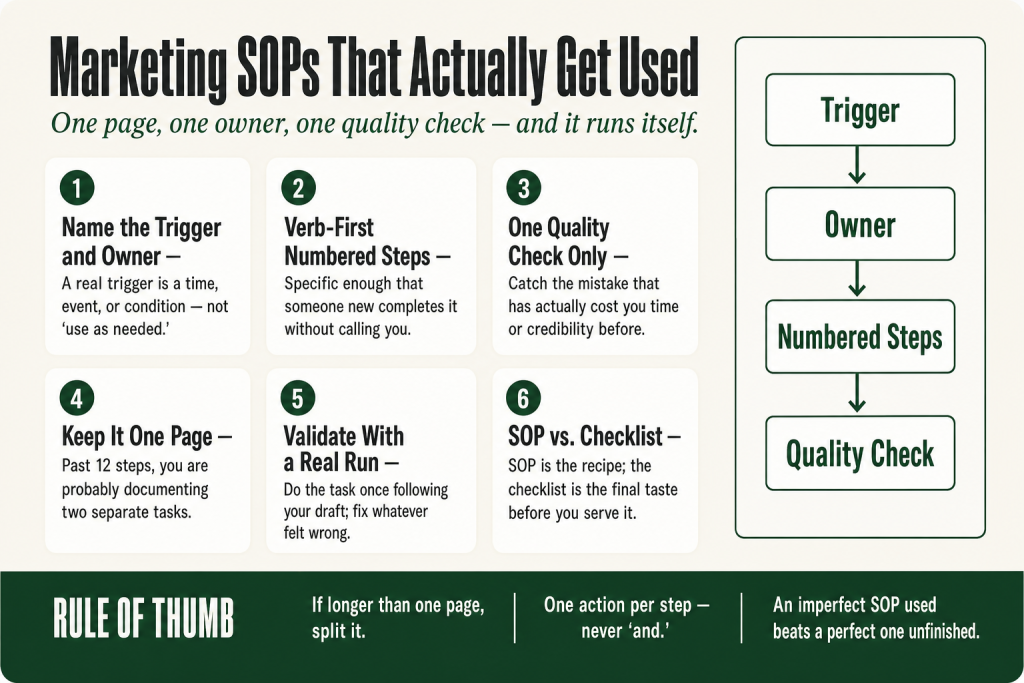
The 30-second answer
- Name the trigger and the owner. Every SOP starts with a specific event or schedule that fires it, and a single person whose name is on it.
- Write numbered steps in plain verb-first language. Each step is one action. If a step has a sub-decision, make a second SOP.
- Add one quality check. Pick the single mistake that kills the task’s effectiveness and build one test for it, right at the end of the steps.
- One-page rule. If your SOP runs longer than one printed page, it’s covering more than one task. Split it.
- Write it once, run it immediately. Do the task once while following your own draft. Fix whatever felt wrong. That first real run is your validation.
Take this fix into your next scenario. The free Builder’s Companion Kit collects the checklists and templates that pair with this guide — so next time, you start from a template, not a blank page. Grab it free →
- Why Most SOPs Get Ignored (and Why Yours Won’t)
- Step One: Name the Trigger and the Owner
- Step Two: Write the Exact Steps Someone Else Could Follow
- Step Three: Add the One Quality Check That Catches the Common Mistake
- Worked Example: A Marketing SOP for Small Business (Weekly Blog Publish)
- The One Rule That Keeps a Marketing SOP for Small Business Usable
- How to Write Your First One This Afternoon
- FAQ
A marketing SOP for small business has a reputation problem. Most operators think of it as a corporate deliverable: a 14-page Word doc with a version-control table, a scope statement, and a signatures page nobody signs. So the task never starts. The real cost shows up later, when a recurring task gets done three different ways in three months, or not at all because the person who knew the steps was out sick. You don’t need the framework. You need one document short enough that you’ll actually open it next time the task comes up. This article shows you exactly how to write that document for any recurring marketing task, gives you a complete worked example, and gives you the single rule that keeps it usable.
Why Most SOPs Get Ignored (and Why Yours Won’t)
The most common failure has nothing to do with writing quality. It’s that the document was written by someone describing how the task should work, not how it actually works. The result is a theoretical process that the person doing the task doesn’t recognize, so they ignore it and run the task from memory instead.
The second failure is length. If it takes longer to read the SOP than to complete the task, the document is already dead. That’s the practical test: read time versus do time. A task that takes 20 minutes shouldn’t have a 25-minute SOP.
The third failure is a missing trigger. Most SOPs tell you how to do something but not exactly when. “Use as needed” isn’t a trigger. It’s a suggestion that depends on someone remembering the document exists. A real trigger is a time (“every Monday morning”), an event (“when a new lead opts in”), or a condition (“when the campaign goes live”). When the trigger fires, the SOP runs automatically.
Fix all three and you’ve got a document people actually open. The rest of this article is the mechanics of doing that.
Step One: Name the Trigger and the Owner
Before you write a single step, put two lines at the top of your document.
Trigger: The specific event or schedule that activates this SOP. Be concrete. “When a new contact is added to the [list name] segment in your email platform” is a trigger. “When we need to send a welcome email” is not.
Owner: One person’s name, not a role, not a team. A role without a name is a shared responsibility, which means it’s nobody’s responsibility. If you’re a solo operator, that name is yours, and writing it down still matters because it closes the loop: this task doesn’t get skipped because everyone thought someone else was handling it.
These two lines do more than orient the reader. They make the SOP self-activating. The trigger is the alarm clock. The owner is the person whose alarm it is. Everything else in the document is just what happens after the alarm goes off.
A note on AI: if you use an AI tool to help draft your steps, it can generate plausible-sounding triggers and step sequences. Your judgment call is whether the trigger matches your actual workflow and whether the steps reflect what you genuinely do. The AI doesn’t know that you check your email on Tuesday mornings, not Monday. You do.
Step Two: Write the Exact Steps Someone Else Could Follow
Number your steps. Start each one with a verb. Be specific enough that a capable person who’s never done this task before could complete it correctly without calling you.
“Send the email” is not a step. “Open [platform], navigate to Campaigns, select the draft named [naming convention], confirm the From name reads [your brand name], and click Send” is a step. The difference is specificity. Vague steps get interpreted differently every time, which is the problem you’re trying to solve.
A few mechanics that make step-writing faster:
- Do the task once while narrating it out loud. Record yourself on your phone. Then transcribe the recording into numbered steps. This captures the real sequence, not your memory of it.
- One action per step. If a step contains the word “and,” it’s probably two steps. Split it.
- Name the tool and the location. Don’t say “update the spreadsheet.” Say “open the [filename] sheet in [folder path], find the tab labeled [tab name], and update column D.”
- Flag the one place where people most often go wrong. Put a short warning inline: “Note: do not click ‘Archive’ here, click ‘Mark Complete’ instead.”
The steps don’t have to be exhaustive. They have to be correct. If someone follows them and produces the right output, the SOP works. That’s the only test that matters.
If your marketing tasks involve a lot of recurring copy, see how to write marketing copy with AI for a method that integrates naturally with an SOP-based workflow.
Step Three: Add the One Quality Check That Catches the Common Mistake
You don’t need a ten-point checklist. You need one check that catches the mistake that actually happens.
Every recurring marketing task has a signature failure mode. For a monthly email newsletter, it’s usually sending to the wrong segment. For a social post, it’s forgetting to swap in the correct link for that week. For a UTM-tagged campaign URL, it’s a copy-paste error that duplicates a previous campaign’s source tag and pollutes your data (see UTM naming convention for the full fix on that one).
The quality check sits at the end of your numbered steps, clearly labeled. It’s a single conditional sentence: “Before clicking Send/Publish/Submit: confirm [specific thing] is [specific correct state].” That’s it. One line, specific, checkable in five seconds.
Why one and not five? Because a five-point checklist gets skimmed. A single, precisely targeted check gets done. You’re not trying to catch every possible error. You’re trying to catch the error that has actually cost you time or credibility before. If you haven’t run this task long enough to know your failure mode yet, write the quality check around the output: “Confirm the final output matches the approved example in [location].” That’s a usable default until your real failure mode reveals itself.
Worked Example: A Marketing SOP for Small Business (Weekly Blog Publish)
Here’s a complete, short SOP for one real marketing task. It’s not a template with placeholders. It’s written the way you’d actually write it for your own operation, then swap in your specifics.
SOP: Publish Weekly Blog Post
Trigger: Every Thursday at 9:00 a.m., when the draft in [CMS name] has status “Ready to Publish.”
Owner: [Your name]
- Open [CMS], go to Posts, filter by status “Ready to Publish.” Confirm exactly one post appears. If more than one appears, stop and check with yourself whether both are intentional before proceeding.
- Open the post. Read the headline and the first paragraph out loud. Confirm they match the approved topic brief in [folder/doc name].
- Check the featured image: it must be present, sized at [your standard dimensions], and the alt text field must be filled in.
- Check the SEO title and meta description fields. Both must be populated. Neither should be auto-generated from the first paragraph.
- Confirm the internal link in the body copy points to the correct destination (click it, don’t just read the URL).
- Confirm the category and at least two tags are set.
- Set the publish date/time to [your standard publish time]. Click “Schedule” (not “Publish immediately”) unless today is the publish day.
- After scheduling, copy the post URL and paste it into the [tracking sheet] in the row for this week’s date.
- Add the post to the content repurposing workflow queue so it gets pulled into your next repurposing pass.
Quality check: Before closing the browser tab, click the live preview link and confirm the post renders correctly on mobile view. If it breaks on mobile, unpublish immediately and fix the formatting.
Output: Post is live (or scheduled), URL is logged, repurposing queue is updated.
Review date: Quarterly.
That entire SOP fits on one page. It took about 25 minutes to write. It will save far more than that the first time someone (including future you, three months from now) needs to run the task without remembering every detail.
The One Rule That Keeps a Marketing SOP for Small Business Usable
One page. That’s the rule.
If your SOP runs longer than one printed page, it’s covering more than one task or it’s describing context instead of steps. Context belongs somewhere else. The SOP is just the steps.
A longer document isn’t more thorough. It’s more likely to get skipped. The practical ceiling for a recurring-task SOP in a one-person marketing operation is roughly 8 to 12 numbered steps. If you’re past 12 steps, ask whether you’re documenting two separate tasks that should each have their own one-pager.
The same principle applies to the “why” explanations inside your steps. A sentence of context per step is fine. A paragraph of reasoning means you’re writing training material, not an operating procedure. Training is what you do before the SOP. The SOP is what you do every time.
One place this shows up: product launches. A launch has dozens of moving parts, but the SOP for each part is still one page. You end up with several short SOPs, not one sprawling document. If you want to see how that breaks down across a full solo launch, the solo operator’s launch playbook walks through the task structure.
How to Write Your First One This Afternoon
Pick the task that caused the most confusion or inconsistency in the last 60 days. Not the most important task: the most chaotic one. That’s where a written procedure will return the most value fastest.
Open a blank document. Write the trigger and the owner first. Then do the task, out loud or with a screen recording running. Pause after each action and write down what you just did, in verb-first plain language. Don’t editorialize, don’t explain the history, just describe the action.
When you’re done, add the quality check at the bottom. Then read the whole thing and cut anything that isn’t a step or a warning about a specific mistake.
Run the task once more using only the document. If you had to go off-document to complete it, the SOP is missing something. Add it. If you never looked at the document because the steps were too obvious to need it, those obvious steps can be collapsed or removed.
The finished document is your first marketing SOP. It will be imperfect. That’s fine. An imperfect SOP that gets used beats a perfect SOP that’s still being written.
Once you have two or three of these, you’ll notice the pattern: the tasks with documented procedures run smoother and take less mental energy than the ones you’re still holding in your head. That’s the compounding benefit. The first one takes an afternoon. Each one after that takes less time, because you already know the shape of what you’re building.
If your recurring tasks include any part of your lead follow-up sequence, that’s one of the highest-value places to document first. See the lead follow-up process playbook for the structure before you write the SOP around it.
FAQ
what should a marketing SOP include
At minimum: a trigger (the specific event or schedule that activates it), a named owner, numbered steps written in plain verb-first language, and one quality check at the end. Anything beyond that is optional. Keep it to one page.
how long should a marketing SOP be
One page. If it’s longer than one page, it’s probably covering more than one task or explaining context that belongs in training materials, not a procedure. Eight to twelve numbered steps is a practical ceiling for most recurring marketing tasks.
can I use AI to write my marketing SOPs
AI can draft a plausible step sequence quickly, and that’s a useful starting point. But AI doesn’t know your actual tools, your naming conventions, or the specific mistake your operation makes most often. You have to verify every step against how the task actually runs in your business, and you have to write the quality check yourself. The judgment stays with you.
how often should I update my marketing SOPs
A quarterly review date on the document is a practical default. Update it immediately any time a tool, platform, or process changes. The faster you update it after a change, the less likely you are to run the old version by accident.
what is the difference between a marketing SOP and a checklist
A checklist confirms things are done. An SOP tells you how to do them. For recurring marketing tasks, you often want both: the SOP as the procedure and a short checklist as the quality check at the end. The SOP is the recipe; the checklist is the final taste before you serve it.
how do I get someone else to actually follow my SOP
Have them run the task using only the document, without you explaining anything. If they get stuck, the SOP is missing a step. If they finish correctly, it works. That test also tells you faster than any review process whether your steps are specific enough to be followed without interpretation.
Sources:
Methodology and usability principles informed by: SystemaFlow, “How to Write an SOP That Actually Gets Used” (May 2026); SystemaFlow, “What Makes a Good SOP?” (May 2026); Trainual, “How to Write a SOP That People Actually Use” (April 2026); Smart Insights, “How to Use Standard Operating Procedures for Marketing” (December 2025); Scribe, “SOP Best Practices: Write Procedures People Follow” (September 2024).
Brian Kasday spent forty years in direct-response marketing before rebuilding the whole operation as a one-person shop. He writes The Operator’s Library — including “Build a Complete Marketing Department” — for operators who’d rather build it themselves than wait on someone else.
Get the Builder’s Companion Kit — the free checklists and templates that pair with this guide: mmsvegas.com/resources.
This guide handles one marketing job. Build a Complete Marketing Department builds the whole department. See the manual →
More Marketing guides
Free · Marketing Operator Toolkit
Running marketing on your own?
Get the free toolkit — the templates and the expensive mistakes behind a one-person marketing department, plus a note when this guide changes.
Get the free toolkit →