
The 30-second answer
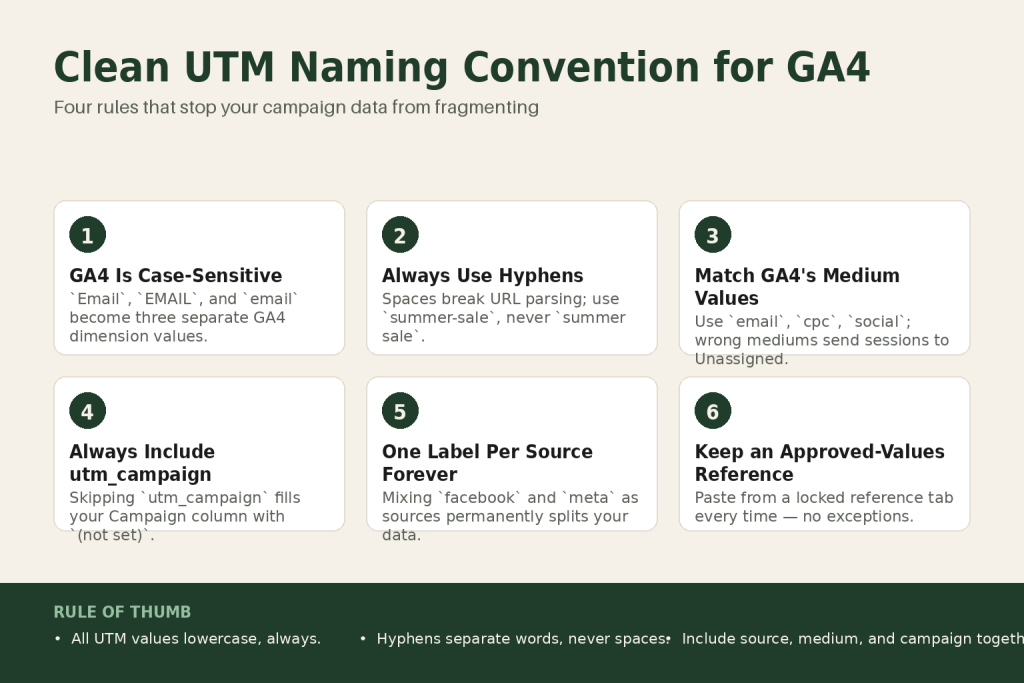
- Always lowercase. GA4 is case-sensitive for parameter values.
Email,EMAIL, andemailare three separate dimension values that fragment your reports. - One label per thing. Pick one word for each source and stick to it forever.
facebookis a source.metais a source. Mixing them splits your data. - Hyphens as your separator. Spaces break URL parsing. Use hyphens between words:
summer-sale, notsummer saleorsummer_sale. - Match GA4’s recognized medium values. Use
email,cpc,social. Invent your own (likenewsletteras a medium) and the visit likely lands in Unassigned. If you need a custom medium, you’ll also need a custom channel group to catch it. - Always include utm_campaign. GA4’s official docs strongly recommend including utm_source, utm_medium, and utm_campaign together. Skipping utm_campaign fills your Campaign column with
(not set). - One habit to stay consistent: keep a tab-sized reference sheet with your approved values and paste from it every time, no exceptions.
Take this fix into your next scenario. The free Builder’s Companion Kit collects the checklists and templates that pair with this guide — so next time, you start from a template, not a blank page. Grab it free →
- Why GA4 Fragments Your Campaign Data
- The Three Parameters That Matter: Source, Medium, and Campaign
- The Exact Rules for a Clean UTM Naming Convention
- Copy-Paste UTM Examples: Email, Social, and Paid Ad
- The One Habit That Keeps Your UTM Naming Convention Consistent
- What This UTM Naming Convention Can’t Fix
- FAQ
A broken UTM naming convention is the most common reason your GA4 Traffic Acquisition report looks like a junk drawer. You see Facebook and facebook as separate rows. You see (not set) swallowing half your campaign column. You see traffic you know came from an email sitting in Direct. None of that is a GA4 bug. It’s a naming problem, and it has a straightforward fix.
This article gives you the exact rules for the three parameters that matter most, source, medium, and campaign, plus a copy-paste example set and one habit that keeps things clean without a governance manual.
Why GA4 Fragments Your Campaign Data
GA4 reads UTM parameter values as plain strings. It does no normalization. Parameter values are case-sensitive: utm_source=google and utm_source=Google are stored as two different sources, each with their own row in every report. (The parameter names themselves, like utm_source or utm_medium, are not case-sensitive. It’s the values after the equals sign that matter.)
That’s the core problem. One campaign, tagged inconsistently across three emails, shows up as three separate campaigns. You can’t compare them, you can’t sum them, and you can’t trust the totals. It’s the data version of a filing cabinet where the same client is under three different spellings of their last name.
The second problem is channel assignment. GA4’s Default Channel Grouping uses rule-based logic to bucket traffic into channels like Email, Paid Search, and Organic Social. Each rule checks a combination of conditions, most commonly both your source value and your medium value together. Paid Social, for example, requires the source to match a recognized social platform AND the medium to match a paid indicator. If your medium values don’t match the strings GA4 expects, or if your source doesn’t match the expected combination, the session can drop into Unassigned, where it inflates a catch-all bucket and hides your actual channel performance.
The third problem is (not set). This appears in your Campaign dimension when utm_campaign is absent from the tagged URL. GA4’s official documentation strongly recommends including utm_source, utm_medium, and utm_campaign together whenever you tag a URL, because omitting any of them silently fills the corresponding dimension with a placeholder that makes filtering impossible. That said, even perfectly tagged campaigns will produce some (not set) values: privacy consent settings, ad blockers, and certain session-timeout edge cases can all create gaps that no amount of correct tagging can prevent. Clean convention minimizes the problem. It doesn’t eliminate it entirely.
All three problems share the same root: no agreed convention enforced consistently. The fix isn’t a tool. It’s a short set of rules you apply before any link goes out.
The Three Parameters That Matter: Source, Medium, and Campaign
There are eight UTM parameters in GA4’s current spec, but three do most of the work. Get these right and your reports become readable. The others are optional refinements.
utm_source: the platform sending the click
utm_source names the specific platform or property where your link lives. Think: facebook, instagram, mailchimp, linkedin, google. One word, all lowercase, no spaces. The rule is simple: pick the most specific name that identifies where the click originated, and never put a channel type here. utm_source=social is wrong. Social is a medium. utm_source=facebook is right.
Source also matters for channel assignment, not just medium. Several GA4 channel rules check both values in combination: a source that matches a recognized social platform paired with a paid medium routes to Paid Social, while the same source with medium=social routes to Organic Social. Get the source wrong and even a correct medium can misfire.
utm_medium: the channel type
This is the most consequential field for your channel reports, but it works in combination with source. GA4’s Default Channel Grouping reads both utm_medium and utm_source together to decide whether a session is Email, Paid Search, Organic Social, or something else. Use the wrong value and the session is likely to go to Unassigned, regardless of how correct your other tags are.
The recognized standard values are: email, cpc, social, referral, affiliate, display. For paid social specifically, a medium that contains cpc or starts with paid paired with a recognized social source will route correctly to the Paid Social channel. Stick to these. Do not use newsletter as a medium. It’s descriptive, but GA4’s Email channel rule matches on email, e-mail, e_mail, and e mail. Traffic tagged utm_medium=newsletter is likely to land in Unassigned rather than Email. Put the newsletter label in utm_campaign instead, where it belongs.
If you genuinely need a custom medium value for a traffic type that doesn’t fit the standard list, you can create a custom channel group inside GA4 (Admin, then Channel groups) to catch it. That’s the right path. Don’t invent a medium value and hope GA4 figures it out.
utm_campaign: the specific promotion
utm_campaign is the name of the individual campaign, send, or promotion. GA4’s official documentation strongly recommends including it alongside utm_source and utm_medium on every tagged URL. Skipping it means every session from that link shows (not set) in your Campaign dimension. Always include it. Use lowercase, hyphens between words, and a format that tells you what the campaign was without needing a decoder ring: summer-sale-2026, welcome-series-day1, fb-retarget-aug.
A campaign name should answer: what was this specific activation? Not what the medium was (that’s already in utm_medium), and not what platform it ran on (that’s in utm_source).
For more on how campaign tracking fits into a full marketing read, see how to read your marketing data without an analyst.
The Exact Rules for a Clean UTM Naming Convention
Four rules. No exceptions.
- All lowercase, always. This is the non-negotiable. GA4 treats the values of your parameters as case-sensitive strings.
Email,EMAIL, andemailare three different dimension values. One slip fragments your data. Lowercase every character in every value. (The parameter names themselves, likeutm_source, are not case-sensitive. It’s what comes after the equals sign that GA4 stores and compares.) - Hyphens as word separators. Spaces break URL parsing entirely. A space character in a parameter value can cause everything after it to be dropped or misread. Use hyphens:
summer-sale, notsummer sale. Underscores are technically safe in most contexts, but hyphens are the cleaner default and the convention most URL builders use. - One label per thing, enforced forever. If you decide the source for your email platform is
mailchimp, it’smailchimpon every send, every year. If you later switch toklaviyo, that’s a new source. You don’t retroactively renamemailchimp. Consistency of historical values matters for trend data. - Match medium to GA4’s recognized channel strings. Do not invent a medium value unless you’re also prepared to create a custom channel group in GA4 (Admin, then Channel groups) to catch it. For most solo operators, the standard list is enough:
email,cpc,social,display,affiliate.
One honest caveat: even perfectly tagged campaigns will produce some residual (not set) values and some Unassigned channel traffic. Privacy consent settings, ad blockers, and certain session-timeout edge cases can all create gaps that proper UTM tagging can’t prevent. Clean convention minimizes it. It doesn’t eliminate it entirely.
Copy-Paste UTM Examples: Email, Social, and Paid Ad
Here are three ready-to-use tagged URLs. Swap https://yoursite.com/offer/ for your actual destination. Each one follows the four rules above exactly.
Email campaign
https://yoursite.com/offer/?utm_source=mailchimp&utm_medium=email&utm_campaign=summer-sale-2026Source: the sending platform. Medium: email, which matches GA4’s Email channel rule. Campaign: descriptive, lowercase, hyphenated. This session will appear correctly in the Email channel, not Unassigned.
Organic social post (e.g., Facebook)
https://yoursite.com/offer/?utm_source=facebook&utm_medium=social&utm_campaign=summer-sale-aug26Source: the platform. Medium: social. GA4’s Organic Social rule checks that the source matches a recognized social platform AND the medium matches a social indicator, so both values work together here. If this were a paid Facebook ad, you’d change the medium to cpc or paid-social to route it to Paid Social instead.
Paid ad (non-Google, e.g., Meta Ads)
https://yoursite.com/offer/?utm_source=facebook&utm_medium=cpc&utm_campaign=retarget-cart-aug26For Google Ads, use auto-tagging (gclid) and do not add manual UTMs on top of it. For every other paid platform, including Meta, LinkedIn, and Microsoft Ads, manual UTMs are the right approach. The cpc medium paired with facebook as source will route this session to Paid Social in GA4’s channel grouping, because GA4 checks both values together.
What the difference looks like in practice
Here’s a concrete scenario. Imagine you run two Facebook posts promoting the same offer, one week apart. The first goes out with utm_source=Facebook&utm_medium=Social (mixed case, copied from a team member’s link). The second goes out with utm_source=facebook&utm_medium=social (correct). In GA4’s Traffic Acquisition report, those two posts show as four separate rows: two sources (Facebook and facebook) each with two mediums (Social and social). You can’t add them together because GA4 doesn’t know they’re the same thing. Your total reach from that campaign is split across rows, each one looking underperforming on its own. Switch to consistent lowercase and the same two posts collapse into one row, with unified session counts, engagement rates, and conversion data you can actually act on.
Notice the campaign names above carry enough context to be read cold in a report six months from now. You don’t need a spreadsheet to decode retarget-cart-aug26. If your campaign names currently look like Campaign1 or test, that’s the first thing worth fixing.
If you’re building out your email funnel and want the campaign values to match your sequence structure, the naming logic pairs naturally with setting up a welcome email sequence for small business.
The One Habit That Keeps Your UTM Naming Convention Consistent
Rules without enforcement revert to chaos inside three months. You’ll be the one breaking your own convention when you’re in a hurry at 11pm before a launch.
The fix is one reference tab in whatever tool you already live in: a Google Sheet, a Notion page, a sticky note in your link-building tool. It needs exactly three columns: Source, Medium, Campaign examples. Approved values only. Every time you build a link, you open that tab, confirm the values, and paste from it. Every time.
That’s it. No elaborate naming taxonomy, no approval workflow, no second tool to maintain.
The reason this works is that it moves the cognitive load out of the moment you’re rushing to publish. The decisions are already made. You’re just copying.
If you use Google’s Campaign URL Builder (available at ga-dev-tools.google/campaign-url-builder/), you can pre-fill source and medium fields and just update the campaign name for each new send. That alone prevents most casing and spelling errors.
One more thing worth verifying before any link goes live: paste the finished URL into GA4’s Realtime report and confirm the source, medium, and campaign show up exactly as you tagged them. A page can load correctly while the UTMs are silently broken, because the browser reads the path but GA4 reads the query string. If the Realtime report shows the right values, the tag is good.
This habit connects directly to how you read the resulting data. If you want to build the skill of interpreting what GA4 is actually telling you, reading your marketing data without an analyst covers the report views that matter most. And if you’re building out a full funnel to track, building a sales funnel without a team shows how the pieces connect end to end.
What This UTM Naming Convention Can’t Fix
Clean naming solves the problems you create. It doesn’t fix problems that come from outside your tags.
Redirects that strip query strings will silently drop your UTMs before GA4 ever sees them. If your link goes through a redirect (a short link service, a landing-page tool, or a link inside a PDF), confirm the redirect preserves the full query string. Paste the final destination URL into your browser and check that the UTM parameters are still there at the end.
Ad blockers and strict browser privacy settings can prevent GA4 from reading UTMs at all. This is a structural reality of the current web. Even a perfectly tagged, perfectly consistent campaign will have some percentage of traffic that’s invisible to GA4. Don’t let that discourage you from tagging. The data you do capture is more useful than none, and consistency makes the captured portion trustworthy.
Late data is also normal. GA4 takes time to run its attribution models after collecting raw event data. If you check a report within hours of a campaign launch, you may see more Unassigned or Direct traffic than will ultimately appear once processing completes. Check campaign performance after at least 24 to 48 hours, not immediately after sending.
Finally, UTM tags on URLs you don’t control, like organic Google results or unprompted referral links, would override GA4’s automatic classification and create wrong data. Never add UTMs to URLs you’re placing on your own website or to Google Ads URLs when auto-tagging is active. Manual UTM tagging is for traffic you’re actively sending from outside your site.
FAQ
Does GA4 UTM tracking care about uppercase vs lowercase?
Yes, GA4 is case-sensitive for UTM parameter values. To be precise: the parameter names themselves (like utm_source or utm_medium) are not case-sensitive, but the values after the equals sign are. “Email”, “EMAIL”, and “email” are stored as three separate dimension values and appear as separate rows in your Traffic Acquisition report. Always use all lowercase values to prevent your data from fragmenting.
Why does my campaign show as (not set) in GA4?
The most common cause is a missing utm_campaign parameter. GA4’s official documentation strongly recommends including utm_source, utm_medium, and utm_campaign together on every tagged URL, because omitting any of them fills the corresponding dimension with (not set) for every session from that link. Beyond missing parameters, privacy settings and ad blockers can also produce (not set) entries that correct tagging alone can’t prevent. Always include all three core parameters on every tagged URL.
What utm_medium value should I use for email?
Use “email” in all lowercase. According to GA4’s Default Channel Group spec, the Email channel rule recognizes four spellings of the medium value: email, e-mail, e_mail, and e mail (with a space). The rule checks medium OR source, so either field containing one of those spellings can qualify a session for the Email channel. Do not use “newsletter” as your medium value; it is not in the Email channel rule and will likely route those sessions to Unassigned. Put the newsletter label in utm_campaign instead.
Should I add UTMs to my Google Ads URLs?
No, not if you have auto-tagging enabled in Google Ads. Auto-tagging appends a gclid parameter automatically and gives GA4 richer campaign data than manual UTMs can. Adding manual UTMs on top of auto-tagging can cause data discrepancies. Use manual UTMs for every other platform, including Meta, LinkedIn, and email.
Can I use underscores instead of hyphens in UTM values?
Underscores work in most URL contexts and won’t break tracking on their own. The stronger reason to prefer hyphens is consistency: Google’s own Campaign URL Builder uses hyphens, and mixing the two separators across campaigns creates visual inconsistency in reports. Pick one and use it everywhere.
How do I fix UTM data that’s already fragmented from past inconsistent tagging?
You can’t retroactively clean historical data in GA4. For past campaigns, the fragmented rows are permanent. What you can do is apply a consistent naming convention from today forward and, over time, the clean data will dominate your reports. For serious historical cleanup, GA4’s Explorations let you build custom segments that group similar values together for one-off analysis.
Sources:
Sources: Google Analytics Help: URL builders: Collect campaign data with custom URLs (official GA4 documentation, verified August 2026); Google Analytics Help: Traffic-source dimensions, manual tagging, and auto-tagging (official GA4 documentation, verified August 2026); Google Campaign URL Builder (official GA4 tool); GA4 Default Channel Grouping rules referenced via multiple practitioner sources cross-checked against Google’s current channel grouping documentation.
Brian Kasday spent forty years in direct-response marketing before rebuilding the whole operation as a one-person shop. He writes The Operator’s Library — including “Build a Complete Marketing Department” — for operators who’d rather build it themselves than wait on someone else.
Get the Builder’s Companion Kit — the free checklists and templates that pair with this guide: mmsvegas.com/resources.
This guide handles one marketing job. Build a Complete Marketing Department builds the whole department. See the manual →
More Marketing guides
Free · Marketing Operator Toolkit
Running marketing on your own?
Get the free toolkit — the templates and the expensive mistakes behind a one-person marketing department, plus a note when this guide changes.
Get the free toolkit →