The 30-second answer
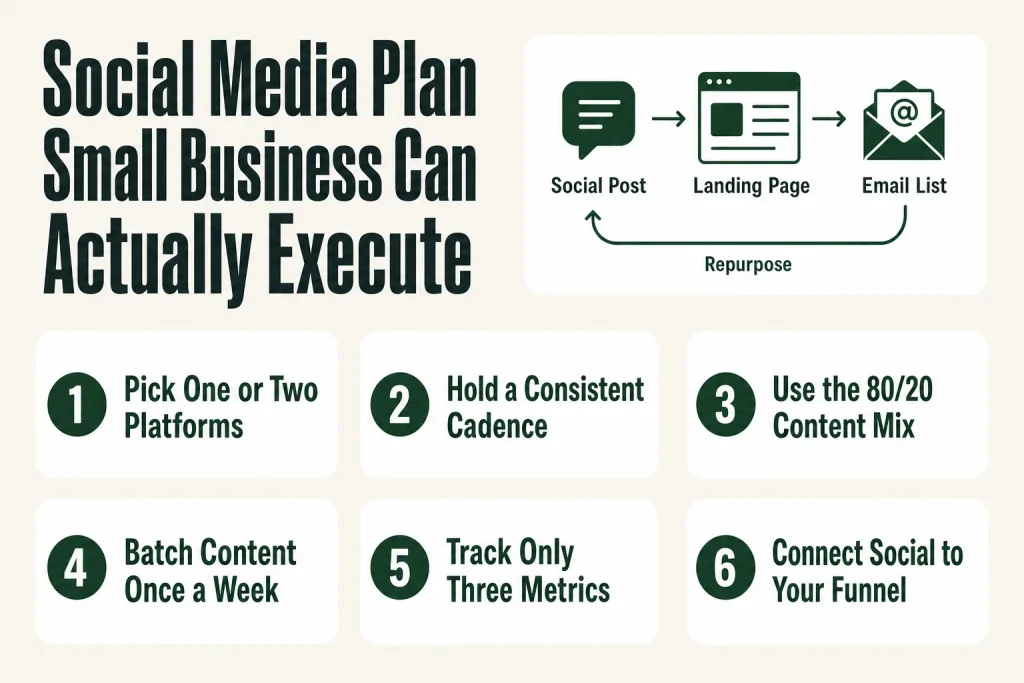
- Pick one or two platforms. More than two without dedicated help almost always means underperformance on all of them.
- Set a posting cadence you can hold. Three posts a week, every week, beats ten one week and none the next.
- Use an 80/20 content mix. Roughly 80% of posts provide value (education, behind-the-scenes, proof). No more than 20% are direct promotions.
- Batch your content. One creation session per week prevents the daily scramble and keeps the calendar from going dark.
- Track three metrics tied to business outcomes: reach (visibility), engagement rate (resonance), and website clicks or leads (revenue signal).
- Review monthly, not daily. Chasing daily numbers wrecks your decision-making. Monthly patterns tell you what to double down on.
Take this fix into your next scenario. The free Builder’s Companion Kit collects the checklists and templates that pair with this guide — so next time, you start from a template, not a blank page. Grab it free →
- Why Most Small Business Social Media Stalls Out
- How to Choose the Right Platforms (Not Just the Popular Ones)
- Set a Cadence You Can Hold for 90 Days
- The Content Mix: Build a Social Media Plan for Small Business That Doesn’t Feel Like Spam
- Batch, Schedule, and Get Out of the Daily Scramble
- A Worked Example: What One Week Actually Looks Like
- Three Metrics Worth Tracking (and the Vanity Numbers to Ignore)
- Connect Social Media to the Rest of Your Marketing
- FAQ
A social media plan for small business sounds simple until you’re twelve tabs deep at 10 p.m., trying to write captions for three platforms you don’t have time to maintain. The problem isn’t social media itself. It’s that most advice is written for teams with a dedicated content person, a designer, and a scheduler. You have yourself. This article skips the fantasy version. You’ll get a plan one person can actually execute: the right number of platforms, a posting rhythm you can hold, a content mix that doesn’t make you cringe, and the three numbers worth tracking. The judgment calls stay with you. The system just makes them easier to act on.
Why Most Small Business Social Media Stalls Out
The most common failure mode isn’t bad content. It’s the focus problem: trying to show up on every platform, posting inconsistently, skipping replies, then wondering why nothing converts. A working marketing calendar fixes the cadence problem, but the platform problem has to come first.
Here’s what happens when you spread thin. Say you’re on Facebook, Instagram, TikTok, LinkedIn, and X. Each one needs different content formats, different copy tones, and different engagement habits. Platform algorithms detect low-resonance content and show it to fewer people, creating a spiral where more effort yields worse reach. You end up busy, tired, and commercially unsure of what’s working.
The fix is almost embarrassingly simple: do fewer platforms well. The data is consistent here. More than two or three platforms without dedicated social media resources almost always results in underperformance across all of them. Start focused. Expand only after the first channel is actually working.
How to Choose the Right Platforms (Not Just the Popular Ones)
The best platform for your business is the one where your customers already spend time, not the one with the most total users. That sentence sounds obvious. Most people ignore it anyway and default to Instagram because it looks nice or LinkedIn because it feels professional.
A cleaner way to think about it: weigh audience fit against content friction. A platform with perfect audience fit but impossible content demands will fail every time. If you hate being on camera, building a strategy around short-form video is a liability, not an asset. Pick the platform you can produce content for consistently, where your buyers are actually present.
Some starting points by business type:
- Local service businesses (HVAC, cleaning, landscaping, etc.): Google Business Profile plus Facebook. Google Business Profile captures high-intent local searches and converts nearby customers. Facebook builds community and handles local retargeting well.
- Visual product or creative businesses (retail, food, interiors, apparel): Instagram, with Reels as the primary format. Instagram Reels and carousels generate meaningfully higher median engagement than static image posts.
- B2B services and consultants: LinkedIn as the primary. A professional services firm that masters LinkedIn outperforms one that half-heartedly posts on five platforms.
- Businesses that can teach via video: YouTube or TikTok. TikTok sees organic engagement rates significantly higher than Facebook or Instagram business accounts, but the content demands are real.
Pick one primary platform and one secondary. Once the primary is producing consistent results, you can repurpose content to the second. That’s the sensible expansion path, not starting five accounts on day one.
Set a Cadence You Can Hold for 90 Days
Consistency matters more than frequency. Posting three times a week every week beats posting ten times one week and nothing the next. The algorithms reward regularity. More importantly, your own system rewards regularity. When you have a fixed cadence, content creation becomes a workflow instead of a crisis.
Three posts a week is a manageable starting point for most solo operators. It gives the algorithm enough signal to distribute your content and keeps your presence active without requiring a full-time commitment. Some platforms are more forgiving of lower frequency if each post has strong engagement signals (saves, shares, comments). Heavy frequency without engagement just burns your time.
Set one main goal per platform per quarter. Anything more than that and you’re working from a wishlist, not a strategy. Attach a measurable number to that goal, and let the cadence serve it. If your Q4 goal is 200 website clicks from Instagram, your cadence and your link-in-bio choices should point directly at that number.
A note on posting times: most platforms offer a “best time to publish” recommendation inside their native analytics. Check yours rather than following generic advice. Your audience’s behavior is what matters, and it varies by industry, location, and account size.
The Content Mix: Build a Social Media Plan for Small Business That Doesn’t Feel Like Spam
The 80/20 rule is the most durable content mix framework for a small business: roughly 80% of posts provide value (education, entertainment, behind-the-scenes, social proof), and no more than 20% are direct promotions. It’s a useful starting line, not a carved-in-stone law. But it has a sharp insight built into it: you earn the right to ask by giving first.
Research suggests a significant share of social media users unfollow brands that post too much promotional content. Zero promotion is also wrong, and worth naming plainly. A 100% value mix is helpful for followers and useless for revenue. The goal is the balance.
Here’s a practical weekly breakdown for three posts:
- Post 1 (value): A tip, how-to, or insight your audience can use without buying anything. Behind-the-scenes content, a lesson learned, a process you follow.
- Post 2 (social proof or community): A customer result, a testimonial, a question for your audience, a reshare of a customer mention. Collecting testimonials without making the ask awkward is a skill worth building separately.
- Post 3 (promotional): Your offer, a clear call to action, a link to book, buy, or inquire. Confident, not desperate.
Organize your content around two or three recurring themes (often called pillars). If you run a bookkeeping firm, your pillars might be: tax tips, client results, and business-owner mistakes. The pillars give you a system for generating ideas without reinventing from scratch every week. They also make it easy to see which type of content drives the most engagement.
One more thing to name: if you’re brand new and nobody knows you yet, dial promotion down and connection up. People buy from accounts they feel they know. Once you have an engaged audience, you can raise promotion for a launch period and return to baseline after.
Batch, Schedule, and Get Out of the Daily Scramble
The daily “what do I post today?” question is a tax on your attention. Replace it with a weekly or biweekly content batching session. Sit down once, create three to six posts, schedule them, and leave it alone. That’s the whole system.
For Facebook and Instagram, Meta Business Suite handles this at no cost. It’s Meta’s free, official tool that lets you schedule posts, Reels, and Stories for both platforms from a single dashboard, manage your Messenger and Instagram DMs in one inbox, and view analytics across both accounts. You can draft content, preview how it will look on each platform, and set publish times in advance. For a solo operator running Facebook and Instagram, it covers most of the daily work without paying for a third-party platform.
A few honest caveats on Meta Business Suite, and these matter: Meta updates the platform regularly, so the interface, feature names, and menu locations you see today may not match any walkthrough written a year ago. Before you build a workflow around a specific feature, verify it’s still where you expect it inside the live tool at business.facebook.com. Check Meta’s official Business Help Center for the current interface and feature set. Beyond that, scheduling features don’t match dedicated tools like Buffer or Hootsuite for advanced workflows. Video and Reels scheduling has had reliability issues reported by users, so test it before you rely on it.
If you’re on LinkedIn or TikTok, both have native scheduling options inside their creator tools. Buffer and Later offer free tiers that cover limited post counts per month if you need a cross-platform option. The tool doesn’t matter much. The batching habit does.
If you use AI to draft captions or brainstorm post ideas, treat the output as a first draft that needs your voice, your specific examples, and your judgment before it publishes. You’re the one who knows the customer, the local market, and whether the tone is right. AI speeds up the drafting step. It doesn’t replace the review step. Writing marketing copy with AI works well as a drafting assist. Every post still needs your eyes and your final call before it goes out.
A Worked Example: What One Week Actually Looks Like
Let’s make this concrete. Say you run a solo residential cleaning business. Your primary platform is Facebook (local audience, community group presence). Your secondary is Google Business Profile (for search visibility). You post three times a week on Facebook.
Monday (value post): A short tip. “Three things that make a bathroom actually smell clean (not just look clean).” No product pitch. Just a useful fact that shows you know your craft.
Wednesday (social proof post): A photo from a completed job (with permission) and a one-sentence client quote. “Came home to a spotless kitchen after a 10-hour workday. Worth every penny. Thanks to Maria!” Tag the neighborhood if the client says it’s okay.
Friday (promotional post): A direct, confident offer. “Spots open for new weekly clients in the Summerlin area. DM me or click the link to see what’s included in a standard clean.” Link goes to your booking page, tracked with a UTM parameter so you know how many clicks came from this specific post.
That’s it. One batching session on Sunday afternoon produces all three. Schedule them. Spend ten minutes each day replying to any comments. Review your reach, engagement rate, and link clicks at the end of the month. Ask one question: which post drove the most website visits? Do more of that format next month.
The whole system fits inside fifteen to twenty hours a month. That’s realistic. Anything that requires more than that without a dedicated hire deserves a hard look at whether it’s the right channel for your stage. Your first marketing hire becomes the answer only after the system is proven and the time cost outweighs the hire cost.
Three Metrics Worth Tracking (and the Vanity Numbers to Ignore)
Likes and follower count feel good and tell you almost nothing. A useful mental model separates your numbers into three groups: attention metrics, intent metrics, and revenue metrics.
- Reach (attention metric): How many unique people saw your content. This tells you if the algorithm is distributing your posts. If reach is flat or falling, your content type or posting time needs to change.
- Engagement rate (intent metric): Interactions (likes, comments, shares, saves) divided by reach, times 100. This tells you if content is resonating with the people who actually saw it. Saves and shares carry more weight than likes on most platforms. Track engagement rate, not raw engagement counts, because raw counts inflate with reach and obscure quality.
- Website clicks or leads (revenue metric): How many people left the platform and landed on your site, booking page, or lead form. This is the number that connects your social activity to your business pipeline. Use UTM parameters on every link so GA4 shows you exactly which post drove which traffic. Getting your UTM naming convention right once saves you months of fragmented data.
Review these three numbers once a month. Look for patterns across post types. Which format (video, carousel, static image) gets the most reach? Which content pillar gets the most saves? Which posts actually drove clicks? Those answers tell you what to make more of. Daily metric checks create noise, not signal.
A word on what AI can and can’t do here: it can help you draft posts faster, suggest topics, and format ideas. It can’t tell you whether your local market is ready to book in December or whether your client base skews toward Instagram or Facebook. That knowledge comes from your own data and your customer conversations. You supply the context. AI speeds up the execution. Connect your social data to your broader marketing KPIs and treat it as one channel in a system, not the whole system.
Connect Social Media to the Rest of Your Marketing
Social media is a visibility and trust-building channel. It’s rarely where a sale closes. The job of most posts is to move someone from “never heard of you” to “know enough to click.” What happens after the click is determined by your landing page, your email list, and your follow-up process.
If you’re using social to drive people into your funnel, the landing page they hit has to earn the click. A lead magnet landing page is often the right destination for top-of-funnel social traffic. Once someone’s on your list, social media becomes a reinforcement channel, not the primary relationship.
Repurposing content across channels also stretches your production time. A tip you wrote for Instagram can become a paragraph in your email newsletter, a section in a blog post, or a pull quote on LinkedIn. A content repurposing workflow makes this systematic rather than ad hoc, which matters a lot when you’re doing this alone.
The point is that social media doesn’t have to carry the whole marketing load. It does its job well when it’s connected to the other channels doing theirs.
FAQ
How many social media platforms should a small business be on?
One to two is the practical answer for most solo operators. More than three without dedicated social media resources almost always results in underperformance across all of them. Start with one primary platform where your customers spend time, get consistent results there, then expand to a second. The goal is depth, not coverage.
How often should a small business post on social media?
Three times a week is a manageable and effective cadence for most small businesses. Consistency matters more than frequency. Posting three times a week every week outperforms posting ten times in one week and nothing the next. Set a schedule you can hold for at least 90 days before adjusting.
What is the 80/20 rule for social media content?
The 80/20 rule means roughly 80% of your posts provide value (tips, behind-the-scenes content, social proof, education) and no more than 20% are direct promotions. It’s a guardrail, not a law. If you’re brand new, lean even further toward value until people know who you are. Never drop to zero promotion, because that’s a hobby, not a business.
What social media metrics should a small business actually track?
Track three: reach (how many unique people saw your content), engagement rate (interactions divided by reach), and website clicks or leads generated from social (the revenue signal). Review them monthly, not daily. Follower count and raw likes are vanity numbers; they feel good but don’t tell you whether social is contributing to revenue.
Is Meta Business Suite free for small businesses?
Yes. Meta Business Suite lets you schedule posts, Reels, and Stories, manage your Facebook and Instagram inbox, and view analytics across both platforms at no cost. There is no paid tier for the core scheduling, messaging, and insights features. You only pay if you run ads. That said, Meta updates the tool regularly, so check the official Business Help Center at facebook.com/business/help to confirm what’s included in the current version before building your workflow around it.
Can AI write my social media posts for me?
AI can draft captions, suggest topics, and speed up your content creation significantly. What it can’t do is know your specific customers, your local market conditions, or whether a given post fits your brand voice. Use it as a drafting tool, then read and edit every post before it publishes. The judgment stays with you. AI cuts the time it takes to get to a first draft. It doesn’t cut the need for your review.
Sources:
- Buffer, “How to Create a Social Media Marketing Strategy in 2026” (buffer.com/resources/social-media-marketing-strategy), platform selection and goal-setting guidance.
- SocialBee, “Top Social Media Platforms for Business in 2026” (socialbee.com/blog/top-social-media-platforms-for-business), platform-by-business-type mapping.
- Braveheart Digital Marketing, “How Many Social Media Platforms Should You Focus On?” (braveheartdigitalmarketing.com), depth-vs-breadth data.
- Multilogin, “How to Use Meta Business Suite in 2026” (multilogin.com/blog/how-to-use-meta-business-suite), scheduling, inbox, and analytics feature verification.
- Metricool, “How to Use Meta Business Suite” (metricool.com/meta-business-suite), current feature set verification.
- Sociallyin, “Social Media Posting Strategy: The 2026 Fixes” (sociallyin.com), content mix ratio comparison.
- Emplifi, “Social Media Metrics for Marketers” (emplifi.io, October 2026), engagement, reach, and conversion metric definitions.
- Borobusinesslab, “Are Your Social Media Results Actually Good? 2026 Benchmarks”, Instagram Reels/carousel engagement data citing Emplifi 2026 Benchmarks Report.
- Social Rails, “Small Business Social Media Strategy: Complete 2026 Guide” (socialrails.com), cadence and 80/20 mix guidance.
- Meta Business Help Center (facebook.com/business/help), official source for Meta Business Suite feature and interface verification.
Brian Kasday spent forty years in direct-response marketing before rebuilding the whole operation as a one-person shop. He writes The Operator’s Library — including “Build a Complete Marketing Department” — for operators who’d rather build it themselves than wait on someone else.
Get the Builder’s Companion Kit — the free checklists and templates that pair with this guide: mmsvegas.com/resources.
This guide handles one marketing job. Build a Complete Marketing Department builds the whole department. See the manual →
More Marketing guides
Free · Marketing Operator Toolkit
Running marketing on your own?
Get the free toolkit — the templates and the expensive mistakes behind a one-person marketing department, plus a note when this guide changes.
Get the free toolkit →