
The 30-second answer
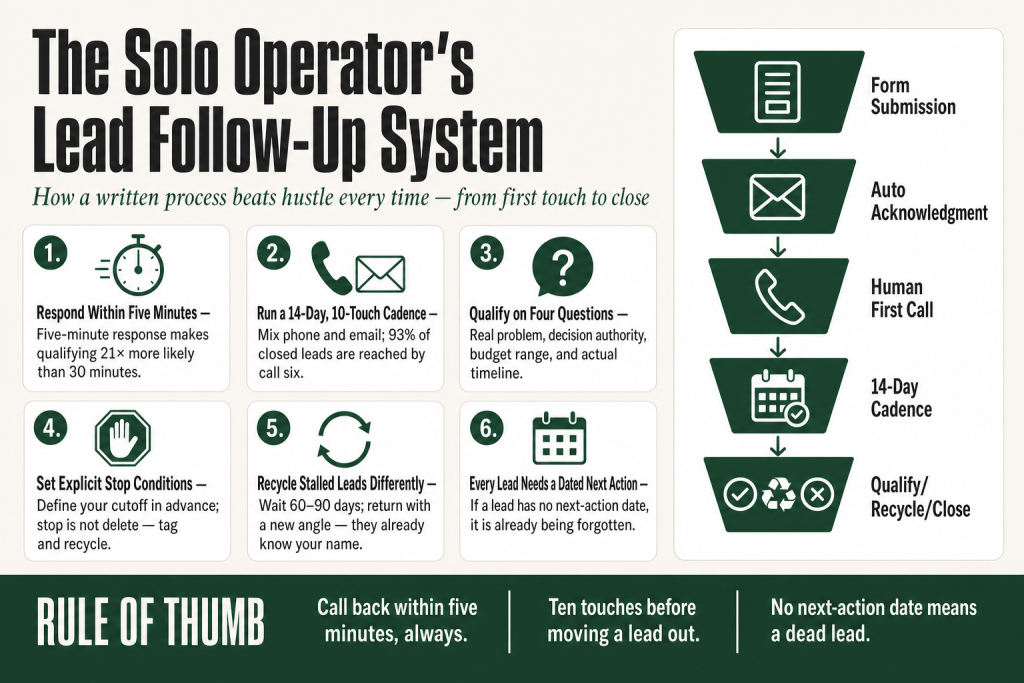
- Respond within five minutes of a form submission when possible. Research consistently shows that inbound leads contacted inside five minutes are 21 times more likely to qualify than those contacted after 30 minutes.
- Run a 10-touch cadence over 14 daysmixing phone and email, before moving a lead to recycled status.
- Qualify on four questions: Does the problem fit? Do they have budget range? Are they the decision-maker? Is there a real timeline?
- Set a hard stop condition after your defined attempts so you stop burning time, and a clear recycle trigger so you re-engage later with a different angle.
- Automate the acknowledgment and task creationbut write every personalized touch yourself or with AI assistance, judgment stays with you.
- Give every lead a dated next-action in your CRM. If a lead has no next date, it is already dead.
Take this fix into your next scenario. The free Builder’s Companion Kit collects the checklists and templates that pair with this guide — so next time, you start from a template, not a blank page. Grab it free →
- Why a Written Process Beats Hustle Every Time
- Response Time: What the Five-Minute Window Actually Means
- Lead Routing When You Are the Only Route
- Contact Attempts, Cadence, and the Lead Follow Up Process That Actually Works
- Scripts, Voicemails, and Email Hooks That Sound Like a Person
- Qualification: Four Questions, Not a Framework Acronym
- Next-Action Dates: The One Discipline That Holds Everything Together
- Stop Conditions: When Persistence Becomes Waste
- Recycling Logic: Turning Stalled Leads Into a Second Pipeline
- Simple Automation That Keeps Judgment in Your Hands
- Worked Example: A 14-Day Lead Follow Up Process from First Touch to Decision
- FAQ
Your lead follow up process is the piece of the puzzle that decides whether the leads you work hard to generate actually turn into revenue. You can have a tight offer, a well-trafficked funnel, and compelling copy, and still lose most of those leads to silence. Not to a competitor with a better product. To a competitor who simply called back first, or followed up one more time, or had a next-action date locked in. This article gives you the complete system: response time targets, a contact cadence you can actually run solo, qualification questions, stop conditions, recycling logic, and automation that handles the mechanical parts while keeping every judgment call in your hands.
Why a Written Process Beats Hustle Every Time
Most solo operators follow up on instinct. They remember the hot leads, forget the warm ones, and write off anything that does not reply to the first two emails. That feels efficient. It is not. The data is uncomfortably clear: the average business takes close to 47 hours to respond to a new lead, and a substantial share of leads never get contacted at all. You are not competing against great salespeople. You are competing against that average.
A written process matters for a different reason too. When you run marketing and sales solo, you have no manager watching the queue, no handoff to a second rep, no SDR catching the overflow. Every lead that touches your funnel is your responsibility from first contact to close or close-out. Without a documented sequence of what happens at each step, you will default to effort when you remember it and nothing when you are busy, which is most of the time.
The goal here is not a complex CRM build or a 22-step automation tree. It is a clear, written agreement with yourself about exactly what happens to a lead from the moment it enters your pipeline to the moment you either close it, park it, or recycle it.
Response Time: What the Five-Minute Window Actually Means
Speed matters more than almost any other single variable in a lead follow up process. Research from MIT and Harvard Business Review, replicated across multiple audits, shows that responding within five minutes makes you roughly 100 times more likely to reach the lead and 21 times more likely to qualify them compared to waiting 30 minutes. Think of a lead’s interest like a pan of water on a stove. At form submission, it is just at boil. Every minute you wait, it cools. After an hour, it is lukewarm. After 47 hours, which is where most businesses land, it is cold tap water.
That five-minute window is not a target you can hit manually for every inbound unless you never sleep and never work on anything else. The practical fix is to split the job in two:
- Automated acknowledgment (0 to 2 minutes): A CRM-triggered email or SMS goes out the moment the form hits. It confirms receipt, sets a realistic callback expectation, and includes one low-friction next step such as a scheduling link. This is not a sale. It is a timestamp that says you are paying attention.
- Human first contact (within business hours): Your CRM creates a task immediately and alerts you by phone. You make the call or send the personal email yourself, ideally within the hour during your working window. Outside business hours, the automation holds the lead warm until your next working session.
One honest caveat: if your funnel generates leads at 2 AM on a Saturday, a 5-minute human response is not realistic. Build the expectation into your acknowledgment: “I’ll be in touch by 9 AM Monday.” A promised callback beats an unexpected one.
Lead Routing When You Are the Only Route
Routing sounds like a team concept. It is not. For a solo operator, routing means deciding in advance which leads get your immediate attention, which get same-day attention, and which join a nurture queue. Without this triage decision made ahead of time, every incoming lead feels equally urgent and you end up reactive, not strategic.
Build three buckets:
- Hot (respond within the hour): Booked calls, demo requests, pricing inquiries, referrals, and anyone who replied to a previous email. These people have done something that signals real intent. Drop what you are doing.
- Warm (respond same business day): Content downloads paired with a specific question, webinar registrants who attended live, leads from paid campaigns with complete form data. Interested but not yet committal.
- Informational (enter nurture sequence): Newsletter sign-ups with no product interest signal, freebie downloads with no follow-up question, conference badge scans where no conversation happened. Put these into an automated nurture sequence and do not chase them manually until they signal intent.
Your CRM should enforce this routing automatically based on the form source, tag, or pipeline stage. If you are using a CRM that does not support basic workflow triggers, a simple tag system and daily queue review gets you 80 percent of the way there. The judgment call on which bucket a lead belongs in is yours. The CRM just holds the queue.
Contact Attempts, Cadence, and the Lead Follow Up Process That Actually Works
How many times should you try before moving on? Research on converted leads shows that roughly 93 percent of leads that ultimately close are reached by the sixth call attempt. An interleaved cadence of about six call attempts and five emails, mixing the two channels, raises contact rates significantly and can more than double conversion rates compared to either channel alone. That is your ceiling for active pursuit. Anything beyond six to eight total touches on an unresponsive lead returns almost nothing and costs you time that could go to warmer prospects.
Here is a 14-day cadence that works for most small business contexts. Adjust the spacing based on your deal size and sales cycle:
- Day 0 (immediate): Automated acknowledgment email. CRM task created for you.
- Day 0 (within the hour, business hours): First phone call. Leave a brief voicemail if no answer. Send a personal email if no pickup.
- Day 1: Second call attempt, different time of day than yesterday. No voicemail this time.
- Day 2: Email with a specific value add: a relevant case study, a short answer to a common question, or a relevant article. Not another “just checking in.”
- Day 4: Third call. If you reach them, great. If not, leave a second voicemail and send a brief email referencing the voicemail.
- Day 7: Email with a direct question: a single yes/no or short-answer ask. “Is [problem] still something you’re working on?” Not a pitch.
- Day 10: Fourth call attempt.
- Day 14: Final email. This is the break-up message. Be direct and respectful. Tell them you will stop reaching out and that they can reconnect whenever the timing is right. This message often gets more replies than any of the prior ones.
One thing to verify against your own data over time: open-rate signals change when to accelerate, not just when to stop. If a lead opens your Day 2 email three times but never replies, they are reading, not ready. Move them to a higher-frequency track and try a different angle before sending the break-up message.
Do not email and call on the same day every day. That is harassment. Space the channels. Each touch should bring something the previous one did not.
Scripts, Voicemails, and Email Hooks That Sound Like a Person
Scripts are not about sounding scripted. They are about removing the blank-page problem when you are juggling five other things. You think better when you are not also composing. Keep these short and model-level simple. AI can help you draft variations efficiently, but the final voice should be yours. (See the guide on writing copy with AI for a practical process that keeps your judgment in the loop.)
First call voicemail (15 seconds)
“Hi [Name], this is [Your Name] from [Business]. You filled out a form on [topic or page]. I’d love to connect and answer any questions you have. I’ll send you a quick email too. Best number to reach me back is [number].”
Second voicemail (Day 4, 15 seconds)
“Hi [Name], [Your Name] again from [Business]. I know timing isn’t always perfect. I’ll send one more email and then give you some space. If [problem] is still on your radar, I’d love to help.”
Day 2 value email (subject line: “One thing about [their situation]”)
Keep the body to four sentences. Acknowledge what they expressed interest in, share one specific and useful thing (not a pitch), and end with a single low-friction question. Ask for a yes/no or a one-word answer, not a 30-minute commitment.
Break-up email (Day 14)
“I’ve tried reaching you a few times and haven’t heard back, which usually means either the timing is off or this isn’t the right fit right now. Either way, I don’t want to keep filling your inbox. If [problem] becomes a priority again, you know where to find me. Take care.” That is it. Short, human, no guilt. This one frequently reopens conversations.
One honest note: resist the urge to use AI to personalize at scale before you have a proven template. Sending 50 AI-personalized emails with the wrong angle wastes more time than sending 10 good ones. Get the template right on real conversations first.
Qualification: Four Questions, Not a Framework Acronym
BANT (Budget, Authority, Need, Timeline) is the classic framework, developed by IBM for a pre-digital sales world. It still works well for simpler deals and high-volume triage, which is exactly the context most solo operators operate in. CHAMP (Challenges, Authority, Money, Prioritization) flips the order to lead with the prospect’s problems rather than your financial questions, which often produces better conversations. For a solo operator, the practical answer is to pick four questions and ask them consistently, in a conversational way, not as an interrogation.
Here are the four things you need to know before investing significant time in any lead:
- Is the problem real? Ask what they are trying to solve, not what they were looking at on your site. A specific, articulated problem is a green flag. A vague “I’m just researching” is not disqualifying but it is a different-speed track.
- Are they the decision-maker, or is someone else involved? You need to know this before you spend time preparing a proposal. Ask: “When a decision like this comes up, is it something you decide on, or does someone else need to weigh in?” Non-judgmental and direct.
- Is there a realistic budget range? You do not need an exact number in the first call. You need to know if they are in the right ballpark. Give them a range and watch the reaction. “Our engagements typically run between X and Y. Does that fit what you were thinking?”
- Is there a real timeline, or is this on a shelf? A lead with a real deadline is worth more of your time than a lead with theoretical interest. “Is there a point by which you’d want this in place?” surfaces that quickly.
A lead that clears all four is sales-ready. A lead that fails on budget or fit goes to the nurture queue, not the trash. A lead that fails on decision authority needs another contact added before the sales conversation can move forward.
Next-Action Dates: The One Discipline That Holds Everything Together
Every lead in your CRM should have one thing: a dated next action. Not a status. Not a note that says “interested.” A specific date and a specific task. “Call Tuesday at 10 AM.” “Send proposal by Thursday.” “Check in early October if no response.” If a lead has no next-action date, it is already being forgotten.
This is the single discipline that separates a working lead follow up process from a pile of contacts. CRM tools, even free ones, will remind you of tasks on the date you set. The machine handles the memory. You handle the decision.
Set the next-action date at the end of every interaction, not after. When you hang up the phone or send an email, before you close the record, type the next action. “No answer, call back Day 4.” “Said to follow up in two weeks.” “Wants proposal by Friday.” Two minutes now saves the lead.
For leads that ask you to follow up “in a few months,” set the exact date. Not “Q4.” October 14th. Specific dates get done. Vague intentions do not.
Stop Conditions: When Persistence Becomes Waste
Persistence is a virtue up to a point. Past that point, it is friction for the prospect and wasted capacity for you. Your process needs explicit stop conditions, written in advance, so you do not make this decision emotionally in the moment when a lead has been frustrating to chase.
Stop active pursuit when any of these are true:
- You have completed your full cadence (10 to 14 touches over 14 days) with no response of any kind.
- The lead explicitly asked you to stop contacting them. Stop immediately, tag them as opted out, and respect it permanently.
- The lead has confirmed they chose a competitor or that the project is cancelled. Move them to recycled, not dead. Circumstances change.
- A qualification conversation revealed a clear disqualifier: wrong budget tier, no authority to buy, or a problem your product does not solve.
Stopping is not the same as deleting. Stopping means moving the lead out of your active follow-up queue and into a status that says “do not chase now, but do not discard.” Most CRMs let you tag or pipeline-stage this clearly. The data has value. The timing was wrong, not the relationship.
One common mistake: stopping too early because two emails went unanswered. Research consistently shows the majority of salespeople give up after one or two follow-ups, which is well before the point where most deals actually close. You are looking for the right stop, not the comfortable one.
Recycling Logic: Turning Stalled Leads Into a Second Pipeline
Recycling a lead is not the same as re-running the same pitch with the same messaging. If they did not respond the first time, the same approach will not work the second time. What changes with recycled leads is your angle, your hook, and sometimes your timing. What does not change is that they already know your name, already expressed some interest, and cost you nothing to re-engage compared to what it would cost to acquire a brand-new lead.
The rule on recycling timing: wait at least 60 to 90 days from the last contact attempt before going back to a stalled lead. For leads that told you to follow up “in a few months,” you already have the date. For cold-silence leads, 90 days creates enough distance that your next message does not feel like you never stopped.
When you do go back, lead with something new. A different angle on their problem. A new case study that matches their industry. A product update that addresses the objection you heard the first time. Recycled leads who did not choose a competitor and did not disqualify themselves are often just waiting for different timing or a different framing. The problem that drove them to your form in the first place usually still exists.
Build a quarterly habit: pull all leads tagged “recycled” or “no decision” from the last six months, scan them for re-engagement signals (did any of them visit your site again, open a recent email, or reply to anything?), and run a short re-engagement sequence on the ones that show any signal at all. This is a second pipeline that costs you almost nothing to work.
Simple Automation That Keeps Judgment in Your Hands
Automation in a solo operator’s lead follow up process has one job: remove the mechanical work so you can focus on the decisions only you can make. It does not replace the conversation. It does not write the personalized email. It does not qualify the lead. It creates the task, sends the receipt, sets the reminder, and moves the stage when you tell it to. You are still the one who reads the signals, adjusts the pitch, and decides whether this person is worth more of your time.
Here is what to automate versus what to keep manual:
Automate these
- Acknowledgment email or SMS sent immediately on form submission.
- Task creation and mobile alert to you when a new lead enters the hot bucket.
- Stage movement when you log a call outcome (“no answer” moves to next attempt, “qualified” moves to proposal stage).
- Next-action date reminders surfacing on your dashboard at the start of each day.
- Recycled lead re-entry into a nurture email sequence after 90 days of silence.
Keep manual (or AI-assisted, with your final review)
- Every personalized email you send during active pursuit.
- Every qualification judgment call.
- Every decision to stop, recycle, or close a lead.
- Every re-engagement message after recycling.
For tool options: HubSpot’s free CRM includes contact management, deal pipelines, email logging, and basic task reminders at no cost. The Starter tier unlocks email sequences and custom fields if you need them. Pipedrive has a cleaner pipeline interface that many solo operators find faster for daily triage. Both are legitimate starting points. What matters more than the tool is that you actually use it daily, log every interaction, and set next-action dates consistently. An unused CRM is just an expensive contacts spreadsheet.
A note on AI for follow-up copy: AI tools are genuinely useful for drafting email variations, reworking a subject line, or refreshing a stale template. They are not useful for automating judgment about which leads to chase harder or how to read a prospect’s hesitation. Use AI to cut the time you spend drafting. Keep the reading and deciding with yourself. That split is where the real efficiency lives. The AI copywriting guide in this library covers that workflow in detail.
Worked Example: A 14-Day Lead Follow Up Process from First Touch to Decision
Here is how the full system runs for a single inbound lead. Use this as a template you can copy directly into your CRM as a pipeline stage checklist.
Scenario: A prospect fills out a contact form on a Wednesday at 2:30 PM asking about your service. They gave their name, email, phone number, and a one-line description of their situation.
- 2:30 PM, Day 0: CRM fires acknowledgment email automatically. “Thanks for reaching out, [Name]. I’ll give you a call within the hour.” Task created in your queue.
- 3:10 PM, Day 0: You call. No answer. Leave voicemail. Send brief personal email. Next-action date set: tomorrow, 10 AM.
- Day 1, 10 AM: Second call, different time slot. No answer. No voicemail. Note logged. Next-action: Day 2, value email.
- Day 2: Email sent with a specific observation about their stated situation and one short useful point. Single direct question at the end. Next-action: Day 4 call.
- Day 4: Call. Reached. Five-minute qualification conversation. They have the problem, they have the budget range, they are the decision-maker, but they want to wait until Q4. Set next-action date for October 6. Tag: “Recycled/Timed.” Exit active cadence.
- October 6: CRM surfaces the task. You send a personal note referencing the conversation from August. Ask if timing is now right. Re-enter active cadence from Day 1 if they respond. If no response, continue cadence for two more touches before reassigning to nurture.
If Day 4 had been no answer instead, you continue the cadence through Day 7 email, Day 10 call, and Day 14 break-up email. If you reach them at any point and they disqualify, you tag and exit. If you complete the full 14 days with no contact, you tag “Recycled/No Contact” and they enter a 90-day nurture sequence automatically.
That is the whole process. Nothing in it requires a sales team. It requires a CRM you open daily, next-action dates you actually set, and cadence discipline for 14 days. The rest is judgment, and judgment is the one thing you cannot automate.
If the leads entering this process came from a launch or campaign, the solo product launch guide covers the pre-launch and post-launch demand capture that feeds this pipeline.
FAQ
How fast should I follow up with a lead?
Within five minutes for hot inbound leads when you are available. Research from MIT and Harvard Business Review consistently shows that responding within five minutes makes you 21 times more likely to qualify the lead compared to waiting 30 minutes. For leads that come in outside business hours, an automated acknowledgment sent immediately, combined with a personal follow-up at the start of your next working day, is realistic and far better than waiting 47 hours, which is where most businesses land.
How many times should you follow up with a lead before giving up?
Between 6 and 10 total touches over 14 days for an active inbound lead, mixing phone and email. Research shows roughly 93 percent of leads that ultimately close are reached by the sixth call attempt. Stopping after one or two attempts, which is what most salespeople do, means you are quitting well before the point where most conversions happen. After completing your full cadence with no response, move to recycled status rather than deleting the lead.
What is the best CRM for following up with leads as a solo operator?
HubSpot’s free CRM is a solid starting point. It includes contact management, deal pipelines, email logging, and basic task reminders at no cost. Pipedrive is a strong alternative if you prefer a visual pipeline interface and do not need deep marketing integration. The tool matters less than the habit of logging every interaction, setting dated next-action tasks, and reviewing your queue daily.
What is a lead recycling process and when should I use it?
Lead recycling means moving an unresponsive or not-yet-ready lead out of your active follow-up cadence and into a re-engagement plan for a later date, rather than deleting them. Use it when a lead completes your full follow-up cadence with no response, explicitly asks you to follow up later, or says timing is not right. Wait 60 to 90 days, then approach with a different angle. Recycled leads cost nothing to re-engage and already know your name.
Can I automate my entire lead follow up process?
You can automate the mechanical parts: acknowledgment messages, task creation, reminders, stage movement, and nurture sequences. You cannot responsibly automate the judgment parts: qualification decisions, personalized outreach during active pursuit, the choice to stop or recycle a lead, and any re-engagement conversation. AI can help you draft follow-up email variations faster, but the reading of signals and the final calls stay with you. That split is where the efficiency lives without sacrificing conversion quality.
What questions should I ask to qualify a lead on the first call?
Focus on four things: Is their stated problem real and specific? Are they the person who can make the buying decision? Is their expected budget in a realistic range for what you offer? Is there an actual timeline or is this theoretical interest? Ask these conversationally, not as a checklist. A lead that clears all four goes into active pursuit. A lead that fails on budget or fit goes into nurture, not the trash.
Sources:
Response time and qualification rate data: MIT Lead Response Management Study (Oldroyd et al., Harvard Business Review, 2011); Velocify “Ultimate Contact Strategy” (2013); InsideSales.com/XANT research. Contact attempt and cadence data: Cirrus Insight “B2B Sales Follow-Up Statistics” (updated June 2026); Outreach.ai email cadence best practices (January 2026). Qualification frameworks: Spotio “B2B Sales Qualification Frameworks” (May 2026); Mailchimp BANT resource; Sybill.ai BANT analysis (March 2026). Lead recycling: Rework lead recycling strategies; Zeliq “Ultimate Guide to Recycling Lead Lists” (July 2025); Launch Leads “How to Revive Dead Leads” (February 2026). CRM tool specifics: HubSpot CRM product page (verified August 2026); TheWayHow HubSpot CRM checklist for small business (July 2026); US Tech Automations “Best Lead Management Tools for Small Business 2026.” 2026 benchmark data: GreetNow “Lead Response Time Statistics 2026”; Prospeo “Average Lead Response Time in 2026”; Optifai Pipeline Study 2026 (N=939 companies).
Brian Kasday spent forty years in direct-response marketing before rebuilding the whole operation as a one-person shop. He writes The Operator’s Library — including “Build a Complete Marketing Department” — for operators who’d rather build it themselves than wait on someone else.
Get the Builder’s Companion Kit — the free checklists and templates that pair with this guide: mmsvegas.com/resources.
This guide handles one marketing job. Build a Complete Marketing Department builds the whole department. See the manual →
More Marketing guides
Free · Marketing Operator Toolkit
Running marketing on your own?
Get the free toolkit — the templates and the expensive mistakes behind a one-person marketing department, plus a note when this guide changes.
Get the free toolkit →