
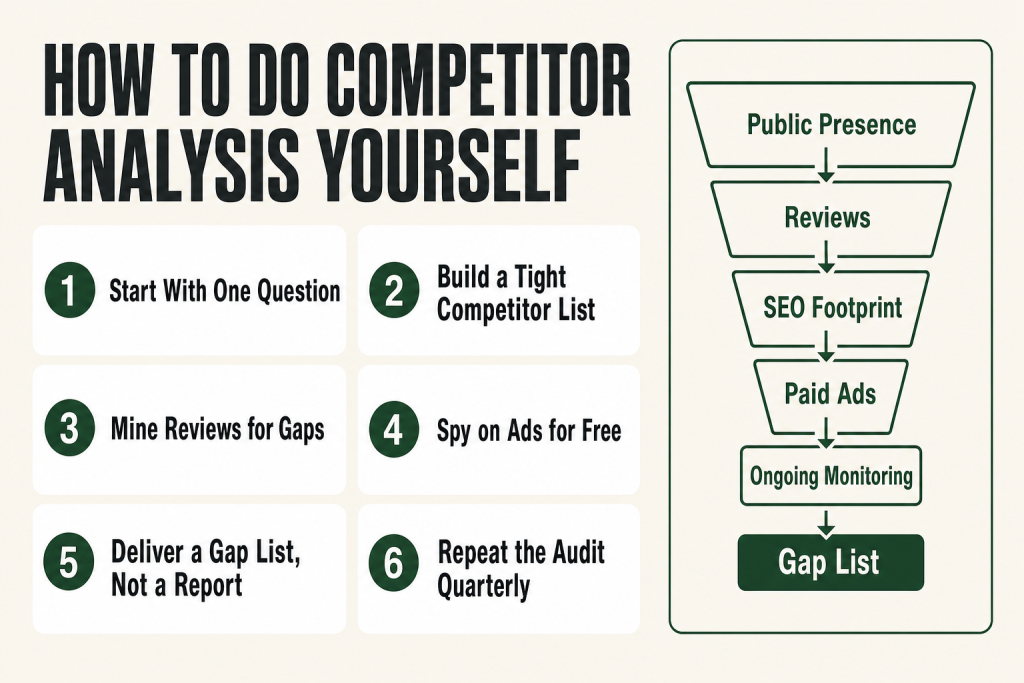
The 30-second answer
- Define the question first. Are you setting prices, sharpening your positioning, or planning content? The answer shapes which data you actually need.
- List 3 to 5 direct competitors and 1 to 2 indirect ones. More than that dilutes your focus.
- Audit their public presence: website, messaging, reviews, and pricing cues.
- Check their SEO footprint with a free tool like Semrush’s free tier or Ubersuggest to spot keyword gaps.
- Review their paid ads in the Meta Ad Library (free, no login needed) to see what offers they’re actively testing.
- Set up a Google Alert for each competitor’s name to catch announcements without manual checking.
- Synthesize into a gap list, not a report. What are they failing to deliver that your buyers want?
- Repeat the full audit quarterly. A one-time snapshot goes stale in months.
Take this fix into your next scenario. The free Builder’s Companion Kit collects the checklists and templates that pair with this guide — so next time, you start from a template, not a blank page. Grab it free →
- Why Most Competitive Research Fails Before It Starts
- How to Do Competitor Analysis: The Step-by-Step Process
- What to Record and What to Ignore
- Worked Example: A Solo Bookkeeper Does the Analysis in an Afternoon
- Where AI Helps and Where It Doesn’t
- How Often to Run the Full Analysis
- FAQ
Knowing how to do competitor analysis yourself is one of the highest-return skills a solo operator can have, and you don’t need an agency or a $500-a-month software suite to do it well. Most small businesses skip the work entirely, or they glance at a rival’s website once and call it research. Market research and competitive intelligence are the same job: figure out what the market already rewards so you can position yourself to capture a piece of it. This guide gives you a specific, repeatable process, names the free tools worth your time, and shows you exactly what to record so the work produces decisions, not just a folder full of screenshots.
Why Most Competitive Research Fails Before It Starts
The most common mistake isn’t skipping competitor research. It’s doing it without a question. You end up with a pile of observations and no action item. Before you open a single tab, write one sentence: “I’m doing this analysis to decide _____.” Pricing, positioning, content topics, a channel to add. Pick one.
The second mistake is tracking the wrong rivals. Direct competitors sell the same thing to the same buyer in the same market. Indirect competitors solve the same underlying problem with a different product. Both matter, but they answer different questions. Pricing research needs direct competitors. Messaging research benefits from looking at indirect ones too.
A useful target list is tight. Analysts generally recommend profiling five to ten competitors total, with deep profiles reserved for the top three to five. Tracking everyone dilutes your focus; tracking only the obvious names misses competitors entering from adjacent markets. Pick your three closest direct rivals and build from there.
The third mistake is confusing data collection with insight. Filling a spreadsheet with competitor features, prices, and taglines is not competitor analysis. Analysis is asking: what are they consistently failing to give buyers, and can I fill that gap? Everything else is just filing.
How to Do Competitor Analysis: The Step-by-Step Process
Work through these five passes in order. Each one builds on the last. Estimated time for three competitors: two to three hours the first time, under an hour on quarterly refreshes.
Pass 1: Map Their Public Presence
Start with what’s in plain sight. For each competitor, review:
- Their homepage headline and subhead. What problem do they claim to solve, and for whom?
- Their pricing page (if public). Premium, mid-market, or budget positioning?
- Their Google Business Profile and review count. High review volume often signals heavy local ad spend or a strong referral engine.
- Their social profiles. Where are they active? How often do they post? What content gets engagement?
Don’t interpret yet. Record what you see. You’re building a factual baseline, not forming opinions.
Pass 2: Read Their Customer Reviews
This is the most underused step in the whole process, and it’s completely free. Go to Google reviews, Yelp (if relevant to your category), Capterra or G2 (for software), or wherever your market leaves feedback. Read the one-star and five-star reviews for each competitor. You’re looking for two things:
- Five-star patterns: What do buyers praise repeatedly? That’s what the market values. If you don’t offer it, you have a gap.
- One-star patterns: What do buyers consistently complain about? That’s your opening. If a rival keeps getting dinged for slow response times and you have a one-hour reply policy, that’s a positioning statement.
The language people use in reviews is also copy research. They’ll phrase the problem in ways your own marketing may be missing. Borrow the words, not the sentiment. This pairs well with the work in finding your niche in a crowded market: the gap in reviews often becomes the flanking move.
Pass 3: Check Their SEO Footprint
You don’t need a paid subscription to get useful keyword data on competitors. Semrush’s free account gives you up to 10 analytics queries per day (shared across all tools, so each domain lookup or keyword search counts against that limit). Ubersuggest’s free tier is more restricted: their official help documentation lists 3 searches or reports per day on the free plan. Either tool will show you a competitor’s top organic keywords and their best-performing pages, though you’ll want to spread your free-tier searches across multiple sessions if you’re profiling more than one or two competitors.
What you’re looking for:
- Keywords they rank for that you don’t. These are content gaps you can close.
- Their top-traffic pages. What topics are earning them the most organic visitors? That tells you what buyers in your category are searching for.
- Their domain authority relative to yours. If they’re significantly stronger, you probably can’t outrank them on head terms yet. Target their weak spots (long-tail, local, specific use-case terms) instead.
If keyword research is new to you, the keyword research guide for small businesses covers how to interpret these numbers without expensive tools.
Pass 4: Study Their Paid Ads
The Meta Ad Library is a public database of every active ad running across Meta’s platforms, including Facebook and Instagram. You can access it at facebook.com/ads/library with no login and no account required. Search your competitor’s name, select their page, and filter to active ads. What you see is what they’re currently spending money to promote.
Two things to note specifically:
- Ad longevity. An ad that has been running for several months is a proxy for performance. Advertisers don’t keep paying for ads that don’t convert. Sort by oldest start date to identify their proven creative and offers.
- Offer structure. Are they leading with price, with a guarantee, with a free trial, or with a pain point? That tells you what their buyers respond to, which is the same pool of buyers you’re trying to attract.
For Google search ads, the Google Ads Transparency Center lives at adstransparency.google.com (not ads.google.com/transparency). It shows ads a verified advertiser is running, searchable by brand name or domain. It doesn’t show spend or performance data for standard commercial ads, but it does show the copy, run dates, and landing page destination.
Pass 5: Set Up Ongoing Monitoring
A quarterly deep audit is not enough on its own. Markets move faster than that. Set up a free Google Alert for each competitor’s name at google.com/alerts. Enter the competitor’s name in quotes, click “Show options,” set frequency to your preferred cadence (once a day or once a week works well for competitor monitoring), and configure the remaining options to match what you want to catch. When a competitor announces a new offer, a price change, or a new partnership, you’ll hear about it without spending time checking manually.
One practical caution: Google Alerts only detects new content that appears in Google’s search index. It won’t catch social media posts, Reddit threads, or community discussions. For those signals, a manual monthly check of the competitor’s social profiles and any relevant subreddits covers most of what the alert won’t catch.
What to Record and What to Ignore
The deliverable from competitor analysis is not a presentation deck. It’s a gap list. You’re identifying things the market wants that your competitors aren’t delivering well. That’s it.
Keep a simple table with these columns for each competitor: positioning claim, price tier, top review praise, top review complaint, top organic traffic topic, current paid offer. That’s six data points per competitor. If you have three competitors, that’s 18 cells. Fill them in, then look across the rows for patterns.
Ignore anything you can’t act on. Competitors’ employee count, their funding (unless you’re pitching investors), their design choices if you’re not redesigning anything, their social follower count as a vanity metric. None of that changes your next move.
What you’re looking for when you scan the completed table: a complaint that appears in multiple competitors’ reviews (an industry-wide failure you can own), a keyword topic none of them are ranking well for (a content opportunity), an offer structure nobody is using (a pricing angle to test). One or two of those is a productive session. You don’t need ten insights from every analysis.
Once you have the gap list, the next step is building it into your positioning. The guide on stopping price competition shows how to translate a differentiation gap into copy and offer structure. For pricing specifically, pricing without guessing walks through how competitor price tiers should actually inform your own numbers.
Worked Example: A Solo Bookkeeper Does the Analysis in an Afternoon
Here’s what the process looks like in practice. Imagine you run a solo bookkeeping practice for e-commerce sellers. You want to know if there’s a positioning gap you can own.
Step 1: Pick your competitors. You identify three other solo bookkeepers marketing to e-commerce sellers in your region, plus one mid-sized firm that advertises heavily on Google.
Step 2: Map their public presence. All three solos lead with “clean books, stress-free finances” and generic catch-all pricing pages with no published rates. The mid-sized firm publishes tiered pricing starting at $400 per month. You record this in your table.
Step 3: Read the reviews. On Google, the mid-sized firm has 34 reviews. The five-star ones consistently mention “they understand e-commerce platforms.” The one-star reviews, three of them, all say some version of “hard to reach, took days to get a reply.” The solos have fewer reviews, but the praise is about responsiveness.
Step 4: Check SEO. You run the mid-sized firm’s domain through Semrush’s free lookup. Their top organic page is a blog post about “Shopify bookkeeping for small businesses.” None of your solo competitors have any meaningful organic presence. The keyword gap is clear: content targeting e-commerce platform-specific queries.
Step 5: Check their Meta ads. You go to facebook.com/ads/library, search the mid-sized firm’s name, and find they’ve been running the same ad for four months: a free 15-minute consultation offer, with copy focused on “tax season stress.” None of the solos are running paid ads at all.
The gap list from this session:
- No one is publishing a price. Publishing yours (even a starting range) removes friction for price-sensitive buyers who otherwise bounce.
- “Hard to reach” is the firm’s most common complaint. A stated response-time guarantee in your positioning directly addresses what buyers already care about.
- No solo is creating any SEO content. One well-written post on Shopify bookkeeping basics could capture traffic none of your competitors are getting.
That’s three actionable moves from one afternoon. None of them required a paid tool or a consultant. The judgment on which move to prioritize first: that’s yours. No tool makes that call for you. For turning these moves into actual content, see the guide on writing blog posts that rank. For baking the positioning gap into a marketing plan, the one-page marketing plan is the right next step.
Where AI Helps and Where It Doesn’t
AI tools are genuinely useful for one part of this process: synthesis. Once you’ve collected raw data from reviews, web searches, and keyword tools, you can paste your notes into a ChatGPT or Claude session and ask it to surface patterns, draft a comparison table, or suggest positioning angles based on the gaps you’ve found.
What AI can’t do: access live competitor sites in real time, check what ads are actually running right now, or tell you which gap to prioritize. AI models work from training data with a fixed cutoff, not a live feed of the web, which means any competitor-specific detail they produce (pricing, feature lists, current offers) may be outdated or fabricated outright. The research still has to happen in the actual tools, and the strategic decision still has to come from you.
One specific caution: never use an AI output as your source on a competitor’s pricing, features, or claims. Always verify those directly from the competitor’s live site before acting on them or putting them in any document. The AI helps you think; it doesn’t replace the legwork of checking.
Where AI earns its keep is in the broader market research process: drafting interview questions, organizing themes from customer feedback, and generating first-draft positioning statements for you to pressure-test against reality. The judgment on what’s worth acting on stays with you.
How Often to Run the Full Analysis
Run the full five-pass process quarterly. Markets shift, competitors adjust pricing and messaging, and new entrants appear. A competitor analysis that’s more than three months old is missing moves that may already be affecting your results.
Between full audits, the Google Alerts you set up handle passive monitoring. Once a month, spend fifteen minutes on a manual social check: look at each competitor’s recent posts and their Google Business Profile for any new reviews. That’s your early warning system between formal sessions.
If you’re about to make a significant move (a price change, a new offer, a new channel), do a targeted refresh first. You want current data on how competitors are positioned before you make a move that’s hard to undo. The small business marketing audit pairs well here: run it on yourself right after you run competitor analysis on the field, and you’ll see your own gaps in context.
FAQ
how to do competitor analysis for free
You can cover most of the essentials without spending anything. Use Semrush’s free account (up to 10 analytics queries per day across all tools) or Ubersuggest (3 searches or reports per day on the free plan) for keyword and traffic data, the Meta Ad Library (facebook.com/ads/library) for paid ad research, Google Alerts for ongoing monitoring, and publicly available reviews on Google and Yelp for customer sentiment. Because free-tier limits are tight, spread your competitor lookups across multiple sessions rather than running them all at once.
how often should you do a competitor analysis
Run the full five-pass audit quarterly. Between sessions, passive monitoring (Google Alerts plus a monthly manual social check) catches major moves. If you’re planning a price change or a new offer launch, do a targeted refresh first so your decision is based on current market conditions, not three-month-old data.
what should a competitor analysis include
At minimum: their positioning claim, price tier, top customer review themes (praise and complaints), top organic search topics, and any current paid ad offers. That six-column table per competitor gives you enough to identify gaps without drowning in data. The goal is a gap list you can act on, not a comprehensive dossier.
how do I find out what keywords my competitors rank for
Enter their domain into Semrush’s free tier or Ubersuggest’s free lookup. Both return a list of their top organic keywords and their highest-traffic pages. Look specifically for keywords they rank well for where your site doesn’t appear yet. Those are content and SEO gaps you can target. Keep in mind that free-tier limits are tight (10 queries per day for Semrush, 3 per day for Ubersuggest), so prioritize your two or three closest competitors and spread lookups across sessions if needed.
how do I see what ads my competitors are running
For Meta ads (Facebook and Instagram), go to facebook.com/ads/library. No login or account required. Search the competitor’s name, select their page, and filter by active ads. For Google search ads, the Google Ads Transparency Center at adstransparency.google.com shows verified advertisers’ active ads, searchable by brand name or domain. Neither tool shows spend or performance data for standard commercial ads, but ad longevity is a reliable proxy for which creative is working.
can AI do competitor analysis for me
AI tools help with synthesis and pattern recognition once you’ve collected raw data, but they can’t access live competitor data. AI models work from a fixed training cutoff, not a live feed of the web, so details like competitor pricing, current offers, or feature sets may be outdated or fabricated. Always verify competitor facts directly from the competitor’s live site before acting on them. Your judgment on which gaps to prioritize and which moves to make stays with you regardless of what any AI tool surfaces.
Sources:
Sources consulted: Meta Ad Library official interface and access URL verified at facebook.com/ads/library (no login required, confirmed via multiple third-party sources, 2025 and 2026); Google Ads Transparency Center confirmed at adstransparency.google.com (not ads.google.com/transparency), verified via fraudblocker.com guide (January 2026) and lineardesign.com (September 2026); Google Alerts setup and configuration options (Show options panel, frequency settings) verified via visualping.io and forumscout.app guides (2026); Semrush free account limit of 10 analytics queries per day (shared across all tools including Domain Overview and Keyword Magic Tool) confirmed via Semrush’s own official blog (May 2025) and multiple independent sources (2025 and 2026); Ubersuggest free tier limit of 3 searches or reports per day confirmed via Ubersuggest’s official help documentation (July 2025); general competitive analysis framework references from multiple sources cited throughout.
Brian Kasday spent forty years in direct-response marketing before rebuilding the whole operation as a one-person shop. He writes The Operator’s Library — including “Build a Complete Marketing Department” — for operators who’d rather build it themselves than wait on someone else.
Get the Builder’s Companion Kit — the free checklists and templates that pair with this guide: mmsvegas.com/resources.
This guide handles one marketing job. Build a Complete Marketing Department builds the whole department. See the manual →
More Marketing guides
Free · Marketing Operator Toolkit
Running marketing on your own?
Get the free toolkit — the templates and the expensive mistakes behind a one-person marketing department, plus a note when this guide changes.
Get the free toolkit →