
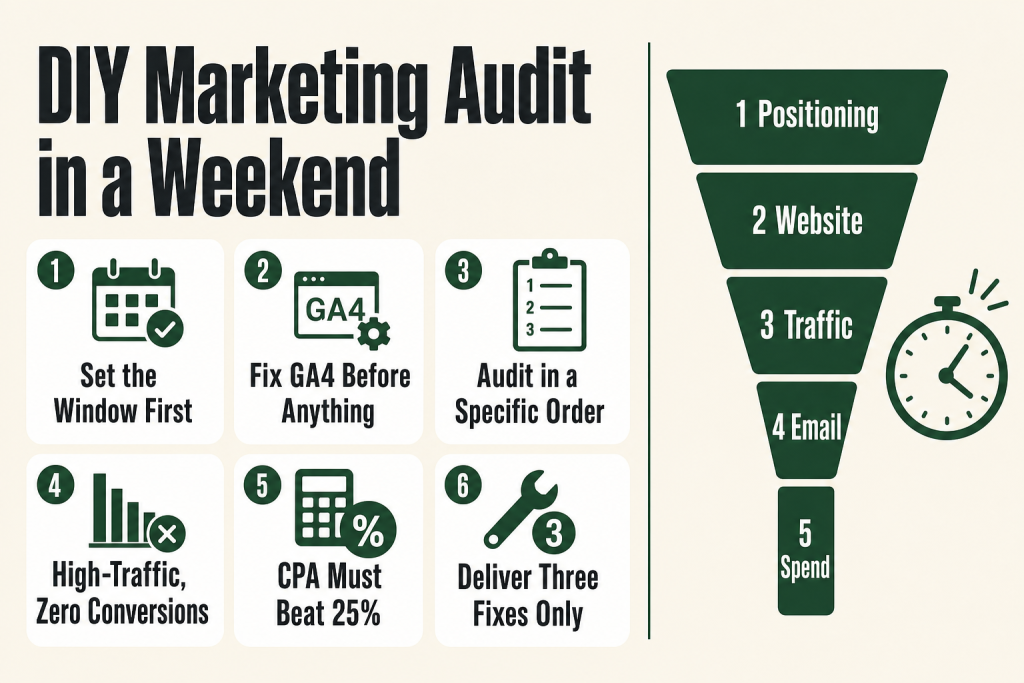
The 30-second answer
- Define the window first. Pick a consistent date range (90 days minimum) before you pull a single number.
- Audit in this order: positioning and message clarity, then website and conversion, then traffic sources, then email, then spend efficiency.
- Pull real data, not feelings. GA4 Acquisition and Key Events reports, your email platform’s per-campaign stats, and your ad platform’s cost-per-result are the three non-negotiable data pulls.
- Flag GA4 hygiene first. If key events aren’t marked and internal traffic isn’t filtered, every number downstream is suspect.
- End with a ranked action list, not a report. Three fixes, in priority order. That’s the deliverable.
- Cadence: full audit once a year; quick channel checks quarterly.
Take this fix into your next scenario. The free Builder’s Companion Kit collects the checklists and templates that pair with this guide — so next time, you start from a template, not a blank page. Grab it free →
- What a Marketing Audit Actually Is (and Isn’t)
- Before You Pull a Single Number: Set Up the Audit Correctly
- Step 1: Audit Your Positioning and Message Clarity
- Step 2: Audit Your Website and Conversion Rate
- Step 3: Audit Your Traffic Sources
- Step 4: Audit Your Email Marketing
- Step 5: Audit Your Spend Efficiency
- A Worked Example: Running the Small Business Marketing Audit in a Weekend
- What to Do With the Audit Findings
- FAQ
A small business marketing audit is the fastest way to stop the gut-feel guessing and find out which of your channels are earning their keep. Most solo operators skip it because it sounds like something agencies charge five figures to produce. It isn’t. You can run a solid one yourself in a weekend with the tools you already have, and it will tell you more than any consultant’s slide deck, because you already know the business context behind the numbers.
The mistake I kept making early on was bolting on new tactics before I knew what the existing ones were doing. New email sequence on top of a broken nurture flow. More ad spend into a landing page that was quietly losing eight out of ten visitors. The audit is how you stop layering fixes on top of unfixed problems.
What a Marketing Audit Actually Is (and Isn’t)
A marketing audit is a systematic review of your marketing environment, objectives, strategies, and activities. The goal is to surface what’s working, what’s wasting money, and where the biggest growth opportunities are sitting untouched. Think of it as a doctor’s checkup: you’re not looking for things to celebrate, you’re looking for things to treat.
What it isn’t: a report you file away, a strategy overhaul, or a reason to blow up everything you’re doing. A strong audit produces priorities. A weak one produces a long list of observations with no owner and no timeline.
For a solo operator, the practical scope is five areas: positioning and messaging, website and conversion, traffic sources, email, and spend efficiency. Cover those five and you have a complete picture. Skip any one of them and you’ll miss a leak.
How often should you do this? A full audit once a year is the floor. Shorter, channel-specific checks on paid and email every quarter make sense if those are active channels for you. The useful trigger isn’t the calendar, though. Run an audit whenever marketing activity is high but confidence is low, when you’re about to increase budget, or when lead flow drops without an obvious explanation.
Before You Pull a Single Number: Set Up the Audit Correctly
Data you can’t trust will send you in the wrong direction. Before you open any dashboard, do three things.
Fix your date range. Pick one consistent window and use it across every platform you touch. Ninety days is the practical minimum for spotting trends. A mismatch between your CRM’s date range and your GA4 date range produces comparisons that mean nothing.
Check GA4 hygiene. GA4 replaced Universal Analytics as the standard web analytics platform, and its event-based model means your conversion tracking only works if you’ve configured it deliberately. In March 2024, Google renamed what GA4 had previously called “Conversions” to “Key Events,” reserving the word “conversion” for actions tied to Google Ads campaigns specifically. The rename was cosmetic at the tracking level: your existing setup carried over automatically and the measurement logic didn’t change. What did change is the label you’ll see in the UI. To check your setup, go to Admin → Data display → Events (the path confirmed across multiple independent sources and the GA4 interface itself). Find the events that represent meaningful business actions (form submissions, phone-number clicks, purchases, bookings) and confirm they have the star icon that marks them as Key Events. If none are starred, you’ve been measuring traffic without measuring outcomes.
Also confirm that an internal-traffic filter is active so your own visits don’t pollute the data. The two-step process: first, go to Admin → Data Streams → [your stream] → Configure tag settings → Show all → Define internal traffic and enter your IP address. Then go to Admin → Data Settings → Data Filters and set the Internal Traffic filter to Active. A filter created but never activated does nothing.
Standardize your naming. If your CRM calls a campaign “Spring Promo” and your ad platform calls it “Spring_2025_Promo,” you can’t combine the data cleanly. This is also the moment to verify that UTM parameters are firing consistently across your links. Broken or missing UTMs are among the most common causes of inaccurate attribution. For a full UTM setup, see the UTM naming convention guide.
Step 1: Audit Your Positioning and Message Clarity
This is the step most operators skip because it feels soft. It isn’t. Positioning is the foundation for conversion. If a visitor lands on your homepage and can’t immediately answer “who this is for, what problem it solves, and why it’s different,” your downstream numbers will all underperform. More traffic on top of an unclear message earns you more of the wrong visitors, not more customers.
Read your homepage headline cold. Ask: does it name a specific person with a specific problem? Or does it describe your company in language your customers would never use to search for you? Warning signs include vague headlines, broad claims, feature-first copy, and generic calls to action.
Then check for consistency. Do your Google Business Profile, your social bio, your email footer, and your homepage all describe the same business in recognizably the same terms? Drift between these touchpoints quietly costs you trust.
Pull your best three customer testimonials and read them alongside your homepage copy. If customers describe your value in words that don’t appear anywhere on your site, you’ve just found your missing message.
If your positioning review reveals that you’re trying to serve everyone and ending up compelling to no one, the companion piece on finding your niche in a crowded market works well alongside this step.
Step 2: Audit Your Website and Conversion Rate
Your website has one job per page: get the right visitor to take the next step. The audit question is whether each page is doing that job.
Start with your conversion rate. The median website conversion rate sits around 2.35%, but top performers reach well above 11%. Most businesses benchmark against the average and treat 3% as success. If you’re well below the median for your traffic type and offer, something structural is broken: trust signals, copy, form friction, or mobile experience.
Check mobile specifically. Mobile accounts for a large share of web traffic but consistently converts at a significantly lower rate than desktop. The gap is usually not a design problem. It’s checkout friction, long forms, and slow load times. If your service business contact form requires more than four fields on mobile, that’s your first fix.
In GA4, go to Reports → Engagement → Landing page. Sort by sessions, then cross-reference with your Key Events to find your highest-traffic pages that aren’t converting. Those pages are your priority. A spike in traffic that doesn’t convert isn’t a win, it’s a cost.
Also review every page for a clear, single call to action. Pages with multiple competing CTAs consistently underperform pages built around one next step. If your homepage has a “Contact Us,” a “Learn More,” a newsletter signup, and a social follow button all above the fold, you’re splitting visitor attention four ways.
Step 3: Audit Your Traffic Sources
Open GA4’s Reports → Acquisition → Traffic acquisition report. You want to know three things: which channels are sending traffic, which channels are sending traffic that converts, and which channels are sending traffic that costs you money and converts no one.
The channels to review are organic search, paid search, direct, social, email, and AI referral traffic. Traffic arriving from AI platforms like ChatGPT, Gemini, Perplexity, and Claude is worth checking in your referral report. The volume is still small as a percentage of total traffic for most small businesses. Multiple studies covering 2025 and 2026 data show that AI referral sessions have grown year over year for many sites, and some large-scale data sets suggest that this traffic may tend to arrive later in the research process. Whether that pattern holds for your business, your industry, and your specific audience is something only your own data can tell you. Check whether these sources appear in your referral report and whether they’re converting for you specifically before drawing any conclusions or making budget decisions around them.
For each channel, ask: what does it cost me (in time or money), how many sessions did it send, and how many key events did those sessions produce? A channel that sends 2,000 sessions and zero conversions isn’t a traffic source, it’s a distraction. A channel that sends 200 sessions and 20 conversions is a priority worth protecting and growing.
If organic search is a meaningful channel for you, cross-reference GA4 traffic data with Google Search Console (free) to see which queries are actually driving clicks. This is where you’ll find keywords you’re ranking for that you didn’t know about, and keywords you assumed were sending traffic but aren’t. The keyword research guide shows you how to turn those Search Console findings into a content plan.
If paid is a channel, the audit question is simple: what is your cost per acquisition, and is it below 25% of customer lifetime value? If you can’t answer that because you don’t have conversion tracking wired up in your ad platform, stop the paid spend until you do. You’re flying blind.
Step 4: Audit Your Email Marketing
Email is the channel most solo operators underinvest in relative to its return. It also degrades quietly if you don’t check it. Run through these four questions.
Is your list growing? Pull your subscriber count month by month for the last 90 days. If it’s flat or declining, your lead capture isn’t working or your churn is too high. Check both your net new subscribers and your unsubscribe rate in the same view.
Are opens and clicks healthy? Average open rates vary by industry and list size, but if your open rate is declining month over month, check three things in order: deliverability (are you landing in spam?), subject line quality, and send frequency. Low open rates usually point to a deliverability or frequency problem before they point to a copy problem. The low email open rates fix list walks through the diagnosis sequence.
Do you have a working welcome sequence? A new subscriber who gets no email in the first 24 to 48 hours has already started to forget you. If your email platform shows that new subscribers receive nothing until your next broadcast, that’s a structural gap. A welcome sequence is the single highest-leverage email automation a small business can run.
Are you sending consistently? Inconsistent sending trains your list to ignore you. If you can’t remember your last send date without checking, that’s the answer. You don’t need to send daily. You need to send reliably.
Step 5: Audit Your Spend Efficiency
Pull your total marketing spend for the period, all in: ad budget, tool subscriptions, contractor costs, any agency retainers. Then pull revenue or leads attributable to marketing by channel.
The ratio you’re solving for is cost per acquisition versus customer lifetime value. A reasonable working target: your CPA should stay below 25% of LTV. If you’re spending $400 to acquire a customer worth $500 over their lifetime, the math doesn’t work at any scale.
For each paid channel, check whether the platform’s reported CPA matches what you can see in GA4 and your CRM. Attribution windows differ across platforms. Your ad platform may claim credit for conversions that GA4 attributes to direct or organic. Neither number is perfectly right, but if they’re wildly different, you have an attribution problem worth solving before you make budget decisions.
Then look at your tool stack. List every subscription you’re paying for, check when you last used each one, and ask whether it has a cheaper or free alternative that would do the same job. Tool sprawl is a common silent leak in small business marketing budgets.
For a structured approach to setting budget from the top down, the marketing budget guide walks you through the revenue-backward method.
A Worked Example: Running the Small Business Marketing Audit in a Weekend
Here’s how this looks in practice for a solo service business (a B2B consultant with a website, email list, and occasional Google Ads spend).
Saturday morning (2 hours): data pull and hygiene check. Set the date range to the last 90 days in all platforms. Open GA4, go to Admin → Data display → Events, and confirm Key Events are marked (look for the star icon) for “contact form submit” and “phone click.” Confirm an internal traffic filter exists and is set to Active under Admin → Data Settings → Data Filters. Export the Traffic Acquisition report and the Landing Page report as CSVs. Open the email platform and export per-campaign stats: open rate, click rate, unsubscribes. Log into Google Ads and pull cost, conversions, and CPA for the same 90 days. Open the billing page for every tool subscription and note the monthly cost.
Saturday afternoon (2 hours): analysis. Read the homepage cold. Does the headline name a specific person with a specific problem? Compare homepage copy to the language in the last five testimonials or reviews. In the Traffic Acquisition export, highlight the two channels with the highest conversion count and the two with the highest session count but lowest conversions. In the Landing Page export, find the top five pages by sessions and check each one’s Key Event count. Flag any page with more than 500 sessions and fewer than 5 Key Events.
Sunday morning (1 hour): ranking and output. Use the effort-versus-impact framing: list every problem you found, then sort by “how much revenue is this costing me” versus “how hard is this to fix.” High impact, low effort goes first. A broken Key Event tracking setup, for example, costs you nothing to fix and makes every future decision more reliable. A complete positioning overhaul is high effort and belongs further down the list. Write out your top three fixes with a specific next action for each one. That list is your deliverable. Not a report. Not a slide deck. Three actions, in order.
What to Do With the Audit Findings
The audit produces a ranked list. The list only has value if you act on it. Two rules for the output.
Fix data before you fix anything else. If Key Events aren’t tracking, if UTMs are missing, or if your ad platform and GA4 show wildly different conversion counts, those are your first three actions. Every decision you make without clean data is a guess dressed up as a strategy.
Connect every finding to your marketing plan. If the audit shows that organic search is your best-converting channel but you’ve been putting all your discretionary time into social, that’s a reallocation decision. A one-page marketing plan is the right place to record that decision so it doesn’t get reversed the next time someone tells you to post more on Instagram. See the one-page marketing plan guide for a format that keeps the strategy visible and actionable.
One honest caveat: an audit tells you what the data shows. It doesn’t tell you why. Low conversion on a specific page might be a copy problem, a traffic quality problem, or a mismatch between what the ad promised and what the page delivers. The audit surfaces the symptom. Diagnosing the cause takes one more layer of investigation, usually a closer read of the page or a few conversations with recent customers. The judgment on what’s causing the problem stays with you. That’s not a limitation of the process. That’s the point.
For reading the data more deeply once your tracking is clean, reading your marketing data without an analyst covers the interpretation layer.
FAQ
How long does a small business marketing audit take?
A focused audit covering positioning, website, traffic, email, and spend can be completed in a weekend for most small businesses. Plan for roughly five to six hours of actual working time: two hours pulling and cleaning data, two hours analyzing it, and one to two hours ranking findings and writing your action list. A deeper audit that includes competitor research and customer interviews can run two to three weeks, but for most solo operators the weekend version produces 80% of the value.
Do I need expensive tools to run a marketing audit myself?
No. The core data you need comes from GA4 (free), Google Search Console (free), your email platform’s built-in reporting, and your ad platform’s native dashboard. A spreadsheet to consolidate the exports is the only additional tool required. Where paid tools add value is in competitive SEO research and more granular attribution, but those are optional layers, not prerequisites.
What’s the difference between a marketing audit and a marketing plan?
The audit is the diagnosis. The plan is the prescription. You run the audit to find out what’s working, what’s broken, and what’s missing. You use those findings to update or build your marketing plan. Doing it in the other order, writing a plan before you understand the current state, is how you end up with a strategy built on assumptions instead of evidence.
How often should a small business run a marketing audit?
A full audit once a year is the minimum. Shorter channel-specific reviews, particularly for paid advertising and email, are worth running every quarter if those channels are active. The other trigger is situational: run an audit before increasing your budget, before hiring a marketing contractor, or any time lead flow drops sharply without an obvious cause.
What should I do if my GA4 Key Events aren’t set up?
Set them up before drawing any conclusions from your audit. In GA4, go to Admin → Data display → Events, find the events that represent meaningful actions for your business (form submissions, phone clicks, purchases, bookings), and toggle on the star icon to mark each one as a Key Event. If those events aren’t firing at all, you’ll need to set up the underlying event tracking via Google Tag Manager or your platform’s native integration first. Until Key Events are in place, GA4 can tell you how many people visited but not whether any of them became customers.
Can AI help me run a marketing audit?
AI tools can help you structure the analysis, draft the questions to ask of your data, and summarize patterns across channel reports you paste in. What they can’t do is pull the data for you, interpret platform-specific attribution quirks, or make the judgment calls about what to fix first given your specific business context. The audit framework is yours to run. AI can reduce the time it takes to organize findings once you have the raw data in front of you. The judgment on what matters stays with you.
Sources:
Sources consulted for this article: Google Analytics 4 official documentation (support.google.com/analytics) for Key Events nomenclature, Admin settings, and event configuration; Google’s March 2024 announcement renaming GA4 “Conversions” to “Key Events,” confirmed across multiple independent sources including kpplaybook.com (April 2025), optimizesmart.com (February 2026), and nicelookingdata.com (June 2026); Ruler Analytics 2026 Conversion Rate Benchmarks (ruleranalytics.com, May 2026), based on 5+ million tracked conversions across 13 industries; Digital Applied Conversion Rate Benchmarks 2026 (digitalapplied.com, April 2026) for median and top-performer conversion rate figures; Adobe Digital Insights AI Traffic data (January 2026), covering more than 1 trillion US retail site visits, for AI referral traffic conversion quality; SE Ranking AI Search Traffic Report 2026 (seranking.com, June 2026) for AI referral traffic volume and platform share data; Higoodie AI Search Market Share Report Wave 2 (higoodie.com, May 2026) for B2B AI referral platform distribution data; Relevantaudience.com ChatGPT vs Google Traffic (June 2026) for AI referral conversion trend data; Reasonate Studio, “How to Run Marketing Audits for Small Business Owners” (June 2026) for data-normalization and date-range consistency guidance; Consulting Vision Marketing Audit Checklist (consultingvision.com, June 2026) for audit output framing.
Brian Kasday spent forty years in direct-response marketing before rebuilding the whole operation as a one-person shop. He writes The Operator’s Library — including “Build a Complete Marketing Department” — for operators who’d rather build it themselves than wait on someone else.
Get the Builder’s Companion Kit — the free checklists and templates that pair with this guide: mmsvegas.com/resources.
This guide handles one marketing job. Build a Complete Marketing Department builds the whole department. See the manual →
More Marketing guides
Free · Marketing Operator Toolkit
Running marketing on your own?
Get the free toolkit — the templates and the expensive mistakes behind a one-person marketing department, plus a note when this guide changes.
Get the free toolkit →