
The 30-second answer
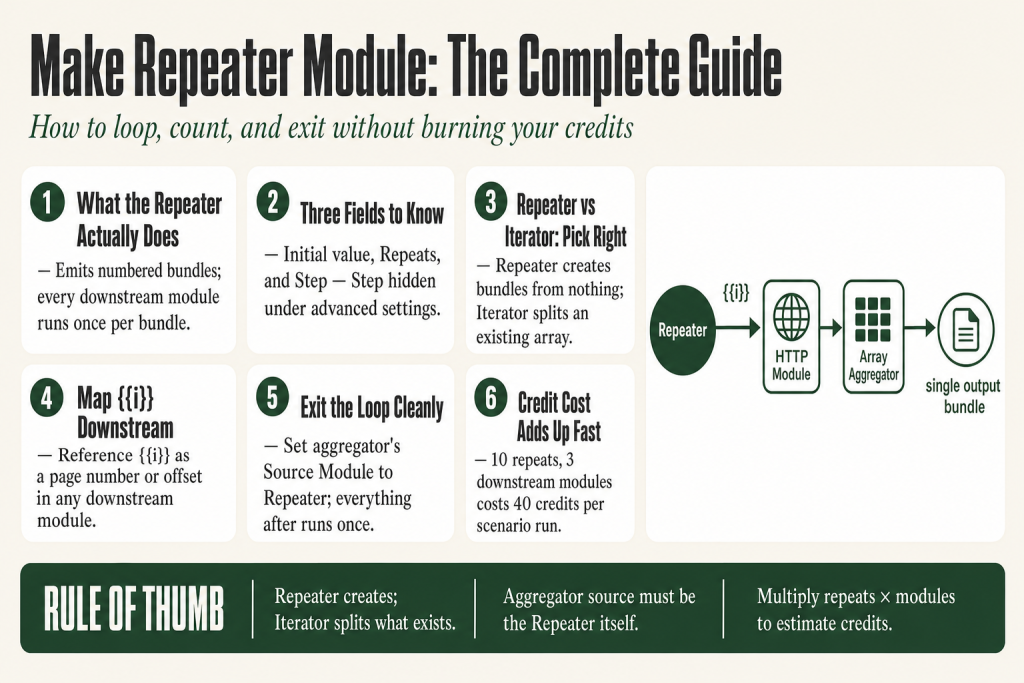
- What it does: Generates a set number of bundles, each containing a single numeric item called
i, so every downstream module runs once per bundle. - Three fields: Initial value (starting number), Repeats (how many bundles to emit), and Step (hidden under Show advanced settings, increments
iby this amount each cycle, defaults to 1). - What you map: Reference
{{i}}in any downstream module to use the current counter, for example as a page number in an API URL. - How to stop modules running after the loop: Place an aggregator with its Source Module set to the Repeater. Everything after the aggregator runs exactly once when the loop finishes.
- When NOT to use it: If you already have an array, use the Iterator. The Repeater generates bundles from scratch; the Iterator splits an existing array into bundles.
- Credit cost: Every module after the Repeater runs once per repetition. Ten repeats through three modules costs thirty credits.
Take this fix into your next scenario. The free Builder’s Companion Kit collects the checklists and templates that pair with this guide — so next time, you start from a template, not a blank page. Grab it free →
- What the Make Repeater Module Actually Does
- The Three Configuration Fields
- Repeater vs Iterator: Pick the Right Tool
- How to Use the {{i}} Counter Downstream
- Worked Example: Paginated API Fetch with the Make Repeater Module
- How to Run Modules Only Once After the Loop Finishes
- Credit Cost: What the Repeater Actually Spends
- Common Mistakes With the Repeater (and How to Avoid Them)
- FAQ
The make repeater module is one of those tools that looks trivial until you grab it for the wrong job and watch your credit count climb. It lives inside the Flow Control group and does exactly one thing: it emits a numbered bundle once per repetition so every module wired after it runs that many times. No array required, no trigger data needed. If you already have an array to loop through, you probably want the Iterator instead. This article explains the three configuration fields, shows you the two most practical use cases, and covers the one wiring mistake that causes modules to keep firing after you thought the loop was finished.
What the Make Repeater Module Actually Does
Think of the Repeater as a metronome. You set the tempo (how many times) and everything downstream plays once per beat. Make’s official documentation describes it precisely: “You can imagine the Repeater module as a generator of bundles outputting one bundle after another.” Each bundle holds a single numeric item named i. The Repeater does not touch any data from your trigger. It just counts.
That distinction matters. If your trigger brings in a list of ten records and you wire a Repeater set to five repetitions directly after it, those downstream modules run fifty times, not five. Each incoming bundle from the trigger gets its own set of five repetitions. In most situations, that is not what you want. Place the Repeater where you need the loop to start, and make sure only one bundle is reaching it unless you specifically need that multiplication effect.
The Three Configuration Fields
Open the Repeater and you see two fields by default. Toggle Show advanced settings to reveal the third.
- Initial value: The number
istarts at on the first bundle. Set it to 1 and the counter begins at 1. Set it to 101 if you already processed the first 100 pages of an API and you need to pick up from page 101. The field accepts a mapped value, so you can drive it from earlier module output. - Repeats: How many bundles the module emits. This is also the number of times every downstream module runs. You can map this field from a previous module if the count is dynamic, for example reading a record count from a data store lookup.
- Step (toggle Show advanced settings to reveal it): The amount added to
ion each repetition. The default is 1, giving you 1, 2, 3, 4, 5. Set it to 10 with an Initial value of 0 and you get 0, 10, 20, 30, 40. This is useful when your API expects an offset parameter instead of a page number.
A concrete example: Initial value 1, Repeats 5, Step 1 produces i values of 1, 2, 3, 4, 5. Initial value 2, Repeats 5, Step 2 produces 2, 4, 6, 8, 10. The formula is: value on cycle N = Initial value + (Step × (N-1)).
Repeater vs Iterator: Pick the Right Tool
This is the most common point of confusion. Here is the rule:
- Use the Repeater when you need to run a module N times and there is no array driving the count. You are generating bundles from nothing.
- Use the Iterator when you already have an array inside a bundle and you want to process each item separately. The Iterator splits that array into individual bundles.
The difference in plain terms: the Iterator splits something that exists; the Repeater creates something that does not exist yet. If you have a Google Sheets module that returns an array of rows, wire it into an Iterator. If you need to call an API five times with different page numbers and you have no pre-built list of those numbers, use the Repeater.
A common mistake is using the Repeater when you have a search module that already outputs multiple bundles. Make processes those bundles sequentially on its own. Adding a Repeater on top multiplies the run count needlessly and burns credits. If you are unsure which to use, check the Make Iterator vs Aggregator article for a full breakdown of how bundles flow through each module type.
How to Use the {{i}} Counter Downstream
Every module after the Repeater can reference {{repeaterModuleNumber.i}}, where the number matches the module ID shown on the canvas. In practice, the mapping panel labels it simply as i under the Repeater’s output group.
Common uses:
- Page numbers in API URLs: Build a URL like
https://api.example.com/items?page={{i}}and the HTTP module fetches a different page on each repetition. - Offset parameters: Set Initial value to 0 and Step to 100, then map
{{i}}as theoffsetquery parameter to walk through paginated API results in chunks of 100. - Sequence labels: Append
{{i}}to a string to generate “Report 1”, “Report 2”, and so on. - Conditional logic: Check whether
{{i}}equals the final repeat count in a filter to fire a cleanup module only on the last pass.
For API pagination specifically, the Repeater plus an HTTP module is a clean pattern when you know the page count in advance. If you do not know the page count, the Repeater becomes awkward because you have to hardcode the Repeats field. In that case, consider the approach in the Make HTTP Pagination article, which covers strategies for APIs where the total page count is unknown.
Worked Example: Paginated API Fetch with the Make Repeater Module
Scenario: an API returns up to 50 records per page, and you know there are exactly 6 pages. You want all 300 records in one array before doing anything with them.
- Repeater: Initial value = 1, Repeats = 6, Step = 1.
- HTTP Make a Request: URL field set to
https://api.example.com/records?page={{i}}&limit=50. This fetches a different page on each of the 6 repetitions. - Parse JSON (or a built-in app module): Extracts the records array from each response.
- Array Aggregator: Source Module set to the Repeater. This is the critical step. Because the source is the Repeater, the aggregator waits until all 6 bundles have passed through before it emits a single combined array. Set the Source Module to the Repeater, not the HTTP or Parse JSON module that comes after it, or you will get six separate output bundles instead of one.
- Iterator: Splits the combined array into individual record bundles for per-record processing downstream.
Credit cost for this pattern: 1 (Repeater) + 6 (HTTP) + 6 (Parse JSON) + 1 (Array Aggregator) = 14 credits to get all 300 records into one array. Everything after the Iterator runs once per record, which is expected and unavoidable.
If you need to build a similar pattern involving HTTP requests and are unsure how the Array Aggregator Source Module field works, the Make Aggregator Not Working article covers every source-module mistake in detail.
How to Run Modules Only Once After the Loop Finishes
This trips up almost everyone the first time. Once the Repeater starts emitting bundles, every module to its right runs once per bundle. If you want a final “cleanup” step to run just once after all iterations complete, you have two options:
Option 1: Aggregator as the loop exit
Place an aggregator (Array Aggregator, Text Aggregator, or Numeric Aggregator) immediately after the repeated modules. Set its Source Module to the Repeater. The aggregator collects all bundles until the Repeater is done, then emits one single bundle. Every module after the aggregator runs exactly once. This is the cleanest exit and also gives you a usable output from the loop.
Option 2: Filter on the final i value
Add a filter after the last repeated module. Set the condition: i equals the value it holds on the last repetition. With Initial value 1, Step 1, and Repeats 5, the filter condition is i = 5. The downstream module runs five times but the filter only passes the fifth bundle. This works for simple cases but it is fragile: if you change the Repeats field you have to remember to update the filter too. Use the aggregator approach when you can.
A third pattern used in the community combines a Router with a filter and an error handler to break out of a loop early when a condition is met mid-loop. It is a real tool, not a last resort. The tradeoff is that the Repeater still emits all its bundles regardless, so the early-exit only stops downstream processing, not the emission itself. See the Make Error Handling article for the full setup.
Credit Cost: What the Repeater Actually Spends
Make’s billing unit is the credit. Make replaced “operations” with “credits” as its billing unit on August 27, 2025, converting existing balances at a 1:1 rate for standard modules. One standard module execution costs one credit. The Repeater itself costs one credit per bundle it emits. Every module after the Repeater also costs one credit per bundle it receives. AI-native modules cost more, at variable rates based on token usage, but the Repeater and any HTTP or app modules you chain after it all stay at one credit each.
Do the math before you build: if you set Repeats to 20 and you have four modules downstream, that loop alone costs 20 + (20 × 4) = 100 credits per scenario run. On a scenario that triggers 500 times a month, you are looking at 50,000 credits from that one loop.
The practical implication: only use the Repeater when the loop count is genuinely bounded and known. An unbounded or very large Repeats value is a credit emergency waiting to happen. If you are mixing the Repeater with an Iterator downstream, multiply the numbers: 10 Repeats × 50 records per HTTP response × 3 downstream modules = 1,500 credits per run. For a full picture of how credits compound across modules, see Make Operations vs Credits.
Common Mistakes With the Repeater (and How to Avoid Them)
Mistake 1: Placing the Repeater after a module that already outputs multiple bundles. If a search module returns 40 bundles and you chain a Repeater set to 5 immediately after it, your downstream modules run 200 times. The Repeater does not collapse incoming bundles. It multiplies them. Either aggregate the upstream bundles first or rethink whether you need the Repeater at all.
Mistake 2: Setting the aggregator’s Source Module to the wrong module. This is the number one reason people report “getting six arrays instead of one” after a paginated loop. The aggregator’s Source Module must be the Repeater itself, not the HTTP module or the Parse JSON module that comes after it. When the source is set to a module inside the loop, the aggregator fires after each individual bundle rather than waiting for the whole loop to finish.
Mistake 3: Using the Repeater to iterate an existing array. If you already have an array, use the Iterator. The Repeater’s i counter does not give you access to the array items. You would need to combine the Repeater with a Get Variable call and set-variable gymnastics to fake what the Iterator does natively and for free.
Mistake 4: Hardcoding Repeats when the count is unknown. If you do not know how many pages an API has, hardcoding Repeats to a high number like 100 and hoping most runs stop early does not work the way you think. The Repeater always emits exactly the number of bundles you specified. It has no built-in conditional stop. You need a Router plus filter pattern or an entirely different pagination approach for dynamic page counts.
If you find your scenario is spending far more credits than expected and you suspect the Repeater is the cause, the Make Execution History article explains how to read the run log and trace exactly how many times each module fired.
FAQ
what does the repeater module do in make
The Repeater generates a fixed number of bundles, each containing a counter variable called i. Every module wired after it runs once per bundle. You set how many times it repeats, the starting value of i, and the step increment between repetitions.
make repeater vs iterator which one should I use
Use the Repeater when you have no existing array and need to run a module a set number of times, for example fetching API pages 1 through 10. Use the Iterator when you already have an array inside a bundle and need to process each item separately. The Iterator splits something that exists; the Repeater creates something from scratch.
how do I stop modules running after make repeater finishes
Place an aggregator immediately after the last repeated module and set its Source Module to the Repeater. The aggregator collects all bundles until the Repeater is done, then emits one single bundle. Every module after the aggregator runs exactly once.
can the make repeater module use a dynamic repeat count
Yes. The Repeats field accepts a mapped value, so you can pull the count from an earlier module output, a data store lookup, or a webhook payload. Just make sure the value resolves to a whole number before the Repeater fires.
how much does the make repeater cost in credits
The Repeater itself costs one credit per bundle emitted. Every standard module after it also costs one credit per bundle it receives. If you set Repeats to 10 and have three downstream modules, the loop costs 10 + 30 = 40 credits per scenario run. Make replaced “operations” with “credits” as its billing unit on August 27, 2025, at a 1:1 conversion rate for standard modules.
can you exit a make repeater loop early based on a condition
Not natively. The Repeater always emits exactly the number of bundles you set. To simulate an early exit, add a Router with a filter that blocks further processing when a condition is met, while a second route triggers an error that terminates the scenario via an error handler. The Repeater still emits all its bundles regardless, so the early-exit only stops downstream processing, not the emission itself. See the Make Error Handling article for the full setup.
Sources:
- Make Help Center: Flow Control (Repeater, Iterator, Array Aggregator documentation)
- Make.com: Flow Control integrations page
- Make Help Center: Credits as new billing unit (August 27, 2025 transition from operations to credits)
- Make Community threads on Repeater loop exit patterns, aggregator source module selection, and pagination use cases (community.make.com)
Brian Kasday spent forty years in direct-response marketing before rebuilding the whole operation as a one-person shop. He writes The Operator’s Library — including “The Missing Manual for Make” — for operators who’d rather build it themselves than wait on someone else.
Get the Builder’s Companion Kit — the free checklists and templates that pair with this guide: mmsvegas.com/make-resources.
This guide solves one Make problem. The Missing Manual for Make covers the production system. See the manual →
More Make guides
Free · Make Operator Toolkit
Running scenarios in Make?
Get the free operator toolkit — production checklists and the fixes that keep scenarios alive under real traffic, plus a note when this guide changes.
Get the free toolkit →