
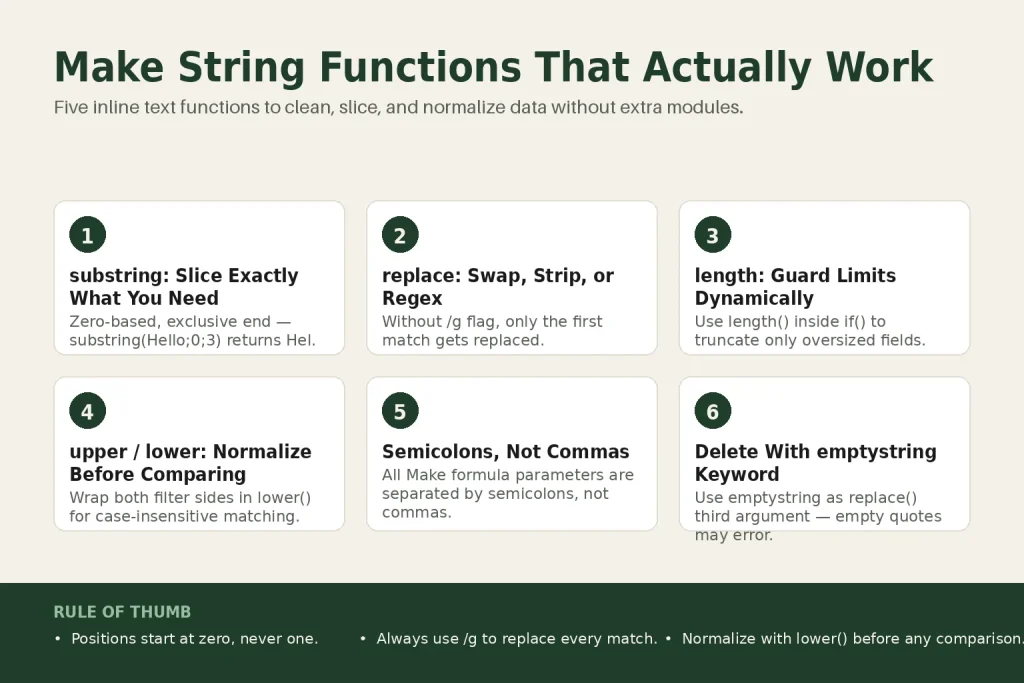
The 30-second answer
- substring(text; start; end)returns characters from position
startup to but not including positionend. Positions are zero-based, so the first character is 0. - replace(text; search; replacement)swaps one literal string for another. Without a regex, it only replaces the first match. Use
/pattern/gto hit every occurrence. - length(text)returns the number of characters. Use it to guard against oversized fields or to calculate a dynamic
substringend position. - upper(text) / lower(text)convert the entire string to uppercase or lowercase. Pair them with filters to do case-insensitive comparisons.
- All Make formula parameters are separated by semicolons, not commas.
- These functions live under the Text and binary functions tab in the formula editor (also available as standalone modules via the Make Functions app).
Take this fix into your next scenario. The free Builder’s Companion Kit collects the checklists and templates that pair with this guide — so next time, you start from a template, not a blank page. Grab it free →
- Where you actually type make string functions
- substring: cut exactly the slice you need
- replace: swap text, strip characters, or run a regex across the whole string
- length: count characters before something breaks
- upper and lower: normalize before you compare
- Worked example: cleaning a make string functions pipeline for a CRM import
- The mistakes that cost the most time
- FAQ
Make string functions are the fastest tools you have for cleaning and reshaping text inside a scenario. No extra modules, no workarounds: you write the expression directly in the mapping field of whatever module needs the clean value. This article covers the five you’ll reach for constantly: substring, replace, length, upper, and lower. For each one you’ll get the exact syntax, a concrete example, and the mistake that wastes the most time.
Where you actually type make string functions
Click into any mappable field in a Make module. At the top of the panel you’ll see a row of tabs: General, Math, Text and binary functions, Date and time, and Array. Click the Text and binary functions tab to browse every string function or just start typing the function name directly in the field. Make autocompletes it.
Parameters inside Make formulas are separated by semicolons, not commas. That’s the single most common syntax error for people coming from Excel or JavaScript. replace(text; search; replacement) is correct. replace(text, search, replacement) will break.
If you prefer a visual, step-by-step approach, Make also ships a Make Functions app that turns these same functions into chainable modules you can add to the canvas. It covers String, Math, Array, Date, General, and Crypto operations. The inline approach costs zero extra operations per function call, so for simple transforms, stay inline.
substring: cut exactly the slice you need
The official Make string functions page documents the signature as:
substring( text ; start ; end )The start position is zero-based: the first character of the string sits at position 0, not 1. The end position is exclusive, meaning the character at that index is not included in the result. Think of the two numbers as a half-open interval: you get everything from start up to, but not including, end.
Quick example from the official docs:
substring( Hello ; 0 ; 3 )
= Hel
H is at 0, e at 1, l at 2. Position 3 (the second l) is excluded. That’s your slice.
Omitting the end argument returns everything from start to the end of the string. Useful when you know where something begins but not where it ends.
The gotcha that burns everyone once: if you pass a literal string with spaces, Make does not trim it before evaluating the positions. A leading space in the source text shifts every index by one. Run the value through trim() first if your source is user-generated.
Combine substring with length to grab the tail of a string of unknown size:
substring( {{1.filename}} ; length( {{1.filename}} ) - 4 )That expression pulls the last four characters regardless of how long the filename is. A clean way to strip or inspect file extensions.
When the text you need to carve out isn’t at a fixed position, substring alone won’t cut it. That’s when you add the Text Parser Match Pattern module to locate the position first, then feed that result into substring.
replace: swap text, strip characters, or run a regex across the whole string
Signature:
replace( text ; search string ; replacement string )The simple case is straightforward:
replace( Hello World ; Hello ; Hi )
= Hi World
Critical limitation with plain strings: without a regular expression, replace() only replaces the first occurrence. If your string has cat cat cat and you want all three gone, a plain search string only kills the first one. You need the /g flag.
Using regex inside replace()
Wrap your pattern in forward slashes and append flags after the closing slash:
replace( text ; /pattern/g ; replacement )Common flags:
gglobal: replace every match, not just the firsticase-insensitive: match regardless of capitalizationmmultiline:^and$match line boundaries, not just string boundaries
Real example: strip every digit from a string.
replace( Order 99 costs $15 ; /d+/g ; X )
= Order X costs $X
To delete characters rather than replace them, use the special keyword emptystring as the replacement. Leaving the third argument blank does not work the way you’d expect; it can cause an error or leave the match in place. Use emptystring explicitly.
Capture groups work in the replacement string. Reference the first capture group with $1the second with $2and so on. Named capture groups are not supported and will throw an error.
When the pattern gets complex enough that replace() feels brittle, the Text Parser Match Pattern module gives you a dedicated regex environment that’s easier to debug.
length: count characters before something breaks
Signature:
length( text or buffer )It returns the number of characters in a text string, or the size in bytes for a binary buffer. The official docs give the simplest illustration:
length( hello )
= 5
That’s it. No edge cases in the basic use. Where length() earns its keep is as an input to other operations.
Guard a character limit before it errors. Say you’re posting to a platform with a 280-character cap. Wrap the mapped value:
substring( {{1.body}} ; 0 ; 280 )But you only want to truncate when the text is actually long. Combine with an if():
if( length( {{1.body}} ) > 280 ; substring( {{1.body}} ; 0 ; 277 ) + "..." ; {{1.body}} )Dynamic tail extraction. You saw this above with substring: subtracting from length() lets you anchor to the end of any string without knowing its size in advance.
Filter by text length. You can use length() inside a Make filter condition to pass bundles only when a field meets a minimum character count. Set the condition operator to a numeric comparison and wrap the field in length().
upper and lower: normalize before you compare
Signatures:
upper( text )
lower( text )
Both convert every alphabetical character in the string. upper(Hello) returns HELLO. lower(Hello) returns hello. Non-alphabetical characters, numbers, and punctuation pass through unchanged.
The practical use isn’t cosmetic formatting. It’s safe comparison. If someone types Approved, APPROVED, or approved into a form field, a filter checking for exact equality on approved will miss two of those three. Wrap both sides in lower() and you get consistent behavior:
lower( {{1.status}} ) = approvedYou can set this directly inside a Make filter: put lower({{1.status}}) in the left-hand Value field and approved in the right-hand field with the operator set to Equal to (case sensitive). Both sides are now lowercase, so the comparison is effectively case-insensitive without needing a special operator.
The same logic applies to any field that users touch: email addresses, country codes, tags, status strings. Push everything to lowercase on the way in, and your downstream logic only ever has to handle one format.
If you’re normalizing data before writing it to a Make data store, doing the lower() conversion at write time prevents the duplicate-key problems that arise when [email protected] and [email protected] land as separate records.
Worked example: cleaning a make string functions pipeline for a CRM import
Scenario: a webhook delivers a contact record. The full_name field has inconsistent casing and may include a trailing ID suffix like Jane Doe #4821. The email field has mixed case. You need to write a clean first name (title-cased), a clean email (lowercase), and a numeric ID pulled from the name string to a data store.
Step 1: Lowercase the email.
lower( {{1.email}} )
Step 2: Strip the ID suffix from the full name. The suffix always starts with #. Use indexOf() to find that position, then substring() to cut before it.
substring( {{1.full_name}} ; 0 ; indexOf( {{1.full_name}} ; " #" ) )
Result from Jane Doe #4821: Jane Doe.
Step 3: Extract just the first name. Cut from position 0 to the first space.
substring( {{1.full_name}} ; 0 ; indexOf( {{1.full_name}} ; " " ) )
Result: Jane.
Step 4: Pull the numeric ID. The digits start two characters after the # sign. Combine indexOf(), basic math, and substring().
substring( {{1.full_name}} ; indexOf( {{1.full_name}} ; "#" ) + 1 )
Result: 4821.
Step 5: Replace any double spaces that sneaked in.
replace( {{result}} ; / +/g ; " " )
All five make string functions appear in a single, linear data-prep chain. No extra modules. The formula not working article covers how to debug any step that returns an empty value or an unexpected type error.
The mistakes that cost the most time
- Commas instead of semicolons. Make formula syntax uses semicolons as argument separators.
replace(text, search, replacement)will not evaluate correctly. Always semicolons. - Off-by-one in substring. Positions are zero-based. The first character is 0, not 1. If you get one character too many or too few, check your start and end values first.
- Forgetting the /g flag in replace(). A plain text search string or a regex without
gonly replaces the first match. Your string looks mostly right but has leftovers. - Using an empty string instead of emptystring. To delete a match with
replace(), use the keywordemptystringas the third argument, not an empty pair of quotes. - Skipping trim() before substring(). Leading or trailing whitespace in the source shifts every index. Trim untrusted input before you count positions.
- Case-sensitive filter comparisons on user-typed fields. A filter with an exact equality check will miss every capitalization variant the user didn’t type. Normalize with
lower()first.
If a formula is returning something unexpected rather than an error, the execution history will show you the exact input and output of every module. That’s the fastest way to find out what value the function actually received.
FAQ
Does Make substring start at 0 or 1?
It starts at 0. The first character of the string is at position 0. So substring(Hello; 0; 3) returns Hel, not ell. If you’re getting one character off, check whether you’re accidentally starting at 1.
Why is replace() only changing the first match?
Without the global flag, replace() stops after the first match. Switch your search string to a regex and add /g: replace(text; /pattern/g; replacement). That tells Make to find and replace every occurrence, not just the first one.
How do I delete characters with replace() in Make?
Use the special keyword emptystring as the third argument: replace(text; unwanted; emptystring). Leaving the third argument blank or using empty quotes may not behave as expected, so use emptystring explicitly.
Can I use upper() or lower() inside a Make filter condition?
Yes. Put lower({{1.fieldname}}) in the left-hand value slot of a filter and type your comparison value in lowercase on the right. Make evaluates the expression, so the comparison is effectively case-insensitive.
What’s the difference between the inline string functions and the Make Functions app?
The inline functions (typed directly in a mapping field) add zero extra operations and keep your canvas clean. The Make Functions app turns those same functions into standalone modules you can chain visually on the canvas, which makes complex multi-step transforms easier to read. Both call the same underlying functions.
Can I nest Make string functions inside each other?
Yes. Nesting works fine: lower(trim({{1.email}})) trims whitespace then lowercases the result in one expression. Keep nesting to a reasonable depth (three or four levels) or the expression becomes hard to debug. For very complex chains, the Make Functions app’s visual chaining can be easier to maintain.
Sources:
Sources: Make Help Center: Text and binary functions; Make Help Center: New Make Functions app; Make Help Center: Using functions; Make Community threads on replace() regex syntax and global flag behavior.
Brian Kasday spent forty years in direct-response marketing before rebuilding the whole operation as a one-person shop. He writes The Operator’s Library — including “The Missing Manual for Make” — for operators who’d rather build it themselves than wait on someone else.
Get the Builder’s Companion Kit — the free checklists and templates that pair with this guide: mmsvegas.com/make-resources.
This guide solves one Make problem. The Missing Manual for Make covers the production system. See the manual →
More Make guides
Free · Make Operator Toolkit
Running scenarios in Make?
Get the free operator toolkit — production checklists and the fixes that keep scenarios alive under real traffic, plus a note when this guide changes.
Get the free toolkit →