
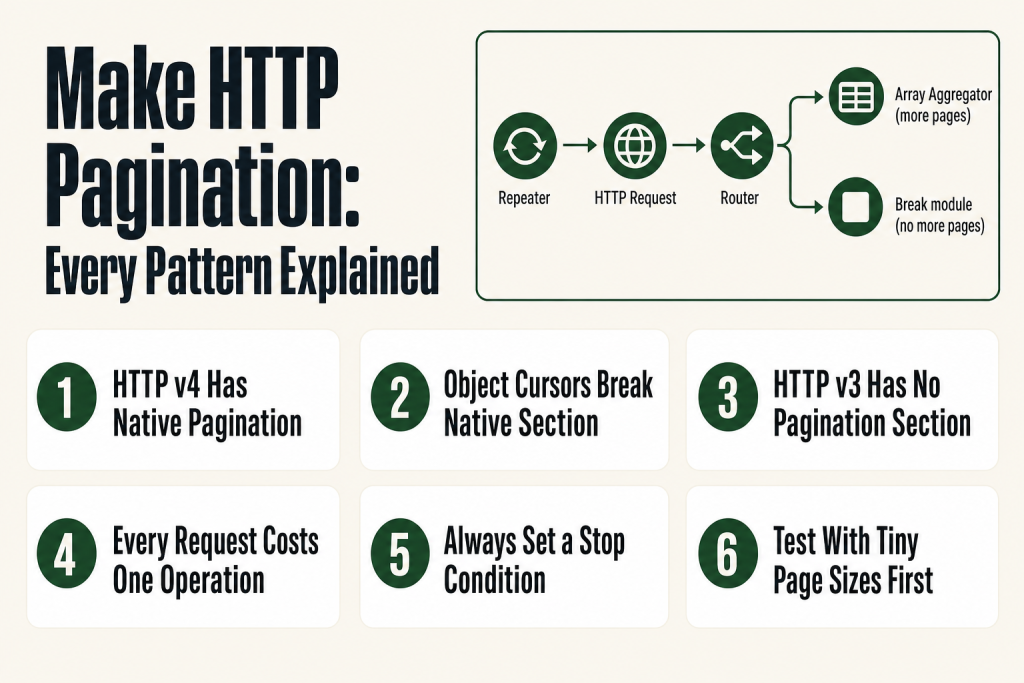
The 30-second answer
- HTTP v4 has native pagination for page-number, offset, simple string cursor/token, and next-URL patterns. Open the Pagination section inside “Make a request” and configure the condition that tells Make when to stop.
- HTTP v4 native pagination works for simple (string) cursors, but not for object-based cursors. If the cursor your API returns is a nested JSON object rather than a plain string, the native section can’t serialize it. Use the Repeater + Data Store pattern instead.
- HTTP v3 (legacy) has no native Pagination section. Build a Repeater + Router + HTTP loop for any pagination pattern when you’re on v3.
- Each paginated request counts as one operation. 20 pages = 20 operations, regardless of which approach you use.
- Always set a stop condition. Without one, Make will keep requesting pages until it hits an internal limit, burning operations on empty responses.
- Test with a tiny page size first (5 to 10 records) so you can verify your loop logic without burning through your operation quota.
Take this fix into your next scenario. The free Builder’s Companion Kit collects the checklists and templates that pair with this guide — so next time, you start from a template, not a blank page. Grab it free →
- Why one HTTP request is never enough
- HTTP v4 native pagination: the fastest path for standard patterns
- The Repeater loop: fallback for legacy HTTP and complex cursors
- Worked example: make http pagination with a page-number API
- Operations cost and rate limits: the bill you didn’t see coming
- What native make http pagination cannot do
- FAQ
Make HTTP pagination is the part most builders skip until their scenario quietly returns 100 records when the API has 3,000. The HTTP module fires one request, hands you one page, and moves on. If you don’t tell it to keep going, it stops. This guide covers every pattern you’ll meet: page-number, offset, cursor/token, and next-URL. It covers the native pagination built into HTTP v4, and the Repeater-loop fallback you need when the native approach can’t handle your API’s response shape. It also covers what each approach costs in operations so you’re not surprised at the end of the billing cycle.
Why one HTTP request is never enough
APIs impose page limits for a good reason: returning 50,000 records in a single response would hammer their servers. So they split results into pages and give you a way to ask for the next one. The problem is Make’s HTTP module is stateless by nature. It fires a request, returns a bundle, and is done. Nothing in the module automatically fetches the next page unless you configure it to do so.
The practical consequence: if your API returns 100 records per page and you have 800 records, a plain HTTP module gives you 100. Your downstream modules process those 100, everything looks fine in the execution log, and you never know the other 700 records existed. That’s the silent failure mode that makes pagination mistakes expensive to diagnose after the fact. If you want to investigate a scenario that ran but produced suspicious output, the Make Execution History guide shows you how to read bundle counts per module, which is your first clue that pagination is missing.
There are four pagination patterns in the wild. Your API’s documentation will tell you which one it uses:
- Page-number: pass
?page=1,?page=2, etc. Stop when you’ve hit the total page count or get an empty array. - Offset: pass
?offset=0&limit=50, then?offset=50&limit=50. Stop when the returned count is fewer than the limit. - Cursor / token: the API returns a
next_cursor,next_page_token, or similar string in each response. Pass it back in the next request. Stop when the cursor is absent or null. - Next-URL: the API returns a full URL for the next page (common in OData and GitHub APIs). Swap your request URL to that value. Stop when the field is absent.
HTTP v4 native pagination: the fastest path for standard patterns
HTTP version 4 is the current version of the HTTP app in Make. The official apps documentation confirms that HTTP v4 provides native pagination, meaning the Pagination section is built directly into the “Make a request” module. If you’re on the legacy HTTP app (v3), you won’t see this Pagination section at all, and you’ll need the Repeater loop described in the next section for any pagination pattern.
Inside the Pagination section you’ll find a way to specify the pagination type and the stop condition. The key variable Make provides is pagination.page, which starts at 1 after the first request and increments automatically. You map it into whatever query parameter your API expects.
The native Pagination section handles four patterns well: page-number, offset, simple string cursor/token, and next-URL. That last point about cursors matters: the native section works when the cursor is a plain string or integer returned in the response body. If your API returns a cursor that is a nested JSON object, the native section will not serialize it correctly. That case requires the Repeater loop covered below.
Page-number pattern
Say your API accepts ?page= and returns a total_pages field. Your query string parameter value is {{pagination.page}}. Your stop condition is an expression that evaluates to false when there are no more pages, such as {{body.total_pages > pagination.page}}. Make fires request 1 (page=1), checks the condition, fires request 2 (page=2), and so on until the condition is false.
Note: some APIs index pages from 0, not 1. The pagination.page variable indexes from 1, so if your API is zero-indexed, subtract 1 in your expression: {{pagination.page - 1}}.
Offset pattern
For offset-based APIs, you need two query parameters: a static limit value in the main request query string, and a dynamic offset inside the Pagination section. The offset is calculated from pagination.page: because pagination.page starts at 1 after the first request, your offset expression is {{(pagination.page - 1) * yourPageSize}}. If your page size is 50, the second request sends offset=50, the third sends offset=100, and so on. Stop when the response array length is less than your page size.
Simple string cursor / token pattern
The cursor pattern works natively in HTTP v4 when the API returns the cursor as a plain string, for example a next_cursor or next_page_token field in the response body. Map that string value into the correct query parameter inside the Pagination section, and set the stop condition to the cursor field itself: {{body.next_cursor}}. Make stops when that field is empty or absent. Stripe, Notion, and many Meta APIs use this approach with plain string tokens.
If the cursor is a nested JSON object instead of a plain string, the native section can’t handle it. Skip ahead to the Repeater + Data Store pattern in the next section.
Next-URL pattern
Some APIs (Microsoft Graph is a common example) return a full URL for the next page in a field like @odata.nextLink. In the Pagination section, set the URL field to that response value. Make will use that URL as the next request’s endpoint instead of the original one. Set the condition to the field itself so pagination stops when the field disappears.
One critical point: without a correct stop condition, Make has no way to know when to stop. It will keep requesting pages until it hits an internal hard limit, which means empty responses, wasted operations, and potential rate-limit errors on the API side. Always set the condition first, test with a small page size, and verify the bundle count in your execution history.
The Repeater loop: fallback for legacy HTTP and complex cursors
Two situations force you off the native pagination path. First, you’re using HTTP v3, the legacy app. The official Make documentation confirms that native pagination is a feature of HTTP v4, and v3 has no Pagination section built in. That means any pagination pattern, whether page-number, offset, cursor, or next-URL, requires a manual loop when you’re on v3. Second, you’re on HTTP v4 but your API returns a cursor that is a nested JSON object rather than a plain string. The native section expects a scalar value it can serialize into a query parameter, so a complex object breaks it.
The Repeater-based loop is the standard workaround for both cases. Think of it like a for-loop with a conditional break. Here’s the structure:
- Flow Control > Repeater: Set the Initial value to 1, the Repeats field to a safe maximum (100 is a common ceiling for most datasets), and the Step to 1. The Repeater outputs a bundle for each iteration, carrying the current value of
i. - HTTP > Make a request: Build your API call. For page-number APIs, map
{{i}}directly to thepageparameter. For offset APIs, use{{(i - 1) * pageSize}}. For cursor APIs, you’ll pull the cursor from a variable or Data Store (more on that below). - Router with two routes: Route 1 has a filter that checks whether there are more pages (e.g., the cursor is non-empty, or the result count equals the page size). Route 2 is the fallback with a Flow Control > Break module. When the Break fires, the Repeater loop stops and execution continues past it.
- Array Aggregator (on Route 1): Collect each page’s results into a single array to pass to downstream modules.
Cursor loop with a Data Store
When the cursor is a nested object, you need a place to store it between iterations, because the Repeater’s i counter is just a number and can’t hold an arbitrary value. Use a Make Data Store with a single record: one field called cursor (Text type). Before the loop, clear the field. Inside the loop, after each HTTP call, write the new cursor value back to the same record. At the top of the next iteration, read it back and inject it into the request body. At the Router, check whether the cursor field is empty; if it is, hit Break. If you’re not yet comfortable with Data Stores, the Make Data Stores guide covers the read/write pattern in detail.
One honest caveat: the Repeater fires every iteration regardless of whether there is data. If you set Repeats to 100 and your API only has 3 pages of results, the Break fires on iteration 4 and the remaining 96 iterations never execute. But if you misconfigure the stop condition and Break never fires, the Repeater runs all 100 iterations, making 100 HTTP requests. Set a conservative ceiling and test with a small dataset first.
For more on how the iterator and aggregator interact in these patterns, the Make Iterator vs Aggregator guide clarifies the distinction and operation costs.
Worked example: make http pagination with a page-number API
Here’s a concrete walkthrough using a fictional contacts API that returns 50 records per page and includes total_pages in every response.
API behavior:
GET /contacts?page=1&per_page=50

Response:
{
  "contacts": [...],
  "total_pages": 6,
  "current_page": 1
}
HTTP v4 native setup:
- Add an HTTP > Make a request module (v4). Set Method to GET and the URL to your endpoint.
- In the Query String section, add a parameter: Name
per_page, Value50. Add a second parameter: Namepage, leave the value field empty for now. - Set Parse response to Yes.
- Open the Pagination section. In the query string parameter for
page, set the value to{{pagination.page}}. - Set the Pagination condition to
{{body.total_pages > pagination.page}}. This evaluates to true as long as there are more pages to fetch, and to false when you’re on the last page. - Run with Run once. Check the execution history and confirm the module output bundle count matches the total record count, not just one page.
What goes wrong most often:
- Forgetting to move
pageout of the main query string and into the Pagination section’s query string. Ifpageis hardcoded in both places, the Pagination section’s value overrides it, but only if merge is enabled. This creates confusing behavior where the first page fires correctly but subsequent pages also fire from page 1. - Off-by-one on the condition. If the API returns
total_pages: 6and you’re currently on page 6, the conditiontotal_pages > pagination.pageevaluates to6 > 6, which is false. Make stops. That’s correct. But if you use>=instead of>, Make requests page 7, which returns an empty array and burns one extra operation. - Pagination section not visible. If you’re on HTTP v3 (legacy), you won’t see the Pagination section. Check whether the app listed in the module header says “HTTP” with a version indicator, and switch to v4 if your scenario allows it.
Operations cost and rate limits: the bill you didn’t see coming
Every HTTP request Make fires is one operation. Pagination multiplies that number directly. Twenty pages means twenty operations, regardless of whether you’re using native pagination or a Repeater loop. This is easy to underestimate when you’re building against a test dataset with three pages and then deploy against a production dataset with 200.
Two habits protect you here:
- Cap your page size at the API’s maximum. Fewer total pages means fewer operations. Most APIs document their maximum page size. Using 100 records per page instead of 20 cuts your operation count by 80 percent for the same dataset.
- Add a Sleep module between requests when the API has rate limits. Pagination means rapid, sequential API calls. If the API enforces a rate limit, you’ll hit a 429 error mid-loop and the scenario will fail with an incomplete execution. A one-to-two second Sleep between iterations is cheap insurance. The Make Rate Limit Error guide covers what to do when you’ve already hit one.
One mistake I’ve made: setting a Repeater ceiling of 500 “just to be safe” on an API that had no stop condition configured. The Break never fired, the loop ran all 500 iterations, and I burned 500 operations on 497 empty responses. Set the ceiling based on reality, configure the stop condition first, and watch the execution history carefully on the first production run. If a scenario fails partway through a pagination loop, check the Make Incomplete Executions guide to understand what gets saved and what gets lost.
If you want the full picture of how operations translate to billing, the Make Operations vs Credits guide explains the counting rules.
What native make http pagination cannot do
The native Pagination section in HTTP v4 is well-suited for standard patterns but has real limits you need to know before you invest hours trying to make it work on the wrong type of API.
- Object-based cursors. If the cursor in the API response is a nested JSON object rather than a plain string or integer, the native module can’t serialize it into a query parameter. It will either ignore the cursor or error. Use the Repeater + Data Store pattern instead.
- POST-body pagination. Some APIs require the pagination token in the request body rather than the query string. The native section’s query string fields won’t help here. Build the Repeater loop and inject the token into the body using a Set Variable module.
- Header-based next links. A small number of APIs (GitHub’s Link header is an example) return the next-page URL inside a response header, not the response body. The native Pagination section can reference response headers, but extracting a URL from a structured Link header value (which looks like
<https://api.example.com/page=2>; rel=“next”) requires a formula to parse it. - Conditional pagination based on response status. If the API signals end-of-results with an HTTP 204 or a non-standard status code rather than a body field, the native condition expression may not give you a clean handle on that. An error handler on the HTTP module is more reliable in those cases.
If you’re unsure which pattern your API uses, read the API’s documentation for the endpoint you’re calling. Look for words like “pagination”, “cursor”, “offset”, “limit”, “next”, or “Link header”. Most REST APIs document this clearly. When they don’t, make a single test call and inspect the raw response body and headers in Make’s execution history to see what pagination fields come back.
FAQ
How do I paginate API results in Make?
If you’re using HTTP v4 (the current version), open the Pagination section inside “Make a request” and configure the pagination type, the query parameter that controls page selection, and the stop condition. For page-number APIs, map {{pagination.page}} to your page parameter and set the condition to stop when you’ve reached the last page. For cursor APIs, the native section works for simple string tokens. If the cursor is a nested object, or if you’re on HTTP v3 (legacy), build a Repeater + Router + HTTP loop with a Break module on the empty-results route.
Does Make HTTP module have built-in pagination?
Yes, but only in HTTP version 4. HTTP v4 includes a native Pagination section that handles page-number, offset, simple string cursor/token, and next-URL patterns. It does not handle cursors that are nested JSON objects rather than plain strings. HTTP v3 (the legacy app) has no built-in Pagination section at all and requires a manual Repeater loop for any pagination pattern.
How many operations does pagination use in Make?
Each HTTP request Make fires counts as one operation. If your data spans 20 pages, pagination uses 20 operations regardless of whether you use native pagination or a Repeater loop. Use the largest page size the API allows to minimize the number of requests.
Make pagination not working, keeps looping or stops after first page
The two most common causes are a missing or incorrect stop condition (causing infinite looping until an internal limit stops it) and having the page parameter hardcoded in the main query string instead of inside the Pagination section (causing it to always request page 1). Check your condition expression first and verify it evaluates to false on the last page, not the second-to-last.
How do I handle cursor-based pagination in Make?
For simple string cursors (like a next_cursor or next_page_token field in the response body), use HTTP v4’s native Pagination section: map the cursor value into the appropriate query parameter and set the stop condition to the cursor field itself. Make stops when the field is empty. For cursor values that are nested JSON objects rather than plain strings, the native section can’t serialize them correctly. Use a Repeater loop and store the cursor in a Make Data Store between iterations instead.
What happens if I don’t set a pagination stop condition in Make?
Make has no way to know when the results end, so it keeps requesting pages until an internal hard limit stops it. This burns operations on empty responses and can trigger rate-limit errors on the API. Always set the condition expression before testing against real data, and verify the bundle count in execution history on your first run.
Sources:
- Make Apps Documentation: HTTP (v4)confirms native pagination is a feature of HTTP v4 and is absent from the legacy v3 app.
- Make Apps Documentation: HTTP (legacy)confirms v3 has no native pagination section; directs users to v4 for that feature.
- Make Developer Hub: Pagination (App Blocks)documents pagination directives including condition, qs, next-URL, cursor/token, and mergeWithParent behavior.
- Make Developer Hub: Pagination (Component Blocks)covers offset, page-number, and cursor pagination patterns with IML examples.
- Make Help Center: Flow Controldocuments the Repeater module fields (Initial value, Repeats, Step).
Brian Kasday spent forty years in direct-response marketing before rebuilding the whole operation as a one-person shop. He writes The Operator’s Library — including “The Missing Manual for Make” — for operators who’d rather build it themselves than wait on someone else.
Get the Builder’s Companion Kit — the free checklists and templates that pair with this guide: mmsvegas.com/make-resources.
This guide solves one Make problem. The Missing Manual for Make covers the production system. See the manual →
More Make guides
Free · Make Operator Toolkit
Running scenarios in Make?
Get the free operator toolkit — production checklists and the fixes that keep scenarios alive under real traffic, plus a note when this guide changes.
Get the free toolkit →