
The 30-second answer
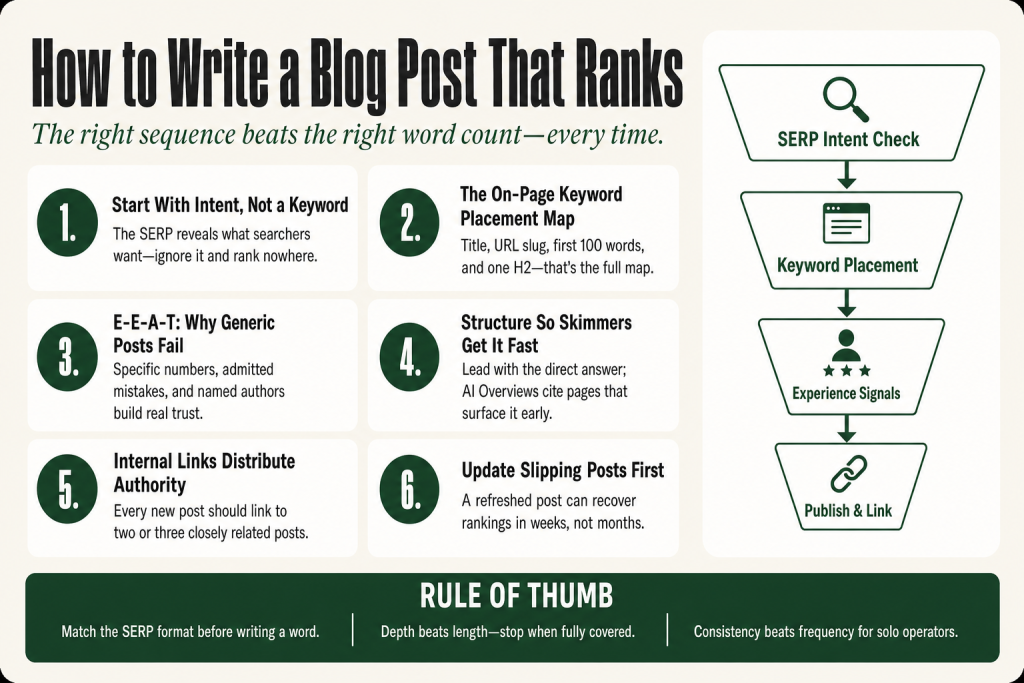
- Start with search intent, not a keyword. Look at what’s actually ranking for your target phrase. Match the format, depth, and angle of those results, not what you assumed the post should look like.
- Pick a keyword you can actually compete for. High-volume head terms are for high-authority domains. Find the lower-competition long-tails where your specific experience outweighs their domain age.
- Answer the question in the first paragraph. Don’t bury the lede. Google and AI answer engines both reward pages that lead with the direct answer.
- Use one H1, then H2s for each major section. Clear heading structure helps both readers scan and search engines understand your page’s architecture.
- Put your keyword in the title, the first 100 words, the URL slug, and at least one H2. That’s the full on-page placement map.
- Add experience signals no AI can fake. A specific result you got, a mistake you made, a number from your actual work. That’s what separates your post from generic filler.
- Link internally to related posts. It distributes authority across your site and keeps readers in your content ecosystem.
- Update posts that slip. A post that ranked and then dropped is usually an intent drift problem or a freshness problem, not a lost cause.
Take this fix into your next scenario. The free Builder’s Companion Kit collects the checklists and templates that pair with this guide — so next time, you start from a template, not a blank page. Grab it free →
- How to Write a Blog Post That Ranks: Start With Intent, Not a Keyword
- The On-Page Placement Map: Where Your Keyword Actually Goes
- The E-E-A-T Problem: Why Generic Posts Don’t Rank Anymore
- Structure Every Post So a Skimmer Gets the Point in 10 Seconds
- Internal Linking: The Solo Operator’s Authority Distribution Tool
- How to Write a Blog Post That Ranks: A Worked Example From Brief to Publish
- When to Update a Post Instead of Writing a New One
- FAQ
How to write a blog post that ranks is a question with a real answer, and it’s not the one most solo operators get told. The usual advice: hit a word count, sprinkle a keyword, and pray. That earns you nothing in 2026. Google has gotten sophisticated enough to see through formula without substance, and AI Overviews (Google’s AI-generated answer summaries) keep raising the bar on what counts as “good enough.” The good news is that the core moves, intent matching, honest experience signals, clean structure, are genuinely within reach when you’re working alone. You won’t have a content team or a six-figure tool budget, and that’s fine. The things that actually move the needle on lower-competition keywords don’t require either. You need the right sequence.
How to Write a Blog Post That Ranks: Start With Intent, Not a Keyword
Most solo operators start by picking a keyword and then writing the post they wanted to write. That’s the wrong order. The keyword tells you the topic. The SERP tells you what Google has already determined the searcher most likely wants. Those are two different things, and ignoring the second one is one of the fastest ways to produce a post that ranks nowhere.
Before you write a word, search your target phrase and look at the top three to five results. What format are they? Step-by-step guide, listicle, definition post, comparison? That format is not a coincidence. It’s a strong signal about what type of content tends to satisfy this specific query. If the top results are all how-to guides and you write an opinion piece, you’ve got an intent mismatch that no amount of technical SEO can fix.
Look at three things in each top-ranking result: the content type (guide, list, tool page), the format (long-form, short answer, video-heavy), and the angle (beginner-friendly, advanced, cost-focused, time-sensitive). Those three signals, sometimes called the “three C’s” of SERP analysis, tell you how to structure your brief before you open a blank document.
One caveat: intent can shift over time. A post that was perfectly intent-matched in 2023 may be off-target now. If you have existing posts that have dropped in rankings, check whether the SERP format has changed before you assume the content is the problem.
If you haven’t done proper keyword research yet, start there first. The article on keyword research for small business walks you through finding the right phrases without expensive tools, including how to spot the lower-competition long-tails where a solo operator can actually compete.
The On-Page Placement Map: Where Your Keyword Actually Goes
There’s no keyword density target that makes a page rank. Forcing your exact phrase into every section makes the writing worse and signals nothing useful to Google. What matters is covering the right locations, once each, in a way that reads naturally.
Here’s the full on-page placement map for a solo-run blog post:
- Title tag: Aim for 50 to 60 characters and put the keyword near the front. Research consistently shows keywords closer to the beginning of the title tag correlate with better rankings. Every page gets a unique title.
- URL slug: Short, descriptive, and keyword-bearing. Three to five words. WordPress will auto-generate a slug from your title, and it’s almost always too long. Edit it before you publish. Don’t include dates in slugs; they make content look stale.
- First 100 words: Use your primary keyword naturally in the opening paragraph. This is also where you answer the question directly, which positions the post for featured snippet consideration.
- At least one H2 heading: The keyword should appear in at least one major section heading where it fits naturally. Don’t force it into every H2.
- Image alt text: When the image genuinely relates to the topic, the alt text should describe it accurately and can include the keyword phrase if it fits the description.
- Meta description: Not a direct ranking factor, but a click-through-rate lever. Keep it in the 120 to 160 character range, lead with the keyword, and write a sentence that earns the click.
That’s the whole list. Over-optimization, repeating the exact phrase in every paragraph, creates patterns that make your post feel outdated and hurts readability.
The E-E-A-T Problem: Why Generic Posts Don’t Rank Anymore
Google’s content quality framework is called E-E-A-T: Experience, Expertise, Authoritativeness, and Trustworthiness. It started as E-A-T (Expertise, Authoritativeness, Trustworthiness), a concept used by Google’s human quality raters since at least 2014. In late 2022, Google formally added the first “E” for Experience to reflect that first-hand, real-world engagement with a topic is itself a quality signal. The framework lives in Google’s Search Quality Rater Guidelines, the document human raters use to evaluate whether Google’s algorithm is surfacing good results. It is not a direct ranking score your page receives, but the signals that demonstrate E-E-A-T are what Google’s algorithm is built to detect and reward.
For a solo operator, this is actually good news. You have real experience. You’ve tried things, gotten results, made mistakes, and corrected course. That’s exactly what Google is now looking for, and it’s something that commodity content produced at scale struggles to provide.
Here’s how experience shows up on the page in practice:
- Specific numbers from your actual work: Not “this strategy increases conversions” but “this change moved our opt-in rate from 1.8% to 4.3%.” Specificity is both memorable and hard to fabricate.
- First-person language that’s verifiable: “I tested,” “we found,” “in our case” all signal authentic engagement. Pair them with concrete detail, not vague claims.
- Admitted misses: Telling the reader about a mistake you made and what it cost you is one of the highest-credibility moves available. It’s also the one commodity content mills will never do.
- Named author attribution: Every post should have a named author with a real bio that establishes relevant expertise. Anonymous or “Admin” bylines are one of the fastest ways to undercut trust signals.
AI is useful for drafting structure, generating outline options, and catching gaps in coverage. What it can’t do is supply your real-world context, your specific numbers, or the judgment calls that make a piece credible. Those come from you. That’s not a workaround. That’s the whole competitive advantage. For a deeper look at where AI earns its place in this workflow, see the article on writing marketing copy with AI.
Structure Every Post So a Skimmer Gets the Point in 10 Seconds
Most people don’t read blog posts. They scan them. They look at the H2s, read the first sentence of each section, and stop when they find what they came for. If your post is a wall of paragraphs with no visual hierarchy, they bounce. That bounce is a bad engagement signal, and bad engagement signals hurt rankings.
Good structure does three jobs at once: it helps readers navigate, helps search engines understand the sections, and improves accessibility for screen readers. One H1 states the main topic. H2s cover the major sections. H3s go inside H2 sections when a point needs a sub-level. Never skip from H1 to H4.
A few structural rules that directly affect ranking:
- Lead with the direct answer. Write the answer to the core question in the first paragraph, before the context, before the backstory. AI Overviews (Google’s AI-generated answer summaries) pull their cited content from pages that surface the answer early. If you bury the answer three paragraphs in, you won’t get cited.
- Use short paragraphs. Three to four sentences max. White space is not wasted space. It’s what keeps readers moving.
- Use lists and tables where data supports it. If you’re presenting steps, options, or comparisons, a list or table beats prose every time for scannability and featured snippet eligibility.
- Depth over length. Word count is not a ranking signal. Depth is. A focused 1,200-word post that completely answers a specific question outranks a padded 3,500-word post that repeats itself. Write until the topic is fully covered, then stop.
Internal Linking: The Solo Operator’s Authority Distribution Tool
Internal links do two things for a solo-run site. They distribute page authority from your stronger posts to newer ones, and they keep readers inside your content ecosystem instead of bouncing to a competitor. Both outcomes matter for rankings.
The rule for internal linking is simple: link when it genuinely helps the reader, not to hit an arbitrary number. Use descriptive anchor text that tells the reader exactly where they’re going. “Click here” or “this article” does nothing. “How to build a lead magnet for a service business” tells both the reader and Google exactly what’s on the other side of that link.
For a solo operator running a content cluster, every new post should link to at least two or three closely related posts. Think of it as a web, not a hub-and-spoke. The more interconnected your content is around a topic, the stronger your topical authority becomes for that topic.
If you’re building out a content calendar and aren’t sure what to write next, the small business SEO checklist maps the on-site work that creates the right infrastructure for all your posts to gain traction. And if you need a system for keeping production consistent without burning out, the marketing calendar for small business covers cadence planning that a one-person operation can actually keep.
How to Write a Blog Post That Ranks: A Worked Example From Brief to Publish
Here’s how a solo operator applies this whole process to a single post, start to finish. Following it won’t hand you a guaranteed ranking position. Competition, domain authority, and timing all play a role, and no process can control those. What it does is put you in the best realistic position, which is the only thing the process is supposed to do.
The scenario: You run a bookkeeping service for creative freelancers. You want to rank for “quarterly taxes for freelancers.”
- SERP check first. Search the phrase. The top results are all step-by-step guides, not tool comparisons or opinion pieces. That tells you the format: a how-to guide with numbered steps.
- Confirm the keyword is winnable. Look at the domains ranking. If they’re all high-authority finance giants, find a longer variation like “quarterly taxes for freelancers first year” where the competition is thinner and the intent is more specific. You can win that.
- Build the outline from the SERP, not your assumptions. Look at the H2s in the top three results. What sections do they all cover? Those are the sections your post must cover. What’s missing? That’s your angle.
- Write the answer first. Before the intro, draft a one-paragraph direct answer. Something like: “Freelancers pay quarterly estimated taxes four times a year using IRS Form 1040-ES, typically in April, June, September, and January. Here’s how to calculate what you owe.” That goes at the top, before anything else.
- Add your experience layer. You’ve seen clients miss the September payment and get hit with penalties. Say that explicitly. Give the actual penalty rate or the approximate dollar cost. That’s the detail that earns trust and citations.
- Place the keyword correctly. It goes in the title tag, the slug (keep it to four words:
quarterly-taxes-freelancers-guide), the first paragraph, and one H2. Done. Don’t force it anywhere else. - Set a named author. Make sure your name and a one-line bio are on the post. “Sarah Chen, bookkeeper to creative freelancers for nine years” does more for your E-E-A-T than any metadata trick.
- Publish, then link to it. Add an internal link from your most-visited existing post to this new one. Give the link equity somewhere to flow from day one.
That’s the whole process. It takes longer than firing off a generic post, but it’s the one that compounds.
When to Update a Post Instead of Writing a New One
New content typically takes three to six months to reach stable ranking positions, depending on keyword competition and domain authority. Lower-competition keywords can rank faster. That timeline means your existing posts are often your fastest path to more organic traffic, not new ones.
Open Google Search Console and look for posts with high impressions but low click-through rates. High impressions mean Google is showing the post. Low clicks mean the title or meta description isn’t earning the click, or you’re ranking for the wrong intent. Fix the title first. If your ranking has slipped after a period of holding, check the SERP: has the format of the top results changed? An article that ranked in 2023 may be off-intent by 2026. That’s an update job, not a new-post job.
When you do update, change the “last updated” date, add any new data or experience you’ve accumulated, and check whether your internal links to and from this post are still pointing to the right places. A refreshed post with stronger experience signals and a corrected intent match can recover rankings in weeks rather than the months a brand-new post requires.
If you’re running a repurposing workflow alongside your blog, the content repurposing workflow guide shows you how to extract material from existing posts rather than starting from zero every time.
FAQ
How long should a blog post be to rank on Google?
There’s no magic word count. Depth matters more than length. A focused 1,200-word post that fully answers a specific question outranks a padded 3,500-word post that repeats itself. Write until the topic is completely covered, then stop. Let the SERP show you what depth the topic requires, not a word count target.
How often should I publish blog posts to improve SEO?
Consistency beats frequency. One well-researched, intent-matched post per week outperforms three rushed posts that don’t satisfy the search query. For a solo operator, a cadence you can sustain is the right cadence. One strong post every week or two, published reliably, will compound faster than an unsustainable sprint that trails off.
Do I need backlinks to rank a blog post?
Backlinks help, especially on competitive keywords. But for lower-competition long-tail queries, strong on-page signals and genuine E-E-A-T can get you rankings without an active link-building campaign. Internal links between your own posts also distribute authority across your site, which is fully within your control from day one.
How do I know if my blog post is targeting the right keyword?
Search the phrase and look at the results. If they’re all product pages or e-commerce listings and you’re writing an informational guide, you have an intent mismatch that no amount of optimization will fix. If the results are guides similar to what you’re building, you’re in the right category. Then check whether your domain can realistically compete with those specific sites.
Can I use AI to write blog posts that rank?
AI is a drafting and research aid, not a substitute for your skills or judgment. It can accelerate structure, suggest related subtopics, and speed up the parts of writing that don’t require your specific context. What it can’t supply is your first-hand experience, your actual results, or your genuine opinion. Those are exactly what Google’s E-E-A-T signals reward. The decision-making, the credibility layer, and the final editorial calls stay with you. Use AI on the mechanical parts of the process, then do the work only you can do.
How long does it take for a new blog post to rank?
New content typically takes three to six months to reach stable ranking positions, depending on keyword competition and your domain’s authority. Lower-competition long-tail keywords can rank in weeks. Targeting a keyword where you have a realistic chance of competing cuts the wait considerably. Don’t judge a post’s performance before the three-month mark.
Sources:
Sources consulted: Typeflo, “SEO Best Practices for Blogs” (May 2026); NisonCo, “SEO Blogging Best Practices for 2026” (July 2026); W3Era, “Search Intent Optimization 2026” (May 2026); Digital Applied, “E-E-A-T in March 2026” (March 2026); Seeklab, “SEO Title Tags and Meta Descriptions: Best Practices for 2026” (June 2026); AIK Designs, “On-Page SEO Guide 2026” (July 2026); NimTools, “How to Write Blog Posts That Rank on Google Faster in 2026” (May 2026); PushLeads, “Google Ranking Factors 2026” (April 2026). On-page placement guidance cross-referenced against Google Search Central SEO Starter Guide.
Brian Kasday spent forty years in direct-response marketing before rebuilding the whole operation as a one-person shop. He writes The Operator’s Library — including “Build a Complete Marketing Department” — for operators who’d rather build it themselves than wait on someone else.
Get the Builder’s Companion Kit — the free checklists and templates that pair with this guide: mmsvegas.com/resources.
This guide handles one marketing job. Build a Complete Marketing Department builds the whole department. See the manual →
More Marketing guides
Free · Marketing Operator Toolkit
Running marketing on your own?
Get the free toolkit — the templates and the expensive mistakes behind a one-person marketing department, plus a note when this guide changes.
Get the free toolkit →