
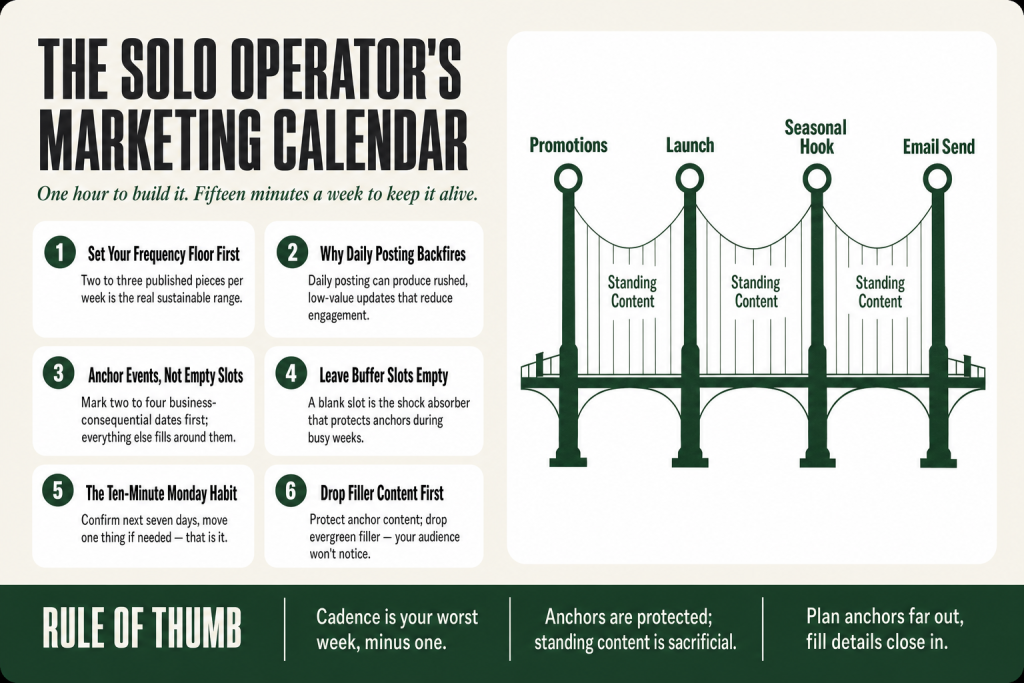
The 30-second answer
- Pick your frequency floor first. For most solo operators, two to three published pieces per week across all channels is the real sustainable range. Commit to that number before you touch a calendar.
- Anchor events, not filled slots. Identify two to four dates each month that have business weight: a promotion, a seasonal hook, a launch, a newsletter send. Everything else fills around those.
- Leave buffer slots empty on purpose. A blank slot is not failure. It is the shock absorber that lets you hold the anchors when a busy week hits.
- One weekly habit keeps the system alive. Every Sunday (or Monday morning) spend ten minutes confirming the next seven days. Move one thing if needed. That is it.
- Drop filler content first. When a crunch week hits, the rule is simple: protect anchor-event content, drop the evergreen filler. Your audience won’t notice one fewer “tips” post. They will notice a missed promotion.
- Build the calendar in a single spreadsheet or free tool. Month view, anchor events in one color, standing content in another, buffer slots empty. No automation required to start.
Take this fix into your next scenario. The free Builder’s Companion Kit collects the checklists and templates that pair with this guide — so next time, you start from a template, not a blank page. Grab it free →
- Why Daily Posting Backfires for the Solo Operator
- How to Pick a Cadence You’ll Actually Keep
- Build the Marketing Calendar for Small Business Around Anchor Events, Not Empty Slots
- A Worked Example: One Month for a Small Service Business
- The One Habit That Keeps the Calendar Alive
- The Drop-First Rule for Busy Weeks
- Build Your Calendar in One Sitting
- FAQ
A marketing calendar for small business sounds like the fix until you open a template and count forty-three columns. You spend the afternoon filling it in, then abandon it by week three because real life doesn’t care about your color-coded slots. The problem isn’t discipline. It’s that the system was designed for a team, not for one person running an actual business. This article gives you the stripped-down version: pick a cadence you can hold, plant three to five anchor events in the month, fill the gaps with the minimum viable content, and use one weekly habit to stop it from sliding. The whole build takes under an hour. Keeping it takes about fifteen minutes a week.
Why Daily Posting Backfires for the Solo Operator
The advice to “post every day” assumes you have a content team, a designer on call, and nothing else on your plate. You don’t. And the data backs your instincts here: high volume without strategy can overwhelm your audience, dilute your message, and exhaust your team. For many small businesses, posting every day can lead to rushed, repetitive, or low-value updates that actually reduce engagement over time.
The honest trade-off is this: when you stretch to fill every day, the quality drops, the ideas run thin, and then you go dark for two weeks because you burned out. Two weeks of silence does more damage than posting three times a week from the start.
There’s also a simpler math problem. If you commit to daily posts on three channels, that’s roughly ninety pieces of content a month. Even at fifteen minutes each, that’s twenty-two hours. That’s most of a work week, just for content creation. No solo operator has that margin without cutting something important from the actual business.
The fix is to pick what researchers call a frequency floor: the minimum amount of content required to stay top-of-mind without causing the audience to tune out. For most small businesses, that floor sits at two to three published pieces per week across your primary channels. Bumping up from one post to a few each week is where the effort really pays off. Start there. Raise it only after holding that number for ninety consecutive days without a gap.
How to Pick a Cadence You’ll Actually Keep
Cadence is not about ambition. It’s about the worst week of your month, not the best. Ask yourself: in the month where a client project runs over, a hire falls through, and a family thing eats a weekend, how many pieces of marketing content can you reliably produce? That number, minus one, is your cadence. The minus-one is your margin.
Here’s a starting framework based on what works for real operators running lean:
- Email newsletter: Once every two weeks is enough to keep a list warm. Weekly is better if you already have a writing habit. Never go longer than three weeks between sends, or the unsubscribes spike when you return.
- Social posts: Starting with a manageable cadence, like three posts per week, allows businesses to build momentum without overextending resources. Pick one primary channel. Own it before you spread to a second.
- Long-form content (blog, video, podcast): One piece every two to four weeks is realistic for a solo operator. Anything more than biweekly requires a content repurposing workflow to make the math work.
Write your chosen cadence on paper and put it somewhere visible. Not in a tool, not in a spreadsheet, on paper. It becomes the standard you hold everything else to.
One honest caveat: matching frequency to platform behavior, audience expectations, and the resources you actually have matters more than hitting some ideal number you read in a marketing blog. The right cadence for a local plumber is different from the right cadence for a B2B consultant. Know your audience’s actual attention patterns before you commit.
Build the Marketing Calendar for Small Business Around Anchor Events, Not Empty Slots
Most calendar systems start by filling every slot. That’s the wrong direction. Start instead with anchor events: the two to four moments in a given month that have direct business consequence. An anchor is a promotion, a product launch, a seasonal hook your customers already care about, a key email send, or a follow-up campaign tied to something you already did. Everything else in the month is secondary to keeping those anchors solid.
Think of it like a suspension bridge. The anchor points hold the structure. The cables between them carry the load. You can adjust or remove a cable without the bridge falling. You cannot move the anchor points without rebuilding from scratch. Frame your campaigns around these major dates and keep track, first to capitalize on sales opportunities, then work the smaller dates in as you can.
Here is how to identify your anchors for any given month:
- Revenue-driving events: A sale, a launch, a discovery-call push, a deadline for a seasonal offer. These are non-negotiable. Mark them first.
- Seasonal or calendar hooks: Dates your customers already have in mind, relevant to your industry. A tax prep firm marks April 15. A landscaper marks the first frost. A fitness coach marks New Year’s and late August. Pick the ones that match your business, skip the random “National Donut Day” filler.
- Relationship touchpoints: A newsletter focused on a customer question, a check-in email to past clients, a referral ask. These build the long game. If you have a referral program for your service business, one anchor per month for a referral nudge is worth protecting.
- Content with compounding value: One piece of content designed to keep earning: a blog post targeting a search term, a lead magnet promotion, a video that answers the question everyone asks. These go in as anchors because they justify the time investment. If you’re building a lead magnet for your service business, its launch and first promotion push both count as anchors.
Once the anchors are marked, the remaining slots fill in around them with standing content: the shorter, lower-stakes posts that keep your channels active between the anchor moments. The key is to never let standing content crowd out an anchor. Standing content is sacrificial. Anchors are not.
A Worked Example: One Month for a Small Service Business
Here’s what a realistic September looks like for a solo home-services operator (say, an HVAC technician who does their own marketing). No team, no agency, one primary channel (email plus Instagram), and about four hours a month to spend on marketing.
Step 1: Mark the anchors.
- September 8: Email newsletter, subject “Is your system ready for winter? Here’s what we check.” Tied to a seasonal tune-up offer.
- September 15: Instagram post + story promoting the tune-up offer with a specific call to action (book by September 30 for priority scheduling).
- September 22: Follow-up email to anyone who opened the September 8 send but didn’t book. One sentence offer, one link.
- September 29: Quick Instagram post showing a before/after from a completed job this month. Social proof to close the month.
Step 2: Fill standing content into remaining slots.
- Week 1 (non-anchor): One Instagram post, a quick tip on thermostat settings going into fall. Takes ten minutes using a photo already on the phone.
- Week 2 (non-anchor): Repost or share a piece of manufacturer content relevant to the audience. Zero writing required.
- Week 3 (non-anchor): One story responding to a common question received that week. Spontaneous, authentic, no prep.
- Week 4 (non-anchor): Skip. The anchor posts this week are already enough. Buffer stays empty.
What this produces: Four anchor pieces, three standing pieces, one intentional skip. Seven total touch points across the month. That’s more than enough for a local service business to stay visible and book work. Total creation time: roughly three hours. The whole calendar fit on a single sheet of paper in under twenty minutes.
Notice what’s missing: no daily posting, no content themes for every day of the week, no complicated approval process, no tool subscriptions. If you want to draft the copy for those anchor emails and posts faster, the AI-assisted copy method cuts the writing time significantly while keeping your voice in charge of every final call.
The One Habit That Keeps the Calendar Alive
Every system breaks down at the same point: the week where something unexpected takes over and you skip the Sunday planning session. Then it’s two weeks later and the calendar is dead.
The fix is a single, tiny, non-negotiable habit: the ten-minute Monday check-in. Every Monday morning, before anything else, open the calendar and answer three questions:
- What is publishing this week, and is it ready to go?
- Is anything this week a risk? (A client deadline, a personal commitment, a travel day.)
- If something needs to move, what moves first?
That’s it. No rewriting the whole month. No redesigning the system. Just confirming or adjusting the next seven days. Consistency in posting is crucial for engagement and brand recognition, so aim for a reliable schedule rather than focusing solely on frequency. The Monday check-in is how you get that reliability without turning the calendar into a second job.
The mistake I made early on was treating any missed week as evidence the system was broken, then rebuilding from scratch. The system wasn’t broken. I just needed to skip one non-anchor piece and keep going. Permission to skip is built into the design. Use it and move on.
If you want to make the habit stickier, document the check-in as a one-page marketing SOP: three questions, the rule for what drops first, five minutes max. When the habit is written down, it survives the weeks where your brain is already full.
The Drop-First Rule for Busy Weeks
Busy weeks are not exceptions. They are a regular feature of running a small business. Your calendar needs a built-in triage rule so you don’t spend twenty minutes deliberating about what to skip when you’re already behind.
The rule is simple: drop standing content before anchors, always.
Here’s the hierarchy, from first to drop to last:
- Drop first: Evergreen or filler social posts with no time sensitivity. A “tips” post, a reshare, a behind-the-scenes story. These have no consequence if they disappear for a week.
- Drop second: A standing newsletter or non-promotional content piece. Your list can absorb one skipped send. Do not make a habit of it, but it won’t hurt the relationship.
- Drop only as a last resort: Anchor-event content. A promotional email, a launch post, a follow-up sequence. Missing these has a direct revenue cost. If an anchor has to move, move it by three to five days maximum, and then send it anyway.
- Never drop: Anything with a paid media spend behind it, any content tied to a live event or a time-sensitive offer with an expiration date visible to customers, or a lead follow-up sequence already triggered by a new inquiry.
Always err on the side of planning further in advance so you have flexibility if something unexpected pops up. That’s the structural version of this rule: build the buffer into the calendar at the start of each month, not after the crisis hits.
If you want to see how this triage decision connects to your actual campaign performance, the way to track which anchors are pulling weight is covered in reading your marketing data without an analyst. You don’t need a dashboard to know which months your anchor content converted.
Build Your Calendar in One Sitting
You don’t need a tool subscription to start. A Google Sheet with a month-view grid, or a printed calendar from any free template, works fine. Here is the one-hour build sequence:
- Minutes 0-10: Write your cadence on paper. How many pieces per week across which channels? Commit to a number you can hold in the worst month of the year.
- Minutes 10-25: Open next month’s calendar view. Mark every date that has business consequence: promotions, seasonal hooks, launch dates, follow-up sends. These are your anchors. Color them one way (bold, highlight, whatever you have). Aim for two to four anchors per month, not more.
- Minutes 25-40: Fill standing content into the remaining slots, up to your weekly cadence number. If the anchor posts already hit your cadence for a given week, leave the standing slot blank. A blank slot is not failure. It is a buffer.
- Minutes 40-50: Write the headlines or subject lines for every anchor piece right now, while you are thinking about it. Even one rough line per anchor is enough to make the actual writing session faster later. If you have a product or service launch as an anchor, draft the core message angle while it’s fresh.
- Minutes 50-60: Set a recurring Monday ten-minute calendar block for the weekly check-in. Protect it the same way you protect a client call.
That’s the whole build. One sheet, one hour, one recurring appointment. The calendar you’ll actually keep is never the most elaborate one. It’s the one that fits inside the life you’re already living.
FAQ
how often should a small business post on social media
Two to three times per week per primary channel is a realistic and effective floor for most small businesses. Posting more frequently only helps if quality stays consistent. For solo operators, starting at three posts per week and holding that cadence for ninety days is more valuable than stretching to daily and burning out by week four.
what should I put in a small business marketing calendar
Start with anchor events: promotions, launches, seasonal hooks, and key email sends. Then fill remaining slots with standing content up to your weekly cadence. Leave buffer slots empty on purpose. A good calendar for a solo operator has no more than two to four anchors per month and a handful of supporting posts around them.
what is the best free tool for a small business marketing calendar
Google Sheets or Google Calendar works fine and costs nothing. A month-view grid with anchor events highlighted in one color and standing content in another is enough to operate from. Dedicated tools like Notion, Trello, or Asana add workflow features, but those matter more when you have a team reviewing content. For a solo operator, the simplest tool you’ll actually open every Monday is the right tool.
how far in advance should I plan my marketing calendar
Plan anchors at least four to six weeks out so you have time to create the content without rushing. Fill in standing content one to two weeks out. Trying to plan an entire quarter of standing content at once usually produces a rigid plan you abandon by month two. Plan anchors far out, fill details close in.
what do I skip when I’m too busy to post
Drop standing and evergreen social content first. Drop a non-promotional newsletter send second. Protect anchor content tied to a promotion or launch last, and if it must move, shift it by a few days rather than canceling. Never skip a follow-up sequence that’s already been triggered by a new lead inquiry.
do I need a different calendar for email and social media
Not at first. One unified view showing all channels by date is easier to manage than separate calendars when you’re the only person working it. As volume grows and you add channels or a contractor, splitting them makes sense. Start unified and split only when the single view gets genuinely crowded.
Sources:
Frequency benchmarks: Buffer Social Media Frequency Guide (2026). Supporting data on sustainable cadence and engagement: BusySeed Small Business Posting Frequency Analysis (2025), referencing HubSpot 2024 research and Sprout Social 2025 data. Anchor-event planning guidance: Clipp 2026 Small Business Marketing Calendar. Frequency floor concept: Small Business Expo Posting Frequency Guide (2026).
Brian Kasday spent forty years in direct-response marketing before rebuilding the whole operation as a one-person shop. He writes The Operator’s Library — including “Build a Complete Marketing Department” — for operators who’d rather build it themselves than wait on someone else.
Get the Builder’s Companion Kit — the free checklists and templates that pair with this guide: mmsvegas.com/resources.
This guide handles one marketing job. Build a Complete Marketing Department builds the whole department. See the manual →
More Marketing guides
Free · Marketing Operator Toolkit
Running marketing on your own?
Get the free toolkit — the templates and the expensive mistakes behind a one-person marketing department, plus a note when this guide changes.
Get the free toolkit →