
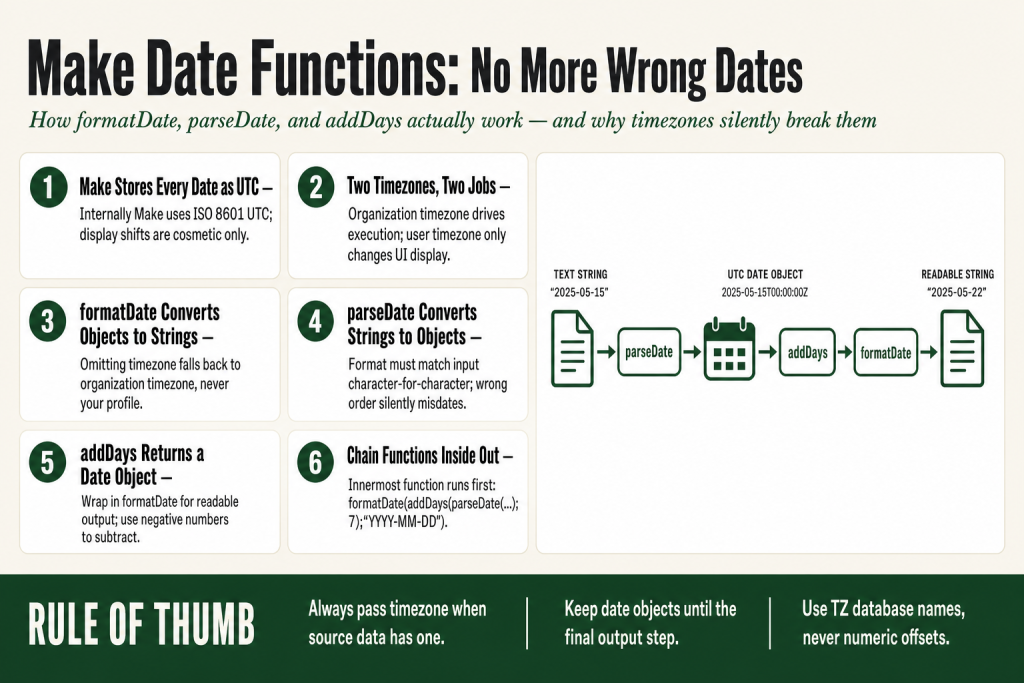
The 30-second answer
- formatDate(date; format; timezone) converts a date object to a string. The timezone parameter is optional. When omitted, Make uses the organization’s timezone for the conversion, not your profile (user) timezone. Pass it explicitly when your output needs to target a specific region.
- parseDate(text; format; timezone) converts a formatted string to a Make date object. The format must match the actual input character-for-character. When the timezone argument is omitted, Make uses the organization’s timezone to interpret the string before converting to UTC internally. Your profile timezone has no effect on this behavior.
- addDays(date; number) adds or subtracts days from a date object. Use a negative number to subtract.
- Make stores every date internally as ISO 8601 UTC. What you see in the UI is re-expressed in your account’s user (profile) timezone, which is a display-only setting.
- The organization timezone controls when scheduled scenarios fire and how date functions behave when no timezone argument is supplied. The user (profile) timezone only controls how the UI displays times to you, such as in execution history.
- Always pass a timezone as the third argument when your source data comes from a specific region, or you will get silent off-by-hours errors.
- Nest functions inside each other:
formatDate(addDays(now; 7); "YYYY-MM-DD")is valid and is how you chain date logic.
Take this fix into your next scenario. The free Builder’s Companion Kit collects the checklists and templates that pair with this guide — so next time, you start from a template, not a blank page. Grab it free →
- How Make Actually Stores Dates
- formatDate: Turning a Date Object into a String
- parseDate: Turning a String into a Date Object
- addDays and the Rest of the Date Arithmetic Functions
- The Make Date Functions Timezone System, Explained Once and For All
- Worked Example: Building a 7-Day Payment Reminder
- The Four Mistakes That Cause Silent Wrong Dates
- FAQ
Make date functions are the small piece of every scenario that nobody thinks about until the wrong date lands in a CRM record, a payment reminder fires at 3 a.m., or a date filter lets everything through. The platform gives you a clean set of tools: formatDate to turn a date object into a readable string, parseDate to turn a string back into a date object, and addDays (plus its siblings) to do date arithmetic. The functions themselves are not complicated. The part that bites you is the two-timezone system running underneath all of them.
One thing worth knowing before you touch a single function: when you omit the timezone argument from formatDate or parseDate, Make falls back to the organization’s timezone, not your personal profile timezone. That fallback controls how functions behave during execution. Your personal profile timezone is a separate setting that only controls how the Make UI displays times to you, such as in the execution history. Keep both of those distinctions in mind as you read through each function below.
How Make Actually Stores Dates
Before touching any function, you need to understand what Make is holding onto when it has a “date.” Internally, Make stores every date value in ISO 8601 UTC format: YYYY-MM-DDTHH:mm:ss.sssZ. The trailing Z means UTC. That value never changes regardless of where you are in the world or what timezone your account is set to.
What does change is how the platform displays that UTC value to you. When you look at an execution log, the timestamp gets re-expressed in your profile’s user timezone. That display shift is cosmetic and personal to your account. The underlying value is still UTC.
The organization timezone is a different setting and a more important one for automation purposes. According to Make’s official documentation, the organization timezone defines the time used when executing scenarios and modules. A scheduled trigger that says “4:00 PM every day” fires at 4:00 PM in the organization’s timezone, regardless of what any individual user’s profile says. It also controls which timezone date functions fall back to when you don’t pass an explicit third argument. Both formatDate and parseDate use this same fallback. Your user (profile) timezone does not affect either of those behaviors.
The confusion that wrecks most people is exactly this: a user sees a timestamp that looks “wrong” because their profile timezone differs from the organization timezone. The data is fine. The display is just showing it in a different offset. Check the Make formula not working guide if you’re getting unexpected values from date expressions, because the root cause is usually this timezone layer, not the function syntax.
formatDate: Turning a Date Object into a String
formatDate takes a date value and converts it to a text string using a format pattern you define. The full signature is:
formatDate(date; "format"; "timezone")The first argument is any date value, including now, a mapped field, or the output of another date function. The second argument is your format string, built from tokens. The third argument is optional. According to Make’s official documentation, when the timezone argument is omitted, formatDate uses the organization’s timezone for the conversion. Your user (profile) timezone plays no role here. Pass "UTC" or a TZ database name like "America/Chicago" to override it. Also note: Make’s documentation states that any invalid timezone value is ignored and the organization’s timezone is used as the fallback, so double-check your TZ string against the Wikipedia “TZ database name” column before relying on it.
Token Reference
Make’s official help center documents its own set of date/time formatting tokens. The pattern is consistent with common date-formatting conventions (uppercase for date components, lowercase for time components), so if you’ve used date tokens in other tools you’ll recognize them quickly. These are the ones you’ll actually use:
YYYY: 4-digit year (2026)YY: 2-digit year (26)MM: 2-digit month (01-12)M: Month without leading zero (1-12)MMMM: Full month name (September)MMM: Short month name (Sep)DD: 2-digit day (01-31)D: Day without leading zeroDo: Day with ordinal (1st, 2nd, 17th)HH: 24-hour hours (00-23)hh: 12-hour hours (01-12)mm: Minutes (00-59)ss: Seconds (00-59)A: AM/PMX: Unix timestamp in secondsx: Unix timestamp in millisecondsddd: Short day name (Mon, Tue)
Always use the token reference in Make’s own help center (Help, Functions, Date and Time, Tokens for Parsing/Formatting) as the authoritative source, since that list covers every supported token including less common ones.
Some examples pulled directly from Make’s official documentation:
formatDate(1.date_created; "MM/DD/YYYY")returns10/01/2018formatDate(1.date_created; "YYYY-MM-DD HH:mm A")returns2018-10-01 09:32 AMformatDate(1.date_created; "DD.MM.YYYY HH:mm"; "UTC")returns01.10.2018 07:32
That third example shows the timezone argument in action. Use the “TZ database name” column on the Wikipedia List of tz database time zones for exact strings.
One thing to watch: MM is month and mm is minutes. The case matters. Mixing them produces a date that looks plausible but is completely wrong, and Make won’t throw an error.
parseDate: Turning a String into a Date Object
Most third-party apps return dates as strings, not as Make date objects. A Typeform submission might hand you "09/15/2026". A webhook from a billing system might send "1728201600" (a Unix timestamp in seconds). Neither of those is a Make date yet. parseDate makes them one.
parseDate("text"; "format"; "timezone")The format pattern must exactly match the structure of the incoming string. From Make’s official documentation, these examples show the expected behavior:
parseDate("2016-12-28"; "YYYY-MM-DD")returns2016-12-28T00:00:00.000ZparseDate("2016-12-28 16:03"; "YYYY-MM-DD HH:mm")returns2016-12-28T16:03:00.000ZparseDate("2016-12-28 04:03 PM"; "YYYY-MM-DD hh:mm A")returns2016-12-28T16:03:06.000ZparseDate("1482940986"; "X")converts a Unix timestamp in seconds to a Make date object
The timezone argument is optional. When you omit it, Make uses the organization’s timezone to interpret the string, then converts to UTC internally. Your user (profile) timezone has no effect on this parsing step. That distinction matters more than most people realize. If your source data is from New York but your organization timezone is set to Los Angeles, the parsed value will be off by hours, silently. Pass "America/New_York" as the third argument whenever you know the origin timezone of the data. Make converts to UTC immediately after parsing, so everything downstream stays consistent.
The most common parseDate failure is a token mismatch. If the string is "15/09/2026" (day first) and your format says "MM/DD/YYYY" (month first), Make will either parse silently to a wrong date or return an invalid date error. Check the actual string character by character against your format pattern whenever something looks off. The Make formula not working guide walks through how to read the output panel to spot mismatches like this.
addDays and the Rest of the Date Arithmetic Functions
addDays takes a date object and adds a number of days to it. From Make’s official documentation: addDays(2016-12-08T15:55:57.536Z; 2) returns 2016-12-10T15:55:57.536Z. To subtract days, pass a negative number.
addDays(date; number)The full family of arithmetic functions follows the same pattern:
addHours(date; number)addMinutes(date; number)addMonths(date; number)addYears(date; number)addSeconds(date; number)
All of them return a Make date object, not a string. That trips people up constantly. When you drop addDays(now; 7) into a text field without wrapping it in formatDate, you get the raw ISO 8601 string like 2026-09-09T22:47:49.218Z. That might be fine for an API that expects ISO 8601, but it is not what you want in an email subject line or a spreadsheet cell. Wrap it: formatDate(addDays(now; 7); "MMMM D, YYYY"). Note that when you omit the timezone argument from that formatDate call, Make uses the organization’s timezone to express the output, not your profile timezone.
You can also chain arithmetic functions together. The innermost function executes first and passes its result outward. To get a date 3 months and 15 days from today: addDays(addMonths(now; 3); 15). To get the first of the current month plus 90 days, formatted for a CRM: formatDate(addDays(setDate(now; 1); 90); "YYYY-MM-DD").
One real-world use worth noting: if you’re logging date-stamped records to a Google Sheet or data store, you almost certainly want to format the date explicitly before it lands there. See the Make Google Sheets common errors guide for what happens when a date type and a text type clash in a sheet column, and see the Make data store duplicate records guide for how date mismatches can cause deduplication logic to miss matches entirely.
The Make Date Functions Timezone System, Explained Once and For All
Make’s official help documentation is direct on this: the organization timezone defines the time used when executing scenarios and modules, and the user (profile) timezone defines how Make displays time in the interface, such as in the execution history. These are separate settings that do separate jobs. A scheduled trigger that says “4:00 PM every day” fires at 4:00 PM in the organization timezone, regardless of what any individual user’s profile says.
For date functions specifically, both formatDate and parseDate fall back to the organization’s timezone when you omit the timezone argument. Make’s official documentation confirms this for formatDate: the timezone parameter is optional, and “if omitted, uses the organization’s timezone.” The same fallback applies to parseDate: omitting the third argument means Make interprets the incoming string against the organization timezone before converting to UTC. Your user (profile) timezone does not factor into either of those function calls at all. That is usually fine if your team and all your source data are in the same region as your organization timezone setting. It becomes a problem the moment you pull data from an API that returns UTC, or from a form tool used by people in a different timezone than your organization is set to.
One more thing to know: Make’s documentation also states that if you pass an invalid timezone string, it’s silently ignored and the organization’s timezone is used as the fallback. That means a typo in your TZ name won’t throw an error. It will just apply the wrong timezone with no warning. Always verify your TZ string against the Wikipedia “TZ database name” column.
The fix is explicit: always pass the timezone argument when the data source has a known timezone. Some concrete patterns:
- API returns UTC Unix timestamp:
formatDate(parseDate("1728201600"; "X"); "YYYY-MM-DD HH:mm"; "America/Los_Angeles") - Form submission from New York users:
parseDate("09/15/2026 2:00 PM"; "MM/DD/YYYY h:mm A"; "America/New_York") - You want the output in UTC regardless of organization settings:
formatDate(now; "YYYY-MM-DD HH:mm"; "UTC")
Daylight saving time is a secondary hazard. Time zones like America/Los_Angeles alternate between UTC-7 and UTC-8 across the year. If you hardcode an offset like UTC-8 rather than using the TZ database name, you will be wrong for half the year. Always use the full TZ name, never a numeric offset.
If your scenario is scheduled and the times feel off, the scheduling article is a useful companion: Make Scheduling Explained covers exactly how the organization timezone interacts with interval and time-of-day schedules.
Worked Example: Building a 7-Day Payment Reminder
Here is a complete, realistic example. You have a webhook that fires when a customer signs up. The payload includes a signup_date field formatted as "September 3, 2026". You need to send a payment reminder exactly 7 days later, and you need the reminder email to show a human-readable due date in the customer’s US Eastern timezone.
Step 1: Parse the incoming date string.
The incoming format is MMMM D, YYYY. The source is a US-based form tool that submits in Eastern time.
parseDate(1.signup_date; "MMMM D, YYYY"; "America/New_York")This converts the string to a Make date object and anchors it to Eastern time before Make converts it to UTC internally. Passing the timezone explicitly here is what keeps the result correct regardless of what your organization timezone is set to.
Step 2: Add 7 days.
addDays(parseDate(1.signup_date; "MMMM D, YYYY"; "America/New_York"); 7)The result is still a date object, 7 days ahead, stored in UTC.
Step 3: Format it for the email body.
formatDate(addDays(parseDate(1.signup_date; "MMMM D, YYYY"; "America/New_York"); 7); "MMMM D, YYYY"; "America/New_York")The whole chain is one expression. You pass it into the email body field. The customer sees “September 10, 2026” and it is correct regardless of where your Make organization is based. The explicit timezone in formatDate is what ensures the output reflects Eastern time rather than defaulting to your organization timezone.
Step 4: If you also need an ISO 8601 value to pass to an API (say, to create a calendar event with a due date), generate a second expression from the same source:
formatDate(addDays(parseDate(1.signup_date; "MMMM D, YYYY"; "America/New_York"); 7); "YYYY-MM-DDTHH:mm:ss"; "UTC")Store the raw parsed date in a Set Variable module early in the scenario if you need to reuse it in multiple places. That way you parse once and reference the variable everywhere, rather than repeating the parseDate call inside each addDays or formatDate. The Set Variable / Get Variable guide covers the scoping rules you need to know before doing that.
The Four Mistakes That Cause Silent Wrong Dates
These are the errors that produce no error message. The scenario runs cleanly and writes wrong data.
- Lowercase mm in a date-only format.
"MM/DD/YYYY mm"appends minutes (00) to every date. The result looks almost right. The correct token for month isMM; for minutes it ismm. Case is everything. - Month/day reversal in the format string. European dates are typically DD/MM/YYYY. US dates are MM/DD/YYYY. If the incoming string is
"05/09/2026"and you parse it with"MM/DD/YYYY", Make reads May 9th. If the source meant September 5th, your due dates are off by four months with no error thrown. - Skipping the timezone argument on source data that has one. When you omit the third argument, Make doesn’t use your profile timezone as the fallback. It uses the organization timezone. So if your organization is set to Los Angeles and the incoming data is from New York, you’re already off by 3 hours before you’ve done anything. An API that returns
"2026-09-03T14:00:00+05:30"(India Standard Time) needs you to specify the source timezone explicitly, or Make will apply the organization timezone instead of the offset in the string. Use theXtoken for Unix timestamps in seconds, or pass the source timezone as the third argument whenever you know the origin of the data. - Passing formatDate output back into a date field.
formatDatealways returns a text string. If a downstream module expects a date object and you map aformatDateresult into it, Make may fail to parse it or accept a wrong value silently. Keep date objects as date objects until the final output step where a human or external API needs a string.
If you are seeing a BundleValidationError on a date field, that last point is often the cause. Make’s own help documentation uses BundleValidationError as the name for validation failures when a module receives data of the wrong type. See the BundleValidationError guide for how to read the error detail and identify which field has the type mismatch.
FAQ
why is my make date showing the wrong time by a few hours
Almost always a timezone mismatch. Make has two separate timezone settings that do different things: the organization timezone controls execution and date function behavior, and the user (profile) timezone controls how the UI displays times to you, such as in the execution history. If those two settings differ, the same underlying UTC value will look different in the interface versus what your functions actually produce during execution. When you omit the timezone argument from formatDate or parseDate, Make falls back to the organization timezone, not your profile timezone. Check your organization timezone under your organization settings, and pass an explicit timezone as the third argument to formatDate or parseDate when you need a specific region.
how do I subtract days in Make instead of adding
Pass a negative number to addDays. For example, addDays(now; -30) gives you the date 30 days ago. The same works for addHours, addMonths, and addYears. Make’s official documentation confirms: to subtract days, enter a negative number.
what is the difference between formatDate and parseDate in Make
They are opposites. parseDate takes a text string and converts it into a Make date object that the platform can work with mathematically. formatDate takes a date object and converts it into a text string in whatever pattern you specify. You typically need parseDate when incoming data arrives as text, and formatDate when you need to display or send a date in a specific format.
why does addDays return a long timestamp instead of a clean date
addDays returns a Make date object, which displays as an ISO 8601 timestamp like 2026-09-10T22:47:49.218Z. Wrap it in formatDate to get a clean string: formatDate(addDays(now; 7); “MMMM D, YYYY”). The format argument controls exactly what the output looks like.
can I chain date functions in Make like formatDate inside addDays
Yes. Make evaluates nested functions from the inside out, so the innermost function runs first and passes its result to the outer function. A valid example from practice: formatDate(addDays(addMonths(now; 3); 15); “YYYY-MM-DD”) gives you the formatted date 3 months and 15 days from today. There is no nesting depth limit documented, but deeply nested expressions become hard to debug, so store intermediate results in a Set Variable if the chain gets long.
how do I convert a unix timestamp to a readable date in Make
Use parseDate with the X token, then wrap it in formatDate. Example: formatDate(parseDate(“1728201600”; “X”); “MMMM D, YYYY”). Before you do this, confirm whether your API is returning the timestamp in seconds or milliseconds. Make’s official token reference lists X (uppercase) for Unix timestamps in seconds and x (lowercase) for Unix timestamps in milliseconds. Most REST APIs use seconds, but some (including several JavaScript-based platforms) use milliseconds. If you use the wrong token, your output date will be off by years. Check a sample value from the API response: a 10-digit number is seconds, a 13-digit number is milliseconds.
Sources:
Sources: Make Help Center: Date and Time Functions (function signatures, official examples, and timezone behavior for formatDate, parseDate, and addDays); Make Help Center: Manage Time Zones (organization timezone vs. user timezone distinction and scheduling behavior); Make Help Center: Tokens for Date/Time Parsing (X for Unix seconds, x for Unix milliseconds, and full token reference); Make Help Center: Tokens for Date/Time Formatting (formatting token reference); Make Developer Hub: Date Parameter (ISO 8601 internal format, UTC storage, and conversion examples); Make Help Center: Resume Error Handler (BundleValidationError as official platform error type); Make Community threads on timezone issues and date formatting (real-world failure patterns).
Brian Kasday spent forty years in direct-response marketing before rebuilding the whole operation as a one-person shop. He writes The Operator’s Library — including “The Missing Manual for Make” — for operators who’d rather build it themselves than wait on someone else.
Get the Builder’s Companion Kit — the free checklists and templates that pair with this guide: mmsvegas.com/make-resources.
This guide solves one Make problem. The Missing Manual for Make covers the production system. See the manual →
More Make guides
Free · Make Operator Toolkit
Running scenarios in Make?
Get the free operator toolkit — production checklists and the fixes that keep scenarios alive under real traffic, plus a note when this guide changes.
Get the free toolkit →