
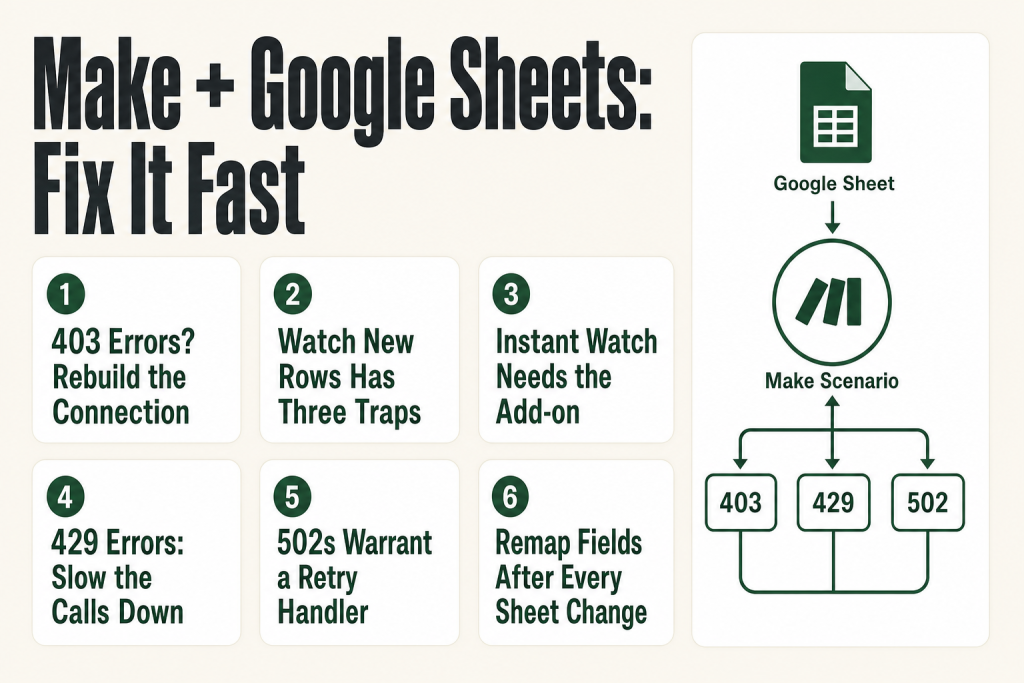
The 30-second answer
- Connection 403 / PERMISSION_DENIED: your OAuth token lacks the right scopes. Delete the connection and recreate it, granting all requested permissions.
- “Failed to load data” when picking a spreadsheet: the connected Google account doesn’t have access to the file, or the connection is stale. Reconnect and verify file sharing.
- Watch New Rows not triggering: the module polls on a schedule. Check that the scenario is on, the “Table contains headers” setting matches your sheet, and there are no blank rows above your data.
- Watch Changes (instant) not firing: you need the Make add-on installed in the Google Sheet and the webhook URL pasted into its settings. API-driven edits do not trigger this module at all.
- 429 RateLimitError from Google Sheets: Make is hitting Google’s per-minute quota. Add a sleep/delay between modules, reduce execution frequency, or split large reads across runs.
- 502 errors that clear on retry: transient Google API outages. Add a retry handler to your scenario rather than rebuilding the scenario logic.
- Mapped fields going blank after edit: you renamed or reordered sheet columns. Remap all downstream modules after any structural sheet change.
Take this fix into your next scenario. The free Builder’s Companion Kit collects the checklists and templates that pair with this guide — so next time, you start from a template, not a blank page. Grab it free →
- 403 PERMISSION_DENIED and Scope Errors
- “Failed to Load Data” When Selecting a Spreadsheet
- Watch New Rows Not Triggering (or Picking Up Old Rows)
- Watch Changes (Instant) Not Firing
- Make Google Sheets Not Working Due to 429 Rate Limit Errors
- 502 Errors That Clear on Retry
- Mapped Fields Going Blank After a Sheet Edit
- Worked Example: Diagnosing a Watch New Rows Scenario That Stopped Cold
- FAQ
Make Google Sheets not working is one of the most common support threads in the Make community, and it almost always turns out to be one of a small set of fixable causes. The problem feels unpredictable because the error messages point in three different directions at once: some blame Make, some blame Google’s API, and some give you nothing useful at all. This guide puts them in order. Work through the sections that match your symptom and you’ll have a diagnosis before you’ve wasted an afternoon.
403 PERMISSION_DENIED and Scope Errors
A 403: PERMISSION_DENIED on a Google Sheets module almost always means one of two things: the connected Google account doesn’t own or have edit access to the spreadsheet, or the OAuth token was granted narrower scopes than the module needs.
The scope issue is sneaky. You can connect once with read-only scopes, have a scenario that works fine for a while on read modules, then add an Update a Row or Add a Row module and suddenly everything breaks. The existing token doesn’t carry write access, and Make doesn’t automatically prompt you to expand it.
The fix is to delete the affected connection entirely, then create a fresh one, accepting every permission Google presents during the OAuth flow. Don’t skip or restrict them. Once the new connection is saved, reassign it to every module in the scenario that used the old one.
If you’re using a custom Google Cloud Platform OAuth client (the “Show advanced settings” path in the connection dialog), you also need to confirm you’ve enabled both the Google Sheets API and the Google Drive API in your GCP project. Make’s own app documentation confirms you need to search for and enable both of these in APIs & Services > Library inside your Google Cloud Console. Both are required. Make uses the Drive API to list and resolve spreadsheet files by name, so a missing Drive API enable will surface as a permission error even when the Sheets API is on.
One more edge case worth knowing: if you built your GCP OAuth app in “Testing” status, Google requires you to reauthorize the connection roughly every week. To stop that cycle, go to Google Auth Platform, open the Audience section, and publish the app to move it to “In production” status. Make’s own docs note that connecting to unverified apps still works, but Google’s policy on that isn’t guaranteed to stay permissive.
If your scenario broke after months of working fine with no changes on your end, check whether a teammate revoked the connected Google account’s access to the spreadsheet file, or whether the sheet was moved to a different shared drive.
“Failed to Load Data” When Selecting a Spreadsheet
This error appears in the module configuration panel when Make can’t enumerate files through the connected account. It’s almost always an authentication problem, not a file problem.
The most common trigger: you authenticated with Google Account A, but the spreadsheet lives in Google Account B’s Drive. Make resolves the Spreadsheet ID using the connected account’s Drive access. If that account can’t see the file, it returns nothing, and the UI reports “Failed to load data.”
Steps to isolate this:
- Open the spreadsheet in a browser tab while signed into the same Google account that’s connected in Make. If you get a permissions error, that’s your answer: share the file with the correct account, or reconnect using the account that owns it.
- If the connected account does have access but the error persists, try entering the Spreadsheet ID manually instead of using the file picker. You can pull the ID from the URL: in
https://docs.google.com/spreadsheets/d/abc1234567/edit, the ID isabc1234567. - If manual entry also fails, delete the connection and rebuild it. A token that was issued years ago occasionally loses refresh capability silently, and the only recovery is a fresh OAuth grant.
Also see the Make Connection Not Working article for the broader connection troubleshooting flow, and Make Connection Expired for cases where a previously working connection suddenly stops authenticating.
Watch New Rows Not Triggering (or Picking Up Old Rows)
The Watch New Rows module is a polling trigger, not an instant one. Make checks for new rows on whatever schedule the scenario is set to run. If the scenario is turned off, nothing fires. If it’s set to a 15-minute interval, new rows added between checks simply wait.
Beyond scheduling, there are three configuration traps that catch almost everyone at least once.
Trap 1: “Table contains headers” is set wrong
When “Table contains headers” is set to “Yes”, Make treats the first row as column names and doesn’t process it as data. If your sheet has no header row, or you’ve set this to “No” when a header row does exist, you’ll either miss real rows or get the header row processed as a data bundle. Verify the setting matches your actual sheet structure.
Trap 2: A blank row is stopping the scan
This is documented behavior that surprises almost everyone. According to Make’s official module docs, if a sheet contains a blank row, Make doesn’t process any subsequent rows past it. A single empty row partway down your data acts like a stop sign. Audit your sheet for blank rows, delete them, and reset the module’s starting position.
Trap 3: The starting row pointer is off
When you first run a Watch New Rows module, Make asks “where do you want to start?” If you chose to start from the beginning of an already-populated sheet, Make will try to replay every existing row before it watches for new ones. The fix is to run the module once and choose “All” only if you want historical data, or pick the row number corresponding to where you want Make to start watching. You can also reset the cursor by right-clicking the module and selecting “Choose where to start.”
If you need instant detection rather than polling, you’ll need to switch to the Watch Changes instant module, covered in the next section. For deeper context on how the polling schedule works, see Make Scheduling Explained.
Watch Changes (Instant) Not Firing
The Watch Changes module carries an “Instant” tag, meaning it fires the moment a cell changes, not on a polling schedule. But it requires a separate setup step that polling modules don’t: you must install the Make add-on inside Google Sheets and connect it to the webhook URL Make provides.
A naming note before you start: Make’s official how-to guide confirms that the add-on is still labelled as “Integromat” in some Marketplace listings, not “Make.” If you search the Google Workspace Marketplace and see “Integromat” rather than “Make for Google Sheets,” that’s the same add-on. Install it regardless of whichever name appears.
The official flow looks like this:
- Add the Watch Changes module to your scenario and create a webhook when prompted.
- Copy the webhook URL from the module.
- In your Google Sheet, go to Extensions > Add-ons > Get Add-ons and search for Make for Google Sheets (it may appear as “Integromat” in the Marketplace listing). Install it.
- After installation, go to Extensions > Make for Google Sheets > Settings (the menu item may read “Integromat” if you installed the legacy-labeled version). Paste the webhook URL, set the sheet name and range you want to monitor, then save.
If you skip step 4, the scenario will sit there waiting for a webhook call that never arrives. The scenario has to be in a listening state (actively running in the editor, or turned on) when you first trigger it so Make can learn the payload structure.
There’s an important limit here that Make’s own docs make explicit: the Watch Changes module only fires for edits made directly by a user inside the Google Sheets interface. Script executions and API requests do not trigger it. If another tool or a Google Apps Script is writing to your sheet programmatically, Watch Changes won’t see those writes. For API-driven changes, you need to use Watch New Rows on a polling schedule or set up a separate webhook call from within the script itself.
For broader webhook troubleshooting, see Make Webhook Not Triggering.
Make Google Sheets Not Working Due to 429 Rate Limit Errors
The error looks like this: RateLimitError [429] Quota exceeded for quota metric ‘Read requests’ and limit ‘Read requests per minute’. It originates from Google’s API, not from Make itself.
Google’s Sheets API enforces per-minute quotas. Check the Google Sheets API usage limits page for current figures, as these change periodically. If your scenario runs multiple Google Sheets modules in a tight loop, or if several scenarios share the same connected account and run simultaneously, you can burn through those limits fast.
Common causes in Make scenarios:
- An iterator feeding a Search Rows or Get Row module in a high-volume loop, firing dozens of API calls per execution.
- Multiple scenarios all sharing one Google account connection, all scheduled to run at the same minute.
- A very large sheet where Make has to page through many row-ranges to find what it needs.
Fixes:
- Add a Sleep module (from the Flow Control app) between Google Sheets modules inside loops. Even a 1-2 second pause spreads the API calls out enough to stay under the per-minute limit.
- Stagger scenario schedules so multiple Google Sheets scenarios don’t fire in the same minute.
- Add a retry error handler to your scenario so transient 429s are retried with a delay rather than failing the whole execution. The Make Retry Strategy article covers the options in detail.
- If you’re on a custom GCP project, you can request a quota increase through the Google Cloud Console, though approval isn’t guaranteed and can take time.
For the broader Make rate-limit picture, see Make Rate Limit Error (429).
502 Errors That Clear on Retry
A wave of 502 Server Error responses from the Google Sheets module, especially when nothing changed on your end, is almost always a transient issue on Google’s infrastructure side. These show up in the Make community periodically, sometimes affecting many users at once.
The practical approach: don’t rebuild your scenario logic because of a 502. Set up a retry handler instead. In Make, you can attach an error handler route to the Google Sheets module and configure it to retry on specific error codes after a delay. This way, your execution pauses and retries rather than failing outright.
If the 502s are clustered at the same time of day, check whether they coincide with your scenario running at peak Google infrastructure load. Shifting your schedule by 15-30 minutes is sometimes enough to avoid the problem entirely.
Persistent 502s that don’t clear after a few retries are worth checking against the Google Workspace Status Dashboard and Make’s own status page to see if there’s a known incident. See also Make Incomplete Executions Piling Up for how to manage the fallout when errors do stack up.
Mapped Fields Going Blank After a Sheet Edit
You add a column to your spreadsheet, or rename an existing header, and suddenly downstream modules in your scenario start showing empty fields or mapping errors. This is expected behavior, not a bug, but it bites hard when you’re not expecting it.
Make resolves mapped fields from Google Sheets by column name (when headers are enabled) or by column index. When you rename a column, the mapping label in your module updates, but the underlying field reference may break silently. When you insert a column in the middle of a sheet, column indexes shift, and any module using positional references gets the wrong data.
The fix is to re-open every downstream module that maps Google Sheets fields and remap them after any structural change to the sheet. Run the scenario once in the editor after remapping to confirm the output panel shows the correct values before turning it back on.
If your fields are going blank without any sheet changes, check whether someone else on the team edited the sheet structure, or whether a Google Form that feeds the sheet added or reordered its fields (Forms can silently reorder columns). Also verify the “Row with headers” range setting in the module still covers the correct row, especially if rows were inserted above your header row.
For a thorough explanation of why mapped fields disappear and how to restore them, see Make Mapping Fields Missing.
Worked Example: Diagnosing a Watch New Rows Scenario That Stopped Cold
Here’s a real pattern worth walking through. You built a scenario six months ago: Google Sheets Watch New Rows feeds a CRM update, it ran flawlessly, and now it’s not picking up new form submissions at all. Work through these steps in order before you touch any scenario logic.
Step 1: Confirm the scenario is on.
Open Make and check the toggle at the bottom of the scenario editor. If it’s grey, turn it on. This sounds obvious but it’s the cause more often than it should be. A teammate may have paused it during a test and never re-enabled it.
Step 2: Run once manually and watch the execution panel.
Click “Run once” in the editor, then add a new row to your sheet by hand. Look at the execution panel on the right. If the Watch New Rows module lights up and shows a bundle with your row data, the scenario logic is fine and the issue is purely scheduling. If the module returns 0 bundles, the problem is in the module configuration itself, not the downstream logic.
Step 3: Check for blank rows in your sheet.
Open the Google Sheet and scroll through your data range. A single blank row anywhere above or within the data stops Make’s scan dead. Delete every blank row you find. After cleaning the sheet, right-click the Watch New Rows trigger module in Make and select “Choose where to start” to reset the row pointer to your current last row.
Step 4: Verify the “Table contains headers” setting.
Open the Watch New Rows module settings. Confirm whether “Table contains headers” is set to “Yes” or “No,” and verify it matches the actual structure of your sheet. If your sheet has a header row but this is set to “No,” Make will process the header as a data row and field mapping will be off. If it’s set to “Yes” but your sheet has no header row, the first data row disappears silently. Remap any fields that shifted after correcting this setting.
Step 5: Check the connection.
Click the connection name inside the module to open it. Verify it’s still valid and shows no warning icon. If you get a 403 error when you test it, the OAuth token has expired or lost scope. Delete the connection and recreate it as described in the 403 PERMISSION_DENIED section above. Reassign the new connection to every module in the scenario that used the old one before turning anything back on.
Step 6: Check the execution history for stalled runs.
Go to the scenario’s Execution History tab. If you see a column of incomplete executions, an upstream error may be holding the trigger pointer in place, preventing it from advancing to new rows. See Make Incomplete Executions Piling Up for how to clear those and unblock the trigger.
If all six steps pass clean, the most likely remaining causes are: your polling interval is longer than you realized (check the scenario schedule), or rows are being added by a script rather than a human between polling windows. For script-driven writes, either accept the polling lag and tighten your schedule, or switch to a webhook-based approach where the script calls Make directly after each write.
FAQ
Why does my Google Sheets module say “No bundles were generated” every run?
The module ran successfully but found no new rows matching its criteria. The most common causes are: the scenario’s starting row pointer is already past all existing data, there are blank rows in your sheet blocking the scan, or the “Table contains headers” setting doesn’t match your sheet layout. Check all three before assuming the integration is broken.
Does Make Google Sheets Watch Changes work with Google Forms submissions?
No. The Watch Changes instant module only fires when a user edits a cell directly inside the Google Sheets interface. Form submissions write to the sheet via Google’s internal pipeline, not via a user action in the UI, so Watch Changes doesn’t see them. Use Watch New Rows on a polling schedule to catch form submissions.
Why does my Google Sheets scenario work sometimes and fail other times with a 429 error?
Google’s Sheets API enforces per-minute request quotas. When multiple modules, multiple scenarios, or a high-volume iterator all fire against the same Google account in the same minute, you exceed the quota and get a 429. Add a Sleep module between calls inside loops, stagger your scenario schedules, and add a retry error handler so transient quota errors retry automatically.
Is it safe to delete and recreate a Google Sheets connection in Make?
Yes, with one precaution. After you delete a connection and create a new one, every module in every scenario that used the old connection will show an error until you reassign them to the new connection. Check all affected scenarios before turning them back on. The connection itself has no memory of past executions, so historical data is not affected.
Why does my Google Sheets scenario break every time I add a column to my spreadsheet?
Make maps fields by column name or position based on the structure it captured when you last configured the module. Adding or renaming a column changes that structure. After any structural edit to your sheet, reopen every module that maps Sheets fields, remap them, and run once in the editor to confirm the output is correct before enabling the scenario.
Why did my Google Sheets connection stop working after a few weeks even though I didn’t change anything?
If you built a custom Google Cloud Platform OAuth app and left it in “Testing” status, Google requires reauthorization roughly every week. Move the app to “In production” status in Google Auth Platform to avoid recurring disconnects. If you’re using Make’s default OAuth (no custom GCP project), a stale refresh token is more likely the cause: delete and recreate the connection.
Sources:
Sources consulted: Make Google Sheets App Documentation (apps.make.com/google-sheets); Make Google Sheets Modules Documentation (apps.make.com/google-sheets-modules); Make Help Center: Fix Rate Limit Errors; Make Help Center: Connect to Google Services Using a Custom OAuth Client; Make: How to Use the Google Sheets Watch Changes Module; Google Sheets API Usage Limits (developers.google.com); Make Community threads on 403 scope errors, Watch New Rows blank-row behavior, and 429 quota issues (community.make.com), verified August 2026.
Brian Kasday spent forty years in direct-response marketing before rebuilding the whole operation as a one-person shop. He writes The Operator’s Library — including “The Missing Manual for Make” — for operators who’d rather build it themselves than wait on someone else.
Get the Builder’s Companion Kit — the free checklists and templates that pair with this guide: mmsvegas.com/make-resources.
This guide solves one Make problem. The Missing Manual for Make covers the production system. See the manual →
More Make guides
Free · Make Operator Toolkit
Running scenarios in Make?
Get the free operator toolkit — production checklists and the fixes that keep scenarios alive under real traffic, plus a note when this guide changes.
Get the free toolkit →