
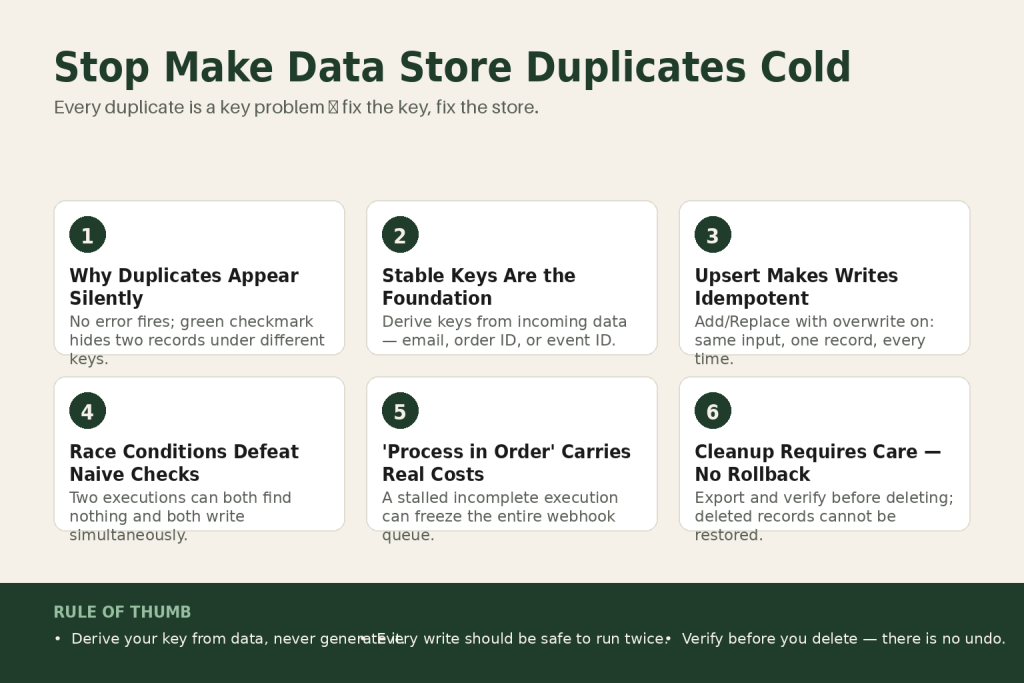
The 30-second answer
- Root cause: Using “Add a Record” with an auto-generated or non-deterministic key means the same real-world entity can land in the store twice.
- Primary fix: Use a stable, deterministic key derived from the incoming data (order ID, email, webhook event ID) so the same entity always maps to the same key. A stable key is necessary but not sufficient if your upstream data varies significantly, so pick your key field carefully.
- Upsert pattern: Replace “Add a Record” with “Add/Replace a Record” with the “Overwrite an existing record” option enabled. A predictable key turns every write into an idempotent operation.
- Search-before-create: Use “Check the Existence of a Record” or “Get a Record” before writing. Route to Update on a hit, Add on a miss. Filter correctly or the check returns empty even when a record exists.
- Race condition: Two simultaneous executions can both see an empty store, both pass the existence check, and both write. “Process data in order” in Scenario Settings serializes webhook-triggered runs within a single scenario, but it carries real costs beyond just speed: a stalled incomplete execution can freeze the entire queue, and it has no effect across two separate scenarios. Some race conditions require custom guard logic beyond what Make provides natively.
- Cleanup: Use “Search Records,” iterate the results with an Iterator, deduplicate by key logic, and delete the extras with “Delete a Record.” Always log what you’d delete and verify before running live, because deleted records cannot be rolled back. For large stores, “Search Records” with no filters may be impractical: the module returns records up to its configured limit per execution, so very large stores may need paginated or chunked cleanup runs.
- Storage pressure: Duplicate records eat into your plan’s data storage allowance. Purging them also frees space.
Take this fix into your next scenario. The free Builder’s Companion Kit collects the checklists and templates that pair with this guide — so next time, you start from a template, not a blank page. Grab it free →
- Why Make Data Store Duplicate Records Appear in the First Place
- Stable Keys: The Foundation of Duplicate Prevention
- The Upsert Pattern: Idempotent Writes With One Module
- Search-Before-Create Logic: When You Need to Branch on Existing Data
- Race Conditions: When Two Executions Both Think the Record Is New
- Worked Example: Deduplicating Inbound Leads (Step by Step)
- Update Versus Add: Making the Right Call Every Time
- Cleaning Up Existing Duplicate Records
- Designing for Idempotency: The Mindset That Prevents Future Duplicates
- FAQ
Make data store duplicate records are quiet. No error fires. No incomplete execution appears. The scenario completes with a green checkmark while a second copy of the same lead, order, or contact sits right below the original, waiting to cause problems downstream. By the time you notice, you might have hundreds of them. This article covers every layer of the problem: why duplicates appear in the first place, the module-level patterns that prevent them, the race condition that defeats naive search-before-create logic, and how to clean up the mess if you’re already in it.
Why Make Data Store Duplicate Records Appear in the First Place
The data store is not a database with a unique constraint on arbitrary fields. The only built-in uniqueness guarantee is the record key. Every data store has a primary key field, and that field must be unique for each record. It’s used for fast lookups and updates. That sounds like enough protection, but the problem almost always lives one step back: what value you feed into the key field.
Every record gets a unique key. You define this yourself, or Make generates a UUID. When you let Make generate the key, you get a different UUID on every run. Two runs processing the same incoming event produce two records with different keys, and the data store accepts both without complaint.
The second common cause is a scenario that was cloned, re-run for testing, or retried after an incomplete execution. Each retry creates a fresh bundle and, if nothing in your logic checks for prior writes, produces a fresh record. A common situation: your workflow processes incoming webhook events such as new leads, orders, or emails, and the same event occasionally fires twice. Without a guard in place, duplicates land silently.
A third cause is multiple scenarios writing to the same data store. Data stores are shared across scenarios within an organization. When multiple scenarios write to the same data store, conflicting logic (such as two scenarios updating the same field differently) creates integrity problems. If each scenario runs “Add a Record” independently with different generated keys for the same real-world entity, both writes succeed. “Add a Record” errors only when the exact same key value is reused; it does not detect or block two records that represent the same entity under different keys.
Stable Keys: The Foundation of Duplicate Prevention
Everything else in this article is a patch on top of a bad key strategy. Fix the key and half your duplicate problems disappear without any extra modules.
A stable key is one you derive from the incoming data rather than generate. It must be unique per real-world entity and it must produce the same value every time the same entity arrives. Good candidates:
- External record ID: The ID from your CRM, e-commerce platform, or webhook payload. If Stripe sends
evt_1abc2def, that becomes the key. - Email address (lowercased): Works for contact deduplication. Map it through
lower(email)so capitalisation differences don’t create separate records. - Composite key: Concatenate two fields when neither alone is unique. For example,
{{orderID}}_{{lineItemID}}. Keep it short and deterministic. - Slug or normalized string: Strip spaces, lowercase, and trim. Two entries for ” Acme Corp ” and “acme corp” should resolve to the same key.
Using a predictable key is critical. It lets you use “Check the Existence of a Record” before adding, and it makes “Get a Record” fast because no full-table search is needed.
One important caveat on stable keys: a stable key prevents duplicate records for the same key value, but it doesn’t automatically resolve cases where upstream data varies in ways you haven’t accounted for. If the same real-world contact arrives as “[email protected]” in one system and “[email protected]” in another, lowercasing handles it. But if they arrive with different phone numbers, different names, or through different integrations that don’t share a common identifier, a stable key strategy won’t catch that they’re the same person. The judgment call on what makes two records “the same entity” belongs to you. Pick the field combination that genuinely identifies the entity, normalize it consistently (lowercase, trim whitespace), document it in the data store’s description field, and build every write module around that decision. No platform feature makes this choice for you.
What to avoid: timestamps, UUIDs generated inside the scenario, and any value that depends on when the scenario runs rather than what it’s processing. Those are guaranteed duplicate factories.
The Upsert Pattern: Idempotent Writes With One Module
Once your key is stable, the simplest duplicate-proof write is a single “Add/Replace a Record” module with the “Overwrite an existing record” option enabled. That combination adds the record if the key is new and replaces it entirely if the key already exists. Because the key is deterministic, running the module ten times with the same input produces exactly one record. That’s the definition of idempotency: the result is the same whether you run it once or a hundred times.
This matters more than it sounds. Retries, incomplete-execution replays, and webhook re-deliveries all become safe. You don’t need a guard clause because the operation itself is the guard.
The distinction from “Update a Record” is important: “Update a Record” modifies one or more fields on an existing record without replacing it. This is different from “Add/Replace a Record,” which overwrites the entire record when the overwrite option is on. Choose based on your situation:
- Use “Add/Replace a Record” (with “Overwrite an existing record” enabled) when the incoming data is the authoritative, complete picture of the entity. A full overwrite is fine.
- Use “Update a Record” (with insert-if-not-found enabled) when you only want to touch specific fields and preserve everything else already stored. If you leave a field blank in the Update module, the contents of that field will not be updated when the scenario runs. That selective merge is the point.
- Use “Add a Record” only when you have verified upstream that the record cannot possibly exist yet, for example when processing brand-new event IDs from a deduplicated queue. Be aware: if a record with the same key already exists, “Add a Record” will throw an error rather than silently overwrite. In most repeatable workflows that’s a risk, not a feature, which is why the upsert pattern is the safer default.
If you’re storing a “seen IDs” registry (a list of processed event IDs used to skip duplicates in later logic), “Add/Replace a Record” with “Overwrite an existing record” enabled is perfect. Write the event ID as the key, write a timestamp or status as the value, and every subsequent scenario run can use “Check the Existence of a Record” to bail early before doing any downstream work.
See the Make Data Stores deep-dive for a full walkthrough of how each module is structured and what the key field configuration looks like in the UI.
Search-Before-Create Logic: When You Need to Branch on Existing Data
Sometimes a plain upsert isn’t enough. You need to know whether a record already exists so you can take a different action: update a counter, merge fields from two sources, or skip an expensive API call. That’s where search-before-create logic comes in.
The pattern has three steps:
- Check existence by key. Use “Get a Record” with your stable key. This retrieves a single record by its exact key. It’s an O(1) lookup that doesn’t scan the entire store. If the record doesn’t exist, the module returns an empty result, not an error.
- Filter on the result. Add a filter after “Get a Record.” Route one path for a non-empty result (record exists) and another for an empty result (record is new). The filter condition is typically checking whether the returned key field is empty or not.
- Write accordingly. On the “exists” path, use “Update a Record” to merge or increment. On the “new” path, use “Add a Record” or “Add/Replace a Record.”
Two mistakes that kill this pattern:
Using “Search Records” instead of “Get a Record” for key-based lookups. Searches perform a full table scan, so for large stores prefer keyed lookups with “Get a Record” when possible. Search is also more prone to filter misconfiguration. If the filter condition is typed incorrectly (wrong field name, wrong operator, wrong value format) it silently returns zero results, and your scenario proceeds to create a duplicate every time.
Not accounting for the empty-result bundle. When “Get a Record” finds nothing, Make does not emit a bundle at all by default. Your downstream filter needs to be built to handle this correctly, often using a Router where one route checks for the key being mapped (record found) and another has no filter or a “does not exist” condition. If the filter structure is wrong, bundles fall through to the wrong path. The Make Filter Not Working article covers exactly this trap.
Race Conditions: When Two Executions Both Think the Record Is New
Search-before-create has a structural weakness that stable keys alone don’t solve: two scenario executions can run at the same time. Imagine two webhook deliveries arriving within milliseconds of each other, both carrying the same order ID. Execution A checks for the record, finds nothing. Execution B checks for the record simultaneously, also finds nothing. Both pass the filter. Both write. Now you have two records.
This is a classic race condition. The check-then-act sequence is not atomic in Make’s data store. Make doesn’t offer record-level locking.
The honest picture on “Process data in order”: In Scenario Settings (click the gear icon in the builder), you can enable “Process data in order,” which processes data in the order it’s received, with each run finishing before the next starts. By default, Make processes webhooks in parallel. When you enable “Process data in order,” it waits until the previous execution is complete before starting the next one. That serializes writes for a single webhook-triggered scenario, so the second execution’s existence check will see the record the first execution created.
That said, treat it as a deliberate trade-off rather than a primary go-to solution. The costs go beyond throughput:
- Speed: Each webhook execution must finish before the next one starts, so a burst of incoming webhooks queues up and each one waits its turn.
- Queue freeze on errors: If there’s an incomplete execution, no new runs are processed until all incomplete executions are resolved. A single bad bundle can freeze the entire queue behind it. This is the most operationally dangerous side effect. A scenario with slow steps or frequent errors can stall all pending webhook payloads indefinitely, not just slow them down.
- Scope is single-scenario only: “Process data in order” serializes runs within that one scenario. If two separate scenarios both write to the same data store, enabling the setting on one does nothing to the other. Those two scenarios can still race.
- Scheduled scenarios: The setting also applies beyond webhooks. When enabled on a scheduled scenario, if incomplete executions exist in the queue, the next scheduled run is paused until they’re resolved.
Weigh those costs against your volume, latency requirements, and error rate before turning this on. For low-to-moderate volume webhook scenarios touching a data store and where errors are rare, sequential processing is often worth it. For high-throughput, latency-sensitive, or error-prone scenarios, the upsert pattern (a stable key plus “Add/Replace a Record” with overwrite enabled) is a stronger primary defense because it doesn’t require serialization to work.
What Make doesn’t natively solve: if you’re writing to the data store from two different scenarios running simultaneously, neither “Process data in order” setting nor any built-in Make feature prevents a race. Make provides no cross-scenario locking mechanism. In that case, the upsert pattern is your only reliable built-in defense. For scenarios where even an upsert isn’t sufficient because you need atomic read-modify-write behavior across multiple fields, you’d need to introduce an external coordination layer (a dedicated queue service, a database with row-level locking, or a serialization webhook endpoint) outside of Make entirely. That’s custom logic. Make doesn’t provide it.
Combine “Process data in order” with solid error handling so a bad bundle doesn’t freeze every bundle behind it. The Make Error Handling article covers the Ignore and Resume handlers that keep the queue moving past single-bundle failures.
Worked Example: Deduplicating Inbound Leads (Step by Step)
Here’s a concrete build. You have a webhook that fires every time someone fills out a lead form. The same person occasionally submits twice. You want exactly one data store record per email address, with the most recent submission data.
Why this scenario? It’s the most common duplicate pattern: a real-world entity (a person) arrives via an external trigger that can fire more than once. Every technique in this article converges on this one use case. A stable key (lowercased email), an upsert-safe write module, a branching router, a race-condition guard, and an operation-efficient module count all apply here at once. If you can build this correctly, you can apply the same logic to orders, webhook events, or any other repeating entity.
Data store structure:
- Key: email address (lowercased)
- Fields:
namesourcecreated_atupdated_atsubmission_count
Scenario module order, with the reasoning behind each step:
- Webhook triggerreceives the form payload.
- Set Variablecompute the key once:
lower(trim({{email}})).Map it to a variable calledrecord_key. Doing this once prevents inconsistencies if the email appears in multiple modules. This is your stable key in action. The same person submitting “[email protected]” and “[email protected]” on two separate days resolves to the same key both times. See Set Variable / Get Variable for common pitfalls with variable scope. - Data Store: Get a Recordkey field mapped to
{{record_key}}. This is an O(1) keyed lookup, not a full table scan. If the record doesn’t exist yet, the module returns an empty result rather than an error. - Routertwo routes:
- Route 1 filter:
namefield from the Get a Record result is not empty (record exists). - Route 2: no filter (fallback for new records).
- Route 1 filter:
- Route 1: Data Store: Update a Recordmap
namesourceupdated_atto new values. Leavecreated_atblank so the original creation date is preserved (Update a Record only touches fields you explicitly map). Mapsubmission_countto{{Get a Record.submission_count + 1}}. This is a partial update, not a full replace, which is exactly why Update is the right choice here rather than Add/Replace. - Route 2: Data Store: Add/Replace a Recordmap all fields, and enable “Overwrite an existing record.” Set
created_atandupdated_atto now. Setsubmission_countto 1. Using Add/Replace with overwrite here (rather than plain Add) is a belt-and-suspenders choice: if a race condition somehow slips through, this module overwrites rather than errors on a key collision.
Race condition mitigation: In Scenario Settings, enable “Process data in order.” This is a trade-off. It serializes all incoming submissions, so duplicate guard logic works reliably, but each payload now waits for the previous execution to complete. A stalled incomplete execution will also freeze the queue until it’s resolved, so pair this with error handling that clears bad bundles quickly. For a lead form at normal volume with low error rates, that’s fine. For a high-volume pipeline, revisit whether the upsert-only path (skip the Router entirely, always use Add/Replace with overwrite) is leaner and sufficient.
Operations cost: This pattern burns exactly three operations per run (Get, then one write, then nothing else on the empty path). That’s lean. Operations cost money. Consult the Make Operations Explained article if you’re watching your credit burn rate on a high-volume webhook.
What this example doesn’t solve: if the same person submits from two different email addresses, the key strategy won’t catch it. That’s a data problem, not a Make problem. The judgment call on what counts as “the same entity” is yours. Document it in the data store’s description field so a future version of you doesn’t accidentally break the assumption.
Update Versus Add: Making the Right Call Every Time
The choice isn’t purely technical. It depends on what “correct” means for your data.
Add/Replace a Record (with “Overwrite an existing record” enabled): The whole record is overwritten with the new payload. Use this when your source of truth is always the latest incoming data and you don’t need to preserve anything that isn’t in the current bundle. Good for caches, seen-ID registries, and state snapshots.
Update a Record (partial): Only the fields you map get touched. Only the mapped fields are updated; other fields remain unchanged. Use this when the record accumulates data from multiple sources or you want to preserve fields like created_at, original_source, or a running counter that would be overwritten by a full replace.
Add a Record (new records only): Use this only when you’re certain the key doesn’t already exist. If a record with the same key is already in the store, “Add a Record” throws an error. It will not silently overwrite. That error behavior is actually useful as a strictness check in workflows where a duplicate write signals a real upstream problem. Outside of that deliberate use case, it’s not a safe default for any write that might repeat. In most webhook-driven scenarios, the upsert pattern is the right starting point.
The dangerous middle ground: Using “Add/Replace a Record” when you think you want partial updates. If you map only three out of six fields, the other three get wiped. This is not a duplicate problem, but it’s a data-loss problem that people discover when looking for duplicate causes. A full replacement means fields not included in the mapped data may be removed or reset to empty.
Decision shortcut: ask yourself whether the incoming bundle contains the complete, authoritative state of the entity. If yes, use Add/Replace (overwrite on). If the bundle is a partial update (a status change, a new timestamp) use Update a Record and map only what changed. If you’re certain the record is brand new and you want the scenario to surface any surprise collisions as errors, use Add a Record.
Cleaning Up Existing Duplicate Records
If you already have duplicates, the cleanup is manual work inside a scenario. Make has no built-in deduplication sweep. Here’s the approach:
- Export and audit first. Before deleting anything, add a “Search Records” module with no filters to return everything in the store. Connect an Array Aggregator to collect all records into one bundle, then use a JSON module or HTTP module to dump them somewhere inspectable (a Google Sheet or a temporary webhook endpoint). Identify which records are duplicates and which key or field value determines the “winner.” This export step doubles as your backup, because deleted records cannot be restored from within Make. Once a record is gone, it’s gone.
Size caveat: “Search Records” with no filters is practical for small-to-moderate stores. For large stores, the module returns records up to its configured limit per execution and cannot paginate automatically in the same run. If your store has thousands of records, you may need to run the cleanup in multiple chunked passes (using key ranges or sort order as a cursor) or use the Make API to retrieve records programmatically. Test with a small result set before attempting a bulk export on a large store.
- Build a cleanup scenario and test it dry. Use “Search Records” with a filter that identifies duplicates. For example, if you know all real keys should follow a specific format, filter for records whose key does not match that pattern. Those are likely the auto-generated UUID records from before you fixed your key strategy. Run the scenario once in test mode, log the keys it would delete, and verify the list manually before going live. A single bad filter condition can sweep the wrong records. There’s no undo.
- Iterate and delete. Connect an Iterator to the search output to process records one bundle at a time. For each bundle, use “Delete a Record” with the record key. If the key doesn’t exist, Make returns a success response, so the delete operation is idempotent. You won’t get errors from re-running the cleanup.
- Verify counts. Use “Get Count of Records” before and after the cleanup to confirm the number dropped as expected.
Storage note: Duplicate records consume your plan’s data storage allowance. On moderate plans, a store full of duplicates can hit its size cap and start throwing storage errors. Cleanup isn’t just tidy, it’s functional.
The Make Incomplete Executions article is worth reading before you run any destructive scenario, since incomplete executions can leave partial deletes that are hard to reason about.
Designing for Idempotency: The Mindset That Prevents Future Duplicates
Every write to a data store should be safe to run twice. That’s the idempotency principle, and it’s the real answer to duplicate records. It means you’re not relying on the scenario running exactly once. Retries, replays, test runs, and error-recovery reruns all become safe by design.
Checklist for every data-store write in your scenarios:
- Is the key derived from incoming data, not generated at runtime?
- Does the same input always produce the same key? If your upstream data varies (different email formats, missing fields, inconsistent IDs), have you normalized it before it reaches the key?
- Is the write module an upsert (Add/Replace with overwrite enabled, or Update-with-insert) rather than a plain Add?
- If you’re using search-before-create, is “Process data in order” enabled to serialize runs within that scenario? Have you weighed the throughput cost, the queue-freeze risk on errors, and confirmed it’s the right trade-off for your volume?
- If two separate scenarios write to the same store, have you accepted that “Process data in order” won’t help across scenarios, and that truly atomic read-modify-write across multiple fields may require custom logic outside Make?
- Have you documented the key strategy in the data store’s description field so a future version of you (or a collaborator) doesn’t break it?
- Before any destructive cleanup run, have you exported and verified the records you’re about to delete? If the store is large, have you planned for chunked passes rather than a single no-filter sweep?
The judgment call on what counts as “the same entity” stays with you. Make can enforce uniqueness on the key, but only you know whether two records with different emails but the same phone number represent one person or two. Don’t outsource that decision to the platform. Map it explicitly, enforce it in the key you choose, and the data store will hold the line.
If your scenario is complex enough that idempotency feels hard to reason about, check whether the retry strategy itself is contributing. The Make Retry Strategy article explains how automatic retries can rerun modules that already succeeded, which is exactly the condition that creates duplicates when writes aren’t idempotent.
FAQ
Does Make data store prevent duplicate records automatically?
No. The only built-in uniqueness guarantee is on the record key field. If you use two different keys for the same real-world entity, the data store accepts both records without error. Duplicate prevention is entirely your responsibility through key design and write-module choice.
What is the difference between “Add a Record” and “Add/Replace a Record” in Make?
“Add a Record” always tries to create a new record. If a record with the same key already exists, it will throw an error, not silently overwrite. “Add/Replace a Record” is an explicit upsert: when its “Overwrite an existing record” option is enabled, it creates the record if the key is new and replaces it entirely if the key already exists. For duplicate prevention, “Add/Replace a Record” with overwrite enabled and a stable key is the safer default. Reserve “Add a Record” for situations where you specifically want the scenario to error on a key collision, as a strictness check.
Can two Make scenarios running at the same time create duplicate data store records?
Yes. If two executions both check for a record, both find nothing, and both write, you get two records. The “Process data in order” setting in Scenario Settings serializes runs for a single webhook-triggered scenario, but its impact goes beyond just slowing things down: each run must finish before the next starts, and a stalled incomplete execution can freeze the entire queue until it’s resolved. It’s a deliberate trade-off, not a default recommendation. Critically, “Process data in order” on one scenario does nothing for a second separate scenario writing to the same store. The upsert pattern (Add/Replace with overwrite enabled plus a stable key) is your only reliable built-in defense across scenarios, since an upsert overwrites rather than duplicates on a key collision. For cases requiring atomic read-modify-write across multiple fields, you’d need custom logic outside Make.
How do I delete duplicate records from a Make data store?
Build a cleanup scenario: use “Search Records” with a filter identifying the duplicates, connect an Iterator to process them one at a time, then use “Delete a Record” for each. Always export and verify what you’d delete before running live. Deleted records cannot be restored from within Make, so a logged dry run is not optional, it’s protection. For large stores, be aware that “Search Records” with no filters returns records only up to its configured limit per execution. Very large stores may need chunked cleanup passes or the Make API rather than a single full-table sweep.
Does “Process data in order” slow down my Make scenario?
Yes, and the effects go beyond speed. Each webhook execution must finish before the next one starts, so a burst of incoming webhooks queues up. If your scenario has slow steps, latency compounds across the queue. More critically: if there’s an incomplete execution, no new runs are processed until all incomplete executions are resolved, which can stall the entire queue indefinitely, not just slow it down. The setting also applies to scheduled scenarios, not just webhooks. Treat it as a deliberate trade-off rather than a default setting. For low-to-moderate volume webhook scenarios with low error rates touching a data store, the cost is often acceptable. For high-throughput, latency-sensitive, or error-prone scenarios, the upsert pattern with a stable key is a stronger primary defense because it doesn’t require serialization to work.
Will Make data store duplicates cause an error or just silently stack up?
They stack up silently when keys differ. No error fires because each record is technically valid from the store’s perspective. The only time you’ll get an error is if you try to write two records with the exact same key using “Add a Record” (or “Add/Replace a Record” with the overwrite option disabled), which errors on a key collision by design. You’ll notice real duplicates when downstream apps start seeing doubled entries, counts are off, or the data store hits its storage size limit and throws a capacity error.
Sources:
Sources: Make Help Center: Data Stores; Make Help Center: Scenario Settings; Make Developer Hub: Data Stores API; Make Product Description (August 2025); Workfront Fusion Data Store Modules (shares Make engine). Module names and behavior verified against live Make documentation and Workfront Fusion documentation as of August 2026.
Brian Kasday spent forty years in direct-response marketing before rebuilding the whole operation as a one-person shop. He writes The Operator’s Library — including “The Missing Manual for Make” — for operators who’d rather build it themselves than wait on someone else.
Get the Builder’s Companion Kit — the free checklists and templates that pair with this guide: mmsvegas.com/make-resources.
This guide solves one Make problem. The Missing Manual for Make covers the production system. See the manual →
More Make guides
Free · Make Operator Toolkit
Running scenarios in Make?
Get the free operator toolkit — production checklists and the fixes that keep scenarios alive under real traffic, plus a note when this guide changes.
Get the free toolkit →