
The 30-second answer
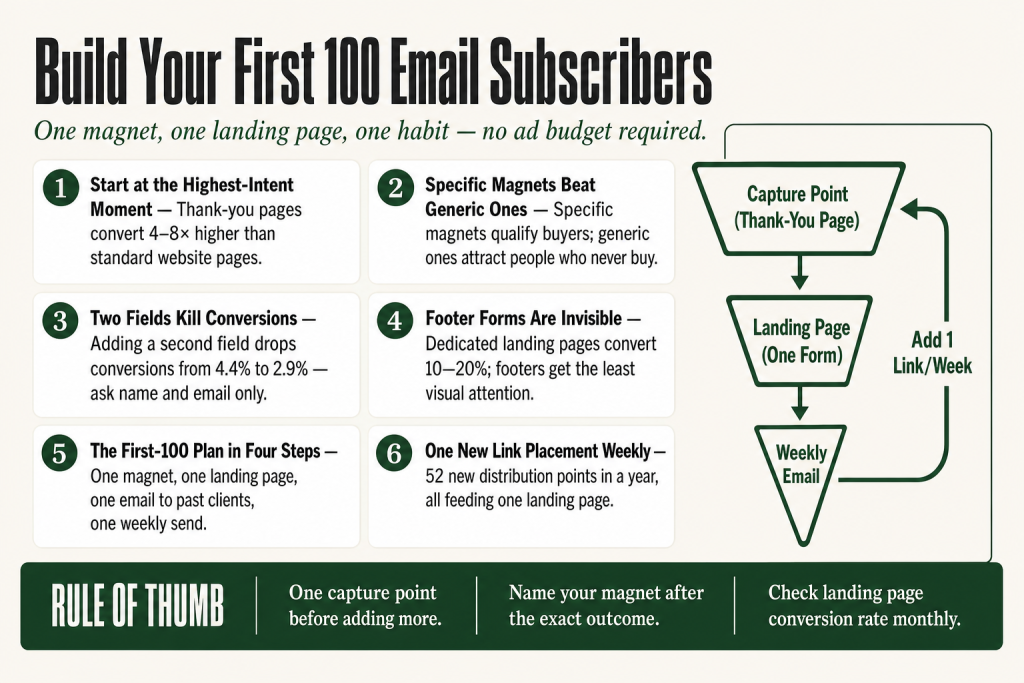
- The single best capture point when you’re starting at zero: your contact or booking confirmation page, where intent is already highest.
- The one lead magnet worth building first: a specific, outcome-named checklist or short guide that solves the exact problem your best clients ask about most.
- Where to put the signup form: above the fold on a dedicated landing page, plus embedded inside your highest-traffic page (usually your services or about page), not buried in the footer.
- The first-100-subscribers plan in plain terms: one lead magnet, one landing page, one email sent to every past client asking them to grab it, and one weekly send to keep the list warm.
- The one growth habit: add the landing page link to every outbound touchpoint every week, without exception.
- Tool to start on: Kit’s free Newsletter plan (Kit, formerly ConvertKit, rebranded in October 2024) supports up to 10,000 subscribers with unlimited email sends, unlimited landing pages, and one automation sequence at no cost. Note: the free plan requires Kit branding on emails and forms, and participation in the Recommendations feature (which shows other Kit creators’ newsletters to your new subscribers). Verify current limits and conditions at kit.com before you start.
Take this fix into your next scenario. The free Builder’s Companion Kit collects the checklists and templates that pair with this guide — so next time, you start from a template, not a blank page. Grab it free →
- Why Most Small Businesses Stall Before Subscriber 10
- The Single Best Place to Capture Your First Subscribers
- The One Lead Magnet Worth Building First
- Where to Put the Signup So People Actually See It
- Build an Email List from Scratch: The First-100-Subscribers Plan for a Service Business
- The One Habit That Keeps the List Growing
- Which Tool to Use and What to Verify Before You Start
- FAQ
To build an email list from scratch, you don’t need a content calendar, a paid ads budget, or a stack of opt-in forms covering every page of your site. You need three decisions made well: where you capture the first names, what you give them in exchange for an email address, and where you put the form so real humans actually see it. Make those three calls correctly and you can hit your first hundred subscribers before you touch anything else. Skip one and the whole thing stalls. This article gives you the plan, a worked example from a real service business type, and the one habit that keeps the list compounding after you hit that first milestone.
Why Most Small Businesses Stall Before Subscriber 10
The usual mistake is trying to build a list everywhere at once. Footer form on the website, popup on the blog, link in the Instagram bio, mention at the end of a podcast. None of them get enough attention individually to move the number. The list sits at six people for four months and the owner concludes that email doesn’t work for their business.
It’s a placement and focus problem, not an email problem. Slapping a plain signup form on a landing page won’t bring you subscribers on its own. You need a reason for someone to hand over their address, and you need to put that reason somewhere they’re already paying attention.
The other stall point is the lead magnet. Generic magnets attract generic leads. A “free marketing guide” pulls in everyone vaguely interested in the topic, including people who will never buy from you. The download happens, but nothing follows from it. Specific magnets, ones tied tightly to the exact problem your paying clients come to you with, pull in people who are one step away from becoming clients.
Fix the focus first. One capture point, one magnet, one placement. You can add complexity later. Right now, complexity is the enemy.
The Single Best Place to Capture Your First Subscribers
When you have no traffic, you have to fish where the fish already are. For a small service business starting from zero, that place is your existing client base and your post-inquiry confirmation page.
Here’s the logic. Every time someone fills out your contact form or books a discovery call, they’ve already told you they’re interested enough to take an action. That moment, the thank-you page right after they submit, is the highest-intent touchpoint in your entire funnel. Click-through rates on thank-you pages run 4 to 8 times higher than on standard website pages, a figure cited across multiple conversion data sources including Webtonic’s 2026 roundup drawing on ReConvert data. Most businesses use that page for nothing beyond a receipt. You can use it for a second ask.
Add a single line below the confirmation message: “While you wait, grab our free [specific guide] so you get the most out of our call.” Link it to your lead magnet landing page. You’re not adding friction to the inquiry process; the person has already committed. You’re giving them something useful in the gap between sending the form and hearing back from you.
This is your first capture point. It costs nothing to set up and it converts your warmest possible audience. Once that’s running, you layer in website traffic. But start here.
The One Lead Magnet Worth Building First
You need one magnet. Not five, not a full content library. One thing that takes your best client’s most common pre-hire question and answers it completely in under ten minutes of reading.
For a service business, the format that punches above its weight is a short, specific checklist or decision guide. Not a 40-page ebook. A one-to-two-page document with a clear, outcome-named title. Think “The 7 Things to Check Before You Hire a Bookkeeper” or “How to Know If Your HVAC System Is Ready for Summer: A Homeowner’s Walkthrough.” Both formats are fast to produce and fast to consume.
Why does specificity matter so much? A specific lead magnet qualifies your audience, signals your expertise, and starts a conversation before you ever speak to a prospect directly. A generic one pulls in people with no buying intent. A specific one pulls in people who are actively in the decision process your service addresses.
Two data points worth knowing as you choose your format. First, conversion rates for lead magnets range from 5% to 35% depending on the offer, according to AWeber’s analysis, and the spread is almost entirely explained by how well the magnet matches the audience’s actual problem. Second, each additional form field you add costs you subscribers: Sleeknote’s published data shows conversions drop from around 4.4% to around 2.9% when going from one input field to two, and continue falling with each field after that. Ask for a first name and email only. Nothing more.
The deeper question to answer: what’s the thing your best clients had wrong, or didn’t know, right before they hired you? That’s your magnet topic. If you’re not sure, look at the last three discovery calls you ran and find the one question that came up on all of them. That’s it.
For a deeper look at choosing and positioning a lead magnet for a service business, see Lead Magnet for Service Business: Pick the Right Problem, Make It Specific, Turn It Into a Sale.
Where to Put the Signup So People Actually See It
The footer is a trap. Eye-tracking studies consistently show that footer content receives the least visual attention of any page element, yet this is exactly where most businesses place their only signup form. Roughly half of website visitors never scroll past the first screen. A form that lives below the fold is invisible to half your audience before they’ve even made a decision about your site.
You need two placements working together.
Placement one: a dedicated landing page. This is a single page with one job: describe the lead magnet, show the form, get the email. No navigation bar pulling people away, no other CTAs competing for attention. Dedicated landing pages can achieve 10 to 20% conversion rates, compared to the typical 1 to 2% for regular pages. Kit’s free Newsletter plan gives you unlimited landing pages built into the platform, so you don’t need a separate tool or your own domain to get started. This is the URL you put everywhere: in your email signature, in your booking confirmation, in your social bio.
Placement two: above the fold on your highest-traffic page. Check your analytics. For most service businesses, that’s either the home page hero section or the services page. Place an embedded form or a visually prominent CTA button there that links to your landing page. Keep it short: one line of benefit copy, one field (email), one button. Placing a form above the fold means it is visible the moment the site loads, giving it maximum exposure to every visitor, not just the ones patient enough to reach the footer.
That’s your full placement strategy at this stage. Two spots. Add more once those two are converting consistently.
Build an Email List from Scratch: The First-100-Subscribers Plan for a Service Business
Here’s a concrete walkthrough. The business: a solo bookkeeper serving small retail shops. She has 22 past clients, a website that gets modest traffic, and no existing list.
Week 1: Build the one asset
- Write a two-page PDF: “The Monthly Numbers Every Retail Shop Owner Should Review (And What to Do When They Look Wrong).” This is the exact question she answers on every first call.
- Set up a Kit free account (the Newsletter plan). Kit, formerly ConvertKit, rebranded in October 2024. The free plan supports up to 10,000 subscribers with unlimited email sends and unlimited landing pages, plus one automation sequence, at no cost. Two things to know before you sign up: Kit branding appears on all emails and forms sent from the free plan, and the free plan requires enabling the Recommendations feature, which shows your new subscribers other Kit creators’ newsletters after they opt in. Both go away when you upgrade to Creator. Verify current conditions at kit.com before you start.
- Build a landing page inside Kit using their template library. Headline: the PDF title. Sub-head: one sentence on what they’ll be able to do after reading it. Form: first name and email only. Done.
Week 2: Activate the warm audience
- Email every past client personally. Not a mass blast, a short note: “I put together something I wish I’d given you when we started working together. Here’s the link if you want it.” That’s it. No pitch.
- Add the landing page URL to her email signature, her booking confirmation page, and her Google Business profile description.
- Post the link once to her LinkedIn with a one-paragraph explanation of what the guide covers and who it’s for.
Week 3 onward: Send one email per week
- Every Thursday, send a short email to the list. One topic, three to five paragraphs, one practical takeaway. No pitch required yet. The goal at this stage is to make the list worth being on, so that when she eventually does ask for something (a referral, a paid offer, a discovery call), the list responds.
- Every week, add the landing page link to at least one new touchpoint: a partner’s newsletter, a local business group, a speaking slot at a chamber event.
At a conservative 15% conversion rate on her warm email to 22 past clients, she gets three to four subscribers from that list alone. The landing page in her email signature and booking confirmation, combined with two to three social posts per month and the weekly email, reaches the first hundred within 60 to 90 days without a single paid ad.
Once the welcome sequence is running automatically, every new subscriber enters a three-email welcome series that delivers the PDF, shares one client result, and makes a soft offer for a discovery call. That sequence works while she’s serving clients. For the full setup guide on that sequence, see Welcome Email Sequence for Small Business: The Complete Setup Guide.
And once those subscribers are clicking and reading, the list connects naturally into the broader sales process. See How to Build a Sales Funnel Without a Team for how to turn a list into a repeatable pipeline without adding headcount.
The One Habit That Keeps the List Growing
Every tactic in this article works once. The habit is what compounds them.
The habit is this: every week, before you send your Thursday email, add the landing page link to one place it wasn’t before. One new location. That’s the whole rule.
This week it’s your email signature. Next week it’s your invoice footer. The week after, it’s a guest comment you leave in an industry Facebook group. The week after that, it’s a partnership email swap with a complementary service provider. Each placement is a small thing on its own. Over 12 months, it’s 52 new distribution points feeding the same one landing page.
The reason this habit beats campaign thinking is that campaigns end. You run a promotion, you get a spike, it fades. A distribution habit doesn’t fade because it doesn’t require a launch. It requires five minutes of attention, once a week, attached to something you’re already doing (sending the email).
One honest caveat: the landing page link habit only works if the landing page converts. Check the conversion rate every month. If it’s below 10% on targeted traffic (people who already know you), the problem is almost always the headline or the form copy, not the placement. Rewrite the headline before you add more placements.
This is also the point where an AI writing tool earns its keep. Use it to generate five alternative headlines for your landing page, then lay them out in front of you. The AI handles the drafting gruntwork and gives you options fast. You read each one, throw out the generic, pick the one that most precisely names the outcome your reader actually wants, and rewrite any of them that are close but not quite right. The AI shortens the work. What stays with you: whether any of them are worth using, which one earns the click, and whether the one you choose is honest about what the page delivers. That judgment is yours, and it should be. For the method, see How to Write Marketing Copy With AI (the Solo Operator’s Method).
Which Tool to Use and What to Verify Before You Start
For a service business building from zero, Kit (formerly ConvertKit, rebranded in October 2024) is the cleanest starting point in 2026. The free Newsletter plan supports up to 10,000 subscribers with unlimited email broadcasts, unlimited landing pages, and unlimited signup forms at no cost. You get one automation sequence on the free plan, which is exactly enough to run a welcome series for new subscribers. That’s all you need for the first hundred.
Before you rely on the free plan, know these three conditions:
- Kit branding appears on all emails and forms sent from the free plan. The free plan also requires you to enable the Recommendations feature, which shows your new subscribers other Kit creators’ newsletters after they opt in. If either of those matters to your audience, plan for the Creator plan upgrade from the start.
- Creator starts at $39 per month billed monthly (or $33 per month billed annually) for up to 1,000 subscribers. It removes Kit branding, drops the Recommendations requirement, unlocks unlimited automations, and adds native integrations with third-party tools.
- The free plan limits you to one automation sequence. Once you want separate sequences for different lead magnets or different audience segments, you’ll need to upgrade.
- Native third-party integrations are not available on the free plan. Check kit.com for the current list of integrations available at each tier before you build a workflow that depends on them.
Always verify current plan details directly at kit.com before committing, since pricing and feature limits have changed more than once in the past 18 months. The September 2025 paid-plan price increase did not affect the free Newsletter plan, but paid tiers are worth confirming before you budget for an upgrade.
If your business is already running an e-commerce component, Mailchimp’s template editor and e-commerce integrations may be a better fit, though Mailchimp’s free tier has become more restricted since early 2026. Check both against your actual workflow before choosing.
The tool matters less than the decision to start. A plain form on a free plan that goes live this week beats a perfectly designed setup that launches in November.
FAQ
how long does it take to build an email list from scratch
For a service business with an existing client base, the first 50 to 100 subscribers are reachable in 30 to 90 days if you send one personal email to past clients and activate two or three consistent placement points. Growth past that depends on how much traffic or partnership reach you can route to your landing page each week.
do I need a website to start building an email list
No. Kit’s free Newsletter plan includes hosted landing pages, so you can collect subscribers from a shared link before you own a domain or have a finished website. The landing page URL works in social bios, email signatures, and anywhere else you can paste a link.
what is the best free email marketing tool for small business in 2026
Kit’s free Newsletter plan is one of the most generous available in 2026: up to 10,000 subscribers, unlimited email sends, unlimited landing pages, and one automation sequence at no cost. The main limitations are Kit branding on emails and forms, a required Recommendations feature (which shows your new subscribers other Kit creators’ newsletters), one automation sequence, and no native third-party integrations. Verify current plan details at kit.com before starting, since paid-plan limits changed in September 2025.
how many fields should an email signup form have
First name and email only. Sleeknote’s published data shows conversions drop from around 4.4% to around 2.9% when going from one input field to two, and continue falling with each field added after that. Every additional field costs you subscribers.
where should I put my email signup form on my website
Two places: a dedicated landing page (linked from everywhere you show up) and an embedded form or CTA button above the fold on your highest-traffic page. Keep the footer form if you want, but don’t rely on it. Footer content gets the least visual attention of any page element, and roughly half of all visitors never scroll that far.
what lead magnet works best for a service business
A short, specific checklist or decision guide named after the exact outcome your client wants before they hire you. Generic guides attract people who will never buy. A magnet tied precisely to a pre-hire question your best clients ask qualifies the subscriber before the first email is sent. Consultation offers and free assessments also convert well for service businesses, at around 23% according to a 2026 analysis of lead generation forms.
Sources:
- Kit free Newsletter plan details: kit.com (verify current limits at kit.com/pricing before starting; free plan confirmed at 10,000 subscribers with unlimited sends, landing pages, and one automation sequence through multiple independent sources as of July-August 2026; free plan also requires Kit branding on emails/forms and the Recommendations feature; paid-plan pricing updated September 2025)
- Sleeknote, popup conversion rate data: field-count effect on form conversion rates (4.41% to 2.90% from one to two fields, per Sleeknote’s published popup statistics)
- AWeber, “Lead Magnet Ideas to Grow Your Email List,” April 2026: conversion rate range for lead magnets
- Webtonic / ReConvert data roundup, 2026: click-through rate multiplier on thank-you pages vs. standard pages (4-8x higher)
- MailerLite, “Best Lead Magnet Analysis of 41,000+ Forms,” April 2026: conversion rates by lead magnet format including consultation offers
- Omnisend, “Ultimate Guide to High-Converting Signup Forms,” 2026: signup form conversion benchmarks and placement guidance
- Kissmetrics, “Email Sign-Up Form Best Practices,” 2026: footer visibility data and above-fold placement guidance
- Getconverti / Converti Blog: dedicated landing page conversion rate benchmarks (10-20% vs. 1-2% for standard pages)
Brian Kasday spent forty years in direct-response marketing before rebuilding the whole operation as a one-person shop. He writes The Operator’s Library — including “Build a Complete Marketing Department” — for operators who’d rather build it themselves than wait on someone else.
Get the Builder’s Companion Kit — the free checklists and templates that pair with this guide: mmsvegas.com/resources.
This guide handles one marketing job. Build a Complete Marketing Department builds the whole department. See the manual →
More Marketing guides
Free · Marketing Operator Toolkit
Running marketing on your own?
Get the free toolkit — the templates and the expensive mistakes behind a one-person marketing department, plus a note when this guide changes.
Get the free toolkit →