
The 30-second answer
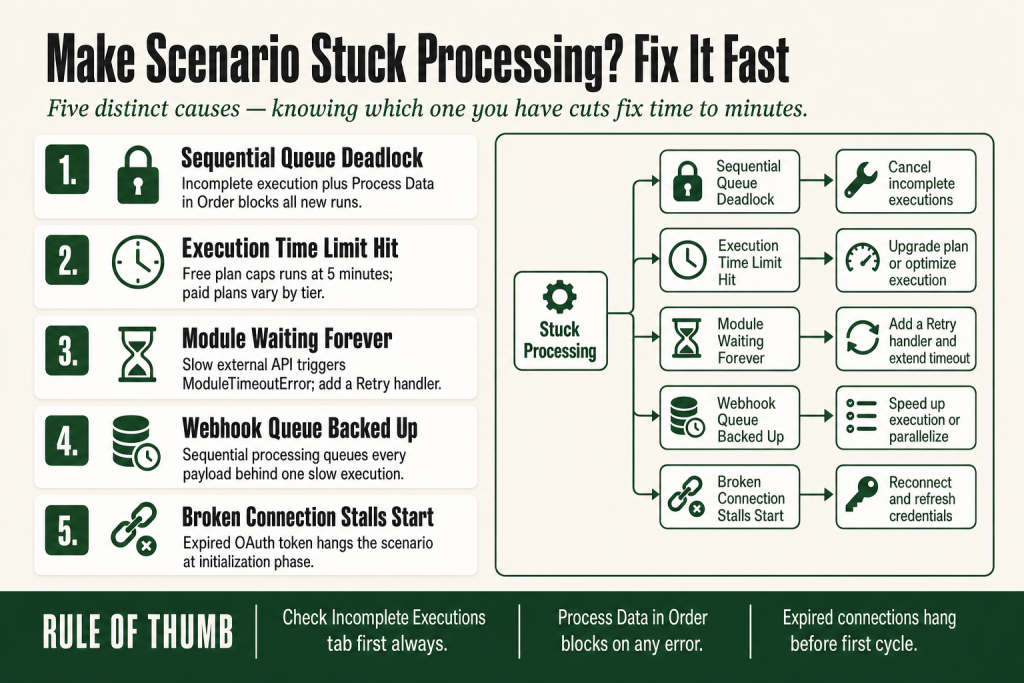
- Process Data in Order is on AND there’s a parked incomplete execution. Make won’t start new runs until you clear the queue. Go to the Incomplete Executions tab and resolve or delete the stuck entry.
- The scenario hit its plan’s maximum execution time. The free plan caps runs at 5 minutes. For paid plans, the limit varies by tier. Make community posts and Make’s own error messages frequently cite 40 minutes, but confirm the current limit for your specific plan on the Make pricing page, since these values change when plans are updated.
- A module is waiting for an external response that never comes (ModuleTimeoutError). Per-module timeout limits vary by module type and configuration. Slow or overloaded third-party APIs are the most common trigger. Check Make’s documentation for the current limit on any module you’re debugging.
- The webhook queue has backed up. With Process Data in Order enabled, a high-volume webhook scenario queues every payload sequentially. Incoming payloads pile up behind a slow execution.
- A connection problem is stalling initialization. Make verifies every connection before the first cycle. An expired or broken OAuth token causes the scenario to hang at the initialization phase.
Take this fix into your next scenario. The free Builder’s Companion Kit collects the checklists and templates that pair with this guide — so next time, you start from a template, not a blank page. Grab it free →
- What “stuck processing” actually looks like
- Cause 1: Process Data in Order is blocking new runs
- Cause 2: The scenario hit its plan’s execution time limit
- Cause 3: A module is waiting for a response that never comes
- Cause 4: The webhook queue has backed up
- Cause 5: A broken connection stalls the initialization phase
- Worked diagnostic: scenario stuck on a webhook scenario with sequential processing
- FAQ
A make scenario stuck processing is one of those problems that looks like a platform bug but almost always has a logical, fixable cause. The spinner keeps spinning, the execution counter doesn’t move, and nothing in the History tab tells you why. Before you start rebuilding modules, read this. There are five distinct causes, and knowing which one you have cuts the fix time to minutes.
What “stuck processing” actually looks like
“Stuck processing” covers at least three different visual states in Make, and it matters which one you’re seeing:
- Spinning animation in the scenario canvas, no progress. You clicked Run Once and the circle has been turning for longer than the scenario should take.
- History tab shows an execution with no end time. The run started but never finished. It may show “Processing” instead of a green or red status badge.
- The scenario is scheduled and active, but no new runs appear in History. This looks more like the scenario isn’t running at all. It’s actually blocked, not absent.
- Webhook queue shows pending payloads that aren’t being consumed. The counter climbs; the executions don’t.
Each of these points to a different root cause. Work through the sections below in order. The first two causes account for most reports in the Make community.
Cause 1: Process Data in Order is blocking new runs
This is the most common reason a make scenario stuck processing blocks silently. Process Data in Order is a setting in Scenario Settings (gear icon in the builder). When it’s on, Make finishes each execution before starting the next. (The Make community and some third-party docs use the term “Sequential Processing” for this behavior, but the setting label inside the Make builder itself reads “Process Data in Order.”)
The catch: if there is an incomplete execution sitting in the queue, Make will not start new runs until all incomplete executions are resolved. The scenario is technically active and healthy. It’s just waiting for a problem you haven’t cleared yet.
The same rule applies to webhook scenarios. When Process Data in Order is enabled, Make queues incoming webhook payloads and processes them one at a time. A single slow or stuck execution means every payload behind it waits.
Fix:
- Open the scenario. Click the Incomplete Executions tab.
- For each parked execution, click Details, read the error on the failed module, and decide: retry (if the root error is fixed) or delete (if the data is stale or you don’t need to reprocess it).
- Once the incomplete executions tab shows zero, the scenario resumes automatically.
If you don’t need strict ordering, consider whether Process Data in Order is actually required for your use case. Turning it off lets Make run executions in parallel and prevents one bad run from blocking everything else. The trade-off is that order is no longer guaranteed. See Make Incomplete Executions Piling Up for the full picture on how incomplete executions accumulate and how to clear them safely.
Cause 2: The scenario hit its plan’s execution time limit
Every Make plan has a hard cap on how long a single execution can run. The free plan caps runs at 5 minutes. For paid plans, the limit varies by tier. Make’s own error messages and community discussions frequently cite 40 minutes as a common paid-plan ceiling, but the exact value for your plan may differ. Make’s official documentation directs you to the pricing page for the confirmed limit on your plan. Check the current Make pricing page before relying on any specific number, since these figures can change when plans are updated. Neither the free-plan limit nor any paid-plan limit is something you can extend within a given plan tier.
When a scenario hits the limit, Make raises an ExecutionInterruptedError with the message “Execution was requested to stop because MAXIMUM EXECUTION TIMEOUT had elapsed.” The scenario ends, and if Store Incomplete Executions is on in Scenario Settings, the run lands in the Incomplete Executions tab.
This is easy to mistake for a freeze because the scenario can run for a long time before hitting the wall. A batch scenario iterating over hundreds of rows, or one with Sleep modules adding deliberate pauses, routinely hits this.
Fix options:
- Split the work across multiple scenarios. Scenario A processes rows 1 to 100 and writes a cursor (a progress marker stored as a data store record) to a data store. Scenario B picks up from where A left off. See Make Data Stores for a walkthrough of the cursor pattern and how to implement it.
- Reduce the batch size. If your trigger fetches records, lower the Max Results or limit field to pull fewer items per run so each run finishes within the limit.
- Move heavy API calls to a sub-scenario triggered via HTTP and run asynchronously.
- Upgrade the plan if you’re on the free tier and hitting the 5-minute wall. Paid plans give you significantly more execution time per run.
Check the Make Limits reference and Make’s current pricing page for the most up-to-date per-plan execution time values.
Cause 3: A module is waiting for a response that never comes
Make sends a request to an external service and waits. Each module has its own per-request timeout limit. The exact value varies by module type and can depend on individual module settings, so check Make’s official documentation for the specific module you’re working with rather than assuming a single number applies everywhere. If the external server doesn’t respond within the module’s timeout window, Make raises a ModuleTimeoutError.
From inside the canvas this looks like the scenario is “processing” indefinitely. In reality Make is waiting at one specific module, and once the timeout fires the run ends with an error.
Common triggers:
- An AI or LLM API taking a long time to generate a response. Response times for AI APIs vary significantly by provider, model, and prompt complexity. Check the current timeout limits with your API provider directly, since these can change and differ from Make’s own module timeout window.
- A slow or overloaded third-party server.
- A Make HTTP module calling an endpoint that hangs instead of returning an error.
Fix:
- Open the execution in History. Click on the failed module to see the error type. If it says
ModuleTimeoutError, the problem is the external service, not your scenario logic. - Add a Retry error handler on the slow module to attempt the call again if the first try times out. Retry handlers are user-configured per module, not applied by default. You attach one explicitly to the module where you expect the timeout risk.
- If the endpoint is consistently slow, consider breaking the long-running call into a separate scenario that runs independently and stores results for the main flow to pick up later.
See Make Error Handling for how to attach a retry handler to a specific module without wrapping the whole scenario.
Cause 4: The webhook queue has backed up
Webhook scenarios with Process Data in Order enabled process payloads one at a time. If your scenario is slow (say, 20 seconds per run) and payloads arrive faster than that, the queue grows faster than it drains. The scenario is technically running, but the backlog looks like it’s stuck because new items keep piling on.
Make also provides a rate-limit option for instant scenarios that lets you set how many executions can start per minute. When a scenario reaches its configured run limit, Make queues requests and processes them gradually. This is a feature, not a bug, but it can look like processing is stalled if you’re watching the queue counter in real time.
How to tell: Open the scenario. If there’s a queue counter showing pending payloads, and executions are completing (even slowly) in History, the scenario is not stuck. It’s draining at its natural pace.
Fix:
- Audit the scenario for unnecessary slow steps. Removing a Sleep module or combining API calls often cuts execution time significantly.
- If strict ordering is not required, turn off Process Data in Order. Make then processes webhooks in parallel and clears the queue much faster.
- Use the runs-per-minute throttle intentionally to avoid overwhelming downstream APIs, rather than leaving it unset and hitting 429 errors. See Make Rate Limit Error (429) for context on when this trade-off matters.
Cause 5: A broken connection stalls the initialization phase
Before the first cycle runs, Make verifies every connection in the scenario. If an OAuth token has expired or a connection credential has changed, Make can hang at initialization without surfacing a clear error in the canvas spinner. You may see a “Requesting execution” state that never advances.
This is more likely after you’ve recently changed a password, revoked an app permission, or after an app provider rotated their API tokens without notice. Scenarios copied between organizations or imported from blueprints are especially vulnerable because the connections don’t carry over.
Fix:
- Go to Connections in the left sidebar. Look for any connection that shows a warning icon or expired status.
- Click the connection and use Verify to test it. If it fails, use Reauthorize to refresh the OAuth flow.
- Return to the scenario and run it manually with Run Once to confirm it passes initialization.
For a deeper walkthrough of connection states and the difference between a broken connection and an expired one, see Make Connection Expired and Make Connection Not Working.
Worked diagnostic: scenario stuck on a webhook scenario with sequential processing
Here’s how this plays out in practice. Say you have a webhook scenario that catches form submissions and writes to a CRM. One morning it’s active, the queue shows 14 pending payloads, and nothing is moving.
Step 1: Check the Incomplete Executions tab. You see one entry from two days ago. It failed at the CRM module with a ConnectionError. Process Data in Order is on, so Make has been refusing to start new runs ever since.
Step 2: Fix the root cause first. Go to Connections, find the CRM connection, and reauthorize it. Run the scenario once manually to confirm it completes cleanly.
Step 3: Resolve the stuck execution. Go back to the Incomplete Executions tab. Click Details on the parked entry. Click the warning icon on the CRM module. Because the connection is now fixed, click Retry. The execution completes.
Step 4: Watch the queue drain. With no incomplete executions blocking the queue, Make starts processing the 14 pending payloads in order. Each one appears in History within seconds.
Total fix time: under five minutes. The scenario wasn’t broken. It was waiting for you to clear a single error from two days ago.
If the root cause is a recurring connection issue rather than a one-off, read Make Connection Expired for how to set up monitoring so you catch it before the queue backs up again.
FAQ
make scenario stuck processing won’t finish
The most common cause is an incomplete execution blocking the queue, especially when Process Data in Order is enabled. Check the Incomplete Executions tab first. If it’s empty and the scenario still won’t finish, look for a MaximumExecutionTimeout error in History, which means the run exceeded your plan’s time limit.
how long can a make scenario run before timeout
The free plan caps executions at 5 minutes. For paid plans, the limit varies by tier. Make community posts and Make’s own error messages frequently cite 40 minutes as a common ceiling, but Make can update these limits when plans change. Verify the exact value for your plan on Make’s current pricing page before relying on any figure you read elsewhere. If your scenario regularly approaches that ceiling, split the work across multiple scenarios.
make scenario says processing but nothing in history
If the execution spinner is active but no entry appears in History yet, the scenario is still in its initialization phase, verifying connections before the first cycle runs. A broken or expired connection is the most likely cause. Check your Connections list for any that show a warning or expired status.
make webhook queue not processing records
With Process Data in Order enabled, a single incomplete execution blocks all queued webhook payloads. Clear the Incomplete Executions tab first. If there are no incomplete executions but the queue still isn’t draining, check whether the scenario is actually active (the toggle should be green) and try toggling it off and back on to prompt it to resume.
make scenario stuck after deleting incomplete executions
Deleting the incomplete executions should release the block, but occasionally a page refresh is needed before Make recognizes the queue is empty. Reload the scenario page, confirm the Incomplete Executions tab shows zero, then toggle the scenario off and back on to prompt it to resume scheduling.
make scenario processing vs incomplete execution, what is the difference
A stuck processing scenario is still mid-run or blocked from starting new runs. An incomplete execution is a run that has already ended with an error and is being held for review or retry. The two are related: an incomplete execution can cause new runs to appear stuck if Process Data in Order is on.
Sources:
Sources: Make Help: Scenario Settings (Process Data in Order); Make Help: Options Related to Incomplete Executions; Make Help: Incomplete Executions (Store Incomplete Executions setting); Make Help: Fix Errors and Warnings (ModuleTimeoutError); Make Help: Scenario Execution, Cycles, and Phases; Make Help: Scenario Rate Limits for Instant Triggers; Make Pricing (execution time limits by plan); Make Community threads on sequential processing deadlocks, execution timeout limits, and webhook queue behavior (various dates, 2023 to 2026).
Brian Kasday spent forty years in direct-response marketing before rebuilding the whole operation as a one-person shop. He writes The Operator’s Library — including “The Missing Manual for Make” — for operators who’d rather build it themselves than wait on someone else.
Get the Builder’s Companion Kit — the free checklists and templates that pair with this guide: mmsvegas.com/make-resources.
This guide solves one Make problem. The Missing Manual for Make covers the production system. See the manual →
More Make guides
Free · Make Operator Toolkit
Running scenarios in Make?
Get the free operator toolkit — production checklists and the fixes that keep scenarios alive under real traffic, plus a note when this guide changes.
Get the free toolkit →