
The 30-second answer
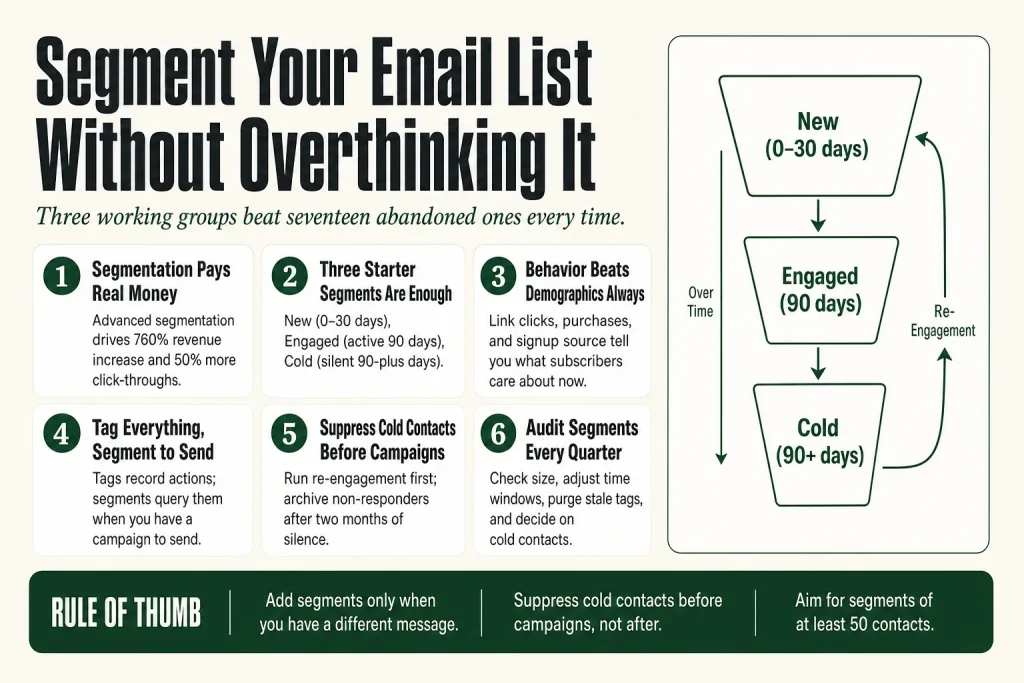
- Start with three segments: new subscribers (under 30 days), engaged contacts (opened or clicked in the last 90 days), and cold contacts (no activity in 90-plus days).
- Let behavior drive the work: your platform can move contacts between segments automatically based on opens, clicks, and purchases.
- Add segments only when you have a different message to send, not because the feature exists.
- Use tags to record what people care about, then build segments from tag combinations when you are ready.
- Suppress cold contacts before campaigns, not after, to protect deliverability.
- Audit your segments quarterly so small lists stay usable and stale criteria do not silently break your targeting.
Take this fix into your next scenario. The free Builder’s Companion Kit collects the checklists and templates that pair with this guide — so next time, you start from a template, not a blank page. Grab it free →
- Why Segmentation Pays (and Where It Goes Wrong)
- The Three Starter Segments Every List Needs
- Behavioral Segmentation Beats Demographic Segmentation
- Tags vs. Segments: What the Difference Actually Means for You
- How to Segment Your Email List: A Worked Walkthrough
- Collect Better Data Without Annoying Your Subscribers
- When to Add More Segments (and When Not To)
- Keeping Your Segments Clean Over Time
- Where AI Fits Into Your Segmentation Workflow
- FAQ
If you want to know how to segment your email list, the honest answer is: you only need three working groups to beat a single unsegmented blast. Most solo operators either skip segmentation entirely or go so deep into conditions and sub-tags that they freeze up and stop sending. Both mistakes cost you. Segmented emails can achieve significantly higher open rates and click-through rates than non-segmented emails. The problem is not the concept. It is the implementation advice that tells you to build seventeen segments before you send your next campaign. This article gives you the short version: what actually matters, in what order, and how to set it up without turning email into a part-time job.
Why Segmentation Pays (and Where It Goes Wrong)
The math is straightforward. Marketers using advanced segmentation see a 760% increase in revenue, and segmented email campaigns generate roughly 30% more opens and 50% more click-throughs than non-segmented campaigns. That is not because the segments are sophisticated. It is because a relevant message beats an irrelevant one every time.
Where it goes wrong is over-engineering. Solo operators read about micro-segmentation and build conditions that require data they do not have yet. They end up with six segments, two of which are empty and one that overlaps with another. Then they spend thirty minutes figuring out which one to send to, give up, and blast the whole list anyway. The point of segmentation is to send a better email faster, not to create a database project.
Begin with one or two segmentation criteria, measure results, then add complexity. A simple segment like “purchased in last 90 days” is better than a complex segment you never actually use. That is the rule this article follows.
The Three Starter Segments Every List Needs
Before you touch any advanced features, build these three. They require almost no data you do not already have, and they solve the biggest problem on most small lists: sending the same message to people at completely different stages of the relationship.
1. New Subscribers (0 to 30 days)
Someone who signed up yesterday needs a different experience than someone who has been on your list for two years. New subscribers are in orientation mode. They want to know what you do and why it matters to them. Blast them with the same promotional email you send your old list and you lose them before the relationship starts. Point new subscribers at your welcome sequence and hold off on hard offers until they have had at least a few emails from you. If you do not have a welcome sequence yet, the article on welcome email sequences for small businesses walks through the full setup.
2. Engaged Contacts (opened or clicked in the past 90 days)
This is your working list. These people are paying attention. You can segment by subscriber engagement, and looking at email metrics like open and click-through rates helps you understand each subscriber’s level of interest in your brand. When you have a new offer, a promotion, or important news, this is the segment that gets it first and gets it most frequently.
3. Cold Contacts (no activity in 90-plus days)
Cold contacts are not necessarily gone forever. But emailing them at the same frequency and with the same content as your engaged list drags down your overall deliverability, because inbox providers notice when people stop opening your mail. Launch re-engagement campaigns to dormant subscribers, and prune your list of chronically inactive contacts. A re-engagement sequence with one specific, high-value offer is the right move here. If they still do not respond, suppress them. Your deliverability is worth more than the vanity of a large subscriber count. For the full picture on open rate health, see the guide on fixing low email open rates.
Start with three to five core segments and build a strong foundation before adding complexity. You can always refine later as you learn more about your audience.
Behavioral Segmentation Beats Demographic Segmentation
Dividing your list by age, gender, or location is Email Segmentation 101, but it is not enough. Enrich your data with behavioral and psychographic insights instead. Demographics tell you who someone is. Behavior tells you what they care about right now.
For a solo operator, behavioral data is easier to collect than demographics because your platform already tracks it. Every email platform records opens, clicks, and (if connected to your store) purchases. You do not need to ask anyone to fill out a form. You just need to use the data your platform is already sitting on.
The most useful behavioral signals are:
- Link clicks: what topic or offer did they click? Someone who clicked on your pricing page is different from someone who clicked on a how-to article.
- Purchase history: are they repeat buyers, one-time customers, or high spenders? Each group responds to a different offer structure.
- Signup source: which lead magnet or landing page did they come from? That tells you which problem brought them in. For help building the right entry point, the guide on lead magnets for service businesses covers this in full.
- Sequence completion: did they finish your welcome sequence or drop off partway through? Where they stopped often tells you exactly what friction exists.
Demographic segmentation has its place, especially if you serve multiple distinct audiences (say, B2B clients and individual consumers). But start with behavior. It is immediately actionable and does not require you to collect additional data you may not have.
Tags vs. Segments: What the Difference Actually Means for You
Most modern email platforms use both tags and segments, and the distinction matters when you are deciding how to organize your list. Getting this wrong means either rebuilding your tagging system in six months or creating segments you cannot properly query.
Tags are labels you attach to a contact. They record facts about that person: what they bought, what they clicked, what form they submitted, what interest they expressed. Tags are the raw data layer. Tags in Kit (formerly ConvertKit) are action-based labels that track subscriber behavior and engagement.
Segments are queries. A segment says: show me all contacts who have tag X and also opened an email in the last 60 days. In Mailchimp, segments are dynamic filters that update automatically as contact data changes.
The practical rule: tag everything, segment for sending. Apply a tag every time a meaningful action happens. Build a segment when you have a campaign to send and need to define exactly who gets it. This keeps your tagging system rich without creating dozens of segments you maintain but never use.
In Mailchimp, the plan you are on determines how much logic you can stack. According to Mailchimp’s official documentation, for anyone on a Free or Essentials Marketing plan, each segment can include up to 10 conditions and use one and/or logic operator. Anyone on a Standard, Premium, or Legacy plan with Mailchimp Pro can use the advanced segment builder, where each segment can have unlimited conditions with nested and/or logic operators. Note: Mailchimp’s own help pages still reference a “Legacy plan with Mailchimp Pro” tier alongside current plans, so if your account predates recent restructuring, verify your specific plan’s capabilities in your account settings. In Kit, your subscribers all live in one list, and you use tags and segments to organize them. Kit segments are dynamic groupings that update automatically when subscribers meet or no longer meet the segment’s filter conditions. It is a clean mental model: tag the action, then build the segment from tag combinations.
How to Segment Your Email List: A Worked Walkthrough
Here is how you build the three starter segments in Mailchimp. The logic translates to Kit, ActiveCampaign, and most other tools, even if the UI labels differ. Verify the current navigation in your platform’s own help docs before you start, because email platforms update their interfaces regularly.
Step 1: Map your data before you click anything
Open a blank document and answer three questions: Who are your distinct audiences? What do they need from you at different stages? What actions in your platform signal those stages? This takes fifteen minutes and saves you from rebuilding segments later because the criteria were wrong from the start.
Step 2: Create your New Subscribers segment
In Mailchimp, click Audience, then click Segments, then click Create new segment. Set the condition to Date Added, then choose “is within the last” and enter 30 days. Save it as “New Subscribers.” Mailchimp recalculates segment membership continuously, so anyone who joins tomorrow is automatically included.
In Kit, go to the Subscribers page, click “All Segments” in the right sidebar, click the + icon to create a new Segment, add a filter for Date Subscribed within the last 30 days, and save.
Step 3: Create your Engaged segment
In Mailchimp, add two conditions joined by “or”: Campaign Activity opened is within the last 90 days, or Campaign Activity clicked is within the last 90 days. This catches both click-heavy and open-heavy contacts. Save it as “Engaged – Last 90 Days.”
In Kit, create a segment using engagement-based tags (for example, an “Engaged 90 days” tag applied by an automation when a subscriber opens three or more emails in 90 days) or use Kit’s built-in “Cold subscribers” filter inversely to find active ones. Verify the exact filter labels in Kit’s current documentation, as the interface updates periodically.
Step 4: Create your Cold segment
In Mailchimp, set Campaign Activity opened is not within the last 90 days, and Campaign Activity clicked is not within the last 90 days. Add a condition to exclude contacts added in the last 30 days, so new subscribers are not flagged as cold before they have had a chance to engage. Save as “Cold – 90 Days No Activity.”
In Kit, the platform has a built-in “Cold subscribers” filter you can select directly when building a segment. Check Kit’s documentation for the current definition of “cold” in your account, since the threshold can vary.
Step 5: Automate tags as you go
Most email platforms can automatically add or remove contacts from segments based on behavioral triggers like viewing a page or clicking an email. This saves you from having to manually update your lists. Set up tag rules now, even if you only have three tags. For example: tag anyone who clicks a link in a specific campaign with the topic name. Tag anyone who completes a purchase. Tag anyone who clicks your pricing page if your platform allows website tracking. Each tag becomes a future segmentation option.
Step 6: Suppress cold contacts before your next campaign
Do not delete cold contacts yet. Suppress them. Suppression means they exist in your platform but do not receive your campaign. Run your re-engagement sequence for cold contacts first. Anyone who opens or clicks during that sequence moves back to engaged. Anyone who does not gets archived after two months of silence.
Collect Better Data Without Annoying Your Subscribers
The biggest data collection mistake is asking for everything on the signup form. Long forms kill conversion rates. Short forms leave you with email addresses and nothing else. The fix is progressive profiling: collect a little at signup, then earn the rest over time.
Start with just an email address and perhaps a name. Then prioritize the additional data points that would most improve your segmentation, and identify natural touchpoints to gather each data type.
In practice, this looks like:
- Signup form: first name and email only.
- First email: ask one question, like “what is the biggest challenge you are working on right now?” Use a link-based answer so their click tags them automatically.
- Purchase confirmation: ask for the data that improves your product or service delivery (company size, use case, etc.).
- Post-purchase survey: ask what they almost bought instead, and what made them choose you. This is also where you collect the voice-of-customer language that makes future emails sound less like marketing. The guide on collecting customer testimonials covers how to run this conversation well.
Each piece of data you collect this way goes into a tag or custom field, which means your segments get more specific over time without any extra effort from you on send day.
When to Add More Segments (and When Not To)
The rule is simple: add a segment when you have a genuinely different message to send. Not because you have the data, not because a blog post recommended it, and not because your platform makes it easy. When you catch yourself writing a campaign and thinking “half this list does not need this,” that is the moment to create a new segment.
Common reasons to add a segment beyond the starter three:
- You serve two clearly different customer types with different problems and different vocabularies. Service buyers and product buyers, for instance, or B2B and B2C audiences.
- You have a product launch aimed at one part of your list, not all of it. The product launch sequence guide covers how to structure this messaging, and the right segment is the delivery vehicle for it.
- You want to run a re-engagement sequence without bothering your active subscribers.
- You have abandoned cart data and want to target non-purchasers specifically. The abandoned cart email copy guide covers what to write for each of those emails.
Reasons not to add a segment:
- A segment of 10 people might be perfectly targeted, but it may not be worth the effort to create unique content. Aim for segments that represent at least 5 to 10 percent of your list, or 50-plus contacts, whichever is smaller.
- You do not have a different email to send yet. Build the email first. Then build the segment.
- You are avoiding sending by planning instead. This one is common. If you have been “setting up segmentation” for two weeks without a campaign going out, ship something to your engaged list and audit your system after.
Keeping Your Segments Clean Over Time
Segments drift. Someone who was active in Q1 goes cold in Q3. A tag you applied eighteen months ago no longer reflects what that person cares about. Outdated or duplicate data can ruin even the best segmentation strategy. Audit your email list regularly: remove inactive subscribers who have not engaged in a long time.
A quarterly segment audit takes about forty-five minutes and covers:
- Segment size check: is each segment still large enough to be worth a distinct campaign? If your “B2B buyers” segment has dropped to eight contacts, it may be time to merge it with a broader group or wait until it grows.
- Criteria review: does the 90-day window still make sense for your sending frequency? If you only email monthly, 90 days captures a much smaller slice of engaged subscribers than it would for a weekly sender. Adjust the window to reflect your actual cadence. The email cadence guide helps you nail down the right sending frequency first.
- Tag cleanup: remove or consolidate tags that were one-off experiments and now just create noise in your contact records.
- Cold list decision: contacts who have not opened anything in six or more months need a final re-engagement attempt or a clean archive. Keeping them active hurts deliverability more than it helps your list size.
It may take some time for certain adjustments to your account, such as audience changes or adding a new integration, to be reflected in your segments, so check that segments are pulling accurate counts after any major account change before you send.
Where AI Fits Into Your Segmentation Workflow
AI can assist at two points in your segmentation workflow: drafting copy variations for each segment and surfacing patterns in your performance data. What it cannot do is make the strategic call about which segments to create. That requires knowing your business, your customers, and what you are trying to accomplish. You make those calls. The AI handles the legwork you hand it.
Specific places where AI saves time:
- Drafting segment-specific copy variations. Once you know a segment (say, “one-time buyers” vs. “repeat buyers”), you can prompt an AI tool to draft two versions of a campaign email that speaks to each group’s different mindset. You review, you edit, you approve, you send. The AI does not supply the copywriter’s instinct or your knowledge of your customers. It cuts blank-page time and nothing more. The guide on writing marketing copy with AI covers exactly this workflow.
- Summarizing performance data. After a campaign, you can paste open rate and click rate data by segment into an AI tool and ask it to flag which segment underperformed and suggest one possible reason. Verify the reasoning yourself before acting on it. The AI does not know what changed in your business last week.
- Suggesting tag names and structures. If you are building a tagging taxonomy from scratch, asking an AI for a proposed structure based on your product and audience saves thirty minutes of whiteboarding. You still decide what to keep.
What AI will not do reliably: tell you which customers are about to churn, predict who will buy, or substitute for the qualitative knowledge you have built up from actually talking to your customers. Predictive segmentation features exist in some platforms (Mailchimp offers them on Standard and above), but for a solo operator they are a distraction until your basic three-segment system is running cleanly. Your judgment stays in charge. That is not a limitation to work around. It is the whole point.
FAQ
how to segment email list for beginners
Start with three segments: new subscribers (added in the last 30 days), engaged contacts (opened or clicked in the past 90 days), and cold contacts (no activity in 90-plus days). Most email platforms let you build these with two or three conditions each and will auto-update them as contacts behave. Get these working before you add anything else.
how many email segments should I have
Three to five is the right number for most solo operators. Add a new segment only when you have a genuinely different message to send to that group. A segment of fewer than 50 contacts is rarely worth the effort of creating unique content for it.
does email segmentation really improve open rates
Yes, consistently. Segmented campaigns tend to achieve meaningfully higher open rates and click-through rates than unsegmented blasts, with multiple data sources pointing to double-digit improvements in opens and larger gains in clicks. The exact lift depends on how relevant your segments are to the messages you send them.
what is the difference between tags and segments in email marketing
Tags are labels applied to individual contacts that record what they have done or who they are. Segments are queries that group contacts based on one or more conditions, including tags. Tag everything as contacts take actions, then build segments when you need to send a campaign to a specific slice of your list.
how do I segment my email list without a lot of data
Use the data your platform already collects automatically: signup date, email opens, and link clicks. Those three data points are enough to build the starter segments. Add tags manually or through automation as contacts take actions, and your data depth grows naturally over time without requiring surveys or long signup forms.
how often should I clean up my email segments
A quarterly audit is usually enough. Check that each segment is still large enough to warrant unique content, adjust any time-window criteria if your sending frequency has changed, clean up one-off tags, and archive contacts who have not engaged after a final re-engagement attempt. Do not let stale segments run unchecked for more than six months.
Sources:
Sources consulted: Mailchimp official documentation (mailchimp.com/help/getting-started-with-segments/, mailchimp.com/help/create-and-send-to-a-segment/, mailchimp.com/help/about-advanced-segmentation/, mailchimp.com/help/save-and-manage-segments/); Kit (formerly ConvertKit) official documentation (help.kit.com/en/articles/4257108-tags-and-segments-in-kit-and-when-to-use-which); Sender.net Email Marketing Statistics 2026; Mailotrix Email Open Rate Statistics 2026; HubSpot Email List Segmentation guide; Ian Brodie Ultimate Email List Segmentation Guide; EmailToolTester Kit vs ActiveCampaign 2026 comparison; MailToolScout ActiveCampaign vs ConvertKit 2026.
Brian Kasday spent forty years in direct-response marketing before rebuilding the whole operation as a one-person shop. He writes The Operator’s Library — including “Build a Complete Marketing Department” — for operators who’d rather build it themselves than wait on someone else.
Get the Builder’s Companion Kit — the free checklists and templates that pair with this guide: mmsvegas.com/resources.
This guide handles one marketing job. Build a Complete Marketing Department builds the whole department. See the manual →
More Marketing guides
Free · Marketing Operator Toolkit
Running marketing on your own?
Get the free toolkit — the templates and the expensive mistakes behind a one-person marketing department, plus a note when this guide changes.
Get the free toolkit →