
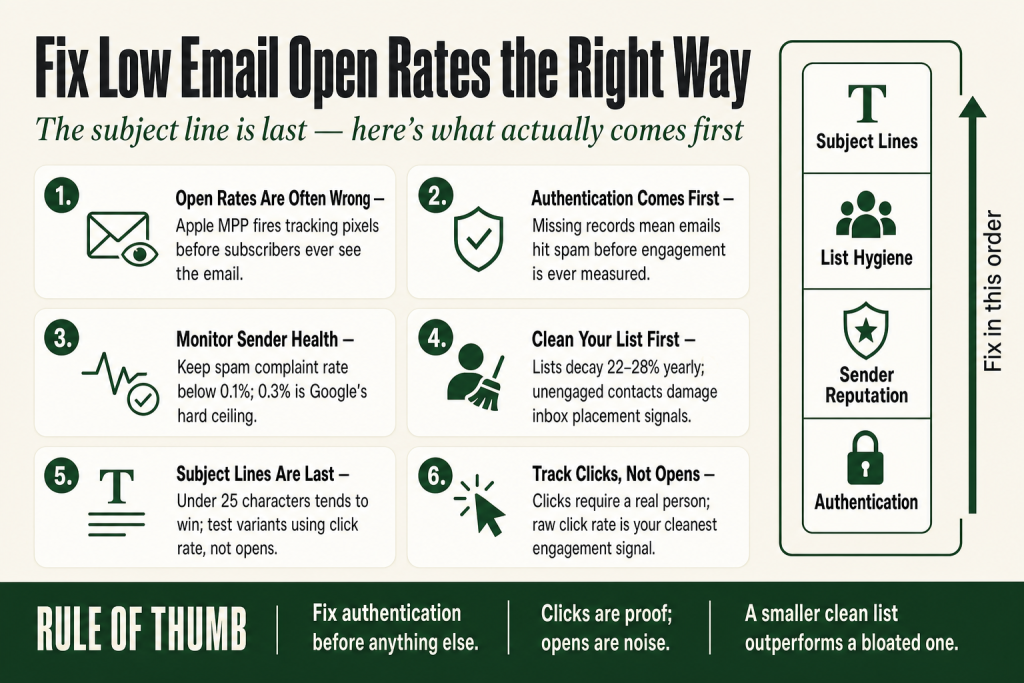
The 30-second answer
- Check authentication first. SPF, DKIM, and DMARC missing or misconfigured means your emails may not reach the inbox at all, no matter how good the subject line is.
- Then check your sender reputation. Set up Google Postmaster Tools and review your compliance status and spam-complaint rate before touching anything else.
- Clean your list before your next send. Mailing a large block of unengaged contacts tanks your engagement signals and can worsen your reputation over time.
- Understand what your open rate actually measures. Apple Mail Privacy Protection inflates reported opens for a meaningful share of many lists, though the exact scale varies by ESP and audience. Click rate is now a more honest signal.
- Fix the subject line last. If authentication, reputation, and list hygiene are solid, subject line work moves the needle. Before that, it’s polishing a car that won’t start.
- Track clicks, not opens. Clicks are unaffected by privacy proxies and tell you whether your email is actually doing its job.
Take this fix into your next scenario. The free Builder’s Companion Kit collects the checklists and templates that pair with this guide — so next time, you start from a template, not a blank page. Grab it free →
- Why Your Open Rate Is Probably Wrong Before You Even Start
- Fix 1: Authentication. Start Here, Every Time.
- Fix 2: Check Your Sending Health in Google Postmaster Tools
- Fix 3: Clean Your List Before the Next Send
- Fix 4: Low Email Open Rates From Subject Lines, and How to Actually Test Them
- Before and After: One Campaign Fixed Top to Bottom
- What to Track Instead of Opens
- FAQ
Low email open rates feel like a subject line problem, so that’s where most people look first. Swap a few words, run an A/B test, and wait. The number barely moves. That’s because most of the time, the subject line isn’t the culprit. Your emails may be landing in spam, or getting pre-fired as “opened” by a privacy proxy, or dragging a reputation score built up by six months of mailing a list full of ghosts. This guide skips the theory and gives you a prioritized fix list you can start on today, with the biggest deliverability levers at the top and subject line work where it actually belongs: near the bottom.
Why Your Open Rate Is Probably Wrong Before You Even Start
Before you diagnose low email open rates, you need to know whether the number you’re looking at reflects reality. It often doesn’t.
Apple’s Mail Privacy Protection (MPP), introduced in 2021, works by preloading email content through Apple’s own proxy servers before a subscriber ever touches the message. That fires your tracking pixel. Your email platform records an open. The subscriber may never have looked at it. Reading your marketing data correctly means knowing when a metric is trustworthy and when it isn’t, and right now, opens are one of the least trustworthy metrics in email.
The scale of this distortion is real, but it isn’t uniform. Apple accounts for a large share of the email client market in many lists, but how many of your reported opens are phantom proxy fires depends on your specific audience, your ESP’s reporting settings, and whether MPP-capable Apple Mail versions dominate your subscriber base. One analysis of B2C campaigns found a majority of subscribers using MPP-capable Apple Mail, but your list may look different. The point isn’t a precise universal number. The point is that opens are compromised enough that you shouldn’t treat them as ground truth.
The practical result runs in two directions. If your platform includes MPP opens by default, your open rate looks high and you feel fine while real engagement is quietly collapsing. If your platform excludes them, your rate looks low and you panic. Neither number tells you what you actually want to know: did a human read this?
What MPP does not touch is clicks. A click requires a real person to tap or click a link. That makes click rate the metric to watch. Use it as your primary engagement signal from here forward. Your ESP’s click-to-open rate (CTOR) is similarly useful but be aware it also uses the inflated open count as its denominator, which can make it look artificially low. Raw click rate is cleaner.
One practical step: check your ESP’s settings. Some platforms now let you toggle whether Apple MPP opens are included in your campaign reports. Knowing which mode your dashboard is in matters before you draw any conclusions.
Fix 1: Authentication. Start Here, Every Time.
If your SPF, DKIM, and DMARC records aren’t set up correctly, your emails can be rejected, quarantined, or quietly sorted to spam before any engagement signal is ever recorded. This is the fastest way to have low email open rates that have nothing to do with your content.
Think of these three records as a package of credentials your mail has to show at the door. SPF tells receiving servers which services are authorized to send on your behalf. DKIM cryptographically signs each message so the receiving server can verify it wasn’t tampered with in transit. DMARC tells receiving servers what to do if either check fails, and sends you reports so you can see what’s happening.
Google’s email sender guidelines, which took effect February 1, 2024, require all senders to Gmail accounts to have at least SPF or DKIM in place. For bulk senders (Google defines this as senders of 5,000 or more messages per day to personal Gmail accounts), both SPF and DKIM are required, along with a DMARC record of at least p=none. Enforcement tightened progressively, with harder rejections for non-compliant bulk senders beginning in November 2025. If you’re below the 5,000-message bulk-sender threshold, the formal requirement for DMARC doesn’t apply in exactly the same way, but having all three records in place is still the right call: authentication failures damage your sending health and can lead to rate limits or rejections at any volume. Getting these records in place is only the beginning. Ongoing monitoring, correct DNS alignment, and coordination with your ESP all add complexity that can take time to sort through. Don’t expect a one-afternoon fix if anything is misconfigured.
Here’s how to check where you stand right now:
- Go to MXToolbox.com. Enter your sending domain and run the SPF, DKIM, and DMARC lookups. Look for any red or warning indicators. If records are missing or misconfigured, that’s your first fix.
- Check alignment. Your DKIM signing domain should match the domain in your From address. A mismatch breaks DMARC alignment even if all three records technically exist.
- Set DMARC to
p=nonefirst if you’re starting from scratch. This monitoring-only mode sends you reports without affecting delivery. Once you’ve confirmed SPF and DKIM are working correctly, you can tighten the policy toquarantineorreject. - Your ESP’s setup guide is the right reference for DKIM. Each platform generates keys differently. Follow their specific documentation rather than a generic tutorial, and add the DNS records they give you exactly as written.
Authentication is the foundation everything else builds on. If you’re uncertain whether your records are correctly aligned end-to-end, it’s worth getting a second set of eyes from someone with deliverability experience, especially before a high-stakes send.
Fix 2: Check Your Sending Health in Google Postmaster Tools
Authentication tells inbox providers your emails are legitimate. Sender health tells them whether people actually want them. Your domain accumulates a track record based on engagement signals, spam complaints, and bounces. Poor signals mean your mail gets filtered regardless of how good your subject line is.
Google Postmaster Tools v2, which launched in 2024 and became the default interface when Google began redirecting all users to it starting September 30, 2025, is the most useful free tool for monitoring how Gmail handles your sending domain. Set it up at postmaster.google.com and verify your sending domain. Note: Google’s own live documentation states that the v1 web interface deprecation has been postponed in response to sender feedback, so v1 may still be accessible for some accounts. The v1 API endpoints, however, stopped returning data as of late 2025. Treat v2 as your working interface regardless.
The key change from v1 to v2: the familiar Domain Reputation and IP Reputation dashboards (which showed High, Medium, Low, and Bad labels) are gone. In their place, v2 centers on a Compliance Status dashboard that checks whether your domain meets Gmail’s sender requirements across specific items including SPF, DKIM, DMARC, one-click unsubscribe, and spam rate. In early June 2026, Google added a Deliverability Analysis section to the Compliance Status page, which gives plain-language verdicts on whether Gmail users are engaging positively with your mail. Both sections together give you a more actionable picture than the old reputation scores did.
Two things to watch closely:
- Compliance Status. Flags specific failures across sender requirement checks. A ‘Needs work’ result is actionable. Fix the flagged item before the next send.
- Spam rate. Google’s official guidance calls for staying below 0.1%, with 0.3% as the hard ceiling where enforcement and eligibility for mitigation support both apply. Watch this number after every campaign send.
A few things to know about how Gmail calculates spam rate: it’s calculated daily, dividing user-reported spam complaints by emails that reached the inbox, not total sent. Emails already routed to spam automatically don’t enter the calculation because those recipients never saw the message. That means your Postmaster number can look acceptable even while a meaningful share of your mail is already being sorted to spam before anyone sees it.
Check Postmaster Tools before your next send, and check it after every campaign. If you see the spam rate approaching the warning threshold, pause and investigate before the next send. Waiting until enforcement kicks in means the damage is already compounding.
One honest caveat: Postmaster Tools shows data only for sends to Gmail addresses and does not reflect how Outlook, Yahoo, Apple Mail, or any other provider is handling your mail. Think of it as one important signal, not the complete picture of your deliverability health. For broader visibility, look at Microsoft’s SNDS for Outlook and your ESP’s complaint reporting for other providers. Also keep in mind that low-volume senders may see limited data or empty panels, since some dashboards require sufficient send volume to populate.
Fix 3: Clean Your List Before the Next Send
Email lists decay naturally. One widely cited estimate puts list degradation at roughly 22 to 28% per year as people change addresses, abandon inboxes, or just stop caring. Sending to that dead weight has a direct cost beyond wasted effort: it signals to inbox providers that your mail isn’t wanted.
The mechanism works like this. Mailbox providers track engagement at the domain level. When a large portion of your list ignores every email you send, providers read that as a signal your mail may be low quality. Over time, that can contribute to more of your mail being filtered to spam, which means even engaged subscribers see fewer of your messages. Lower visibility produces lower engagement. Lower engagement produces worse filtering. The pattern tends to compound.
A sunset policy helps interrupt it. The concept is simple: identify subscribers who haven’t clicked anything in a defined window, run one re-engagement attempt, then suppress the non-responders. Most practitioners use a 90 to 180-day no-click window as the inactivity threshold. The right number for your list depends on your sending frequency and your product’s natural purchase cycle.
Important nuance for 2026: don’t use opens as your only inactivity signal. Because of Apple MPP, an “open” from a portion of your list may be a phantom proxy fire, not a real read. The exact proportion varies by audience, but the risk is real enough that clicks are a safer primary engagement indicator when building your inactive segment.
The re-engagement sequence before removal is three emails, not one. The first acknowledges the silence and asks if they still want to hear from you. The second offers a reason to stay: useful content, a relevant offer, or a preference-update option. The third is a direct “we’re removing you” notice that lets them opt back in. Anyone who doesn’t click through any of those three gets suppressed.
One thing that often surprises operators: shrinking your list can improve your metrics, not hurt them. A smaller, engaged list tends to produce better engagement signals because inbox providers reward those signals. Your ESP bill may drop too, since most platforms charge by contact count. Results vary based on your list composition and ESP, so treat this as a likely improvement, not a guaranteed one.
List hygiene isn’t a one-time task. Build it into a recurring calendar review so it becomes a habit, not a crisis fix. For more on blocking time for recurring maintenance tasks like this, the guide on building a marketing calendar covers the workflow.
Fix 4: Low Email Open Rates From Subject Lines, and How to Actually Test Them
Subject lines matter, but they’re the last thing to optimize, not the first. If your emails are landing in spam or your domain health is damaged, no subject line will rescue you. Once the infrastructure is solid, subject line work genuinely moves the number.
A few things the data consistently shows:
- Shorter usually wins for campaign emails. Subject lines under about 25 characters tend to drive higher open rates on campaign sends. The reason is partly mobile: over 60% of emails are opened on mobile devices, and longer subject lines get cut off before the reader reaches the value.
- The preheader is half the subject line. The preview text that follows the subject in most inboxes is prime real estate most senders leave to chance. Treat it as the second sentence of a two-part hook. State the topic in the subject, hint at the payoff in the preheader.
- First-name personalization alone doesn’t move the number much. Personalization works when it’s tied to genuine segmentation, not just a merge tag. An email that’s actually relevant to this subscriber’s situation outperforms a generic email addressed to their first name every time.
- Spam-trigger words and all-caps still matter. Excessive exclamation points, all-capital subject lines, and certain high-pressure phrases increase the chance of spam filter hits at the content layer, independent of your authentication and sending health.
Test one variable at a time. If your ESP supports A/B subject line testing, use it, but set the winning metric to click rate, not open rate. An open rate winner that produces no clicks has told you nothing useful.
AI tools are genuinely useful for generating subject line variants quickly. Give the tool your email topic, your audience’s specific situation, and a character-count target, then ask for ten options. You pick which two to test. You set click rate as the winning metric. Every judgment call stays with you, and the final decision is always yours. That’s where AI earns its keep: drafting volume so you can focus your attention on selection and testing, not on staring at a blank line. The AI handles the drafting. You handle the thinking. For a practical method on using AI for copy tasks without handing over that thinking, see the guide on writing marketing copy with AI.
Before and After: One Campaign Fixed Top to Bottom
Here’s a concrete example of how this plays out. Suppose you’re running a service business and you send a monthly newsletter to 1,800 subscribers. Your reported open rate is 18%. That sounds low, so you rewrite the subject line. The next month it’s 20%. You conclude the rewrite worked.
But when you check Postmaster Tools for the first time, you find your compliance status shows authentication issues, and your spam rate spiked to 0.24% on one send three months ago. You also discover that DMARC was never set up. And when you look at engagement by contact age, 620 of your 1,800 subscribers haven’t clicked anything in over 180 days.
The before state:
- No DMARC record. SPF exists but is only partially aligned with your ESP’s sending domain.
- Compliance Status in Postmaster Tools showing authentication issues.
- 620 subscribers (34% of list) with zero clicks in 180 days.
- Reported open rate: 18-20%, but includes Apple MPP proxy opens of unknown proportion.
- Click rate: 0.8%.
The fixes applied, in order:
- Added DMARC
p=nonerecord. Corrected SPF alignment with ESP’s sending domain. Verified DKIM in MXToolbox. - Ran a three-email re-engagement sequence to the 620 inactives over two weeks. 71 clicked through and stayed. 549 were suppressed.
- Sent next campaign to 1,251 active contacts instead of 1,800.
- Rewrote the subject line using AI-generated variants, tested two options, picked the winner on click rate.
The after state (90 days later):
- Compliance Status in Postmaster Tools moved to passing on authentication checks.
- Spam rate dropped below 0.05%.
- Reported open rate: 29% (a more honest number because the active-only list has fewer MPP-inflated phantom opens dragging the denominator).
- Click rate: 2.1%.
The subject line rewrite contributed something. The list clean and the authentication fix contributed more. That said, this is one illustrative example, not a guaranteed outcome. Deliverability improvements vary based on your list, your ESP, your sending history, and factors outside your direct control. The order of operations is what matters: fix the foundation first, then optimize the details.
If you’re still building out the full system that surrounds your email program, the welcome email sequence guide covers how to start new subscribers on the right foot so they never become the inactive segment you’re cleaning out later.
What to Track Instead of Opens
Given the noise in open data, here’s the short list of metrics worth watching regularly:
- Click rate. Unaffected by MPP. Tells you whether your email content did its job. A healthy click rate for a small list with strong audience fit sits somewhere in the low single digits as a percentage of total sends. Anything above 2% across a list of mixed-engagement contacts is a solid starting benchmark, though benchmarks vary widely by industry and list type.
- Unsubscribe rate. A sudden spike after a campaign tells you the content missed or the send was to the wrong segment. A rate climbing gradually over several sends tells you relevance is slipping. Watch the trend, not just the absolute number.
- Bounce rate. Hard bounces (permanent failures) should be removed immediately. A hard-bounce rate above about 2% on a send is a signal that your list needs cleaning. High bounce rates directly damage sender reputation.
- Spam complaint rate. Below 0.1% is the target Google sets for Gmail. Watch this in Postmaster Tools for Gmail traffic and use your ESP’s complaint reporting for other providers. This is the number that most directly drives inbox placement decisions.
- Revenue or conversion tied to email. If you have UTM parameters on your email links and your analytics are set up correctly, you can track which campaigns actually drove action. Opens are vanity; revenue is the point. The guide on UTM naming conventions covers the setup if your campaign tracking is currently fragmented.
Pick two or three of these and review them after every send. Build it into your send workflow so it takes ten minutes, not an hour. A number you check consistently is worth more than a sophisticated dashboard you open twice a year.
FAQ
what is a good email open rate for small business
Reported open rates vary widely depending on which ESP you use, whether MPP opens are included or excluded, and your industry. Numbers from benchmark reports range broadly, and any single figure you see is likely skewed by Apple Mail Privacy Protection. A more useful benchmark is your own click rate trend over time. Below 15% reported open rate is a signal to review list hygiene and deliverability before touching subject lines, but don’t treat any industry average as a hard target without checking how it was measured. Click rate is a more reliable health indicator: aim for above 1.5-2% on campaign sends to a mixed list, and watch your own trend rather than a competitor’s number.
why are my emails going to spam
The most common reasons are missing or misconfigured authentication (SPF, DKIM, or DMARC), poor sending health from past high spam-complaint rates or hard bounces, or mailing a large block of disengaged subscribers who consistently ignore your emails. Check MXToolbox for authentication records and Google Postmaster Tools for your compliance status and spam rate on Gmail traffic. Fix authentication first, then clean your list before the next send. Deliverability problems often have more than one cause, so work through the list systematically rather than fixing one thing and expecting a full recovery overnight.
does Apple Mail Privacy Protection affect my open rate
Yes, for most lists it has a meaningful effect, though the exact scale depends on your audience and your ESP’s reporting settings. Apple MPP preloads email images through Apple’s proxy servers, which fires your tracking pixel even if the subscriber never reads the email. This inflates reported open rates for anyone with Apple Mail users on their list. The distortion is real but not uniform across all senders. Use click rate as your primary engagement metric instead, and check whether your ESP lets you exclude MPP opens from campaign reports.
how do I clean my email list
Identify contacts who haven’t clicked anything in 90 to 180 days (use clicks as the primary signal, not opens, because of Apple MPP). Send those contacts a two or three-email re-engagement sequence. Anyone who clicks through any of those emails stays on the list. Anyone who doesn’t gets suppressed or removed. Hard bounces should be removed immediately after any send, before the next campaign goes out.
how do I set up SPF DKIM and DMARC
Start with your ESP’s own setup documentation, which will give you the specific DNS records to add for DKIM. For SPF, you add a TXT record to your domain’s DNS that authorizes your ESP’s sending servers. Add a DMARC TXT record starting with p=none to monitor without affecting delivery. Use MXToolbox.com to verify all three records after adding them. If any check shows an error, fix it before sending another campaign. Getting the records technically present is step one. Getting alignment correct end-to-end takes more careful review, and if you’re unsure, it’s worth a second look from someone with deliverability experience before a high-stakes send.
should I use AI to write email subject lines
AI is genuinely useful for generating subject line variants quickly: give it your email topic, your audience’s situation, and a character-count target, and ask for ten options. Then you pick which two to A/B test, and you set click rate as the winning metric. The AI handles the drafting volume. Every judgment call stays with you, and the final decision is always yours. Don’t skip authentication and list hygiene fixes in favor of AI-written subject lines. The subject line is the last thing to optimize, not the first.
Sources:
Sources consulted: Google Email Sender Guidelines (Gmail Help, live); Google Email Sender Guidelines FAQ (Gmail Help, live); Google: Learn about the deprecation of the old Postmaster Tools interface (Gmail Help, live); Campaign Monitor: Apple Mail Privacy Protection (official documentation); EmailTooltester: Apple MPP Open Rate Tracking (August 2026); ActiveCampaign 2026 Email Marketing Benchmarks; Brevo 2026 Marketing Orchestration Benchmark; MailerLite Email Marketing Benchmarks 2025; Valimail: SPF, DKIM, and DMARC Made Simple (January 2026); MailMonitor: SPF, DKIM, DMARC in Post-Send Reporting (March 2026); SenderReputation.org: Email Sunset Policy and Re-Engagement Guide (July 2026); Mailflow Authority: Sunset Policies (April 2026); Attentive: Email Subject Line Best Practices, analysis of 91B subject lines (July 2026); Klaviyo: Email Subject Line Best Practices (September 2025); SMTPedia: Google Postmaster Tools in 2026: v2, API and Deliverability; E-Warmup: Google Postmaster Tools V2 After V1 Retired (August 2026); Warmy.io: Google Postmaster Tools v2: What Changed After v1 Retired (July 2026).
Brian Kasday spent forty years in direct-response marketing before rebuilding the whole operation as a one-person shop. He writes The Operator’s Library — including “Build a Complete Marketing Department” — for operators who’d rather build it themselves than wait on someone else.
Get the Builder’s Companion Kit — the free checklists and templates that pair with this guide: mmsvegas.com/resources.
This guide handles one marketing job. Build a Complete Marketing Department builds the whole department. See the manual →
More Marketing guides
Free · Marketing Operator Toolkit
Running marketing on your own?
Get the free toolkit — the templates and the expensive mistakes behind a one-person marketing department, plus a note when this guide changes.
Get the free toolkit →