
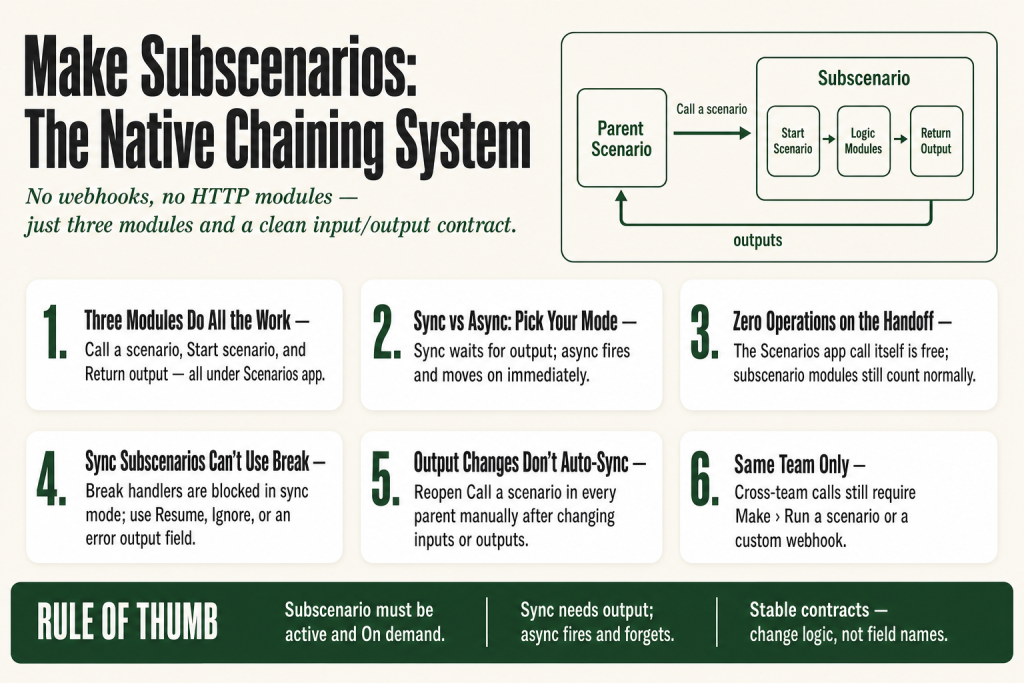
The 30-second answer
- Three modules do the work:
Scenarios > Call a scenario(in the parent),Scenarios > Start scenario(triggers the subscenario), andScenarios > Return output(sends data back). The official docs confirm these live under the Scenarios app, not a “Tools” app. - The subscenario must be active and scheduled On demand or the call fails.
- Synchronous mode pauses the parent until the subscenario finishes and returns outputs. Asynchronous mode fires the subscenario and moves on immediately without waiting.
- No operation cost on the handoff itself: calls via the Scenarios app don’t consume operations for the connection. The subscenario’s own modules still count normally.
- Same-team only: you can only call scenarios in your own team this way. Cross-team calls still require
Make > Run a scenarioor a webhook. - Sync subscenarios can’t use Break error handlers to create incomplete executions. Async subscenarios can. Handle errors inside a sync subscenario before returning output.
- Input/output changes in the subscenario aren’t auto-reflected in the parentyou must reopen the Call a scenario module and re-sync manually.
Take this fix into your next scenario. The free Builder’s Companion Kit collects the checklists and templates that pair with this guide — so next time, you start from a template, not a blank page. Grab it free →
- What make subscenarios actually are
- The three modules: Call a scenario, Start scenario, Return output
- Synchronous vs asynchronous: which mode to use
- Operations cost: what the Scenarios app actually saves you
- Worked example: a registration-check subscenario
- The sync problem: when you update a subscenario’s inputs or outputs
- Error handling inside synchronous subscenarios
- Limits and when to skip subscenarios
- FAQ
Make subscenarios are the platform’s native answer to a problem every operator eventually hits: you’re rebuilding the same five modules in ten different scenarios, and maintaining them is a nightmare. The subscenario system lets you pull that repeated logic into a standalone scenario, call it from any parent with typed inputs, and get structured data back. No webhooks, no HTTP modules, no operations burned on the handoff itself. This article covers exactly how the three modules work, the two calling modes, the gotchas the docs bury, and when you should skip subscenarios entirely.
What make subscenarios actually are
A subscenario is a regular Make scenario that gets triggered by another scenario instead of a schedule or a webhook. The scenario doing the triggering is the parent. The one being called is the subscenario. The relationship is explicit and typed: you define what data goes in and what comes back, and Make enforces the structure.
Before subscenarios existed, chaining scenarios meant combining an HTTP module with a custom webhook and a webhook response. That worked, but it cost operations on both ends and gave you no built-in way to define a clean input/output contract. The Scenarios app replaced that pattern for same-team work.
A subscenario isn’t a special scenario type. It’s a normal scenario that happens to use Start scenario as its trigger. That same scenario can be called by multiple parents simultaneously. It has its own execution history, its own error state, its own scheduling setting (which must be On demand).
The subscenario system is also how Make AI agents and the Make MCP server call your automations as tools. If you build your subscenarios correctly, the same scenario can serve a parent scenario, an AI agent, and an API call with no extra wiring. For more on how Make connects to external systems, see the Make Webhooks Explained article for the webhook-based alternative, and Make HTTP Module Not Working if you’re troubleshooting legacy HTTP-based chaining.
The three modules: Call a scenario, Start scenario, Return output
Every subscenario setup uses exactly three modules from the Scenarios app. The official Make documentation confirms these module names and app location: Scenarios > Call a scenario, Scenarios > Start scenario, and Scenarios > Return output. Here’s what each one does and where it lives.
Call a scenario (in the parent)
This is the action module you add to the parent scenario wherever you want to hand off to the subscenario. You pick the target scenario from a dropdown. That scenario must already exist, be active, and be scheduled On demand. Once you select it, the module’s input fields populate based on whatever inputs that subscenario has declared. You fill those fields by mapping data from earlier modules in the parent, exactly like you’d map any other module.
If you create a new subscenario directly from this module (there’s a “Create a scenario” option in the dropdown), Make adds the Start scenario and Return output modules to the new scenario automatically.
Start scenario (in the subscenario)
This is the trigger for the subscenario. It replaces whatever trigger you’d normally use (webhook, schedule, watch module). When the parent fires Call a scenario, Make wakes up the subscenario at this module and passes the input values in. Those values are then mappable to any subsequent module in the subscenario, just like bundle data from a trigger.
You define the input fields in the Scenario inputs and outputs panel in the scenario toolbar. Each input has a name, a data type, an optional default value, and a required flag. When you trigger the subscenario manually with the Run once button (for testing), Make prompts you to fill in the required inputs before it will run.
Return output (in the subscenario)
This module sends data back to the parent. Think of it as a return statement in a function. The moment Make hits it, the subscenario’s run ends for that route. You cannot add modules after it on the same route. If you have a Router inside the subscenario, only the first Return output that gets reached in the flow fires; the others are ignored.
The output fields are defined in the same Scenario inputs and outputs panel where you defined the inputs. Each output field has a name and a type. In the Return output module itself, you map actual data from the subscenario’s modules to those output fields. Back in the parent, those values appear as bundle output from the Call a scenario module, ready to map into the next step.
Synchronous vs asynchronous: which mode to use
The two calling modes are not just a performance setting. They change what the parent scenario can do after the call, and they change which error-handling patterns are available inside the subscenario.
Synchronous execution
The parent fires Call a scenario, passes the inputs, and then stops and waits. The subscenario runs start to finish, hits Return output, and sends data back. The parent picks up those outputs and continues. From the parent’s perspective, it’s like calling a function and waiting for the return value.
Use synchronous mode when the parent needs the subscenario’s result to decide what to do next. The classic case: a subscenario checks whether a contact already exists in your CRM and returns a status, and the parent uses that status to route the bundle. If you need that answer before continuing, synchronous is the only mode that works.
One important constraint: synchronous subscenarios can’t use the Break error handler to create incomplete executions. If the subscenario paused to save an incomplete execution, the parent would hang indefinitely waiting for a response that never comes. Make blocks the pattern entirely. Asynchronous subscenarios don’t have this restriction. Because the parent isn’t waiting, an async subscenario can use Break normally. See the error handling section below for your options in sync mode.
Asynchronous execution
The parent fires Call a scenario and immediately moves on. It doesn’t wait. The subscenario runs independently in the background. The parent gets no output from the subscenario because it didn’t wait for any.
Use asynchronous mode for fire-and-forget work: sending a notification, logging an event to a data store, kicking off a long-running process that the parent doesn’t need to hear back from. It’s also the safer mode when the subscenario’s work is slow and you don’t want the parent to sit idle. And because the parent isn’t waiting, async subscenarios can use Break error handlers and incomplete executions normally.
One parent scenario can call multiple subscenarios in different modes. Some calls can be synchronous (where you need output), others asynchronous (where you don’t).
The async housekeeping note
When you create a subscenario from inside the Call a scenario module, Make automatically adds a Return output module to the new subscenario. If you’re running in asynchronous mode, that module serves no purpose. Deleting it is optional, not a default action Make takes for you. You can right-click it and remove it to keep the canvas clean, but leaving it in place won’t break anything.
Operations cost: what the Scenarios app actually saves you
Calls made through the Scenarios app’s Call a scenario module don’t consume operations for the connection itself. The official Make documentation states that with the Scenarios app you can call scenarios, pass inputs, and return outputs free of charge. The subscenario’s own modules still count as operations normally, same as any scenario run.
Contrast this with the old webhook-plus-HTTP-module approach. Every time a parent scenario called a child via HTTP and webhook, you were burning operations on the HTTP module in the parent and the webhook trigger in the child. Two extra operations per call, every time. At scale that adds up fast.
The same cost saving on the handoff applies to AI agents and MCP server calls through the Scenarios app. If you’re currently chaining scenarios using Webhooks > Custom webhook plus an HTTP request in the parent, switching to the Scenarios app’s native modules removes that specific per-call overhead. How much you actually save depends on your total volume and the number of modules inside each subscenario, since those still count normally. See Make Operations vs Credits for how operations translate to your bill.
Worked example: a registration-check subscenario
Here’s a concrete setup to tie the pieces together. The scenario is a registration form. The parent receives a form submission, calls a subscenario that checks whether the email already exists in a Google Sheet, and gets back a status string it uses to route the bundle.
Step 1: build the subscenario
- Create a new scenario. Name it clearly, something like “Check email registration.”
- Add
Scenarios > Start scenarioas the trigger. Open the Scenario inputs and outputs panel in the toolbar, click Add scenario inputs, and define one input: email (type: Text, Required: Yes). - Add
Google Sheets > Search Rows. Map the email input from the Start scenario module into the filter field for the email column. - Add a Router. On one route (matching rows found), add
Scenarios > Return output. In the outputs panel, define one output: status (type: Text). In the Return output module, map the value “exists” into the status field. - On the other route (no rows found), add another
Return output. Map the value “new” into the status field. - Set the scenario scheduling to On demand. Activate it.
Step 2: wire the parent
- In the parent scenario, after your form trigger, add
Scenarios > Call a scenario. - Select the “Check email registration” subscenario from the dropdown. The email input field appears automatically.
- Map the email value from the form trigger into the email field.
- Add a Router after the
Call a scenariomodule. Filter route 1 onstatus = existsand route 2 onstatus = new.
Run the parent once. The subscenario fires synchronously, checks the sheet, returns “new” or “exists”, and the parent routes accordingly. You can see the subscenario’s own run in its execution history separately from the parent’s run. If something goes wrong in the subscenario, that’s where you look first. See Make Execution History Explained for how to read both.
The sync problem: when you update a subscenario’s inputs or outputs
This is the most common trap. You add a new input or output to a subscenario, test it, and it works great in isolation. Then you go back to the parent and the new field isn’t there.
Make does not automatically push input and output changes from a subscenario to its parent scenarios. You have to go back to each parent, open the Call a scenario module, and manually trigger a refresh so the new fields appear. On the output side, you also need to update any subsequent modules in the parent that map the subscenario’s output bundle, because the new field won’t be there until you do.
The practical rule: whenever you change a subscenario’s input or output structure, treat every parent that calls it as broken until you’ve verified the mapping. If you have five parents calling the same subscenario, that’s five modules to check. Name your subscenarios clearly and keep a note of which parents call which subscenario so you don’t miss one.
Reusability works the other way: if you update the logic inside the subscenario (but keep the same inputs and outputs), all parents benefit automatically. That’s the win. The contract (inputs and outputs) is what you need to keep stable.
Error handling inside synchronous subscenarios
Here’s a real gotcha. Synchronous subscenarios can’t use the Break error handler to create incomplete executions. If a module inside a synchronous subscenario fails and you have a Break handler on it, Make throws an error telling you that creating an incomplete execution isn’t allowed for scenarios running as synchronous subscenarios.
This isn’t a bug. It’s a consequence of how synchronous execution works: the parent is sitting and waiting for a response. If the subscenario pauses to create an incomplete execution (which could sit unresolved for hours or days), the parent would hang indefinitely. Make prevents that by disallowing the pattern entirely.
If you need Break-style error handling with incomplete executions, the clearest path is to run the subscenario in asynchronous mode instead. Async subscenarios aren’t waiting on the parent, so Break handlers work normally there.
For synchronous subscenarios, your options are:
- Use Resume or Ignore handlers inside the subscenario for errors you can recover from gracefully. Map a fallback value to the output and let the parent handle the bad-data case via a filter or router.
- Use an error route that returns a structured error status. Add an output field like
error_messageand map error text into it from an error handler. The parent receives a clean output bundle with the error described, and you decide what to do with it in the parent’s flow. - Switch to asynchronous mode if the subscenario’s work is risky and you don’t need the result back synchronously. Async subscenarios can use Break normally because the parent isn’t waiting.
For a full reference on error handler types and what they do, see Make Error Handling: Retry, Skip, Resume, Commit, Rollback. For what happens when incomplete executions pile up in any scenario, see Make Incomplete Executions Piling Up.
Limits and when to skip subscenarios
The Scenarios app’s Call a scenario module only works within the same team. If you need to call a scenario in a different team or a different organization, you have to fall back to Make > Run a scenario or a Webhooks > Custom webhook setup. That’s a real constraint for agencies managing multiple client workspaces.
Subscenarios also aren’t the right tool for everything. A few cases where you’re better off keeping the logic in the parent:
- One-off logic. If only one parent ever needs this code, the overhead of a separate scenario isn’t worth the maintenance split.
- Very fast, simple transformations. A formula or a Set Variable can do what a two-module subscenario does, with less to maintain. See Make Set Variable / Get Variable for that pattern.
- You need fine-grained retry control on every module. Synchronous subscenarios don’t support Break/incomplete executions. If you need that reliability per module, keep the logic in the parent where you have full error handler flexibility. Or run those subscenarios asynchronously.
The subscenario pattern pays off best when the same block of logic runs in three or more places, when the logic involves external API calls that might change independently, or when you want a smaller, cleaner canvas in each parent. If you’re cloning whole scenarios just to reuse logic, that’s the signal to refactor into a subscenario. See Clone Make Scenario for when cloning is still the right call.
FAQ
Does calling a subscenario cost operations?
The handoff through the Scenarios app’s Call a scenario module doesn’t consume operations. Make’s official documentation confirms you can call scenarios, pass inputs, and return outputs free of charge via the Scenarios app. The subscenario’s own modules still count as operations normally, so how much you actually save depends on your total volume and scenario complexity. If you chain scenarios via an HTTP module and a custom webhook instead, both the HTTP call and the webhook trigger each consume an operation, so switching to the native Scenarios app removes that specific overhead.
Why does my Call a scenario module not show the subscenario’s input fields?
The subscenario must have its inputs defined in the Scenario inputs and outputs panel before you select it in the parent. If you added inputs to the subscenario after already configuring the parent’s Call a scenario module, Make won’t reflect those changes automatically. Reopen the Call a scenario module in the parent and refresh the scenario selection to pull in the updated input structure.
Can I call a subscenario from a different team?
No. The Scenarios app’s Call a scenario module only works within the same team. To call a scenario across teams or organizations, use the Make app’s Run a scenario module or trigger the target scenario with a Webhooks custom webhook.
What happens if a synchronous subscenario errors out?
The error propagates back to the parent scenario. If the subscenario has no error handler, its run fails and the parent’s run also fails at the Call a scenario module. You can’t use a Break handler inside a synchronous subscenario to create incomplete executions because the parent would have to wait indefinitely. Asynchronous subscenarios don’t have this restriction and can use Break normally. The practical fix for sync mode is to use Resume or Ignore handlers inside the subscenario, or design an error output field that the parent can check and route on.
Does the subscenario need to be turned on for the parent to call it?
Yes. The subscenario must be active and its scheduling must be set to On demand. If the subscenario is inactive or set to a different scheduling type, the Call a scenario module will fail when the parent tries to trigger it.
Can one subscenario call another subscenario?
Yes. A subscenario can itself contain a Call a scenario module and act as a parent to a deeper subscenario. Make supports nested subscenario chains. Just make sure each scenario in the chain is active, scheduled On demand, and that you track the input/output contracts at each level, since changes at any layer won’t auto-propagate upward.
Sources:
- Make Help Center: Subscenarios
- Make Apps Documentation: Scenarios (Call a scenario, Start scenario, Return output)
- Make Help Center: Scenario inputs and outputs
- Make Help Center: Use scenario inputs
- Make Help Center: Use scenario outputs
Brian Kasday spent forty years in direct-response marketing before rebuilding the whole operation as a one-person shop. He writes The Operator’s Library — including “The Missing Manual for Make” — for operators who’d rather build it themselves than wait on someone else.
Get the Builder’s Companion Kit — the free checklists and templates that pair with this guide: mmsvegas.com/make-resources.
This guide solves one Make problem. The Missing Manual for Make covers the production system. See the manual →
More Make guides
Free · Make Operator Toolkit
Running scenarios in Make?
Get the free operator toolkit — production checklists and the fixes that keep scenarios alive under real traffic, plus a note when this guide changes.
Get the free toolkit →