
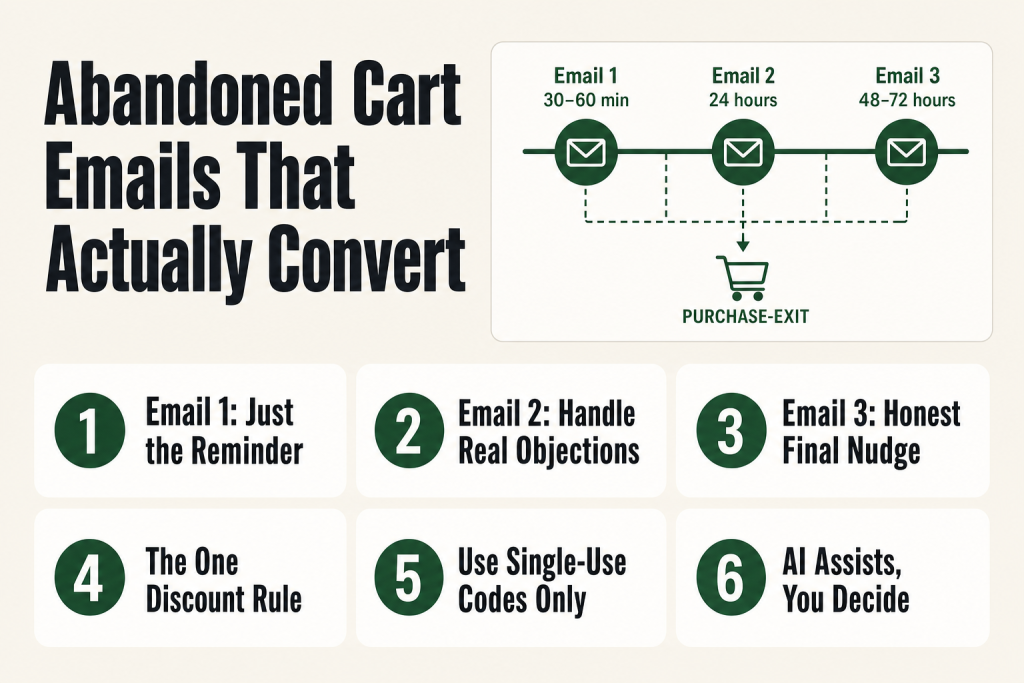
The 30-second answer
- Email 1 (30-60 min after abandonment): Pure reminder. Assume distraction, not objection. Show the item, one button, no discount.
- Email 2 (24 hours later): Objection-handler. Address the real reasons people hesitate: shipping cost, trust, return policy, fit uncertainty. Still no discount unless shipping is your known barrier.
- Email 3 (48-72 hours later): Final nudge. Honest scarcity or a genuine close. This is the only email where a discount belongs, and only if you have margin to spend and a reason to spend it.
- The one discount rule: Discounts in Email 1 train shoppers to abandon on purpose. Hold it until Email 3, use it once per customer, and make it one-time-use so it cannot be shared.
- What AI can help with: Drafting subject line variations, tightening body copy, generating objection lists for Email 2. The final judgment on tone and offer still stays with you.
Take this fix into your next scenario. The free Builder’s Companion Kit collects the checklists and templates that pair with this guide — so next time, you start from a template, not a blank page. Grab it free →
- Why Three Emails, and Why Each One Has a Different Job
- Email 1: The Reminder (Send 30-60 Minutes After Abandonment)
- Email 2: The Objection-Handler (Send 24 Hours Later)
- Email 3: The Final Nudge (Send 48-72 Hours Later)
- The One Rule About Discounts in Abandoned Cart Email Copy
- Using AI on Abandoned Cart Email Copy Without Outsourcing the Judgment
- Quick Checklist Before You Send Any of the Three Abandoned Cart Emails
- FAQ
Abandoned cart email copy is where most solo operators leave serious money on the table, and not because they skip the sequence. They skip the thinking behind it. They treat all three emails as the same email sent three times with slightly more desperation each round. The reminder sounds like the nudge. The nudge sounds like the closer. Nobody buys, or the only people who buy are the ones who trained themselves to wait for your discount.
This guide fixes that. You get the distinct job each email has to do, the reasoning behind the structure, and word-for-word copy you can adapt and send this week. No setup walkthrough. No automation deep-dive. Just the words.
Why Three Emails, and Why Each One Has a Different Job
The average cart abandonment rate across ecommerce sits around 70%, and the reasons people leave run a wide spectrum: unexpected shipping costs, checkout friction, trust concerns, distraction, or just browsing with no intention to buy yet. That spread is why one email cannot do the work of three.
Think of it this way: a three-email sequence is like a short conversation with a warm prospect in a hallway. The first pass is a tap on the shoulder. The second answers the question they didn’t ask out loud. The third is a handshake and a door held open. If you start that conversation by dangling a coupon, you teach them the coupon is always available, and they will come back for the coupon, not for the product.
Each email earns the right to the next one by doing its own job cleanly. When all three sound the same, or when the first one already contains the discount you were saving for the third, the sequence collapses into noise.
For more on how the copy connects to your broader funnel, see how to build a sales funnel without a team.
Email 1: The Reminder (Send 30-60 Minutes After Abandonment)
The job of Email 1 is to assume the best. The shopper got a phone call, walked away to check a size chart, or simply got pulled away from the tab. Research consistently shows that a first cart recovery email sent within an hour of abandonment outperforms delayed follow-ups. You are not chasing. You are finishing a sentence they started.
Keep this email short, warm, and low-pressure. Include a clear image of the item, the name, the price, and one button back to the cart. That is the whole email. No discount. No urgency language. No stacked social proof. This email’s conversion load is light because it only has to catch the people who simply forgot, and that group is larger than you think: roughly 43% of shoppers who abandon are still in “just browsing” mode and may need nothing more than a nudge at the right moment.
Example copy for Email 1
Subject: You left something behind, [First Name]
Preview text: Still thinking it over? It’s right here when you’re ready.
—
Hey [First Name]
Looks like you got pulled away before you finished checking out. No worries. Your [Product Name] is still in your cart.
[Product image]
[Product name], $[Price]
[COMPLETE YOUR ORDER button]
If you have a question before you buy, just reply to this email. I read every one.
[Your name / Brand name]
—
That is the whole email. Resist the urge to add more. The simplicity is the point. The reader’s attention is already fractured. A cluttered email asks them to work harder, and they will not.
Subject line note: Personalized subject lines that include the customer’s first name can improve open rates meaningfully. Keep the line under 50 characters so nothing gets cut on mobile. Avoid starting with “Don’t” or “You forgot” as both can feel accusatory. “You left something behind” assumes distraction, not rejection, and that framing matters.
Email 2: The Objection-Handler (Send 24 Hours Later)
If they did not come back after Email 1, they have a reason. Your job in Email 2 is to name the most likely reasons out loud and dissolve them, without guessing wrong.
The most common removable objections that drive abandonment are: extra costs like shipping and taxes, uncertainty about fit or returns, trust concerns, and checkout friction. Notice that most of those are not price objections in the pure sense. A shopper who bails because they couldn’t see your return policy is not asking for 10% off. A discount doesn’t close that gap. It just makes the uncertainty slightly cheaper.
Email 2 is your chance to address the real hesitations head-on. Lead with your return policy or satisfaction guarantee if you have one. Show a customer review that speaks to the specific benefit they care about. Clarify shipping costs or speed if those are likely friction points. If you offer free shipping above a threshold, say it clearly here.
This email can be slightly longer than Email 1. You are doing real persuasion work. But stay focused on one or two objections, not eight. Pick the two most common barriers for your product type and handle those cleanly.
Example copy for Email 2
Subject: Still on your mind? A few things worth knowing, [First Name]
Preview text: Shipping, returns, and why [Product Name] is worth it.
—
Hey [First Name]
Your [Product Name] is still waiting. Before you decide, here are a few things people usually want to know before they order:
Shipping: Standard orders ship within [X] business days. We offer free shipping on orders over $[threshold], and your cart already qualifies / is $[X] away from qualifying.
Returns: Not happy? Return it within [30/60] days, no questions. We handle the label.
What buyers say:
“[Short customer quote that speaks to the main benefit or the main concern]”, [First name, location or product variant]
If something in the checkout gave you trouble, reply here and I’ll sort it personally.
[COMPLETE YOUR ORDER button]
[Your name / Brand name]
—
A few things to adapt: if shipping cost is your single biggest abandonment driver (check your checkout-drop data first), consider offering free shipping here rather than a percentage discount. Free shipping addresses the actual barrier. A 10% discount often does not, because the problem was not the total price. The problem was the surprise line item at checkout.
For help getting the copy right without hiring a copywriter, the AI-assisted copy method works well for drafting Email 2 objection lists: ask the model to generate the ten most common reasons someone would hesitate to buy your specific product, then pick the two most likely and write to those.
Email 3: The Final Nudge (Send 48-72 Hours Later)
Email 3 is the closer. Its job is honest finality. You are not bluffing. You are wrapping up the conversation with a clear choice: complete the purchase now, or the cart is gone and you move on.
This is the only email in the three-part sequence where a discount belongs. And even here, it only belongs if two conditions are true: (1) you have the margin to offer it, and (2) the discount reflects a real decision, not a default. More on that rule in the next section. If you are not using a discount, lean into genuine scarcity: low stock, an upcoming price change, or a shipping cutoff for a holiday or event. Do not manufacture urgency. People can smell fake countdown timers from three emails away.
Keep this one short. The reader has seen two emails already. They know the product. They know your policies. What they need now is a clear, low-friction path to yes or a clean exit. Both are fine. Harassing someone into a purchase they do not want is how you generate refund requests and one-star reviews.
Example copy for Email 3, without a discount
Subject: Last call, [First Name], we’re clearing carts tonight
Preview text: After today, your cart is gone. Here’s how to finish.
—
Hey [First Name]
This is my last note about your [Product Name]. Tonight we clear out saved carts, so this is your last chance to grab it at the current price.
If the timing is right, here’s the link: [COMPLETE YOUR ORDER button]
If it’s not the right time, no hard feelings. You know where to find us.
[Your name / Brand name]
—
Example copy for Email 3, with a discount
Subject: [First Name], here’s 10% off, but just for today
Preview text: One-time offer on the [Product Name] in your cart.
—
Hey [First Name]
Still on the fence? I’ll make it easier. Use code [UNIQUE CODE] at checkout and take 10% off your [Product Name].
This code is one-time-use and expires at midnight tonight. It’s not something I send to everyone, and I won’t send it again.
[COMPLETE YOUR ORDER button]
If you’ve got a question before you decide, reply here.
[Your name / Brand name]
—
The one-time-use note matters. Using dynamic, single-use codes means the code cannot be shared on coupon sites or reused. It also signals to the reader that this is a real, bounded offer, not something they can screenshot and use next month.
The One Rule About Discounts in Abandoned Cart Email Copy
Here is the rule, stated plainly: do not put a discount in Email 1, and think hard before putting one in Email 2.
The reason is behavioral. When a cart recovery sequence sends a discount every time, to every shopper who leaves without buying, you teach your customers that abandoning their cart is the way to get a deal. They did not start doing this consciously. But patterns repeat, and soon your cart abandonment rate climbs because informed shoppers have figured out the system. The discount didn’t close a sale. It trained a behavior.
The discount belongs in Email 3 under these conditions: the math supports it (your margin can absorb it), you have a clear signal that price is the actual barrier rather than uncertainty or distraction, and you are not using it as a reflex. Discounts work as closing tools when they arrive after the reminder and the objection-handler have already done their work. They work poorly when they arrive first, because they short-circuit the trust-building that makes people actually want to buy from you again.
A few situations where a discount in Email 3 makes clear sense: high-AOV products where a 10% reduction genuinely changes the math for the buyer, first-purchase offers on consumables where repeat behavior is strong, or situations where you have a real shipping cutoff that creates honest urgency around a coupon code.
Situations where a discount makes less sense: you already have an exit-intent popup offering 15% off. You already emailed a welcome discount in your welcome sequence. Stacking discounts across touchpoints erodes your price anchor and attracts the wrong buyer profile.
If you are concerned about discount abuse, use one-time-use dynamic codes. These are unique to each recipient and expire after a single use, so they cannot be leaked to coupon aggregator sites or shared with a friend.
And if you decide not to use a discount at all, that is a legitimate call. Plenty of recovery sequences close at strong rates with nothing more than urgency copy, clear return policies, and honest closing language. Discounts are a tool, not a requirement. Whether to use them is a judgment call that stays with you.
For context on how discounting fits into your broader pricing posture, see how to stop competing on price.
Using AI on Abandoned Cart Email Copy Without Outsourcing the Judgment
AI is useful here in specific, bounded ways. It will not replace the thinking. The thinking is yours, and it has to be, because the thinking is the product.
Where AI earns its keep in this workflow:
- Objection brainstorming for Email 2. Give the model your product description and ask it to list the ten most likely reasons a customer would hesitate after adding it to their cart. You will recognize the real ones immediately. Write to those.
- Subject line variations. Write three subject line options for each email yourself first, then use the model to generate five more. Compare them against the principle: does this assume distraction or accusation? Does it create honest urgency or manufactured pressure? You make the final call.
- Tightening body copy. Paste your draft into the model and ask it to shorten it by 30% without losing the key objection or offer. Then read the output and restore anything that sounds like a person left the room.
Where AI will not help: deciding whether your specific margin supports a discount in Email 3, knowing whether your customers’ primary objection is shipping cost or trust, reading the tone of your brand voice at sentence level. Those require your judgment and your data.
The goal of this workflow is to cut your dependence on outside copywriting help, not to hand the work off entirely. You write it. The tool speeds up the iteration. The final calls stay with you.
For a structured method on using AI to draft and refine copy across your marketing, see how to write marketing copy with AI. For the broader question of when your email program needs more infrastructure, the minimum viable marketing tech stack covers what tools actually need to be in place for a sequence like this to run.
Quick Checklist Before You Send Any of the Three Abandoned Cart Emails
Before you activate the sequence, run through this:
- Email 1 has exactly one CTA button. If you count two links, remove one.
- Email 1 has no discount. Not even a hint of one in the preview text.
- Email 2 directly names an objection. “Here’s our return policy” or “Here’s what shipping actually costs” counts. Vague reassurance does not.
- Email 3 creates honest scarcity or a bounded offer. If you write “hurry” without a real reason, cut it.
- Any discount code in Email 3 is single-use and set to expire. Verify this in your email platform before the sequence goes live.
- Each email has a plain-text reply path. A visible sentence like “just reply to this email” recovers edge cases where the buyer has a question and your CTA button alone would not convert them.
- Subject lines are under 50 characters. Gmail and most mobile clients cut off longer lines. Put the most important words first.
- The sequence stops when someone buys. Check that your automation exits the contact from the flow on purchase, not just on click. Sending Email 3 to someone who already completed their order is an embarrassing and avoidable error.
If your open rates are lagging across the whole sequence, the problem is usually deliverability or subject lines, not the body copy. See the prioritized fix list for low open rates before you rebuild copy that is not the actual problem.
FAQ
How long should abandoned cart emails be?
Email 1 should be short: product image, one or two sentences, one button. Email 2 can run a bit longer because you are addressing objections directly. Email 3 should be short again. Length is not the variable; clarity is. Cut anything that doesn’t move the reader toward a decision.
Should I offer free shipping or a percentage discount in my cart recovery emails?
Check your checkout data first. If your analytics show a high drop-off rate at the shipping cost step, free shipping addresses the actual barrier. A percentage discount often does not, because the shopper’s problem was the surprise line item, not the total price. Free shipping also feels like a removal of friction rather than a concession on price, which protects your brand positioning better.
What is the best time to send abandoned cart emails?
Email 1 should go out 30 to 60 minutes after abandonment, while the product is still top of mind. Email 2 follows 24 hours later. Email 3 goes out 48 to 72 hours after abandonment. The first recovery window, the first three days, is where the majority of recovered carts come from.
Do abandoned cart emails train customers to expect discounts?
Yes, if you put a discount in Email 1 or send one by default in every sequence. The pattern teaches shoppers to abandon their cart on purpose and wait for the offer. Hold the discount until Email 3, use one-time-use codes so they expire after a single redemption, and only deploy it when your margin actually supports the spend.
How many abandoned cart emails should I send?
Three is the practical ceiling for most solo operators selling to a general audience. Data shows that multi-email sequences consistently outperform single emails, and a three-email series is the most common high-performing configuration. Beyond three, unsubscribe rates tend to rise, and the incremental revenue rarely justifies the brand cost of being annoying.
Can I use AI to write my abandoned cart email copy?
AI is useful for generating objection lists for Email 2, drafting subject line variations, and tightening body copy by cutting word count. It is not useful for deciding whether your margin supports a discount, reading the emotional tone of your specific brand voice, or knowing which objection is actually blocking your buyers. Draft with AI, judge with your own eyes, and send with your own signature.
Sources:
Sources consulted: Baymard Institute cart abandonment meta-analysis (49 studies, updated 2025); Klaviyo 2025 future of consumer marketing report and 183,000-brand benchmark data; Omnisend 2025 automation benchmarks; Rejoiner abandoned cart statistics analysis (1,000+ brands); BigCommerce abandoned cart best practices guide (updated March 2026); Maropost cart abandonment email guide (April 2026); EC Digital Strategy abandoned cart discount analysis (July 2026). All platform-specific claims were cross-referenced against live documentation at the time of writing.
Brian Kasday spent forty years in direct-response marketing before rebuilding the whole operation as a one-person shop. He writes The Operator’s Library — including “Build a Complete Marketing Department” — for operators who’d rather build it themselves than wait on someone else.
Get the Builder’s Companion Kit — the free checklists and templates that pair with this guide: mmsvegas.com/resources.
This guide handles one marketing job. Build a Complete Marketing Department builds the whole department. See the manual →
More Marketing guides
Free · Marketing Operator Toolkit
Running marketing on your own?
Get the free toolkit — the templates and the expensive mistakes behind a one-person marketing department, plus a note when this guide changes.
Get the free toolkit →