
The 30-second answer
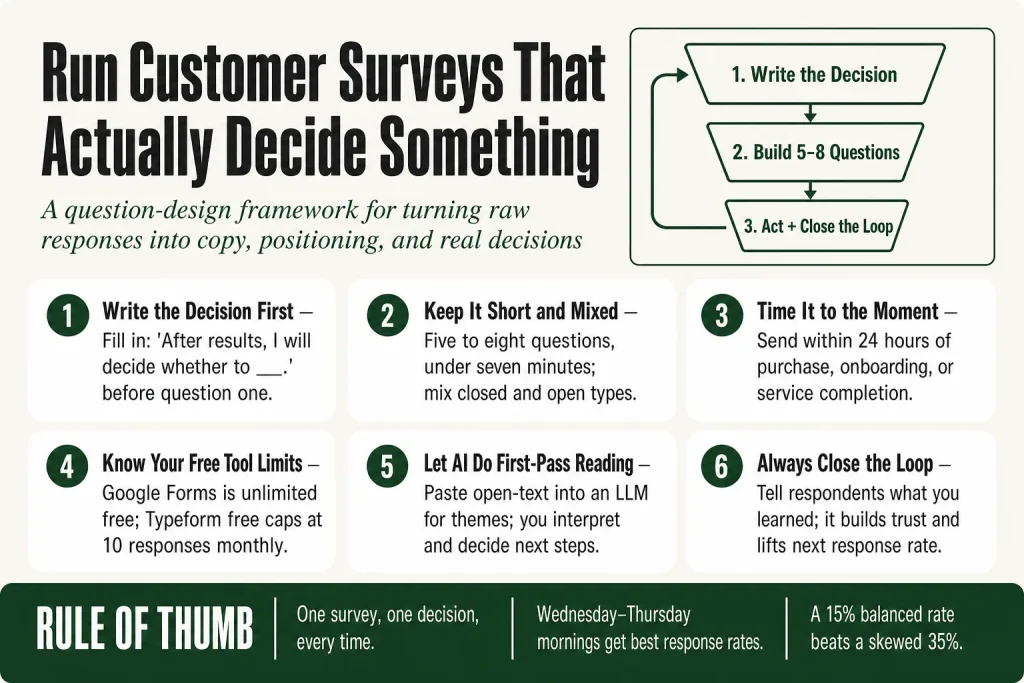
- Start with one decision. Every survey should be built around a single question you’re trying to answer internally before you write a single survey question.
- Keep it short. Surveys that take under seven minutes get the best completion rates. Five to eight questions is a workable ceiling for most small-list sends.
- Mix question types. Use closed-ended questions (rating scales, multiple choice) to measure, and one or two open-ended questions to explain the numbers.
- Time it to a moment. Send within 24 hours of a purchase, onboarding, or service interaction while the experience is fresh.
- Use free tools wisely. Google Forms is unlimited and free. Typeform’s free plan caps at 10 responses per month across all your forms, per Typeform’s own Help Center documentation, so it’s a tool for testing your form design, not deploying to a real list.
- Let AI do the first pass on open-text. Paste responses into an LLM to spot themes, but you make the call on what the themes mean and what to do about them.
- Close the loop. Tell respondents what you learned. It builds trust and improves your next response rate.
Take this fix into your next scenario. The free Builder’s Companion Kit collects the checklists and templates that pair with this guide — so next time, you start from a template, not a blank page. Grab it free →
- Start With One Decision, Not a List of Curiosities
- Question Design: What to Ask and in What Order
- Timing and Channel: When and How You Ask Matters as Much as What You Ask
- Tool Comparison: Google Forms vs. Typeform for Solo Operators
- A Worked Example: How to Run a Customer Survey for a Service Business
- Using AI to Analyze Open-Text Responses Without Losing the Thread
- How to Act on Your Survey Results (and Close the Loop)
- FAQ
Knowing how to run a customer survey sounds straightforward until you send one and get back forty responses that all say “great product, keep it up.” That tells you nothing you can use. The problem is almost never the tool you picked or the size of your list. It’s that most surveys are designed to collect opinions instead of designed to answer a specific question. This guide fixes that. You’ll walk away with a question design framework, timing rules, a plain-language tool comparison, and a repeatable process for turning raw responses into copy, positioning, and product decisions.
Start With One Decision, Not a List of Curiosities
The most common survey mistake is writing questions before you’ve written the decision. You sit down and brainstorm everything you’d love to know about your customers. An hour later you have 22 questions and a survey nobody will finish.
Flip the order. Write this sentence first: “After I read the results, I will decide whether to ___.” Fill in that blank before you write question one. If you can’t fill it in, you don’t have a survey yet. You have curiosity. Curiosity is fine, but it doesn’t produce usable data.
Good decision prompts look like:
- “Decide whether to reposition my offer around outcome X or feature Y.”
- “Decide whether onboarding friction or pricing is the main reason free users don’t convert.”
- “Decide what to call my new tier so the name matches what buyers actually want.”
One decision. One survey. Run them sequentially if you have multiple decisions to make. A five-question survey sent three times over three months beats a 20-question survey sent once that 80% of recipients abandon halfway through.
If you’re still figuring out where your biggest positioning gaps are, a small business marketing audit is a good place to start before you survey anyone.
Question Design: What to Ask and in What Order
Every question in your survey should earn its spot. A useful filter: if a question’s answer wouldn’t change what you do, cut it.
Closed-ended questions: measure the what
Closed-ended questions provide consistency and make it easier to spot patterns or compare groups. They’re faster to answer and easier to analyze. Use them for rating scales (1 to 5, or the classic Net Promoter Score 0 to 10), multiple choice, and yes/no items. These are your workhorses.
Missing choices, overlapping ranges, or biased labels can distort results more than you think, so write balanced options. “Good, okay, poor” is balanced. “Excellent, good, decent, bad” is not.
Open-ended questions: explain the why
Open-ended questions add depth by capturing context, personal experiences, and motivations. They’re where customers hand you their actual language, the words they use to describe your product’s value, and the complaints they’ve never told you directly.
The catch is that open-ended questions carry a meaningfully higher nonresponse rate than closed-ended ones, so use them sparingly. Keeping open-ended questions to roughly 10 to 20% of total survey items can help maintain completion rates. For a 10-question survey, that’s one or two open-text fields.
The most efficient pattern: a closed rating question followed immediately by a short open-text prompt asking why. Closed-ended questions tell you the “what,” but open-ended questions tell you the “why.” A respondent who rates a service 3 out of 10 has given you a data point; asking why they gave that score gives you the context to act on it.
Question order
Think carefully about question order. Closed-ended questions placed before open-ended ones on the same topic can influence responses, a phenomenon known as a question order effect. When in doubt, lead with an open-ended question on the topic you care about most, then follow up with structured rating questions.
End with one broad open-ended question, something like “Is there anything else you would like to share?” This gives respondents a final opportunity to raise topics the survey did not cover. This one question routinely surfaces the most unexpected and useful answers.
Timing and Channel: When and How You Ask Matters as Much as What You Ask
A great survey sent at the wrong moment is a wasted send. Context matters because memory fades fast and so does the emotional texture of an experience.
Ask at the right moment. Trigger the survey right after a purchase or key action. For service businesses, that means within 24 hours of a completed project, onboarding call, or delivery. For product businesses, it means right after first use or within the first week of a subscription.
Response rate benchmarks to set realistic expectations
For email-based customer surveys, 20 to 25% is the broadly cited “acceptable” range. If you’re sending to a warm, engaged list of paying customers, you may do better. Cold or lapsed contacts will land near the floor.
A higher rate does not automatically mean better data. What matters is whether the respondents mirror the total audience on the variables that influence the answers: tenure, spend, sentiment, and geography. A 15% rate that is demographically balanced can outperform a 35% rate dominated by vocal promoters. Treat response rate as a quality signal to audit representativeness, not as a vanity KPI.
Channel options
- Email: The default for most small operators. Personalize the subject line and mention the customer’s recent action. Generic survey requests often get ignored. Personalizing the subject line, sender name, and message based on the customer’s recent activity helps the request feel more relevant.
- In-app or on-page popups: In-app and web surveys get much better engagement than regular email surveys. Studies of in-app surveys have shown average response rates around 25% and comparable completion rates.
- One-question SMS pulse: SMS surveys typically achieve 40 to 50%, thanks to their immediacy and high engagement. Use this for a single rating question with a link to a longer form for those who want to say more.
One reminder, not three
Follow up once. A single, well-timed reminder can meaningfully lift response rates without feeling like harassment. Send it 48 to 72 hours after the first ask. After that, let it go.
The days and times that perform best
Most people respond to surveys during weekdays. Wednesday and Thursday tend to get the best response rates. Early morning (before 10 AM) and mid-afternoon (2 to 3 PM) work best.
Tool Comparison: Google Forms vs. Typeform for Solo Operators
You don’t need fancy survey software to get usable data. You need the right tool for your volume and use case. Here’s an honest look at the two tools most small operators reach for first. Pricing and plan limits shift, so verify the current details at each tool’s pricing page before you commit.
Google Forms
Google Forms is free and stays free. Every Google account gets unlimited forms, unlimited questions, and unlimited responses at no cost. Responses sync automatically into Google Sheets in real time, which means your data is ready to sort and filter the moment it comes in.
Logic branching lets you send people to different sections based on their answers. If someone picks “Yes” to question 3, skip them to section 5. The branching is section-level, not question-level, so complex multi-condition routing is outside its range. For most customer surveys, that limitation won’t matter.
For most small operators running a survey to their own customer list, Google Forms is the right starting point. It handles the job without cost or response caps. The trade-offs are real but narrow: design customization is limited to pre-set color themes, and the analytics dashboard is basic. If you need a more branded experience or deeper reporting, you’ll want a paid tool.
Typeform
Typeform guides respondents one question at a time in a conversational flow, which can reduce drop-off on longer surveys. The experience feels less like filling out a form and more like answering a few questions in a chat. That UX difference is real and worth testing if completion rate is your biggest concern.
The free plan limit is the thing to know before you deploy. Typeform’s free plan is capped at 10 responses per month, shared across all your forms. That figure comes directly from Typeform’s own Help Center documentation. Once you hit it, your forms go into private mode and stop collecting until the next month resets or you upgrade. Ten responses is enough to proof-check a form with a few colleagues, not to run a real survey.
Note: the 10-response cap is documented in a Typeform Help Center article rather than on the main pricing page, which does not display a free plan card at all. Always check the Help Center and the pricing page directly at typeform.com before you assume anything has changed, since these limits can be adjusted with little public notice.
If you want Typeform’s conversational UX for real sends, budget for a paid plan. The Basic plan starts at $28 per month billed annually (or $39 per month billed monthly) for 100 responses. If you want unlimited responses at no cost, Google Forms is the straightforward answer.
Which to pick
- Simple feedback survey to your list: Google Forms.
- Onboarding or NPS survey where the conversational flow helps completion: Typeform paid tier, or use the free plan to test the UX before committing.
- Need the data in a spreadsheet automatically: both tools connect to Google Sheets.
A Worked Example: How to Run a Customer Survey for a Service Business
Say you run a bookkeeping service and you want to know whether your clients value speed of turnaround, accuracy assurance, or the feeling that someone has their back on tax issues. You’re deciding which of those angles to lead with in your marketing. That’s your decision. Now build backward.
Survey goal: Identify which benefit resonates most so you can rewrite your homepage headline.
Audience: Paying clients who’ve been with you at least 90 days. Not prospects, not trial users.
Timing: Sent the Monday morning after monthly close, when the value of your service is freshest in their minds.
Question set (five questions):
- Open-ended, first: “When you tell someone what your bookkeeper does for your business, how do you usually describe the value?” (Free text. This gives you their language, unprompted.)
- Closed, ranking: “Which of the following matters most to you? Choose one.” Options: Fast monthly close / Confidence I won’t have a tax surprise / Feeling like someone else has their eye on the numbers / Accurate reporting I can share with my lender.
- Closed, rating scale: “On a scale of 1 to 5, how confident were you in your financials before we started working together?”
- Closed, rating scale: “On the same scale, how confident are you now?”
- Open-ended, last: “Is there anything about working with us that you’d want a friend to know before hiring a bookkeeper?”
Five questions. Under three minutes. The first question gives you organic language for copy. Questions two through four give you quantifiable data. Question five is your testimonial mine.
Once you have the responses, your homepage headline writes itself. If 60% of respondents ranked “confidence I won’t have a tax surprise” first, and their own language in question one uses phrases like “I stopped losing sleep over it,” that’s your headline.
The responses from question one and question five are also raw material for testimonials and product descriptions. For more on pulling copy directly from customer language, see how to write product descriptions that sell and how to get customer testimonials without making the ask awkward.
Using AI to Analyze Open-Text Responses Without Losing the Thread
The richest answers in any survey are the ones in the open-text fields. They’re also the hardest to work with when you have 80 responses to read. A large language model can do the first-pass sorting so you’re not staring at raw text for three hours. It won’t replace your read of the data. It just gets you to the interesting part faster.
Many teams now use large language models like ChatGPT or Claude to summarize and tag responses. AI-assisted analysis often includes sentiment analysis to categorize responses by emotional tone. It’s fast and flexible, useful for getting a high-level overview or exploring early-stage patterns.
Here’s a simple workflow that doesn’t require any paid analysis tool:
- Export your open-text responses to a plain text file or spreadsheet column.
- Paste the batch into your LLM of choice with a prompt like: “Read these customer survey responses and list the top five themes you see. For each theme, quote two or three examples verbatim.”
- Read the output critically. The themes the AI surfaces are a starting point, not a conclusion. You’ll often spot one or two that the AI lumped together incorrectly, or a nuance it missed entirely.
- Flag the verbatim quotes that sound like your best customers talking at their most honest. Those are your copy seeds.
Using AI to analyze open-ended survey responses requires a careful balance of automated tools and human oversight. The AI won’t know that the customer who said “it’s fine” has been with you for three years and buys at your highest tier. You do. That context changes the weight you give that response. The judgment stays with you, and that’s not a limitation to work around. It’s the actual job.
One honest caveat: AI-assisted theme detection is best with 20 or more open-text responses. Below that, just read them yourself. You’ll be done in 10 minutes and you won’t miss anything.
If you’re using survey data to feed into broader market research, see how to do market research with AI in an afternoon for a compatible workflow.
How to Act on Your Survey Results (and Close the Loop)
Data you don’t act on is a gift you never opened. After every survey run, you need three outputs: a decision, a copy harvest, and a reply to respondents.
The decision
Go back to the decision you wrote at the start. Read it out loud. Do your results answer it? If yes, make the call and document it. If no, identify the one follow-up question you still need answered and design a shorter second pass, not a fishing expedition.
The copy harvest
Pull every phrase from open-text responses that your customers wrote in their own words to describe a benefit, a fear, or a result. Drop these into a running document. These become headlines, subject lines, sales page bullets, and ad hooks. The customer who wrote “I finally stopped dreading tax season” has handed you a headline. Don’t let it sit in a spreadsheet.
If you’re building a launch or revising a sales page based on what you learn, these articles will give you a direct path from insight to copy: how to write a sales page yourself and how to plan a product launch email sequence.
Closing the loop
Send a one-paragraph reply to everyone who responded. Tell them what you heard and what you’re doing about it. It doesn’t have to be long. “You told us delivery speed was the thing you valued most. We heard that. Here’s what we’re changing.” Programs that systematically close the loop with known customers improve retention and loyalty faster than those that don’t.
Closing the loop also materially improves your next survey’s response rate. People answer surveys when they believe something will happen as a result. Prove it happened, and they’ll answer the next one.
Finally, tie your survey cadence to your broader marketing calendar. A quarterly pulse to active customers and a post-purchase trigger on every new buyer gives you a continuous signal without survey fatigue. See how to build a marketing calendar for small business for a framework to schedule it alongside everything else.
FAQ
how many questions should a customer survey have
Five to eight questions is a practical ceiling for most email surveys sent to a customer list. Surveys that take under seven minutes get the best completion rates. Every question you add past that threshold costs you some respondents. If you have more than eight things you want to know, you have more than one survey.
what is a good response rate for a customer survey
For email-based surveys sent to customers, 20 to 25% is the broadly cited acceptable range. If you’re sending to a warm list of paying customers with a personalized ask, you can exceed that. A lower rate isn’t necessarily bad data. What matters is whether the people who responded are representative of your full customer base.
should I offer an incentive to complete a customer survey
Small incentives like a discount code or entry into a draw can lift response rates, but they also attract respondents who care more about the prize than giving useful feedback. For a small list of real customers, a personal, direct ask with a clear reason why their input matters tends to outperform an incentive without the relationship context.
what is the best free survey tool for small business
Google Forms is the most capable free option for most small operators. It offers unlimited forms, unlimited questions, and unlimited responses at no cost, with direct integration to Google Sheets. Typeform’s free plan is capped at 10 responses per month across all your forms, per Typeform’s own Help Center documentation. That cap makes it useful for testing your survey design but not for actual deployment to a customer list. Always verify current plan limits at each tool’s pricing page and Help Center before you deploy, since these limits can change with little public notice.
how do I analyze open-ended survey responses
Export the responses and paste them into an LLM like ChatGPT or Claude with a prompt asking it to identify the top themes and pull verbatim examples of each. Treat the output as a first draft, not a final analysis. The LLM surfaces patterns quickly, but it doesn’t know which customers are your highest-value accounts or what context sits behind a short answer. You bring that. Verify that the themes make sense against what you know about your customers before you act on them. Your judgment is the last step, not an optional one.
when is the best time to send a customer survey
Send within 24 hours of the experience you want feedback on, while it’s still fresh. For general relationship surveys, Wednesday and Thursday mornings before 10 AM tend to get the best open and completion rates. Avoid sending at quarter-end for B2B customers or during any other high-stress period for your audience.
Sources:
Response rate benchmarks: Survicate 2025 Benchmark Report; Clootrack average survey response rate guide, 2025; TruRating 2026 benchmarks. Question design: SurveyMonkey open vs. closed-ended question guide; Sogolytics open vs. closed-ended guide; Journalism University survey question types guide. Tool pricing: Typeform Help Center: Free plan (official documentation); Typeform Help Center: What plan is best for me?; Growform Typeform pricing, 2026; FormNX Typeform pricing, 2026; Formbricks Typeform pricing breakdown, 2026; Google Forms pricing verified via Google Workspace documentation and multiple independent 2026 reviews. AI analysis: Caplena open-ended analysis guide; InsightLab analyzing open-ended surveys at scale.
Brian Kasday spent forty years in direct-response marketing before rebuilding the whole operation as a one-person shop. He writes The Operator’s Library — including “Build a Complete Marketing Department” — for operators who’d rather build it themselves than wait on someone else.
Get the Builder’s Companion Kit — the free checklists and templates that pair with this guide: mmsvegas.com/resources.
This guide handles one marketing job. Build a Complete Marketing Department builds the whole department. See the manual →
More Marketing guides
Free · Marketing Operator Toolkit
Running marketing on your own?
Get the free toolkit — the templates and the expensive mistakes behind a one-person marketing department, plus a note when this guide changes.
Get the free toolkit →